




The Bayer name is missing message appears when your accounting software sends an invoice to the National Invoicing System (JoFotara) and the invoice comes back rejected with code 400. Bayer name is missing means that the buyer’s name is not in the invoice file, in a case where the technical guide makes it mandatory.
That case is defined by two conditions, and only two. The first is that the invoice is a receivable (credit-sale) invoice. The second is that it is a cash invoice worth more than JOD 10,000 or its equivalent in foreign currencies. If either one applies, the cbc:RegistrationName element in the buyer details must carry the buyer’s name.
This article explains what the message means as it appears in the technical guide issued by the Income and Sales Tax Department (ISTD), version 1.5. It shows how the invoice file sets the payment method and where the buyer’s name sits in the template. It then moves on to the steps for fixing the error and a checklist to use before you send.
What the Bayer name is missing message means
The technical guide describes code 400 (Bad Request) as an error in the values sent inside the XML file. The detail of the error is written in the EINV_MESSAGE field of the response file. One of the messages the guide lists under this code is Bayer name is missing, and on p. 101 it explains it in these words.
«يدل بأن اسم المشتري غير موجود (مع العلم ان اسم المشتري إجباري في حال كانت الفاتورة ذمم أو كانت نقدية وقيمتها أكثر من 10 آلاف دينار أو ما يعادلها بالعملات الأجنبية)».
In English, the guide says the message indicates that the buyer’s name is missing, and notes that the buyer’s name is mandatory if the invoice is a receivable invoice, or a cash invoice worth more than 10 thousand dinars or its equivalent in foreign currencies. ISTD publishes this guide in Arabic only; the English here is our rendering, and the Arabic text is the authority.

Note the spelling of the message. Its first word is Bayer, exactly as the guide prints it [sic], and the intended word is Buyer. When you search for the message or log it, copy the text as it comes back in the response file and do not correct it. A search for Buyer name is missing may not match the text the system returns.
The message is one of the rejection messages collected, together with the other codes, in our article JoFotara Error Codes: Why an Invoice Is Rejected and How to Fix It. This article deals with this one message alone, its condition, its place in the file and how to fix it.
Where the message appears in the response file
JoFotara returns the result of its checks inside the EINV_RESULTS element. It holds three arrays, INFO, WARNINGS and ERRORS. Each entry in these arrays carries five fields, type, status, EINV_CODE, EINV_CATEGORY and EINV_MESSAGE. The text Bayer name is missing comes in the last of them.
If the invoice is rejected, its status in EINV_STATUS carries the value NOT_SUBMITTED, and the QR code, the unique identifier and the invoice number come back as null. So do not judge the invoice by the HTTP code alone. Read EINV_STATUS first, as the guide requires in its guidelines.
When the buyer’s name is mandatory in the invoice file
The guide ties the buyer’s name to two things in the invoice itself, the payment method and the invoice value. The table below sums up the three cases.
ISTD’s wording sets the threshold at more than 10 thousand dinars, so the condition starts above that amount, not at it. The same two conditions are repeated in ISTD’s procedures guide for issuing an invoice in the Jordanian National Electronic Invoicing System. The buyer’s name is always required on a receivable invoice, and it is required on a cash invoice if the value is more than JOD 10,000.
How the system knows whether an invoice is cash or receivable
The system reads the payment method from the name attribute of the cbc:InvoiceTypeCode element. The value of that attribute is a three-digit code. The first digit is the trade type, the second is the payment method (1 for cash, 2 for receivable), and the third is the tax family. The trade type covers cases such as local or export.
For example, a local general sales tax invoice carries 012 if it is a cash invoice and 022 if it is a receivable invoice. These two codes belong to this case only, since the first and third digits change with the invoice type and its tax. What this means for you is that the second digit in your file decides which of the two conditions applies.
So if the message appears on a small sale that was paid in cash, check this digit first. Your software may be sending 2 where it should send 1.
The element is in every invoice, and the content is the condition
The buyer details template in the guide starts with the cac:AccountingCustomerParty element, and the name sits inside cac:PartyLegalEntity. The guide shades the cbc:RegistrationName element yellow, the color of mandatory elements, and places a note above the template with the same two conditions.
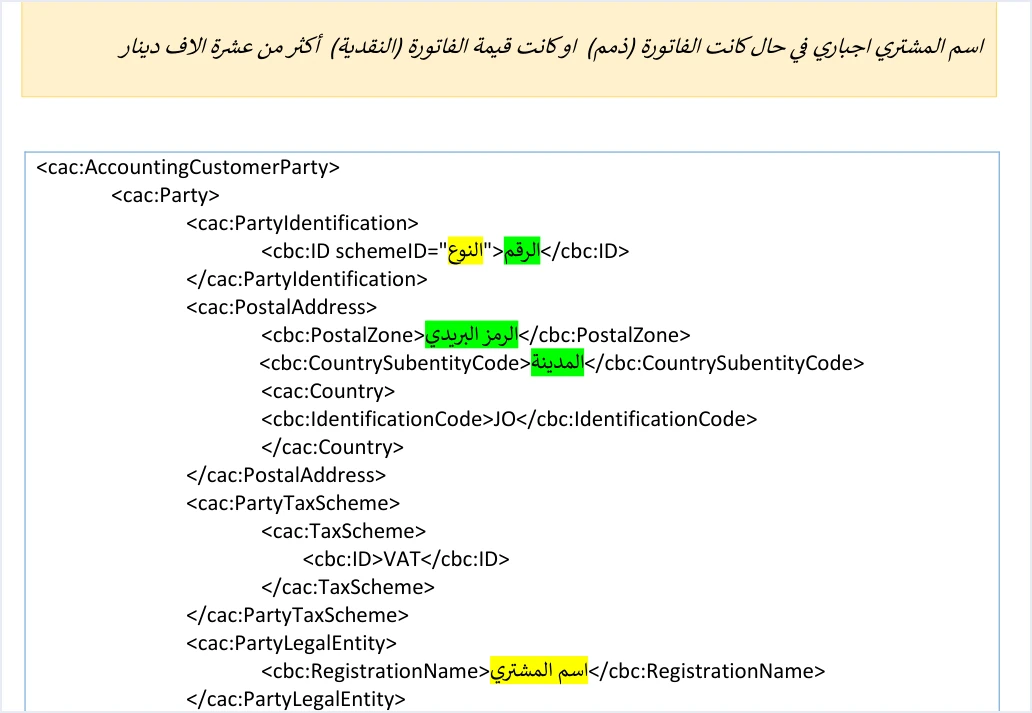
The element is present in the template of every invoice, but whether it must be filled in with the buyer’s name is governed by the two conditions above. Our article JoFotara Mandatory Fields: Reading the Technical Guide explains how to read the yellow and green shading across all the templates.
The name is not the same thing as the buyer’s number in the same template. The ID type in the schemeID attribute is shaded yellow, and its values are NIN for the national number, PN for the personal number of a non-Jordanian and TN for the tax number. The value of the number itself is shaded green. The Bayer name is missing message concerns the name alone. Every element of the buyer block is covered in our article JoFotara Buyer Identification: NIN, PN and TN.
Invoices in a foreign currency
The system accepts eighteen currencies, the Jordanian dinar by default and seventeen others, and the currency is changed at the level of the whole invoice. On a cash invoice, the threshold for the name is measured as the equivalent of JOD 10,000 in the foreign currency. The technical guide, however, contains no element for an exchange rate and no rule for converting the amount to dinars. For that reason this article sets out no rate and no conversion method.
The buyer’s name in Regulation No. 34 of 2019
The technical guide’s condition is a validation rule applied to the invoice file. Alongside it, Article 5(b) of Regulation No. 34 of 2019 on Organizing and Controlling Invoicing Affairs requires the buyer’s name to be stated clearly in a deferred sale, an installment sale or a sale paid in stages.
That text sets when the name is required. It does not set the invoice type code. The technical guide does not say whether an invoice that is partly paid is sent as a cash invoice or a receivable invoice. But if the sale is in installments or paid in stages, put the buyer’s name on the invoice, because Article 5(b) of Regulation No. 34 of 2019 requires it.
The same article holds another threshold of JOD 10,000 that concerns a different matter. Under Article 5(c)(2) of Regulation No. 34 of 2019, when the value of an invoice exceeds JOD 10,000, the seller must prove that the buyer has received it. This is an obligation to prove receipt, and it does not deal with the buyer’s name.
How to fix the Bayer name is missing error
The fix happens in the invoice data inside your accounting software, and then in the file you send. Follow these steps in order.
- Read the message in
EINV_MESSAGE. Make sure the text isBayer name is missingand that the invoice status isNOT_SUBMITTED. - Check the second digit of the invoice type code. If it is 2, the invoice is a receivable invoice and the name is required in every case. If it is 1, move on to the invoice value.
- Check the actual payment method. If the sale was paid in cash but the invoice code says receivable, correct the payment method on the invoice before you resend it. Article 10 of Regulation No. 34 of 2019 makes the seller and the buyer alike responsible for the invoice matching what actually took place.
- Compare the value with the threshold. On a cash invoice, if the value is more than JOD 10,000 or its equivalent in foreign currencies, the name is required.
- Add the buyer’s name. Enter the name in the customer details in your software, so that it reaches
cbc:RegistrationNameinsidecac:PartyLegalEntity, and make sure the element is not sent empty. - Resend with the same number and identifier. When a send fails, the guide asks you to resend the invoice with the same invoice number,
cbc:ID, and the same unique identifier,cbc:UUID, not with a new identifier, because generating a new identifier may duplicate the invoice.
If other messages appear alongside this one in the ERRORS array, fix all of them before you resend. The Total General Amount is Not Correct message, for example, is the totals error, and it may appear in the same file. It has its own article in this series.
Pre-submission checklist
Go through these points on every invoice before it leaves your software.
- The second digit of the invoice type code matches the actual payment method, 1 for cash and 2 for receivable.
- Every receivable invoice carries the buyer’s name in
cbc:RegistrationName. - Every cash invoice worth more than JOD 10,000 or its equivalent carries the buyer’s name.
- A deferred sale, an installment sale or a sale paid in stages carries the buyer’s name, under Article 5(b) of Regulation No. 34 of 2019.
- The buyer ID type in
schemeIDis one ofNIN,PNorTN. - The invoice number
cbc:IDand the identifiercbc:UUIDare stored, so that you can resend with them if the invoice is rejected.
In its guidelines, the technical guide recommends checking the totals, the taxes, the tax number, the buyer’s number and the mandatory fields before sending, to reduce errors with code 400.
How Qoyod helps
When you issue your invoice from accounting software, you do not write the XML file by hand. Qoyod is integrated with the National Invoicing System (JoFotara). Qoyod builds the invoice file in UBL 2.1 format with its unique identifier (UUID) and sends it to the National Invoicing System without any manual intervention. Qoyod’s integration with the National Invoicing System works on this layer as follows.
- A check before sending. Qoyod checks each invoice at field level as it is created, covering the tax number, the document type and payment method, the General Sales Tax rate and whether the lines are complete, and alerts you to any error before the invoice is sent, to reduce rejections.
- Every invoice’s status in view. ISTD returns the invoice status and any error message, and Qoyod shows them in its status panel.
- Resending with the same identifier. The status panel lists invoices that were not sent and need to be resent, and when you resend one it keeps the same UUID.
The pre-send check is an alert, not a guarantee. It covers the fields named above, so the accuracy of the buyer details remains your responsibility, and acceptance of the invoice rests with the National Invoicing System alone. To see the full integration, visit our National Invoicing System page.
Where to go next
- The other rejection codes and messages. They are in our article JoFotara Error Codes: Why an Invoice Is Rejected and How to Fix It.
- The full picture of the system. How it works and how to connect your business to it, in our article Jordan’s National E-Invoicing System.
- Field shading in the templates. It is the subject of our article JoFotara Mandatory Fields: Reading the Technical Guide.
- Reading the response file for code 400. See our article on JoFotara error 400 and the
EINV_MESSAGEfield.
E-invoicing and full accounting in one system
Qoyod is integrated with the National Invoicing System (JoFotara). You issue your invoice in Jordanian dinars from Qoyod, it is booked to your ledgers automatically and sent to the system, and once it is accepted it comes back with a QR code from the Income and Sales Tax Department.
Frequently asked questions
What does the Bayer name is missing message mean?
It means that the buyer’s name is not in the invoice file, although the invoice is a receivable invoice or a cash invoice worth more than JOD 10,000 or its equivalent in foreign currencies. The technical guide lists it among the code 400 errors, whose detail comes in the EINV_MESSAGE field.
Why is it spelled Bayer and not Buyer?
It is spelled that way because that is the text of the message exactly as the technical guide prints it, and the intended word is Buyer. Use the text as it comes back in the response file when you search for it or log it.
Is the buyer’s name mandatory on every invoice?
The technical guide makes it mandatory in two cases, a receivable invoice whatever its value, and a cash invoice worth more than JOD 10,000. Article 5(b) of Regulation No. 34 of 2019 also requires it in a deferred sale, an installment sale or a sale paid in stages.
Is a cash invoice of exactly JOD 10,000 rejected if it has no buyer’s name?
The guide’s wording is more than 10 thousand dinars, so the condition starts above that amount, not at it. For a cash invoice of JOD 10,000 or less, the guide does not make the buyer’s name mandatory.
How does the system know that my invoice is a receivable invoice?
The system reads the second digit of the three-digit code in the name attribute of the cbc:InvoiceTypeCode element. The digit 1 means cash and 2 means receivable, so if your software sends 2 on a cash sale, the receivable condition is applied to it.
Do I generate a new unique identifier when I resend after adding the name?
Do not generate a new identifier. The technical guide asks you to resend with the same invoice number, cbc:ID, and the same identifier, cbc:UUID, because generating a new identifier may lead to the invoice being duplicated.
References
- Income and Sales Tax Department (ISTD), technical guide for integrating with the National Invoicing System through the API, version 1.5 (in Arabic), pp. 16 and 101.
- Regulation No. 34 of 2019 on Organizing and Controlling Invoicing Affairs, as amended, consolidated text (in Arabic), Articles 5 and 10.
- ISTD’s National Invoicing System guides (in Arabic)




