




JoFotara terminology is the set of names the Income and Sales Tax Department (ISTD) uses in its guides, on the portal screens and in the API response of the National Invoicing System (JoFotara). Examples are the sub-user, the income-source sequence, device linking, the return invoice and EINV_STATUS. Knowing the exact names saves time when you read an error message, look for an option on the screen or write a request to ISTD.
This quick glossary collects fifty terms in five groups, namely bodies and systems, accounts and access, invoices and invoice types, the invoice file, and responses and statuses. Each entry gives the Arabic term as ISTD writes it, its English equivalent or the form it takes in the file, and its meaning in a line or two. Where one of our English articles covers a term in depth, the entry links to it.
The legal definitions in Article 2 of Regulation No. 34 of 2019 on Organizing and Controlling Invoicing Affairs, such as goods, service, seller and invoice, are not covered here. This glossary is limited to operating and interface terms.
How to read JoFotara terminology in this glossary
Every entry comes from one of ISTD’s four guides. These are the procedures guide for joining the system and the procedures guide for issuing an invoice (both 2026 editions), the questions and answers guide (2026), and the technical guide for integrating through the API (version 1.5). The technical guide and the questions and answers guide both state that they were prepared by the Invoicing Affairs Directorate and its technical support section.
Option names are given as they appear on the interface, because you search for them on the screen by their exact wording. On this English page each label appears in English first, with the exact Arabic label in parentheses. ISTD calls the items on the home screen options (خيارات), and it calls device linking an option, not a service. XML element names and technical field names are written in Latin characters exactly as they are, because the system reads them character by character.
Bodies and systems
The list starts with the bodies and platforms a taxpayer deals with before issuing a first invoice. Access to JoFotara goes through ISTD’s e-services website, and an invoice is verified after it is issued through a separate app.
Scroll the table sideways to see the remaining columns
Accounts and access
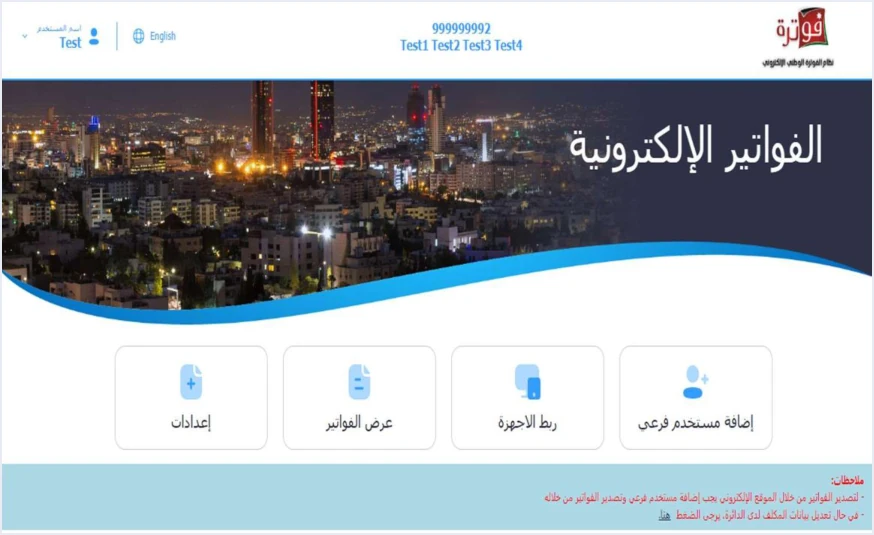
This group covers what a taxpayer meets in the first days, from creating the account to choosing the right path. The guide sets out two paths, and the taxpayer takes one of them. The first is issuing invoices on the portal through a sub-user, for a business with no accounting software. The second is device linking, for a business that has software.
Scroll the table sideways to see the remaining columns
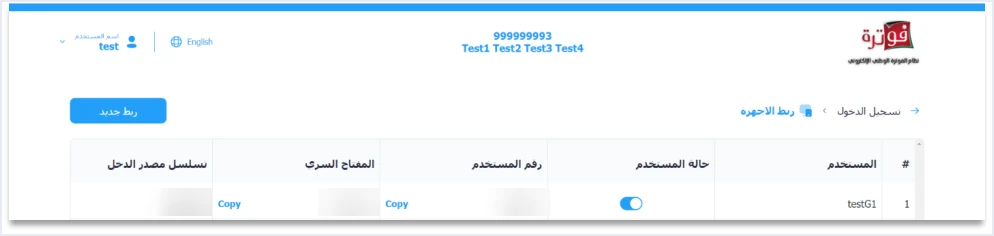
The device linking list in the image above shows four terms from this table on a single row, the user, its status, the Client ID and the Secret Key. Next to them is the income-source sequence those credentials are tied to. Each Client ID and Secret Key pair is tied to one income-source sequence.
Invoices and invoice types
In this group, what appears on the portal meets what is written in the file. On the portal, the taxpayer chooses cash (نقدي) or receivable (ذمم) and picks the invoice type from a list. A linked accounting system writes the same two choices as two digits inside the invoice type code.
Scroll the table sideways to see the remaining columns
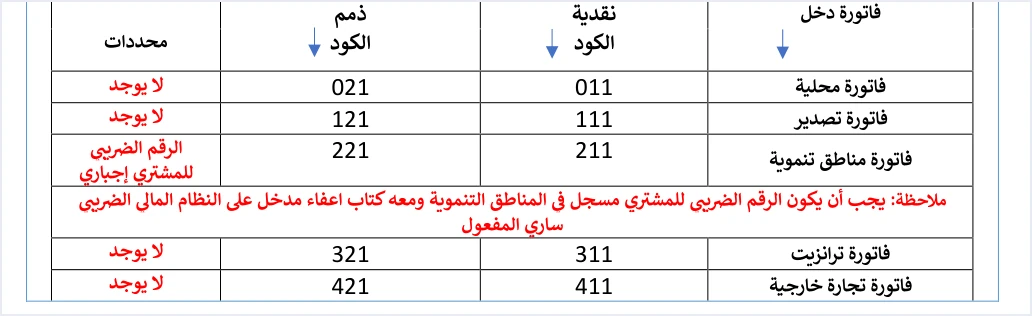
This table from the technical guide shows how three terms in the glossary combine in a single code. On a local income invoice the code is 011 for cash and 021 for receivable. The first digit is the transaction type, the second the payment method and the third the tax family.
The invoice file: API integration terms
These terms matter to a business that links its software to the system, or to the developer who builds that link. A business that issues its invoices on the portal never sees them, because the portal builds the file for it.
Scroll the table sideways to see the remaining columns
Responses and statuses
After every submission the system returns a response in JSON format that contains the fields below. The technical guide stresses that the outcome of an invoice is judged by EINV_STATUS, not by the HTTP status code alone.
Scroll the table sideways to see the remaining columns
Similar terms and what separates them
Some JoFotara terms sound alike or are borrowed from another context, which makes them easy to confuse. ISTD’s own guides draw the line between the following pairs.
- Main user and sub-user. The main user manages the account, adds users and creates the linking credentials, while the sub-user issues invoices. If you look for Issue an invoice (تنظيم فاتورة) on the main user’s screen you will not find it. According to the questions and answers guide, the fix is to create a sub-user and log in with it.
- Income-source sequence and “activity number”. The term activity number (رقم النشاط) does not appear in ISTD’s guides. The field is called the income-source sequence. The taxpayer selects it from a list, and in device linking the system generates only the Client ID and the Secret Key.
- The HTTP status code and
EINV_STATUS. The first tells you the request arrived and was processed technically. The second tells you whether the invoice was accepted. An accepted invoice comes back with a QR code inEINV_QR. - Return invoice and debit note. Version 1.5 of the technical guide defines only two values for the document type,
388for a new invoice and381for a return invoice. A return invoice is therefore a credit note, and the guide defines no document called a debit note. - Encoding and encryption. The guide calls the Base64 step encryption (تشفير), and the accurate term for it is encoding. The credentials, meaning the Client ID and the Secret Key, travel in the request header, not inside the encoded file.
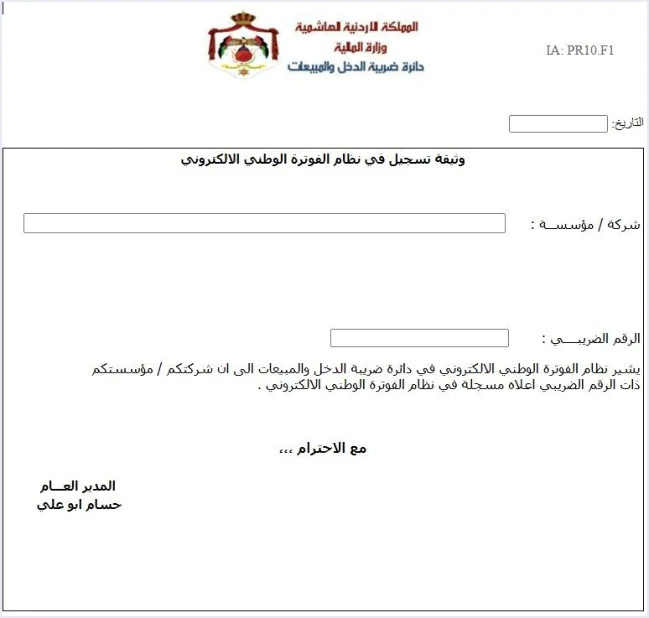
- Registration document and license. The document states only that the tax number is registered in the system. It should not be presented as a license, an approval or a compliance certificate.
- Cash, receivable and the full type code. The payment method is one digit out of three in the type code. The codes
012and022apply only to a local invoice subject to General Sales Tax, while a local income invoice uses011and021. - Device linking and unlinking. Linking is an option the main user chooses on its own. Unlinking is a technical support request that ISTD reviews, and ISTD limits it to a business that has no accounting system and linked by mistake.
- Categories
ZandO. Both carry a 0% rate. The first is for an exempt line and the second for a line subject to the zero rate, and the category not accepted at 0% isS.
How to use these terms with ISTD or your system’s developer
The exact term saves a round of questions in every exchange. Here is a short list that builds on the tables above.
- Name the option as it appears. Write Issue an invoice (تنظيم فاتورة), device linking (ربط الأجهزة) or Add a sub-user (إضافة مستخدم فرعي) with the exact label, and say whether you were logged in as the main user or the sub-user.
- State the income-source sequence involved. The sub-user and the linking credentials are each tied to one sequence, and a problem may affect one sequence and not the others.
- Copy the error text as it is. Copy
EINV_STATUS, the text ofEINV_MESSAGEand the HTTP status code. A general description such as “the invoice was rejected” is not enough. - Keep the invoice number and its UUID. With them you can retry without creating a duplicate invoice, and you can recover the QR code if the status comes back as
ALREADY_SUBMITTED. - Never send the Secret Key in any message. The joining guide tells you to keep the linking credentials in a safe place and not to share them with anyone.
- Choose the right request type. Problems with the file type, the income-source sequence or unlinking are handled through an internal service request on the e-services website, not on the JoFotara portal. For general questions, the technical guide refers you to ISTD’s technical support committee for invoicing affairs through ISTD’s website.
If you are looking for accounting software that handles the link and builds the file for you, see the page Qoyod’s integration with the National Invoicing System.
E-invoicing and full accounting in one system
Qoyod is integrated with the National Invoicing System (JoFotara). You issue your invoice in Jordanian dinars from Qoyod, it is booked to your ledgers automatically and sent to the system, and once it is accepted it comes back with a QR code from the Income and Sales Tax Department.
Frequently asked questions
Which JoFotara terms does a taxpayer need first?
A taxpayer needs five terms at the start, namely the main user, the sub-user, the income-source sequence, device linking and Issue an invoice. With them you can tell who manages the account, who issues the invoice and which of the two paths suits you.
Why don’t I see the Issue an invoice option (تنظيم فاتورة)?
ISTD’s questions and answers guide gives two causes for this. If you are logged in as the main user, the option is not on its screen at all, and the fix is to create a sub-user and log in with it. If you are logged in as the sub-user, the cause is that someone clicked the device linking option (ربط الأجهزة).
What is the difference between a return invoice and a credit note?
There is no difference between them in JoFotara. A return invoice carries the value 381 and is in effect a credit note. It refers to the original invoice and covers quantities only.
Is the JoFotara registration document a license?
It is not a license. Its text says that the business with the tax number shown is registered in the National Electronic Invoicing System, and it says nothing more.
Where do I find the meaning of an error message I don’t understand?
Start by reading EINV_STATUS and then the text of EINV_MESSAGE in the response. If the status code is 500, 403 or 400, the technical guide lists the causes it gives for each of these codes.
Are cash and receivable two types of invoice?
They are the two payment-method values, not separate invoice types. Each of the six invoice types can be issued as cash or receivable, and the payment method shows in the second digit of the type code.
References
- Income and Sales Tax Department (ISTD), procedures guide for joining the Jordanian National Electronic Invoicing System, 2026 edition (in Arabic).
- Income and Sales Tax Department (ISTD), procedures guide for issuing an invoice in the Jordanian National Electronic Invoicing System, 2026 edition (in Arabic).
- Income and Sales Tax Department (ISTD), questions and answers guide for the National Invoicing System, 2026 (in Arabic).
- Income and Sales Tax Department (ISTD), technical guide for integrating with the National Invoicing System through the API, version 1.5 (in Arabic).




