




JoFotara tax rate not accepted describes a value that your accounting software sends in the rate field cbc:Percent of an invoice line when that value is not among the values the API accepts for the field. The technical guide that the Income and Sales Tax Department (ISTD) publishes for the National Invoicing System (JoFotara) lists this case among the causes of status code 500, after other causes that concern the taxpayer’s identity and the linking credentials.
The fix starts with the invoice lines. Compare the rate written on each line with the values the guide gives for new sales invoices, which are 0, 1, 2, 3, 4, 5, 7, 8, 10 and 16. Then correct the value at its source in your software, and resend the invoice with the same invoice number and the same unique identifier (UUID).
This article explains what version 1.5 of the technical guide says about this cause, which values the rate field accepts and in what format, and how this list differs from the rates set by law. It then gives the steps for checking a rejected invoice, and lists what the guide does not say about this case.
What JoFotara tax rate not accepted means
Every line of a general sales tax invoice carries its own tax block. That block holds two neighboring elements, the tax category and the tax rate. The category is one of three letters, S, Z and O, and the rate is a number written in the cbc:Percent element. This is the form the guide gives for a taxable line at a rate of 16.
<cac:TaxSubtotal>
  <cbc:TaxAmount currencyID="JO">...</cbc:TaxAmount>
  ...
    <cbc:ID schemeAgencyID="6" schemeID="UN/ECE 5305">S</cbc:ID>
    <cbc:Percent>16</cbc:Percent>
    <cac:TaxScheme>
      <cbc:ID schemeAgencyID="6" schemeID="UN/ECE 5153">VAT</cbc:ID>
    </cac:TaxScheme>
  ...
</cac:TaxSubtotal>
In this article, “not accepted” means that the value matches none of the values the guide sets for the field. It is a technical description of a value in a file, not a judgment on the tax treatment of the item. The tax treatment can be correct in your books while its number is written in the file in a form the field does not accept.
The field matters because it drives the tax on the line. The guide calculates the tax on a line as (quantity × unit price − discount) × tax rate. In the guide’s general sales tax invoice example (pp. 40, 43 and 44), a line worth 33 × 2 − 2 = 64 carries a rate of 7, so its tax is 4.48 and the line total is 68.48. The example shows that the field holds the rate as a whole or decimal number in percent, which means 7 and not 0.07.
What the technical guide says about the rate and error 500
On its errors page, the guide lists the causes of status code 500 (Internal Server Error) in these words.
«وهذا يدل على وجود خطأ في الرقم الضريبي أو تسلسل مصدر الدخل وبدرجة أقل يكون الخطأ في ال Client_ID أو ال Secret_Key ويمكن ان تكون نسبة الضريبة الموجودة في ملف ال XML ليست ضمن نسب الضريبة المعتمدة لدى الدائرة»
In English, the guide says that this indicates an error in the tax number or the income-source sequence, that less often the error is in the Client_ID or the Secret_Key, and that a tax rate in the XML file may not be among the rates ISTD has approved. ISTD publishes this guide in Arabic only; the English here is our rendering, and the Arabic text is the authority.

The text sorts the causes into three groups. The first is the tax number or the income-source sequence. The second is the Client ID and the Secret Key, and only this group carries the guide’s “less often”. The third is the tax rate, which the guide adds in a separate clause as something that “may” be the case. The guide sets no other order among these causes beyond that “less often”, and it does not say that a rate outside the list leads to code 500 every time.
That is why code 500 alone does not identify the cause. Every rate on the invoice can be correct while the error sits in the tax number or in the linking credentials. The checks for those other causes are outside the scope of this article, which goes deeper into the rate check alone.
Note also where the guide places this cause. It sits under code 500, not among the code 400 messages whose details arrive in the EINV_MESSAGE field. None of the messages the guide gives for code 400 concerns a rate outside the list.
The values the cbc:Percent field accepts
The guide describes the rate field in the line table of a new general sales tax invoice (p. 42) in these words.
«نسبة الضريبة العامة على السلعة أو الخدمة وحسب النسب التالية»
In English, the field holds the general tax rate on the good or service, according to the rates that follow. ISTD publishes this guide in Arabic only; the English here is our rendering, and the Arabic text is the authority. The guide then lists 0%, 1%, 2%, 3%, 4%, 5%, 7%, 8%, 10% and 16%. It adds that the format follows the examples given, and in those examples the number is written alone inside the element, as 1, 4, 8 and 16.
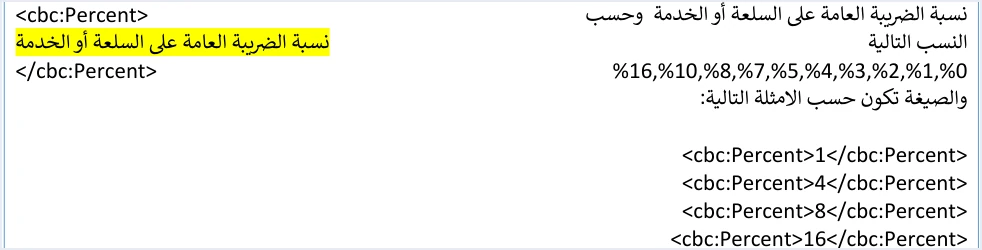
Three practical points follow from this table.
- The number alone, without the percent sign. The guide’s examples write the value as
16, not 16%. In the full invoice samples it also appears as7.00and16.000. - The rate in percent, not as a decimal fraction. The value 0.16 is not among the listed values. The value that corresponds to it in the examples is 16.
- Zero goes with two categories. On a domestic invoice, the value 0 is sent with category
Zfor an exempt line orOfor a zero-rated line, and every other value is sent with categoryS. The categories are explained in our article JoFotara Tax Categories: S, Z and O Explained.
On the return invoice pages (pp. 54 and 82), the guide’s description of the rate lists the values without zero (1, 2, 3, 4, 5, 7, 8, 10 and 16), while the category table on the same pages still gives 0 for categories Z and O. The same zero-less description also appears in the line table of a new special tax invoice (p. 69), so of these pages only p. 42 includes 0 in the description. The guide does not explain the difference, so we report it as printed, without interpreting it.
A technical checklist, not a list of what the law imposes
The list above is a technical checklist. It gives the values the field accepts at submission. It is not a table of the rates the law imposes on goods and services, and the two answer different questions.
- Which rate applies to this item? The General Sales Tax Law and its schedules answer this, and our article General Sales Tax in Jordan: Rates, Registration, Filing explains them. Review this question with your accountant.
- Which value does the rate field in the invoice file accept? The technical guide answers this on page 42, and this is the question that code 500 concerns in this case.
So do not read the list as a source of rates. A value on the list does not mean that the law sets a rate of that size on any item, and the guide does not explain why each value is there. In the same way, the rate due on your item does not come from the list. It comes from the tax treatment of the item itself.
How to write the rate field by line type and invoice type
A value being on the list is not enough on its own. The guide ties the rate to the category and to the invoice type, and the table below collects what it says on this point.
Scroll the table sideways to see the remaining columns
The table shows that some cases carry no rate field at all. An income invoice, issued by a business that is not registered for sales tax, has no tax block in its lines. This cause does not concern it, which leaves the tax number, the income-source sequence and the linking credentials. The special tax is sent as an amount in a block whose scheme is OTH, before the general tax block, and it is explained in our article JoFotara Special Tax OTH: The Special Sales Tax Line.
Zero with category S is a different case. The value 0 is on the list, and the error lies in the category sent with it. The guide answers that case with code 400 and the message General tax percentage must be zero. For export invoices and the four other non-domestic types, the guide requires a rate of 0% and category O for all goods on general sales tax and special tax invoices. These invoices are explained in our article Export Invoice JoFotara: Code, 0% and Category O.
Steps for checking an invoice rejected because of the rate
If the request came back with code 500 and you want to check the rate, follow these steps in order.
- Check the invoice type. An income invoice has no rate field, so move straight to the checks on the tax number, the income-source sequence and the linking credentials.
- Inspect the XML file that was actually sent. The value that matters to the API is the one written in the file before Base64 encoding, not what your software shows on screen or in the print version.
- Extract the
cbc:Percentvalue from every line. Check all the lines, not only the first one, because a single invoice can combine lines with different rates and categories. - Compare each value with the list. The values on page 42 are 0, 1, 2, 3, 4, 5, 7, 8, 10 and 16. Any other value is outside the list, including decimal fractions such as 0.16 and fractional values produced by a calculation or by rounding.
- Check the format. Write the number alone, as in the guide’s examples, with no percent sign and no spaces or extra text inside the element.
- Match the category to the rate. Zero goes with
ZorOon a domestic invoice, zero goes withOon export invoices and the other non-domestic types, and every other value goes withS. - Recalculate the line and the totals. Changing the rate changes the tax and total of the line, and then the invoice’s total tax and grand total. If the totals do not match after the fix, the invoice can come back with a different message,
Total General Amount is Not Correct. - Fix the source, not only the file. If the value came from the item setup or from a calculation rule in your software, correct that setting so the same value does not repeat on the next invoices.
Based on how accounting systems work, and not on the guide’s text, we suggest looking at four possible sources of a value outside the list. The first is a system that stores the rate as a decimal fraction (0.16) and sends it as it is. The second is a system that derives the rate by dividing the tax amount by the taxable amount, so rounding produces a fractional value. The third is a manual entry mistake when an item is set up. The fourth is the special tax amount entered in the rate field. These are possibilities to check, not causes that the guide names.
If every rate is on the list and in the right format and code 500 still comes back, the remaining causes the guide names are the other two groups, the tax number and the income-source sequence, or the Client ID and the Secret Key. This is our reading of the text, not a statement by ISTD. It rests on the guide listing these three groups of causes for this code.
After the fix: resending and reading the result
An invoice whose request came back with code 500 and no QR code has not been accepted, so resend it after the fix. The guide’s guidelines require resending with the same invoice number and the same unique identifier, and they require that no new identifier is generated when a submission fails or the connection drops.
Then judge the result from the EINV_STATUS field and not from the status code alone, as the guidelines require. The value SUBMITTED means that the invoice was accepted, and its QR code comes back with it in the EINV_QR field. The guide requires this code to be present for the invoice to count as received and accepted by ISTD. After acceptance, store the invoice number, its UUID, the QR code and its status, which the guidelines require for traceability and later retrieval.
What the guide does not say about this case
It helps to know the limits of the text before you build a rule on it in your software. Version 1.5 of ISTD’s technical guide does not answer the following questions.
- A message specific to the rate. The technical guide documents no specific message for this case. It names a rate outside the list only as a possible cause of code 500.
- Why zero is missing from some pages. The rate description on the return invoice pages, and in the new special tax invoice line table, lists the values without zero, and the guide does not explain why.
- Why each value is on the list. The guide lists the values without tying any of them to a good or a service.
- How other formats are treated. The guide shows examples of the correct format, and it does not say what happens when the percent sign or a decimal fraction is sent.
If you face a case that the guide does not settle, you can contact the technical support committee for invoicing affairs at ISTD through the ISTD website, as page 104 states.
How Qoyod helps
Qoyod is integrated with the National Invoicing System (JoFotara). Qoyod builds the invoice file in UBL 2.1 format with its unique identifier (UUID) and sends it to the National Invoicing System without any manual intervention. Qoyod checks each invoice at field level as it is created, covering the tax number, the document type and payment method, the General Sales Tax rate and whether the lines are complete, and alerts you to any error before the invoice is sent, to reduce rejections.
ISTD returns the invoice status and any error message, and Qoyod shows them in its status panel. The status panel lists invoices that were not sent and need to be resent, and when you resend one it keeps the same UUID. Checking the tax treatment of each item remains your responsibility, together with your accountant.
Where to go next
- The full map of rejection codes. In our article JoFotara Error Codes: Why an Invoice Is Rejected and How to Fix It.
- The three categories in detail. In our article JoFotara Tax Categories: S, Z and O Explained.
- The full picture of the system. How it works and how to connect your business to it, in our article Jordan’s National E-Invoicing System: How It Works and How to Connect Your Business.
E-invoicing and full accounting in one system
Qoyod is integrated with the National Invoicing System (JoFotara). You issue your invoice in Jordanian dinars from Qoyod, it is booked to your ledgers automatically and sent to the system, and once it is accepted it comes back with a QR code from the Income and Sales Tax Department.
Frequently asked questions
What does JoFotara tax rate not accepted mean?
It means that the value of the rate field cbc:Percent on one of the invoice lines is not among the values that the technical guide sets for that field. The guide names this case as a possible cause of status code 500.
Which values does the rate field accept on a general sales tax invoice?
The technical guide lists them on page 42 for new sales invoices, as 0, 1, 2, 3, 4, 5, 7, 8, 10 and 16. Write the number alone, as in the guide’s examples, such as 16, without the percent sign.
Are the accepted values the rates set by law?
They are not. They form a technical checklist of what the field accepts at submission. The rate that applies to a particular good or service is set by the General Sales Tax Law, and the seller’s system then writes it in the field.
Does a rate that is not accepted always lead to code 500?
The guide does not say so. It introduces the rate as a possibility, after the tax number, the income-source sequence and the linking credentials, and it does not state that the rate leads to this code every time.
How does this case differ from the General tax percentage must be zero message?
The General tax percentage must be zero message comes with code 400, and the rate in that case is an accepted zero while the error is in the category S sent with it. A rate that is not accepted is a value missing from the list altogether, and the guide lists it among the causes of code 500.
Do I generate a new unique identifier when I resend after the fix?
You do not. The guide’s guidelines require resending with the same invoice number and the same unique identifier. The rejected invoice was never accepted, and generating a new identifier can lead to a duplicate invoice.
References
- Income and Sales Tax Department (ISTD), technical guide for integrating with the National Invoicing System through the API, version 1.5 (in Arabic), pp. 40, 42, 43, 44, 54, 68, 69, 81, 82, 101 and 104.
- ISTD’s National Invoicing System guides (in Arabic)




