




The JoFotara tax number appears in three connected places on an invoice. First, it is an item that Article 5 of Regulation No. 34 of 2019 on Organizing and Controlling Invoicing Affairs requires on every invoice. Second, it is a mandatory field in the invoice file that the seller sends to the National Invoicing System (JoFotara). Third, it is one of the data items that the Sanad app reads from inside the QR code that comes back with the invoice once it is accepted. On top of that, it is the first thing you type to sign in to your business’s account on the system itself.
This article maps these places one by one, based on the text of the regulation and on the official guides issued by the Income and Sales Tax Department (ISTD). It shows when the national number takes the place of the tax number, what happens when a wrong number reaches the system, and what these sources leave unsaid about the format of the number and how many digits it has.
JoFotara Tax Number at a Glance
The table below gathers the places where the tax number appears and the source for each one. The sections that follow give the detail.
Scroll the table sideways to see the remaining columns
For the full picture of the system and how to connect your business to it, read our article Jordan’s National E-Invoicing System, or see how Qoyod works with JoFotara on our National Invoicing System page.
What Article 5 of Regulation No. 34 of 2019 requires
The rule starts in Regulation No. 34 of 2019 on Organizing and Controlling Invoicing Affairs, as amended. Paragraph (a) of Article 5 of Regulation No. 34 of 2019 requires the seller of any goods or service worth at least one dinar to organize and issue an invoice in at least two copies, and it lists five items that the invoice must contain. The third of them reads as follows.
«الرقم الضريبي للبائع إذا كان مسجلاً في ضريبة المبيعات والرقم الوطني إذا كان غير مسجل في ضريبة المبيعات».
In English, item 3 of Article 5(a) of Regulation No. 34 of 2019 calls for the seller’s tax number if the seller is registered for sales tax, and the seller’s national number if the seller is not registered for sales tax. No official English translation of this regulation was found; the English here is our rendering, and the Arabic text is the authority.
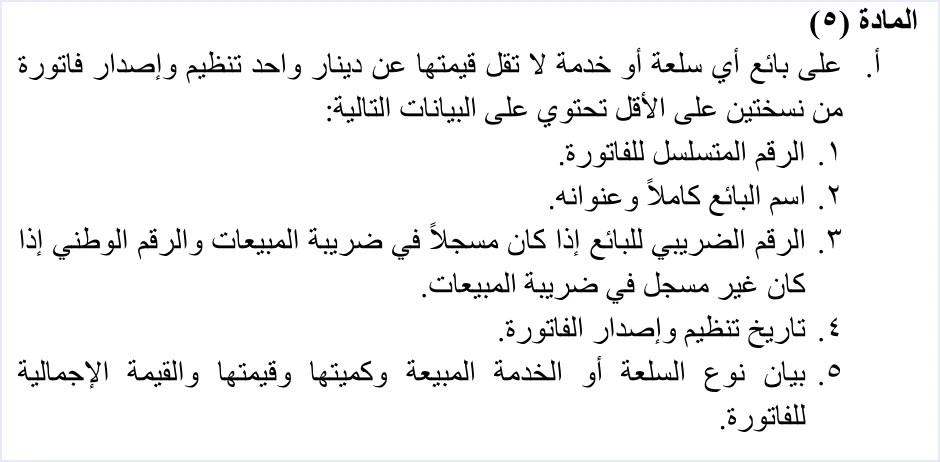
This item gives the seller two cases, and the seller’s sales tax registration decides which one applies.
- A seller registered for sales tax. The invoice carries the seller’s tax number.
- A seller not registered for sales tax. The invoice carries the seller’s national number in place of the tax number.
Article 3 of Instructions No. 1 of 2019 on Invoicing Affairs and Their Control spells out the second case for the items of a cash sales invoice. Where the seller is not registered for sales tax, the item is the national number for a Jordanian person, and the number approved by the competent authority for a non-Jordanian person.
Sales tax registration has one more effect on what the invoice contains, and the definition of the invoice in Article 2 of Regulation No. 34 of 2019 states it. The definition says the invoice shows the following.
«مقدار الضريبة العامة على المبيعات المحتسبة على الفاتورة في حال كان من المكلفين المسجلين في ضريبة المبيعات».
In English, the definition in Article 2 of Regulation No. 34 of 2019 includes the amount of General Sales Tax charged on the invoice where the seller is among the taxpayers registered for sales tax. No official English translation of this regulation was found; the English here is our rendering, and the Arabic text is the authority.
So the seller’s sales tax status decides which number appears on the invoice, and it also decides whether the invoice carries a tax amount at all. Article 5 is explained together with the rest of the regulation in our article Jordan Invoicing Regulation No. 34 of 2019 Explained.
Where the seller’s tax number sits in the invoice file
When an invoice is sent from accounting software linked to the system, the XML file carries the seller’s tax number in the seller details block cac:AccountingSupplierParty, in the cbc:CompanyID element inside cac:PartyTaxScheme. The technical guide describes the content of this element as the tax number of the taxpayer, meaning the seller. It shades the element yellow, the color that marks in the guide a mandatory variable that the seller’s system fills in. ISTD publishes this guide in Arabic only; the English here is our rendering, and the Arabic text is the authority.
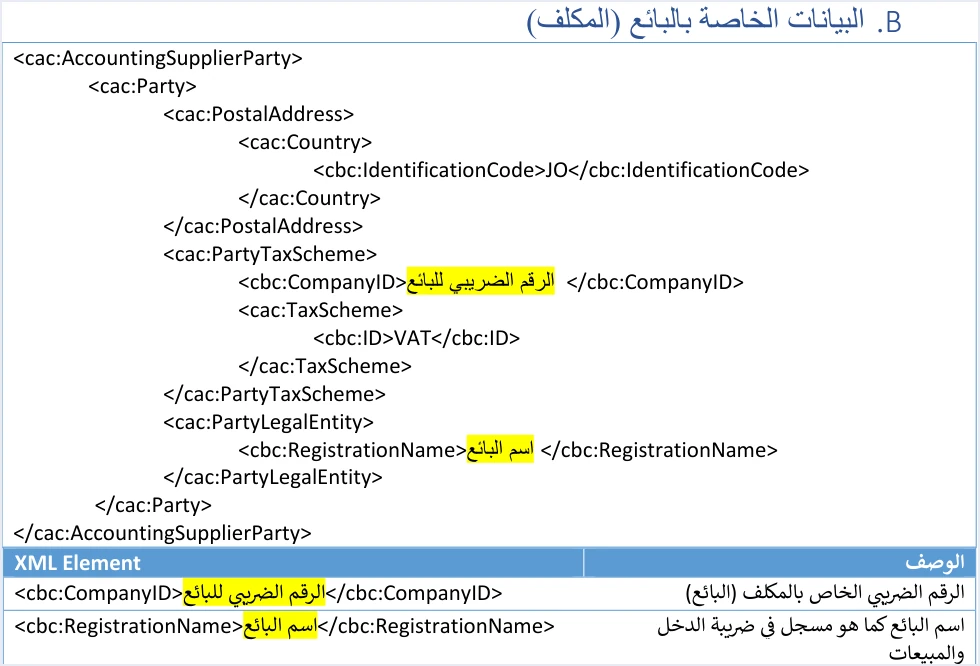
Two elements sit next to the number in the same block. The tax-scheme code VAT is a fixed value in the template and is copied as it stands. In the invoice file, VAT is only the fixed tax-scheme code of the UBL template; the tax itself is Jordan’s General Sales Tax (GST). The seller’s name goes in cbc:RegistrationName, written as it is registered with ISTD. These elements and their constraints are explained in our article JoFotara Seller Details: Fields and Rules.
Every submission through the integration also carries the income-source sequence alongside the tax number. It is another mandatory element in the invoice file, and the taxpayer selects it when creating the linking credentials under the device linking option (ربط الأجهزة). The technical guide names the two together among the causes of rejection, as the section on rejection messages shows.
The buyer’s tax number and the TN identifier type
The buyer has an additional identifier in the invoice file, sent in the cac:AccountingCustomerParty block. Its type is set by the schemeID attribute, which takes one of three values.
NINfor the national number.PNfor the personal number of a non-Jordanian.TNfor the tax number.
The guide requires the value of this identifier to be digits only. Going by the field shading in version 1.5 of the technical guide, the identifier type is a mandatory variable, while the value of the buyer’s number is shaded in the color the templates use for optional variables.
The rule changes for development zone and investment promotion invoices. On these invoices the guide makes the buyer’s tax number mandatory. It also requires the buyer to be registered in the development zones, to hold a valid exemption letter entered on the financial system, and the tax rate to be 0% on general and special sales tax invoices. If the buyer’s tax number is not associated with the development zone, the invoice comes back with a message that starts with the word BuyerTaxNumber, covered in detail in our article BuyerTaxNumber Error on Development Zone Invoices.
On the system’s portal, the invoice form has two matching fields in the buyer details, the buyer additional-ID type (نوع المعرفات الإضافية للمشتري) and the buyer number (رقم المشتري). The full explanation of the buyer fields and their values is in our article JoFotara Buyer Identification: NIN, PN and TN.
The tax number in your JoFotara account
Before the tax number reaches any invoice, it is the key to your business inside the system. The official guides mention it in the following places.
- Creating the account. The first field on the Create an account form (إنشاء حساب) is the tax number, which appears auto-filled and read-only. It is followed by the username, the password and the password confirmation.
- Signing in to the system. The main user and the sub-user sign in with the same three fields, the tax number, the username and the password.
- The invoice form on the portal. On the New invoice form (فاتورة جديدة), the seller details include the tax number field alongside the name, the income-source sequence, the country, the postal code and the phone number, all auto-filled and read-only. The sub-user does not type the number by hand when issuing an invoice from the portal. All the fields are explained in our article JoFotara Invoice Form Fields Explained.
- Internal service requests. When you need something from ISTD, such as adding an active income-source sequence, you sign in to the e-services site with your tax number and password and then choose the Internal services menu (الخدمات الداخلية).
- The registration document. The registration document (وثيقة تسجيل في نظام الفوترة الوطني الالكتروني) has three fields, the date, the name of the company or establishment, and the tax number. Its text states that the business with the tax number shown on it is registered on the system. It proves registration only. It is not a license and not an accreditation.
ISTD also offers a registration check for the National Invoicing System (in Arabic) that searches by tax number.
The tax number inside the QR code
The response returns the invoice status, and if the invoice is accepted a QR code comes back with it, which the guide requires to be shown on the seller’s invoice. This code is one more place that carries the seller’s tax number.
According to the technical guide, a taxpayer who wants to verify the QR code can do so only by scanning it with the Sanad app, through its digital document verification option (التحقق من المستندات الرقمية). If the code is sound, the message The document is valid (الوثيقة صحيحة) appears, and the app retrieves the basic invoice data held inside the code. There are six items, in the guide’s order.
- The invoice total.
- The invoice number.
- The total tax on the invoice.
- The invoice date.
- The seller’s tax number.
- The seller’s name.
So the tax number that Sanad shows here is read from inside the code itself, as the guide describes it. The guide frames this step around a taxpayer who wishes to verify. The full verification steps are in our article How to Verify an E-Invoice with the Sanad App.
The tax number and rejection messages
The technical guide links the tax number to two rejection messages and to one of its ten operating guidelines.
Code 500. The guide (version 1.5, p. 101) explains the causes of this code in these words.
«خطأ في الرقم الضريبي أو تسلسل مصدر الدخل وبدرجة أقل يكون الخطأ في ال Client_ID أو ال Secret_Key ويمكن ان تكون نسبة الضريبة الموجودة في ملف ال XML ليست ضمن نسب الضريبة المعتمدة لدى الدائرة».
In English, the guide says the error lies in the tax number or the income-source sequence, less often in the Client ID or the Secret Key, and that the tax rate in the XML file may not be one of the tax rates adopted by ISTD. ISTD publishes this guide in Arabic only; the English here is our rendering, and the Arabic text is the authority.

The text names the tax number and the income-source sequence together, then names the Client ID and the Secret Key as less often the cause, and then the tax rate. It does not say which tax number it means, the seller’s or the buyer’s. How to check these causes one after another is covered in our article JoFotara Error 500: Causes and Fix.
The message This user is not authorized to submit this type of invoice. It appears among the code 400 errors, and the guide explains it in these words about the taxpayer.
«يقوم بارسال نوع فاتورة لا يتناسب مع رقمه الضريبي او تسلسل مصدر الدخل الخاص به».
In English, the guide gives the cause as the taxpayer sending an invoice type that does not match their tax number or their income-source sequence. ISTD publishes this guide in Arabic only; the English here is our rendering, and the Arabic text is the authority. An example is an income invoice sent by a taxpayer registered for General Sales Tax, or the reverse. The detail is in our article Not authorized to submit this type of invoice: JoFotara.
The Verify before sending guideline (التحقق قبل الإرسال). Among the ten operating guidelines in the technical guide is one that says to check the totals, the taxes, the taxpayer number, the buyer number and the mandatory fields before sending the invoice, to reduce code 400 errors.
What the technical guide does not set about the tax number’s format
You may look for the number of digits in the tax number, or its format, before you set it up in your software. The accurate answer is that the technical guide does not set the number of digits in the tax number or any format for it, and you should know this before you build any validation rule on it.
- The example numbers are illustrations. The guide’s example fills the
cbc:CompanyIDelement with the number 12345678, an illustrative value that shows the shape of the block. Do not infer the length of the number from it, and do not copy it into your file. - The digits-only rule comes from the buyer details. The statement that the value takes digits only appears in the table for the buyer’s identifier. Do not extend it to the seller field as if it were a rule from the guide.
- Digit counts in circulation. Unofficial sources circulate specific digit counts for the tax number. We do not rely on them here, because they do not appear in the official guides this article is based on.
- The unregistered seller in the invoice file. Article 5 of Regulation No. 34 of 2019 makes the national number an item on the invoice of a seller who is not registered for sales tax, while the technical guide describes the
cbc:CompanyIDelement as the seller’s tax number. We found no text in the technical guide on what goes in this element for an unregistered seller. If this is unclear for you, ask the technical support committee for invoicing affairs at ISTD (لجنة الدعم الفني لشؤون الفوترة).
The practical rule that the guides support is to match the number in the invoice file with your business’s number at ISTD. That is the same number you sign in to the system with, and the one that appears auto-filled in the seller details on the portal. This match is more reliable than any example or general length rule.
How Qoyod handles the tax number
In Qoyod, the Jordanian tax invoice template includes a tax number field. Qoyod’s integration with the National Invoicing System works on this part as follows. Qoyod checks each invoice at field level as it is created, covering the tax number, the document type and payment method, the General Sales Tax rate and whether the lines are complete, and alerts you to any error before the invoice is sent, to reduce rejections.
ISTD returns the invoice status and any error message, and Qoyod shows them in its status panel. The status panel lists invoices that were not sent and need to be resent, and when you resend one it keeps the same UUID. A rejected invoice is resent after you correct it. The pre-send check is an alert, not a guarantee. It covers the fields listed above, and the decision to accept the invoice rests with the National Invoicing System alone.
Tax number checklist before you send an invoice
- Establish your sales tax status. A registered seller puts the tax number on the invoice, and an unregistered seller puts the national number, under Article 5(a)(3) of Regulation No. 34 of 2019.
- Match the seller’s number in the file with your sign-in number. Compare the
cbc:CompanyIDvalue in the actual invoice file with the tax number you sign in to the system with, not with what your software’s settings screen shows. - Remove any value copied from the examples. Make sure the field does not hold a number taken from the technical guide’s examples.
- Review the income-source sequence with the number. The guide names the two together among the causes of code 500, and it links them to the permitted invoice type in the This user is not authorized message.
- Choose the right buyer identifier type.
TNfor the tax number,NINfor the national number andPNfor the personal number of a non-Jordanian, with digits only in the value. - Add the buyer’s tax number on development zone invoices. It is mandatory on this type of invoice.
- Show the QR code after acceptance. It carries the seller’s tax number for a taxpayer who verifies the invoice with the Sanad app.
E-invoicing and full accounting in one system
Qoyod is integrated with the National Invoicing System (JoFotara). You issue your invoice in Jordanian dinars from Qoyod, it is booked to your ledgers automatically and sent to the system, and once it is accepted it comes back with a QR code from the Income and Sales Tax Department.
Frequently asked questions
Where does the tax number appear on a Jordanian e-invoice?
It appears in three places. Article 5(a)(3) of Regulation No. 34 of 2019 requires the invoice to carry the seller’s tax number if the seller is registered for sales tax. The number is sent in the XML file in the CompanyID element within the seller details. The Sanad app reads it from inside the QR code, as one of six data items, when the code is verified.
Does a seller who is not registered for sales tax put a tax number on the invoice?
Article 5(a)(3) of Regulation No. 34 of 2019 provides that such a seller’s invoice carries the national number. Article 3 of Instructions No. 1 of 2019 makes the number approved by the competent authority the item for an unregistered non-Jordanian person.
How many digits does a tax number have in Jordan?
The technical guide for the National Invoicing System does not set the number of digits in the tax number, and the number 12345678 in its examples is an illustrative value. Use your business’s number as it appears in your account on the system, and do not build a length rule from an unofficial source.
Is the buyer’s tax number mandatory on the invoice?
It becomes mandatory on development zone and investment promotion invoices, according to the technical guide. On other invoices the guide shades the value of the buyer’s identifier in the color for optional variables, while the identifier type stays a mandatory variable.
Does an error in the tax number lead to the invoice being rejected?
The technical guide lists an error in the tax number or the income-source sequence among the causes of code 500, and names the Client ID and the Secret Key as less often the cause, or a tax rate outside the adopted rates. It explains the This user is not authorized message as the taxpayer sending an invoice type that does not match the tax number or the income-source sequence.
Does the sub-user type the tax number when issuing an invoice from the portal?
No, the tax number field in the seller details appears auto-filled and read-only on the invoice form, so the user does not type it by hand. The sub-user signs in to the portal with the tax number, the username and the password.
References
- Regulation No. 34 of 2019 on Organizing and Controlling Invoicing Affairs, as amended, consolidated text (in Arabic), Articles 2 and 5.
- Instructions No. 1 of 2019 on Invoicing Affairs and Their Control, as amended (in Arabic), Article 3.
- Income and Sales Tax Department (ISTD), technical guide for integrating with the National Invoicing System through the API, version 1.5 (in Arabic), pp. 15, 101, 104 and 106.
- Income and Sales Tax Department (ISTD), procedures guide for joining the Jordanian National Electronic Invoicing System, 2026 edition (in Arabic).
- Income and Sales Tax Department (ISTD), procedures guide for issuing an invoice in the Jordanian National Electronic Invoicing System, 2026 edition (in Arabic).
- Income and Sales Tax Department (ISTD), questions and answers guide for the National Invoicing System, 2026 (in Arabic).




