




When two invoicing tools run in one business at the same time, such as a point-of-sale system on the shop floor and an accounting program in the back office, the practical question is how to link multiple programs to JoFotara under the same tax number, and what that means for credentials, the invoice counter, invoice numbers and return invoices. The technical guide from the Income and Sales Tax Department (ISTD) for the National Invoicing System (JoFotara) answers part of the question and is silent on another part, and this article names that part.
This article differs from two close neighbors. Our article on multiple activities and income-source sequences in JoFotara starts from several activities and sequences and gives one section to the linking rule for each sequence. Our article on changing the accounting software linked to JoFotara covers one program replacing another. Here both programs run side by side, each with its own invoices and numbers, and we follow what that parallel run touches, item by item.
Link Multiple Programs to JoFotara: The Short Answer
The short answer is that every link you create from the device linking option (ربط الأجهزة) gets its own Client ID and Secret Key generated by the system, and is tied to a single income-source sequence that you select when you create it, so each program has its own link and its own credentials. What happens when both tools send their invoices at the same time is not settled by version 1.5 of the technical guide.
The position comes down to four points.
- Documented. A new link generates a new pair of credentials tied to one income-source sequence.
- Documented. Every invoice carries the income-source sequence inside its file, and an error in the sequence or in the tax number is among the causes of status 500 that the guide lists.
- Not documented. Whether the system accepts two links on the same sequence, and whether the invoice counter (
ICV) is one counter for the business or a separate one for each program or each sequence. - Not documented. What happens with two identical invoice numbers issued by two programs, and what happens with a return invoice sent by a program other than the one that sent the original invoice.
What the Technical Guide Documents About a New Link
Link credentials are created by the main user, because device linking is one of the options on the main user’s home screen and does not appear among the two options the sub-user sees. The technical guide describes the path to them in four steps.
- Sign in to the National Invoicing System from ISTD’s e-services.
- Choose device linking (ربط الأجهزة) on the home screen, then New link (ربط جديد).
- Enter a username for the link and select the income-source sequence from the list.
- The system generates the Client ID and the Secret Key.
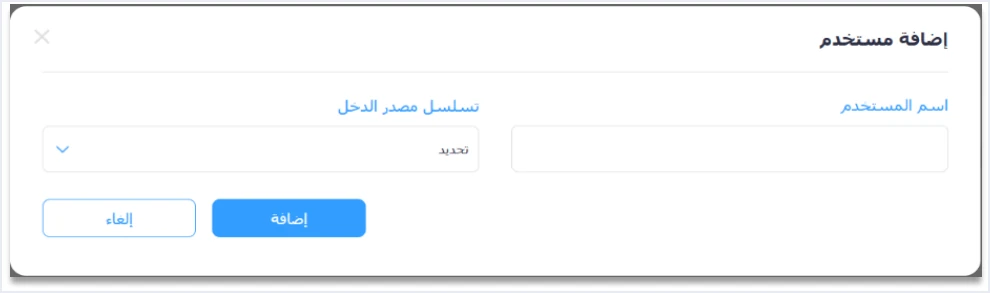
What matters in these steps if you run two programs is that the system does not generate the sequence. You select it for each link, and the system generates only the two values. If you create one link for the point-of-sale system and another for the accounting program, the sequence each link carries is your decision. Creating and storing the two values is covered in our article on the JoFotara Client ID and Secret Key.
Once a link is created, the system shows the links in a numbered list with one row per link. The columns are user, user status, user number (the Client ID), secret key and income-source sequence, with a copy button beside each of the two values and the New link (ربط جديد) button above the list.
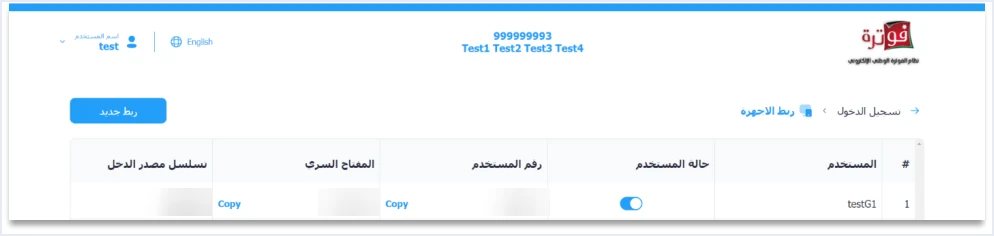
The User status column (حالة المستخدم) shows an on/off switch. Version 1.5 of ISTD’s technical guide does not state what this switch does, so we do not describe its effect on the linked program or on its invoices. The guide also does not state a limit on the number of links in one account.
Accounting Program and Point of Sale: Two Ways to Run in Parallel
A business that combines two programs falls into one of two cases, and the difference is the income-source sequence each link carries.
Case one, a different sequence for each program. For example, the point-of-sale system serves a retail activity on one sequence, and the accounting program serves another activity on a second sequence. This is the closest case to what the guide documents, because each pair of credentials is tied to one sequence, so each program sends the invoices of its own sequence with its own credentials. The definition of the sequence and the places where it appears are in our article on the JoFotara income-source sequence.
Case two, both programs on one sequence. For example, the point-of-sale system issues the cash sales invoices in the shop, and the accounting program issues the receivable invoices for wholesale customers, with a single activity. Here the unanswered questions multiply. The guide does not say whether the New link (ربط جديد) screen accepts a sequence that was already linked, and it does not say how invoice numbers and the counter are shared between invoices that carry the same sequence and come from two programs.
Choosing the point-of-sale system itself, and the criteria for comparing systems, is the subject of our article POS System in Jordan. This article starts after that choice, when your business has two programs sending to the system.
Credentials in Each Program: One Link per Tool
A program sends its invoice to the system with the Client ID and the Secret Key in the request headers, and the body of the file carries the income-source sequence in the cbc:ID field inside the cac:SellerSupplierParty block. Every invoice therefore combines three values that must agree, namely the tax number, the sequence and the credentials.
The guide does not forbid two programs from using one pair of credentials in so many words, and it does not address the case at all. But three texts in it make a separate link for each program the safer arrangement, and this is our inference, not text in the guide.
- The guide places the confidentiality of the two values on the taxpayer, who bears full responsibility for any unauthorized use of them.
- Guideline 7 in the guide asks you to protect the Client ID and the Secret Key, and Guideline 10 asks for a full audit log of sends, responses and resends. A separate link per program ties every invoice in that log to the program that sent it.
- The joining guide ends the linking steps with a line telling you to save the link data in a safe place and not to share it with anyone.
ISTD publishes the technical guide in Arabic only; the English here is our rendering, and the Arabic text is the authority.
If values get mixed up between the two programs, the messages the guide lists show you where to look. Status 403 means an error in the Client ID or the Secret Key. For status 500, the guide lists among the causes an error in the tax number or the income-source sequence and, less often, an error in the Client ID or the Secret Key. The message This user is not authorized to submit this type of invoice appears when the taxpayer sends an invoice type that does not match their tax number or their income-source sequence. If you set the sequence of one link in one program and entered the credentials of another link, these messages are the first thing to check.
The Invoice Counter ICV When Two Programs Send
Every invoice file carries a counter in the cac:AdditionalDocumentReference element with the ID ICV. The guide describes it as a counter that the taxpayer creates for electronic invoices, starting sequentially from 1 and continuing without limit under the global definition.

The definition says who creates the counter and where it starts, and it does not say what the counter covers. The guide does not state whether the counter is one for the whole business, one for each income-source sequence, or one for each link. With two programs running, this silence becomes a direct practical question, because each program creates its own counter, and the guide does not say whether the two programs follow a shared counter or each starts from 1.
The guide also does not state what happens when two invoices carry identical counter values, and none of the error messages it lists concerns the counter. Do not infer from the absence of a message that identical values are accepted, and do not infer from the word “sequentially” that they are rejected. What you hold is a design decision that you document internally and agree on with the vendors of both programs, as a decision of your business and not a requirement from ISTD. The position of the counter in the file and what the guide says about it are in our article on the JoFotara ICV.
Invoice Numbers Across Two Programs: Avoiding Overlap
Article 5(a) of Regulation No. 34 of 2019 on Organizing and Controlling Invoicing Affairs requires the invoice to carry the serial number among its items. The exact wording of that item is below.
«الرقم المتسلسل»
In English, Article 5(a) of Regulation No. 34 of 2019 lists the serial number among the items an invoice must contain. No official English translation of this regulation was found; the English here is our rendering, and the Arabic text is the authority.
The technical guide puts the invoice number in the cbc:ID field in the file header. It states that the invoice number is not the ID alone, but is made of the ID and the UUID together as a primary key, and the unique identifier (UUID) is generated by the taxpayer’s system, not by the National Invoicing System.
This is where the risk of running two programs in parallel sits. If each program starts its numbering from the same number, two invoices from two programs carry the same number with different identifiers. The guide does not say whether the system accepts or rejects this, and it does not say whether the serial number is one series for the business or whether several series are allowed. Note that the message The ID number must be unique in the guide concerns the line item number inside a single invoice, not the invoice number.
The safer step is an internal decision that no ISTD text backs. Each program takes a number series that does not overlap with the other’s, and you write that in your numbering policy. The guide does not set the format of the number itself, so agree on it with the vendors of both programs. The four numbers on an invoice and the difference between them are in our article on JoFotara invoice numbering.
A Return Invoice From a Program Other Than the One That Sent the Original
After sending, a correction is made with a return invoice (credit note), which the guide identifies by the invoice type code 381, and the return is on quantities only. A return invoice points back to the original with specific elements, so it is not enough for the program to know the customer’s name and the invoice value.
- The original invoice’s number, its unique identifier (UUID) and its total, inside the
cac:BillingReferenceblock. - The line item number, the item name and the unit price as they are on the original invoice.
- Buyer details that match the buyer’s details on the original sales invoice it is linked to.
- A quantity that does not exceed the quantity sold on the original invoice, with more than one partial return allowed until the quantities are used up.
Suppose the point-of-sale system sold goods to a customer, and the accountant later wants to return part of them from the accounting program. The accounting program needs all of these details exactly as the point-of-sale system sent them, and in practice it also needs to know what was already returned from each line. Whether the system accepts a return sent with link credentials other than those the original was sent with, or with a different sequence, is not addressed by the technical guide.
The safer arrangement is therefore that the return is issued from the program that issued the original invoice, unless the two programs exchange the invoice and line data in full. This is a practical recommendation from us, not a rule from ISTD. If you need anything else, ask ISTD before you build a fixed procedure on it.
The Portal and Invoice View After Two Programs Are Linked
ISTD’s questions and answers guide states that the sub-user does not see the Issue an invoice option (تنظيم فاتورة) once the device linking option has been clicked, and that undoing the link is an invoicing-system support request (طلب دعم فني لنظام الفوترة) sent to ISTD, not a setting you control. So do not plan on the portal being one of your two issuing paths next to a linked program before you read our article on using the portal and device linking together.
For following invoices, the View invoices option (عرض الفواتير) appears on the main user’s home screen. The 2024 user guide for the platform is a secondary source prepared by a party other than ISTD, and the current interface may differ from it. It says that the main user sees in this view all the invoices of the tax number, whether they were issued from the platform, from the mobile app or through device linking. If that holds on the current platform, it is one place where you can review the invoices of both programs together, so check it in your own account before you rely on it.
What the Documents Do Not Cover When Two Programs Run Together
The table below gathers every question raised by a parallel run, next to what technical guide 1.5 and ISTD’s other guides document and what they do not.
Scroll the table sideways to see the remaining columns
For every item in the last column, the answer sits with ISTD, not with your software vendor. The guide directs inquiries to the invoicing technical support committee at ISTD through ISTD’s website.
Checklist Before You Switch On the Second Program
The steps below are organizational steps that build on what the guide documents, and where a step is an internal decision we say so.
- Know your sequences. Review the active sequences in your account and decide which sequence each program carries.
- Create one link per program. Use device linking, then New link (ربط جديد), with a username that identifies the program, so you can tell its row apart in the links list.
- Keep each pair in its own program. Do not move the link data of one program into the other, and store it in a safe place as the joining guide asks.
- Agree on numbering. Give each program a number series that does not overlap with the other’s, and write it into your numbering policy as a decision of your business.
- Agree on the counter. Decide with the vendors of both programs how the invoice counter (
ICV) works, and document the decision internally. - Fix the return path. Give every invoice a known program that issues its return, preferably the program that issued the invoice.
- Keep what Guideline 5 asks for in each program. The invoice number, the unique identifier, the QR code and the invoice status, together with the line item numbers for any later return.
- Read the response, not the status code. Judge each invoice by the
EINV_STATUSvalue, which the guide treats as the reference for the invoice state, not by the response status code. - Treat the first invoice as a live one. The technical guide mentions no test environment, so review the whole setup before the first send from the second program.
The technical steps for linking one program, from creating the credentials to the first invoice, are in our article on how to connect to JoFotara step by step. For a wider view of the system and how to connect your business to it, read our article Jordan’s National E-Invoicing System.
If Qoyod is one of the two programs in your business, note that Qoyod is integrated with the National Invoicing System (JoFotara), and that it brings e-invoicing and accounting together in one system. You can see what Qoyod offers on our National Invoicing System page.
E-invoicing and full accounting in one system
Qoyod is integrated with the National Invoicing System (JoFotara). You issue your invoice in Jordanian dinars from Qoyod, it is booked to your ledgers automatically and sent to the system, and once it is accepted it comes back with a QR code from the Income and Sales Tax Department.
Frequently asked questions
Can I link more than one program to the National Invoicing System for the same business?
The device linking option lets you create a new link, for which the system generates a Client ID and a Secret Key, and each link is tied to one income-source sequence, with the links shown in a list that has one row per link. The technical guide states no limit on the number of links, and it does not explicitly address running two programs together for the same business.
Should I create a separate link for each program?
Yes, a separate link for each program is the safer arrangement, because every new link produces its own pair of credentials. The guide makes the taxpayer fully responsible for any unauthorized use of the two values and asks for an audit log of sends, and a separate link ties every invoice to the program that sent it. This is our reading of the text, not a statement by ISTD.
Is the invoice counter ICV one counter for both programs?
The technical guide does not settle this. It defines the counter as created by the taxpayer and starting sequentially from 1, and it does not state whether its scope is the business, the sequence or the link, nor how identical values are treated. Agree on the counter method with the vendors of both programs and document it as a decision of your business.
May both programs issue identical invoice numbers?
The guide makes the number and the unique identifier together the primary key of the invoice, and it does not say whether the system accepts two identical numbers with different identifiers from two programs. For that reason, give each program a number series that does not overlap with the other’s, as an internal decision and not a requirement from ISTD.
Can I return from the accounting program an invoice that the point-of-sale system issued?
A return needs the original invoice’s number, identifier and total, its lines as they were sent, and a buyer who matches the original. The guide does not address sending a return from a program or a link other than the one that sent the original, so the safer course is to issue the return from the program that issued the original invoice, or to ask ISTD first.
Is there a test environment where I can try the second program?
Version 1.5 of the technical guide mentions no open test environment for taxpayers or for software vendors. Review the whole setup of the second program before its first send, and treat the first invoice from it as a live invoice.
References
- Income and Sales Tax Department (ISTD), technical guide for integrating with the National Invoicing System through the API, version 1.5 (in Arabic).
- Income and Sales Tax Department (ISTD), procedures guide for joining the Jordanian National Electronic Invoicing System, 2026 edition (in Arabic).
- Income and Sales Tax Department (ISTD), questions and answers guide for the National Invoicing System, 2026 (in Arabic).
- Regulation No. 34 of 2019 on Organizing and Controlling Invoicing Affairs, as amended, consolidated text (in Arabic), Article 5(a).
- User guide for the National Invoicing System platform (2024), prepared by a software vendor, not ISTD (secondary source) (in Arabic).




