




The invoice file you send to the National Invoicing System (JoFotara) carries three values with similar names, the invoice number, the unique identifier (UUID) and the invoice counter. This article covers the third. The JoFotara ICV, or invoice counter, is a numeric value that the seller’s system places in the invoice header inside the cac:AdditionalDocumentReference block, next to an element that holds the fixed value ICV.
The short answer is this. The technical guide published by the Income and Sales Tax Department (ISTD) describes the counter as one created by the taxpayer for electronic invoices that starts sequentially from 1, and it shades the counter’s value in yellow in the template, the color that marks mandatory fields. The other sequencing questions, such as gaps, repeats, restarts and order checks, are not addressed anywhere in the guide’s text.
Below you will find what the guide says about the counter, where the counter sits in the invoice file, and how it differs from the unique identifier and the invoice number. We then set out what the guide does not say, so that your system is not built on an assumption attributed to ISTD that ISTD never made.
What the JoFotara ICV is
The counter is described in the basic invoice information table of ISTD’s technical guide for integrating with the National Invoicing System through the API, version 1.5 (p. 13). In the short-description column the guide calls it an invoice counter created by the taxpayer. It then spells this out in the following text.
«عداد يتم إنشاؤه من قبل المكلف للفواتير الإلكترونية يبدأ بشكل تسلسلي من 1 إلى ما لانهاية حسب التعريف العالمي».
In English, the guide describes a counter created by the taxpayer for electronic invoices, which starts sequentially from 1 and runs to infinity according to the global definition. The English here is our rendering, and the Arabic text is the authority.

That one sentence holds four pieces of information. Each has limits worth knowing before you write a line of code.
- Who creates the counter. The taxpayer, meaning the system that builds the invoice file and sends it. Nowhere does the guide say that the National Invoicing System generates the counter on the taxpayer’s behalf.
- Which invoices it covers. The wording is the general phrase for electronic invoices. The description draws no distinction between an income invoice and a general or special sales tax invoice, and it does not name the return invoice (credit note).
- Where it starts. At 1. The text says so explicitly.
- How it moves. Sequentially and to infinity, which means the guide sets no upper limit for the counter.
The guide does not explain the phrase according to the global definition, and it does not point to any particular reference for it. So do not read a specific technical meaning into it that the text does not give, and do not build an extra rule on it into your system as if it were an ISTD requirement.
Where the counter sits in the invoice file
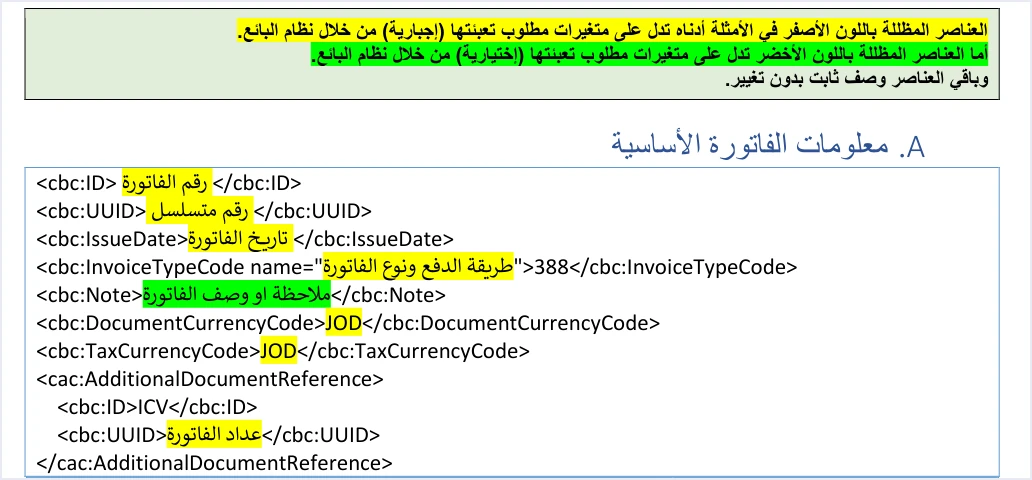
The guide shows the basic invoice information template on p. 12. In it, the counter block comes in the invoice header directly after the two currency elements. In the template it looks like this. The template’s placeholder in the cbc:UUID element is written in Arabic and means invoice counter; it is shown in English below.
<cac:AdditionalDocumentReference>
  <cbc:ID>ICV</cbc:ID>
  <cbc:UUID>[invoice counter]</cbc:UUID>
</cac:AdditionalDocumentReference>
To read this block you need the color key that the guide places above the template. The key says that elements shaded yellow in the examples are variables the seller’s system must fill in (mandatory), and that unshaded elements are a fixed description that does not change.
«العناصر المظللة باللون الأصفر في الأمثلة أدناه تدل على متغيرات مطلوب تعبئتها (إجبارية) من خلال نظام البائع».
In English, the elements shaded yellow in the examples below are variables that must be filled in (mandatory) by the seller’s system. The English here is our rendering, and the Arabic text is the authority.
Applying the key to the block makes the job of each element clear.
Scroll the table sideways to see the remaining columns
The result is that only one value in this block changes from one invoice to the next, the number inside the cbc:UUID element. The block name and the value ICV are copied as they are on every invoice.
The block is part of an XML file built to the standard the guide requires, UBL 2.1. Any flaw in the block’s structure, such as a dropped closing tag or a renamed element, is a flaw in the structure of the whole file.

In its general sales invoice example (p. 34), the guide shows the block filled in, with the value 1 in the cbc:UUID element. That value is consistent with the description, which starts the counter at 1, but it is still an example value. Do not hard-code it on every invoice, because the description itself says the counter advances sequentially.
An element named UUID that does not hold the unique identifier
The first source of confusion in this block is the element’s name. The counter is written inside an element called cbc:UUID, the same name used by the invoice’s unique identifier. The difference lies in the position and in the value. The unique identifier is a direct child of the invoice header, while the counter sits inside the cac:AdditionalDocumentReference block. The table below puts the look-alike values side by side.
Scroll the table sideways to see the remaining columns
Three points follow from this table.
- The counter is outside the primary key. The guide (pp. 12 and 104) makes the invoice number and the unique identifier together a primary key that prevents an invoice sent to the system from being duplicated. It does not include the counter in that key.
- Do not put the unique identifier in the counter’s place. The guide describes the unique identifier as a distinct UUID (Universal Unique Identifier) number created by the taxpayer’s system for each invoice, and the counter as a number that starts at 1 and advances sequentially. Moving a value from one position to the other contradicts the guide’s description in both places.
- The line number is sequential too, but its scope is different. The line number orders the lines of a single invoice and must be unique within it, while the counter counts invoices.
What the guide says about the counter’s sequence, and what it does not
The word sequentially raises practical questions for a developer straight away. What if the number skips? What if it repeats? Does it go back to 1? The table below sets each question against what you will find in version 1.5 of the technical guide.
The error messages the guide does list are covered in our article JoFotara Error Codes.
The ten guidelines that close the guide (p. 104) confirm this silence. Guideline 5, storing the core data, asks you to keep the invoice number, the unique identifier, the QR code and the invoice status. It does not mention the counter, and none of the ten guidelines names the counter at all.
References for other e-invoicing systems may set out detailed rules for a counter with the same name. Those rules belong to those systems and do not appear in the guide for Jordan’s National Invoicing System. Do not carry them into your file or your documentation as if they were an ISTD requirement.
So what should you do in the face of this silence? Three things.
- Do not present the likely answer as a rule. If you tell your team or your client that a gap in the counter is rejected, or that it is accepted, you are attributing to the guide a ruling it does not make.
- Keep design decisions separate from the guide’s text. The counter’s scope in your system, and how it handles a rejected invoice, are decisions you make yourself. Document them internally as part of your system’s design, not as a stated requirement.
- Ask the competent body when you need to. The guide (p. 104) directs inquiries to ISTD’s technical support committee for invoicing affairs through ISTD’s website.
The counter when an invoice is resent
In Guideline 3, resend management, the guide asks that an invoice whose sending failed be resent with the same invoice number and the same unique identifier. In Guideline 8, handling outages, it asks that the attempt be retried after a connection failure without generating a new UUID. In neither place does the guide mention the counter value.
Our practical conclusion is to store the counter value with the invoice record, just as you store its number and unique identifier. This is our reading of the text, not a statement by ISTD. If your software rebuilds the file for the same invoice, it then comes out with the same values, and a counter that changes between two attempts never becomes a question the guide does not answer.
If the first attempt was accepted and the response was lost, resending with the same invoice number and unique identifier returns the status ALREADY_SUBMITTED together with the original QR code, according to the guide (p. 99). The guide ties this status to sending the invoice number and unique identifier together again, and it does not mention the counter in that case.
Pre-submission checklist for the invoice counter
This list brings together what the guide states about the counter and keeps it apart from practical conclusions, so you know where each item comes from.
- The block is in the invoice header.
cac:AdditionalDocumentReferencesits in its place in the basic invoice information template (p. 12). - The value ICV is fixed. The
cbc:IDelement inside the block holdsICVas it is, because it is not shaded in the template (p. 12). - The counter is in its place. The
cbc:UUIDelement inside the block holds the counter number, not the invoice’s unique identifier (pp. 12 and 13). - Start and progression. The counter starts at 1 and advances sequentially, as the guide describes it (p. 13).
- The example value is not fixed. The value 1 in the guide’s example (p. 34) is not copied onto every invoice.
- The counter is stored with the invoice. The counter value is kept in the invoice record with its number and unique identifier. This is a practical conclusion, not text.
- Extra rules are documented as design. Any rule you apply to gaps or to the counter’s scope is documented internally as a decision in your own system.
Checking the counter is part of a wider check required by Guideline 2, validation before sending. That guideline asks you to verify the totals, the taxes, the taxpayer number, the buyer number and the mandatory fields before the invoice is sent to the system.
How Qoyod handles the invoice file
Everything above is work for the taxpayer’s system, the software that builds the invoice file and sends it. Qoyod’s integration with the National Invoicing System works on this layer as follows.
- Building and sending the file. Qoyod builds the invoice file in UBL 2.1 format with its unique identifier (UUID) and sends it to the National Invoicing System without any manual intervention.
- A check before sending. Qoyod checks each invoice at field level as it is created, covering the tax number, the document type and payment method, the General Sales Tax rate and whether the lines are complete, and alerts you to any error before the invoice is sent, to reduce rejections.
- The status of every invoice in front of you. ISTD returns the invoice status and any error message, and Qoyod shows them in its status panel, with states that include sent (مرسلة), previously sent (مرسلة مسبقًا) and not sent (لم تُرسل) together with the error message.
- Resending with the same identifier. The status panel lists invoices that were not sent and need to be resent, and when you resend one it keeps the same UUID.
For a wider view of the system and how to connect your business to it, read our article Jordan’s National E-Invoicing System. You can also see what Qoyod offers on its National Invoicing System (JoFotara) page.
E-invoicing and full accounting in one system
Qoyod is integrated with the National Invoicing System (JoFotara). You issue your invoice in Jordanian dinars from Qoyod, it is booked to your ledgers automatically and sent to the system, and once it is accepted it comes back with a QR code from the Income and Sales Tax Department.
Frequently asked questions
What is the JoFotara ICV?
The technical guide from the Income and Sales Tax Department defines it as a counter created by the taxpayer for electronic invoices that starts sequentially from 1. It is written in the invoice header inside the AdditionalDocumentReference block, in the UUID element that follows the ID element holding the fixed value ICV.
Is the invoice counter the same as the UUID?
The counter is not the unique identifier, even though the element names match. The unique identifier is a direct element of the invoice header and forms the primary key together with the invoice number. The counter is written inside the AdditionalDocumentReference block and is a sequential number that starts at 1.
Is the invoice counter field mandatory?
The technical guide shades the counter value yellow in the basic invoice information template (p. 12). In the guide’s color key, yellow marks variables that the seller’s system must fill in (mandatory).
Is an invoice rejected if there is a gap in the counter sequence?
The technical guide does not say how gaps in the counter are treated, and none of the error messages it lists concerns the counter. So neither rejection nor acceptance in this case can be attributed to the guide.
Does the invoice counter go back to 1 at the start of each year?
The guide does not mention restarting the counter, whether at the start of a year, for each income-source sequence or for each user. Its text says the counter starts at 1 and continues sequentially to infinity.
Does the National Invoicing System return the counter value in its response?
The counter is not among the response elements the technical guide explains, which include the invoice status, the QR code and the unique identifier. According to the guide, the counter is a value the taxpayer creates and sends in the invoice file.
References
- Income and Sales Tax Department (ISTD), technical guide for integrating with the National Invoicing System through the API, version 1.5 (in Arabic), pp. 12, 13, 34 and 97 to 104.




