




When your business links its accounting software to the National Invoicing System (JoFotara), the practical question is the order of the steps, meaning what happens first and when the invoice reaches the buyer. JoFotara real-time approval is the label we use in this article for a sequence that the technical guide from the Income and Sales Tax Department (ISTD) documents. It is our own description, not an ISTD term. The seller’s system sends the invoice to JoFotara, the system returns its result in the response to that request, and a QR code comes back only with an accepted invoice.
The short answer to the question of order is that the technical guide treats an invoice as received and approved when the QR code comes back in the response, and it requires that code to be shown on the seller’s invoice. The practical consequence we draw from those two texts is that the copy the buyer receives comes after the system’s response, not before, because it is the copy that carries the code.
This article walks through the official sequence as the guide draws it, then turns it into a working order for issuing an invoice, and covers what to do when an invoice is rejected or the connection drops. It also takes up the question of a deadline, because the official sources it relies on set no deadline in hours or days for sending an invoice after the sale. The steps for issuing an invoice from the portal itself are in our article Issue an Invoice on the JoFotara Portal: The Steps.
What is JoFotara real-time approval?
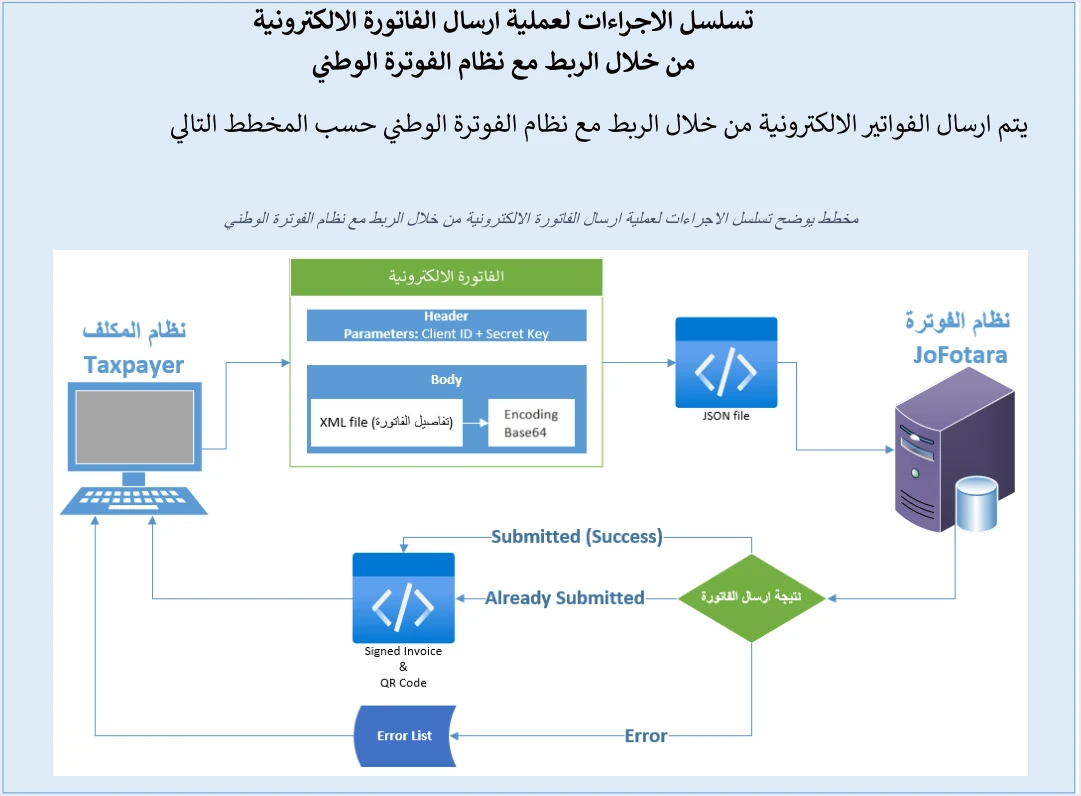
On page 9 of the technical guide (version 1.5), ISTD shows a diagram of the sequence of procedures for sending an electronic invoice through the link to the National Invoicing System. It reads in four stages.
- The invoice is built in the taxpayer’s system. The seller’s system writes the invoice details into an XML file, then encodes it in Base64.
- The request is prepared. The encoded file goes into a JSON file, and the request header carries the user ID and the secret key (Client ID and Secret Key) that the system generates when devices are linked.
- The request is sent to JoFotara. The request reaches the system, which processes the invoice and decides the result of the send.
- The result returns to the taxpayer’s system. At “the result of sending the invoice” the diagram splits into three branches. With Submitted (Success) and with Already Submitted, a “Signed Invoice & QR Code” returns to the taxpayer’s system, meaning the signed invoice and the QR code. With Error, an “Error List” returns, meaning the list of errors.
“Real-time approval” is a description we apply to this sequence. We did not take it word for word from ISTD. The word approval itself does appear in the guide, where page 97 lists the purposes of the response to a send, and one of them is, in the guide’s wording, to find out whether the invoice was approved or rejected.
«معرفة ما إذا تم اعتماد الفاتورة أو رفضها»
In English, the guide lists, among the purposes of the response, knowing whether the invoice was approved or rejected. ISTD publishes this guide in Arabic only; the English here is our rendering, and the Arabic text is the authority.
The guide lists six purposes in all.
- Verify that the invoice was sent successfully.
- Know whether the invoice was approved or rejected.
- Show the reasons for errors.
- Retrieve the QR code.
- Retrieve the invoice’s unique number (UUID).
- Let linked systems process the result of the send automatically.
Two things in this sequence define what the model means. The first is that the verdict on the invoice comes from the system in its response to the request that sent it. The second is that the QR code is issued by ISTD and comes back in the response, and the seller’s software does not generate it. Our article on the ISTD-issued QR code (EINV_QR) covers where the code comes from and where it sits in the response.
When is an invoice accepted in JoFotara?
The technical guide sets two rules on page 98 that decide the moment of acceptance, and it repeats the second on page 104.
- A QR code in the response. The code must come back in the
EINV_QRfield for the invoice to count as received and approved. - The code shown on the seller’s invoice. The guide’s wording follows.
«يجب اظهار QR CODE … على فاتورة البائع»
In English, the guide says the QR code must be shown on the seller’s invoice. ISTD publishes this guide in Arabic only; the English here is our rendering, and the Arabic text is the authority. The verb in the text is “shown”, so the guide names no particular means in this rule, such as printing.
The guide adds in its guidelines (p. 104) that the final status of the invoice is decided from the EINV_STATUS field, not from the technical status code alone. A status code of 200 means the request was received and processed technically. Acceptance is something you read from the invoice status and from the presence of the QR code. The table below sums up the three statuses as the guide explains them, and what each means for the invoice in your hands.
Scroll the table sideways to see the remaining columns
Checking an invoice after it is issued is done by scanning the code in the Sanad app through its digital document verification option (التحقق من المستندات الرقمية), and the details are in our article how to verify an e-invoice with the Sanad app in Jordan.
What JoFotara real-time approval means for the order of issuing an invoice
The steps below bring the technical guide and Regulation No. 34 of 2019 on Organizing and Controlling Invoicing Affairs together into one order. Each step names its source, and where a step is our inference we say so.
- The sale sets the moment of issue. Article 3 of Regulation No. 34 of 2019 fixes the time and date of a sale as the time and date the sale actually takes place, and Article 5(d) of the same regulation ties issuing the invoice to that moment.
- Build the invoice with its unique identifier. The seller’s system generates the UUID, and together with the invoice number it forms the invoice’s primary key. Store it from the first moment, because you will need the same one if you resend. The details are in our article JoFotara UUID: Why It Comes Back With the ID.
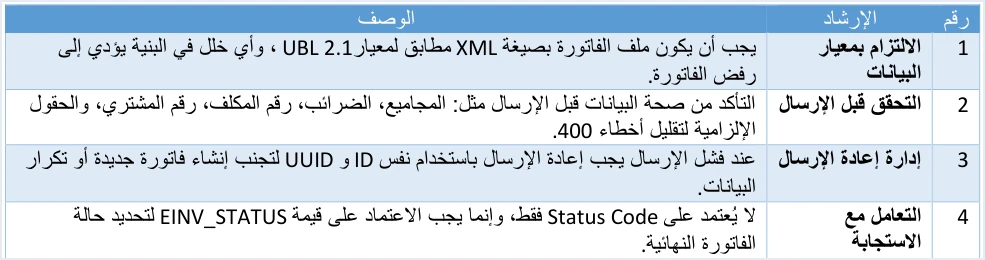
- Check before sending. Guideline 2 in the guide asks you to validate the totals, the taxes, the taxpayer number, the buyer number and the mandatory fields before sending, to reduce 400 errors.
- Send, then read the status. The linked system sends the invoice, then reads the status from
EINV_STATUS, as guideline 4 says. - Store after acceptance. Guideline 5 asks you to store the invoice number, the unique identifier, the QR code and the status, for tracking and later retrieval. Article 8(b) of Regulation No. 34 of 2019 provides that the data of the National Invoicing System is relied on in place of keeping the invoice on paper.
- Hand the buyer’s copy over with the code on it (our inference). The guide requires the QR code to be shown on the seller’s invoice, and the code comes back only after acceptance. So we infer that the copy you hand to the buyer comes after the response arrives. Article 5(a) of the regulation provides for an invoice in at least two copies, and Article 5(c)(1) provides that a copy goes to the buyer in the way used to issue the invoices, with the other copies kept by the seller.
- Proof of receipt on large invoices. When an invoice is worth more than JOD 10,000, Article 5(c)(2) of the regulation requires the seller to prove that the buyer received it.
Step six is where the order of work changes most. On our reading of the sequence the guide draws, an invoice is not complete when it reaches the buyer unless the code has come back, because the code is something that must be shown on it.
If the send is not accepted: rejection and lost connection
JoFotara real-time approval does not mean every send ends in acceptance. The guide deals with two cases that bear directly on the issuing order.
A rejected invoice
When the status NOT_SUBMITTED comes back, no QR code comes back, so the invoice does not count as approved. Read the reason for the rejection in EINV_RESULTS, then in the ERRORS list and the EINV_MESSAGE field, and fix the file.
When you resend, guideline 3 asks you to use the same invoice number and the same unique identifier, and not to generate new values. The guide also warns on page 104 that many systems generate the unique identifier automatically, and that failing to store it can lead to duplicate invoices when an invoice is resent.
The connection drops before the response arrives
When a timeout or a connection failure occurs, guideline 8 asks you to retry without generating a new unique identifier. If the invoice was accepted on the first attempt and the response never reached you, the system returns the status ALREADY_SUBMITTED on the next attempt, with the original QR code.
Correcting an accepted invoice
An invoice that has been accepted is not edited after it is issued. The alternative the system offers is a return invoice (credit note), and its correction is on quantities only. That is why the check before sending matters, because an error found before sending is fixed in the same file.
Is there a deadline for sending an invoice to JoFotara after the sale?
The official sources this article relies on set no deadline in hours or days for sending an invoice to the system after the sale. Those sources are version 1.5 of the technical guide, the joining, invoice-issuing and questions-and-answers guides that ISTD issued in 2026, and Regulation No. 34 of 2019 as amended.
What these sources do provide is a link between issuing the invoice and the sale itself. Article 3 of Regulation No. 34 of 2019 fixes the time and date of a sale as the time and date the sale actually takes place, and Article 5(d) ties issuing the invoice to that moment. Those two articles speak about the sale and the issuing of the invoice, and neither names a date for sending the invoice to the system.
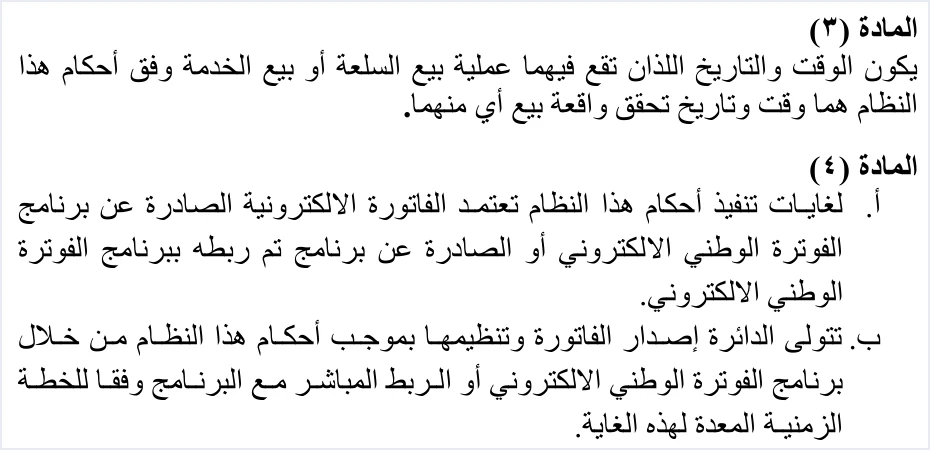
The same page shows Article 4(a) and Article 4(b) of Regulation No. 34 of 2019. Article 4(a) recognizes the electronic invoice issued by the National Invoicing System or by a program linked to it.
«تعتمد الفاتورة الالكترونية الصادرة عن برنامج الفوترة الوطني الالكتروني أو الصادرة عن برنامج تم ربطه ببرنامج الفوترة الوطني الالكتروني»
In English, Article 4(a) of Regulation No. 34 of 2019 provides that, for the purposes of the regulation, the electronic invoice that is recognized is the one issued by the National Invoicing System or by a program linked to it. No official English translation of this regulation was found; the English here is our rendering, and the Arabic text is the authority.
Article 4(b) speaks of issuing and organizing the invoice according to a timetable, and it gives no date.
«تتولى الدائرة إصدار الفاتورة وتنظيمها بموجب أحكام هذا النظام من خلال برنامج الفوترة الوطني الالكتروني أو الربط المباشر مع البرنامج وفقاً للخطة الزمنية المعدة لهذه الغاية»
In English, Article 4(b) of Regulation No. 34 of 2019 gives ISTD the task of issuing and organizing the invoice through the National Invoicing System or a direct link to it, according to the timetable set for that purpose. No official English translation of this regulation was found; the English here is our rendering, and the Arabic text is the authority.
Three practical rules keep you inside the text on the question of a deadline.
- Ask for the source of any figure. If you read that sending has a deadline of a set number of hours or days, ask which ISTD text it comes from before you build an internal procedure on it.
- Leave the invoice date alone. Do not handle a late send by changing the invoice date to an earlier one. Article 3 of Regulation No. 34 of 2019 fixes the date of the sale as the date it takes place, and Article 5(d) ties issuing to that moment. This is our reading of the text, not a statement by ISTD.
- Standardize the time format. Guideline 9 in the guide asks for a standard time format (Standard Time Format) to avoid differences in processing between systems.
What JoFotara real-time approval does not mean
Several ideas get mixed into this topic that ISTD’s texts do not support. These are the main ones, with what the source says.
- It does not mean your software generates the QR code. The code comes back from the system in the
EINV_QRfield after acceptance, and your software’s job is to store it and show it on the invoice. - It does not mean a digital signature from the taxpayer. Version 1.5 of the technical guide asks the taxpayer for no invoice signature and no digital certificate, and ISTD is the party that returns the signed invoice in the
EINV_SINGED_INVOICEfield. Our article on the digital signature in JoFotara goes further into this. - It does not mean a status code of 200 is acceptance. The final status is read from
EINV_STATUS, and acceptance goes together with the QR code coming back. - We draw no conclusion from the value of
ProfileID. The guide asks for thecbc:ProfileIDelement on every invoice with the valuereporting:1.0. It is a fixed value that you write as given, and this article builds no judgment on it about how the system works. - It does not mean linking is mandatory for every business. Article 4(a) of Regulation No. 34 of 2019 recognizes the invoice issued by the national program or by a program linked to it. In its questions and answers guide, ISTD says the following about a business that has an accounting system.
«اما من يمتلك نظام محاسبي يلزمه ربط نظامه مع نظام الفوترة»
In English, the questions and answers guide says that a business that has an accounting system must link it to the invoicing system. ISTD publishes this guide in Arabic only; the English here is our rendering, and the Arabic text is the authority. The full discussion is in our article Is Linking Accounting Software to JoFotara Mandatory?.
The ten guidelines that close the technical guide have a full explanation in our article JoFotara Guidelines for Linked Systems: All Ten Explained.
A checklist for the issuing order in your system
If you are building the link yourself or reviewing a linked program, these questions show whether the order follows what the guide draws.
- Does it take the invoice date and time from the moment of the sale?
- Does it generate the unique identifier once and store it before sending?
- Does it check the totals, the taxes, the taxpayer number, the buyer number and the mandatory fields before sending?
- Does it read the status from
EINV_STATUS, and not rely on the technical status code alone? - Does it store the invoice number, the unique identifier, the QR code and the status after acceptance?
- Does it show the QR code on the invoice that reaches the buyer?
- Does it resend after a rejection or a lost connection with the same number and the same unique identifier?
- Does it keep a full log of sends, responses and resends, as guideline 10 asks?
How Qoyod handles this order
The issuing order sits with the seller’s system, meaning the software that builds the invoice file and sends it. Qoyod’s integration with the National Invoicing System works on this layer as follows.
- Building the file and sending it. Qoyod builds the invoice file in UBL 2.1 format with its unique identifier (UUID) and sends it to the National Invoicing System without any manual intervention.
- An alert before sending. Qoyod checks each invoice at field level as it is created, covering the tax number, the document type and payment method, the General Sales Tax rate and whether the lines are complete, and alerts you to any error before the invoice is sent, to reduce rejections. The pre-send check is an alert, not a guarantee.
- Every invoice’s status in view. ISTD returns the invoice status and any error message, and Qoyod shows them in its status panel, with states that include sent (مرسلة), previously sent (مرسلة مسبقًا) and not sent (لم تُرسل) together with the error message.
- Resending with the same identifier. The status panel lists invoices that were not sent and need to be resent, and when you resend one it keeps the same UUID.
- The QR code comes from ISTD. The taxpayer needs no digital certificate or signature of their own to send invoices through Qoyod. Once ISTD accepts the invoice it returns a QR code, and Qoyod shows that code on the invoice.
For a wider view of the system and how to connect your business to it, read our article Jordan’s National E-Invoicing System. You can also see what Qoyod offers on our National Invoicing System page.
E-invoicing and full accounting in one system
Qoyod is integrated with the National Invoicing System (JoFotara). You issue your invoice in Jordanian dinars from Qoyod, it is booked to your ledgers automatically and sent to the system, and once it is accepted it comes back with a QR code from the Income and Sales Tax Department.
Frequently asked questions
What is JoFotara real-time approval?
It is our description of a sequence that the technical guide draws on page 9, and it is not an ISTD term. The seller’s system sends the invoice to JoFotara, the system returns its result in the response, and an accepted invoice comes back with the QR code and the signed invoice, while a rejected one comes back with the list of errors.
Do I hand the invoice to the buyer before the system’s response arrives?
The technical guide requires the QR code to be shown on the seller’s invoice, and the code comes back only with an accepted invoice. So we infer that the copy you hand to the buyer is the copy that carries the code, after the response arrives.
Is there a set deadline for sending an invoice after the sale?
The official sources this article relies on set no deadline in hours or days. Articles 3 and 5(d) of Regulation No. 34 of 2019 tie the time of the sale and the issuing of the invoice to the moment the sale takes place.
Is a status code of 200 enough to treat the invoice as accepted?
No. The technical guide asks you to decide the final status from the EINV_STATUS field, not from the status code alone. An invoice counts as received and approved when the QR code comes back in the EINV_QR field.
What do I do if the connection drops before the response arrives?
Retry with the same number and the same unique identifier, without generating a new one, as guideline 8 asks. If the invoice was already accepted, the system returns the status ALREADY_SUBMITTED with the original QR code.
Does my software generate the QR code itself?
No. The code is issued by the Income and Sales Tax Department and comes back in the response to the send after the invoice is accepted. Your software’s job is to store the code and show it on the invoice.
References
- Income and Sales Tax Department (ISTD), technical guide for integrating with the National Invoicing System through the API, version 1.5, 2026 (in Arabic), pp. 9, 10 and 97 to 104.
- Regulation No. 34 of 2019 on Organizing and Controlling Invoicing Affairs, as amended (in Arabic), p. 2, Articles 3, 4, 5 and 8.
- Income and Sales Tax Department (ISTD), questions and answers guide for the National Invoicing System, 2026 (in Arabic).
- ISTD’s National Invoicing System guides (in Arabic)




