




When you decide that your accounting software will send its invoices directly to the National Invoicing System (JoFotara), your system becomes responsible for work that the system’s website used to do for you. That is why the Income and Sales Tax Department (ISTD) gives one page of its technical guide to a short list it calls the guidelines. In this article we call that list the ten JoFotara guidelines. There are ten items on a single page, each with a heading and a line or two of description.
In short, these guidelines describe how your system prepares the invoice, how it sends it, how it reads the system’s reply, and what it stores and logs afterward. In practice, each guideline corresponds to a programming decision or an operating procedure inside your business. This article sets out the ten headings in the order the guide gives them, explains what each guideline means when you apply it, and points you to a related article where a guideline needs a deeper explanation.
What the ten JoFotara guidelines are and who they address
The guidelines appear on page 104 of ISTD’s technical guide for integrating with the National Invoicing System through the API, version 1.5, issued on May 12, 2026 by the Invoicing Affairs Directorate, Technical Support Section, at ISTD. Their place near the end of the guide tells you something. They come after the explanation of the file structure, the sending method and the response format, and they gather the operational takeaways into one table.
These guidelines address the taxpayer’s system that sends invoices through the API, because they are part of the technical guide for linking. ISTD’s procedures guide for joining the Jordanian National Electronic Invoicing System, 2026 edition, says that the taxpayer must coordinate with the system’s programmer or the technical solutions provider it works with to complete the technical requirements. The provider meant here is the one the taxpayer deals with, not a list of providers that ISTD approves. So if your software handles the sending, these guidelines describe what your software must do and what you need to confirm. The connection steps themselves are covered in our article on how to connect your system to JoFotara step by step.
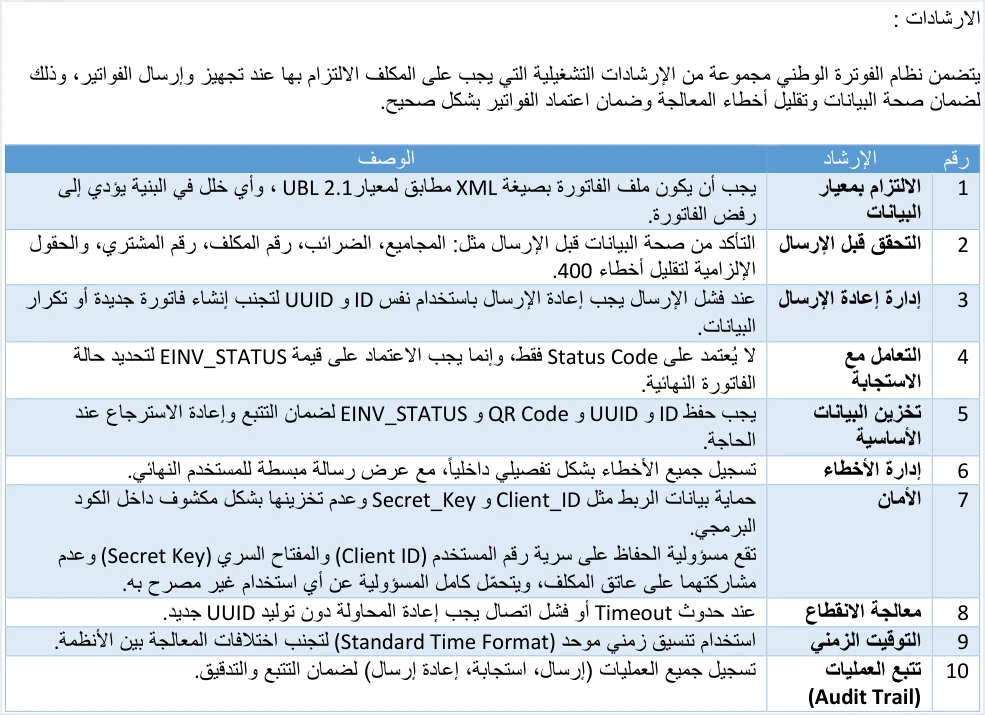
These are the ten headings in the guide’s order, with a summary of what each guideline asks for and what it means for your system.
Scroll the table sideways to see the remaining columns
Guidelines 1 and 2: what happens before the invoice leaves your system
1. Adherence to the data standard
The guideline states that the invoice file must be an XML file that conforms to the UBL 2.1 standard, and that any flaw in its structure leads to the invoice being rejected. The key word here is structure. It refers to the shape of the file, before any of its values.
Examples of the structure the guide sets include every file starting with the same prolog, the cbc:ProfileID field carrying the value reporting:1.0 on every invoice, and the opening <Invoice> tag sitting on a single line with all of its attributes. If that tag is split over more than one line, the message Invalid Invoice Minification appears (p. 102). The file is then Base64-encoded and placed inside a JSON file before it is sent.
In practice, this guideline is the job of whoever built the software more than the job of the accountant. Still, it helps to know that a rejection here comes from the shape of the file itself, so changing a number or an amount will not fix it.
2. Validation before sending
The guide asks you to make sure the data is correct before sending. It gives totals, taxes, the taxpayer number, the buyer number and mandatory fields as examples, and it states the aim plainly, which is to reduce 400 errors.
Your system should therefore check the invoice itself before sending it, instead of waiting for the system to reject it. This check answers questions such as the following.
- Do the header totals equal the sum of the lines? This is what the message
Total General Amount is Not Correctchecks. - Is the seller’s tax number correct, and does the invoice type match that tax number and the income-source sequence the invoice is sent under?
- Are the buyer details as complete as the invoice type requires?
- Are all the mandatory fields filled in? The guide marks these fields with yellow shading in its tables.
The link between this guideline and code 400 is one the guide makes itself. Code 400 is the code returned when the values in the XML file contain an error, which the EINV_MESSAGE message then details.
Guidelines 3 and 4: resending and reading the response
3. Resend management
The guide says that when a send fails, the invoice must be resent with the same ID and UUID, to avoid creating a new invoice or duplicating data. The reason for this rule is that the invoice’s identity in the system is the two values together, the invoice number in cbc:ID and the unique identifier in cbc:UUID. If you resend with a new identifier, the system sees a different invoice.
The practical value of this rule shows when you do not know whether the first invoice arrived. If it was in fact accepted, resending it with the same number and the same identifier returns the status ALREADY_SUBMITTED along with the original QR code, so the invoice is not duplicated.
4. Handling the response
The guideline says not to rely on the Status Code alone, and to rely instead on the value of EINV_STATUS to determine the final status of the invoice. The system’s reply has two layers. The first is the technical status code of the request, which tells you that the request arrived and was processed technically. The second is EINV_STATUS, the official status of the invoice itself.
The guide gives three values for this status, and your system has to act on each of them.
SUBMITTEDmeans the invoice was accepted and a QR code came back with it.ALREADY_SUBMITTEDmeans the same invoice was sent before with the same number and identifier, and the original QR code comes back with it.NOT_SUBMITTEDmeans the invoice was rejected. In this case the status code is not 200, and the values for the QR code, the identifier, the number and the signed invoice come back empty.
In its operational notes, the guide adds a condition that completes this guideline. It asks you to check that a QR code is present in the EINV_QR element for the invoice to count as fully received and approved. So the working rule for your system is to treat an invoice as accepted only when two things are true together, a status that shows acceptance and a QR code present in the reply.
Guidelines 5 and 6: storing the core data and managing errors
5. Storing the core data
The guide asks your system to keep four values, ID, UUID, QR Code and EINV_STATUS. It gives the aim as ensuring tracking and retrieval when needed.
Each of the four values has a practical reason. The invoice number and the identifier are what you need to resend with the same identity and to link a return invoice (credit note) to its original invoice. The QR code is what must be shown on the seller’s invoice. The invoice status settles whether the invoice was accepted. If you did not keep the QR code, you can recover it by resending the same invoice, because the ALREADY_SUBMITTED status returns the original code. This is the route the guide documents for recovering a code that was not stored.
6. Error management
The guideline asks you to log all errors in detail internally, while showing the end user a simplified message. It asks for two things at once, a full log for the technical team and a message that the person issuing the invoice can understand.
The shape of the reply helps you apply this guideline. The EINV_RESULTS element holds three groups, INFO, WARNINGS and ERRORS. Each entry in them carries the type, the status, the code EINV_CODE, the category EINV_CATEGORY and the message EINV_MESSAGE. In practice, your system stores these entries as they arrived, then shows the accountant a clear sentence that says which field needs correcting. One of the guide’s own examples is an error with the code totalGeneralTaxesAmount, the category invoice and the message Total General Amount is Not Correct. To read the errors and their codes together, see our article JoFotara Error Codes: Why an Invoice Is Rejected and How to Fix It.
Guidelines 7, 8 and 9: security, outages and time format
7. Security
The guide asks you to protect the linking credentials, such as Client_ID and Secret_Key, and not to store them in the open inside the program code. Under the same heading, it adds that keeping the Client ID and Secret Key confidential, and not sharing them, is the taxpayer’s responsibility, and that the taxpayer bears full responsibility for any unauthorized use.
The system generates these two values when the taxpayer chooses device linking (ربط الأجهزة) and selects the income-source sequence, so each pair is tied to one income-source sequence. They travel in the header of every submission request. Keep the two values in a protected place in your system settings, not in the program’s source, and do not send them by email or in chats. You can find how to create them in our article JoFotara Client ID and Secret Key: Device Linking Steps. ISTD’s technical guide ties error 403 to a wrong Client ID or Secret Key.
8. Handling outages
The guideline says that on a Timeout or a connection failure, you must retry without generating a new UUID. It applies guideline 3 to one specific case, the case where no reply reaches you at all, so you do not know whether the invoice arrived.
One example of this case is code 504. According to the guide, it means your system could not reach the National Invoicing System, and the cause is either the taxpayer’s firewall or ISTD’s site. Version 1.5 of ISTD’s technical guide does not state how many times to retry or how long to wait between attempts. That decision belongs to whoever builds the system. The only fixed point in the text is that the identifier does not change between attempts.
9. Time format
This guideline calls for a unified time format, which the guide names in English as Standard Time Format, to avoid processing differences between systems.
Version 1.5 of ISTD’s technical guide does not state a specific format or time zone for this guideline. What the text requires is consistency itself, meaning that your systems write times and dates in one fixed way, so the same value is not read differently from one system to another. The practical step we suggest is that the systems exchanging invoice data inside your business agree on one way of writing time and keep to it. This is our reading of the text, not a statement by ISTD.
Guideline 10: Audit Trail
The guideline asks you to log all operations, meaning each send, response and resend, to ensure tracking and auditing. The difference from guideline 5 is that guideline 5 keeps the final result of each invoice, while guideline 10 keeps the whole story, every send attempt, every reply and every resend, in order.
The value of this log shows when someone asks about a specific invoice. When was it first sent? What reply came back? How many times was it resent before it was accepted? With the log and the four values stored under guideline 5, your system can answer these questions without guessing.
The operational notes that accompany the guidelines
Directly under the table of guidelines, the guide places four important operational notes. They explain some of the guidelines from another angle, and they add one rule that does not appear in the table.
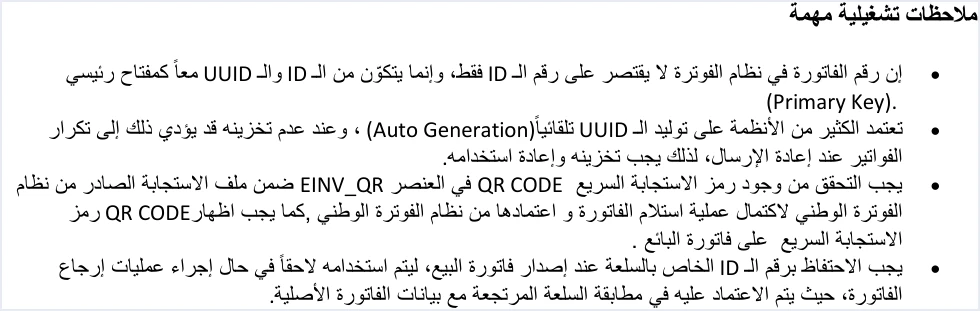
- The invoice identity is a pair of values. The guide says the invoice number in the system is not limited to the ID alone, and is made up of the ID and the UUID together as a Primary Key. This is what makes guidelines 3 and 8 possible.
- The automatically generated identifier is stored and reused. The guide warns that not storing the automatically generated identifier may lead to duplicate invoices on resend.
- The QR code is a condition for approval, and it is shown on the seller’s invoice. The guide asks you to check that the code is present in
EINV_QRfor the invoice to count as fully received and approved, and it says that the QR code must be shown on the seller’s invoice. The verb the guide uses is “show.” - The line item number is kept from the sales invoice. This is the new rule. The guide asks you to keep the
IDof each item when you issue the sales invoice, because the items on a return invoice are matched on that number. In JoFotara, a return invoice is based on quantities, and the quantity returned cannot exceed the quantity sold.
The guide states that the QR code can be verified after the invoice is issued only through the Sanad app, using its digital document verification option (التحقق من المستندات الرقمية).
A quick checklist for your system before the first invoice
If you are reviewing software before you adopt it, or reviewing an existing link, these ten questions sum up the guidelines in the same order. A no to any of them points you to the guideline that needs work.
- Does the invoice file come out in UBL 2.1 format, with the same prolog and the opening tag on one line?
- Does the system check the totals, taxes, tax number, buyer number and mandatory fields before sending?
- When a send fails, does the system resend with the same invoice number and the same identifier?
- Does the system judge the invoice by the
EINV_STATUSvalue and the presence of a QR code, not by the technical status code alone? - Does the system keep the number, the identifier, the QR code and the status of every invoice?
- Are errors logged in full internally, with a simplified message shown to the user?
- Are the Client ID and Secret Key kept in a protected place, not in the open in the program’s source?
- When the connection drops, does the retry happen without generating a new identifier?
- Do your systems use one unified time format?
- Is there a log of every send, response and resend?
Two questions from the operational notes complete the list. Does the QR code appear on the seller’s invoice? Does the system keep the line item number for each item, ready for returns? If you have a question the guide does not answer, the guide itself refers you to ISTD’s technical support committee for invoicing affairs through ISTD’s website.
Which of these guidelines Qoyod handles
The ten guidelines describe the work of the taxpayer’s system, and that work falls to your accounting software if it is the one sending the invoices. Qoyod’s integration with the National Invoicing System works on this layer as follows.
- Building the file and the identifier. Qoyod builds the invoice file in UBL 2.1 format with its unique identifier (UUID) and sends it to the National Invoicing System without any manual intervention.
- A check before sending. Qoyod checks each invoice at field level as it is created, covering the tax number, the document type and payment method, the General Sales Tax rate and whether the lines are complete, and alerts you to any error before the invoice is sent, to reduce rejections.
- The status of every invoice in front of you. ISTD returns the invoice status and any error message, and Qoyod shows them in its status panel, with states that include sent (مرسلة), previously sent (مرسلة مسبقًا) and not sent (لم تُرسل) together with the error message.
- Resending with the same identifier. The status panel lists invoices that were not sent and need to be resent, and when you resend one it keeps the same UUID. Resending is a step you take yourself from the status panel.
Once ISTD accepts the invoice it returns a QR code, and Qoyod shows that code on the invoice. Guideline 7 stays with you, as the guide says, because keeping the Client ID and Secret Key confidential is the taxpayer’s responsibility. For a wider view of the system and how to connect your business to it, read our article Jordan’s National E-Invoicing System. You can also see what Qoyod offers on its National Invoicing System (JoFotara) page.
E-invoicing and full accounting in one system
Qoyod is integrated with the National Invoicing System (JoFotara). You issue your invoice in Jordanian dinars from Qoyod, it is booked to your ledgers automatically and sent to the system, and once it is accepted it comes back with a QR code from the Income and Sales Tax Department.
Frequently asked questions
What are the ten JoFotara guidelines?
They are ten operating guidelines on page 104 of the technical guide issued by the Income and Sales Tax Department, version 1.5. Their headings are adherence to the data standard, validation before sending, resend management, handling the response, storing the core data, error management, security, handling outages, time format, and Audit Trail.
Who are these guidelines addressed to?
They are addressed to the taxpayer’s system that sends invoices through the API, because they are part of the technical guide for linking. ISTD’s joining procedures guide asks the taxpayer to coordinate with the system’s programmer or the technical solutions provider it deals with to complete the technical requirements.
Is a status code of 200 enough to know the invoice was accepted?
It is not enough. Guideline 4 says not to rely on the status code alone and to rely on the EINV_STATUS value to determine the final status of the invoice. The guide also asks you to check that a QR code is present in the EINV_QR element.
How many times does the system retry when the connection drops?
The technical guide does not set the number of attempts or the time between them. What it does set is that the retry happens without generating a new UUID, and with the same invoice number.
Which values does the guide ask you to keep for each invoice?
Guideline 5 asks you to keep four values, the invoice number ID, the unique identifier UUID, the QR code and the invoice status EINV_STATUS. The operational notes add the line item number for each item, for use in return invoices, and guideline 10 adds a full log of sends, responses and resends.
Who is responsible for keeping the Client ID and Secret Key confidential?
The technical guide puts this responsibility on the taxpayer. It asks that the two values not be shared and not be stored in the open inside the program code, and it states that the taxpayer bears full responsibility for any unauthorized use.
References
- Income and Sales Tax Department (ISTD), technical guide for integrating with the National Invoicing System through the API, version 1.5 (in Arabic), pp. 7, 8, 10, 97 to 102 and 104.
- Income and Sales Tax Department (ISTD), procedures guide for joining the Jordanian National Electronic Invoicing System, 2026 edition (in Arabic).




