




The message The ID number must be unique appears when your accounting software sends an invoice to the National Invoicing System (JoFotara) with two or more lines that carry the same line number. The “ID” here is the cbc:ID field inside each invoice line (cac:InvoiceLine). It is not the invoice’s unique identifier (UUID) and it is not the invoice number. Within a single invoice, this field is a serial number that must not repeat, and if it does repeat, the invoice is not issued.
The fix is an edit to the XML file that renumbers the lines in sequence so that no number appears twice. The line number also has a job beyond getting the invoice accepted. It is the reference a return invoice is built on later, so it is worth setting it correctly and storing it from the start.
This article explains what the message means as it appears in the technical guide published by the Income and Sales Tax Department (ISTD), version 1.5. It identifies the field the message refers to and how that field differs from the invoice number, then sets out the steps to fix the file and resend it, and the role the line number plays in a return invoice.
What the message The ID number must be unique means
The technical guide lists this message among the messages of code 400 (Bad Request). That code signals an error in the values sent inside the XML file, and the detail comes in the EINV_MESSAGE field of the response. The guide explains the message in these words.
«يدل على تكرار رقم ال ID الخاص بالسلعة او الخدمة لاكثر من سلعة (على سبيل المثال السلعة الأولى رقم ال ID هو 1 والسلعة الثانية رقم ال ID هو 1) وبالتالي لن يتم اصدار الفاتورة حيث ان رقم ال ID الخاص بالسلعة هو فريد على مستوى الفاتورة ويجب عدم تكراره».
In English, the guide says the message means that the ID number of a good or service is repeated for more than one good (for example, the first good has ID 1 and the second good also has ID 1). As a result the invoice will not be issued, because a good’s ID number is unique within the invoice and must not be repeated. ISTD publishes this guide in Arabic only; the English here is our rendering, and the Arabic text is the authority.

The text carries three pieces of information that decide how you handle the error.
- The number in question belongs to the good or service inside the invoice. In other words, it is the line number, not the number of the invoice itself.
- The scope of uniqueness is a single invoice. The text says the number is unique within the invoice. It says nothing about the same number appearing on one invoice and then on another.
- The result is that the invoice is not issued. No QR code comes back for it, and it stays unaccepted until it is corrected and sent again.
Where to find the message in the response
With every submission, JoFotara returns a response file in JSON format. The final status of the invoice is in the EINV_STATUS field. If the invoice is rejected, that field holds the value NOT_SUBMITTED, and the fields for the QR code, the invoice number, the UUID and the signed invoice come back empty. The reason for the rejection comes inside the ERRORS array. Each entry in that array carries the fields type, status, EINV_CODE, EINV_CATEGORY and EINV_MESSAGE, and the message this article explains appears in the last of them.
Version 1.5 of ISTD’s technical guide does not state which EINV_CODE or EINV_CATEGORY value accompanies this particular message. Identify it by the text of EINV_MESSAGE instead. Each element of the response is explained in our article JoFotara API Response: The EINV Elements.
The field in question: cbc:ID inside the invoice line
Each good or service on the invoice is sent in its own element, named cac:InvoiceLine, and the first field in that element is cbc:ID. In its table for the line template, the guide describes the field as follows.
«هو رقم تسلسلي خاص لكل (سلعة أو خدمة) لا يتكرر على مستوى الفاتورة الواحدة».
In English, the guide describes it as a serial number specific to each good or service that does not repeat within a single invoice. ISTD publishes this guide in Arabic only; the English here is our rendering, and the Arabic text is the authority.
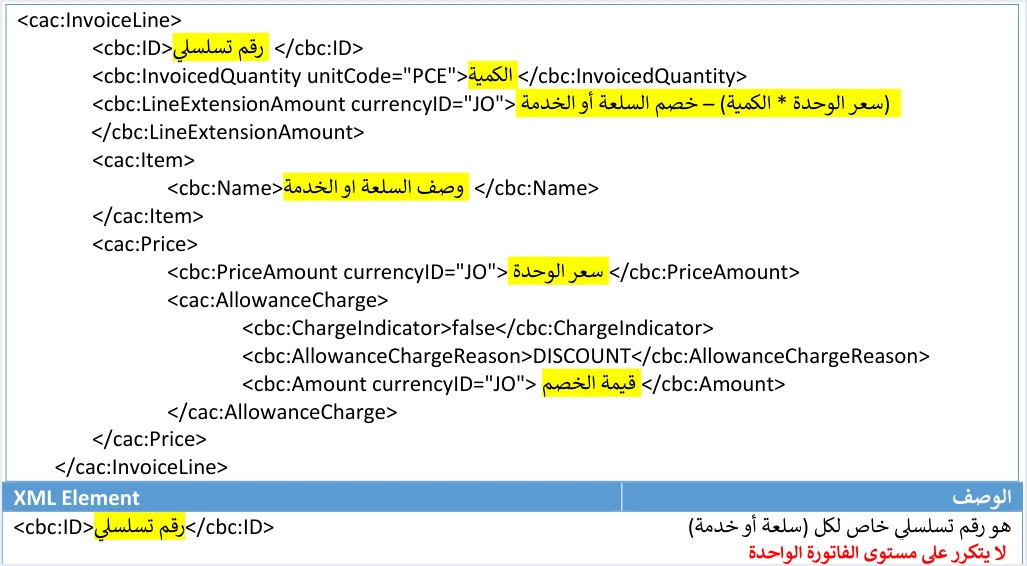
In the same template, the field is followed by the quantity (cbc:InvoicedQuantity), then the line amount after discount (cbc:LineExtensionAmount), then the description of the good or service (cbc:Name), then the unit price and the discount. The line number is what tells each line apart from the others in the file, while the remaining fields describe what the line contains. Every line element and the rule on each are covered in our article JoFotara InvoiceLine: Invoice Lines and Their Rules.
The guide’s example in the text of the message gives the first good the number 1. From the description “serial number” we read that the second line takes 2, the third takes 3, and so on. This is our reading of the text, not a statement by ISTD. The condition the guide states explicitly is that the number does not repeat within the invoice.
Do not confuse it with the invoice number and its UUID
The invoice header has another field that is also named cbc:ID, but that one is the number of the invoice itself. It travels with the unique identifier cbc:UUID, which the taxpayer’s system generates, and the two together form the key that identifies the invoice. Their rules are different from the rules for the line number. If you send an invoice again with the same number and the same UUID after it has been accepted, the system returns the status ALREADY_SUBMITTED, and the original QR code comes back with it. This side of the subject is covered in our article JoFotara Error Codes: Why an Invoice Is Rejected and How to Fix It, and the two header identifiers each have their own article, JoFotara UUID: Why It Comes Back With the ID and JoFotara Invoice Numbering: Serial Number and cbc:ID. The invoice header also carries a third counter (ICV), and that one counts invoices, not lines.
Why the line number repeats in your file
The guide gives no causes for a repeated line number. It describes the error and its result only. The points below are possibilities we suggest for checking your software or your integration code. They are not causes stated in the guide.
- A fixed number on every line. For example, the code writes the value 1 on every line instead of incrementing it, which is exactly the case the guide gives as its example.
- The item code used in place of the line number. If the software takes the
cbc:IDvalue from the item’s code in inventory, the same item appearing on two lines repeats the number. - Numbering that restarts. For example, lines from two sources are combined into one invoice and each source starts its numbering from 1.
- A copied line. For example, an existing line is copied to add a new one, and its number is copied with it and never updated.
- A deleted line followed by a new one. If the software calculates the new number from the count of lines after the deletion, it may assign a number that another line already uses.
Checking the file directly is faster than guessing. Open the XML file that was actually sent, pull out the cbc:ID values inside the cac:InvoiceLine elements only, and look for repeated values among them. Leave out of this check the cbc:ID in the invoice header and in any other element.
How to fix The ID number must be unique and resend the invoice
An invoice rejected with this message was never issued. Correcting what your software displays is not enough, because a new file with correct numbering has to go out. These are the steps, in order.
- Identify the repeated lines. Work from the XML file that was sent, as in the check above.
- Renumber the lines. Give each line its own serial number that does not repeat within the invoice.
- Do not change what the lines contain. The quantity, price, discount and description stay as they are, because the error is in the line number alone.
- Resend with the same invoice number and UUID. When a submission fails, the guide recommends trying again with the same invoice number and the same unique identifier (UUID), without generating a new identifier.
- Judge the result by the invoice status. Read
EINV_STATUS, not the HTTP code alone, and do not treat the invoice as accepted unless its QR code has come back. - Store the line numbers with the invoice. The numbers the invoice was accepted with are the ones you will need for any later return.
Renumbering on its own changes no amount on the invoice. If you dealt with the repetition by merging two lines into one, however, the line values have changed. In that case, check the invoice totals again before you send it, so that a numbering error does not turn into a totals error with the message Total General Amount is Not Correct.
The guide also recommends logging errors in detail inside your own system and showing the user a simplified message. Keep the message exactly as it came back with the invoice, because it is your reference if the rejection happens again.
The line number after acceptance: the reference for a return invoice
The job of the line number does not end when the invoice is accepted. In JoFotara, a return is made with a separate return invoice (credit note), which refers to the original invoice in the cac:BillingReference element. The return invoice carries the original invoice’s number, its unique identifier (UUID) and its total. The returned lines are identified by the same line number, and the guide states this as follows.
«يجب ان يكون رقم الID للسلعة او الخدمة المراد ارجاعها كما هو في الفاتورة الاصلية».
In English, the guide requires the ID number of the good or service being returned to be the same as on the original invoice. ISTD publishes this guide in Arabic only; the English here is our rendering, and the Arabic text is the authority.
For the return line, the guide also requires the description of the good or service and the unit price to be the same as on the original invoice. Returns are on quantities only. The line number is therefore the link between the return line and the line that was originally sold, which is why it has to be stored in your system with every accepted invoice.
The table below sums up what the line number carries in each place.
The table leads to a practical conclusion. If your software renumbers the lines of an accepted invoice for any reason, such as an internal edit to its records, the return invoice loses its correct reference. Fix the line numbers at the moment of acceptance and do not change them afterwards.
Pre-submission checklist
In its instructions, the guide recommends checking the fields before sending in order to reduce 400 errors. These are the checks that concern the line number.
- Every
cac:InvoiceLineelement carries acbc:IDfield with a value. - No
cbc:IDvalue repeats between the lines of the same invoice. - The numbering is serial, and it is not taken from the item code or from any value that can repeat.
- The check covers
cbc:IDinside the lines only and is not mixed up with the invoice number in the header. - On a return invoice, the number of each returned line matches its number on the original invoice.
- The line numbers are stored in your system together with the invoice number, its UUID, its QR code and its status.
The checks for the rest of the invoice are gathered in our article JoFotara Validation Checklist Before You Submit.
How Qoyod helps
When your invoice is issued from accounting software, you do not write the XML file by hand. Qoyod builds the invoice file in UBL 2.1 format with its unique identifier (UUID) and sends it to the National Invoicing System without any manual intervention. This is done through Qoyod’s integration with the National Invoicing System, which also works on this layer.
- A check before sending. Qoyod checks each invoice at field level as it is created, covering the tax number, the document type and payment method, the General Sales Tax rate and whether the lines are complete, and alerts you to any error before the invoice is sent, to reduce rejections.
- Every invoice’s status in view. ISTD returns the invoice status and any error message, and Qoyod shows them in its status panel.
- Resending with the same identifier. The status panel lists invoices that were not sent and need to be resent, and when you resend one it keeps the same UUID.
The pre-send check is an alert, not a guarantee. It covers the four fields listed above, and accepting the invoice remains a decision for the National Invoicing System alone.
Where to go next
- Other rejection codes and messages. See our article JoFotara Error Codes: Why an Invoice Is Rejected and How to Fix It.
- The full picture of the system. For a wider view of the system and how to connect your business to it, read our article Jordan’s National E-Invoicing System.
- Qoyod’s integration with the system. How you issue your invoices and track their status from one program is set out on the page Qoyod and the National Invoicing System.
E-invoicing and full accounting in one system
Qoyod is integrated with the National Invoicing System (JoFotara). You issue your invoice in Jordanian dinars from Qoyod, it is booked to your ledgers automatically and sent to the system, and once it is accepted it comes back with a QR code from the Income and Sales Tax Department.
Frequently asked questions
What does the message The ID number must be unique mean?
It means that the line number (cbc:ID inside cac:InvoiceLine) is repeated for more than one good or service on the same invoice. The technical guide lists it among the code 400 messages and states that the invoice is not issued in this case.
Is the message about the invoice number or the line number?
It is about the line number. The guide speaks of the ID number of the good or service and makes it unique within the invoice. The invoice number and its UUID in the header follow other rules.
Can the same line number appear on two different invoices?
The guide sets the scope of uniqueness as a single invoice. It says nothing about a line number repeating from one invoice to another.
Do I generate a new UUID for the invoice after fixing the numbering?
No, the guide recommends resending with the same invoice number and the same UUID, without generating a new identifier. Correct the line numbers only, then resend the invoice with the number and UUID it was first sent with.
Why keep the line numbers after the invoice is accepted?
The guide requires the line number on a return invoice to be the same as on the original invoice. If you do not keep the line numbers the invoice was accepted with, you cannot build a return invoice that points to the right lines.
References
- Income and Sales Tax Department (ISTD), technical guide for integrating with the National Invoicing System through the API, version 1.5 (in Arabic), 2026, pp. 20 and 101.
- ISTD’s National Invoicing System guides (in Arabic)




