




A business sends its invoice to the National Invoicing System (JoFotara), and the response comes back accepting or rejecting it. Everything before the send and after it still sits on your desk. This article covers in-house accountant JoFotara tasks, the recurring work of an accountant employed by a single business who follows its invoices from issue to archive. It is not about an outside accounting firm serving many clients.
The short answer is that the accountant’s work turns on six recurring tasks. You judge every invoice by the EINV_STATUS value, not by the HTTP code. You handle unsent invoices with the same identifiers. You correct with a return invoice on quantities. You check supplier invoices when they arrive. You keep the sales invoice register that Article 6 of Regulation No. 34 of 2019 requires. And you keep invoices for the period set by Article 8 of the same regulation. This article puts those tasks into one routine and links to more detail where it exists.
This article does not give the period of the General Sales Tax return or its filing date, because we have no documented official source for either. What you find here are tasks tied to the invoice itself. Take the return date directly from the Income and Sales Tax Department (ISTD).
In-house accountant JoFotara tasks: what changes in the job
A paper invoice used to end its life when it was handed to the buyer. That is no longer the case. Article 4(a) of Regulation No. 34 of 2019 on Organizing and Controlling Invoicing Affairs, as amended, sets the rule in these words.
«تعتمد الفاتورة الالكترونية الصادرة عن برنامج الفوترة الوطني الالكتروني أو الصادرة عن برنامج تم ربطه ببرنامج الفوترة الوطني الالكتروني»
In English, the electronic invoice that is recognized is the one issued by the national electronic invoicing program or by a program that has been linked to it. No official English translation of this regulation was found; the English here is our rendering, and the Arabic text is the authority.
So every invoice now has a third party that accepts or rejects it, and the accountant’s job is to confirm that outcome for each one.
This is different from the work of an outside accounting firm. A firm serving ten clients has to deal with keeping the businesses apart and with the linking credentials of each client. An in-house accountant has one business and one tax number in front of them. Their daily question is simpler and more exact at the same time. Was every invoice issued today accepted, and what is still pending?
For most of these tasks, your reference is the technical guide that ISTD publishes for integrating with the National Invoicing System through the API, version 1.5. It sets out ten operating instructions. For the register and for retention, the reference is Articles 6 and 8 of Regulation No. 34 of 2019.
Before you issue: the account you work from and the data you set
Your business’s path decides where the invoice is issued from. If the business issues its invoices on the system’s portal, the main user does not see the Issue an invoice tile (تنظيم فاتورة) at all. The main user sees Add a sub-user (إضافة مستخدم فرعي), device linking (ربط الأجهزة), View invoices (عرض الفواتير) and Settings (إعدادات). Invoices are issued by the sub-user, which is bound to one income-source sequence when it is created. The difference between the two accounts is explained in our article JoFotara Sub-User vs Main User: Roles and Permissions, and the portal steps are in our article Issue an Invoice on the JoFotara Portal.
If your accounting software is linked to the system, the invoice is issued from the software itself, and the link relies on the Client ID and the Secret Key. Instruction 7 of the technical guide asks you to protect these two values and not to store them in the open inside the code. It also makes keeping them confidential, and not sharing them, the taxpayer’s responsibility. So do not pass them around in emails or in shared files inside the business. How a business links its software is covered in our article how to connect your software to the National Invoicing System.
Before you issue an invoice, three points from Regulation No. 34 of 2019 are worth turning into fixed habits.
- Time of issue. Articles 3 and 5(d) of Regulation No. 34 of 2019 tie the time and date of the invoice to the moment the sale takes place. Do not hold an invoice back from the sale until the end of the week.
- Buyer’s name. Article 5(b) of Regulation No. 34 of 2019 requires the buyer’s name to be stated clearly in a deferred sale, an installment sale or a sale paid in stages.
- Proof of receipt. If an invoice is worth more than JOD 10,000, Article 5(c)(2) of Regulation No. 34 of 2019 requires the seller to prove that the buyer received it. Keep that proof with the invoice itself.
Checking the fields themselves before sending, from totals and taxes to the tax number and the buyer’s number, is the subject of instruction 2 of the technical guide.
After every send: read EINV_STATUS, not the HTTP code
After every send, the system’s response carries two elements that are easy to confuse when you review invoices. The first is Response Status Code, the technical result of the call. The second is EINV_STATUS, the final status of the invoice. Instruction 4 of the technical guide is clear that the invoice is judged by the second element, not by the status code.
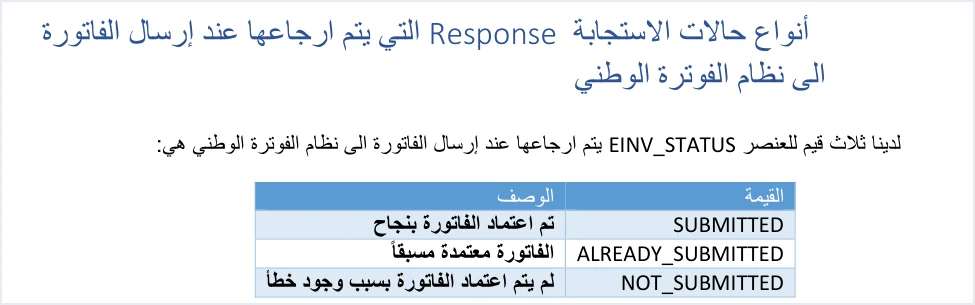
EINV_STATUS has only three values, and each one calls for different work on your desk.
Scroll the table sideways to see the remaining columns
SUBMITTED on its own is not enough. The technical guide requires you to check that a QR code is present in the EINV_QR element for the invoice to count as received and approved, and then to show the code on the seller’s invoice.
The habit that sums up this section is to review the day’s invoice list by status, not by whether the send went through. An invoice that left your system and came back without a QR code is not a complete invoice yet.
Unsent invoices: working the list without duplicating an invoice
Some days end with invoices that did not complete, either because the system rejected them or because the connection dropped before the response came back. The mistake that turns a small problem into a bigger one is creating a new invoice instead of resending the same one.

The technical guide identifies an invoice by its number, ID, and its unique identifier, UUID, taken together. That is why instruction 3 says to resend a failed invoice with the same number and identifier, and instruction 8 says to retry after a timeout or a connection failure without generating a new identifier. Generating a new identifier in that situation creates a second invoice for the same sale.
Work the list according to why each invoice is still on it.
- An invoice that was rejected. Read the error message in the
EINV_MESSAGEelement, fix the cause, then resend. The error messages ISTD documents are covered in our article JoFotara Error Codes. - An invoice that got no response. Resend it with the same number and identifier. If it was accepted the first time, the response comes back with
ALREADY_SUBMITTEDand the QR code of the original invoice. - An invoice that was accepted but whose code was not stored. The route is the same. Resend it with the same number and identifier to get the original code back.
Instruction 10 asks for a full record of every send, response and resend. If you are asked later about an invoice that was sent more than once, that record is your answer.
Return discipline: correcting with a return invoice on quantities
The technical guide defines only two invoice types by purpose, the new invoice (code 388) and the return invoice (credit note, code 381). So every correction to an accepted invoice reaches your desk as a return invoice, and returns follow rules worth knowing by heart.
- Returns are on quantities only. The quantity returned cannot exceed the quantity sold on the original invoice, and more than one partial return is allowed against the same invoice until its quantities are used up.
- Reference to the original. The return invoice carries the original invoice’s number, its unique identifier and its total.
- The reason is mandatory. The reason is written as text on the return invoice.
- The same buyer. The technical guide sets this rule in its own words, quoted below.
- Discount on a partial return. If a line carries a discount and you return part of its quantity, the discount on the return is a share of the total discount in line with the quantity returned.
«يجب أن تتوافق بيانات المشتري في فاتورة الإرجاع مع بياناته في فاتورة البيع الأصلية المرتبطة بها»
In English, the guide requires the buyer details on the return invoice to match the buyer details on the original sales invoice it is linked to. The English here is our rendering, and the Arabic text is the authority.
The discipline that protects your books here is simple. Every return invoice has a specific original and a written reason, and quantities are never corrected with a manual entry in the books alone. What can and cannot be corrected is covered in our article Editing an Issued Invoice in Jordan’s National Invoicing System, and the portal steps for a return are in our article Return an Invoice on the JoFotara Portal.
Supplier invoices: check on receipt, not at closing
Part of the responsibility falls on the business in its role as a buyer too. Article 10 of Regulation No. 34 of 2019 places the responsibility for an invoice matching what actually happened on the seller and the buyer alike. That is why it pays to check every document from a supplier before you record it, not months later during the audit.
The official tool for the check is the Sanad app. The technical guide states it in these words.
«يمكنه ذلك من خلال مسحه باستخدام تطبيق سند فقط من خيار التحقق من المستندات الرقمية»
In English, the technical guide says that a taxpayer who wants to verify the QR code can do so only by scanning it with the Sanad app, through its digital document verification option (التحقق من المستندات الرقمية). The English here is our rendering, and the Arabic text is the authority.
A successful scan shows the heading The document is valid (الوثيقة صحيحة) with six items of data carried in the code. They are the invoice total, the invoice number, the total tax on the invoice, the invoice date, the seller’s tax number and the seller’s name. Match these against the paper in your hands. If the message An error occurred (حدث خطأ) appears instead, the code is invalid or unreadable for some reason.
The scanning steps and how to read the result are in our article How to Verify an E-Invoice with the Sanad App. The habit we suggest is to make the check one of the steps of receiving a document, before payment to the supplier is approved.
The sales invoice register required by Article 6
Article 6 of Regulation No. 34 of 2019 requires a register of sales invoices, on paper or computerized, headed with the seller’s name. It holds four items, the register page number, the buyer’s name, the invoice number and the invoice total.
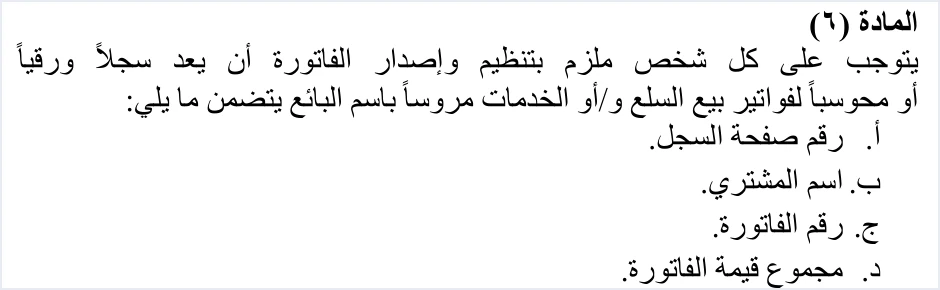
The text allows a computerized register, so you do not need a paper ledger if your software keeps these four items for every sales invoice under the business’s name. Your job is to make sure the data in it is complete, the buyer’s name above all, and that the register covers every sales invoice, not only the ones accepted on a given day.
One periodic task we suggest is to reconcile the register with the list of invoices the system accepted, so that no invoice appears in one without the other.
A note on the limits of the text. Article 6 of Regulation No. 34 of 2019 sets out what the register contains and does not state how long it must be kept. The period in Article 8 of the same regulation applies to the invoice. So do not carry the invoice period over to the register as if it were the regulation’s text.
How long to keep invoices, and what replaces the paper copy
Paragraph (a) of Article 8 of Regulation No. 34 of 2019 requires the invoice to be kept for four years. The four years start from the latest of three dates, the end of the tax period, the filing of the return, or the notification of the result of an administrative assessment.
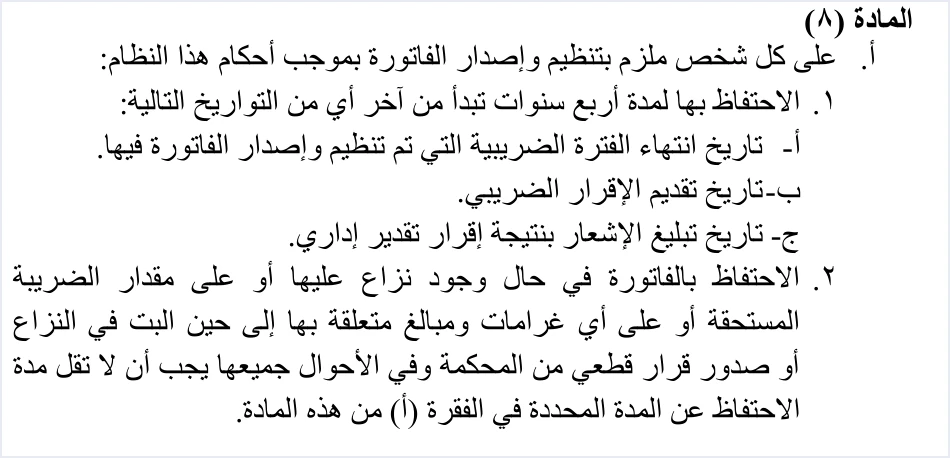
If a dispute arises over the invoice, over the amount of tax due or over penalties related to it, the invoice is kept until the dispute is decided or a final decision is issued. Article 8 of Regulation No. 34 of 2019 adds a floor in these words.
«وفي الأحوال جميعها يجب أن لا تقل مدة الاحتفاظ عن المدة المحددة في الفقرة (أ)»
In English, in all cases the retention period must not be shorter than the period set in paragraph (a). No official English translation of this regulation was found; the English here is our rendering, and the Arabic text is the authority. So four years is a minimum, even in a dispute.
Paragraph (b) of Article 8 of Regulation No. 34 of 2019 provides that the data in the National Invoicing System is relied on instead of keeping the invoice on paper. You do not need a paper archive for electronic invoices, but you do need to know where your data lives for the whole period. If you work on cloud software, know your provider’s policy after a subscription ends. In Qoyod, for example, data stays available to view and export for two years after a paid subscription ends and is then permanently deleted. That is shorter than the period in Article 8, so export your archive before it runs out if you stop the subscription.
Instruction 5 of the technical guide also asks you to store the response data for each invoice, the ID, the UUID, the QR code and the status, so keep those with the archive too.
The recurring task table for the in-house accountant
The table below brings the tasks above into one routine. The timing in the second column is our suggestion for organizing the work, not a rule in the regulation, except where the table ties it to an article or an instruction.
You will notice that the table has no date for the tax return. That date comes from ISTD, and we do not state it here without an official source.
How Qoyod helps
Part of the routine above falls to the software that issues the invoice. Here is how Qoyod’s integration with the National Invoicing System handles that part.
- A check before sending. Qoyod checks each invoice at field level as it is created, covering the tax number, the document type and payment method, the General Sales Tax rate and whether the lines are complete, and alerts you to any error before the invoice is sent, to reduce rejections.
- The status of each invoice in view. ISTD returns the invoice status and any error message, and Qoyod shows them in its status panel, with states that include sent (مرسلة), previously sent (مرسلة مسبقًا) and not sent (لم تُرسل) together with the error message.
- A list of unsent invoices. The status panel lists invoices that were not sent and need to be resent, and when you resend one it keeps the same UUID. Resending is a step you take yourself from the panel.
- A QR code from ISTD. Once ISTD accepts the invoice it returns a QR code, and Qoyod shows that code on the invoice.
The tasks that no software does for you stay with you. Those are checking supplier invoices, reviewing the register, deciding on a return and its reason, and keeping the archive for its full period. For a wider view of the system and how to connect your business to it, read our article Jordan’s National E-Invoicing System. To see what Qoyod offers, visit Qoyod and the National Invoicing System.
E-invoicing and full accounting in one system
Qoyod is integrated with the National Invoicing System (JoFotara). You issue your invoice in Jordanian dinars from Qoyod, it is booked to your ledgers automatically and sent to the system, and once it is accepted it comes back with a QR code from the Income and Sales Tax Department.
Frequently asked questions
What does an in-house accountant check first after an invoice is sent?
The accountant checks the EINV_STATUS value in the system’s response. Instruction 4 of the technical guide makes that value, not the HTTP code, the final word on the invoice. If the value is SUBMITTED, the accountant then checks that a QR code is present in the EINV_QR element.
Should I create a new invoice if the system sends no response?
You should not create a new invoice. Instructions 3 and 8 of the technical guide say to resend with the same ID and the same UUID. If the invoice was already accepted, the response comes back with ALREADY_SUBMITTED and the QR code of the original invoice.
How do I correct an error in an invoice that was accepted?
You correct it with a return invoice that refers to the original invoice by its number, unique identifier and total. The return is on quantities only and cannot exceed the original quantity, and it carries a written reason and the same buyer details.
Do I need a paper register of sales invoices?
You do not need one if your register is computerized. Article 6 of Regulation No. 34 of 2019 allows a register on paper or computerized, headed with the seller’s name, and holding the register page number, the buyer’s name, the invoice number and the invoice total.
How long must invoices be kept?
Invoices must be kept for four years. Article 8(a) of Regulation No. 34 of 2019 starts the four years from the latest of the end of the tax period, the filing of the return and the notification of the result of an administrative assessment. In a dispute the period runs longer, and it is never shorter than four years.
How do I verify an invoice I received from a supplier?
You scan its QR code in the Sanad app, through the digital document verification option (التحقق من المستندات الرقمية). This is the only route the technical guide names. Then you match the six items of data that appear against the invoice in your hands.
References
- Income and Sales Tax Department (ISTD), technical guide for integrating with the National Invoicing System through the API, version 1.5 (in Arabic), pp. 26, 49, 76, 97, 98, 104 and 105 to 107.
- Regulation No. 34 of 2019 on Organizing and Controlling Invoicing Affairs, as amended, consolidated text (in Arabic), Articles 3, 4, 5, 6, 8 and 10.
- Income and Sales Tax Department (ISTD), procedures guide for joining the Jordanian National Electronic Invoicing System, 2026 edition (in Arabic).




