




When your accounting software sends an invoice to Jordan’s National Invoicing System (JoFotara), a response file comes back with the system’s verdict on the invoice and the data that goes with it. That file is the JoFotara API response. Its element names start with the prefix EINV, except the technical Response Status Code. Anyone building a link between an accounting or ERP system and JoFotara needs to know what each element carries, when it comes back empty, and which one decides the fate of the invoice.
The short answer is that the technical guide issued by the Income and Sales Tax Department (ISTD), version 1.5, lists seven elements in its response elements table, namely Response Status Code, EINV_STATUS, EINV_RESULTS, EINV_MESSAGE, EINV_QR, EINV_NUM and EINV_INV_UUID, and an eighth element, EINV_SINGED_INVOICE, appears in the response samples. The invoice is judged by the value of EINV_STATUS, not by the HTTP code alone.
This article goes through the elements one by one and, for each, points to the article that explains its behavior in detail. It then gathers them into a single processing order for your system, and it ends with what the guide does not say about them, so that nobody builds on a guess.
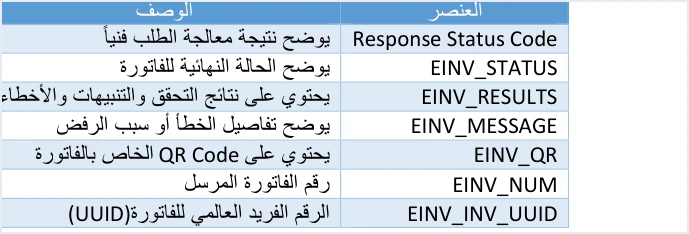
What the JoFotara API response contains
The technical guide describes the response file in the part on sending an invoice and receiving the response (pp. 97 to 100). It starts with a table of two columns, the element and its description, then shows the three status values, then gives three sample responses in JSON. The table below gathers the eight elements, with each description as the guide gives it in its table and what happens to the element when the invoice is rejected. ISTD publishes this guide in Arabic only; the English here is our rendering, and the Arabic text is the authority.
Scroll the table sideways to see the remaining columns
The names in the table are written as they appear in the guide, and their Latin letters are part of the key your system reads. Do not translate them in code and do not correct their spelling. That includes EINV_SINGED_INVOICE, which appears in the guide with exactly this spelling.
Why the system returns a response file
The guide (p. 97) gives six purposes for the response file.
- To verify that the invoice was sent successfully.
- To learn whether the invoice was accepted or rejected.
- To show the reasons for errors.
- To retrieve the invoice’s QR code.
- To retrieve the invoice’s unique identifier (UUID).
- To let linked systems process the result of the submission automatically.
The sixth purpose matters most to a developer. The response is written for a machine to read, and your system is what turns it into a status the user sees and a log entry someone can return to. If you set the first five purposes against the element descriptions in the table, each purpose has a field that answers it. The Response Status Code answers whether the send went through technically, EINV_STATUS answers accepted or rejected, EINV_RESULTS and EINV_MESSAGE answer why an error occurred, EINV_QR holds the code, and EINV_INV_UUID holds the identifier. That pairing is our reading of the table’s descriptions, not a sentence in the guide.
Response Status Code, a technical code and not a verdict on the invoice
The first thing that reaches your system from the reply is an HTTP code. The guide describes it as showing the technical result of processing the request, and the value 200 means the request was received and processed technically. When an invoice is rejected, the value is not 200.
The guide does not, however, treat this code as a verdict on the invoice. Its fourth guideline, on handling the response, asks you to determine the final status of the invoice from EINV_STATUS, not from the status code. Your system should therefore never treat an invoice as accepted just because the code is 200.
The other codes each have a documented cause in the guide (p. 101). Code 400 covers errors in the values of the XML file, with the details in EINV_MESSAGE. Code 403 concerns the Client ID and the Secret Key. Code 504 means the system could not be reached. Code 500 is tied to the tax number or the income-source sequence, to a lesser degree to the credentials, or to a tax rate that is not among the rates ISTD has approved. Each code and how to handle it is covered in our article JoFotara Error Codes: Why an Invoice Is Rejected and How to Fix It.
If no reply arrives at all because the connection dropped or the request timed out, there is no field to read. The eighth guideline, on handling interruptions, asks you in that case to try again without generating a new UUID.
EINV_STATUS, the field that decides the invoice
The guide describes this element as showing the final status of the invoice, and it lists three values for it (p. 98). All the logic of your system rests on it, because every branch of the processing starts from its value.
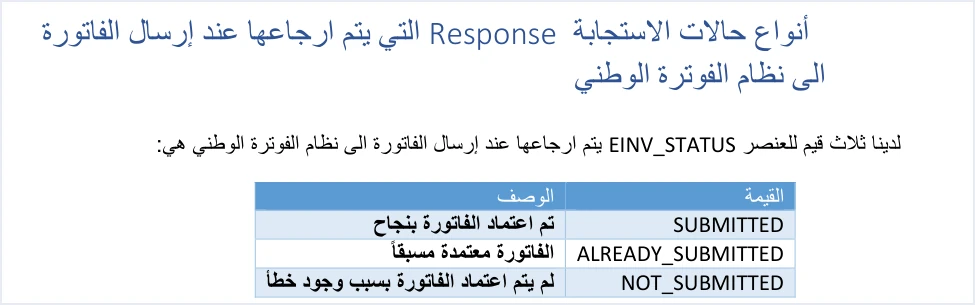
SUBMITTED. The guide’s description is that the invoice was approved successfully. The invoice was accepted and its code came back inEINV_QR.ALREADY_SUBMITTED. The description is that the invoice was already approved. The same invoice was sent again with the same number and the same identifier after it had been accepted, so the original QR code comes back. This is the documented way to retrieve a code you did not store.NOT_SUBMITTED. The description is that the invoice was not approved because of an error. The invoice was rejected, and the fields for the code, the identifier, the number and the signed invoice come back empty.
A note for when you consult the guide. The response sample shown on p. 100 is the NOT_SUBMITTED sample, but the heading written above it mentions ALREADY_SUBMITTED. Rely on the content of the sample, not on its heading.
The EINV_RESULTS array
The guide describes EINV_RESULTS as holding the validation results, warnings and errors. In the guide’s samples (pp. 98 to 100) it consists of a status field whose value is PASS or ERROR, and three lists, INFO, WARNINGS and ERRORS.
Each item inside these lists carries five keys, type, status, EINV_CODE, EINV_CATEGORY and EINV_MESSAGE. The guide gives two examples.
- An item from the INFO list in the acceptance sample (p. 98). The type is
INFO, the result isPASS, the code isXSD_VALID, the category isXSD validationand the message isComplied with UBL 2.1 standards. - The error example. The code is
totalGeneralTaxesAmount, the category isinvoiceand the message isTotal General Amount is Not Correct, which concerns the calculation of the invoice totals.
The guide does not publish a list of EINV_CODE or EINV_CATEGORY values, and it does not explain what they mean. Do not build logic in your system that assumes values the guide never gave, and rely on the text of the message for diagnosis. The documented rejection messages are indexed in our article JoFotara Error Codes: Why an Invoice Is Rejected and How to Fix It.
EINV_MESSAGE, error detail and rejection reason
The guide’s table describes EINV_MESSAGE as showing the details of the error or the reason for rejection. In the response samples this key appears inside the items of EINV_RESULTS. In the acceptance sample (p. 98) it carries an informational message in the INFO list, not an error message.
The messages are written in English, as the system returns them, and some appear in the guide with unusual spelling. If your system matches the text of a message, match it exactly as it appears, character for character. The sixth guideline, on error management, recommends logging errors in detail in the internal log and showing the end user a simplified message. The original message belongs in the log, and the user needs a sentence that tells them what to correct.
EINV_QR, the code of an accepted invoice
The guide describes it as holding the invoice’s QR code. The code comes back in it with the status SUBMITTED, the original code comes back with ALREADY_SUBMITTED, and the element is empty with NOT_SUBMITTED.
- Its presence is a condition. The guide ties the invoice being fully received and approved to a code being present in this element, so the status alone is not enough without a code.
- It must be shown. The guide (pp. 98 and 104) requires the QR code to be shown on the seller’s invoice.
- It comes from ISTD. The code comes back from ISTD in the reply, and your system does not generate it.
- Verifying it. According to the guide, a taxpayer who wants to verify the QR code can do so only by scanning it with the Sanad app, through its digital document verification option (التحقق من المستندات الرقمية).
The guide does not explain how the code is encoded. All it says about its content is that the Sanad app, on verification, displays the basic invoice data that is inside it (p. 106). So do not decode its content and do not build logic on it in your software. Everything about the code, from where it comes to how it is retrieved, is in our article JoFotara QR Code: Where the ISTD QR Comes From.
EINV_NUM and EINV_INV_UUID, the invoice identity in the reply
The guide describes EINV_NUM as the number of the invoice that was sent, and EINV_INV_UUID as the globally unique number of the invoice (UUID). The two elements return to you the identity of the invoice your system sent, and both come back empty with the status NOT_SUBMITTED.
Your system generates the unique identifier, not JoFotara, and the invoice’s key in the guide is the invoice number ID and the identifier UUID together, not the number alone. That is why the third guideline, on managing resends, asks you to resend an invoice whose submission failed with the same number and the same identifier, because generating a new identifier can lead to a duplicate invoice. The details are in our article JoFotara UUID: Why It Comes Back With the ID.
We suggest your system save the number and the identifier with the invoice before sending it, rather than wait for them in the reply, because they do not come back when the invoice is rejected. And do not copy identifier values from the guide’s samples. The identifier in the p. 98 sample contains characters that are not valid in a UUID, and the samples are illustrative.
EINV_SINGED_INVOICE, the invoice signed by ISTD
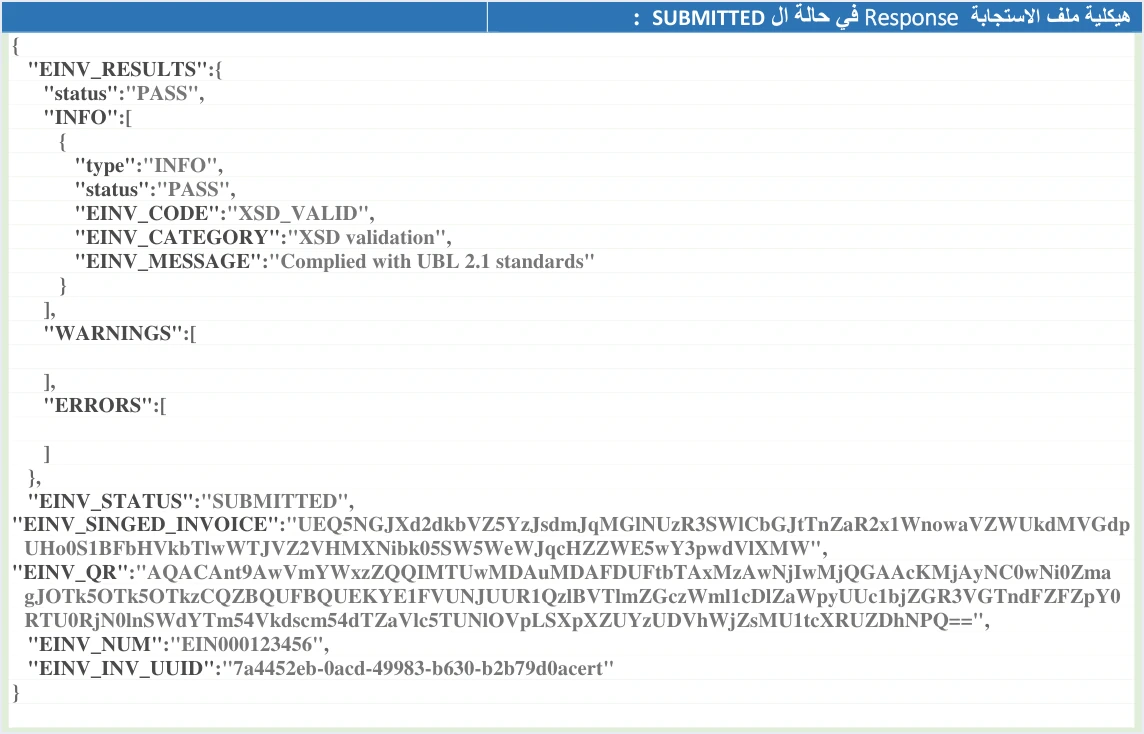
This element is not in the elements table (p. 97), but it appears in the response samples, including the acceptance sample above. It carries the signed invoice that the system returns in the reply, and its name appears with this spelling, EINV_SINGED_INVOICE, so read it in your system as it comes back.
The signature here comes from ISTD. Version 1.5 of the technical guide does not ask the taxpayer for a digital signature or a certificate, and the signed invoice comes back to the taxpayer from the system. The reason is explained in our article JoFotara Digital Signature: No Taxpayer Certificate. With the status NOT_SUBMITTED this element comes back empty.
The guide does not explain the structure of this element or how to read it. If your system stores it, store it as it came, and do not build logic on decoding its content.
Processing order for the response inside your system
These are steps in order that gather the above into one path. They describe the logic and are not ready-made code, and each step rests on a passage in the guide or on one of its ten guidelines.
- Log the request and the reply. Save every submission and its response in the operations log, as the tenth guideline, on tracing operations, asks, and use one standard time format, as the ninth guideline, on timestamps, asks.
- Handle a missing reply. If the connection dropped or the request timed out, resend with the same number and the same identifier, without generating a new identifier.
- Read
EINV_STATUSfirst. In no branch of the processing should you judge the invoice by the HTTP code alone. - On
SUBMITTED. Check thatEINV_QRholds a code, then save the ID, the UUID, the QR code andEINV_STATUSas the fifth guideline asks, and show the code on the seller’s invoice. - On
ALREADY_SUBMITTED. The invoice was accepted before, so take the original code fromEINV_QRand save it if it is not already stored, and do not treat the invoice as a new one. - On
NOT_SUBMITTED. Read the items of theERRORSlist and the message of each, log them in detail, show the user a simplified message, and resend after the correction with the same number and the same identifier.
This order matches what the guide asks for in its guidelines. Each guideline is explained in our article JoFotara Guidelines for Linked Systems: All Ten Explained.
What the guide does not say about the response fields
Some questions a developer asks about the response are not answered by version 1.5 of the technical guide. Silence here does not mean the expected answer is right. It means the point is not documented.
- A list of check codes. The guide does not publish a list of
EINV_CODEandEINV_CATEGORYvalues or their meanings. It gives only the two examples above. - The structure of the QR code. The guide does not explain how
EINV_QRis encoded or how the data is ordered inside it. It says only that the Sanad app displays the basic invoice data when the code is verified. - The structure of the signed invoice. The guide does not explain the content of
EINV_SINGED_INVOICEor how to read it. - The number of retries. The guide asks for a resend with the same identifier and does not set the number of attempts or the interval between them.
In every one of these cases the reference stays the same, the value of EINV_STATUS and the presence of a code in EINV_QR.
How Qoyod handles the JoFotara response
Everything above is work that falls on the system linked to the National Invoicing System. Qoyod’s integration with the National Invoicing System works at that layer as follows.
- A check before sending. Qoyod checks each invoice at field level as it is created, covering the tax number, the document type and payment method, the General Sales Tax rate and whether the lines are complete, and alerts you to any error before the invoice is sent, to reduce rejections.
- Every invoice’s status in view. ISTD returns the invoice status and any error message, and Qoyod shows them in its status panel, with states that include sent (مرسلة), previously sent (مرسلة مسبقًا) and not sent (لم تُرسل) together with the error message.
- The QR code after acceptance. Once ISTD accepts the invoice it returns a QR code, and Qoyod shows that code on the invoice.
- Resending with the same identifier. The status panel lists invoices that were not sent and need to be resent, and when you resend one it keeps the same UUID.
The pre-send check is an alert, not a guarantee. Resending here is a step you take yourself from the status panel. For a wider view of the system and how to connect your business to it, read our article Jordan’s National E-Invoicing System.
E-invoicing and full accounting in one system
Qoyod is integrated with the National Invoicing System (JoFotara). You issue your invoice in Jordanian dinars from Qoyod, it is booked to your ledgers automatically and sent to the system, and once it is accepted it comes back with a QR code from the Income and Sales Tax Department.
Frequently asked questions
What are the fields of the JoFotara API response?
The technical guide, version 1.5, lists seven elements in its response table, namely Response Status Code, EINV_STATUS, EINV_RESULTS, EINV_MESSAGE, EINV_QR, EINV_NUM and EINV_INV_UUID. An eighth element, EINV_SINGED_INVOICE, appears in the response samples and carries the invoice signed by ISTD.
Is an HTTP 200 code enough to treat the invoice as accepted?
No, the code alone is not enough. The fourth guideline, on handling the response, asks you to determine the final status from EINV_STATUS, and the guide ties full acceptance to a code being present in EINV_QR.
Which fields come back empty when the status is NOT_SUBMITTED?
EINV_QR, EINV_NUM, EINV_INV_UUID and EINV_SINGED_INVOICE come back as null, and the Response Status Code is not 200. The reason for rejection stays in the EINV_RESULTS items and in the EINV_MESSAGE text.
Does the guide publish a list of EINV_CODE and EINV_CATEGORY values?
No, the guide publishes no such list and does not explain what the values mean. It gives only two examples, XSD_VALID in the acceptance sample and totalGeneralTaxesAmount in the error example.
Why is EINV_SINGED_INVOICE spelled this way?
The element name appears with this spelling in the guide’s response samples. Your system reads the key as it comes back in the reply, so use it as written and do not correct its letters.
What should I do with the QR code that comes back in the response?
Save it with the invoice number, the identifier and the status, as the fifth guideline asks, and show it on the seller’s invoice, as the guide requires. A taxpayer who wants to verify it can do so only through the Sanad app.
References
- Income and Sales Tax Department (ISTD), technical guide for integrating with the National Invoicing System through the API, version 1.5 (in Arabic), pp. 97 to 101, 104 and 106.




