




In the invoice file of the National Invoicing System (JoFotara), the buyer details sit in a single block of the XML file, cac:AccountingCustomerParty. This block is where JoFotara buyer identification takes place. In it, the seller’s system writes the buyer’s ID and the type of that ID, the postal code and the governorate code, and the buyer’s name and phone number. The technical guide issued by the Income and Sales Tax Department (ISTD), in its version 1.5, sets a constraint for each of these elements. It shades some of them yellow because they are mandatory and others green because they are optional.
This article is an index to the buyer block. It goes through the documented elements one at a time, giving what each element carries, its constraint and its shading, and it points to the article that goes deeper where an element needs a longer explanation. It starts with the ID type and its three values, NIN, PN and TN.
The article is written for anyone who builds or reviews the invoice file. That may be a developer linking an accounting system to the National Invoicing System, or an accountant who wants to understand what their software sends in their name. What the legislation requires an invoice to contain in principle, apart from the file structure, is covered in our article E-Invoicing Requirements in Jordan.
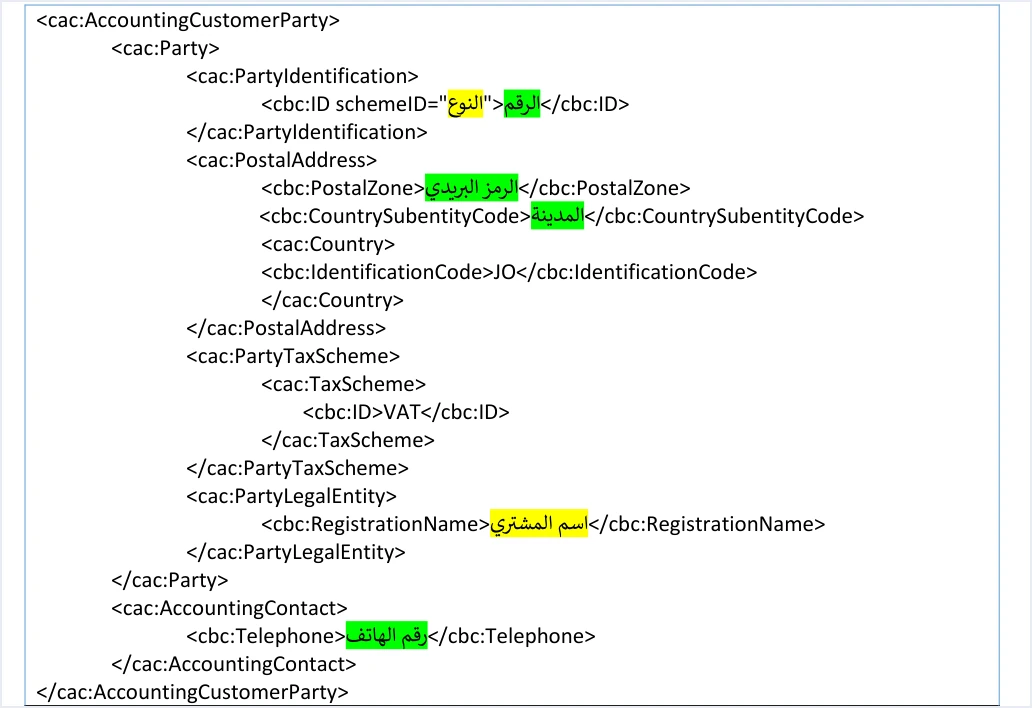
JoFotara buyer identification: where the block sits and what it holds
The cac:AccountingCustomerParty block appears in every template of the technical guide. It is in the income invoice, the general sales tax invoice and the special tax invoice, in both the new invoice and the return invoice templates. A developer reads its rules from the color key at the top of the templates, which the guide words as follows.
«العناصر المظللة باللون الأصفر … تدل على متغيرات مطلوب تعبئتها (إجبارية) من خلال نظام البائع. أما العناصر المظللة باللون الأخضر تدل على متغيرات مطلوب تعبئتها (اختيارية) … وباقي العناصر وصف ثابت بدون تغيير».
In English, the key says that elements shaded yellow are variables the seller’s system must fill in (mandatory), that elements shaded green are variables to be filled in (optional), and that the remaining elements are fixed description that does not change. ISTD publishes this guide in Arabic only, so the English here is our rendering, and the Arabic text is the authority.
Anything the guide leaves unshaded in the block is fixed text, copied as it is, such as the element names themselves and the literal values printed in them. The variables are the ones in the table below, in the order they appear in the template.
Scroll the table sideways to see the remaining columns
The table shows that only two elements in the block are shaded yellow, the ID type and the buyer’s name. The other four are green. Filling them in is left to the seller, unless another condition makes one of them required on a particular invoice. How to read this shading across all the templates, not only in the buyer block, is the subject of our article on mandatory and optional fields in JoFotara.
Buyer ID type: NIN, PN and TN
The buyer’s number goes into the file inside the cbc:ID element. With it goes the schemeID attribute, which states what type of number it is. The guide accepts three values for this attribute, and each has a specific meaning.
In its description of this element, before the table of types, the guide sets one constraint on the value itself. The number is written in digits only. No letter or symbol goes into the value, whichever type is selected.
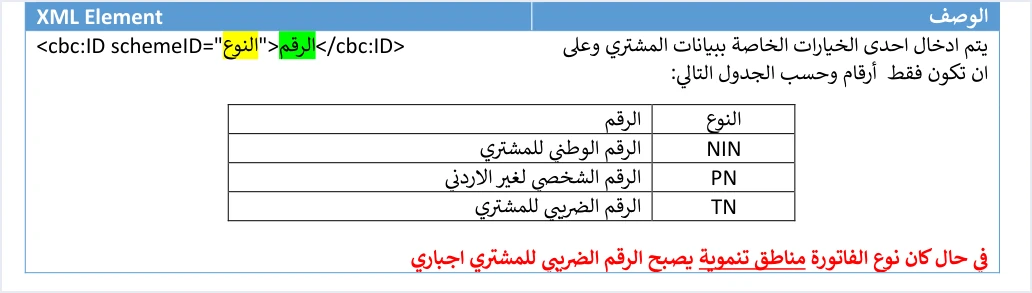
The type is mandatory, the value is optional
This element carries two shadings, and that is easy to misread on a first pass through the template. The type inside schemeID is shaded yellow, while the number between the element’s tags is shaded green. Under the color key, this means the seller’s system always states the ID type. Filling in the number itself is left to the seller’s system, unless another rule requires it.
When the buyer’s tax number becomes mandatory
The guide documents one case in which the buyer’s number becomes required, the development zones invoice. On that invoice the buyer’s tax number is mandatory. The guide also adds two conditions that sit outside the file. The buyer must be registered in the development zones, and must have a valid exemption letter entered on the financial system. The conditions of that invoice type are set out in our article Development Zone Invoice JoFotara: The Three Conditions.
The buyer ID on the portal
On the portal’s invoice form, the field that matches the schemeID attribute is the buyer additional-ID type field (نوع المعرفات الإضافية للمشتري). Its options are the same three types under their Arabic names, national number (الرقم الوطني), tax number (الرقم الضريبي) and personal number for non-Jordanians (الرقم الشخصي لغير الأردني). The next field on the form is buyer number (رقم المشتري). The identity rules behind the national number and the personal number are outside the scope of this article, which stays with the structure of the file.
Buyer address: postal code and governorate code
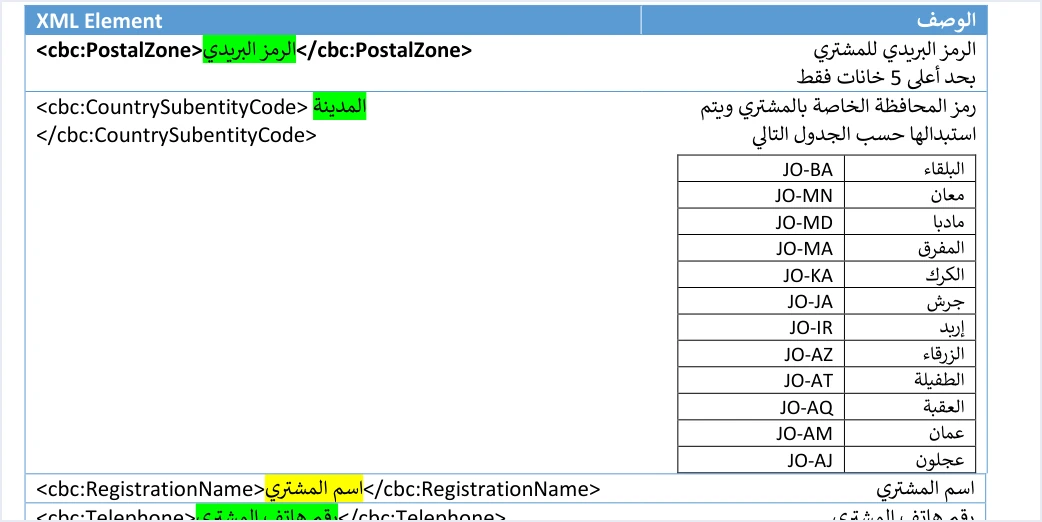
The buyer template documents only two address elements, and both are shaded green.
- Postal code,
cbc:PostalZone. The guide sets its limit at 5 characters at most. If it is longer, the invoice is rejected with the messagePostal code length is incorrect. Do not assume any other format for the postal code beyond this limit. - Governorate code,
cbc:CountrySubentityCode. It carries the buyer’s governorate code from a table of twelve governorates, such asJO-AMfor Amman,JO-IRfor Irbid andJO-AQfor Aqaba. Inside this element the template prints the word for city (المدينة) as a placeholder for the value, but the guide describes the element as the governorate code, to be replaced from the table. The full table of codes, and how to read it, is the subject of our article on JoFotara governorate codes in the same series.
The guide has a typo in this table that is worth watching for. In the table of the special tax template (p. 63), the code for Balqa appears as O-BA. The correct code is JO-BA, as in the other tables.
The UBL 2.1 standard defines other address elements, such as street, city and building number, but the buyer template in the guide does not list them. Their status is therefore undocumented, and they cannot be described as either optional or mandatory. If your system needs them, check with ISTD technical support before you build on them.
Buyer name: a yellow element with conditional content
The cbc:RegistrationName element is shaded yellow, so it is present in the structure of every invoice. Whether its content is required, though, depends on two cases that the technical guide sets out.
- Receivable (credit-sale) invoice. The buyer’s name is mandatory, whatever the invoice value.
- Cash invoice. The buyer’s name is mandatory if the invoice value is more than JOD 10,000 or its equivalent in foreign currencies.
The system reads the payment method from the second digit of the three-digit code in the name attribute of the cbc:InvoiceTypeCode element, where 1 means cash and 2 means receivable. If the name is missing in a case where the guide requires it, the invoice is rejected with the message Bayer name is missing, spelled this way by ISTD.
Buyer phone number
The cbc:Telephone element is shaded green, and the guide states its constraint in these exact words.
«يأخذ فقط أرقام وبحد أعلى 14 رقم و بحد أدنى 9 أرقام».
In English, the guide says the element takes digits only, with a maximum of 14 digits and a minimum of 9. ISTD publishes this guide in Arabic only, so the English here is our rendering, and the Arabic text is the authority.
This constraint has two bounds, a minimum and a maximum, unlike the postal code, which has a maximum only. The text limits the value to digits, and it does not say that a plus sign, spaces or hyphens are accepted inside the number. If your software stores phone numbers in a readable display format, make sure it sends only the digits to the file, and that there are between 9 and 14 of them.
What stays optional in the buyer block
Taken together, the elements of the block fall into three groups.
- Always mandatory. The ID type in
schemeID, and the presence of thecbc:RegistrationNameelement in the structure. - Optional, but required under a condition. The buyer’s number in
cbc:ID, where the buyer’s tax number is required on a development zones invoice. The content of the buyer’s name, on a receivable invoice and on a cash invoice worth more than JOD 10,000. - Optional, with no documented condition that changes this. The postal code, the governorate code and the phone number. Their constraints still apply whenever you fill them in, so the postal code is no longer than 5 characters, and the phone number is digits only, between 9 and 14 of them.
The shading is the only signal in version 1.5 of what is mandatory and what is optional. If you need to cite the rule for one of these elements in correspondence or in a technical specification, cite it as “per the field shading in technical guide version 1.5”.
Buyer details on the portal invoice form
If you issue invoices from the portal, you do not write an XML file. You fill in the Buyer details section (بيانات المشتري) of the new invoice form. In the procedures guide for issuing an invoice in the Jordanian National Electronic Invoicing System, 2026 edition, this section has six fields. They are name (الاسم), buyer additional-ID type (نوع المعرفات الإضافية للمشتري), buyer number (رقم المشتري), phone number (رقم الهاتف), city (المدينة) and postal code (الرمز البريدي).

The same procedures guide applies the same name rule on the portal. The buyer’s name is required on a cash invoice worth more than JOD 10,000, and it is always required on a receivable invoice. Only the sub-user can issue an invoice on the portal, and the full steps are in our article Issue an Invoice on the JoFotara Portal: The Steps. Each field of the form is explained in our article JoFotara Invoice Form Fields Explained.
Each guide describes its own fields independently of the other. So do not assume that the city field (المدينة) on the portal maps to a particular element in the file. Treat each one according to the guide that describes it.
Buyer details on a return invoice
A return invoice (credit note) carries the buyer block too, but the guide binds it with an explicit rule that is repeated in all three return templates (pp. 26, 49 and 76).
«يجب أن تتوافق بيانات المشتري في فاتورة الإرجاع مع بياناته في فاتورة البيع الأصلية المرتبطة بها».
In English, the guide requires the buyer details on the return invoice to match those on the original sales invoice it is linked to. ISTD publishes this guide in Arabic only, so the English here is our rendering, and the Arabic text is the authority.
So on a return invoice, do not change the ID type, the buyer’s number or the buyer’s name from what was sent on the original invoice. That is why your system should store the buyer details exactly as they were sent with each invoice, rather than read them again from the customer record, which may have changed since the sale. The return invoice also reuses the name code of the cbc:InvoiceTypeCode element and the currency of the original invoice, while the value of that element changes from 388 to 381.
Pre-submission checklist for the buyer block
One of ISTD’s ten guidelines for linked systems is to check, before sending, the totals, the taxes, the taxpayer’s tax number, the buyer’s number and the mandatory fields, to reduce errors with code 400. For the buyer block in particular, these are the questions to go through before every submission.
- Does
schemeIDcarry one of the three valuesNIN,PNorTN, and does the type match the number actually sent? - Is the buyer’s number digits only, with no letters or symbols?
- If the invoice is a development zones invoice, is the number sent the buyer’s tax number?
- If it is a receivable invoice, or a cash invoice worth more than JOD 10,000, does
cbc:RegistrationNamecarry the buyer’s name? - If you filled in the postal code, is it 5 characters or fewer?
- If you filled in the governorate code, is it one of the twelve codes with the
JO-prefix? - If you filled in the phone number, is it digits only, between 9 and 14 of them?
- If it is a return invoice, do its buyer details match those on the original invoice?
If the invoice is still rejected, read the reason for the rejection in the response file, and judge the outcome by the invoice status, EINV_STATUS, not by the response code alone. Then, once the problem is fixed, resend the invoice with the same invoice number, cbc:ID, and the same unique identifier, cbc:UUID, as the guide recommends for resending.
How Qoyod helps
When you issue your invoice from accounting software, you do not write the buyer block by hand. Qoyod is integrated with the National Invoicing System (JoFotara). Qoyod builds the invoice file in UBL 2.1 format with its unique identifier (UUID) and sends it to the National Invoicing System without any manual intervention. Around that file, it also does the following.
- Qoyod checks each invoice at field level as it is created, covering the tax number, the document type and payment method, the General Sales Tax rate and whether the lines are complete, and alerts you to any error before the invoice is sent, to reduce rejections.
- ISTD returns the invoice status and any error message, and Qoyod shows them in its status panel.
- The status panel lists invoices that were not sent and need to be resent, and when you resend one it keeps the same UUID.
The pre-send check is an alert, not a guarantee. It covers the fields named above, so the accuracy of the buyer details you enter for each customer remains your responsibility, and acceptance of the invoice rests with the National Invoicing System alone.
Where to go next
- Field shading across all the templates. It is the subject of our article on mandatory and optional fields in JoFotara.
- The full picture of the system. How it works and how to connect your business to it, in our article Jordan’s National E-Invoicing System.
- Other parts of the same series. See our articles on JoFotara governorate codes and on seller details in the JoFotara invoice.
E-invoicing and full accounting in one system
Qoyod is integrated with the National Invoicing System (JoFotara). You issue your invoice in Jordanian dinars from Qoyod, it is booked to your ledgers automatically and sent to the system, and once it is accepted it comes back with a QR code from the Income and Sales Tax Department.
Frequently asked questions
Where are the buyer details in the JoFotara invoice file?
They sit in the cac:AccountingCustomerParty block, which appears in every template of the technical guide. The block holds the ID type, the buyer’s number, the postal code, the governorate code, the buyer’s name and the buyer’s phone number.
What is the difference between NIN, PN and TN in the buyer ID?
These values set the type of the number sent, in the schemeID attribute. NIN is the national number, PN is the personal number for non-Jordanians and TN is the tax number. In all three cases the number is digits only.
Is the buyer’s number mandatory on every invoice?
The technical guide shades the ID type yellow and the buyer’s number itself green, so the type is mandatory and the number is optional. The guide documents one case in which the number becomes required, the development zones invoice, which requires the buyer’s tax number.
How many characters does the buyer’s postal code accept?
It accepts 5 characters at most, according to the technical guide, and the element is shaded green. If the code is longer, the invoice is rejected with the message Postal code length is incorrect.
What are the rules for the buyer’s phone number in the invoice file?
The guide requires digits only, with at least 9 digits and at most 14. The element is shaded green, so filling it in is left to the seller, but its constraint applies whenever it is filled in.
Can the buyer details be changed on a return invoice?
The guide does not allow it. It requires the buyer details on a return invoice to match those on the original sales invoice it is linked to. So keep the buyer details as they were sent with the original invoice, and use them for the return.
References
- Income and Sales Tax Department (ISTD), technical guide for integrating with the National Invoicing System through the API, version 1.5 (in Arabic), pp. 12, 16, 17, 26, 49, 63, 76 and 104.
- Income and Sales Tax Department (ISTD), procedures guide for issuing an invoice in the Jordanian National Electronic Invoicing System, 2026 edition (in Arabic), p. 6.
- ISTD’s National Invoicing System guides (in Arabic)




