




Every seller in Jordan has to switch from income invoice to sales tax invoice in the National Invoicing System (JoFotara) once registered for General Sales Tax (GST), whether the seller crossed the registration threshold or registered voluntarily. In JoFotara, the invoice type does not follow the seller’s choice or the nature of the business. It follows the seller’s registration status with the Income and Sales Tax Department (ISTD). While unregistered, the seller issues an income invoice that carries no tax. Once registered, the seller’s invoice becomes a general sales tax invoice.
This article covers the moment of the switch and nothing else. It explains which digit changes in the invoice type code, what registration adds to the invoice, the message that comes back if your software stays on the old type, and what happens to invoices issued before registration. It then turns to a part that ISTD’s guides do not explain, which is how the new registration carries over to your account in the system. It says so plainly instead of filling the gap with steps of our own.
It does not explain General Sales Tax rates or how the tax is calculated, and it does not compare every invoice type. That comparison is in our article Invoice Types in the National Invoicing System. Registering with JoFotara itself is a separate step from registering for GST, and it is covered in our article JoFotara Registration and the Registration Document. For a wider view of the system and how to connect your business to it, read our article Jordan’s National E-Invoicing System.
What changes when you switch from income invoice to sales tax invoice
Version 1.5 of ISTD’s technical guide for integrating with the National Invoicing System through the API builds its XML invoice models on the type of taxpayer, not on the type of goods. It splits them into three families, and each family has one model for creating an invoice and one for returning it.
- Income invoice, which the guide assigns to taxpayers not registered for sales tax.
- Sales invoice, which the guide assigns to taxpayers registered for sales tax. In this article we call it the general sales tax invoice.
- Special sales invoice, which the guide assigns to taxpayers registered for Special Sales Tax.
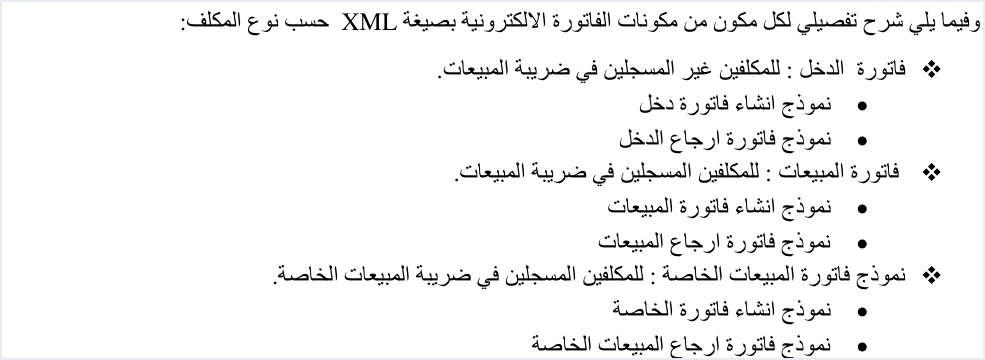
Registration is therefore the line between the first two families. Regulation No. 34 of 2019 on Organizing and Controlling Invoicing Affairs, as amended, sets the same basis in law. Article 2 of Regulation No. 34 of 2019 defines the invoice, and the definition brings the tax amount in only for a registered seller.
«مقدار الضريبة العامة على المبيعات المحتسبة على الفاتورة في حال كان من المكلفين المسجلين في ضريبة المبيعات»
In English, Article 2 of Regulation No. 34 of 2019 has the invoice show the amount of General Sales Tax charged on it if the seller is registered for sales tax. No official English translation of this regulation was found; the English here is our rendering, and the Arabic text is the authority.
So tax does not enter the invoice before registration, and it does after.
When a seller must register is set by the General Sales Tax Law, not by the invoicing regulation. According to summaries of that law published by international advisory firms, Article 13 of the General Sales Tax Law sets the registration threshold at JOD 30,000 of annual taxable sales for service providers and JOD 75,000 for sellers of goods, and Article 14 of the same law allows voluntary registration. The thresholds are set out in detail in our article General Sales Tax in Jordan.
The third digit of the invoice type code
The invoice file declares its type in the cbc:InvoiceTypeCode element. The element’s value separates a new invoice (388) from a return invoice (381). Its name attribute holds a three-digit code that combines three pieces of information.
- The first digit is the trade type, such as local, export or transit.
- The second digit is the payment method, 1 for cash and 2 for receivable.
- The third digit is the tax family, 1 for the income invoice, 2 for the general sales invoice and 3 for the special sales invoice.
When you switch, only the third digit changes, from 1 to 2. The first two digits are set by the sale itself, meaning the trade type and the payment method, and registration does not touch them. A local cash sale carries 011 before registration and 012 after it, and a local receivable sale moves from 021 to 022. The income invoice code table in the guide shows that every one of its codes ends in 1.
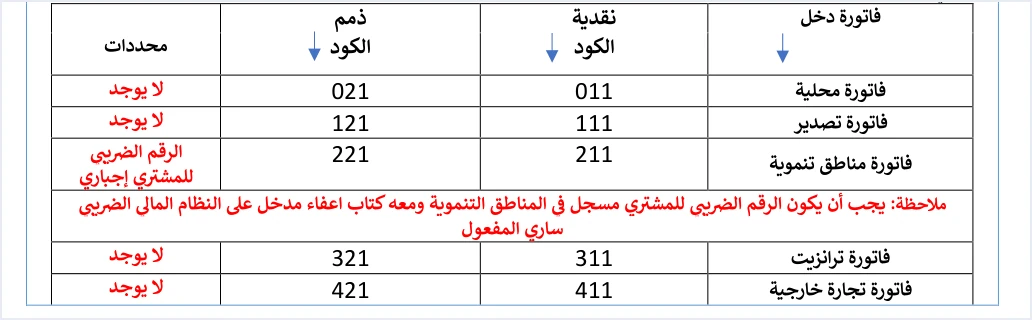
The general sales invoice table shows that all of its codes end in 2, with a conditions column that differs from the one in the income invoice table.
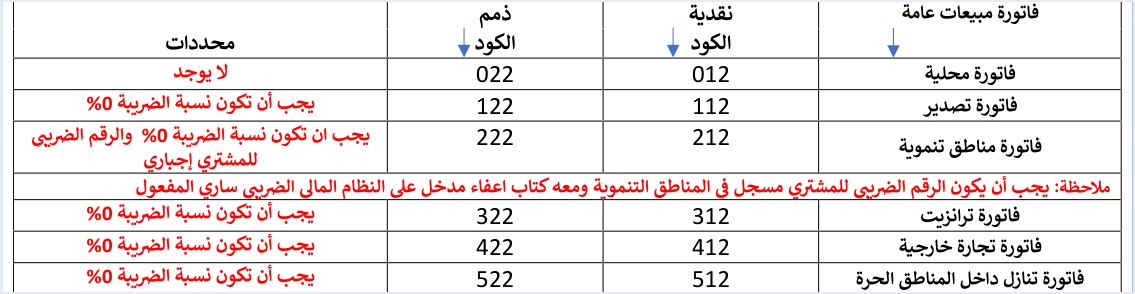
The table below puts the two codes side by side for each trade type, together with the conditions the guide lists for the general sales invoice.
Scroll the table sideways to see the remaining columns
The difference in the last column is part of the switch itself. In the income invoice table, the conditions column reads None for every type except development zones, because an income invoice carries no tax lines at all. After registration, the guide requires a 0% tax rate on the five non-local types. If your business exports or sells in development zones, the switch adds a condition to those invoices that did not apply to them before.
What registration adds to the invoice itself
Changing the third digit is what the file declares, but the invoice itself changes with it in three places.
In the XML file that is sent
An income invoice carries no TaxTotal block at all, neither at line level nor at invoice level, so its lines hold only quantity, price, discount and name. A general sales tax invoice adds each line’s tax, with its category, rate and amount. It also adds the total General Sales Tax amount to the invoice header, which the guide defines as the sum of the line taxes. The totals follow from that, so the invoice total including tax equals the sum of the net line amounts plus their taxes. The switch therefore means your software builds a different template, not that it swaps one digit in the code.
In the seller details the regulation requires
Paragraph (a) of Article 5 of Regulation No. 34 of 2019 lists the details that every invoice must carry. They include the seller’s tax number if the seller is registered for sales tax, and the national number if not. So the seller number on the invoice also follows registration.
In the National Invoicing System portal
The invoice form shown in ISTD’s 2026 procedures guide for issuing an invoice belongs to a sub-user registered for General Sales Tax. On that form, the general tax rate field (نسبة الضريبة العامة) is mandatory for every good or service. The guide does not show the portal screen for an income invoice, so we do not describe what changes on screen when you switch. We only note that the rate field is part of the registered seller’s form as the guide shows it.
If your software stays on the income invoice after registration
The file declares the invoice type, but it does not decide it. The third digit follows your registration status with ISTD. If the two do not match, the invoice is rejected with code 400 and the message This user is not authorized to submit this type of invoice. The technical guide explains that this message means the taxpayer is sending an invoice type that does not match their tax number or their income-source sequence. Its example is an income invoice sent by a taxpayer registered for General Sales Tax, or the reverse.

The guide’s example is the switch itself. A business that has registered for General Sales Tax and whose software keeps sending invoices with a code ending in 1 will get this rejection on every invoice, until the type setting in the software is changed. A rejected invoice has not been accepted, so no QR code comes back with it, because the code is returned only after the invoice is accepted.
The guide also covers the opposite case, a general sales invoice sent by an unregistered taxpayer. From it we infer that switching your software to the new code before your new registration status shows at ISTD may meet the same rejection. This is our own inference, not text from the guide. Because the guide does not say when the new status appears in the system, the timing of the switch is a question to put to ISTD, not a rule we can set for you.
What the guides do not document about your account’s switch
ISTD publishes four official guides for the National Invoicing System. They are the technical guide for integrating through the API (version 1.5), the procedures guide for joining, the procedures guide for issuing an invoice, and the questions and answers guide. We have read all four in full. They tie the invoice family to registration, as shown above, but they do not explain how a taxpayer’s account in the system moves from the first family to the second. We found no answer in them to these questions.
- Does the new registration status carry over to the account in the National Invoicing System without a request, or does the taxpayer have to take some action?
- From what date does the system start rejecting income invoices from a newly registered taxpayer, and is that tied to the date the registration takes effect?
- Does the income-source sequence stay as it is, or is a new one added?
- Do you need a new Client ID and Secret Key for the link, or do the existing link credentials carry on?
- Does the invoice form on the portal change for an existing sub-user?
- Do the invoice serial number and the invoice counter (ICV) continue unchanged after the switch?
That is why this article suggests no steps for the account. Any step we wrote here would be ours, not ISTD’s. The technical guide directs inquiries to ISTD’s technical support committee for invoicing affairs through the ISTD website, and that committee is who to ask about these points before the day of the switch.
The questions and answers guide names the internal services route (الخدمات الداخلية) on the e-services site for specific requests. They include changing the taxpayer’s file type, adding an active income-source sequence and unlinking devices. The guide names no request related to registering for General Sales Tax, so we do not name a request type that ISTD has not named.
Invoices issued before registration
An income invoice accepted before registration was accepted under its own family, and the technical guide does not address any effect of a later registration on it. The practical question comes up when you need to return it.
The guide states that a return invoice reuses the original invoice’s code and currency, and only the document type changes, to 381. So the code 011 with the value 381 is a local cash return against an income invoice. The return carries the original invoice’s number, its unique identifier (UUID) and its total. The buyer details on it must match those on the original invoice, and it covers quantities only, never more than the quantity sold.
The guide does not, however, deal with a taxpayer who has since registered and needs to return an income invoice issued before registration. The return rule says the code follows the original invoice. The This user is not authorized message says the invoice type follows registration. The guide does not say which of the two rules governs this case. If you need a return like this, ask ISTD before you send it.
If an invoice from the wrong family was issued after registration and accepted, the guide does not address correcting the type code alone after sending. An issued invoice cannot be edited, and it is corrected with a return invoice on quantities, so we do not present a return as a sure fix for an error in the code alone. In either case, keep the number of each earlier income invoice, its UUID and its line numbers, because a return matches lines by their numbers.
Checklist for the day of the switch
This is a checklist we suggest ourselves, built on what the technical guide and the invoicing regulation establish. It is not a set of steps issued by ISTD.
- Confirm your registration status and its date with ISTD. What counts is your registration as ISTD records it, not your own estimate of your sales.
- Ask ISTD how registration affects your account in the system. Use the six questions in the previous section, and record the answer and its date.
- Change the tax family in your software. The third digit becomes 2, and the first two digits stay as each sale sets them.
- Complete the tax details for every good and service. Every line on a general sales invoice carries the tax category, rate and amount, and on the five non-local types the guide requires a 0% rate.
- Send the first invoice and read its status. Judge the result from the
EINV_STATUSfield, not from the HTTP code alone. An accepted invoice comes back with a QR code. - If the
This user is not authorizedmessage comes back, check the third digit against your registration, then check the income-source sequence against your link credentials. - Keep a record of your earlier income invoices. Each invoice’s number, UUID and line numbers are needed for any later return.
How Qoyod helps
In Jordan, Qoyod issues the document types the technical guide defines, among them the income invoice, the general sales tax invoice and the return invoice. Qoyod builds the invoice file in UBL 2.1 format with its unique identifier (UUID) and sends it to the National Invoicing System without any manual intervention.
- Qoyod checks each invoice at field level as it is created, covering the tax number, the document type and payment method, the General Sales Tax rate and whether the lines are complete, and alerts you to any error before the invoice is sent, to reduce rejections.
- ISTD returns the invoice status and any error message, and Qoyod shows them in its status panel. If the rejection message comes back after the switch, that is where you see it.
- The status panel lists invoices that were not sent and need to be resent, and when you resend one it keeps the same UUID.
The pre-send check is an alert, not a guarantee. Your registration status stays with ISTD, and the National Invoicing System decides whether an invoice is accepted. To learn more about the integration, visit our page Qoyod and the National Invoicing System.
E-invoicing and full accounting in one system
Qoyod is integrated with the National Invoicing System (JoFotara). You issue your invoice in Jordanian dinars from Qoyod, it is booked to your ledgers automatically and sent to the system, and once it is accepted it comes back with a QR code from the Income and Sales Tax Department.
Frequently asked questions
What changes in the invoice type code after registering for General Sales Tax?
The third digit of the name attribute changes from 1 to 2, while the first digit (trade type) and the second (payment method) stay the same. A local cash invoice moves from 011 to 012, and a local receivable invoice from 021 to 022.
Is an income invoice rejected if a taxpayer registered for General Sales Tax sends it?
It is rejected. The technical guide gives this case as an example of the message This user is not authorized to submit this type of invoice, one of the code 400 messages. The invoice is not accepted, and no QR code comes back with it, until the type that matches the registration is sent.
Does ISTD say when my account in the system moves to the general sales tax invoice?
The four guides ISTD publishes for the National Invoicing System give no procedure and no timing for a new registration to carry over to the account. They also do not say whether the income-source sequence or the link credentials change. The body to ask is ISTD’s technical support committee for invoicing affairs.
How do I return an income invoice issued before I registered?
The guide states that a return invoice reuses the original invoice’s code with the value 381, so a return against a local cash income invoice carries the code 011. The guide does not deal with this return when it is sent by a taxpayer who has since registered, so ask ISTD before you send it.
Is it enough to change the third digit in the software settings?
Changing the digit is not enough on its own. The software also has to build the full general sales invoice template, meaning each line’s tax with its category, rate and amount, the total General Sales Tax amount in the invoice header, and totals that include the tax. On the non-local types, the guide also requires a 0% tax rate.
Does Qoyod know my General Sales Tax registration status?
Your registration status stays with ISTD, so confirming it is a matter for you and ISTD. Qoyod checks each invoice at field level as it is created, covering the tax number, the document type and payment method, the General Sales Tax rate and whether the lines are complete, and alerts you to any error before the invoice is sent, to reduce rejections. The pre-send check is an alert, not a guarantee.
References
- Income and Sales Tax Department (ISTD), technical guide for integrating with the National Invoicing System through the API, version 1.5 (in Arabic), pp. 10, 12, 33, 101 and 104.
- Income and Sales Tax Department (ISTD), procedures guide for issuing an invoice in the Jordanian National Electronic Invoicing System, 2026 edition (in Arabic).
- Income and Sales Tax Department (ISTD), questions and answers guide for the National Invoicing System, 2026 (in Arabic).
- Regulation No. 34 of 2019 on Organizing and Controlling Invoicing Affairs, as amended, consolidated text (in Arabic), Articles 2 and 5.
- ISTD’s National Invoicing System guides (in Arabic)




