




JoFotara InvoiceLine blocks are the parts of the invoice file that describe each item, goods or service, on its own. Every item gets a separate cac:InvoiceLine block in the file of the National Invoicing System (JoFotara). The block holds the line number, the quantity, the unit price, the discount and the line amount, and it also holds the line’s tax when the invoice is a sales tax invoice. The invoice totals in the file header are built from these blocks, so whatever is written in a line carries through to the total.
This article goes through the elements of a line one by one, as they appear in version 1.5 of the technical guide for integrating with the National Invoicing System through the API, published by the Income and Sales Tax Department (ISTD). It sets out the rule on each element, the difference between a line on a general sales tax invoice and a line on an income invoice, and the reason to keep the line number after the invoice is accepted. It is written for anyone who builds or reviews the XML file, whether a developer or an accountant who wants to understand what happens inside the file.
The order of all the fields in the file, and whether each one is mandatory or optional, is covered in our article on mandatory and optional fields in JoFotara. The overall picture of the system is in our article Jordan’s National E-Invoicing System. If you issue invoices on the portal rather than through a linked system, the form fields are covered in our article JoFotara Invoice Form Fields Explained.
What JoFotara InvoiceLine blocks are
The guide splits the invoice file into two parts. The header carries the details of the invoice itself, such as its number, its unique identifier, its date and its type. The lines carry the details of the goods and services. In the general sales tax invoice, the guide titles the line template as the inputs for the goods details of the general invoice.
The cac:InvoiceLine element repeats in the file once for each item on the invoice. An invoice that sells three items therefore carries three blocks, each with its own number and its own amounts. The guide applies the same convention to the lines as to the rest of the file. Elements shaded in yellow are mandatory variables that the seller’s system fills in, and unshaded text is a fixed description that is copied exactly as written.
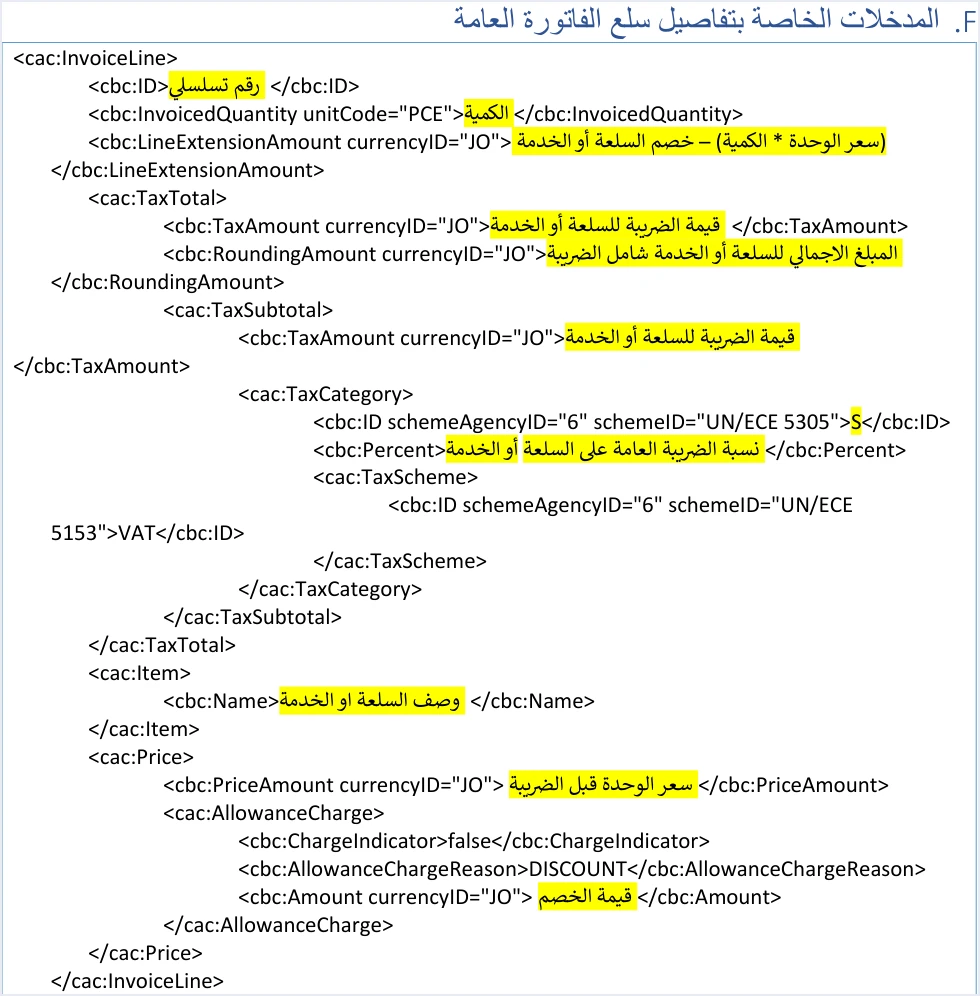
The template shows the order of the elements inside a line. The line number comes first, then the quantity, then the line amount before tax. The tax block cac:TaxTotal follows, then the name of the goods or service inside cac:Item, then the price and the discount inside cac:Price. This is the order the guide’s template gives for a line on a general sales tax invoice.
Line elements and the rule on each
The table below lists the elements of a general sales tax invoice line as the guide describes them, with the rule the guide sets for each one. The sections after it explain each element in more detail.
Scroll the table sideways to see the remaining columns
Every amount in the guide’s examples carries the attribute currencyID="JO", the four line amounts included. The guide does not say which values the system accepts for this attribute, so no rule about any other value can be drawn from its examples.
The line number cbc:ID: sequential and never repeated in the invoice
The guide describes the line number as a serial number specific to each item, goods or service. It adds, in red, that the number does not repeat within a single invoice. The first line takes one number and the second line takes another, and no two lines in the same file may carry the same number.
This number has nothing to do with the invoice number, even though both elements share the name cbc:ID. The invoice number sits in the file header, and together with the unique identifier cbc:UUID it is the key that identifies the invoice. The line number sits inside the cac:InvoiceLine block, and its scope is that one invoice only.
If a line number repeats in the file, the invoice is rejected with the message The ID number must be unique.
The quantity InvoicedQuantity and the unit code unitCode
The cbc:InvoicedQuantity element holds the quantity of the goods or service on the line. The guide requires it to be a whole or decimal number greater than 0, with no more than 9 decimal places. A zero or negative quantity therefore does not meet the guide’s condition on a sales invoice line, while a decimal quantity does, as long as it stays within nine decimal places.
In every example the guide gives for a new sales invoice, the quantity comes with the attribute unitCode="PCE". Lines on a general sales tax return invoice add one more element, <cbc:BaseQuantity unitCode="C62">1</cbc:BaseQuantity>. The guide gives no list of unit codes and no rule on which codes are accepted or rejected. The guide alone therefore does not tell you whether the system accepts or rejects another unit, such as the kilogram or the liter.
Price and discount: PriceAmount and AllowanceCharge
The price and the discount sit together inside the cac:Price block. The cbc:PriceAmount element holds the unit price, and the general sales tax invoice template describes it as the unit price before tax. The price on a line is always a net price, and the tax on it is calculated in a separate block. The guide applies the same condition to the unit price as to the quantity, which means it must be greater than 0, with up to nine decimal places.
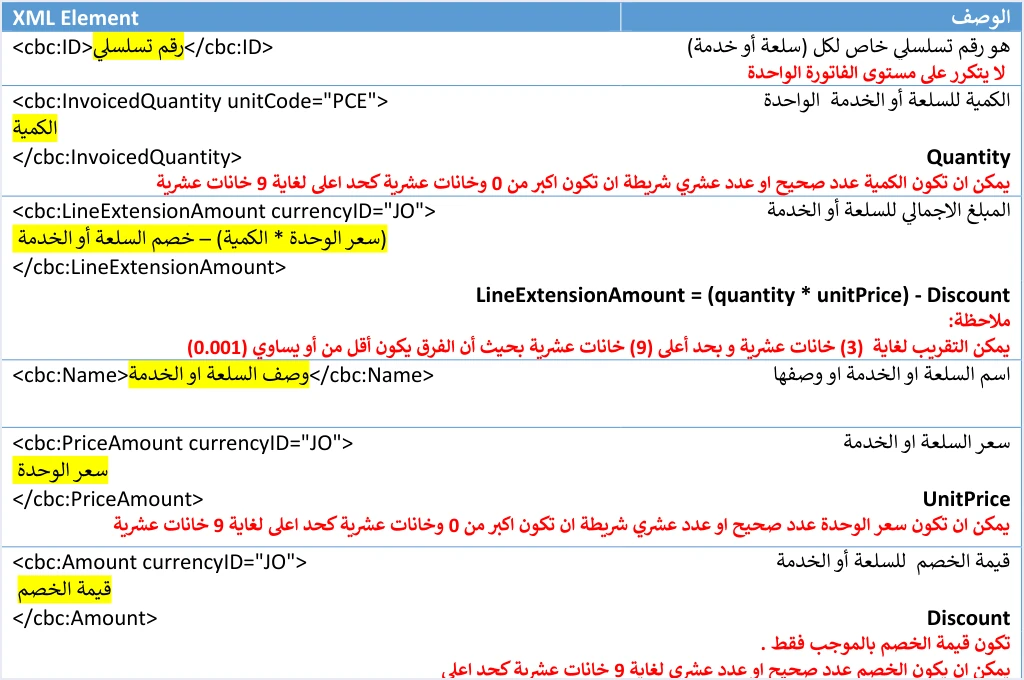
The discount comes after the price, in the cac:AllowanceCharge block, which has three elements. The first is cbc:ChargeIndicator, with the fixed value false. The second is cbc:AllowanceChargeReason, with the fixed value DISCOUNT. The third is cbc:Amount, which holds the discount amount. The first two are fixed descriptions in the template, and only the third is a variable that the seller’s system fills in.
The guide requires the discount amount to be positive only. The discount is written as a positive number, and the formula is what subtracts it from the line amount. Writing it with a minus sign breaks this rule.
In the National Invoicing System file, a discount is a line discount. The system does not accept a separate invoice-level discount. The discount in the header is the sum of the line discounts, so a seller who discounts the invoice total spreads that discount across the lines before sending.
The line amount LineExtensionAmount
The cbc:LineExtensionAmount element holds the line amount after the discount and before tax. The guide gives its formula as LineExtensionAmount = (quantity * unitPrice) − Discount, which is the quantity multiplied by the unit price, minus the line discount.
This element is the base of the whole line. The tax is calculated on it, and the tax amount is added to it to give the line total. An error in it therefore spreads to the two elements that follow and to the invoice totals. The totals in the file header are built from the line elements, and when they do not match, the invoice is rejected with the message Total General Amount is Not Correct.
The tax block in the line: TaxAmount and RoundingAmount
Lines on a general sales tax invoice carry a cac:TaxTotal block with two main elements. The first, cbc:TaxAmount, holds the tax amount on the line, and the guide’s formula for it is (quantity × unit price − discount) × tax rate. The second, cbc:RoundingAmount, holds the line total including tax, and its formula is the line amount before tax plus the tax amount.
Beneath these two elements sits a cac:TaxSubtotal block. It repeats the tax amount and carries the tax category, the rate and the tax scheme. The category is in the cbc:ID element under the UN/ECE 5305 scheme, the rate is in cbc:Percent, and the tax scheme is VAT. What the categories S, Z and O mean, and when each one applies, is explained in our article on tax categories in JoFotara.
The return and special tax templates show one more element, cbc:TaxableAmount, whose value is the quantity × unit price − discount. This element does not appear in the line template of a new general sales tax invoice. A special tax invoice line carries an additional tax block under a separate scheme, and General Sales Tax on that line is calculated on the line amount plus the special tax. The details are in our article on the special tax line in the JoFotara invoice file. The tax base also changes for a taxpayer who has obtained the consumer price permission from ISTD, when the consumer price is higher than the unit price. The tax is then calculated on the quantity × the consumer price, as our article Consumer Price in JoFotara explains. The TaxAmount and RoundingAmount formulas above therefore apply to a general sales tax invoice line in its usual form.
One line from the guide’s example
The guide’s example of a general sales tax invoice includes a line taxed at a rate of 7. The table below shows which element carries each of its figures, and how each element is derived from the one before it.
Scroll the table sideways to see the remaining columns
This chain shows that each line calculates itself. The tax is calculated on the line amount after the discount, not on the price before it, and the line total adds the two amounts together. The totals in the file header are then summed from these values, line by line.
Income invoice lines: no TaxTotal block
A line on an income invoice differs from a line on a sales tax invoice in one essential way, which is that the whole tax block is missing. An income invoice line carries no cac:TaxTotal, no tax amount, no total including tax, and no category or rate.
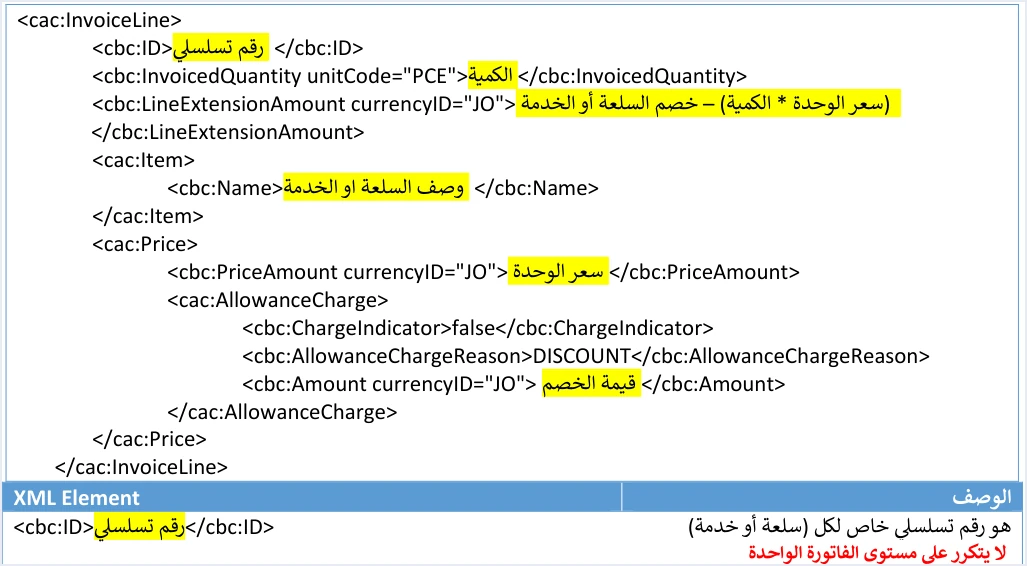
In the guide’s template, an income invoice line is made up of the line number, the quantity in the PCE unit, the line amount cbc:LineExtensionAmount, the name of the goods or service, and then the unit price and the discount. The rules on these elements are the same as on a sales tax invoice line. The number does not repeat, the quantity and the price are greater than zero, and the discount is positive.
The guide’s examples of an income invoice have two lines. The first is 33 × 2 − 2 = 64, and the second is 10 × 5 − 5 = 45. Each one stops at the line amount, with no tax added to it. Copying the sales tax line template into an income invoice therefore adds a block to the file that has no place in the income invoice template.
The invoice type itself must also match the seller’s tax number and income-source sequence. If a taxpayer registered for General Sales Tax (GST) sends an income invoice, or the other way round, the invoice may come back with the rejection message This user is not authorized to submit this type of invoice. The other differences between the two invoice families are covered in our article General Sales Tax Invoice in JoFotara.
Keep the line numbers: a return invoice matches lines by number
The life of a line number does not end when the invoice is accepted. Alongside its ten operating instructions, the guide adds an explicit note about the line number on a sales invoice.

The note says that the item’s ID must be kept when the sales invoice is issued, so it can be used later in returns and to match the returned item to the original invoice. The reason is that a return invoice in the National Invoicing System is built on lines. The guide requires the ID of the goods or service being returned to be exactly as it is on the original invoice, and the same applies to its name and its unit price.
The guide sets further rules for a return line. Returns are on quantities only, and a return cannot exceed the quantity sold on the original invoice. The returned quantity is greater than zero, and it may be the full quantity or part of it, as a whole or decimal number. More than one partial return is allowed against the same original invoice until its quantities are used up.
If the seller’s system renumbers the lines after the invoice is issued, or never stores their numbers, it will struggle to build a return line that matches the original line. Store the number of each line with the invoice, together with the invoice number, its unique identifier and the QR code that comes back once the invoice is accepted.
Pre-submission checklist for a JoFotara invoice line
The list below collects the line rules the guide states, in the order the elements appear in the template.
- Line number. A serial number for each item, goods or service, that does not repeat within the invoice.
- Quantity. Greater than zero, with up to nine decimal places, and with the
unitCodeattribute as in the guide’s template. - Line amount. Quantity × unit price − discount, calculated from the values sent in the same line.
- Tax block. Present on a sales tax invoice line, and entirely absent from an income invoice line.
- Tax amount. Calculated on the line amount after the discount, at the line’s rate and category, on a usual line with no special tax and no consumer price higher than the unit price.
- Line total. Line amount before tax + tax amount.
- Unit price. Before tax, and greater than zero.
- Discount. Positive only, and at line level, not invoice level.
- Storage after acceptance. The number of each line is stored with the invoice for use in returns.
This check comes on top of what the guide requires in its operating instructions, which is to verify the totals, the taxes and the mandatory fields before sending. If the invoice is still rejected, the error details come back in the response, and our article JoFotara Error Codes explains the common rejection messages.
How Qoyod handles invoice lines
When the invoice is issued from accounting software linked to the system, you do not write the line elements by hand in an XML file. Qoyod builds the invoice file in UBL 2.1 format with its unique identifier (UUID) and sends it to the National Invoicing System without any manual intervention. This is done through Qoyod’s integration with the National Invoicing System.
- A check before sending. Qoyod checks each invoice at field level as it is created, covering the tax number, the document type and payment method, the General Sales Tax rate and whether the lines are complete, and alerts you to any error before the invoice is sent, to reduce rejections.
- Every invoice’s status in view. ISTD returns the invoice status and any error message, and Qoyod shows them in its status panel.
- Resending with the same identifier. The status panel lists invoices that were not sent and need to be resent, and when you resend one it keeps the same UUID.
The pre-send check is an alert, not a guarantee. It covers the fields listed above, and accepting the invoice remains a decision for the National Invoicing System alone. To see how your business connects to the system, read about Qoyod and the National Invoicing System.
E-invoicing and full accounting in one system
Qoyod is integrated with the National Invoicing System (JoFotara). You issue your invoice in Jordanian dinars from Qoyod, it is booked to your ledgers automatically and sent to the system, and once it is accepted it comes back with a QR code from the Income and Sales Tax Department.
Frequently asked questions
What are JoFotara InvoiceLine blocks?
They are the blocks in which the XML file describes each item, goods or service, on its own. Each line carries its number, its quantity, its amount before tax, the item name, the unit price and the discount, and on a sales tax invoice it also carries the tax block.
Can a line number repeat within the same invoice?
A line number cannot repeat, because the technical guide states that it does not repeat within a single invoice. If it does, the invoice is rejected with the message The ID number must be unique.
Which unit of measure appears in the guide’s examples?
The unit PCE appears in every example of a new sales invoice, and general sales tax return lines add the BaseQuantity element in the unit C62. The guide gives no list of unit codes and no rule for accepting them.
Is the unit price written including tax?
The unit price is written before tax, because the guide describes the PriceAmount element as the unit price before tax. On a usual line, the tax is calculated on the line amount after the discount and appears in a separate block.
Do income invoice lines carry tax?
Income invoice lines carry no TaxTotal block at all. Their lines are limited to the number, the quantity, the line amount, the name, the unit price and the discount.
How do return invoice lines link to the lines of the original invoice?
They link by number, because the guide requires the returned line’s number, name and unit price to be exactly as they are on the original invoice. That is why the guide asks you to keep the number of each line when the sales invoice is issued.
References
- Income and Sales Tax Department (ISTD), technical guide for integrating with the National Invoicing System through the API, version 1.5 (in Arabic), 2026, pp. 20, 41 and 104.
- ISTD’s National Invoicing System guides (in Arabic)




