




A foreign currency invoice in the National Invoicing System (JoFotara) is an invoice whose currency the seller changes from the Jordanian dinar to another currency that the system accepts. Version 1.5 of the technical guide for integrating with the National Invoicing System through the API governs the foreign currency invoice JoFotara accepts through two elements in its header, cbc:DocumentCurrencyCode and cbc:TaxCurrencyCode, and through one explicit rule. The currency can only be changed for the invoice as a whole.
This article brings together what the official documents of the Income and Sales Tax Department (ISTD) say about the currency of an invoice, from the header of the XML file to the portal form and the return invoice. It also states plainly what the guide leaves out. The most important gap is that version 1.5 contains no element for an exchange rate and no rule for converting amounts into dinars.
Foreign currency invoice JoFotara rules in the technical guide
The technical guide lists the invoice currency in its table of invoice header elements, alongside the invoice number, its unique identifier, its issue date and its type. What it says on the subject comes down to five points.
- Two header elements set the invoice currency, and their default value is
JOD. - The currency is changed only at the level of the whole invoice.
- The system accepts eighteen currencies, the Jordanian dinar by default plus seventeen others.
- A return invoice takes the currency of the original invoice.
- The guide has no element for an exchange rate and no rule for converting amounts into dinars.
These points are written for the XML file that accounting software linked to the system sends. The portal form handles currency differently. It places the currency field in the invoice details, not in the goods or services details, and the portal section below explains it.
The two elements that set the invoice currency
The header of every invoice carries two currency elements. The first, cbc:DocumentCurrencyCode, is the document currency. The second, cbc:TaxCurrencyCode, is the tax currency. The default value of both is JOD, the Jordanian dinar.
In describing the two elements, the guide says that the currency type is changed to the required currency as shown in the table that follows. It then adds a note in red stating that the currency type is changed only at the level of the whole invoice.

The only example in the guide
The guide gives a single example of a currency change. In it, the invoice carries the US dollar in both elements.
<cbc:DocumentCurrencyCode>USD</cbc:DocumentCurrencyCode>
<cbc:TaxCurrencyCode>USD</cbc:TaxCurrencyCode>

The guide shows no case in which the two elements differ, for example a document currency in dollars and a tax currency in dinars. Nor does it say whether that is allowed or forbidden. The only documented form, then, is the one in the example, with the same currency in both elements.
The currency changes for the whole invoice only
This is the most important operating rule on the subject. Currency is a property of the invoice as a whole, not of each line. The lines of a single invoice are therefore not written in different currencies. If you choose the dollar, every unit price, every discount, every tax amount and every total on the invoice is read in dollars.
Two practical consequences follow when you prepare the file.
- Set the currency before the lines. The currency is decided once, in the invoice header, and the lines and totals are then calculated in it.
- Keep the totals consistent. The guide’s formulas for totals are the same in every case. The amount before tax equals the sum of quantity multiplied by unit price, and the amount payable equals the sum of the line values after discount and tax. The guide gives no different formula for a foreign currency invoice.
The rounding note that the guide repeats under every amount applies here as well. It allows amounts to be rounded to 3 decimal places, up to a maximum of 9 decimal places, provided the difference is less than or equal to 0.001. The note makes no distinction between the dinar and other currencies.
Eighteen currencies in the National Invoicing System
The system accepts eighteen currencies, the Jordanian dinar by default plus seventeen others. The technical guide lists them in a table with their codes and their Arabic and English names. One of them is the US dollar used in the guide’s example.
This article does not reproduce the list, because the practical decision does not depend on it. What a seller needs is for the currency of the sale to be one of the currencies in the guide’s table, and for its code to be written exactly as the table gives it. If the sale is in a currency that is not in the table, the guide describes no way to issue the invoice in that currency.
The currencyID attribute on invoice amounts
Besides the two header elements, every amount in the guide’s examples carries an attribute named currencyID. Its value in all the examples is JO, not JOD. The attribute appears on the discount, on the amount before tax and after tax, and on the amount payable, as in the following income invoice totals example.
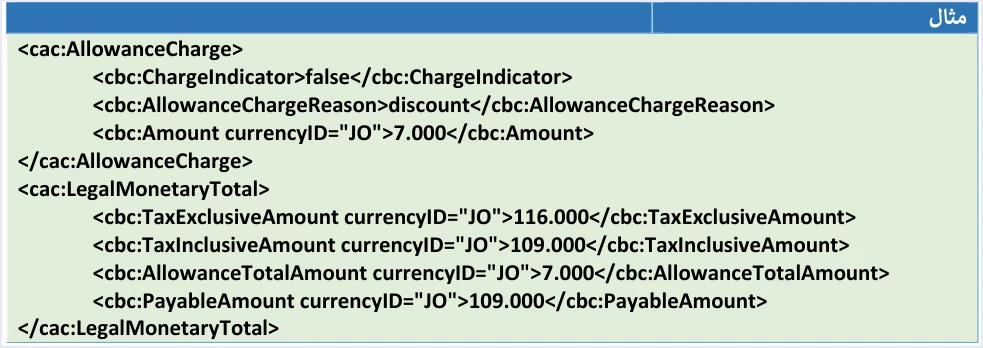
The example also shows the formulas at work. The amount before tax is 116.000, the discount is 7.000 and the amount payable is 109.000. It is an income invoice with no tax lines, so the amount after tax equals the amount payable.
What the guide does not say about currencyID
The guide’s examples use the value JO on every amount, and the guide does not explain that value anywhere. It does not say whether the system accepts JOD in this attribute, or what to write in it when the invoice is in dollars, for example. This article therefore does not state the correct value for a foreign currency invoice. That is left to a test run by the developer of the linked system, or to an inquiry to ISTD.
Watch for a defect in some of the Special Sales Tax examples. On pages 68 and 81, the attribute is written with a doubled quotation mark at its end. A file copied from those examples word for word is not well-formed XML. The guide’s own guidelines require compliance with the UBL 2.1 standard, and any structural flaw leads to the invoice being rejected.
Version 1.5 has no exchange-rate element
This is the question on which the technical guide is entirely silent. Version 1.5 contains no element that carries an exchange rate and no rule for converting invoice amounts into dinars, and it does not name any source from which a rate should be taken.
The only mention of foreign currencies in the guide outside the two header elements is the buyer-name rule, which refers to JOD 10,000 or its equivalent in foreign currencies. That wording does not set the exchange rate by which the equivalent is measured either.
This silence has three consequences you should know about.
- Do not send an exchange rate in the file. The guide’s templates have no element for it, so do not add an element to the file that the guide does not describe.
- Do not build on an explanation attributed to the guide. Any explanation that sets out how amounts are converted into dinars inside the National Invoicing System, or a specific rate the system applies, is not based on version 1.5.
- Ask the right party. Ask your accountant how to treat the exchange in your books, and ask ISTD about anything that concerns the system itself.
On page 104, the technical guide states that further inquiries can be directed to ISTD’s technical support committee for invoicing affairs through the department’s website.
Buyer name and the JOD 10,000 threshold on a foreign currency invoice
The cbc:RegistrationName element in the buyer details is present in every template, but filling in the buyer’s name is mandatory in two cases set by the technical guide.
- Receivable (credit-sale) invoice. The buyer’s name is always mandatory, whatever the invoice value and currency.
- Cash invoice. The buyer’s name is mandatory if the invoice value is more than JOD 10,000 or its equivalent in foreign currencies.
If the invoice is in dollars, for example, the threshold is measured against the equivalent of JOD 10,000, not against the number 10,000 itself. The guide does not state the exchange rate used to calculate that equivalent or the date of that rate. If your cash invoice is close to the threshold, the guide does not settle the question, and you need your accountant’s view or an answer from ISTD.
When a required buyer name is missing, the rejection message the technical guide lists for this case is Bayer name is missing, spelled as in the guide.
A return invoice follows the currency of the original invoice
When you return part or all of a foreign currency invoice, the return invoice does not choose its currency again. In its section on the return invoice, the guide states that the type of the return invoice is chosen according to the type selected in the original invoice, and that this also applies to currencies, according to the currency selected in the original invoice.
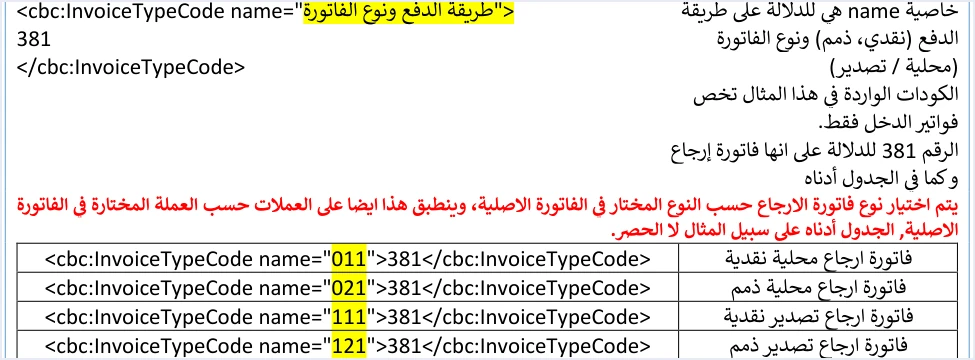
So if the original invoice was issued in dollars with the type code 011, the return invoice carries the value 381, the same code 011 and the same currency. The general return rules in the guide then apply.
- A return is on quantities only and cannot exceed the quantity sold on the original invoice.
- The return invoice carries the original invoice’s number, its unique identifier (UUID) and its total.
- The buyer details on the return invoice must match those on the original invoice.
- The return reason is mandatory and is written as free text.
Currency on the National Invoicing System portal
If you issue your invoices on the portal rather than from accounting software, the New invoice form (فاتورة جديدة) in the procedures guide for issuing an invoice in the Jordanian National Electronic Invoicing System, 2026 edition, opens with the Invoice details section (بيانات الفاتورة). That section has three fields, invoice type (نوع الفاتورة), invoice issue date (تاريخ إصدار الفاتورة) and currency type (نوع العملة).
The currency type field carries an asterisk, which means it is mandatory, and its default value is Jordanian dinar (دينار أردني) with the code JOD. The guide states that both the invoice type and the currency are selectable. Every field on that form is explained in our article JoFotara Invoice Form Fields Explained, and the full steps for issuing an invoice on the portal are in our article Issue an Invoice on the JoFotara Portal: The Steps.
ISTD’s 2026 guide does not say whether the currency can be changed after goods are added. The 2024 user guide for the platform, which was prepared by a software vendor and not by ISTD, says the currency cannot be changed after the first item is added, and the current interface may differ. Either way, choosing the currency before adding any item fits the technical guide’s rule that currency is a property of the whole invoice.
What the guide sets and what it leaves out
Scroll the table sideways to see the remaining columns
Checklist before sending a foreign currency invoice
Go through these points before your system sends the invoice, or before you press Issue (إصدار) on the portal.
- A currency from the guide’s table. Make sure the currency of the sale is in the currency table and that its code is written as the table gives it.
- Both elements match. Write the same code in
cbc:DocumentCurrencyCodeandcbc:TaxCurrencyCode, as in the guide’s example. - One currency per invoice. All lines, discounts, tax amounts and totals are in the same currency.
- currencyID tested. Do not assume its value on a foreign currency invoice until a test shows what the system accepts.
- No exchange rate in the file. Do not add an element that is not in the guide’s template.
- Buyer name. Fill it in on every receivable invoice, and on a cash invoice worth more than the equivalent of JOD 10,000.
- Return in the original currency. The return invoice is issued in the currency and type of the original invoice.
- Currency before goods on the portal. Choose the currency type (نوع العملة) before adding the first item.
If the invoice is in a foreign currency because the buyer is outside Jordan, the invoice type and the tax rate are a separate question from the currency. The invoice types are compared in our article Invoice Types in the National Invoicing System.
Where to go next
- The full picture of the system. For a wider view of the system and how to connect your business to it, read our article Jordan’s National E-Invoicing System.
- Requirements in Jordan. What the system asks of a business is set out in our article E-Invoicing Requirements in Jordan.
- Qoyod for invoicing in Jordan. See our National Invoicing System page.
E-invoicing and full accounting in one system
Qoyod is integrated with the National Invoicing System (JoFotara). You issue your invoice in Jordanian dinars from Qoyod, it is booked to your ledgers automatically and sent to the system, and once it is accepted it comes back with a QR code from the Income and Sales Tax Department.
Frequently asked questions
Can I issue an invoice in US dollars in JoFotara?
The technical guide allows the invoice currency to be changed from the dinar to another currency in its currency table. Its only example puts the value USD in both cbc:DocumentCurrencyCode and cbc:TaxCurrencyCode, and the change applies to the whole invoice.
Can one invoice have lines in two currencies?
The technical guide states that the currency type is changed only at the level of the whole invoice. Currency is a property of the invoice as a whole, so all its lines and totals are read in the currency its header carries.
What exchange rate does JoFotara use?
Version 1.5 of the technical guide does not set any exchange rate. It contains no element for an exchange rate and no rule for converting amounts into dinars, so ask your accountant or ISTD’s technical support committee for invoicing affairs.
How many currencies does JoFotara accept?
The system accepts eighteen currencies, the Jordanian dinar by default plus seventeen others. The technical guide lists them in a table with their codes and names, so write the code exactly as the table gives it.
In which currency is a return invoice issued?
A return invoice is issued in the currency of the original invoice. The guide states that the type of the return invoice follows the type of the original invoice, and that this also applies to the currency selected in it.
What value does the currencyID attribute carry?
The attribute carries the value JO in all the technical guide’s examples. The guide does not say whether the system accepts other values in it, such as JOD or the code of the foreign currency, so test this before you rely on it.
References
- Income and Sales Tax Department (ISTD), technical guide for integrating with the National Invoicing System through the API, version 1.5 (in Arabic), pp. 13, 14, 19, 24, 68, 81, 101 and 104.
- Income and Sales Tax Department (ISTD), procedures guide for issuing an invoice in the Jordanian National Electronic Invoicing System, 2026 edition (in Arabic).
- ISTD’s National Invoicing System guides (in Arabic)




