




A car sale invoice in the National Invoicing System (JoFotara) brings together several general rules, none of them specific to cars, that all meet when a car is sold. That is what shapes the car sale invoice JoFotara accepts. According to professional summaries of the General Sales Tax Law, cars are among the goods subject to Special Sales Tax (SST) on top of General Sales Tax (GST). The price of a car can also exceed JOD 10,000, and a car can be sold on deferred terms or in installments. Each of these situations is governed either by the technical guide that the Income and Sales Tax Department (ISTD) publishes or by Regulation No. 34 of 2019 on Organizing and Controlling Invoicing Affairs.
This article puts those rules in one place, in the order a seller meets them while issuing the invoice. It starts with the special tax, which is entered on the line as an amount and not as a rate. It then covers General Sales Tax, which is calculated on top of it, the invoice type code, the buyer’s name in deferred and installment sales, proof of receipt when the invoice is worth more than JOD 10,000, the consumer price option, and returns. It ends with a checklist and with what the official sources leave unsaid.
It is written for the accountant of a business that sells cars and is registered for Special Sales Tax, and for whoever builds the invoice file in that business’s accounting software. None of the texts this article relies on sets a separate rule for cars. Everything here is a general rule applied to the sale of a car. For a wider view of the system and how to connect your business to it, read our article Jordan’s National E-Invoicing System.
What governs a car sale invoice in JoFotara
Five rules govern the invoice, and each one comes from a published text. The table below sets each rule beside its source and the situation in which it applies to a car sale.
The point that cars are subject to Special Sales Tax comes from professional summaries of the law, not from its text. Those summaries list cars together with tobacco, fuel and other goods. Before you base a decision on that, check your business’s registration status with ISTD, because that registration decides which invoice family you are allowed to issue.
Special tax is an amount entered on the line, not a calculated rate
In its description of the line on a special tax invoice, the technical guide states that the special tax is a value entered without any calculation. The system therefore does not calculate the special tax from the price of the car. It receives the amount ready-made, as the seller writes it on the line.
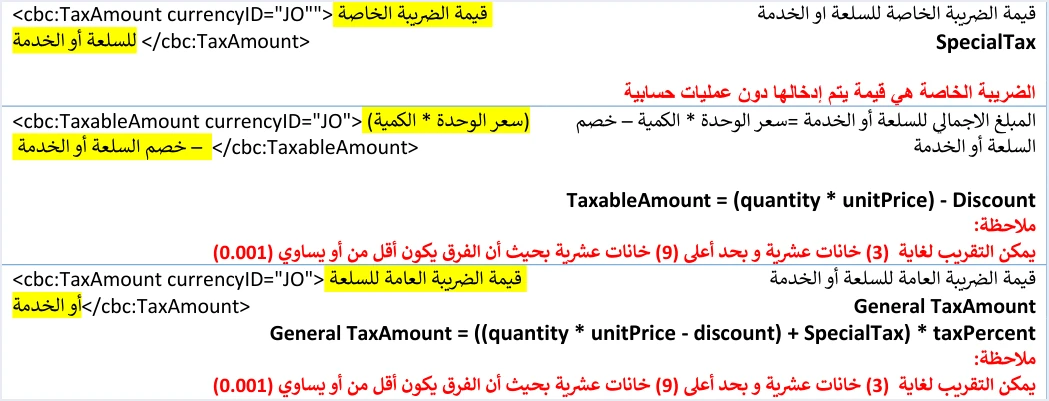
In the invoice file, the special tax is sent in its own cac:TaxSubtotal block. Its tax scheme is OTH, its category is S, and it carries no cbc:Percent rate element. On the line, this block comes before the General Sales Tax block.
The technical guide does not say where the special tax amount for each car comes from. It treats the amount as a ready-made input. For that reason this article gives no special tax amount or rate for cars, because the sources it relies on give none. The amount you write on the line is your responsibility. Article 10 of Regulation No. 34 of 2019 places responsibility for the invoice matching what actually took place on the seller and the buyer alike.
A business that issues its invoices on the portal, without linking accounting software, will find no description of the special tax invoice form in ISTD’s 2026 guides. The only available source for that form is a user guide prepared by a software vendor in 2024. It mentions a special tax value field (قيمة الضريبة الخاصة) that is filled in by hand. The current interface may differ from it, so check it before your first invoice.
General Sales Tax on top of the special tax on a car line
Once the special tax amount is entered, General Sales Tax is calculated on a base that includes it. The guide writes the formula as General TaxAmount = ((quantity * unitPrice − discount) + SpecialTax) * taxPercent. In other words, the General Sales Tax base is the line amount after the discount, plus the special tax amount.
The table below shows the order of the calculation on a single car line. It uses symbols instead of figures, because this article gives neither a special tax amount for cars nor the General Sales Tax rate that applies to them.
Scroll the table sideways to see the remaining columns
Two points stand out in the table. First, the TaxAmount element on the line does not add the two taxes together. It carries the General Sales Tax only, and the special tax stays in its own block. Second, the line total adds all three amounts. If the software wrongly adds the special tax to TaxAmount, the tax total will differ from what the guide’s method produces.
The rate multiplied by the base is the General Sales Tax rate that applies to the goods under the law. The standard rate in Jordan is 16%, and the law sets reduced rates for specific goods, which are covered in our article General Sales Tax in Jordan. This article does not set the rate that applies to cars. For that, check your goods’ position with ISTD or ask your accountant.
Invoice type code for a car sale: 013 or 023
The invoice type code in the invoice file has three digits. The first digit is the trade type. The second is the payment method, 1 for cash and 2 for receivable. The third is the tax family, 1 for income, 2 for general sales and 3 for special sales. A local car sale inside Jordan on a special tax invoice therefore carries the code 013 if the invoice is a cash invoice and 023 if it is a receivable (credit-sale) invoice. This family is explained from the business side in our article Special Sales Tax Invoice in JoFotara, and the family ending in 2 in our article General Sales Tax Invoice in JoFotara.
The seller does not choose the invoice family at will. The system reads the type from the invoice file, but the taxpayer’s registration with ISTD decides what the file may say. If a business that is not registered for Special Sales Tax sends an invoice from this family, the system rejects it with the message This user is not authorized to submit this type of invoice.
The other, non-local types, such as export and development zones, have their own codes in the same family, and for those the guide requires a 0% tax rate. All the types are compared in our article Invoice Types in the National Invoicing System. One question remains that the technical guide does not answer, which is the invoice type for a sale where part of the price is paid at issue and the rest later. The guide does not say whether that invoice is issued as cash or receivable, and it does not mention partial payment.
The buyer’s name in an installment or deferred car sale
Article 5(b) of Regulation No. 34 of 2019 requires the invoice to state the buyer’s name clearly in three kinds of sale, a deferred sale, an installment sale and a sale paid in stages. If you sell a car on any of these terms, the buyer’s name is a required part of the invoice under the regulation.

The technical guide has a second, separate rule that looks at the invoice type and value. The buyer’s name in the cbc:RegistrationName element is always mandatory on a receivable invoice. On a cash invoice it is mandatory if the invoice is worth more than JOD 10,000 or its equivalent in foreign currencies. If the name is missing in either case, the invoice is rejected with the message Bayer name is missing, spelled that way by ISTD.
The two rules do not conflict. If either one requires the name, you write it, even when the other is silent. The table below applies both to different car sales. The amounts in it are illustrative examples.
Scroll the table sideways to see the remaining columns
The table shows that the buyer’s name on an installment or deferred car sale invoice is required in every case, because Article 5(b) of Regulation No. 34 of 2019 is enough on its own to require it.
The guide also sets other buyer details. The buyer identifier type is one of three, the national number, the personal number for non-Jordanians and the tax number. The phone field accepts digits only, with at least 9 digits and at most 14.
Proof of receipt when the invoice exceeds JOD 10,000
Article 5(c) of Regulation No. 34 of 2019 opens with this text.
«يتوجب تسليم نسخة من الفاتورة إلى المشتري وفقاً للطريقة المستخدمة في تنظيم وإصدار الفواتير وتحفظ باقي النسخ لدى البائع»
In English, a copy of the invoice must be handed to the buyer in line with the method used to prepare and issue invoices, and the remaining copies are kept by the seller. No official English translation of this regulation was found; the English here is our rendering, and the Arabic text is the authority.
The same paragraph then adds that if the value of the invoice exceeds JOD 10,000, the seller must prove that the buyer received it.
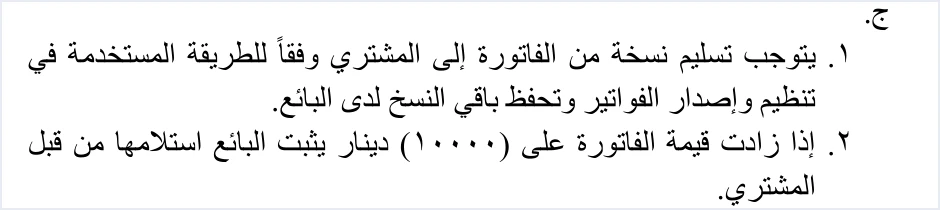
Three things in this text matter to a car seller. First, the condition is that the value exceeds JOD 10,000, so an invoice worth exactly JOD 10,000 is not covered by the text. Second, the duty falls on the seller, who is the one who must prove that the buyer received the invoice. Third, the text does not set the method of proof. It mentions neither a signature nor a specific form.
Do not confuse this rule with the buyer-name rule in the technical guide, even though the figure is the same in both. The receipt rule is a legal provision in Regulation No. 34 of 2019 that asks the seller for proof. The name rule is a technical condition on the invoice file, and the system rejects the invoice if it is not met. The wording about foreign currencies belongs to the name rule in the technical guide. Article 5(c) of Regulation No. 34 of 2019 does not deal with invoices in a foreign currency.
The consumer price is an option on request, not a seller obligation
Version 1.5 of the technical guide added a mechanism called the consumer price. It is the final price to the consumer, sent on every line inside the cac:ItemPriceExtension element, and it is used as the basis for calculating tax. The mechanism is optional, so neither a car seller nor anyone else is required to use it.
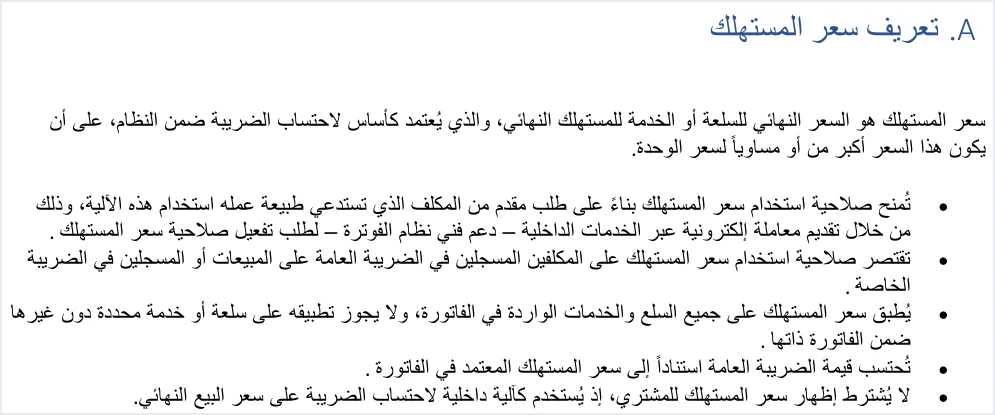
The guide sets clear conditions for this mechanism. The permission is granted on the taxpayer’s request through internal services (الخدمات الداخلية), as an invoicing-system support request (دعم فني نظام الفوترة). It is limited to taxpayers registered for General Sales Tax or Special Sales Tax. It applies to all the lines of the invoice, so it cannot be used for one item and not another. The consumer price does not have to be shown to the buyer, and it must not be lower than the unit price.
If a business registered for Special Sales Tax requests the permission, the General Sales Tax base changes when the consumer price is higher than the unit price. General Sales Tax then becomes ((quantity × consumer price) + special tax) × rate, instead of (line amount + special tax) × rate when the two prices are equal. When the consumer price is higher, the discount does not reduce the tax base, while the line amount stays quantity × unit price − discount.
The mechanism and how to request it are explained in our article Consumer Price in JoFotara.
Returning a car after its invoice is issued
An invoice that has been issued and accepted is not changed. In JoFotara, a correction is made with a return invoice. What can and cannot be done with an issued invoice is covered in our article Editing an Issued Invoice in Jordan’s National Invoicing System. Legally, the return invoice is a credit note, and version 1.5 of the technical guide does not define a debit note. If the buyer returns the car, or if you need to reverse the effect of an invoice issued with a wrong quantity, you issue a return invoice linked to the original.
The return invoice carries the value 381 in its type code element, with the same code as the original invoice in the name attribute, so the return of a 013 invoice stays 013. The guide sets specific conditions for it.
- Returns are on quantities. A return cannot exceed the quantity sold on the original invoice.
- Reference to the original invoice. Its number, its unique identifier (UUID) and its total.
- Return reason. Mandatory, written as free text.
- Buyer details. The guide requires the buyer details on the return invoice to match those on the original sales invoice it is linked to.
- Line details. The line number, name and price as on the original invoice.
The return mechanism has a limit that matters to car sellers. If the only error is the invoice type code and the quantity is correct, the guide does not address the case, because returns work on quantities and no quantity is wrong. Check the type code before you issue the invoice, not after.
Checklist before issuing a car sale invoice JoFotara accepts
Review these points before you send each car sale invoice. Each one ties back to an earlier section of this article.
- Registration. The business is registered for Special Sales Tax, so family 3 is open to it.
- Type code. 013 for cash and 023 for receivable on a local sale.
- Special tax. An amount entered in the
OTHblock with no rate, placed before the General Sales Tax block. - General Sales Tax. Calculated on the line amount plus the special tax.
TaxAmounton the line. Carries the General Sales Tax only.- Buyer’s name. Written on every deferred, installment or staged sale, on every receivable invoice, and on every cash invoice worth more than JOD 10,000.
- Proof of receipt. A recorded way of proving that the buyer received every invoice worth more than JOD 10,000.
- Consumer price. Sent only if the business has been granted the permission, and then on every line, at a value not lower than the unit price.
- Match with reality. The invoice details match the actual sale, because responsibility for that match lies with the seller and the buyer together.
What the official sources do not say about car invoices
The technical guide and Regulation No. 34 of 2019, the two sources this article relies on, do not answer some questions a car seller asks. This article stops at those questions and does not fill the gaps with inference.
- The special tax amount or rate on cars. Neither source gives one, and the guide receives the amount ready-made.
- Used cars, customs duties and licensing fees. Neither source deals with them.
- The invoice type for a sale paid partly at issue. The guide does not say whether it is issued as cash or receivable.
- How to prove receipt. Article 5(c) of Regulation No. 34 of 2019 does not set a method.
- Correcting the type code alone after sending. The guide does not address it, because returns work on quantities.
On each of these questions, the safest answer comes from ISTD or from an accountant who knows your business’s position.
How Qoyod handles the invoice file
When the invoice is issued from accounting software linked to the system, you do not write the line elements by hand in an XML file. Qoyod builds the invoice file in UBL 2.1 format with its unique identifier (UUID) and sends it to the National Invoicing System without any manual intervention. This runs through Qoyod’s integration with the National Invoicing System.
- Pre-send check. Qoyod checks each invoice at field level as it is created, covering the tax number, the document type and payment method, the General Sales Tax rate and whether the lines are complete, and alerts you to any error before the invoice is sent, to reduce rejections.
- Invoice status. ISTD returns the invoice status and any error message, and Qoyod shows them in its status panel.
The pre-send check is an alert, not a guarantee. Acceptance of the invoice remains a decision for the National Invoicing System alone. The consumer price permission is requested from ISTD, not from the software. If your business needs it together with Special Sales Tax, check with the Qoyod team how it is handled in the integration before you activate it.
E-invoicing and full accounting in one system
Qoyod is integrated with the National Invoicing System (JoFotara). You issue your invoice in Jordanian dinars from Qoyod, it is booked to your ledgers automatically and sent to the system, and once it is accepted it comes back with a QR code from the Income and Sales Tax Department.
Frequently asked questions
Is the special tax on a car entered as a rate or as an amount?
It is entered as an amount. The technical guide states that the special tax is a value entered without any calculation, and it is sent in its own OTH block that carries no rate element.
Is General Sales Tax calculated on the special tax on a car invoice?
It is calculated on it, because in the guide the General Sales Tax base is the line amount after the discount plus the special tax amount. The TaxAmount element on the line carries the General Sales Tax only.
Must the buyer’s name appear on the invoice for a car sold in installments?
It must. Article 5(b) of Regulation No. 34 of 2019 requires the buyer’s name to be stated clearly in a deferred sale, an installment sale and a sale paid in stages, whatever the invoice type.
What does proof of receipt mean on an invoice worth more than JOD 10,000?
It means the seller must prove that the buyer received the invoice when its value exceeds JOD 10,000, under Article 5(c) of Regulation No. 34 of 2019. The text does not set the method of proof.
Does a car dealer have to use the consumer price?
A car dealer does not have to use it. The consumer price is a permission granted at the taxpayer’s request, and it is limited to taxpayers registered for General Sales Tax or Special Sales Tax. Once granted, it applies to every line of the invoice.
What is the invoice type code for a car sold inside Jordan?
The code is 013 for a cash invoice and 023 for a receivable invoice, because a third digit of 3 marks the Special Sales Tax family. A return invoice carries the same code, with the value 381.
References
- Income and Sales Tax Department (ISTD), technical guide for integrating with the National Invoicing System through the API, version 1.5 (in Arabic), pp. 68, 81, 86 and 101.
- Regulation No. 34 of 2019 on Organizing and Controlling Invoicing Affairs, as amended, consolidated text (in Arabic), Article 5, paragraphs (b) and (c), and Article 10.
- ISTD’s National Invoicing System guides (in Arabic)




