




Every invoice you send to the National Invoicing System (JoFotara) has a number you already know, the invoice number in the cbc:ID field. The system does not identify the invoice by that number alone, though. Alongside it, the file carries the JoFotara UUID, the unique identifier in the cbc:UUID field. Together, the two values are what set your invoice apart from every other invoice on the system.
The short answer to the question behind this article is that the technical guide issued by the Income and Sales Tax Department (ISTD) makes the invoice number and the UUID together the invoice’s primary key, makes generating the UUID the job of the taxpayer’s system, and asks for the same UUID to be reused every time the invoice is resent. That gives the practical rule everything below turns on. Generate the UUID once, store it, and never replace it.
This article explains where the UUID sits in the invoice file and in the system’s response, why invoices get sent twice when it is lost, what to keep for every invoice, and what not to copy from the guide’s examples.
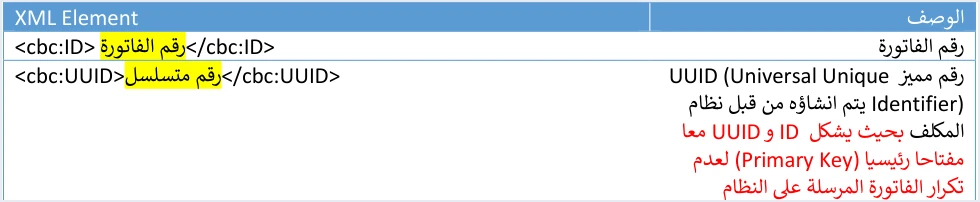
ID and UUID together: the invoice’s primary key
The technical guide (version 1.5, p. 12) describes both fields in its invoice header table. The cbc:ID field is the invoice number. For the cbc:UUID field, the guide describes a distinctive number, a UUID (Universal Unique Identifier), that is created by the taxpayer’s system, so that ID and UUID together form a primary key that stops an invoice sent to the system from being duplicated.
That description contains three points worth pausing on.
- The key is made of two values. The invoice number alone is not enough for the system to identify the invoice, and neither is the UUID alone. The identity is the pair.
- The taxpayer’s system generates the UUID. Your software does not wait for JoFotara to give it one. Your software creates the UUID and places it in the file before sending.
- The purpose is to prevent duplication. The guide says explicitly that the key exists so that an invoice sent to the system is not duplicated.
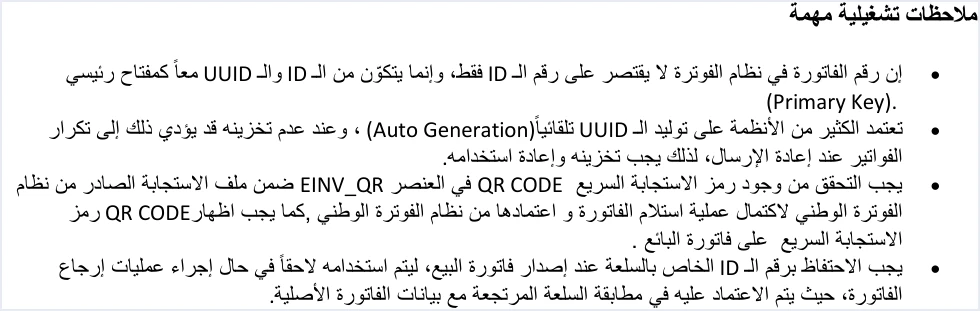
The guide repeats the same rule in its operational notes (p. 104). There it says that the invoice number in the National Invoicing System is not limited to the ID, and that it consists of the ID and the UUID together as a primary key.
The practical consequence is that whenever you talk about “the same invoice” in JoFotara, you are talking about the same pair. If you send the same invoice number with a different UUID, then as far as the key is concerned you are sending a different pair.
Where the JoFotara UUID appears in the file and the response
The UUID is not a field you write once and forget. It appears in the header of the sales invoice, it comes back to you in the system’s response, and you need it again if you issue a return invoice against the same invoice. The file also has other fields with similar names that have nothing to do with the key, so it helps to see them all in one place.
Scroll the table sideways to see the remaining columns
Two rows in this table cause more confusion than the others. The first is the line number. It uses the same element name, cbc:ID, but it lives inside an invoice line and only orders the lines within the invoice. The second is the invoice counter block. It contains an element named UUID, yet its value is the invoice counter, which starts at 1 and rises, not the invoice’s unique identifier. The counter is not part of the invoice’s primary key either.
Who generates the UUID and why you must store it
Because the taxpayer’s system generates the UUID, the taxpayer’s system is also responsible for keeping it stable. The technical guide warns about one specific mistake here, in its operational notes (p. 104). The note says that many systems rely on generating the UUID automatically (Auto Generation), that failing to store it can lead to duplicate invoices when an invoice is resent, and that the UUID must therefore be stored and reused.
So the problem is not automatic generation in itself. The problem is a UUID that is generated and never kept. Picture software that creates a new UUID every time it builds the invoice file. The invoice is sent, and the response is lost for some reason. The software rebuilds the file and sends it again. On the second attempt the file carries the same invoice number with a different UUID, so the pair is no longer the first pair. This is the path the guide describes when it says that not storing the UUID can lead to duplicate invoices.
The right order for this step is simple.
- Generate the UUID when the invoice is created, not when the file for sending is built.
- Save it with the invoice record in your software’s database before the first attempt to send.
- Read it from the record every time the file is rebuilt, so the same invoice never gets a second UUID, however many times the file is built.
This order is a practical inference from the guide’s text. The guide asks you to store the UUID and reuse it. Version 1.5 of ISTD’s technical guide does not state the moment at which the UUID should be generated. Saving it before the first send, though, is what makes sure you can find it when you need it.
Resending with the same UUID: the rule for every failed send
Of the ten guidelines the technical guide sets out (p. 104), two deal with this topic directly.
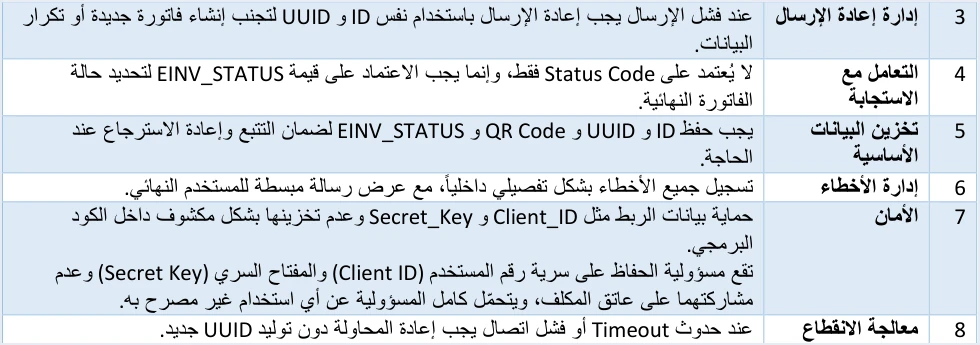
- Guideline 3, resend management. When a send fails, the guide asks you to resend with the same invoice number (ID) and the same unique identifier (UUID), so that no new invoice is created and no data is duplicated.
- Guideline 8, handling outages. It says that when a Timeout or a connection failure occurs, you must retry without generating a new UUID.
The two guidelines cover two different cases, and the rule is the same in both.
Case one, the invoice is rejected because of an error in its data. Here you know the invoice was not accepted, and the system’s response tells you why. You fix the cause, then resend with the same invoice number and the same UUID. Where you make the fix depends on the error code. In every case, changing the UUID is not part of the fix.
Case two, the connection drops before the response arrives. This case is riskier, because you do not know what happened to the first attempt. The invoice may never have arrived. It may also have arrived and been accepted, with the response lost on the way back. Being unable to reach the system at all is a separate situation with its own error code. In both situations, the guide asks you to retry without generating a new UUID.
Version 1.5 of ISTD’s technical guide does not state how many times to retry or how long to wait between attempts. That is a decision for whoever designs your system. The one fixed point in the text is that the UUID does not change from one attempt to the next.
If the first attempt was in fact accepted, the invoice has been issued, and the technical guide offers no way to edit it. Any correction after acceptance is made with a return invoice that refers to the original invoice’s number, unique identifier and total. It is never made by resending the invoice with new content.
The ALREADY_SUBMITTED status: when the system recognizes an accepted invoice
This is where the two-part key clearly pays off. If you resend an invoice that was already accepted, with the same invoice number and the same UUID, the system returns the status ALREADY_SUBMITTED in the EINV_STATUS field, together with the original QR code, and the invoice is not duplicated. That makes this status the documented way to recover a QR code you were not able to save after the first attempt. If the UUID changed between the two attempts, you are on the path the guide warns can lead to duplicate invoices. The three EINV_STATUS values and the other response codes are explained in our article JoFotara error codes.
What to store for every invoice after sending
Guideline 5 in the technical guide, headed storing the core data, says that ID, UUID, QR Code and EINV_STATUS must be kept so the invoice can be traced and retrieved again when needed. That is four values for every invoice, and each has its own role.
- The invoice number,
cbc:ID. The first half of the key, and the value you use to look the invoice up in your records. - The UUID,
cbc:UUID. The second half of the key. Without it you cannot resend the invoice under the same identity. Among the six purposes the guide gives for the system’s response (p. 97) is retrieving the invoice’s unique number (UUID), which arrives in theEINV_INV_UUIDfield. - The QR code. It comes back in the
EINV_QRfield once the invoice is accepted, and the invoice does not count as received and accepted unless the QR code is there. The guide requires this code to be shown on the seller’s invoice. - The invoice status,
EINV_STATUS. This is the reference for judging the invoice. Guideline 4 says not to rely on the Status Code alone, and to rely on the value ofEINV_STATUSto determine the invoice’s final status.
The guide adds two more things to these four values. The first is a complete log of sends, responses and resends, which is guideline 10, the audit trail. The second is keeping the line number of each item on the sales invoice, because a return invoice is matched against the line numbers of the original invoice.
When a return comes along, these values meet in one place. The reference block of the return invoice carries the original invoice’s number, its UUID and its total. If you did not store the original invoice’s UUID, you will have nothing to put in that block.
Do not copy the UUID examples from the technical guide
The technical guide’s examples are illustrations, and some of them contain flaws that make them unsafe to copy. Two of those flaws concern the UUID.
- Two UUIDs written incorrectly, on pages 14 and 98. The last group in the first example is incomplete, with only eleven characters, and the second example contains characters that are not hexadecimal. For that reason we do not reproduce them here. Do not use either of them in a test file or in your software’s settings.
- The return invoice example does not match its original invoice. In the example of a return against a general sales tax invoice, the reference points to a UUID that differs from the UUID of the original invoice in the same example. In real use, the reference must carry the original UUID exactly as you stored it.
The rule to take away is that your system generates the UUID itself for every invoice, and never copies a UUID from an example, whether from the guide or from an earlier invoice. A copied UUID reuses a value that does not belong to your invoice.
How Qoyod handles the UUID
Everything above is work that falls on the taxpayer’s system, which is the job your accounting software takes on if it is linked to JoFotara. The connection steps are covered in our article on how to connect your system to JoFotara step by step. Qoyod’s integration with the National Invoicing System works on this layer as follows.
- Building the file and the UUID. Qoyod builds the invoice file in UBL 2.1 format with its unique identifier (UUID) and sends it to the National Invoicing System without any manual intervention.
- Every invoice’s status in view. ISTD returns the invoice status and any error message, and Qoyod shows them in its status panel, with states that include sent (مرسلة), previously sent (مرسلة مسبقًا) and not sent (لم تُرسل) together with the error message.
- Resending with the same identifier. The status panel lists invoices that were not sent and need to be resent, and when you resend one it keeps the same UUID.
Resending here is a step you take yourself from the status panel. Once ISTD accepts the invoice it returns a QR code, and Qoyod shows that code on the invoice. For a wider view of the system and how to connect your business to it, read our article Jordan’s National E-Invoicing System. You can also see what Qoyod offers on our National Invoicing System page.
E-invoicing and full accounting in one system
Qoyod is integrated with the National Invoicing System (JoFotara). You issue your invoice in Jordanian dinars from Qoyod, it is booked to your ledgers automatically and sent to the system, and once it is accepted it comes back with a QR code from the Income and Sales Tax Department.
Frequently asked questions
What is the JoFotara UUID?
It is a distinctive number that the taxpayer’s system generates and places in the cbc:UUID field of the invoice header. According to ISTD’s technical guide, it forms a primary key together with the invoice number in the cbc:ID field, and that key stops an invoice sent to the system from being duplicated.
Does the National Invoicing System generate the invoice’s UUID?
The system does not generate it. The technical guide states that the UUID is created by the taxpayer’s system, and the system then returns it in its response in the EINV_INV_UUID field.
Do I generate a new UUID when I resend an invoice that failed to send?
You do not generate a new UUID. The technical guide asks you to resend with the same invoice number and the same UUID, and to retry after a connection failure without generating a new UUID, because not storing the UUID can lead to duplicate invoices.
What does the ALREADY_SUBMITTED status mean?
It means the invoice was sent before, with the same invoice number and the same UUID, and was accepted. The system returns the original QR code with it, and this is the documented way to recover a QR code you did not save.
Which values should I store for every invoice?
The technical guide recommends storing four values, the invoice number, the UUID, the QR code and the invoice status in EINV_STATUS. It also asks for a complete log of sends and responses, and for the line numbers that return invoices are matched against.
Can I use the UUID examples in the technical guide?
You should not use them. The two UUIDs on pages 14 and 98 are written incorrectly, and the guide’s examples are illustrations that are not safe to copy into a real file. Generate a new UUID for every invoice and store it.
References
- Income and Sales Tax Department (ISTD), technical guide for integrating with the National Invoicing System through the API, version 1.5 (in Arabic), pp. 12, 97 and 104.




