




You send an invoice to the National Invoicing System (JoFotara) and the response comes back without a QR code. One value in the status field settles what happened. That value is the JoFotara NOT_SUBMITTED status, and it is the only one of the three response values that means the invoice was rejected. The good news is that the reason for this rejection can be found, because the response itself carries a message that explains what needs fixing.
In short, the technical guide issued by the Income and Sales Tax Department (ISTD) defines this status as an invoice that was sent but was neither accepted nor approved because a particular error occurred. The guide adds that the technical Response Status Code will not be 200, and the sample response returns the QR code, unique identifier, invoice number and signed invoice fields empty. You read the reason in EINV_MESSAGE, fix it in the invoice file, and then resend with the same invoice number (ID) and the same unique identifier (UUID).
This article explains what the status means as the guide defines it, what a rejected response looks like field by field, where to find the reason for the rejection, and how to fix the invoice and resend it without creating a duplicate. It also sets out what the guide does not say about this status, so that you do not build on it.

What the JoFotara NOT_SUBMITTED status means
After every send, the system’s response carries an element called EINV_STATUS, and version 1.5 of the technical guide (p. 98) states that it has three values. The guide defines the value NOT_SUBMITTED on p. 100 with this text.
«أي أن الفاتورة المرسلة الى نظام الفوترة لم يتم قبولها ولا اعتمادها وذلك بسبب حدوث خطأ معين. في هذه الحالة فان Response Status Code لن تكون قيمته 200».
In English, the guide says that the invoice sent to the invoicing system was neither accepted nor approved because a particular error occurred, and that in this case the Response Status Code will not be 200. ISTD publishes this guide in Arabic only; the English here is our rendering, and the Arabic text is the authority.
This definition carries three practical points.
- The invoice was sent and then rejected. The text speaks of the invoice sent to the invoicing system. In other words, the system received it, checked it and replied that it was not accepted. Because the status is a value inside the response, seeing it means that a response did reach your system.
- The rejection has a specific cause. The phrase “because a particular error occurred” means the rejection is not random, and the cause is written in the response, as the next section shows.
- The technical Response Status Code is not 200. The guide stops at this negative statement and does not tie the status to any particular code.
This status sits alongside two other values. The value SUBMITTED means the invoice was accepted successfully. The value ALREADY_SUBMITTED means the invoice was already approved. NOT_SUBMITTED is the only one of the three that means rejection.
The rejected response and the fields that come back empty
On p. 100 the guide shows a complete sample of a rejected response. The value that matters first is EINV_STATUS, followed by the four fields that come after it, all of which carry the value null.
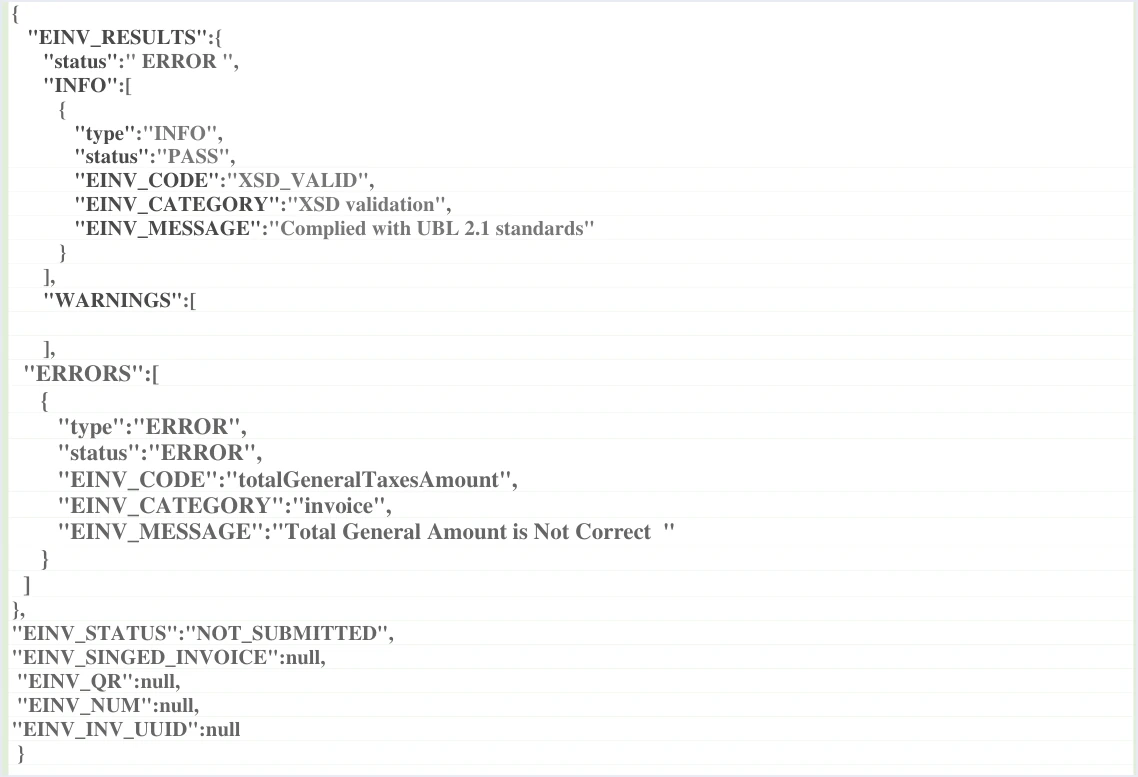
The table below lists the elements of this response, how the guide describes each one, and what it means for you when the status is NOT_SUBMITTED.
Scroll the table sideways to see the remaining columns
One detail in the sample deserves attention. The INFO list carries a passing result for the XSD check, with the message Complied with UBL 2.1 standards, while the ERRORS list carries an error in the tax total. So in this sample the file passed the XSD check and was rejected because of a value in the totals. The guide does not say that every rejection follows this pattern. This is only what the sample shows.
An empty QR code means the invoice is not accepted
The guide (p. 98) requires checking that the QR code is present in the EINV_QR field for the receipt and approval of the invoice to be complete, and it requires the code to be shown on the seller’s invoice. If the field comes back empty, you have no code to show, and the invoice does not count as accepted until you resend it and it is accepted.
An empty identifier in the response does not cancel yours
An empty EINV_INV_UUID does not mean you need to generate a new identifier. The unique identifier is generated by the taxpayer’s system and placed in the invoice file, in the cbc:UUID field. The field in the response comes back empty in the case of rejection, as in the guide’s sample. That same identifier is what you will need when you resend, so keep it unchanged. Who generates the identifier and why it is resent with the number is explained in our article JoFotara UUID: Why It Comes Back With the ID.
Do not judge the invoice by the Response Status Code alone
The fourth instruction in the guide (p. 104), titled handling the response (التعامل مع الاستجابة), sets the rule in this text.
«لا يُعتمد على Status Code فقط، وإنما يجب الاعتماد على قيمة EINV_STATUS لتحديد حالة الفاتورة النهائية».
In English, the guide says not to rely on the Status Code alone and requires relying on the value of EINV_STATUS to determine the final status of the invoice. ISTD publishes this guide in Arabic only; the English here is our rendering, and the Arabic text is the authority.
This instruction is the key to handling a rejection, for two reasons.
- The guide names no specific code for this status. All it says is that the code will not be 200. The message in the p. 100 sample is one of the messages the guide lists under code 400, but the guide does not state the Response Status Code above the sample, and it does not limit the status to one code. So do not build your software’s logic on any particular number.
- The status is the final verdict. Software that reads
EINV_STATUSknows that the invoice was rejected whatever the Response Status Code, and it also knows that it has to read the errors before any new attempt.
The guide (p. 101) lists four Response Status Codes other than 200, with their causes. Code 400 indicates an error in the values sent in the XML file, and the error is explained in EINV_MESSAGE. Code 403 means a wrong Client ID or Secret Key. The guide traces code 500 first to the tax number or the income-source sequence. Code 504 means the system could not be reached. All of these codes are covered in our article JoFotara Error Codes: Why an Invoice Is Rejected and How to Fix It. The guide does not say whether a 403, 500 or 504 response carries any value in EINV_STATUS at all.
Where to find the rejection reason in the response
The reason for the rejection sits inside the EINV_RESULTS element, in the ERRORS list. Each entry in this list carries five fields, which are type, status, EINV_CODE, EINV_CATEGORY and EINV_MESSAGE. The last field is where the explanation lives. In its explanation of code 400, the guide (p. 101) states that the error is explained in EINV_MESSAGE in the response file. The response elements as a whole are covered in our article JoFotara API Response: The EINV Elements.

In the p. 100 sample, the error entry carries these values.
- The error code
EINV_CODEwith the valuetotalGeneralTaxesAmount. - The error category
EINV_CATEGORYwith the valueinvoice. - The error text
EINV_MESSAGEwith the valueTotal General Amount is Not Correct, a message about how the totals are calculated.
Each message the guide lists has its own cause and its own fix. The rule here is to read the message exactly as it is, without translating it or guessing, and then to look for the value it points to in the XML file that was actually sent.
How to fix the rejected invoice before resending
The steps below are based on the definition of the status and on the guide’s operating instructions (p. 104). They run in order from the moment the response arrives to the moment you resend.
- Confirm the status. Read the value of
EINV_STATUS. If it isNOT_SUBMITTED, the invoice was not accepted, and an emptyEINV_QRconfirms it. - Collect every entry in the ERRORS list. The list is an array, so do not stop at its first entry. Copy the five fields of each entry exactly as they came back.
- Find the value in the XML file. Check the value the message points to in the file that was sent, not on the data-entry screen, because the system judges what reached it in the file.
- Fix the value and review what surrounds it. The second instruction, pre-send validation (التحقق قبل الإرسال), says to check the totals, the taxes, the taxpayer number, the buyer number and the mandatory fields before sending. So if you fix one value, check again the totals that it affects.
- Keep the invoice number and the unique identifier as they are. Do not change
cbc:IDorcbc:UUIDin the corrected file. - Log the error, then resend. Record the error details in your system before the new attempt, then send the corrected file and read the status in the new response.
Resending with the same ID and UUID
The third instruction in the guide, titled resend management (إدارة إعادة الإرسال), sets the rule in this text.
«عند فشل الإرسال يجب إعادة الإرسال باستخدام نفس ID و UUID لتجنب إنشاء فاتورة جديدة أو تكرار البيانات».
In English, the guide requires that, when a send fails, the invoice is resent with the same ID and UUID, to avoid creating a new invoice or duplicating data. ISTD publishes this guide in Arabic only; the English here is our rendering, and the Arabic text is the authority.

The reason for this instruction is that the system identifies an invoice by two values together, the invoice number in cbc:ID and the unique identifier in cbc:UUID. The guide (p. 12) describes the two as forming a primary key together, so that the invoice sent to the system is not duplicated. If your software generates a new identifier on every attempt, one invoice ends up with more than one identity, which is exactly what the guide warns against.
After the resend you read the status again and act on its value.
Scroll the table sideways to see the remaining columns
The guide does not explicitly describe the response to a resend of an invoice that was rejected before, and it sets neither a number of attempts nor an interval between them. So in every attempt the reference remains the value of EINV_STATUS, as the fourth instruction requires. Resending the same file without fixing it serves no purpose, because the error that caused the rejection is still in it. For the approval model behind these statuses, see our article JoFotara Real-Time Approval: What It Means.
What to log in your system after each rejection
A rejection is an event to record, not one to skip past. Three of the guide’s instructions (p. 104) set out what the linked system records.
- The fifth instruction, storing the basic data (تخزين البيانات الأساسية). It requires saving the ID, the UUID, the QR Code and
EINV_STATUSto ensure tracking and re-retrieval. In a rejection the code is empty, so you save the number, the identifier and the status, and the invoice stays in your system until it is fixed. - The sixth instruction, error management (إدارة الأخطاء). It requires logging errors in detail in the internal log and showing the end user a simplified message. So the five fields of each error entry are saved as they are, and the user sees a sentence they can understand.
- The tenth instruction, Audit Trail (تتبع العمليات). It says to keep a full record of sends, responses and resends, which later shows when the invoice was rejected and when it was accepted.
These instructions and the others are explained in our article JoFotara Guidelines for Linked Systems: All Ten Explained.
A note on the caption over the p. 100 sample
Above the rejected response sample on p. 100, the guide places a caption that describes the structure of the response file in the case of ALREADY_SUBMITTED. The sample itself, however, carries the value NOT_SUBMITTED and the empty fields that belong to a rejection. If you go back to the guide, rely on the definition of the status on the same page and on the value written inside the sample, not on the caption. The guide’s samples are illustrative in general, so do not copy them into a real file.
What the guide does not say about the rejected status
It helps to know the limits of the official text, so that you do not build your software on an assumption. Version 1.5 of ISTD’s technical guide does not state the following points.
- A specific Response Status Code for the status. The guide says the code will not be 200, and nothing more.
- The number of resend attempts or the interval between them. The guide sets no limit and no timing.
- A deadline for resending an invoice after it is rejected. None of the sources we rely on sets a period in hours or days for sending the invoice to the system.
- The shape of the response to a resend of a rejected invoice. The guide does not describe it explicitly, and the reference for it is the value of
EINV_STATUS.
If you need an answer on one of these points, the body that answers it is ISTD, as the next section explains.
When to contact ISTD
If the rejection keeps happening after you fix what the message points to, or you receive a message that the guide does not explain, the guide (p. 104) refers you to the technical support committee for invoicing affairs at ISTD through its website istd.gov.jo. Having the following at hand makes the review easier.
- The invoice number and its unique identifier, exactly as they were sent.
- The five fields of each entry in the
ERRORSlist, copied without changes. - The value of
EINV_STATUSand the technical Response Status Code in every attempt. - What you fixed in the file between one attempt and the next.
A quick checklist when the status appears
If NOT_SUBMITTED appears in the system’s response, go through these questions in order.
- Did you read the status from
EINV_STATUSand not from the technical Response Status Code? - Did you collect every entry in the
ERRORSlist, not only the first one? - Did you find the value the message points to in the XML file that was actually sent?
- Did you review the totals, the taxes, the taxpayer number, the buyer number and the mandatory fields after the fix?
- Did the invoice number and the unique identifier stay the same in the corrected file?
- Did you log the error details in your system before resending?
- After the resend, did the status come back as
SUBMITTEDwith a QR code inEINV_QR? If it did, save the code and show it on the seller’s invoice.
How Qoyod handles rejected invoices
Everything above is work that falls on the taxpayer’s system linked to JoFotara. Qoyod’s integration with the National Invoicing System works at that layer as follows.
- A check before sending. Qoyod checks each invoice at field level as it is created, covering the tax number, the document type and payment method, the General Sales Tax rate and whether the lines are complete, and alerts you to any error before the invoice is sent, to reduce rejections.
- Every invoice’s status in view. ISTD returns the invoice status and any error message, and Qoyod shows them in its status panel, with states that include sent (مرسلة), previously sent (مرسلة مسبقًا) and not sent (لم تُرسل) together with the error message.
- Resending with the same identifier. The status panel lists invoices that were not sent and need to be resent, and when you resend one it keeps the same UUID.
Resending here is a step you take yourself from the status panel after you fix the cause of the rejection. Once ISTD accepts the invoice it returns a QR code, and Qoyod shows that code on the invoice. For a wider view of the system and how to connect your business to it, read our article Jordan’s National E-Invoicing System, or see what Qoyod offers on our National Invoicing System page.
E-invoicing and full accounting in one system
Qoyod is integrated with the National Invoicing System (JoFotara). You issue your invoice in Jordanian dinars from Qoyod, it is booked to your ledgers automatically and sent to the system, and once it is accepted it comes back with a QR code from the Income and Sales Tax Department.
Frequently asked questions
What does the JoFotara NOT_SUBMITTED status mean?
It means the invoice that was sent was neither accepted nor approved because a particular error occurred. ISTD’s technical guide defines it this way and states that the technical Response Status Code will not be 200.
Which fields come back empty in the response for a rejected invoice?
Four fields come back with the value null in the guide’s sample on p. 100. They are the QR code in EINV_QR, the unique identifier in EINV_INV_UUID, the invoice number in EINV_NUM and the signed invoice in EINV_SINGED_INVOICE.
Where do I find the reason my invoice was rejected?
You find it in the ERRORS list inside the EINV_RESULTS element, specifically in the EINV_MESSAGE field of each error entry. The same entry also carries the error code EINV_CODE and its category EINV_CATEGORY.
Do I generate a new unique identifier before resending a rejected invoice?
Do not generate a new one. When a send fails, the guide requires resending with the same ID and UUID to avoid creating a new invoice or duplicating data, and an empty identifier in the response does not cancel the one in your file.
Which Response Status Code comes with the NOT_SUBMITTED status?
The guide states that it will not be 200 and names no specific code. That is why the guide requires the invoice to be judged by the value of EINV_STATUS, not by the technical Response Status Code alone.
How many times can I resend an invoice after it is rejected?
The technical guide sets neither a number of attempts nor an interval between them. What matters is that you fix the cause of the rejection before each attempt and judge its result by the value of EINV_STATUS.
References
- Income and Sales Tax Department (ISTD), technical guide for integrating with the National Invoicing System through the API, version 1.5 (in Arabic), pp. 12, 98, 100, 101 and 104.




