




JoFotara mandatory fields and optional fields are read from the colored shading in the technical guide that the Income and Sales Tax Department (ISTD) publishes for the National Invoicing System (JoFotara). In version 1.5 of the guide, every XML template shades in yellow the variables that the seller’s system must fill in, and shades in green the optional variables. The rest of the text is left unshaded, because it is fixed description that is copied as it is.
This article collects what that shading says into a reference table organized by invoice block, namely the header, the seller, the buyer, the income-source sequence, the totals and the lines. It then sets out the conditions that make a field that looks optional in the template required on a particular invoice. It also flags what the guide does not document at all, so that its silence is not read as permission.
The article is written for anyone who builds or reviews the JoFotara invoice file, whether a developer linking an accounting system to JoFotara or an accountant trying to understand why an invoice was rejected. The data that the legislation requires on an invoice in principle, apart from the structure of the file, is covered in our article e-invoicing requirements in Jordan.
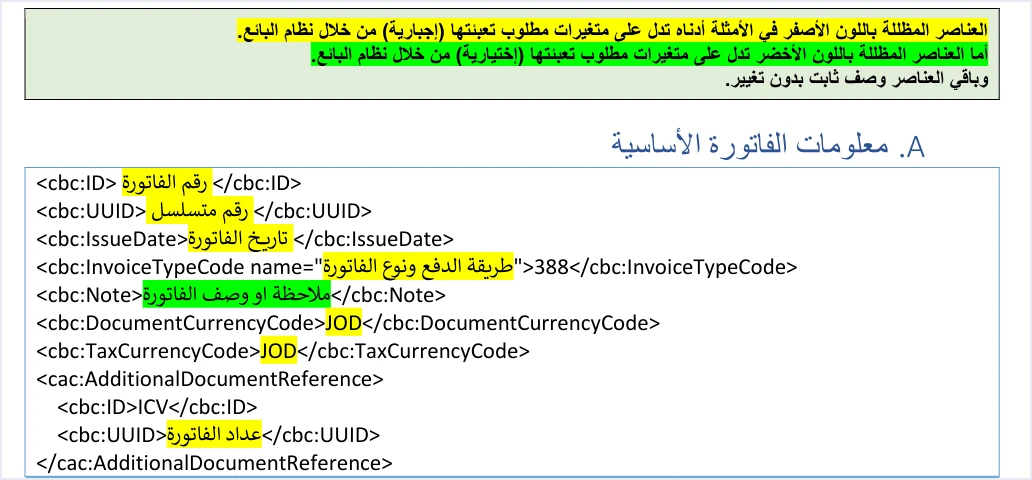
The technical guide’s shading: JoFotara mandatory fields and optional fields
The technical guide opens its templates with a color key that is repeated above every template. On page 12 of version 1.5 it reads as follows.
«العناصر المظللة باللون الأصفر … تدل على متغيرات مطلوب تعبئتها (إجبارية) من خلال نظام البائع. أما العناصر المظللة باللون الأخضر تدل على متغيرات مطلوب تعبئتها (اختيارية) … وباقي العناصر وصف ثابت بدون تغيير».
In English, the key says that elements shaded yellow are variables that must be filled in (mandatory) by the seller’s system, that elements shaded green are variables to be filled in (optional), and that the remaining elements are fixed description that does not change. The English is our rendering of ISTD’s Arabic text, and the Arabic is the authority.
That text gives three categories for everything you see in any template.
- Yellow Mandatory variable. A value that changes from one invoice to the next and that the seller’s system must supply, such as the invoice number, its date and its unique identifier.
- Green Optional variable. A value that changes from one invoice to the next and that the seller may choose to fill in, unless another condition makes it required on a particular invoice.
- Fixed Fixed description. The element names themselves and literal values such as
ICV,JOandVAT, which are copied without change.
The shading is the only signal in version 1.5 of what is mandatory and what is optional. So if you need to cite a field’s status in correspondence or in a technical specification, cite it as per the field shading in technical guide 1.5, and do not attribute the rule to any other source.
One point in the text deserves attention. In describing the green variables, the guide combines the phrase “to be filled in” with the label optional. It does not explain how a green element should be handled when you have no value for it, whether it is left out of the file or sent empty. If you meet this case, settle it with your software provider or with ISTD technical support, not by inference.
The five elements shaded green
Across all its templates, the guide shades five elements in green. One is in the header and four are in the buyer block.
Scroll the table sideways to see the remaining columns
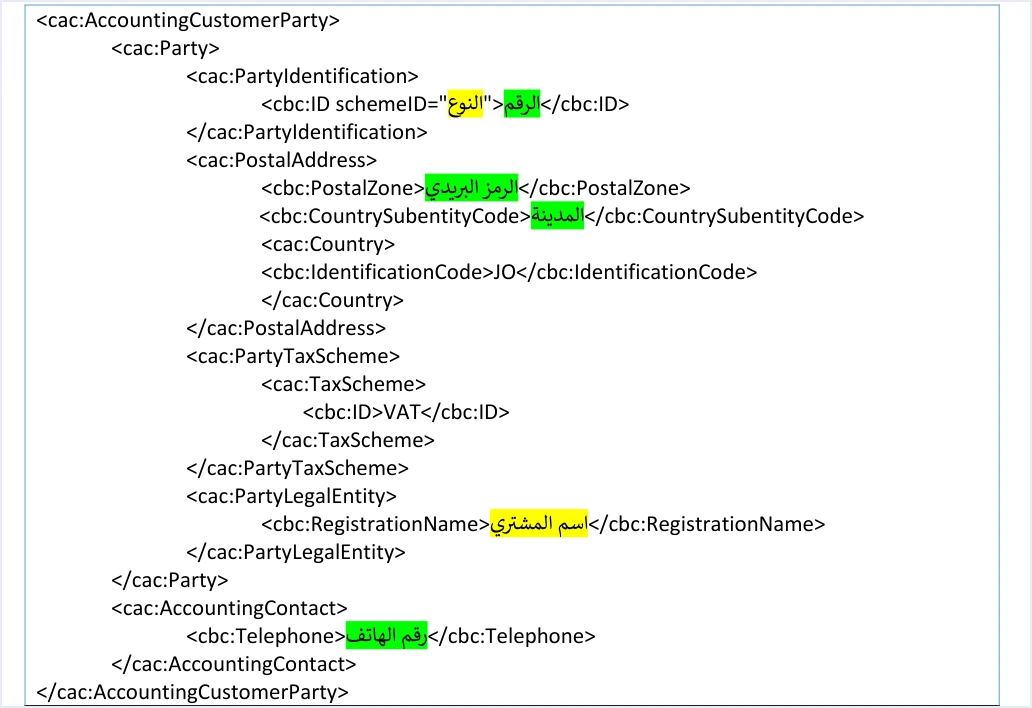
Four of the five sit in the buyer block. That is the block where a field’s status changes with the invoice type and the invoice value, as the conditions section below shows.
Being optional does not mean these values are unconstrained. If you send the postal code, it must not exceed 5 characters, or the response comes back with the message Postal code length is incorrect. If you send the phone number, it must be digits only, between 9 and 14 digits.
Reference table of fields by invoice block
The tables below bring together the main elements of each block and their status, not every element. The status in each table is taken from the shading of the guide’s own templates, namely the income invoice template (pp. 12 to 20) and the general sales tax invoice template (pp. 33 to 42). In the seller, totals and lines blocks, the guide shades every variable in yellow, including elements that are not in the tables, such as the tax category and its rate on the lines of a general sales tax invoice.
Do not copy the XML examples in the guide word for word as if they were valid files. Some of them contain documented defects, among them unique identifiers in an incorrect format and doubled quotation marks in the special tax examples. Use the templates to understand the structure, and build the values from your own data.
Header (basic invoice information)
The header elements are preceded by the file’s declaration line and then by the element cbc:ProfileID, with the value reporting:1.0 on every invoice. The opening Invoice tag must sit in full on a single line, or the error Invalid Invoice Minification comes back.
Scroll the table sideways to see the remaining columns
Seller
Scroll the table sideways to see the remaining columns
In the invoice file, VAT is only the fixed tax-scheme code of the UBL template; the tax itself is Jordan’s General Sales Tax (GST).
Buyer
Scroll the table sideways to see the remaining columns
How the same buyer details appear on the portal’s invoice form is covered in our article JoFotara invoice form fields.
Seller’s income-source sequence
Scroll the table sideways to see the remaining columns
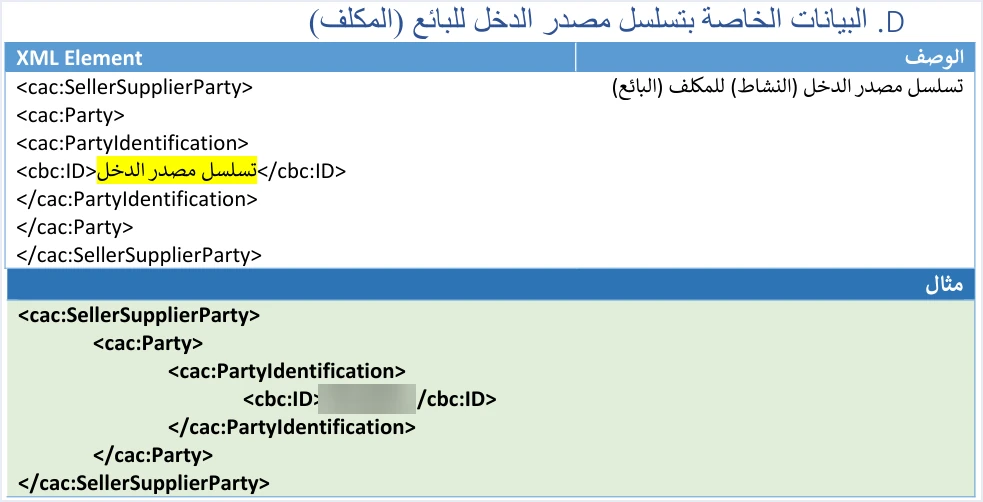
The taxpayer selects the income-source sequence when creating the linking credentials from the device linking option (ربط الأجهزة), and each pair of Client ID and Secret Key is tied to one sequence. The guide lists an error in this value among the leading causes of status code 500.
Totals
Scroll the table sideways to see the remaining columns
The point to take from this block is that the invoice-level discount is not a free field. If you discount the whole invoice, your software must spread that discount across the lines before sending.
Lines
Scroll the table sideways to see the remaining columns
Conditions that change a field’s status
The shading describes the template. Some rules in the guide, however, make a field’s value required on one invoice and not on another, or remove a whole block from a particular invoice type. These are the documented rules.
Buyer name
The buyer name element, cbc:RegistrationName, is shaded yellow in every template, but whether its value is required depends on the case. The technical guide requires it in two cases, when the invoice is a receivable (credit-sale) invoice, or when it is a cash invoice worth more than JOD 10,000 or its equivalent in foreign currencies. If the name is missing in either case, the response returns the message Bayer name is missing, spelled exactly as it appears in the guide.
Separately, Article 5(b) of Regulation No. 34 of 2019 on Organizing and Controlling Invoicing Affairs requires the buyer’s name to be stated clearly in a deferred sale, an installment sale and a sale paid in stages.
Buyer tax number
The buyer identifier value is shaded green in the template. The guide, however, makes the buyer’s tax number mandatory when the invoice is a development zones invoice, and it is sent with the identifier type TN. Here the field that is optional in the template becomes a condition for this invoice type to be accepted.
Income invoice
An income invoice carries no TaxTotal block, either at line level or at invoice level. Its lines hold only quantity, price, discount and name. Anyone who reads the general sales tax invoice template and applies it to an income invoice will add a block that has no place there.
Return invoice
A return invoice adds a reference to the original invoice that carries its number, its unique identifier and its total. It also adds a mandatory return reason, written as free text. The buyer details on the return must match those on the original invoice. On general sales tax and special tax invoices, the return header does not carry the cbc:Note element, while the income return invoice keeps it as optional.
Consumer price
The cac:ItemPriceExtension element appears only for a taxpayer who has been granted the consumer price permission on request to ISTD. That permission is available only to taxpayers registered for General Sales Tax or for Special Sales Tax. When it is used, it applies to every line of the invoice, and it must not be lower than the unit price.
What the guide does not document, so do not treat it as optional
An optional field is one the guide shades green. Anything that does not appear in the templates at all has an undocumented status, and the difference between the two changes how you build the file. The guide is silent on these five cases, among others.
- Other buyer address elements. The UBL 2.1 standard defines elements for the street, the city and the building number. The buyer template in the guide, however, gives only the postal code and the governorate code for the address. These other elements are undocumented in the guide, so they cannot be described as optional or as mandatory.
- Handling an empty green element. Version 1.5 of ISTD’s technical guide does not state whether a green element with no value is left out of the file or sent empty.
- Unit codes. The unit
PCEis the only one shown on the lines of new invoices. The guide gives no list of other units and no rule for accepting or rejecting them. - The currency attribute on amounts. The guide’s examples use the value
JOin thecurrencyIDattribute on every amount. The guide does not say whether any other value is accepted. - Exchange rate. The guide contains no element for an exchange rate and no rule for converting an invoice in a foreign currency to dinars.
The rule in all of these cases is the same. The guide’s silence about an element is not permission to send it or to leave it out. Check with ISTD technical support or with your software provider before you build on it.
Four mistakes in reading the shading
- Dropping the buyer name element because its value may not be required. The element is yellow in every template. What changes from one invoice to the next is whether its value is required, depending on the payment method and the amount.
- Leaving the buyer identifier empty on a development zones invoice. The green shading in the template does not cancel the requirement for the buyer’s tax number on this invoice type.
- Editing fixed description. Unshaded values such as
ICV,VATandreporting:1.0are copied as they are, and splitting the openingInvoicetag over more than one line returns an error. - Reading the guide’s silence as a choice. An element that does not appear in the template is undocumented. It is not green.
If an invoice is rejected because of a missing field or a value outside the limits, the code 400 messages and how to read them are covered in our article JoFotara error codes.
How Qoyod handles the invoice fields
When the invoice is issued from accounting software linked to the system, you do not write the XML file by hand or check the shading of its fields. Qoyod builds the invoice file in UBL 2.1 format with its unique identifier (UUID) and sends it to the National Invoicing System without any manual intervention. This happens through Qoyod’s integration with the National Invoicing System.
- A check before sending. Qoyod checks each invoice at field level as it is created, covering the tax number, the document type and payment method, the General Sales Tax rate and whether the lines are complete, and alerts you to any error before the invoice is sent, to reduce rejections.
- The status of each invoice in front of you. ISTD returns the invoice status and any error message, and Qoyod shows them in its status panel.
- A resend with the same identifier. The status panel lists invoices that were not sent and need to be resent, and when you resend one it keeps the same UUID.
The pre-send check is an alert, not a guarantee. It covers the four items listed above, and accepting the invoice remains a decision for the National Invoicing System alone.
For a wider view of the system and how to connect your business to it, read our article Jordan’s National E-Invoicing System.
E-invoicing and full accounting in one system
Qoyod is integrated with the National Invoicing System (JoFotara). You issue your invoice in Jordanian dinars from Qoyod, it is booked to your ledgers automatically and sent to the system, and once it is accepted it comes back with a QR code from the Income and Sales Tax Department.
Frequently asked questions
What are the JoFotara mandatory fields and optional fields?
They are set by the shading in technical guide 1.5. Yellow marks a mandatory variable, green marks an optional variable, and anything unshaded is fixed description. There are five green elements, the note in the header, the buyer identifier value, the postal code, the governorate code and the phone number.
Is the buyer name an optional field?
The guide shades the buyer name element in yellow in every template. Its value is required on a receivable invoice, and on a cash invoice worth more than JOD 10,000 or its equivalent in foreign currencies.
When does the buyer’s tax number become mandatory?
It becomes mandatory when the invoice is a development zones invoice, even though the buyer identifier value is shaded green in the template.
Are the other buyer address elements optional?
The guide documents two buyer address elements, the postal code and the governorate code, and both are optional. The street, the city and the building number do not appear in the template, so their status is undocumented and they are not optional.
Does the income invoice carry tax fields?
The income invoice has no TaxTotal block at line level or at invoice level. Its lines hold only quantity, price, discount and name.
Can I copy the XML examples in the guide as they are?
Some of the guide’s examples contain defects, among them unique identifiers in an incorrect format and doubled quotation marks, so they should not be treated as valid files. Use them to understand the structure, and build the values from your own invoice data.
References
- Income and Sales Tax Department (ISTD), technical guide for integrating with the National Invoicing System through the API, version 1.5 (in Arabic).
- Regulation No. 34 of 2019 on Organizing and Controlling Invoicing Affairs, as amended, consolidated text (in Arabic), Article 5.
- ISTD’s National Invoicing System guides (in Arabic)




