




The technical guide issued by the Income and Sales Tax Department (ISTD) for Jordan’s National Invoicing System (JoFotara) includes a complete model of a return invoice on a sale subject to General Sales Tax (GST), running from page 45 to page 56 of version 1.5. This article is a JoFotara sales tax return XML example read block by block. It shows what each element carries, what kind of value goes into it, the rule the guide states for it, and what differs between the return and the original sales invoice. Here “return” means the return invoice (credit note), not the periodic sales tax return that a business files.
The article is meant for whoever builds the link between an accounting or resource-planning system and the National Invoicing System. It explains the structure of the example and is not a file ready to send. Neither the guide’s example nor any snippet in this article was sent to the system, because the guide documents no open test environment for taxpayers or developers. Note also that the example’s values do not match the sales invoice it is supposed to be returning from, and we show that, with its pages, in a separate section. For the sale that a return reverses, see our article on the general sales tax invoice in JoFotara.
JoFotara sales tax return XML example: where it sits in the guide and how to read it
The model appears in the fourth section, on the general sales return invoice (رابعاً: فاتورة إرجاع المبيعات العامة), right after the model for a new general sales invoice. In every model the guide follows the same order, with the template first, then a table describing each element, then an example with written values.
The template separates three kinds of elements by color (p. 12). Elements shaded yellow are “mandatory” variables that the seller’s system fills in, elements shaded green are “optional” variables, and the guide describes the remaining elements as a fixed description with no change. How to read this shading is explained in our article on mandatory and optional fields in the invoice file. The whole file starts with the XML declaration and the element cbc:ProfileID with the value reporting:1.0, as in every invoice in the system, and it is built to the UBL 2.1 standard.
The guide divides the return model into seven blocks lettered A to G. The table below summarizes each block, its pages and what distinguishes it from the sales invoice.
Scroll the table sideways to see the remaining columns
Only two blocks are entirely new, the reference inside the header and the return reason block. The rest exist in the sales invoice, but their values in the return follow extra rules that tie them to the original invoice.
Block A: the return invoice header and the original invoice reference (pp. 46 and 47)
The first block gathers the data of two documents in one place. Its top part belongs to the return invoice itself, its middle part points to the original invoice, and its last part carries the invoice counter.
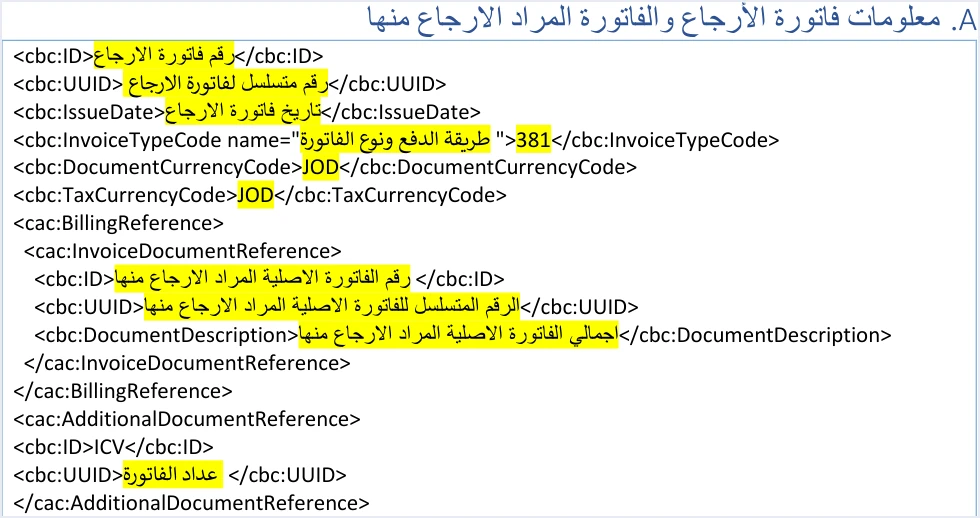
The elements below follow the order in which they appear in the template.
cbc:IDandcbc:UUIDin the header. The template describes them as the return invoice number and the serial identifier of the return invoice. So they are a new number and a new unique identifier that your system generates for the new document, and the guide makes the number and the identifier together the key of the invoice. The identifier is covered in our article on the JoFotara UUID.cbc:IssueDate. The date of the return invoice in the format yyyy-mm-dd, as in all the XML examples in the guide.cbc:InvoiceTypeCode. The element value is 381 for a return invoice, instead of 388 for a new invoice. In thenameattribute the template writes “payment method and invoice type”, and a return invoice takes the same code as the original invoice. Examples the guide gives for return codes in this family (p. 47) are 012, 022, 112, 122, 212 and 222, where the last digit, 2, is the number of the General Sales Tax family.cbc:DocumentCurrencyCodeandcbc:TaxCurrencyCode. The template shows JOD in both, and a return invoice takes the same currency as the original invoice.cac:BillingReference. It carries three values, all from the original invoice, namely its number, its unique identifier and its total, incbc:DocumentDescription. Each value and where it comes from in your system are explained in our article on the original invoice reference.cac:AdditionalDocumentReference. It carries the fixed identifier ICV and then the invoice counter, which the taxpayer generates in sequence. The counter is covered in our article on the JoFotara ICV.
The header template for a general sales return has no cbc:Note element, which is optional in the sales invoice, while it remains optional in the header of an income invoice return. The snippet below shows the structure of the block, with an English description where each value goes. It is an explanatory snippet and is not sent as it is.
<cbc:ID>new return invoice number</cbc:ID>
<cbc:UUID>new unique identifier generated by your system for the return</cbc:UUID>
<cbc:IssueDate>return date in the format yyyy-mm-dd</cbc:IssueDate>
<cbc:InvoiceTypeCode name="original invoice code, for example 012">381</cbc:InvoiceTypeCode>
<cbc:DocumentCurrencyCode>currency of the original invoice</cbc:DocumentCurrencyCode>
<cbc:TaxCurrencyCode>currency of the original invoice</cbc:TaxCurrencyCode>
<cac:BillingReference>
  <cac:InvoiceDocumentReference>
    <cbc:ID>number of the original invoice</cbc:ID>
    <cbc:UUID>unique identifier of the original invoice</cbc:UUID>
    <cbc:DocumentDescription>full total of the original invoice</cbc:DocumentDescription>
  </cac:InvoiceDocumentReference>
</cac:BillingReference>
<cac:AdditionalDocumentReference>
  <cbc:ID>ICV</cbc:ID>
  <cbc:UUID>invoice counter value</cbc:UUID>
</cac:AdditionalDocumentReference>
The phrases inside the snippet are not values to send. They indicate what goes in their place, and they replace the Arabic descriptive phrases of the guide’s template.
Blocks B and D: seller data and the income-source sequence (pp. 48 and 50)
The return adds nothing new to these two blocks, since they have the same structure as the sales invoice.
- Seller data (
cac:AccountingSupplierParty). The country code JO, the seller’s tax number incbc:CompanyID, the tax-scheme codeVAT, and the seller’s name incbc:RegistrationNameas registered with ISTD. - Income-source sequence (
cac:SellerSupplierParty). Thecbc:IDelement inside it carries the income-source sequence. The linking credentials, meaning the Client ID and the Secret Key, are each tied to one sequence.
In its table of errors (p. 101) the guide states that an error in the tax number or in the income-source sequence is one of the causes of the 500 response.
Block C: buyer data and matching the original invoice (pp. 49 and 50)
The buyer block in the return has the structure of the buyer block in the sales invoice, from the identification type and its value to the postal code, the governorate code, the phone and the name. The difference is one rule, which the guide places directly above the template.

The guide states that the buyer data in the return invoice must match the buyer’s data in the linked original sales invoice (our rendering of the Arabic text). The practical result is that your system does not read the buyer data from the customer’s current record when it creates the return. It reads it from the record of the original invoice as it was sent. If the customer’s phone or address changed after the sale, the return keeps the data the original invoice carried.
The field rules still apply. The postal code has a maximum of 5 characters, the governorate code comes from the list the guide gives, and the buyer name is mandatory in a receivable invoice and in a cash invoice whose value exceeds 10,000 dinars or its equivalent. Because the return carries the data of the original, whatever was written there is carried over as it is. The buyer template in this model matches the buyer template in the model for returning a special tax invoice (pp. 76 and 77) in structure and shading.
Block E: the return reason in PaymentMeans (p. 50)
This block does not exist in the sales invoice, and it is mandatory in every return.
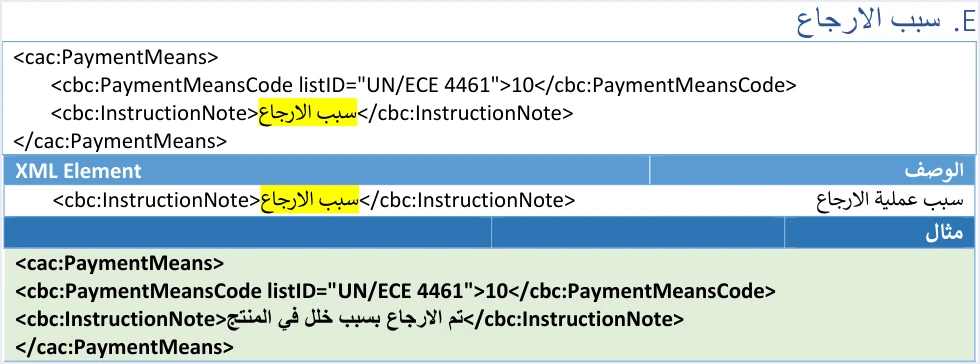
cbc:PaymentMeansCode. The value 10 with the attributelistID="UN/ECE 4461". It is not shaded in the template, which means it is a fixed description that is carried over as it is.cbc:InstructionNote. Free text in which you write the reason for the return. The guide’s example is “The return was made because of a product defect” (تم الارجاع بسبب خلل في المنتج).
The name of the block suggests a payment method, but it does not carry one. The payment method in the National Invoicing System is the second digit of the name attribute code in cbc:InvoiceTypeCode, and the return takes it from the original invoice. The block and what goes into it are explained in our article on the return reason.
<cac:PaymentMeans>
  <cbc:PaymentMeansCode listID="UN/ECE 4461">10</cbc:PaymentMeansCode>
  <cbc:InstructionNote>the reason for the return as free text</cbc:InstructionNote>
</cac:PaymentMeans>
Block F: return totals for the returned part only (pp. 51 and 52)
In a return invoice the totals block carries the figures of what is being returned only, not the figures of the original invoice. The guide describes the totals as being “for the part to be returned”, and it describes the invoice tax total in cac:TaxTotal as the sum of the tax values to be returned from the invoice (our rendering of the Arabic text).
So two total figures appear in a return file and they must not be mixed up. One is the return total in the totals block, and the other is the full total of the original invoice in cbc:DocumentDescription inside the reference block. The rounding rule that the guide repeats applies to every amount, which is up to 3 decimal places and at most 9, with a difference of no more than 0.001.
If the system replies with the message Total General Amount is Not Correct, our article on JoFotara error codes explains why invoices are rejected and how to fix them.
Block G: return lines and returned quantities (pp. 53 to 56)
The lines block is where the return actually happens, because a return in the National Invoicing System is made on quantities alone. A returned line has the structure of a sales invoice line, covered in our article on JoFotara InvoiceLine, with the following rules.
Scroll the table sideways to see the remaining columns
The guide sets three rules for quantities. A return is made on quantities, not on amounts. The returned quantity may not exceed the quantity sold in the original invoice. More than one partial return is allowed on the same invoice until the quantities run out. For the sale being reversed from the portal side, see our article on how to return an invoice on the JoFotara portal.
Two things stand out in the lines template. First, the lines of a general sales return add the element cbc:BaseQuantity with the unit C62 and the value 1. It does not appear in the lines of a sales invoice, and the guide gives no list of units and no rule for it. Second, the template of a return line includes the element cbc:TaxableAmount, the taxable amount, whose value is the returned quantity multiplied by the unit price after the discount is deducted. The classification of each line is explained in our article on tax categories S, Z and O, and the tax rates themselves in our article on General Sales Tax in Jordan.
The discount share in the returned line (p. 55)
If the original line carried a discount, the discount is not carried over to the return as it is, unless the whole quantity is returned.
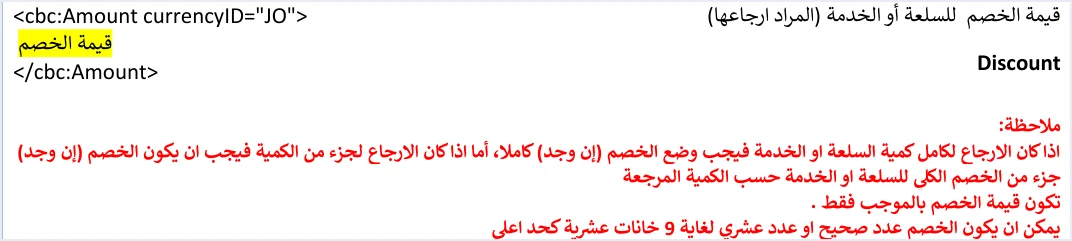
The guide’s wording, in our rendering of the Arabic text, is that if the return covers the whole quantity of the goods or service, the discount (if any) must be entered in full, and if the return covers part of the quantity, the discount (if any) must be a part of the total discount on the goods or service according to the returned quantity. It adds that the discount value is positive only, and that it is a whole or decimal number with up to 9 decimal places.
The guide ties the discount share to the returned quantity but gives no formula for it. So we do not present a formula here as coming from the guide. The discount on the sales invoice itself, including how a discount on the invoice total is distributed over the lines, is explained in our article on the invoice discount in JoFotara.
Where the guide’s example does not match its original invoice
After each template the guide gives an example with written values. The example of the general sales return does not match the example of the new general sales invoice that precedes it, so it is not suitable as a reference for values. These points stand out in it.
- The unique identifier in the reference (p. 47). The example points to a unique identifier that differs from the identifier of the original invoice in its own example.
- The totals (pp. 47, 55 and 56). The return figures in the example do not match the figures of its original invoice, so none of them is suitable as a reference for calculating a real return.
- The classification of the exempt line (pp. 55 and 56). The line that carries the classification
Zat 0% in the original invoice appears in the return example with the classificationSand a rate of 10%.
These notes do not touch the structure of the model, since the template and the description of the elements are what you build on. We do not recalculate the example’s figures here or suggest replacement figures, because the guide gives no matching example. The practical rule is to build every return from the stored record of the original invoice. Take from it the number, the identifier, the total, the buyer data, and the line numbers, names and prices, and then write only the returned quantities.
The guide’s other two return models have separate articles, one for the return of an income invoice and one for the return of a special tax invoice, each with its own notes on its example.
Pre-submission checklist
The checklist below is based on the guide’s rules stated above, and its order follows the order of the blocks in the file.
- Header. A new number and a new unique identifier for the return invoice, the value 381, the
nameattribute with the code of the original invoice, the same currency, and the date in the format yyyy-mm-dd. - Reference. The number, identifier and full total of the original invoice, taken from its stored record.
- Counter. The next counter value in your system’s sequence.
- Seller and sequence. The tax number, the seller’s name and the income-source sequence as in the linking data.
- Buyer. The buyer data as in the original invoice, not as in the customer record today.
- Reason. The code 10 and the reason for the return in
cbc:InstructionNote. - Lines. Line number, name and price as in the original, a quantity greater than zero that does not exceed what remains, and a discount share that follows the returned quantity.
- Totals. Totals of the returned part only, and a tax total equal to the sum of the tax of the returned lines.
- After sending. Read the status from
EINV_STATUS, and resend after a failure with the same number and identifier.
The guide’s guidelines (p. 104) recommend storing the invoice number, its identifier, its QR code and its status, and keeping the line numbers of the sales invoice because the return matches them. Since a return is tied to the original invoice from several directions, the practical result is that your system should also store, for every accepted invoice, its total, its buyer data and its line quantities.
How Qoyod handles the invoice file
Building the return file and keeping what it needs from the original invoice is work that falls on the taxpayer’s system, meaning the accounting software linked to the National Invoicing System. The document types in Qoyod for Jordan are the four that the National Invoicing System defines, which are the income invoice, the general sales tax invoice, the special tax invoice and the return invoice (credit note).
- Building and sending the file. Qoyod builds the invoice file in UBL 2.1 format with its unique identifier (UUID) and sends it to the National Invoicing System without any manual intervention.
- A check before sending. Qoyod checks each invoice at field level as it is created, covering the tax number, the document type and payment method, the General Sales Tax rate and whether the lines are complete, and alerts you to any error before the invoice is sent, to reduce rejections.
- The status of each invoice in view. ISTD returns the invoice status and any error message, and Qoyod shows them in its status panel, with states that include sent (مرسلة), previously sent (مرسلة مسبقًا) and not sent (لم تُرسل) together with the error message.
- Resending with the same identifier. The status panel lists invoices that were not sent and need to be resent, and when you resend one it keeps the same UUID.
For a wider view of the system and how to connect your business to it, read our article Jordan’s National E-Invoicing System. To see what Qoyod offers, visit our page on the National Invoicing System.
E-invoicing and full accounting in one system
Qoyod is integrated with the National Invoicing System (JoFotara). You issue your invoice in Jordanian dinars from Qoyod, it is booked to your ledgers automatically and sent to the system, and once it is accepted it comes back with a QR code from the Income and Sales Tax Department.
Frequently asked questions
Can I copy and send the guide’s XML example for returning a general sales tax invoice?
The example is useful for understanding the structure and the order of the elements only. Its values do not match the original invoice example in the unique identifier, the totals and the classification of one line (pp. 47, 55 and 56), and it was not tested on the system because the guide documents no test environment. An actual return invoice is built from the record of the original invoice in your system.
What value goes in InvoiceTypeCode for a return invoice?
The value 381 goes in the element itself, and the name attribute keeps the code of the original invoice, such as 012 for a local cash general sales invoice or 022 for a local receivable one. The value says the document is a return, and the code says the type of invoice it is returning from.
Do I add the Note element to the return invoice header?
The guide’s header template for a general sales return has no such element, and the reason for the return is written in InstructionNote inside the PaymentMeans block. In the header of an income invoice return the element remains optional.
How is the discount calculated on a line that was partly returned?
The guide requires the discount to be a part of the total discount on the goods or service according to the returned quantity, and to be entered in full if the whole quantity is returned. The guide gives no formula for this share, and the value is written as a positive number with up to 9 decimal places.
Should I use the customer’s current data in the return invoice?
No, the guide requires the buyer data in the return invoice to match the buyer’s data in the linked original sales invoice. So the data is taken from the record of the original invoice as it was sent, even if something changed in the customer record after the sale.
Can I return an amount without a quantity in a general sales tax invoice?
No, the guide states that a return is made on quantities only, within the quantity sold in the original invoice. More than one partial return is allowed on the same invoice until its quantities run out.
References
- Income and Sales Tax Department (ISTD), technical guide for integrating with the National Invoicing System through the API, version 1.5 (in Arabic), pp. 10, 12, 45 to 56, 76, 77, 101 and 104.




