




When a JoFotara return exceeds original quantity limits, the return invoice sent to the National Invoicing System (JoFotara) asks to take back more of a good or service than the original invoice sold. The technical guide issued by the Income and Sales Tax Department (ISTD) rules this out explicitly. Under the guide, a return is made on quantities only, it cannot go beyond the quantity sold on the original invoice, and it may be made in several installments until those quantities are used up. ISTD publishes this guide in Arabic only; the English here is our rendering, and the Arabic text is the authority.
Looking at the latest return invoice on its own is not enough, because the count includes the returns that came before it. The rule applies to the line you are returning from, that line is identified by its number on the original invoice, and the quantity still available for return goes down with every return invoice already accepted against it.
This article sets out the rule as it appears in version 1.5 of the technical guide. It then shows how to work out the remaining quantity for each line with an example, lists possible reasons for going over it, gives the steps to correct the return invoice and send it again, and explains when to contact ISTD. For the wider set of JoFotara error messages and status codes, see our article JoFotara Error Codes.
The rule in the technical guide: quantities only, within what was sold
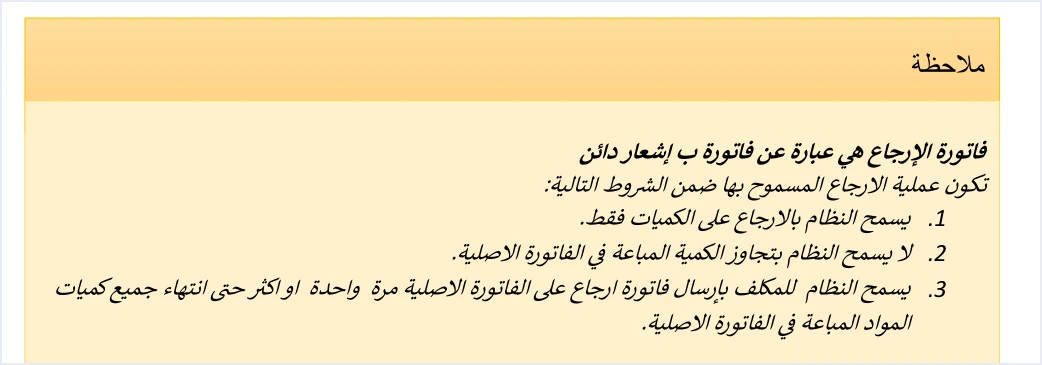
The guide opens its return invoice section with a note that defines a return invoice as a credit note, and then sets the conditions for an allowed return in three points.
«يسمح النظام بالارجاع على الكميات فقط. لا يسمح النظام بتجاوز الكمية المباعة في الفاتورة الاصلية. يسمح النظام للمكلف بإرسال فاتورة ارجاع على الفاتورة الاصلية مرة واحدة او اكثر حتى انتهاء جميع كميات المواد المباعة في الفاتورة الاصلية».
In English, the note says that the system allows returns on quantities only, that it does not allow the quantity sold on the original invoice to be exceeded, and that it allows the taxpayer to send a return invoice against the original invoice once or more, until all the quantities of the items sold on the original invoice are used up.
Read together, the three conditions make one rule.
- The unit of a return is the quantity. You do not return an amount or part of a price. You return a number of units of a good or service that appeared on the original invoice.
- The ceiling is the quantity sold. What was sold on the original invoice is the most that can be returned from it.
- Returns can repeat until the quantity runs out. You may send more than one return invoice against the same original invoice, until the quantities of the items sold on it are used up.
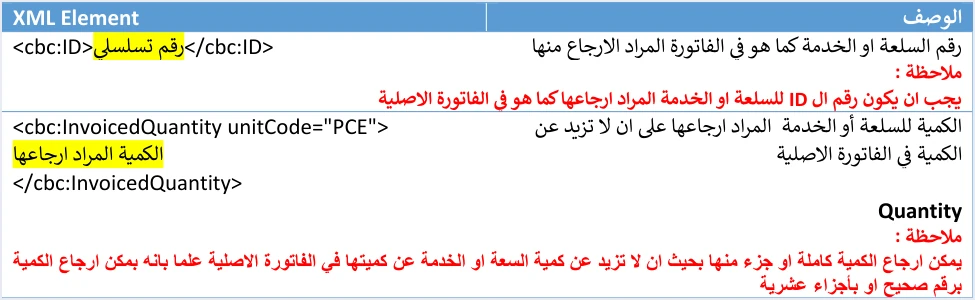
The guide comes back to the same rule at line level, in the table that describes the lines of a return invoice. It describes the quantity field cbc:InvoicedQuantity as the quantity of the good or service to be returned, provided it is no more than the quantity on the original invoice, and adds this note beneath it.
«يمكن ارجاع الكمية كاملة او جزء منها بحيث ان لا تزيد عن كمية [السلعة] او الخدمة عن كميتها في الفاتورة الاصلية علما بانه [يمكن] ارجاع الكمية برقم صحيح او بأجزاء عشرية».
In English, the note says that the full quantity or part of it can be returned, as long as the quantity of the good or service is no more than its quantity on the original invoice, and that the quantity can be returned as a whole number or in decimal parts.
The comparison is therefore made line by line, not on the invoice total. It is not enough for the total you return to be lower than the total you sold. The quantity of each returned line has to stay within that line’s quantity on the original invoice.
How the system knows which line you are returning from: the line number cbc:ID
Each good or service on an invoice is sent in a cac:InvoiceLine element, and its first field is the line number cbc:ID, a sequential number that does not repeat within a single invoice. On a return invoice, the guide requires the returned line to carry the same number.
«يجب ان يكون رقم ال ID للسلعة او الخدمة المراد ارجاعها كما هو في الفاتورة الاصلية».
In English, the guide says that the ID number of the good or service to be returned must be the same as on the original invoice.
The guide also requires the description of the good or service, cbc:Name, and the unit price, cbc:PriceAmount, to be the same as on the original invoice. On a return line, then, only the quantity changes, along with what follows from it, which is the line amount, its tax and the discount if there is one.
This is why the guide requires the line number to be kept from the moment of sale.

The line number matters for the over-quantity problem for this reason. The returned quantity is compared with the quantity of the line that carries the same number on the original invoice. The rules for the line number and the other line elements are covered in our article JoFotara InvoiceLine. A repeated line number inside one invoice is a different problem, which comes back with the message The ID number must be unique.
The running total: how much of each line you can still return
The guide’s third condition allows more than one return invoice against the original invoice, until all the quantities of the items sold are used up. The plain reading of the second and third conditions together is that the ceiling applies to the total returned from a line across all return invoices, not to each return invoice separately. If you sold ten units and have returned six of them, only four units remain available for return.
The formula you need for each line is simple. It is our own wording, not the text of the guide.
Quantity available for return = quantity on the original invoice − total quantity returned from the same line in return invoices already accepted.
Only accepted return invoices count toward that total, meaning those that came back with the status SUBMITTED together with the QR code. A return invoice rejected with the status NOT_SUBMITTED was not accepted and no QR code comes back with it, so leave it out of your count.
A worked example
The following example is our own illustration, not one of the guide’s examples. An original sales invoice has two lines.
- Line 1. 10 units of an item at JOD 5.000 per unit.
- Line 2. 4 units of another item at JOD 12.500 per unit.
The business then sent return invoices against this invoice one after another. The table shows the effect of each one on the available quantity.
Scroll the table sideways to see the remaining columns
In the third return, the requested quantity (2.5) did not exceed the line’s quantity on the original invoice (10), but it did exceed what was left of it after two earlier returns. This is the case that is missed when each return is compared with the original invoice alone. The correction is to return only one unit from line 1 and keep the three units of line 2 as they are, because they equal what remains of that line and do not exceed it. If the customer really did bring back more than one unit of the first item, first check whether the extra quantity was sold on another invoice, and return it from that invoice.
The example also shows that fractions are accepted in the returned quantity, since the guide allows the quantity to be returned as a whole number or in decimal parts.
Why a JoFotara return exceeds original quantity: possible causes
The guide gives no causes for this error. It only sets the rule. What follows are possibilities we suggest for checking your software or integration code, not causes stated in the guide.
- Earlier returns not counted. The software takes the quantity straight from the original invoice and does not subtract what was returned before.
- Wrong line number. The return line points to a different line number on the original invoice, so the quantity is compared with a smaller line.
- Wrong original invoice. The return invoice carries the number and identifier of another invoice, so the quantities are compared with an invoice other than the one on which the item was sold.
- A duplicate return under a new identifier. The guide warns that relying on automatic generation of the UUID without storing it may lead to duplicate invoices on resend. If a return was sent twice under two different identifiers, it may use up the quantity twice, and the next return goes over what remains.
- Merging similar lines. The software combines one item that appeared on two lines of the original invoice into a single return line, so its quantity exceeds that of either line.
How to correct the return invoice and send it again
A return invoice that was rejected was not issued. Correcting the number on screen is not enough. A new return file with correct quantities has to go out. Follow these steps in order.
- Read the status of the return invoice and its message. The final status is in the
EINV_STATUSfield, and the reason for rejection is in theEINV_MESSAGEfield. The technical guide documents no specific message for this case. Rely on what actually comes back in the response, and store it as it is. - Pull the lines of the original invoice from your system. Take their numbers, quantities, descriptions and prices, together with the original invoice’s number and its unique identifier.
- Work out what is available on each line. From each line’s quantity, subtract what was returned from it in accepted return invoices against the same original invoice.
- Set the quantity of each returned line. It must not exceed what is available on that same line.
- Match the line to its original. The line number, the item description and the unit price must be as they are on the original invoice.
- Recalculate the discount and amounts. The line amount, its tax and its discount are based on the returned quantity alone, as explained in the next section.
- Check the link to the original invoice. The
cac:BillingReferenceelement carries the original invoice’s number incbc:ID, its identifier incbc:UUIDand its total incbc:DocumentDescription, which our article JoFotara BillingReference covers in full. The return reason is written incbc:InstructionNote(see our article JoFotara Return Reason), and the buyer details match those on the original invoice. - Resend under the same return invoice number and identifier. When a send fails, the guide requires the resend to use the same invoice number and unique identifier, without generating a new identifier.
How to confirm the correction worked
Judge the result from the invoice status, not from the HTTP code alone. If the status comes back as SUBMITTED with the QR code in EINV_QR, the return invoice has been accepted. At that point, record the returned quantities against each line in your system, because they are now part of the running total from which any later return will be calculated.
The discount on a partial return
If the line carried a discount on the original invoice, the guide sets out how it appears on the return invoice.
«اذا كان الارجاع لكامل كمية السلعة او الخدمة فيجب وضع الخصم (إن وجد) كاملا، أما اذا كان الارجاع لجزء من الكمية فيجب ان يكون الخصم (إن وجد) جزء من الخصم الكلي للسلعة او الخدمة حسب الكمية المرجعة».
In English, the guide says that if the full quantity of the good or service is returned, the discount (if any) must be included in full, and that if part of the quantity is returned, the discount (if any) must be a part of the total discount on the good or service according to the returned quantity.
The guide gives no formula for that part. It says only that the part follows the returned quantity. The plain reading is to spread the discount in proportion to the quantity. If line 1 in our example carried a discount of JOD 2.000 on the ten units, returning 3 units would, on this reading, carry a discount of JOD 0.600 (2.000 × 3 ÷ 10), and the returned line amount would be JOD 14.400 (3 × 5.000 − 0.600). These figures are our own illustration, not a formula issued by ISTD.
The totals of the return invoice cover only the part being returned, as the guide states, so do not carry the original invoice’s totals over to them. The original invoice’s total belongs in the cbc:DocumentDescription field inside the reference element, not in the return totals.
Summary of the rules in a table
When the quantities run out or the rejection continues
Once the running total for a line reaches that line’s quantity on the original invoice, nothing more can be returned from it under the third condition. The guide describes no other route for correcting anything beyond that, or for a correction that is not about quantity, because returns under the guide are on quantities only. A larger quantity is therefore not a way around the limit, since the return rules exclude it.
If you have recalculated and found that the requested quantity is within what is available, and the line number, the original invoice number and its identifier are correct, but the rejection continues, read the full text in EINV_MESSAGE and then contact ISTD. The technical guide refers further questions to the technical support committee for invoicing affairs at the Income and Sales Tax Department, through the ISTD website. Attach to your request the return invoice number and its identifier, the original invoice number and its identifier, and the text of the message as it came back.
For invoices you issued on the portal before linking your accounting software, ISTD’s questions and answers guide states that the platform lets you return invoices sent through it in all cases, whether or not the business has linked a system. The portal steps are in our article Return an Invoice on the JoFotara Portal.
Pre-submission checklist
- Each returned line carries the same line number
cbc:IDthat it carried on the original invoice. - The item description and unit price on each returned line are as they are on the original invoice.
- The quantity of each line is no more than its original quantity minus what was returned from it in accepted return invoices.
- The comparison was made line by line, not on the total quantities of the invoice.
- The discount is in full if the whole line quantity was returned, and a part of it according to the returned quantity if the return is partial.
- The totals of the return invoice cover only the returned part.
- The reference element carries the original invoice’s number, its identifier and its total, and the return reason is written.
- The buyer details match those on the original invoice.
- Accepted return invoices are stored in your system with their quantities per line, so that the next return is calculated from them.
How Qoyod helps
When you issue your invoices from accounting software, you do not write the XML file by hand. Qoyod builds the invoice file in UBL 2.1 format with its unique identifier (UUID) and sends it to the National Invoicing System without any manual intervention. The document types in Qoyod for Jordan are the four that the system defines, which are the income invoice, the General Sales Tax invoice, the special tax invoice and the return invoice. Qoyod’s integration with the National Invoicing System works on this layer as follows.
- Checking before sending. Qoyod checks each invoice at field level as it is created, covering the tax number, the document type and payment method, the General Sales Tax rate and whether the lines are complete, and alerts you to any error before the invoice is sent, to reduce rejections.
- Every invoice’s status in view. ISTD returns the invoice status and any error message, and Qoyod shows them in its status panel.
- Resending with the same identifier. The status panel lists invoices that were not sent and need to be resent, and when you resend one it keeps the same UUID.
The pre-send check is an alert, not a guarantee. It covers the four checks listed above, and the final decision rests with ISTD.
Where to go next
- The elements of a line and their rules are in our article JoFotara InvoiceLine.
- The reference to the original invoice is in our article JoFotara BillingReference.
- Other JoFotara errors are listed in our article JoFotara Error Codes.
- The full picture of the system. For a wider view of the system and how to connect your business to it, read our article Jordan’s National E-Invoicing System.
- Qoyod’s integration with the system. To see how you issue your invoices and follow their status from one program, visit our National Invoicing System page.
E-invoicing and full accounting in one system
Qoyod is integrated with the National Invoicing System (JoFotara). You issue your invoice in Jordanian dinars from Qoyod, it is booked to your ledgers automatically and sent to the system, and once it is accepted it comes back with a QR code from the Income and Sales Tax Department.
Frequently asked questions
Does the National Invoicing System accept a return of more than was sold?
It does not accept it. The technical guide states that the system does not allow the quantity sold on the original invoice to be exceeded, and that the quantity of a returned line is no more than its quantity on the original invoice.
Can I return the same line in more than one installment?
The guide allows a return invoice to be sent against the original invoice once or more, until the quantities of the items sold on it are used up. Each time, work out what remains of the line after subtracting what was returned from it in accepted return invoices.
Can the returned quantity be a fraction?
It can. The guide states that the quantity can be returned as a whole number or in decimal parts, provided it is no more than the line’s quantity on the original invoice.
Can I return an amount instead of a quantity?
The guide states that the system allows returns on quantities only. A return line carries a quantity of a good or service that appeared on the original invoice, with the same description and unit price.
What links a return line to the line on the original invoice?
The line number cbc:ID links them. The guide requires the number of the returned good or service to be the same as on the original invoice, and requires that number to be kept when the sales invoice is issued so it can be used for returns.
Does a rejected return invoice use up the available quantity?
A return invoice that came back with the status NOT_SUBMITTED counts as an invoice that was not issued, and no QR code comes back with it. So do not count it among the returned quantities, and count only accepted return invoices.
References
- Income and Sales Tax Department (ISTD), technical guide for integrating with the National Invoicing System through the API, version 1.5 (in Arabic), pp. 23, 29, 30 and 104.
- Income and Sales Tax Department (ISTD), questions and answers guide for the National Invoicing System, 2026 (in Arabic).
- ISTD’s National Invoicing System guides (in Arabic)




