




JoFotara governorate codes are the twelve codes that the technical guide published by the Income and Sales Tax Department (ISTD) sets for an invoice sent to the National Invoicing System (JoFotara). There is one code for each governorate the guide lists. Every code starts with the letters JO, followed by a hyphen and two more letters, for example JO-AM for Amman and JO-IR for Irbid. The code goes in the cbc:CountrySubentityCode element inside the buyer details of the XML file, and the guide’s shading marks that element as optional.
This article puts the twelve codes in one table, with the name of each governorate in English and as the guide prints it in Arabic. It then shows where the element sits in the invoice file, what it means for it to be optional, a typo in one of the guide’s tables that should not be copied, and how this element differs from the City field on the invoice form of the portal. It ends with a short checklist for anyone who builds the invoice file.
The article is written for the developer who links accounting software to JoFotara, and for the accountant who reviews a file before it is sent. Everything in it comes from version 1.5 of the technical guide and from the 2026 edition of the procedures guide for issuing an invoice. The order of all the invoice fields, and whether each one is mandatory or optional, is covered in a separate article in this technical series.
JoFotara governorate codes: the full table
The technical guide describes cbc:CountrySubentityCode as the buyer’s governorate code, to be replaced with a value from the table that follows. It then lists twelve governorates with the code for each. The table below rearranges that same list.
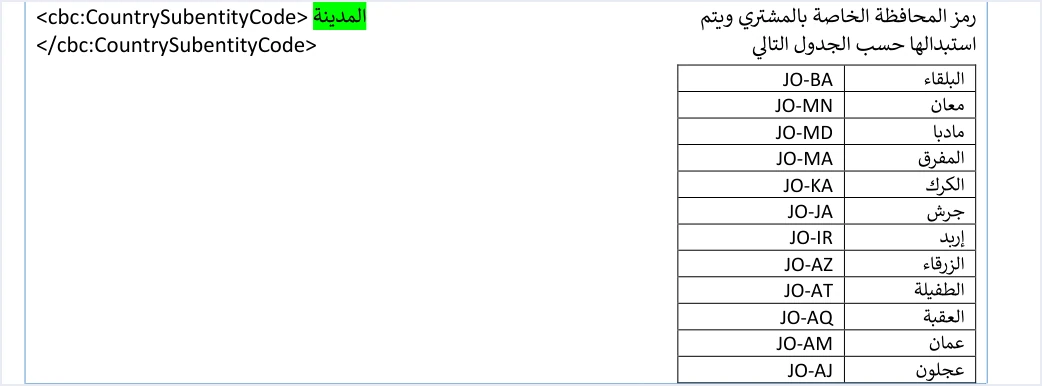
This list is everything the guide documents for this element. It gives no codes for districts, sub-districts or cities within a governorate. If a customer’s address is in a city or a town, the value the table offers is the code of the governorate that place belongs to. There is no separate code for the city.
Each code has two parts. The first part, JO, is the same in all twelve codes. The second part is two capital Latin letters that identify the governorate, and a hyphen separates the two parts. Write the value exactly as the table prints it, with no spaces and no Arabic name next to it.
If you need the English equivalents of other Arabic terms used in JoFotara, see our article JoFotara Terminology: Arabic to English Quick Glossary.
Why the codes cannot be worked out from governorate names
Whoever builds the file is tempted to generate the code from the first letters of the governorate’s name. That leads to mistakes in several codes. The two letters do not always follow the name as it is written in Arabic, and some codes are similar enough to be confused. The table below collects the places that deserve a second look. All of them come from comparing the guide’s codes with one another.
The practical lesson is to build the mapping between each governorate and its code as a fixed table inside your system, copied from the guide, rather than as a formula that generates the code from the name. Check that table once, line by line, against the page of the guide. That single review saves you from checking every invoice separately.
Where CountrySubentityCode sits in the XML file
The element sits in the buyer block, cac:AccountingCustomerParty, inside the buyer’s address, cac:PostalAddress. In the template it comes after the postal code, cbc:PostalZone, and before the country block, which carries the fixed value JO. Here is an extract of the template structure, using the code for Irbid as the example.
<cac:AccountingCustomerParty>
  <cac:Party>
    ...
    <cac:PostalAddress>
      <cbc:PostalZone>...</cbc:PostalZone>
      <cbc:CountrySubentityCode>JO-IR</cbc:CountrySubentityCode>
      <cac:Country>
        <cbc:IdentificationCode>JO</cbc:IdentificationCode>
      </cac:Country>
    </cac:PostalAddress>
    ...
  </cac:Party>
</cac:AccountingCustomerParty>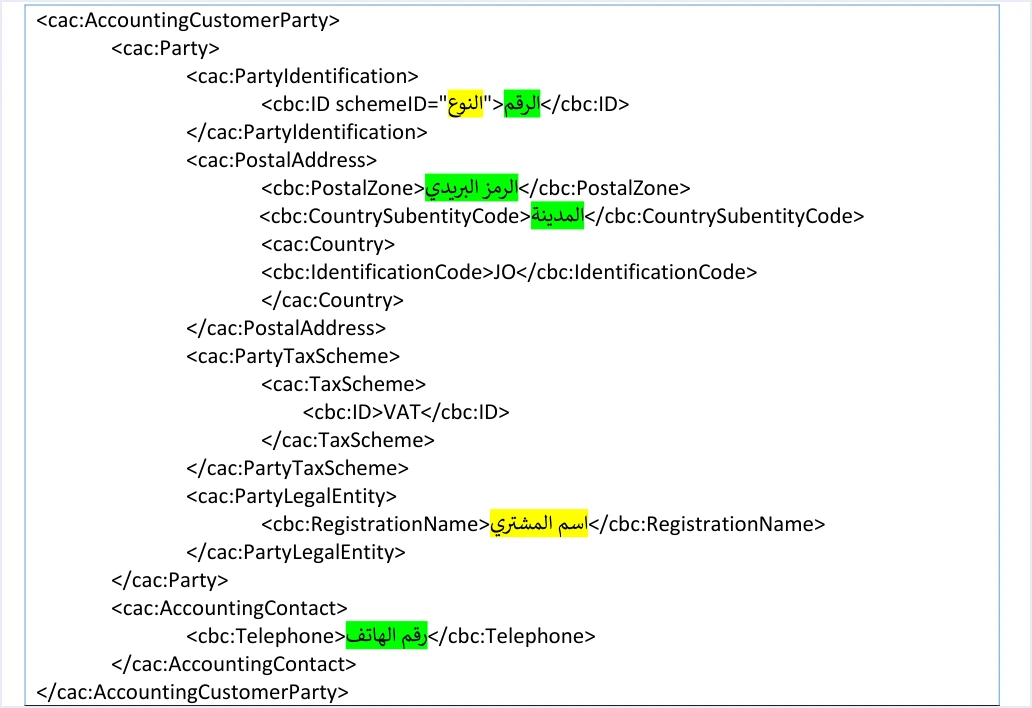
The template image shows that the guide puts the word city (المدينة) where the value goes, shaded green. The guide’s description of the element, however, calls it the buyer’s governorate code and refers to the governorate table. So the value the element expects is one of the twelve codes, not a city name written in Arabic.
Other elements sit next to this one in the buyer block. Each has its own rule, given here in one line.
- Buyer identifier type. The
schemeIDattribute is mandatory. Its values areNINfor the national number,PNfor the personal number of a non-Jordanian andTNfor the tax number. The identifier value itself is shaded green. - Postal code. An optional element with a maximum of 5 characters.
- Buyer name. The element is shaded yellow. Its value is required on a receivable invoice, and on a cash invoice worth more than JOD 10,000.
- Phone number. An optional element that accepts digits only, from 9 to 14 digits.
- Buyer tax number on development zones invoices. It becomes mandatory when the invoice is of this type. The conditions of that invoice are covered in our article Development Zone Invoice JoFotara: The Three Conditions.
The whole block, with its elements and their order, has its own article on buyer details in the invoice file in this series.
What it means that the governorate code is optional
The guide sorts the elements of its templates by color. Its wording on this is the following.
«العناصر المظللة باللون الأصفر … تدل على متغيرات مطلوب تعبئتها (إجبارية) من خلال نظام البائع. أما العناصر المظللة باللون الأخضر تدل على متغيرات مطلوب تعبئتها (اختيارية) … وباقي العناصر وصف ثابت بدون تغيير»
In English, the guide says that elements shaded yellow are variables the seller’s system must fill in (mandatory), that elements shaded green are variables to be filled in that are optional, and that the remaining elements are a fixed description that does not change. The English here is our rendering, and the Arabic text of the guide is the authority. The cbc:CountrySubentityCode element is shaded green in every template in the guide, so it is optional according to the field shading in version 1.5 of the technical guide.
Three things follow from this that anyone building the file should know.
- Leaving out the governorate does not make the invoice incomplete under the guide. If you do not hold the buyer’s governorate, leaving the value out is consistent with the shading.
- If you fill in the element, the value comes from the table. The guide says the value is replaced according to the table, so do not put in a value from outside the twelve codes.
- Some details are not documented in the guide. Version 1.5 of ISTD’s technical guide does not state whether a green element with no value is left out or sent empty, and it does not say how the system handles a code from outside the table. Do not build on an assumption in either case. Have your system send a code from the table, or leave out the governorate, according to what your developer has verified.
The shading is a rule for the element in the file, not a rule for the customer data in your books. A business may keep a full address for its customer for its own purposes. What is sent to the National Invoicing System stays limited to the elements the guide documents.
The O-BA typo in the special tax invoice table
The governorate table appears in more than one place in the guide, including page 17 and page 63. In the table on page 63, part of the special tax invoice template, the code for Balqa is printed as O-BA, with the letter J missing from the start. The correct code for Balqa is JO-BA, as the table on page 17 shows and as the pattern of the other eleven codes requires.
This typo has a practical effect if the code table is copied from the special tax template in particular. A system built on that template may carry the incomplete code into every invoice for a customer in Balqa. The fix is to take the table from page 17, or to correct this one line after copying.
The typo also shows that the guide’s samples are not fit to be copied word for word. The examples in the guide are illustrative, and other places in them need correcting before use. One of them is doubled quotation marks in some of the special tax invoice examples, which make the XML file malformed if it is copied as is.
The City field on the portal invoice form
A business that issues its invoices on the JoFotara portal does not write an XML file. It fills in the New invoice form (فاتورة جديدة). The 2026 edition of the procedures guide for issuing an invoice shows six fields in the Buyer details section (بيانات المشتري) of that form. They are the name, the buyer additional-ID type, the buyer number, the phone number, the city and the postal code.

The portal field is labeled City (المدينة), which is the same text the technical guide puts in place of the governorate code value in the XML template. Neither guide, however, states that the portal field is what fills the cbc:CountrySubentityCode element, and neither lists the values the portal field offers. We therefore present them here as two separate pieces of information, one about the portal form and one about the integration file, and we do not connect them.
The practical difference between the two paths is clear. A portal user works with a ready-made form and does not need to know the codes. A business that links accounting software to the system is in a different position, because its system writes the code into the file, so the code table and the element’s place in the file matter to it. Each field of the portal form is explained in our article JoFotara Invoice Form Fields Explained.
Checklist before you send the governorate code
These items sum up the sections above as steps you can check on a single file before you settle on how the file is built.
- Source of the table. Were the codes copied from the table on page 17, or, if they were copied from page 63, was the Balqa line corrected to
JO-BA? - Number of values. Does the table in your system hold the twelve codes only, with no codes added for cities or districts?
- Format of the value. Is the value written as a Latin code, exactly as in the table, and not as the governorate name or a city name in Arabic?
- Similar pairs. Has the reviewer checked the codes for Mafraq, Ma’an and Madaba, and for Ajloun and Jerash?
- Position. Does the element sit inside
cac:PostalAddressin the buyer block, after the postal code and before the country block? - Missing data. Has your team decided what the system does when the buyer’s governorate is not known, based on verifying how the system behaves rather than on an assumption?
- File integrity. Does the complete file pass an XML well-formedness check before it is encoded and sent, especially if it was built from the guide’s examples?
How Qoyod handles the invoice file
When you issue an invoice from accounting software linked to the system, you do not write the elements of the XML file yourself. Qoyod builds the invoice file in UBL 2.1 format with its unique identifier (UUID) and sends it to the National Invoicing System without any manual intervention. This runs through the integration between Qoyod and the National Invoicing System.
- Qoyod checks each invoice at field level as it is created, covering the tax number, the document type and payment method, the General Sales Tax rate and whether the lines are complete, and alerts you to any error before the invoice is sent, to reduce rejections.
- ISTD returns the invoice status and any error message, and Qoyod shows them in its status panel.
- The status panel lists invoices that were not sent and need to be resent, and when you resend one it keeps the same UUID.
The pre-send check is an alert, not a guarantee. It covers only the four items listed above, and the governorate code is not one of them. Accepting the invoice remains a decision for the National Invoicing System alone. For a wider view of the system and how to connect your business to it, read our article Jordan’s National E-Invoicing System. For what an e-invoice in Jordan has to meet overall, see our article E-Invoicing Requirements in Jordan.
E-invoicing and full accounting in one system
Qoyod is integrated with the National Invoicing System (JoFotara). You issue your invoice in Jordanian dinars from Qoyod, it is booked to your ledgers automatically and sent to the system, and once it is accepted it comes back with a QR code from the Income and Sales Tax Department.
Frequently asked questions
What are the governorate codes in a JoFotara invoice?
The technical guide sets twelve codes. They are JO-AM Amman, JO-IR Irbid, JO-AZ Zarqa, JO-BA Balqa, JO-MD Madaba, JO-MA Mafraq, JO-KA Karak, JO-JA Jerash, JO-AJ Ajloun, JO-AT Tafilah, JO-AQ Aqaba and JO-MN Ma’an.
Is the governorate code mandatory on the invoice?
Version 1.5 of the technical guide shades the cbc:CountrySubentityCode element green in its templates, and green marks an optional variable in the guide. If you fill it in, the value must be one of the twelve codes in its table.
Where in the XML file does the governorate code go?
It goes in the buyer block, cac:AccountingCustomerParty, inside the buyer’s address, cac:PostalAddress. It comes after the postal code and before the country block, which carries the value JO.
What is the correct code for Balqa?
The correct code is JO-BA. The table in the special tax invoice template on page 63 prints it as O-BA, which is a typo and should not be copied.
Are there codes for cities or districts?
The technical guide gives codes for the twelve governorates only. A customer in a city within a governorate takes the code of that governorate, and the guide documents no more detailed code.
Is the City field on the portal the same as the governorate code?
Neither the portal guide nor the technical guide says so. The City field (المدينة) appears in the Buyer details section of the invoice form on the portal, while the governorate code is written into the XML file by a business that links its system, and the two guides do not connect them.
References
- Income and Sales Tax Department (ISTD), technical guide for integrating with the National Invoicing System through the API, version 1.5 (in Arabic), pp. 12, 16, 17 and 63.
- Income and Sales Tax Department (ISTD), procedures guide for issuing an invoice in the Jordanian National Electronic Invoicing System, 2026 edition (in Arabic), p. 6.
- ISTD’s National Invoicing System guides (in Arabic)




