




Every invoice you send to Jordan’s National Invoicing System (JoFotara) opens with a short group of elements that identify the invoice before any seller, buyer or line item appears. That group is the JoFotara invoice header, and the technical guide issued by the Income and Sales Tax Department (ISTD) calls it “Basic invoice information” («معلومات الفاتورة الأساسية»).
This article is a reference for the header itself. It gathers its eight elements in one place and shows what changes in the header between an income invoice, a general sales tax invoice and a special tax invoice, and between a new invoice and a return invoice. At each element it points to the article that explains it in detail, so it does not repeat what is already explained there. Everything in it rests on the technical guide for linking to the system, version 1.5.
What the JoFotara invoice header carries
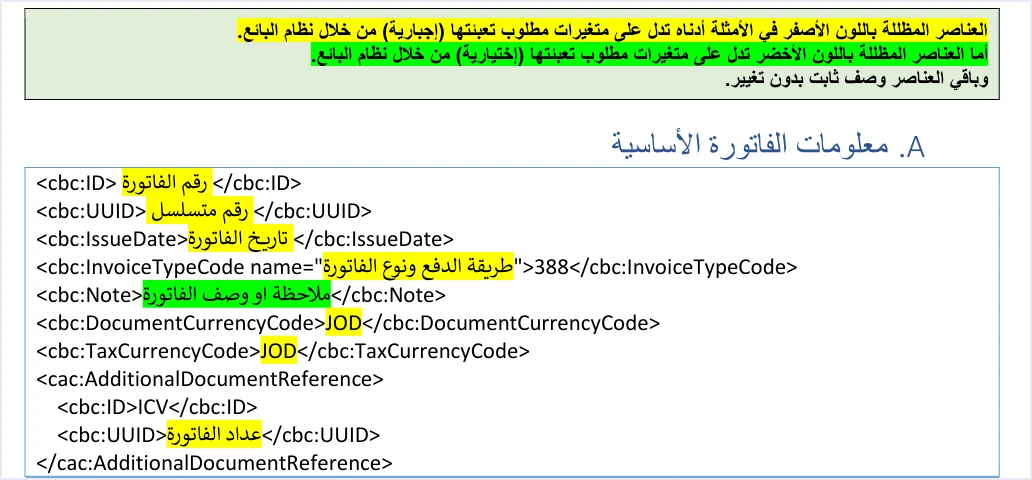
The guide shows the template “Basic invoice information” on page 12, with the color key that repeats in every template above it. The key says that the elements shaded yellow are variables that must be filled in (mandatory) by the seller’s system, that the elements shaded green are optional variables, and that the remaining elements are fixed description with no change. This is the wording of the guide.
«العناصر المظللة باللون الأصفر … تدل على متغيرات مطلوب تعبئتها (إجبارية) من خلال نظام البائع»
In English, the guide says the elements shaded yellow are variables that the seller’s system is required to fill in, and it adds that the elements shaded green are optional variables and that the rest is fixed description. ISTD publishes this guide in Arabic only; the English here is our rendering, and the Arabic text is the authority. How to read this shading across the whole file is the subject of our article JoFotara Mandatory and Optional Fields. Here it is enough to apply it to the header.
The elements appear in the template in the order below. The three dots mark each variable value that your system fills in.
<cbc:ID>...</cbc:ID>
<cbc:UUID>...</cbc:UUID>
<cbc:IssueDate>yyyy-mm-dd</cbc:IssueDate>
<cbc:InvoiceTypeCode name="...">388</cbc:InvoiceTypeCode>
<cbc:Note>...</cbc:Note>
<cbc:DocumentCurrencyCode>JOD</cbc:DocumentCurrencyCode>
<cbc:TaxCurrencyCode>JOD</cbc:TaxCurrencyCode>
<cac:AdditionalDocumentReference>
  <cbc:ID>ICV</cbc:ID>
  <cbc:UUID>...</cbc:UUID>
</cac:AdditionalDocumentReference>
The table below sets out the elements in rows. For each one it shows what it carries, how it is shaded and where it is covered in detail. The only element shaded green in the header is the note. All the other variable values in it are shaded yellow.
Scroll the table sideways to see the remaining columns
The header elements one by one
This section goes through the elements in their template order. For each one it gives what the guide says, what you need to watch when your system builds the file, and a pointer to the article that covers it in depth.
Invoice number and unique identifier
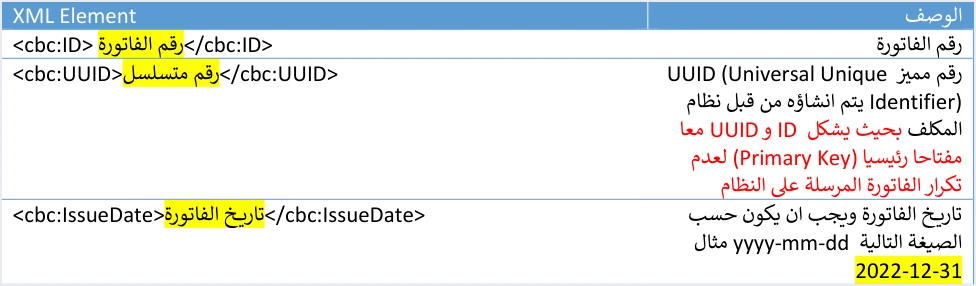
The guide describes cbc:ID as the invoice number and cbc:UUID as a unique number that the taxpayer’s system creates. It then makes the two elements together a primary key that prevents an invoice from being duplicated. So what identifies an invoice in the system is the full pair, not the invoice number alone.
This has a practical consequence that the guide warns about explicitly. If sending fails and your system generates a new identifier when it retries, a duplicate invoice results. Your system should therefore store the identifier with the invoice and resend it with the same number and the same identifier, which is what the third of the guide’s ten guidelines says. The identifier and where it sits in the file and in the response are explained in our article JoFotara UUID, and the invoice number and how it relates to the serial number in the Regulation on Organizing Invoicing Affairs are explained in our article on invoice numbering in JoFotara.
Invoice date
The date is written in cbc:IssueDate in the format yyyy-mm-dd, which means year, then month, then day, as in 2022-12-31. This is the format used in all the XML examples in the guide. The description of the format, as copied from the guide’s file, may show the parts of the date in a different order on some pages, so go with the format of the examples. The detail, together with the ninth guideline on a uniform time format, is in our article on the invoice date format in JoFotara.
Invoice type code and the name attribute
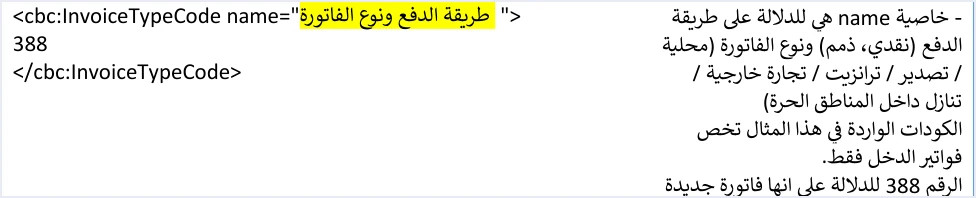
The cbc:InvoiceTypeCode element carries two pieces of information in two places. Its value says whether the invoice is new (388) or a return invoice (381), and a return invoice is, in its legal meaning, a credit note. Its name attribute is a code of three digits. The first digit is the invoice type (local, export, development zones, transit, foreign trade, or assignment within free zones), the second is the payment method (1 for cash and 2 for receivable), and the third is the tax family (1 for income, 2 for general sales tax and 3 for special sales tax).
So the code 011 means a local cash income invoice, the code 022 a local receivable general sales tax invoice, and the code 513 a cash special tax invoice for an assignment within free zones. For that reason a single code should never be stored as “the cash code” for all invoices. The file declares the type, but the third digit must match your registration with ISTD, or the invoice is rejected with the message This user is not authorized to submit this type of invoice, which says that the user is not authorized to send this type of invoice.
Note
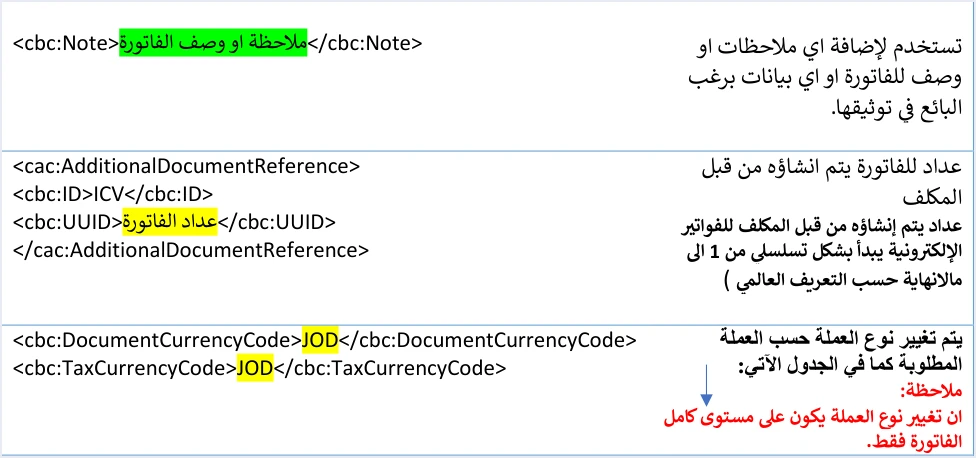
The cbc:Note element is free text that adds a note or a description to the invoice. It is the only element in the header shaded green, which means it is optional. Two points matter most to whoever builds the file. First, the note is absent from the header of a return invoice in general sales tax and special tax, and stays optional in the return of an income invoice. Second, the reason for a return is not written in the note, but in another element that comes up later in this article.
Currency codes
The header carries two currency elements, cbc:DocumentCurrencyCode for the document currency and cbc:TaxCurrencyCode for the tax currency, and the default value of both is JOD. The guide states that changing the currency is done at the level of the whole invoice only, and its example changes both elements together. It lists a table of seventeen other currencies besides the dinar, which makes eighteen currencies in all. The guide does not mention an exchange-rate element or a rule for converting to the dinar. What the guide says and what it leaves unsaid on this point is covered in our article Foreign Currency Invoice JoFotara: What the Guide Says.
Invoice counter
The header ends with a cac:AdditionalDocumentReference block that holds two elements. The first is cbc:ID with the fixed value ICV. The second is an element named cbc:UUID, but it does not hold the unique identifier. It holds the counter value. The guide describes the counter as one that the taxpayer creates for electronic invoices and that starts in sequence from 1. The similarity between this element’s name and the unique identifier at the start of the header can cause confusion when you write the code, so tell the two apart by the position of the element, not by its name. The counter and the limits of what the guide says about its sequence are explained in our article JoFotara ICV.
What changes in the header between invoice types
The guide repeats the header template in each of its sections, for the income invoice, the general sales tax invoice and the special tax invoice, and for the return invoice in each of them. The differences it documents in the header are limited to three elements and one block that is added to a return. The table below gathers them.
Scroll the table sideways to see the remaining columns
The invoice number, the unique identifier, the date and the counter appear in the same description in every position. The guide describes the counter as being “for electronic invoices”, in general terms, without distinguishing one family from another or a new invoice from a return.
The block that references the original invoice has one detail that concerns the return alone. The guide requires it to carry the number of the original invoice and its unique identifier in two elements, and requires the cbc:DocumentDescription element to carry the total of the original invoice. That is why it helps for your system to store the number of each invoice and its identifier once the invoice is accepted, because a return comes back to them later.
Invoice-level elements that do not belong to the header
Some elements sit at the level of the whole invoice, so a first-time reader of the file assumes they belong to the header. The guide places them in other blocks, and knowing where they are keeps you from mixing up what you check in the header with what you check elsewhere.
- What comes before the header. The declaration line of the file, then the root
Invoiceelement, whose opening tag must come complete on a single line, then thecbc:ProfileIDelement with the valuereporting:1.0in every invoice. This structure is explained in our article JoFotara UBL 2.1. - What comes after the header. The seller block, then the buyer block, then the income-source sequence block
cac:SellerSupplierParty. The seller’s tax number, the buyer’s name and the income-source sequence are all outside the header. They are covered in our articles JoFotara Seller Details and JoFotara Buyer Identification, and the lines in our article JoFotara InvoiceLine. - Discount and tax at invoice level. The invoice-level
cac:AllowanceChargeelement is the sum of the line discounts, and the invoice-levelcac:TaxTotalelement is the sum of the general sales tax in the lines, and it does not appear in an income invoice. Both are tied to the totals, so check them with the totals, not with the header. - The reason for a return. It is written in the
cbc:InstructionNoteelement inside thecac:PaymentMeansblock of the return invoice, and it is mandatory there. So do not put it in the note. It is covered in our article on the return reason in JoFotara.
The header in the system response and after the invoice is accepted
The role of the header does not end at sending, because some of its elements come back to you in the response. Among the response elements the guide lists EINV_NUM, which is the invoice number that was sent, and EINV_INV_UUID, which is the unique identifier of the invoice. The status of the invoice is read from EINV_STATUS, not from the technical response code alone.
If you resend an invoice that was already accepted, with the same number and identifier, the response comes back with the status ALREADY_SUBMITTED together with the original QR code. This is the documented way to retrieve a code that was not saved. That is why the fifth guideline in the guide recommends storing the invoice number, the unique identifier, the QR code and the invoice status for every invoice.
The effect of the header then shows in verifying the invoice. The guide makes verification of the QR code possible only through the Sanad app, from the option “Verify digital documents” («التحقق من المستندات الرقمية»). When the document is valid, the app shows the basic invoice data held inside the code, including the invoice number and date, together with the total value, the total tax, and the seller’s tax number and name.
What the guide does not specify about the header elements
Some questions that come up when building the header are not answered by version 1.5 of the guide. Knowing them keeps you from building your system on an assumption that is attributed to ISTD but is not its word.
- Correcting the type code after sending. A sent invoice is not edited, and a correction is made by a return invoice on the quantities. The guide does not address the case of an invoice with correct quantities that was sent with a wrong type code.
- Details of the counter sequence. The description of the counter says that it starts from 1 and advances in sequence. It does not address gaps, restarting, or the effect of resending on its value.
- The exchange rate. The guide has no element for an exchange rate, and no rule for converting an invoice in a foreign currency to the dinar.
Pre-submission checklist
The second guideline in the guide asks you to check the mandatory fields before sending, to reduce rejections. This checklist applies that to the header alone.
- The invoice number is present in
cbc:ID, and a unique identifier is incbc:UUIDand is stored in your system with the invoice. - When you resend after a failure, the number and the identifier stay as they were in the first attempt.
- The date is in the format yyyy-mm-dd, and it is the issue date of the invoice.
- The value of
cbc:InvoiceTypeCodeis 388 for a new invoice and 381 for a return. - The third digit of the
nameattribute matches your registration with ISTD, and the first and second digits match the invoice type and the payment method. - In a return invoice, the
nameattribute and the currency are identical to those in the original invoice. - The note is absent from the header of a return in general sales tax and special tax, and the reason for the return is in its dedicated place.
- If you change the currency, change it in both currency elements together, as the guide’s example shows, because a currency change applies to the whole invoice.
- The last block carries ICV in
cbc:IDand the counter value incbc:UUID, not the unique identifier.
How Qoyod handles the invoice file
Everything above is work that falls on the taxpayer’s system, meaning the software that builds the invoice file and sends it. Qoyod’s integration with the National Invoicing System works at that layer as follows.
- Building and sending the file. Qoyod builds the invoice file in UBL 2.1 format with its unique identifier (UUID) and sends it to the National Invoicing System without any manual intervention.
- A check before sending. Qoyod checks each invoice at field level as it is created, covering the tax number, the document type and payment method, the General Sales Tax rate and whether the lines are complete, and alerts you to any error before the invoice is sent, to reduce rejections.
- The status of each invoice in view. ISTD returns the invoice status and any error message, and Qoyod shows them in its status panel, with states that include sent (مرسلة), previously sent (مرسلة مسبقًا) and not sent (لم تُرسل) together with the error message.
- Resending with the same identifier. The status panel lists invoices that were not sent and need to be resent, and when you resend one it keeps the same UUID.
For a wider view of the system and how to connect your business to it, read our article Jordan’s National E-Invoicing System.
E-invoicing and full accounting in one system
Qoyod is integrated with the National Invoicing System (JoFotara). You issue your invoice in Jordanian dinars from Qoyod, it is booked to your ledgers automatically and sent to the system, and once it is accepted it comes back with a QR code from the Income and Sales Tax Department.
Frequently asked questions
What is the invoice file header in JoFotara?
The header is the group of elements that an invoice starts with, after the declaration line and the value of ProfileID, and the technical guide calls it “Basic invoice information”. It consists of the invoice number, the unique identifier, the date, the invoice type code with its name attribute, the note, the two currency codes, and the invoice counter (ICV) block.
Which header elements are optional?
The technical guide shades only the note, cbc:Note, in green in the header, and green in its color key marks an optional variable. All the other variable values in the header are shaded yellow, which means they are mandatory and are filled in by the seller’s system.
Does the header differ between an income invoice and a general sales tax invoice?
The elements are identical in the two cases, and the difference is in the last digit of the name attribute, which is 1 for an income invoice, 2 for a general sales tax invoice and 3 for a special tax invoice. Another difference appears in returns, where the note is absent from the header of a general sales tax and special tax return and stays optional in the return of an income invoice.
What is the difference between cbc:UUID at the start of the header and cbc:UUID in the ICV block?
The first element holds the unique identifier of the invoice, which together with the invoice number is the primary key that prevents duplication. The second sits inside the AdditionalDocumentReference block after the fixed value ICV, and it holds the invoice counter, which starts from 1.
Should I write the reason for a return in the note?
The technical guide gives the reason for a return another place, the InstructionNote element inside the PaymentMeans block of the return invoice, and the reason is mandatory there. The note is not even present in the header of a return in general sales tax and special tax.
Does JoFotara return anything from the header in its response?
The system returns the invoice number that was sent in EINV_NUM and the unique identifier in EINV_INV_UUID, together with the invoice status and a QR code when the invoice is accepted. If an accepted invoice is resent with the same number and identifier, the status comes back as ALREADY_SUBMITTED with the original code.
References
- Income and Sales Tax Department (ISTD), technical guide for integrating with the National Invoicing System through the API, version 1.5 (in Arabic), pp. 12 to 14, 23, 24, 33, 46, 47, 58, 73, 74 and 97 to 107.




