




The JoFotara special tax OTH line carries the Special Sales Tax (SST) as a ready-made amount, not as a rate, in a separate tax block inside the invoice line. The technical guide published by the Income and Sales Tax Department (ISTD) gives every line that carries special tax two consecutive blocks. The first is for the special tax, with the scheme code OTH. The second is for General Sales Tax (GST), with the scheme code VAT. The general tax in the second block is calculated on the line value after the special tax has been added to it.
This article walks through both blocks element by element, explains their order, and gives the formula for each amount in them as it appears in version 1.5 of the technical guide. It then applies those formulas to the guide’s own example, number by number. It ends with a checklist for anyone who builds the invoice file in their software or reviews it after a rejection.
It is written for the developer who links an accounting system to the National Invoicing System (JoFotara), and for the accountant who wants to understand how Special Sales Tax moves from a paper invoice into the XML file. The tax rule itself, meaning which goods carry special tax and how the law calculates it, is covered in our article General Sales Tax in Jordan: Rates, Registration, Filing. When a seller issues a special tax invoice in the first place is covered in our article Special Sales Tax Invoice in JoFotara: When to Issue It. This article stays inside the file.
In the invoice file, VAT is only the fixed tax-scheme code of the UBL template; the tax itself is Jordan’s General Sales Tax (GST).
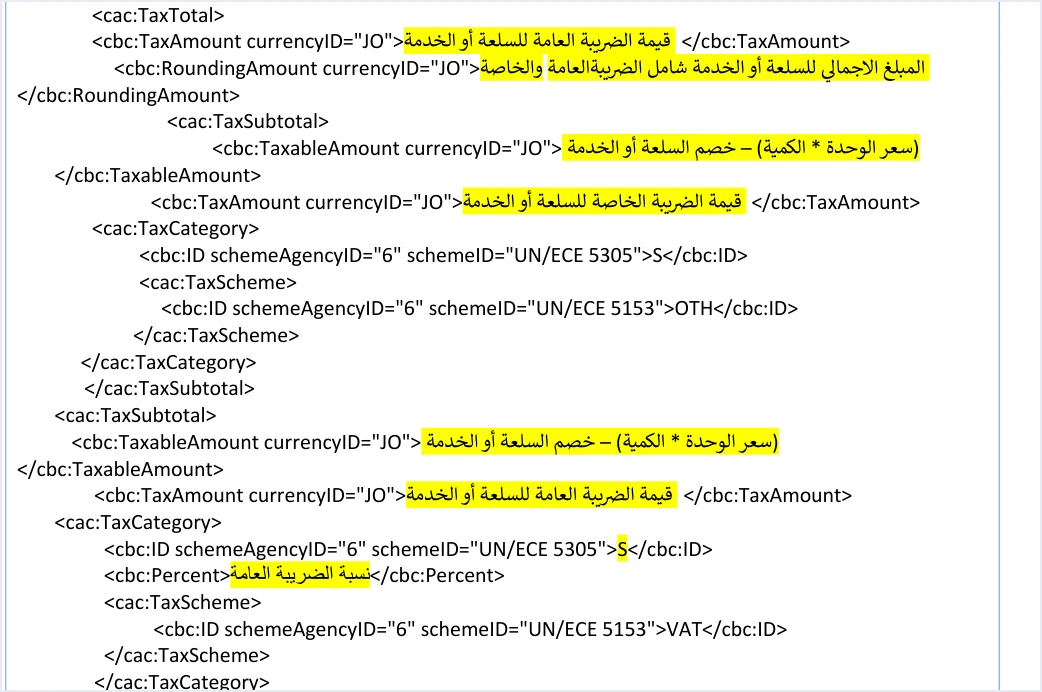
How the JoFotara special tax OTH block appears in the invoice file
Special Sales Tax shows up in two places in the file. The first is the invoice header, where the invoice type code marks the invoice as belonging to the special tax family. The second is every line of the invoice. There, the line’s tax block cac:TaxTotal holds two sub-blocks of type cac:TaxSubtotal instead of one.
The table below compares a line on a general sales tax invoice with a line that carries special tax, based on the guide’s templates.
The table shows that the whole change turns on one amount. That amount enters three places, the OTH block, the base for the general tax and the line’s tax-inclusive total. It stays out of a fourth place, the tax amount on the line.
The invoice type code when the invoice carries special tax
The guide codes the invoice type as a three-digit number in the name attribute of the cbc:InvoiceTypeCode element. The first digit is the trade type, the second is the payment method and the third is the tax family. In the special sales tax family the third digit is 3, against 1 for the income family and 2 for the general sales tax family. The value of the element itself shows whether the invoice is new or a return, 388 for a new invoice and 381 for a return.
The local invoice has no condition in the guide’s table. For the other five types, the guide requires the tax rate to be 0%, and for development zones it adds that the buyer’s tax number is mandatory. How the category is filled in at 0% on these invoices is shown for the export case in our article Export Invoice JoFotara: Code, 0% and Category O.
The OTH block, element by element
The special tax cac:TaxSubtotal block looks like any other subtotal block, but its values are different. The guide’s template on page 67 sets out its elements as shown in the table.
Scroll the table sideways to see the remaining columns
The key feature of this block is the missing cbc:Percent element. In the VAT block, the rate element sits between the category and the tax scheme. In the OTH block, the template goes straight from the category to the scheme. The snippet below is our own illustrative build that puts the two blocks together with the numbers from the guide’s example. It is not a copy from the guide. The currency attributes are left as dots on purpose, because the rule for them is outside the scope of this article.
<cac:TaxTotal>
  <cbc:TaxAmount ...>50.500</cbc:TaxAmount>
  <cbc:RoundingAmount ...>555.500</cbc:RoundingAmount>
  <cac:TaxSubtotal>
    <cbc:TaxableAmount ...>495.000</cbc:TaxableAmount>
    <cbc:TaxAmount ...>10.000</cbc:TaxAmount>
    <cac:TaxCategory>
      <cbc:ID schemeAgencyID="6" schemeID="UN/ECE 5305">S</cbc:ID>
      <cac:TaxScheme>
        <cbc:ID schemeAgencyID="6" schemeID="UN/ECE 5153">OTH</cbc:ID>
      </cac:TaxScheme>
    </cac:TaxCategory>
  </cac:TaxSubtotal>
  <cac:TaxSubtotal>
    <cbc:TaxableAmount ...>495.000</cbc:TaxableAmount>
    <cbc:TaxAmount ...>50.500</cbc:TaxAmount>
    <cac:TaxCategory>
      <cbc:ID schemeAgencyID="6" schemeID="UN/ECE 5305">S</cbc:ID>
      <cbc:Percent>10</cbc:Percent>
      <cac:TaxScheme>
        <cbc:ID schemeAgencyID="6" schemeID="UN/ECE 5153">VAT</cbc:ID>
      </cac:TaxScheme>
    </cac:TaxCategory>
  </cac:TaxSubtotal>
</cac:TaxTotal>
The order of the two blocks is part of the template. The OTH block comes first and the VAT block second, as in the image at the top of this article. Keep to that order.
An amount entered without any calculation
The guide settles what Special Sales Tax is in a single sentence, which it repeats on pages 68 and 81. In that sentence, the special tax is an amount that is entered without any calculation. The National Invoicing System does not expect the seller’s system to multiply a rate by a price to reach the special tax. It expects an amount worked out beforehand and written into cbc:TaxAmount inside the OTH block.
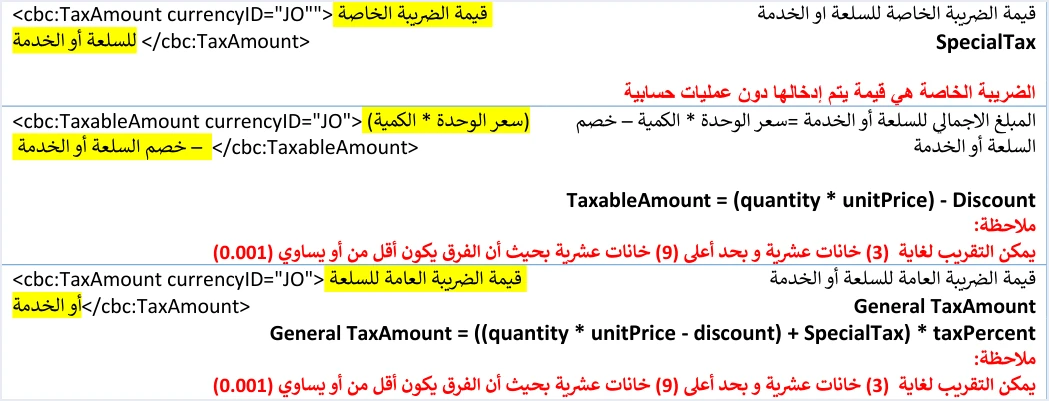
That sentence has three practical consequences for anyone building the file.
- No special tax rate in the file. The template has no field for a special tax rate, so do not look for one and do not add one.
- The amount is the seller’s system’s job. The special tax is calculated outside the invoice file and reaches the file as a final figure.
- The rate list does not cover it. The list of values the API accepts in the rate field belongs to the
VATblock and has nothing to do with the special tax amount.
On the system’s web portal, a user guide for the portal published by a software company in 2024 describes a field called special tax amount (قيمة الضريبة الخاصة) that is filled in by hand on special tax invoices. That source is not one of ISTD’s guides, and the current interface may differ from it. Its idea still matches the technical guide, which is that the special tax is an amount you write in, not a rate you pick.
Calculating General Sales Tax on top of the special tax
After the OTH block comes the VAT block, with its category S and the general tax rate in cbc:Percent. What differs from an ordinary line is the base of the calculation. The guide writes the general tax formula for this line as follows.
General TaxAmount = ((quantity * unitPrice - discount) + SpecialTax) * taxPercent
In other words, the general tax is calculated on the line value after discount plus the special tax. Elsewhere the guide writes the same thing in a shorter form that uses the element name, (LineExtensionAmount + SpecialTax) * taxPercent. The two forms are the same, because cbc:LineExtensionAmount on the line is quantity × unit price − discount.
Note that the guide’s template gives the same description for cbc:TaxableAmount in both blocks, unit price × quantity − discount, even though the general tax is calculated on a larger amount. So do not infer the general tax base for this line from the value of cbc:TaxableAmount. Take the base from the formula.
One possible mistake here is for the seller’s system to calculate the general tax on the line value alone, as it does on a general sales tax invoice. The general tax then comes out short by the special tax multiplied by the rate, and the line total and the invoice total go wrong with it.
If your business uses a consumer price that is higher than the unit price, the base for the general tax on a special tax line changes, as explained in our article Consumer Price in JoFotara: Who Needs It, How to Calculate.
What TaxAmount and RoundingAmount carry on the line
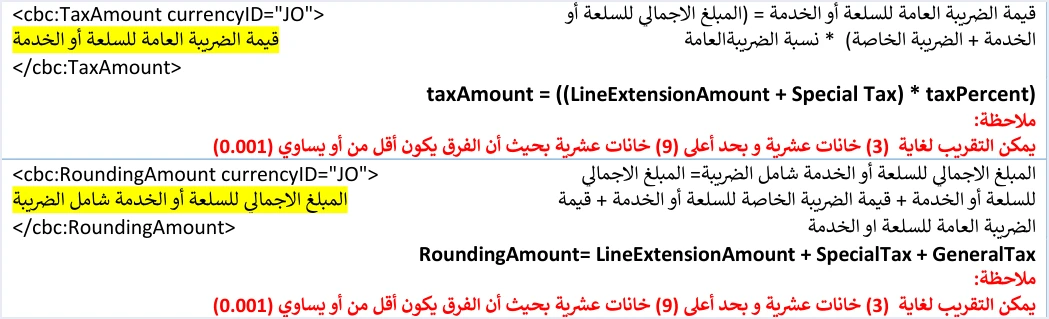
At the top of the line’s cac:TaxTotal tax block are two elements that summarize the whole line. The guide sets the content of each with a formula, as shown in the image.
Scroll the table sideways to see the remaining columns
So the special tax is not added to the general tax in cbc:TaxAmount at line level. It stays in the OTH block on its own. It does enter cbc:RoundingAmount, because the guide defines that element as the total amount for the good or service, tax included. A system that puts the sum of both taxes into cbc:TaxAmount produces a value that contradicts the guide’s formula for that element.
The same logic applies to the invoice header. The cbc:TaxAmount element in the invoice-level cac:TaxTotal block carries the total of the general tax on the lines and nothing else.
Under each of these amounts the guide repeats the same rounding note. Amounts may be rounded to 3 decimal places, with a maximum of 9, provided the difference is no more than 0.001.
The guide’s example in numbers
On pages 69 to 71 the guide gives an example of an invoice with two identical lines, each carrying special tax. The table recalculates one line step by step.
Because the two lines are identical, every figure on the invoice is the line figure multiplied by two. The total general tax in the invoice header is 101.000, that is 2 × 50.500, and it does not include the special tax total of 20. The guide writes the invoice total as the invoice total before discount, minus the total discount, plus the total special tax, plus the total general tax. That gives 1000.000 − 10.000 + 20 + 101.000 = 1111.000, which is also the sum of cbc:RoundingAmount on the two lines.
The rate of 10 in this example is a general tax rate the guide chose for illustration, not a ruling on any particular good. The rate that applies to each good is set by the General Sales Tax law. The example gives no rate for the special tax at all, because in the file it is an amount, not a rate.
Using this example as a test is simple. Build the line in your software with a quantity of 10, a unit price of 50, a discount of 5, special tax of 10 and a general tax rate of 10. Then compare the output with the five figures in the table. If any one of them differs, you know which formula in your software needs another look.
Return invoices that carry special tax
A return invoice is sent with the value 381 in the invoice type element and the same family code in the name attribute. On page 74 the guide gives the codes 013 and 023 for it. Return lines follow the same structure. On the return pages, 80 to 84, the guide explains the OTH block and the VAT block again, and on page 81 it repeats that the special tax is an amount entered without any calculation.
The general return rules apply here too. Returns are on quantities only and cannot exceed the quantity sold on the original invoice. The line number, name and unit price are written exactly as they appear on the original. The totals of the return invoice cover only the part being returned, and its tax total carries the amount of tax being returned. The header of a special tax return has no notes element, just as the header of a general sales tax return has none.
Notes on the guide’s examples before you copy them
The guide’s examples are illustrative. Some of the special tax examples have formatting defects that make the text invalid if it is copied as it is. The notes below are tied to page numbers so that you can find them easily.
- Doubled quotation marks in attributes. On pages 69, 82, 91 and 93 the attributes are written with doubled quotation marks, as in
schemeAgencyID=""6"". The correct form is a single quotation mark on each side, as in the template. - An extra quotation mark in the currency attribute. On pages 68 and 81 the currency attribute ends with an extra quotation mark, so the XML file is not well-formed if it is copied as it is.
- The return invoice header. On page 74 the special tax return example copies the original invoice reference from the general sales tax return example, including its total of 68.48. Do not use the figures in that reference in your tests.
The safer approach is to build the invoice file from the template and the formulas, and to use the example figures only for comparison, as in the test suggested in the previous section.
Pre-submission checklist for a special tax line
This list is drawn from the template and the formulas above. You can run it over any line before sending or after a rejection.
- Family code. The third digit in the
nameattribute is 3, as in 013 for a local cash invoice and 023 for a local receivable invoice. - Number of blocks. The line has two
cac:TaxSubtotalblocks, the first with the schemeOTHand the second with the schemeVAT. - Rate element. The
OTHblock has nocbc:Percent, and theVATblock carries the rate. - Category. The value
Sin theOTHblock, as in the template, and in theVATblock when the general tax rate is not zero. For the five non-local types, the guide on page 69 requires a 0% rate and the valueOfor all goods. - General tax base. The line value after discount plus the special tax.
- Tax amount on the line. The general tax only, without the special tax.
- Line total. The line value, the special tax and the general tax together.
- Tax total in the header. The total of the general tax on the lines and nothing else.
If the invoice is rejected even though all eight points check out, start from the error message itself. Rejection messages are explained in our article JoFotara Error Codes: Why an Invoice Is Rejected and How to Fix It.
How Qoyod handles the invoice file
When the invoice is issued from accounting software linked to the system, you do not write the tax blocks into the XML file by hand. Qoyod builds the invoice file in UBL 2.1 format with its unique identifier (UUID) and sends it to the National Invoicing System without any manual intervention. Read more about Qoyod’s integration with the National Invoicing System.
- Qoyod checks each invoice at field level as it is created, covering the tax number, the document type and payment method, the General Sales Tax rate and whether the lines are complete, and alerts you to any error before the invoice is sent, to reduce rejections.
- ISTD returns the invoice status and any error message, and Qoyod shows them in its status panel.
- The status panel lists invoices that were not sent and need to be resent, and when you resend one it keeps the same UUID.
The pre-send check is an alert, not a guarantee. It covers the four fields listed above, and accepting the invoice remains a decision for the National Invoicing System alone. For a wider view of the system and how to connect your business to it, read our article Jordan’s National E-Invoicing System. You can also read about Qoyod and the National Invoicing System.
E-invoicing and full accounting in one system
Qoyod is integrated with the National Invoicing System (JoFotara). You issue your invoice in Jordanian dinars from Qoyod, it is booked to your ledgers automatically and sent to the system, and once it is accepted it comes back with a QR code from the Income and Sales Tax Department.
Frequently asked questions
How does Special Sales Tax appear in a JoFotara invoice?
It appears on each line as a separate TaxSubtotal block with the scheme OTH and the category S, holding the special tax amount with no rate element. On the same line it is followed by the General Sales Tax block with its own tax-scheme code (the fixed UBL code shown in the body above), and the invoice type code marks the special tax family with a third digit of 3.
Is Special Sales Tax sent as a rate or as an amount?
It is sent as an amount. The technical guide states that the special tax is an amount entered without any calculation, which is why the OTH block has no cbc:Percent element.
What amount is General Sales Tax calculated on for a line with special tax?
It is calculated on the line value after discount plus the special tax, multiplied by the general tax rate. In the guide’s example that was (495 + 10) × 10% = 50.500.
Is the special tax included in TaxAmount at line level?
No, it is not. That element carries the general tax only. The special tax is included in RoundingAmount, which is the line’s tax-inclusive total.
Which of the two blocks comes first on the line?
The special tax block with the scheme OTH comes first, then the General Sales Tax block with its tax-scheme code, as in the technical guide’s template on page 67.
What is the invoice type code for a local invoice that carries special tax?
The code is 013 for a cash invoice and 023 for a receivable invoice, in the name attribute of the invoice type element. The value of the element is 388 for a new invoice and 381 for a return invoice.
References
- Income and Sales Tax Department (ISTD), technical guide for integrating with the National Invoicing System through the API, version 1.5 (in Arabic), pp. 67 to 71, 74, 80 to 84, 91 and 93.
- User guide for the National Invoicing System platform (2024), prepared by a software vendor (secondary source). The current interface may differ (in Arabic).
- ISTD’s National Invoicing System guides (in Arabic)




