




The JoFotara API endpoint and request headers are the address your software sends an invoice to and the headers that travel with every request. ISTD’s technical guide (version 1.5) defines them in a single example, on p. 96. The address is one, the method is POST, there are three headers, and the request body carries one key named invoice.
This article is a quick reference for developers of accounting or ERP software that sends invoices to the National Invoicing System (JoFotara). It gathers what the guide says about the submission address and about each header, explains why the two header names are spelled differently from page to page, and ties each error code to the part of the request it concerns. It ends with what the guide does not specify at all. The article describes the structure of the request and offers no ready-made code, because we have not sent any test request to the system, and the guide mentions no open test environment for taxpayers. The invoice header element group at the start of the XML file is a different subject, covered in our article JoFotara Invoice Header: Element Reference.
JoFotara API Endpoint and Request Headers at a Glance
The table below collects everything the technical guide specifies for an invoice submission request. Each value comes from the submission example on p. 96 or from the description of the flow on pp. 9 and 10.
Scroll the table sideways to see the remaining columns
Arranged as one structure, the elements look like this. It is an illustration of the structure, not code to run, and the values in angle brackets are placeholders for your own values.
POST https://backend.jofotara.gov.jo/core/invoices/
Client-Id: <client-id>
Secret-Key: <secret-key>
Content-Type: application/json

{"invoice": "<base64-of-ubl-xml>"}
The first line is the method and the address. The three lines after it are the request headers. Everything after the blank line is the request body, which holds the invoice and nothing else.
The Endpoint: The Only Submission Address in the Guide
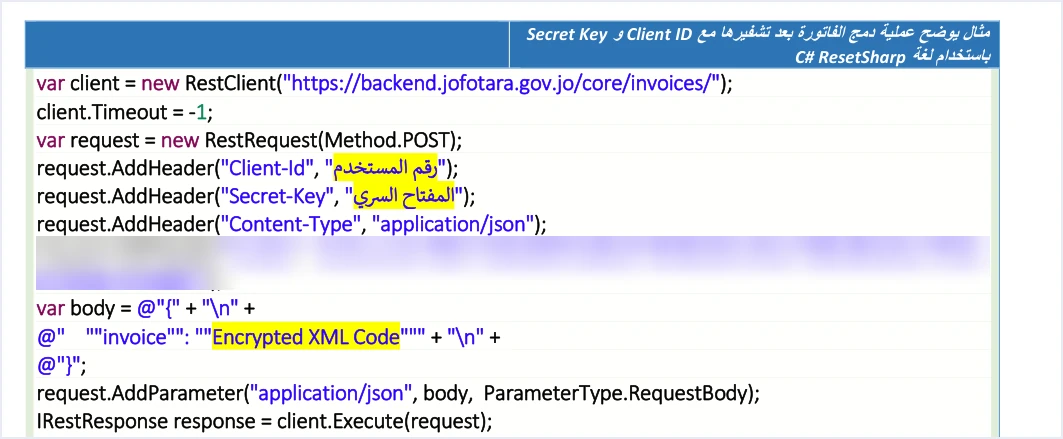
The guide’s example sends the invoice to https://backend.jofotara.gov.jo/core/invoices/ with the POST method. The address starts with the secure protocol HTTPS, and its path is /core/invoices/, with a slash at the end exactly as the example writes it. Our advice, not ISTD’s, is to copy it character for character, because the guide gives no alternative form.
The guide as a whole contains only three addresses. The first is ISTD’s website, to which it refers for the joining guide (p. 6). The second is the submission address above (p. 96). The third is a link to the invoicing technical support committee (p. 104). So the guide gives no second submission address, no address for a test environment, and no path for looking up an invoice after it has been sent.
The guide’s screenshots do show an internal test account at ISTD. That indicates ISTD tests the system internally, but it does not document an environment open to taxpayers or to software providers. The guide also describes no way to send a test request to this address.
The Three Request Headers and What Each Carries
The guide’s example sends three headers with every request, and each has a single job.
Client-Idcarries the Client ID. The system generates it when the taxpayer creates a new link from the device linking option (ربط الأجهزة), and it appears in the linked devices list with a copy button.Secret-Keycarries the Secret Key. The system generates it in the same step, and it appears in the same row of the list.Content-Typewith the valueapplication/json. It declares that the request body is JSON, and its value is fixed in the example.
The first two values are tied to a single income-source sequence, the one the taxpayer selects when creating the link. Each pair of Client ID and Secret Key therefore belongs to one sequence. The steps for creating them are in our article JoFotara Client ID and Secret Key: Device Linking Steps, so we do not repeat them here.
The example shows no fourth required header. The extra header that does appear in it is not a requirement of the request, and a later section returns to it.
Spelling the Header Names: Client-Id or Client_ID
The guide writes the two header names in two forms in different places, and a developer should know that before getting confused.
- In the submission example (p. 96) it writes both names with a hyphen, as
Client-IdandSecret-Key. This is the only place in the guide that puts them in an actual request. - In the error code table (p. 101) and in the seventh guideline (p. 104) it writes them with an underscore, as
Client_IDandSecret_Key, in an explanatory context and not in a request.
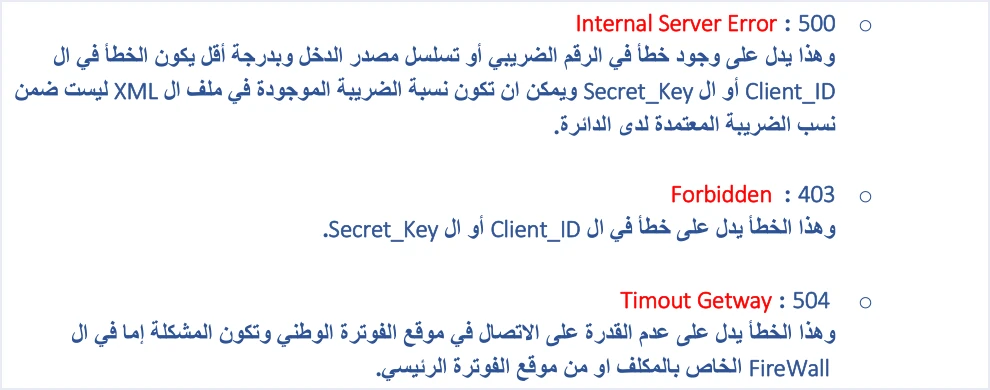
For that reason this article writes the names as in the submission example, which is the place that describes the request itself. We do not say the system accepts or rejects the other form, because the guide does not say so, and we have not tried either form on the system.
The “Three Components” on p. 10 and Where the p. 96 Example Puts Them
On p. 10 the guide says that an invoice prepared for sending in JSON format contains three components. They are the Client ID, the Secret Key and the invoice in XML format. It adds that the first two are taken from the device linking (ربط الأجهزة) screen.
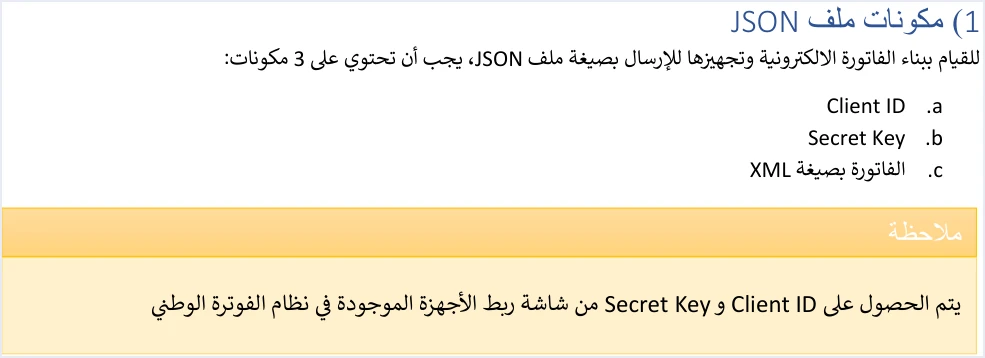
The p. 96 example, however, spreads these components over two places. The Client ID and Secret Key go in the request headers, and the invoice alone goes in the body. The flow diagram on p. 9 agrees with the example, since it puts the two values under the word Header and the XML file under the word Body.
The right reading is therefore that the “three components” are what the whole request carries, not what the JSON text carries by itself. Putting the Client ID and Secret Key inside the body contradicts the only request example in the guide.
The Request Body: One Key Named invoice
The body in the guide’s example is JSON text with a single key, invoice. Its value is the invoice file in UBL 2.1 XML format after Base64 encoding. The example puts placeholder text where the value goes and adds no other key to the body. The format itself is covered in our article JoFotara UBL 2.1: What It Is and What It Requires.
Three rules from the guide touch what goes into that value.
- The XML file starts with the declaration line with UTF-8 encoding, then the root element
Invoicewith its namespaces, thencbc:ProfileIDwith the valuereporting:1.0(p. 10). - The opening tag of the
Invoiceelement is written on one line, otherwise the errorInvalid Invoice Minificationcomes back (p. 102). Our article JoFotara XML Minification: What the Guide Requires covers this rule. - The encoding applies to the XML file alone, and the JSON text itself stays readable.
Encoding changes how the file is written so that it travels as one piece of text, and it does not make its content secret. The steps for preparing the value in order, and what to avoid along the way, are in our article JoFotara Base64: The Invoice File Inside JSON.
What Not to Copy from the Guide’s Submission Example
The guide’s example is written in C# with the RestSharp library, and the guide spells the library name “ResetSharp”. It shows the shape of the request, but it is not ready-to-copy code, for three reasons.
- An extra session header. The example adds a line that sends a Cookie header carrying a session value captured from an ISTD session. Do not send this header, because the request the guide describes rests on the three headers alone. We blurred this line in the image above.
- A timeout value the guide does not explain. The example sets a connection timeout to some value without explaining it, and the guide recommends no timeout. Do not carry that value into your software as if it were ISTD’s recommendation.
- A placeholder in the body. The text placed as the value of the
invoicekey in the example is only a marker, not an invoice file.
The guide’s other XML examples also have known defects, among them malformed unique identifiers (UUID) on pp. 14 and 98. The examples are illustrative, not files that were tested on the system.
Which Error Code Points to Which Part of the Request
On p. 101 the guide lists the most common status codes and what each means. We arrange them here by the part of the request each code points to. This arrangement is our reading of the guide’s text, not a classification by ISTD.
Each code has its own detail elsewhere. For a wider look at why an invoice is rejected and how to respond, see our article JoFotara Error Codes: Why an Invoice Is Rejected and How to Fix It.
Two more points concern the headers. First, valid Client ID and Secret Key values are not enough on their own, because they are tied to one income-source sequence. If the software sends an invoice type that does not fit the tax number or the income-source sequence, the guide gives the code 400 message This user is not authorized to submit this type of invoice for that case. Second, the code 200 means only that the request was received and processed technically. The verdict on the invoice is the value of EINV_STATUS in the response, not the status code alone.
Protecting the Header Values in Your Software
The seventh of ISTD’s ten guidelines is titled Security (الأمان). It asks that the linking data, meaning the Client ID and Secret Key, be protected and not stored exposed inside the code. The guide places responsibility for the confidentiality of the two values on the taxpayer alone, who bears full responsibility for any unauthorized use.
Some practical habits follow from that guideline. We offer them as suggestions from us, not as text from ISTD.
- Keep the two values in protected settings outside the code, not in a file inside the code repository.
- Do not write the Secret Key into the request logs your software keeps. Record only something that identifies which sequence was used.
- Do not send the Secret Key in any message or in a support request.
- If your business has more than one income-source sequence, tie each pair of values to its own sequence in the software settings, so that a request is never sent with a pair that belongs to another sequence.
All ten guidelines, and what each means for linked systems, are explained in our article JoFotara Guidelines for Linked Systems: All Ten Explained.
What the Technical Guide Does Not Specify About the Endpoint
The technical guide (version 1.5) describes one address, three headers and a body with one key. It then says nothing on points developers usually ask about, and we do not fill that silence with an assumption.
- A version number in the address or in a header. The address carries no version number, and the guide mentions no header that sets the version of the interface.
- A limit on the number of requests. The guide states no limit per minute or per day, and no message for exceeding a limit.
- A test environment. The guide states no test address open to taxpayers or to software providers.
- A wait time. The guide sets no time to wait for the response, no number of retries and no interval between them. What it does specify is that a retry after a dropped connection is made without generating a new unique identifier.
- More than one invoice in a request. The body in the example carries one invoice under one key, and the guide describes no request that combines several invoices.
If you need an answer on any of these points, the reference is ISTD itself. The guide (p. 104) refers readers to the invoicing technical support committee at the Income and Sales Tax Department through istd.gov.jo.
For the wider picture, this article is one part of a longer path that starts with registering the business and ends with reading the response. Our article JoFotara Integration: How to Connect Jordan’s National E-Invoicing System, Step by Step covers the whole path.
For a wider view of the system and how to connect your business to it, read our article Jordan’s National E-Invoicing System.
How Qoyod handles the invoice file
If you use Qoyod’s integration with the National Invoicing System, you do not need to build the request yourself. Qoyod builds the invoice file in UBL 2.1 format with its unique identifier (UUID) and sends it to the National Invoicing System without any manual intervention. The taxpayer needs no digital certificate or signature of their own to send invoices through Qoyod.
Qoyod checks each invoice at field level as it is created, covering the tax number, the document type and payment method, the General Sales Tax rate and whether the lines are complete, and alerts you to any error before the invoice is sent, to reduce rejections. The pre-send check is an alert, not a guarantee. ISTD returns the invoice status and any error message, and Qoyod shows them in its status panel. The status panel lists invoices that were not sent and need to be resent, and when you resend one it keeps the same UUID.
E-invoicing and full accounting in one system
Qoyod is integrated with the National Invoicing System (JoFotara). You issue your invoice in Jordanian dinars from Qoyod, it is booked to your ledgers automatically and sent to the system, and once it is accepted it comes back with a QR code from the Income and Sales Tax Department.
Frequently asked questions
What is the JoFotara API endpoint address?
The guide’s example sends the invoice with the POST method to https://backend.jofotara.gov.jo/core/invoices/, which is the only submission address in the technical guide (version 1.5).
Which request headers does the software send with every invoice?
The software sends three headers. They are Client-Id with the Client ID, Secret-Key with the Secret Key, and Content-Type with the value application/json.
Do I write Client-Id or Client_ID?
The submission example on p. 96 writes the names with a hyphen, while the error table and the seventh guideline write them with an underscore. We follow the example because it describes the request itself, and the guide does not say whether the system accepts the other form.
Do the Client ID and Secret Key go inside the JSON body?
The guide lists them among the three components of the request on p. 10, but its example on p. 96 sends them in the request headers and leaves the body to the invoice alone under the key invoice.
Is there a test endpoint for trying a request?
Version 1.5 of ISTD’s technical guide does not state a test address open to taxpayers or to software providers, and it describes no way to send a test request to the submission address.
Is a 200 status code enough to know the invoice was accepted?
No, because the code 200 means the request was received and processed technically. The verdict on the invoice is the value of EINV_STATUS in the response, as the fourth guideline asks.
References
- Income and Sales Tax Department (ISTD), technical guide for integrating with the National Invoicing System through the API, version 1.5 (in Arabic), pp. 6, 9, 10, 14, 96, 98, 101, 102 and 104.




