




A general sales tax invoice in JoFotara is the invoice issued by a seller registered for sales tax with the Income and Sales Tax Department (ISTD). It shows the tax rate and the tax amount on each line, adds the tax up in the invoice total, and is issued through the National Invoicing System (JoFotara) or from accounting software linked to it.
This article answers the questions a business owner or an accountant has about this invoice in particular. It covers who issues it, what it carries that the income invoice does not, what its codes are in the technical guide’s table, and how issuing it on the portal differs from issuing it through a linked system. The comparison of all the invoice types in the system belongs to our article Invoice Types in the National Invoicing System.
What a general sales tax invoice in JoFotara is
Article 2 of Regulation No. 34 of 2019 on Organizing and Controlling Invoicing Affairs defines the invoice as a document issued by the seller that describes the goods or service, the price and the quantity. The definition then adds a tax clause, which reads as follows in the original Arabic.
«مقدار الضريبة العامة على المبيعات المحتسبة على الفاتورة في حال كان من المكلفين المسجلين في ضريبة المبيعات»
In English, Article 2 of Regulation No. 34 of 2019 includes in the invoice the amount of General Sales Tax (GST) charged on it if the seller is one of the taxpayers registered for sales tax. No official English translation of this regulation was found; the English here is our rendering, and the Arabic text is the authority.
The tax amount is therefore part of the invoice when the seller is registered for sales tax, and it is not part of the invoice when the seller is not registered.
Version 1.5 of ISTD’s technical guide for integrating with the National Invoicing System through the API turns this difference into three invoice families, one for each type of taxpayer. The income invoice is for taxpayers not registered for sales tax. The sales invoice is for taxpayers registered for it. The special sales invoice is for taxpayers registered for Special Sales Tax (SST). Each family has one model for creating an invoice and one for returning it.
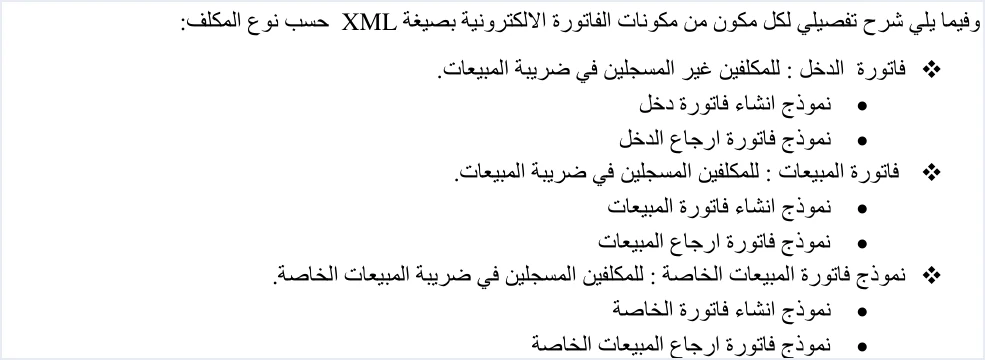
This article is about the second family. The guide calls it the sales invoice, and we call it the general sales tax invoice here. The tax it carries is General Sales Tax, administered by ISTD, at a standard rate of 16%. In the guide’s templates the text VAT appears inside the tax scheme element. That element is one of the unshaded ones, which the guide describes as a fixed description that does not change, so it is copied exactly as written.
None of this means that JoFotara is only for businesses registered for sales tax. Article 5(a) of Regulation No. 34 of 2019 requires the seller of any goods or service worth no less than one dinar to issue an invoice. Article 11 of Regulation No. 34 of 2019, together with Instructions No. 1 of 2019 issued under it, exempts specific categories. A seller that is not registered issues the income invoice, which carries no tax on its lines.
Who issues the general sales tax invoice
The general sales tax invoice is issued by a seller registered for sales tax. The seller does not choose the invoice family at will. It follows the seller’s registration status at ISTD. The system reads the invoice type from two elements in the invoice file, and what those two elements may say is decided by the taxpayer’s registration and by the facts of the sale.
If a taxpayer registered for sales tax sends an income invoice, or an unregistered taxpayer sends a general sales tax invoice, the system rejects it with the message This user is not authorized to submit this type of invoice. The guide gives the cause as the taxpayer sending an invoice type that does not match their tax number or their income-source sequence.
Registration also shows in the mandatory invoice details. Article 5(a) of Regulation No. 34 of 2019 requires the invoice to carry the seller’s tax number if the seller is registered for sales tax, and the seller’s national number if not. The seller number shown on the invoice therefore follows registration too.
When registration for sales tax becomes mandatory is a matter of annual sales thresholds, which differ between goods and services. Our article General Sales Tax in Jordan explains them, along with the rates.
What a general sales tax invoice carries that an income invoice does not
The two families share the seller and buyer details, the income-source sequence, the quantity, the unit price and the discount. The difference lies in everything related to tax, from the code to the line to the total. The table below collects the differences as they appear in the technical guide and in the invoicing texts.
The clearest of these differences sits inside the line. The line template of the general sales invoice adds a tax block that the income invoice does not have. It holds the tax amount for the goods or service, the line total including tax, and then the tax category and the rate.
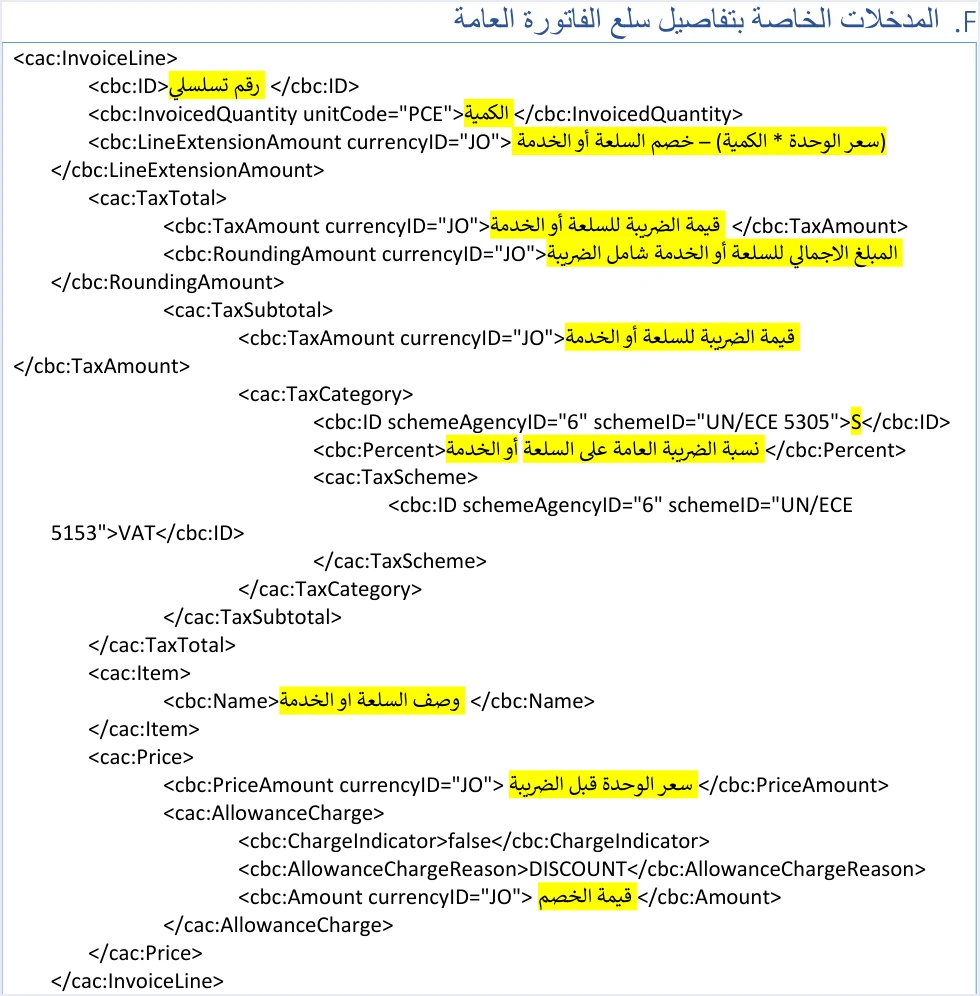
The guide gives each of these fields its own formula. The unit price is entered before tax, and the line value is the quantity times the unit price, minus the discount. The tax amount is the line value after discount multiplied by the tax rate, and the line total is the line value plus the tax amount. The discount is therefore subtracted before tax is calculated, and tax is calculated on each line separately.
The consumer price is a feature added in version 1.5 of the guide. It makes the final consumer price the base for calculating tax on the line. It is available only to taxpayers registered for General Sales Tax or Special Sales Tax, it is activated at the taxpayer’s request, and it applies to every line of the invoice. Once it is active, the line tax formula above changes. If the consumer price is higher than the unit price, tax is calculated on the quantity times the consumer price, and the discount does not reduce that base.
Tax category and rate on each line
Every line of a general sales tax invoice carries one of three tax category values and a General Sales Tax rate. Category S is for a line taxed at any rate other than zero. The guide uses category Z where the goods or service is exempt, and category O where the goods or service is subject to the zero rate. In both of these categories the line rate is 0%.
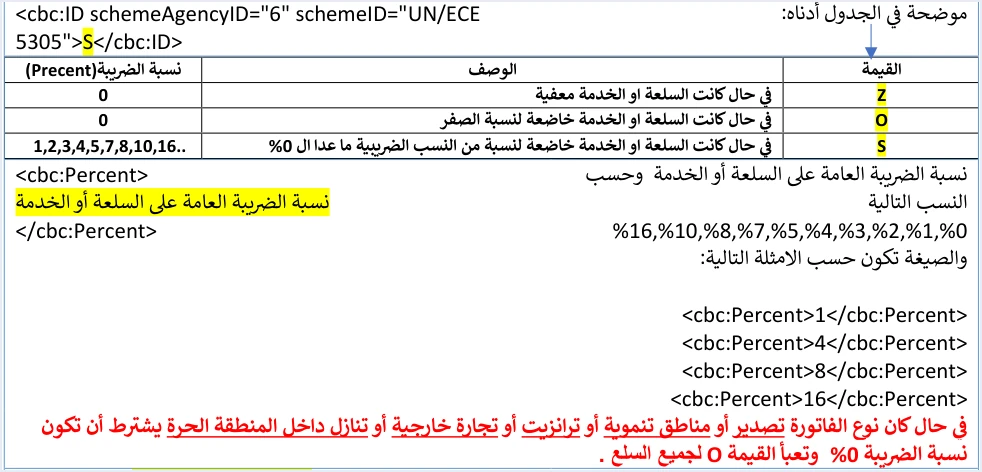
At 0%, category S is not used. Z is used for an exempt line and O for a zero-rated one. For the non-local types, the guide settles the question in a note under the line table on page 42. For export, development zones, transit, foreign trade and free zone assignment invoices, it requires the tax rate to be 0% and the value O to be entered for all goods.
The rates that the rate field accepts are a technical validation list in the guide. They are not a table of sales tax rates in Jordan.
The lines of one invoice do not all have to share a category. The guide’s own example of a general sales invoice combines a taxable line in category S and an exempt line in category Z in a single invoice.
Totals including tax in the invoice header
The line figures are added up in the invoice header in specific elements, and the guide gives a formula for each one. The header of a general sales tax invoice adds one element that the income invoice does not have, the total General Sales Tax amount on the invoice.
Scroll the table sideways to see the remaining columns
The guide applies these formulas in its own example. It has a line taxed at 7% with a value after discount of 64 and tax of 4.48, and an exempt line worth 50. The total before discount is therefore 116.000, the total discount 2.000, the total tax 4.480 and the amount payable 118.480.
These totals come with two constraints that the software sending the invoice has to respect. The first is that the system does not accept a separate invoice-level discount. The discount in the header is only the sum of the line discounts, so a seller who discounts the invoice total has to spread that discount across the lines before sending. The second is that the guide allows rounding to 3 decimal places, up to a maximum of 9, provided the difference is no more than 0.001. If the totals do not match the lines, the invoice is rejected with the message Total General Amount is Not Correct.
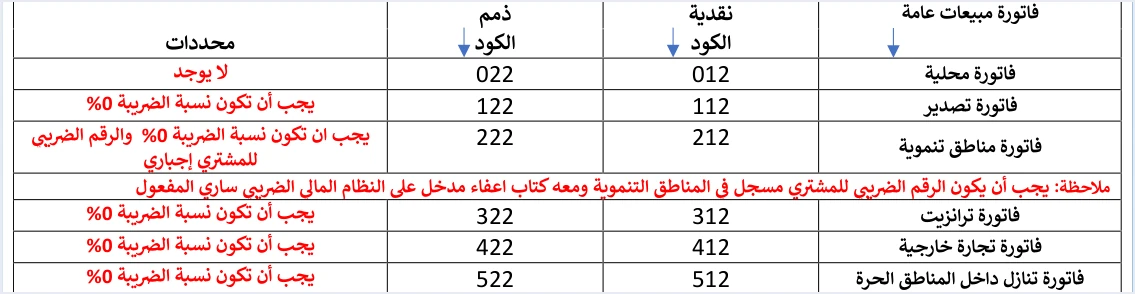
The general sales tax invoice code: third digit 2
The guide codes each invoice type as a three-digit number placed in the name attribute of the invoice type element. The first digit is the trade type, the second is the payment method (1 for cash, 2 for receivable), and the third is the tax family. In a general sales tax invoice the third digit is 2, against 1 for the income invoice and 3 for the Special Sales Tax family.
Scroll the table sideways to see the remaining columns
Code 012 does not mean a cash invoice in general. It means a local general sales tax invoice paid in cash.
The value of the invoice type element itself shows whether the invoice is new or a return, 388 for a new invoice and 381 for a return. A return invoice legally counts as a credit note, and it carries the same code as the original invoice. Version 1.5 of the technical guide defines no third value, so JoFotara has no debit note.
Issuing a general sales tax invoice on the portal or through a linked system
ISTD’s joining guide sets out two paths after the account is created, issuing invoices on the portal for a business with no accounting software, and device linking for a business that has it. The two are alternatives, not consecutive steps.
On the portal, the taxpayer signs in as the sub-user, because the main user does not see the Issue an invoice tile (تنظيم فاتورة). The sub-user then chooses cash (نقدي) or receivable (ذمم), fills in the invoice and buyer details, adds each item with the Add button (إضافة), and presses Issue (إصدار). The form shown in ISTD’s 2026 procedures guide for issuing an invoice is a sub-user form for a taxpayer registered for General Sales Tax. Its goods or services section has a mandatory field called General Sales Tax rate (نسبة الضريبة العامة), whose value is picked from a list. The full steps are in our article Issue an Invoice on the JoFotara Portal, and the fields of the form are covered one by one in our article JoFotara Invoice Form Fields Explained.
Through linking, the main user selects the device linking option (ربط الأجهزة), enters a username and selects the income-source sequence. The system then generates the Client ID (رقم المستخدم) and the Secret Key (المفتاح السري), and the taxpayer completes the technical requirements with the developer of their system or their technology provider. From then on, the accounting software sends the invoice to the system as an XML file in the UBL 2.1 standard, Base64-encoded inside a request. The response returns the invoice status in EINV_STATUS. If the invoice is accepted, a QR code comes back with it in EINV_QR, and the guide requires that code to be shown on the seller’s invoice.
The choice of path has an effect on the portal. ISTD’s questions and answers guide states that the sub-user loses the Issue an invoice tile (تنظيم فاتورة) once the device linking option has been clicked. It also states that unlinking is an invoicing-system support request (طلب دعم فني لنظام الفوترة) submitted to ISTD, and only for a business that has no accounting system and linked by mistake. The same guide adds that a business that has an accounting system is required to link it to the National Invoicing System.
Pre-submission checklist for a general sales tax invoice in JoFotara
The list below turns the sections above into questions for the accountant to answer before the invoice leaves the software or the portal.
- Is the business registered for sales tax? If it is not, the correct invoice is the income invoice, and the system rejects a type that does not match the registration.
- Does the code end in 2? The code is 012 for a local cash invoice and 022 for a local receivable invoice, and the other types have their codes in the table above.
- Does every line have a category and a rate? Category S is for a rate other than zero, Z for an exempt line and O for a zero-rated line, both at 0%.
- Is the trade type non-local? For export, transit, foreign trade, free zone assignment and development zones, the rate is 0% with category O for all goods, and development zones also need the buyer’s tax number and a valid exemption letter.
- Was tax calculated after the discount? The tax amount is the line value after discount times the tax rate, unless the consumer price feature is active and the consumer price is higher than the unit price.
- Is the discount spread across the lines? The system does not accept a separate invoice-level discount.
- Do the totals match the lines? The total tax in the header equals the sum of the line taxes, and the amount payable equals the sum of the line totals including tax.
- Is the buyer’s name required? It is always required on a receivable invoice, and on a cash invoice worth more than JOD 10,000 or its equivalent in foreign currency.
For a wider view of the system and how to connect your business to it, read our article Jordan’s National E-Invoicing System. You can also read about Qoyod and the National Invoicing System.
E-invoicing and full accounting in one system
Qoyod is integrated with the National Invoicing System (JoFotara). You issue your invoice in Jordanian dinars from Qoyod, it is booked to your ledgers automatically and sent to the system, and once it is accepted it comes back with a QR code from the Income and Sales Tax Department.
Frequently asked questions
Who issues the general sales tax invoice in Jordan?
It is issued by a seller registered for sales tax with ISTD. A seller that is not registered issues the income invoice, which carries no tax on its lines.
Does an income invoice carry sales tax?
An income invoice carries no sales tax. Its lines have no tax part, and its header has no tax total. Its codes end in 1, as in 011 and 021.
What is the code for a local general sales tax invoice?
The code is 012 for a local cash invoice and 022 for a local receivable invoice. A third digit of 2 marks the General Sales Tax family in every type, from 012 and 022 to 512 and 522.
Can one invoice combine a taxable line and an exempt line?
One invoice can combine both. The general sales invoice example in the technical guide includes a line in category S at 7% and an exempt line in category Z at 0% in a single invoice.
Can I issue a general sales tax invoice on the portal after linking my accounting software?
The sub-user loses the Issue an invoice tile (تنظيم فاتورة) after device linking, according to ISTD’s questions and answers guide. Unlinking is a support request open only to a business that has no accounting system and linked by mistake, and it is not a setting the taxpayer changes on their own.
How do I correct a general sales tax invoice issued in error?
You correct it with a return invoice that has the value 381 and the same code as the original invoice. The return is on quantities only, carries the same buyer details, and cannot exceed the quantity sold on the original invoice.
References
- Income and Sales Tax Department (ISTD), technical guide for integrating with the National Invoicing System through the API, version 1.5 (in Arabic).
- Income and Sales Tax Department (ISTD), procedures guide for joining the Jordanian National Electronic Invoicing System, 2026 edition (in Arabic).
- Income and Sales Tax Department (ISTD), procedures guide for issuing an invoice in the Jordanian National Electronic Invoicing System, 2026 edition (in Arabic).
- Income and Sales Tax Department (ISTD), questions and answers guide for the National Invoicing System, 2026 (in Arabic).
- Regulation No. 34 of 2019 on Organizing and Controlling Invoicing Affairs, as amended, consolidated text of 2023 (in Arabic).
- ISTD’s National Invoicing System guides (in Arabic)




