




JoFotara Base64 encoding is the step in which the invoice file, written in XML, becomes a single string that sits inside a JSON request before your software sends it to the National Invoicing System (JoFotara) run by the Income and Sales Tax Department (ISTD). The system does not accept the XML file as it is. It expects the file encoded, in the body of the request, under a single key named invoice.
This article shows where that step sits in the submission flow drawn in ISTD’s technical guide (version 1.5), what goes in the request header and what goes in its body, the steps to prepare the body in order, the mistakes to avoid when encoding, and what comes back in the response. It describes the steps and offers no ready-made code, because code that has not been tested against the system itself is no reference.
Where JoFotara Base64 sits in the submission flow
ISTD’s technical guide draws the invoice submission flow in a single diagram (p. 9). The flow starts at the taxpayer’s system, meaning the software that issues the invoice, and ends at the National Invoicing System (JoFotara). In between there are three stops.
- The electronic invoice. It has a header that carries the Client ID and the Secret Key, and a body that holds an XML file with the invoice details. That XML file goes through a step labeled “Encoding Base64”.
- The JSON file. This is the envelope that carries the encoded invoice to the system.
- The submission result. It is either Submitted (Success) or Already Submitted, and in both cases the signed invoice and the QR code come back. Or it is Error, and an error list comes back.
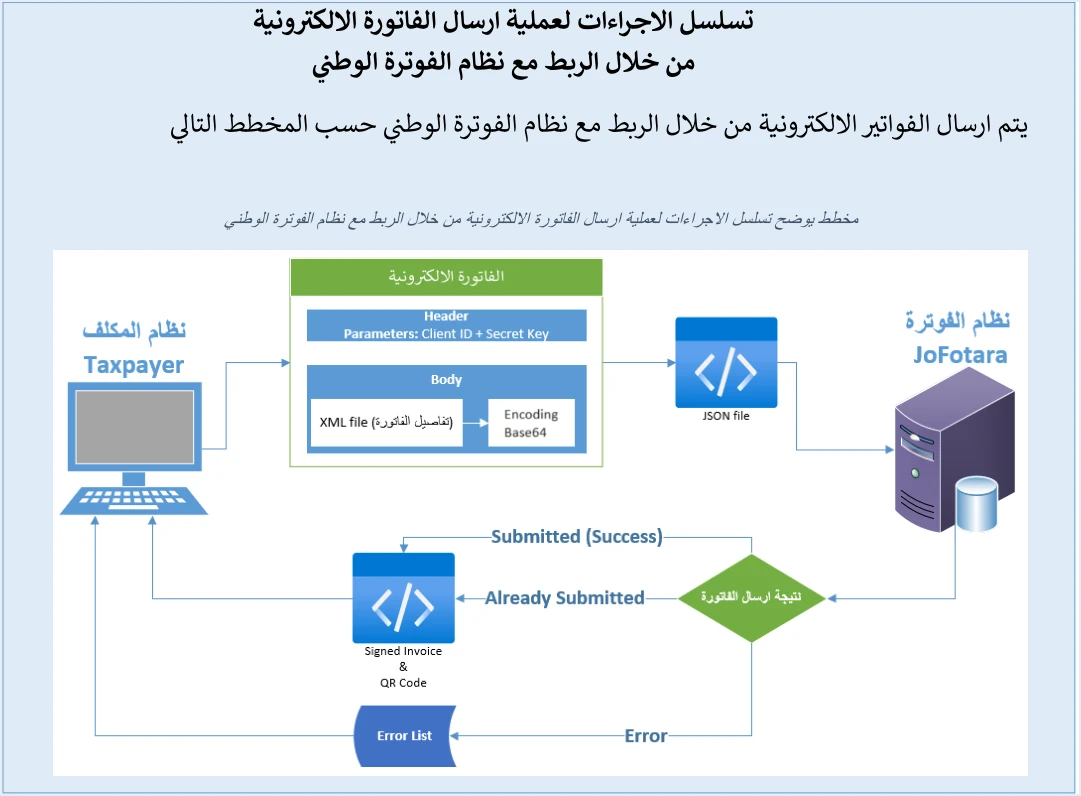
The diagram makes one thing clear. The encoding applies to the XML file alone, inside the body of the request. The JSON file is the container the encoded file is placed in, and it is not encoded itself. Most of what follows in this article rests on that difference.
The file being encoded is built on the UBL 2.1 standard, which the guide requires for every invoice. We cover its structure in a separate article on UBL 2.1 in JoFotara. For the wider picture of the system itself and who must comply with it, read our article Jordan’s National E-Invoicing System.
The parts of the submission request and where each one goes
The technical guide (p. 10) says the JSON file prepared for submission has three components, the Client ID, the Secret Key and the invoice in XML format. A note adds that the first two values are taken from the device linking screen (ربط الأجهزة) in the National Invoicing System.
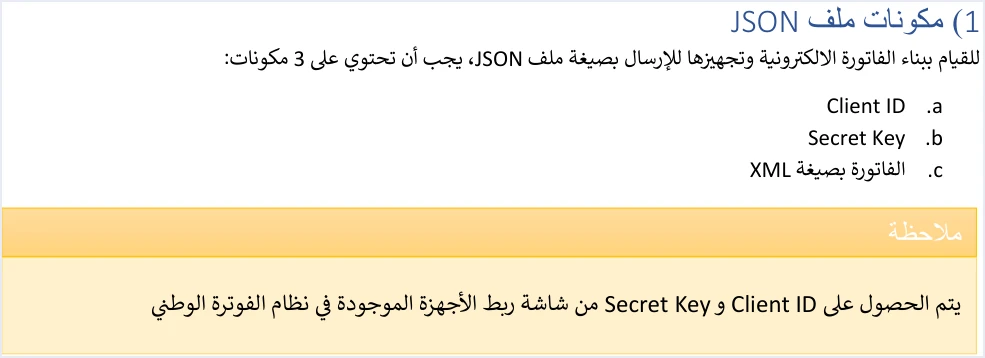
The submission example in the same guide (p. 96), however, places these components in two different spots. The Client ID and the Secret Key go in the request header, and only the encoded invoice goes in the body. The diagram on p. 9 agrees with the example, since it puts both values under the word Header. So it is fair to read “three components” as what the whole request carries, not what the JSON text alone carries.
How to obtain these two values, who creates them and how they relate to the income-source sequence is explained in our article on the Client ID and Secret Key and the device linking steps, so we do not repeat it here.
Steps to prepare the request body {"invoice": "…"}
The technical guide sums up the first step of sending an invoice in one sentence (p. 96). Once the invoice is prepared in XML, the file is encoded in Base64 and placed in a JSON file, with the Client ID and the Secret Key added.

The Arabic sentence in the image uses a different word for this step, and what it means is Base64 encoding. Encoding changes the way the file is written so that it can travel as a single string inside JSON. It does not make the content secret. That is why this article calls it encoding everywhere.
If we break that sentence down using what the guide says elsewhere, the order comes to six steps.
- Build the complete invoice file in UBL 2.1 XML. The file starts with the declaration line that sets the encoding,
encoding="UTF-8", then the root elementInvoicewith its namespaces, thencbc:ProfileIDwith the valuereporting:1.0. The guide (p. 10) requires this opening exactly as written. - Make sure the opening tag of the
Invoiceelement is written on one line. If it spreads over more than one line, the errorInvalid Invoice Minificationcomes back (p. 102). Minifying the file has detailed rules of its own that are beyond the scope of this article. - Finalize the file before you encode it. What you encode is what reaches the system. Any change to the invoice after encoding does not reach it unless you encode again from the edited file.
- Encode the whole file in Base64, from the declaration line to the closing tag, to get a single string.
- Put the resulting string in as the value of the
invoicekey in the JSON request body. The body then takes the form{"invoice": "…"}, where the dots are replaced by the full Base64 string. - Send the request by POST to the address the guide gives, which is
https://backend.jofotara.gov.jo/core/invoices/, with the three headersClient-Id,Secret-KeyandContent-Type: application/json.
This is the order the guide’s own example follows. You build the XML, encode it, place it in the JSON body under the invoice key, and send it with the two credential headers. The guide’s example is written in C#. It shows the shape of the request, but it is not code to copy as it is, as explained below.
Mistakes to avoid when encoding the file and sending the request
Every point in the list below comes from the text of the technical guide or from documented notes on its examples, except two points that we flag clearly as general notes of our own.
- Encoding the whole JSON text instead of the XML file alone. In the diagram (p. 9) the encoding applies to the XML file inside the body. The JSON text stays readable and carries the
invoicekey and its value. - Putting the Client ID and the Secret Key inside the request body. In the guide’s example (p. 96) they belong in the header, and the body carries the invoice alone.
- Renaming the
invoicekey or writing it in another form. The name in the guide’s example is exactly this one. - Encoding a version of the file other than the final one. This is a general note from us, not an ISTD rule. If you edit a line after encoding, the version that reaches the system is the old one.
- Writing the opening tag of the
Invoiceelement over more than one line. The errorInvalid Invoice Minificationthen comes back. - Changing or deleting the declaration line. The guide (p. 10) requires the declaration line with UTF-8 encoding, exactly as it is, at the start of the file.
- Saving the file in a character encoding other than the one the declaration line states. This is a general note from us, not an ISTD rule. If the file declares UTF-8 and your software saves it in another character encoding, the file says one thing about itself while its text says another. The guide does not mention this case, and it gives no error message specific to it.
- Copying the XML examples from the guide as they are. Some of the guide’s examples have known defects, including doubled quotation marks in the Special Sales Tax examples and unique identifiers (UUIDs) in an invalid format. Encoding fixes nothing in the file. Whatever was defective before it stays defective after it.
- Copying the guide’s C# example word for word. The example adds a fourth header that carries a session value captured from ISTD’s own session. Do not send that header and do not copy the example as it is. The request the guide describes rests on the three headers above.
- Looking for a test environment in the guide. Version 1.5 of ISTD’s technical guide does not state any test environment open to taxpayers or software providers. The only submission address in it is the one above.
The request is not protected by the encoding. It is protected by keeping the Client ID and the Secret Key safe. One of ISTD’s ten operating instructions is that the two values must not be written in the open in code, and the guide places full responsibility for any unauthorized use of them on the taxpayer.
What comes back in the response
The system returns a response that carries a response status code and several fields. A status code of 200 means the request was received and processed technically, but it does not settle what happened to the invoice. The deciding status of the invoice is the value of the EINV_STATUS field, which has three values.
SUBMITTEDmeans the invoice was accepted and the QR code came back with it.ALREADY_SUBMITTEDmeans the invoice was sent before with the same number and the same unique identifier, and the original QR code comes back with it.NOT_SUBMITTEDmeans the invoice was rejected. The status code is then not 200, and the QR code, unique identifier, number and signed invoice fields come back empty.
One of the response fields is EINV_SINGED_INVOICE (spelled this way in the guide). It holds the invoice signed by ISTD, and it also comes back in Base64 encoding. The signature therefore comes from ISTD, and the guide asks the taxpayer for no signature or digital certificate. The guide does not, however, explain the structure of this field once decoded, nor the structure of the QR code in EINV_QR. So do not build logic in your software that depends on decoding either of them. Store both values as they arrived, and show the QR code on the seller’s invoice, as the guide requires.
If the status code is not 200, the code tells you where to look, according to the guide (p. 101).
- Code 403 points to an error in the Client ID or the Secret Key.
- Code 400 points to errors in the values of the XML file, detailed in the
EINV_MESSAGEfield. - The guide ties code 500 to an error in the tax number or the income-source sequence, less often to the Client ID or the Secret Key, or to a tax rate that is not among the rates ISTD recognizes.
- Code 504 points to a failure to reach the National Invoicing System, caused by the taxpayer’s firewall or by the system’s own site.
For the rejection messages themselves and how to deal with them, see our article on why an invoice is rejected and how to fix it.
Resending after an error or a dropped connection
If the submission fails or the connection drops before the response arrives, ISTD’s instructions are clear on two points.
- Resend with the same number and the same unique identifier. The primary key of an invoice in the system is the number
cbc:IDand the identifiercbc:UUIDtogether, and the guide warns that generating a new identifier when retrying may lead to a duplicate invoice. - Judge the result by the value of
EINV_STATUS, not by the status code alone. If the value comes back asALREADY_SUBMITTED, the invoice arrived on the first attempt, and the original QR code comes back with it.
If the response is an error in the invoice values, the fix lies in the XML file itself. Correct the file, encode it again, then send it with the same number and unique identifier. The guide also recommends storing the number, the unique identifier, the QR code and the invoice status, and keeping a full log of every submission, response and resend. That log is what you go back to when you ask why a particular invoice was rejected.
If you need ISTD, the guide (p. 104) refers you to ISTD’s technical support committee for invoicing affairs through istd.gov.jo. Before you get in touch, have the invoice number, its unique identifier, the time of submission and the full text of the response ready, and never send the Secret Key in any message.
Base64 encoding when Qoyod sends your invoices
If you use Qoyod’s integration with the National Invoicing System, you do not need to prepare the request body yourself. Qoyod builds the invoice file in UBL 2.1 format with its unique identifier (UUID) and sends it to the National Invoicing System without any manual intervention. The taxpayer needs no digital certificate or signature of their own to send invoices through Qoyod.
Qoyod checks each invoice at field level as it is created, covering the tax number, the document type and payment method, the General Sales Tax rate and whether the lines are complete, and alerts you to any error before the invoice is sent, to reduce rejections. If an invoice is rejected, ISTD returns the invoice status and any error message, and Qoyod shows them in its status panel. Correct the cause first. The status panel lists invoices that were not sent and need to be resent, and when you resend one it keeps the same UUID.
E-invoicing and full accounting in one system
Qoyod is integrated with the National Invoicing System (JoFotara). You issue your invoice in Jordanian dinars from Qoyod, it is booked to your ledgers automatically and sent to the system, and once it is accepted it comes back with a QR code from the Income and Sales Tax Department.
Frequently asked questions
What does Base64 encoding mean in JoFotara?
It means turning the invoice file, written in XML, into a single string in Base64 encoding, then placing that string as the value of the invoice key in the body of a JSON request sent to the National Invoicing System.
Do I encode the whole JSON file or only the XML file?
In the technical guide’s diagram, the encoding applies to the XML file alone. The JSON text stays a readable envelope that carries the invoice key and its encoded value.
Do the Client ID and Secret Key go inside the JSON file?
The guide lists them among the three components of a submission, but its example on p. 96 sends them in the request header, named Client-Id and Secret-Key, and leaves the body to the invoice alone.
Does Base64 encoding protect the invoice data?
It does not. It is an encoding that changes the way the file is written, and it does not make the file secret. The protection the guide asks for is keeping the Client ID and the Secret Key safe and not writing them in the open in code.
Is there a test environment for trying the request before a live submission?
Version 1.5 of ISTD’s technical guide does not state any test environment open to taxpayers or software providers. The only submission address it gives is https://backend.jofotara.gov.jo/core/invoices/.
What should I do with the signed invoice field that comes back encoded?
Store it as it arrived. The system returns the invoice signed by ISTD in Base64 encoding, but the guide does not explain its structure once decoded, so do not build logic on it in your software before you have verified it.
References
- Income and Sales Tax Department (ISTD), technical guide for integrating with the National Invoicing System through the API, version 1.5 (in Arabic), pp. 9, 10, 96, 101, 102 and 104.




