




Anyone building the link between accounting software and the National Invoicing System (JoFotara) will find a whole section on the special sales return invoice in the technical guide from the Income and Sales Tax Department (ISTD), running from page 72 to page 84. This article is a block-by-block JoFotara special tax return XML example. It shows what goes into each element, which values are fixed and copied as they are, which values come from the original invoice, and which rule in the guide governs each one.
The article is a map of the structure, not a file to copy. The guide’s examples are illustrative, and in the example for this section two places should not be copied literally, which we set out in a section of their own. We did not send any example from this article to the National Invoicing System, because version 1.5 of the guide documents no open test environment for taxpayers or software providers. This is why the few snippets shown here are short, and why their values are descriptions inside comments, not values to send.
The article is written for the developer who already knows the structure of the new special tax invoice and wants to know what the return adds to it and what stays the same.
What the JoFotara special tax return XML example shows
The technical guide defines only two document types in the invoice type element, the value 388 for a new invoice and the value 381 for a return invoice (credit note). An invoice is not edited after it is issued, so everything returned from a sales invoice goes through a return invoice linked to it, and a return is on quantities only.
A return invoice in the special tax family carries the same line structure as the new special tax invoice. Each line has a special tax block with the tax scheme OTH, followed by a general sales tax block with the tax scheme VAT. The return adds three things to it, which are the reference to the original invoice, the return reason, and restrictions on what is written in the lines so that they match the original.
The guide presents this section in two stages, a template in which the variables appear as shaded Arabic descriptions, and then an example with actual values. On page 12 the guide explains the shading and repeats it in every template. Elements shaded yellow are mandatory variables, elements shaded green are optional variables, and the rest of the elements are fixed description with no change. ISTD publishes this guide in Arabic only; the English here is our rendering, and the Arabic text is the authority. The template is the reference for the structure, while the example only illustrates the shape of the values.
File map from the header to the last line
The table below lists the blocks of the return file in the order in which they appear in the template sections, with what goes into each block and the rule that governs it. The sections after it then explain each group of blocks in turn.
Scroll the table sideways to see the remaining columns
The table shows that most values in the return file are copied from the record of the original invoice, and that little is written new. What is new is the return invoice number, its identifier, its date and its counter, the return reason, and the returned quantities with the amounts that follow from them.
The return header and the original invoice reference
The template starts with section A, whose title in the guide is Basic invoice information and information on the invoice being returned from (معلومات الفاتورة الأساسية و معلومات الفاتورة المراد الارجاع منها). This section holds the data of the return invoice itself, then the reference block that points to the original invoice, then the invoice counter.
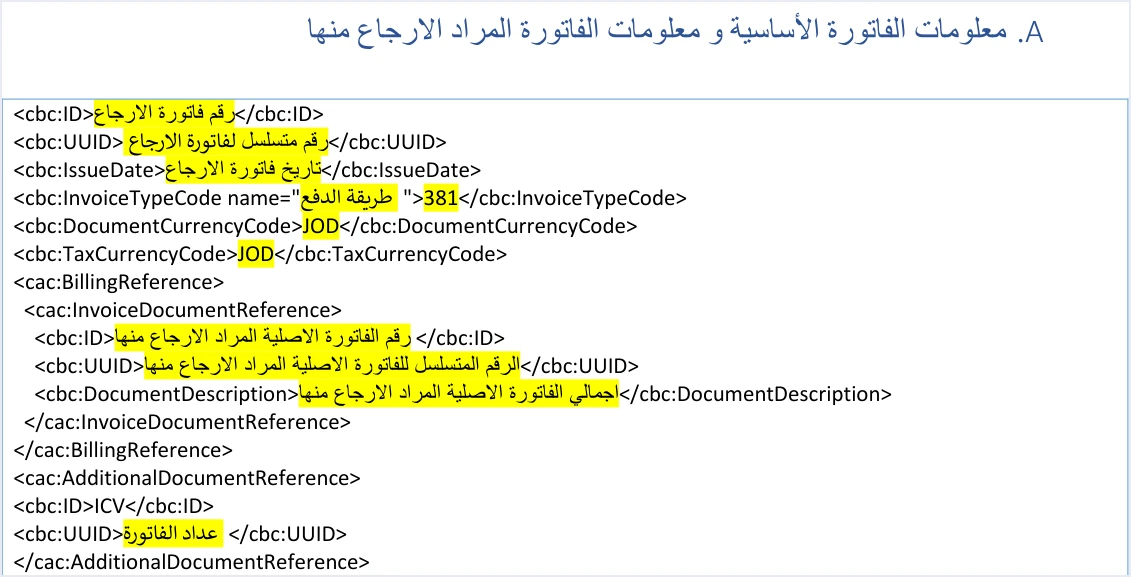
The return header has three items that belong to the return invoice alone.
- The return invoice number and identifier.
cbc:IDholds the return invoice number, andcbc:UUIDholds its unique identifier. The primary key of any invoice in the National Invoicing System is the number and the identifier together. Your system generates the identifier, so you save it before the first send and reuse it in any resend. - The return invoice date. It is written in
cbc:IssueDatein the formatyyyy-mm-dd, as in all the XML examples in the guide. The description copied from the guide file on page 73 may show the parts of the date in a different order, so use the format the examples use. - No notes element. The header of the special tax return does not carry the element
cbc:Note, and neither does the header of the General Sales Tax return. The header of the income invoice return differs, because it keeps the element optional.
The invoice type element always has the value 381 in a return, and its name attribute carries the same three-digit code as the original invoice. The third digit of that code is 3 for the special tax family, the second digit is 1 for cash and 2 for receivable, and the first digit is the trade type. For this family the guide gives two examples, 013 for the return of a local cash invoice and 023 for the return of a local receivable invoice.
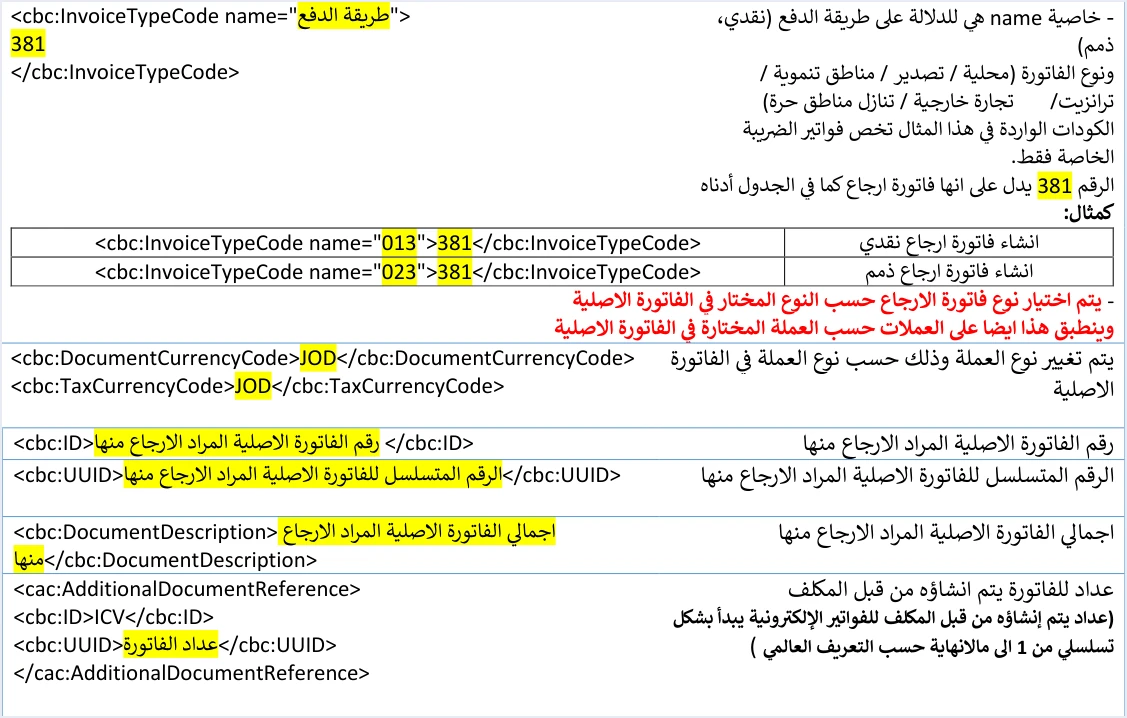
Below those two examples the guide places an explicit rule that the type of the return invoice is chosen according to the type chosen in the original invoice, and that this applies to the currency as well. So if the original invoice is in a currency other than the dinar, the return invoice carries the same currency in both currency elements, because in the guide a change of currency applies to the whole invoice.
The reference block cac:BillingReference comes next. It has three elements, which are the original invoice number, its unique identifier, and its total in cbc:DocumentDescription. Our article JoFotara BillingReference: Original Invoice Link goes through this block and what each element equals. The section ends with the invoice counter, which the guide describes as a counter created by the taxpayer for the electronic invoices, starting sequentially from 1 and increasing without limit according to the global definition. For the counter itself, see our article JoFotara ICV: The Invoice Counter Explained.
This is a short snippet that shows the order of the header elements. The comments in it describe what goes in place of the dots.
<cbc:ID>...</cbc:ID>  <!-- the return invoice number in your system -->
<cbc:UUID>...</cbc:UUID>  <!-- a new unique identifier for the return invoice, saved by your system -->
<cbc:IssueDate>...</cbc:IssueDate>  <!-- the return date in the format yyyy-mm-dd -->
<cbc:InvoiceTypeCode name="...">381</cbc:InvoiceTypeCode>  <!-- the code of the original invoice, such as 013 or 023 -->
<cbc:DocumentCurrencyCode>...</cbc:DocumentCurrencyCode>  <!-- the currency of the original invoice -->
<cbc:TaxCurrencyCode>...</cbc:TaxCurrencyCode>  <!-- the same currency -->
<cac:BillingReference>
  <cac:InvoiceDocumentReference>
    <cbc:ID>...</cbc:ID>  <!-- the original invoice number -->
    <cbc:UUID>...</cbc:UUID>  <!-- the identifier of the original invoice -->
    <cbc:DocumentDescription>...</cbc:DocumentDescription>  <!-- the total of the original invoice -->
  </cac:InvoiceDocumentReference>
</cac:BillingReference>
Seller, buyer, income-source sequence and return reason
Four short blocks follow the header. Three of them are present in every invoice, and the fourth belongs to the return.
The seller. The block cac:AccountingSupplierParty carries the country code JO, the seller’s tax number in cbc:CompanyID, the scheme VAT, and the seller’s name in cbc:RegistrationName as registered with ISTD.
The buyer. The title of this section in the template, section C, is Buyer data, fixed description with no change or addition (البيانات الخاصة بالمشتري). Under it sits the rule that governs it.

The rule says that the buyer data in the return invoice must match the buyer’s data in the original sales invoice it is linked to. That data includes the identification type in the schemeID attribute, whose values are NIN for the national number, PN for the personal number of a non-Jordanian and TN for the tax number, then the postal code, the governorate code, the phone and the name. The buyer’s name is required on a receivable invoice, and on a cash invoice if its value is more than JOD 10,000 or the equivalent in foreign currencies. The practical route is for your system to read this block from the record of the original invoice, not to enter it again.
The income-source sequence. The block cac:SellerSupplierParty carries the income-source sequence in cbc:ID, and it is a mandatory value in every submission. The Client ID and the Secret Key are tied to one sequence, so if the sequence differs from what suits the invoice, the submission may be rejected with a message saying that the user is not authorized to submit this type of invoice.
The return reason. This block belongs to the return invoice. The element cac:PaymentMeans carries PaymentMeansCode listID="UN/ECE 4461" with the value 10, and cbc:InstructionNote carries the return reason as free text. The reason is mandatory. The name of the block suggests a payment method, but the payment method in the National Invoicing System is the second digit of the invoice type code. The detail is in our article JoFotara Return Reason: The PaymentMeans Element.
Invoice-level totals of the return
The principle that governs this section is that the totals of a return invoice cover only the part being returned, not the whole original invoice. In the template for this section the guide puts the phrase for the part to be returned next to the totals, and describes the tax total in the header as the total general sales tax amount (p. 78).
This section has three blocks.
- The invoice-level discount. The block
cac:AllowanceChargecarriesChargeIndicatorwith the valuefalse, the reasondiscount, and an amount equal to the sum of the line discounts. The system does not accept a separate discount on the invoice as a whole. - The tax total in the header. The block
cac:TaxTotalcarries incbc:TaxAmountthe sum of the line taxes. In a new special tax invoice this element carries the general sales tax alone, because in the guide’s example it equals the sum of the general sales tax in the two lines. - The totals. The block
cac:LegalMonetaryTotalcarriesTaxExclusiveAmountwith the sum of quantity times unit price,AllowanceTotalAmountwith the sum of the line discounts, andTaxInclusiveAmountandPayableAmountwith the sum of the line totals inRoundingAmount.
The guide states the total of a special tax invoice in these words. The invoice total equals the invoice total before discount, minus the total discount value, plus the total special tax, plus the total General Sales Tax amount. In a return, all these terms are calculated on the lines and quantities being returned. The guide allows rounding to 3 decimal places, up to a maximum of 9, provided the difference does not exceed 0.001.
If the return is rejected with a message about the totals, start from the message text in EINV_MESSAGE, then recalculate every total from the return lines themselves, not from the original invoice. For the error messages the guide documents, see our article JoFotara error codes.
Return lines and the OTH block before the general sales tax block
The last section of the template, titled Inputs for the special return invoice goods details (المدخلات الخاصة بتفاصيل سلع فاتورة الارجاع الخاصة), is the longest, and the guide explains it on pages 80 to 84.
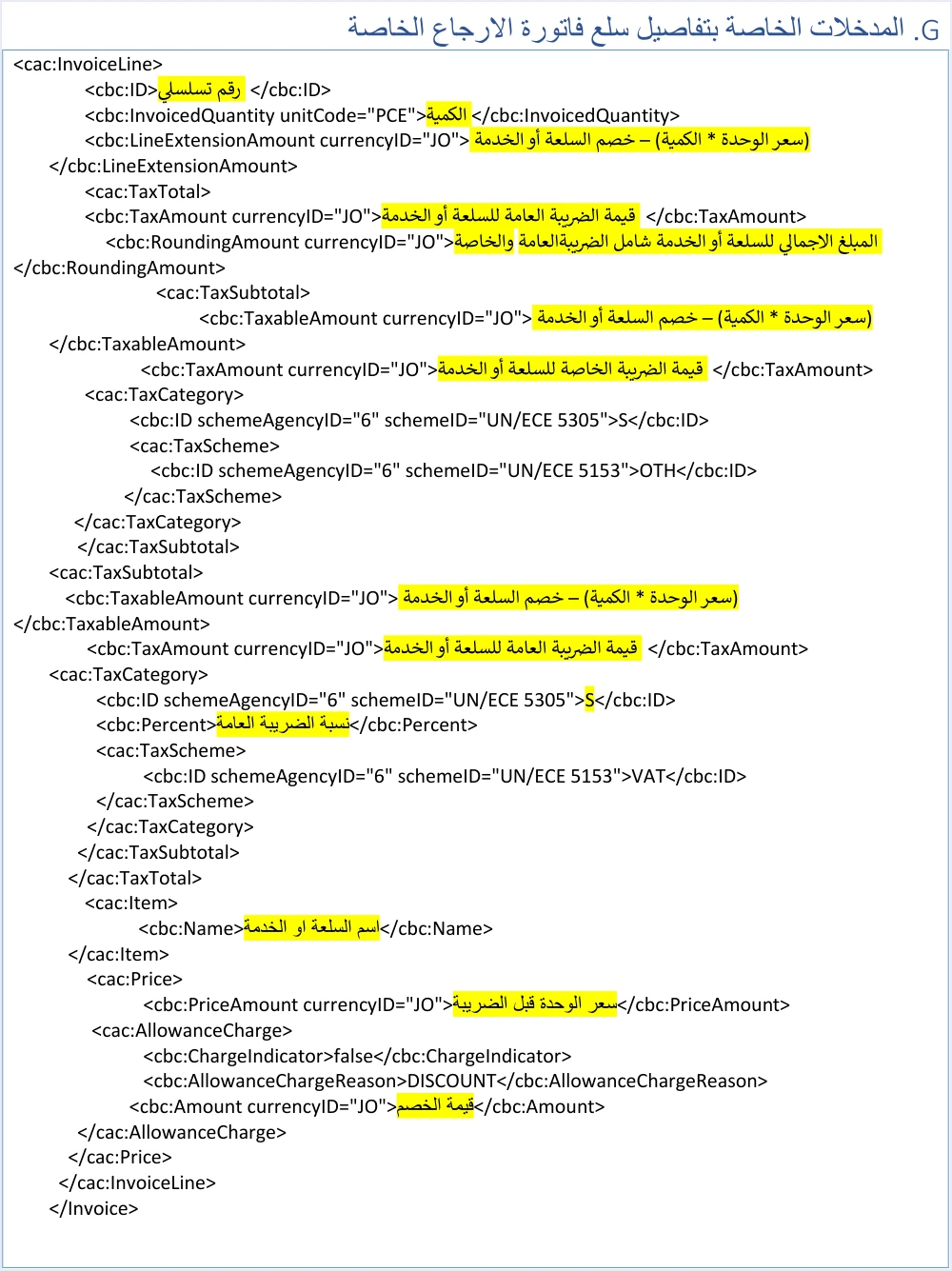
A line starts with its basic data, then the tax block, then the item with its price and discount.
- The line number
cbc:ID. It is written as it is in the original invoice, because the return matches lines by their number. For this reason your system saves the number of every line from the original sale. - The quantity
cbc:InvoicedQuantity. This is the quantity being returned. It may be the full quantity or a part of it, a whole number or with decimal places, and greater than zero. It does not exceed the quantity sold in the original, and more than one partial return may be made against the same invoice until its quantities are used up. - The line value
cbc:LineExtensionAmount. It equals the returned quantity times the unit price, minus the line discount. - The line tax
cac:TaxTotal. Itscbc:TaxAmountcarries the general sales tax alone, and itscbc:RoundingAmountcarries the line value plus the special tax and the general sales tax. - The item name and unit price.
cbc:Nameandcbc:PriceAmountare written as they are in the original invoice, and the price is the unit price before tax.
Inside the line tax there are two cac:TaxSubtotal blocks in a fixed order. The first is for the special tax, with the scheme OTH, and the second is for the general sales tax, with the scheme VAT. This is a short snippet of the first block. The guide’s examples write the value JO in the currencyID attribute, and the guide does not say whether the system accepts another value, so the snippet repeats the guide’s form.
<cac:TaxSubtotal>
  <cbc:TaxableAmount currencyID="JO">...</cbc:TaxableAmount>  <!-- quantity x unit price - line discount -->
  <cbc:TaxAmount currencyID="JO">...</cbc:TaxAmount>  <!-- the special tax amount for the item, an amount you enter, not a rate -->
  <cac:TaxCategory>
    <cbc:ID schemeAgencyID="6" schemeID="UN/ECE 5305">S</cbc:ID>
    <cac:TaxScheme>
      <cbc:ID schemeAgencyID="6" schemeID="UN/ECE 5153">OTH</cbc:ID>
    </cac:TaxScheme>
  </cac:TaxCategory>  <!-- there is no cbc:Percent element in this block -->
</cac:TaxSubtotal>
There are three notes on this block. The first is that on the return pages the guide repeats that the special tax is a value entered without calculations (p. 81), so it is an amount your system writes and not one derived from a rate. The second is that the block carries category S and carries no rate element. The third is that its place is before the general sales tax block. The element-by-element explanation of the block, with the guide’s example in numbers, is in our article JoFotara Special Tax OTH: The Special Sales Tax Line.
The second block carries the taxable amount, the general sales tax amount, the category, the rate in cbc:Percent, and the scheme VAT. The general sales tax is calculated on the line value plus the special tax. The return page for this family lists the rates accepted in the rate field as 1,2,3,4,5,7,8,10,16 (p. 82). That is a list of values the API accepts, not a table of the General Sales Tax rates that the law imposes.
The line ends with the discount block. For the discount in a return the guide has a rule. If the return is of the full quantity of the goods or service, the discount, if there is one, must be entered in full. If the return is of a part of the quantity, the discount, if there is one, must be a part of the total discount of the goods or service according to the quantity returned (p. 82). The guide gives no formula for this split. What can be understood from the phrase according to the quantity returned is that the discount is proportional to the quantity, and the exact calculation is a decision your system takes and documents.
We do not state here a rule for splitting the special tax amount across the returned quantity in a partial return. In this place the guide describes the special tax as a value entered without calculations, and we do not add to its description a rule it does not give.
Two notes on the guide’s example before you rely on it
After the template comes an example written with actual values, and it has two places that need attention. We give the page of each so that it is easy to go back to it in the guide.
- The header of the example (p. 74). The header of the example carries the same header data as the example for the General Sales Tax return, apart from the type code
013, including the reference to the original invoice and its total. So it does not match the example of the new special tax invoice that precedes it in the guide. For this reason, do not rely on the numbers of this reference in your testing. - The quotation marks (pp. 81 and 82). On page 81 the value of the
currencyIDattribute ends with two quotation marks, and on page 82 the attributesschemeAgencyIDandschemeIDare written with doubled marks. If the example is copied as it is, the result will not be a well-formed XML file. The correct form is one quotation mark on each side of the value, as in the template.
These two places are among a larger set of notes on the guide’s examples, which we collect with their pages in our article JoFotara Technical Guide Examples: Do Not Copy As-Is. The quotation-mark problem also appears in the guide’s example for the new special tax invoice.
The safe way is to take the structure and the fixed description from the template, fill the variables from the record of the original invoice and from the returned quantities, and use the example for comparison only.
What this example has that the other two return examples do not
The guide has three complete examples of return invoices, one for each family. All three share the original invoice reference, the return reason and the rule that the buyer must match, and they differ in the following respects.
So the essential difference in this example is the OTH block inside each line, and what follows from it for the base of the general sales tax, the line total and the invoice totals. The rest of the file resembles the General Sales Tax return. The other two return examples are those of the income invoice and of the General Sales Tax invoice. For the legal and procedural side of this family, our article Special Sales Tax Invoice in JoFotara: When to Issue It covers who issues it, its codes and how to return it.
Pre-submission checklist for a return file
This list is drawn from the template and the guide’s rules above, and you can run it over any return file in this family before it is encoded and sent.
- The header. A new number and identifier for the return invoice, the date in the format yyyy-mm-dd, and no
cbc:Noteelement. - Type and currency. The value
381, the code of the original invoice in thenameattribute with its third digit 3, and the currency of the original invoice in both currency elements. - The reference. The original invoice number, identifier and total as in its record.
- The parties. The seller’s data as registered, the buyer’s data matching the original invoice, and the correct income-source sequence.
- The reason. The code 10 and the reason text in
cbc:InstructionNote. - The lines. Line number, name and price as in the original, and a returned quantity that is greater than zero and does not exceed what remains of the quantity sold.
- The two tax blocks. The
OTHblock first with no rate element, then theVATblock with the rate, and the general sales tax calculated on the line value plus the special tax. - The discount. In full when the whole quantity is returned, and a part of it according to the quantity returned in a partial return.
- The totals. Calculated from the return lines alone, and consistent with the total formula of the special tax invoice.
- File integrity. The opening invoice tag on one line, and one quotation mark on each side of the attribute values.
After sending, judge the result from the value of EINV_STATUS, not from the status code alone. The status SUBMITTED means acceptance, and the QR code comes back with it. The status NOT_SUBMITTED means rejection, and its details appear in EINV_MESSAGE. On a resend, the return invoice number and identifier stay as they are.
How Qoyod handles the return invoice file
Building this file and saving what it needs from the original invoice is work that falls on the taxpayer’s system, which is what your accounting software does when it is connected to the National Invoicing System. The document types in Qoyod for Jordan are the four that the system defines, which are the income invoice, the General Sales Tax invoice, the special tax invoice and the return invoice, and Qoyod’s integration with the National Invoicing System works on this layer as follows.
- Building the file and sending it. Qoyod builds the invoice file in UBL 2.1 format with its unique identifier (UUID) and sends it to the National Invoicing System without any manual intervention.
- Alerts before sending. Qoyod checks each invoice at field level as it is created, covering the tax number, the document type and payment method, the General Sales Tax rate and whether the lines are complete, and alerts you to any error before the invoice is sent, to reduce rejections.
- Every invoice’s status in view. ISTD returns the invoice status and any error message, and Qoyod shows them in its status panel.
- Resending with the same identifier. The status panel lists invoices that were not sent and need to be resent, and when you resend one it keeps the same UUID.
For a wider view of the system and how to connect your business to it, read our article Jordan’s National E-Invoicing System, or see how Qoyod works with JoFotara on our National Invoicing System page.
E-invoicing and full accounting in one system
Qoyod is integrated with the National Invoicing System (JoFotara). You issue your invoice in Jordanian dinars from Qoyod, it is booked to your ledgers automatically and sent to the system, and once it is accepted it comes back with a QR code from the Income and Sales Tax Department.
Frequently asked questions
What code does a special tax return invoice carry?
It carries the value 381 in the invoice type element, and the code of the original invoice in the name attribute. For this family the technical guide gives the examples 013 for the return of a local cash invoice and 023 for the return of a local receivable invoice.
Does the OTH block stay in the lines of a return invoice?
Yes, it stays in every line and comes before the general sales tax block, and it carries category S with no rate element. The guide repeats on the return pages that the special tax is a value entered without calculations.
Should I copy the special tax return example from the technical guide?
No, do not copy it literally. The header of the example on page 74 carries the header data of the General Sales Tax return example, and pages 81 and 82 have doubled quotation marks that make the file not well formed. Take the structure from the template and fill the values from the record of your original invoice.
What do I write in the buyer data of a return invoice?
You write the buyer data as it appears in the original invoice, because the guide says that the buyer data in the return invoice must match the buyer’s data in the original sales invoice it is linked to.
How do I calculate the discount in a partial return?
The discount is entered in full if the whole quantity is returned. If part of the quantity is returned, it is a part of the line’s total discount according to the quantity returned. The guide gives no formula for this split.
Did you test the XML snippets in this article on the National Invoicing System?
We did not send them to the system. They are illustrative snippets that explain the structure, and their values are descriptions, not real values. Version 1.5 of the technical guide documents no open test environment for taxpayers or software providers.
References
- Income and Sales Tax Department (ISTD), technical guide for integrating with the National Invoicing System through the API, version 1.5 (in Arabic), pp. 10, 12, 22 to 31, 45 to 84 and 97 to 102.




