




The JoFotara digital signature is not the taxpayer’s job. Version 1.5 of the technical guide for integrating with the National Invoicing System (JoFotara), issued by the Income and Sales Tax Department (ISTD), does not ask the taxpayer to sign an invoice, does not ask for an X.509 digital certificate, and does not ask for an XAdES signature. What the taxpayer sends is the invoice file together with a Client ID and a Secret Key. The invoice then comes back signed by ISTD inside the system’s response.
In short, there is no digital certificate to buy and no signing key to manage. The linking details in the request are two values that the system generates for you on the device linking screen (ربط الأجهزة), and the system returns the signed invoice in a field named EINV_SINGED_INVOICE once the invoice is accepted.
This article is for the business owner who hears about digital certificates and worries that linking is an expensive technical project, and for the developer who builds the link and wants to know where the job ends. It stays with what the technical guide says in its own words, and it states plainly what the guide does not say.
The JoFotara digital signature as the technical guide draws it
On no page does the technical guide contain a step where the taxpayer signs the invoice before sending it, or a request for a digital certificate from an issuing authority. Everything it asks of the taxpayer along the submission path comes down to three things.
- The invoice file in XML, built on the UBL 2.1 standard.
- Base64 encoding of the file, with the result placed inside a JSON file.
- A Client ID and a Secret Key, which the system generates from the device linking screen (ربط الأجهزة).
The signature appears on the path once, on the response side. The official diagram of the submission sequence shows the signed invoice and the QR code as what comes back from the invoicing system after the invoice is accepted, not as something the taxpayer sends to it.
The guide does not explain why it is designed this way, does not describe how ISTD signs the invoice, and does not name the type of certificate ISTD uses for that. This article therefore offers no explanation of those questions. It sticks to the roles the guide assigns to each side. The related question of whether an e-invoice stamp is required in Jordan is covered in our article on the e-invoice stamp in Jordan, and this article does not repeat it.
You may be used to other invoicing systems where the seller holds a digital certificate and signs each invoice with it. That model does not exist in the National Invoicing System according to version 1.5 of the guide, so do not carry its steps over into a project that links to ISTD.
What the taxpayer sends with every invoice
The technical guide sets out the content of the request on p. 10. It states that the JSON file sent contains three components, the Client ID, the Secret Key and the invoice in XML. The same page adds that the first two values are taken from the device linking screen (ربط الأجهزة) of the National Invoicing System.
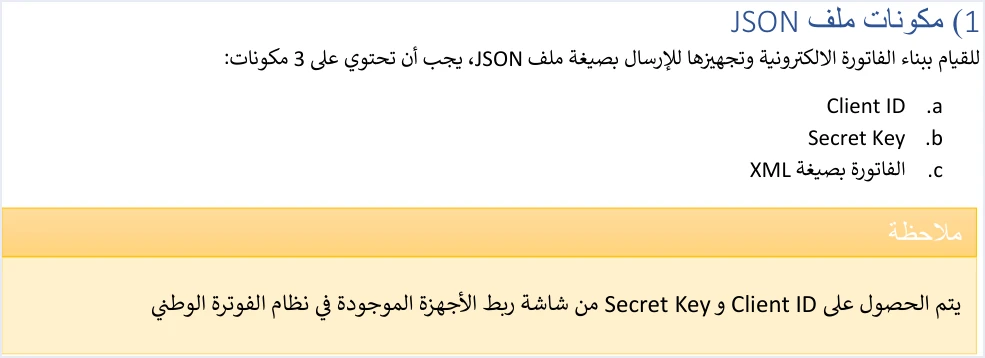
Notice that the list contains no certificate, no signature and no private key belonging to the taxpayer. The code sample in the guide shows where each component goes when the request is actually sent.
- The Client ID and the Secret Key travel as two headers of the HTTP request, named
Client-IdandSecret-Key, not inside the body of the JSON file. - The invoice file is Base64-encoded and placed in the body of the request under the key
invoice. - The content type is set in a third header with the value
application/json.
The Base64 step is encoding and nothing more. Base64 encoding turns the file into text that can travel inside JSON. It does not hide the content, it does not sign it, and it needs no key or certificate. The details of this step are in our article on Base64 encoding in JoFotara.
The structure of the invoice file itself, from the declaration line to the seller, buyer and line elements, is explained in our article on the UBL 2.1 standard in JoFotara. The guide adds no signature element to that structure for the taxpayer to fill in.
Where the signed invoice comes from
On p. 9 the technical guide shows a diagram of the invoice submission sequence. It starts at the taxpayer’s system, where the XML file is built and Base64-encoded inside a JSON file, and the header carries the Client ID and the Secret Key. The request then reaches the National Invoicing System, and the result of the submission leaves it by one of two paths.
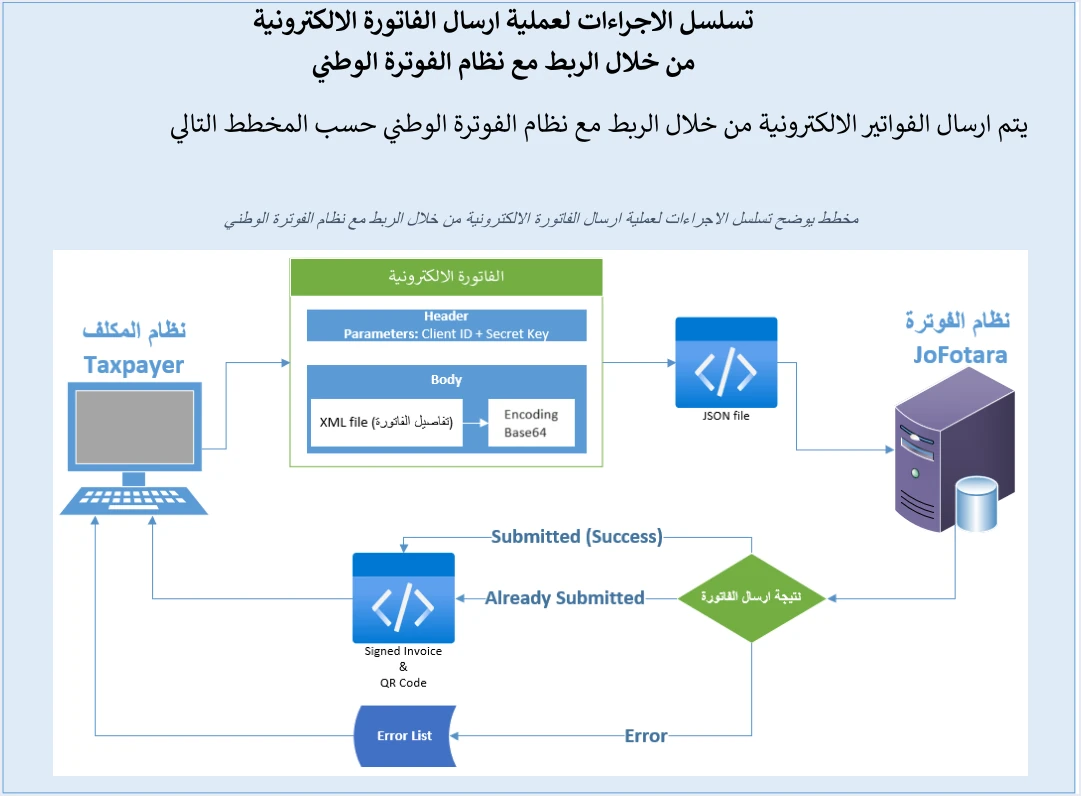
- The acceptance path. The statuses Submitted and Already Submitted lead in the diagram to “Signed Invoice & QR Code”, meaning the signed invoice and the QR code.
- The error path. The status Error leads to “Error List”, a list of the reasons for rejection.
This matches the description of the response in the last pages of the guide. The field EINV_SINGED_INVOICE carries the invoice signed by ISTD in Base64 encoding, and the system itself returns it. The guide and its response examples spell the field name this way, so read it in your software exactly as it appears.
The table below summarizes what comes back for each invoice status, as the guide describes it.
Scroll the table sideways to see the remaining columns
The practical result is that a signed invoice exists only for an invoice the system accepted. If the invoice is rejected, nothing signed comes back, and you read the reason for the rejection in the error message inside the response. That is why the guide recommends judging an invoice by the EINV_STATUS field and not by the technical response code alone.
If you lose the QR code of an accepted invoice, the documented way to recover it is to resend the invoice with the same number and the same UUID. The original code then comes back with the status ALREADY_SUBMITTED. The UUID itself is explained in our article on the JoFotara UUID.
Client ID and Secret Key: the linking details the guide asks for
If there is no digital certificate, what identifies the sender to the system? According to the guide, it is the Client ID and the Secret Key. They are the only values related to the sender’s identity in the request header, as the code sample shows.
Three facts about them are enough to understand their place in the submission path.
- The system generates them, and you do not buy them from a third party. The main user creates them from the device linking screen (ربط الأجهزة) in the business’s account on the National Invoicing System. The main user enters a username and selects an income-source sequence, and the system then generates the two values automatically.
- Each pair is tied to one income-source sequence, the one the main user selected when creating the link.
- They appear in the device linking list, in a row that holds the Client ID and the Secret Key, with a copy button beside each.
The creation steps in detail, with screenshots and the effect of linking on issuing invoices from the portal, are in our article on the JoFotara Client ID and Secret Key. This article does not repeat those steps.
A mistake in these two values leads to specific errors in the technical guide. The guide ties error code 403 to a mistake in the Client_ID or the Secret_Key. It also lists them among the causes of error 500, but less often than the tax number and the income-source sequence. Our JoFotara error codes hub collects the codes that the system returns.
Protecting the Client ID and the Secret Key
The absence of a digital certificate does not mean the absence of responsibility. The Client ID and the Secret Key are what your software uses to send invoices in the taxpayer’s name, and the technical guide treats protecting them as a separate guideline among its ten.

The seventh guideline, titled Security, says that the taxpayer must protect the linking details and must not store them exposed in the source code. The guide puts the full responsibility for keeping the two values confidential on the taxpayer, and states that the taxpayer bears full responsibility for any unauthorized use. ISTD publishes this guide in Arabic only; the English here is our rendering, and the Arabic text is the authority.
A short list follows that you can review with whoever builds the link for you.
- Do not write the two values into the source code in plain view, as the seventh guideline says.
- Do not send them in public messages or in unblurred screenshots, since they are the only linking details in the request header.
- Know where to find them when needed, which is the device linking list of the main user.
- Do not copy the guide’s code sample as it is. It sends a Cookie header with a specific session value. That header is not one of the three components of the request and must not be carried into your software.
Things in the invoicing path that are not a digital certificate
The word “certificate” can blur with other things on the road to joining the National Invoicing System. Four of them follow, and none of them stands in for a digital signing certificate.
- The registration document. Its official title is registration document in the Electronic National Invoicing System (وثيقة تسجيل في نظام الفوترة الوطني الالكتروني), and it states that the business with the tax number named on it is registered in the system. It is proof of registration, not a license, not an approval and not a signing tool. The steps to obtain it are in our article on JoFotara registration and the registration document.
- The QR code. The system returns it in the field
EINV_QRafter the invoice is accepted, and the taxpayer’s software does not generate it. The guide requires it to be shown on the seller’s invoice, and it makes its presence in the response a condition for treating the invoice as received and accepted. - Base64 encoding. A conversion step to carry the file inside JSON. It needs no key and adds no signature.
- Approval of the accounting software. The guide asks the taxpayer to coordinate with the system programmer or technical solutions provider that the taxpayer deals with, to complete the technical requirements. The guide’s own wording describes that provider as an approved one. The phrase means the provider the taxpayer works with, since ISTD’s official guides publish no program for approving accounting software and no list of approved providers.
In the Sanad app, to which the guide confines verification of the QR code, two icons appear on the home screen, Verify digital documents (التحقق من المستندات الرقمية) and Verify digital signature (التحقق من التوقيع الرقمي). The guide directs the taxpayer to the first one to verify the code, and does not explain the second. The step-by-step verification is in our article on how to verify an invoice with the Sanad app.
What the technical guide does not say about the signature
Precision matters more here than a complete answer. The technical guide settles who signs, but it is silent on many details that developers ask about, and that silence should not be filled with a guess.
- The signing method. Version 1.5 of ISTD’s technical guide does not state the algorithm ISTD signs with, or the type of certificate it uses.
- The structure of the signed invoice after decoding. The system returns the field
EINV_SINGED_INVOICEin Base64 encoding, but the guide does not explain what it contains once decoded, so do not build logic on it in your software before verifying it yourself. - The internal structure of the QR code. The guide does not document the order of the data inside the code. It says only that when the code is valid, the Sanad app displays the basic invoice data contained in it.
- Storing the signed invoice. The fifth guideline asks you to store the number, the UUID, the QR code and the status for tracking and retrieval. Its list does not mention the signed invoice, so the decision to keep it is one you take with your software provider.
If you find a source that explains the signing algorithm in the National Invoicing System, or that asks you for a certificate to link, ask for its official source before you build on it. Version 1.5 of the guide, issued in May 2026, contains nothing of the kind.
Checklist before building the link
This is a list to review with your team or with your accounting software provider before work starts. Every item rests on the technical guide.
- Remove from the work plan any item for buying a digital certificate or setting up a signature on the taxpayer’s side, because the guide does not ask for one.
- Create the Client ID and the Secret Key from the device linking screen (ربط الأجهزة) as the main user, and select the right income-source sequence.
- Build the invoice file on the UBL 2.1 standard and check the mandatory fields and the totals before sending, as the second guideline says.
- Base64-encode the file and place it in the request body under the key
invoice, and send the two values in the headers. - Read the
EINV_STATUSfield in every response, and store the number, the UUID, the QR code and the status. - Resend with the same number and the same UUID when a send fails or the connection drops, and do not generate a new UUID, as the third and eighth guidelines say.
- Show the returned QR code on the seller’s invoice, since the guide requires it to be shown.
For a wider view of the system and how to connect your business to it, read our article Jordan’s National E-Invoicing System. Another article in this section covers JoFotara’s real-time approval model (our own description, not ISTD wording), meaning the system’s approval of an invoice once it is sent.
How Qoyod handles this step
If you use Qoyod’s integration with the National Invoicing System, the taxpayer needs no digital certificate or signature of their own to send invoices through Qoyod. Qoyod builds the invoice file in UBL 2.1 format with its unique identifier (UUID) and sends it to the National Invoicing System without any manual intervention. Once ISTD accepts the invoice it returns a QR code, and Qoyod shows that code on the invoice.
Qoyod checks each invoice at field level as it is created, covering the tax number, the document type and payment method, the General Sales Tax rate and whether the lines are complete, and alerts you to any error before the invoice is sent, to reduce rejections. ISTD returns the invoice status and any error message, and Qoyod shows them in its status panel.
E-invoicing and full accounting in one system
Qoyod is integrated with the National Invoicing System (JoFotara). You issue your invoice in Jordanian dinars from Qoyod, it is booked to your ledgers automatically and sent to the system, and once it is accepted it comes back with a QR code from the Income and Sales Tax Department.
Frequently asked questions
Does the taxpayer need a digital certificate to link with the National Invoicing System?
No. Version 1.5 of the technical guide does not ask the taxpayer for a digital certificate, or for a signature from the taxpayer’s side. For authentication it relies only on the Client ID and the Secret Key that the system generates from the device linking screen (ربط الأجهزة).
Who signs the invoice in the National Invoicing System?
ISTD returns the invoice signed inside the system’s response, in the EINV_SINGED_INVOICE field in Base64 encoding. The guide does not describe the signing method or the type of certificate ISTD uses.
Does the signed invoice come back if the invoice is rejected?
No. With the status NOT_SUBMITTED, the value of EINV_SINGED_INVOICE is empty, and so are the QR code, the UUID and the invoice number. The reason for the rejection appears in the error message inside the response.
Is Base64 encoding a kind of signature?
No. Base64 encoding turns the XML file into text that travels inside a JSON file. It needs no key, does not hide the content and does not add a signature. Across the whole path, the signature comes from ISTD in the response.
Is the registration document in the National Invoicing System a digital certificate?
No. The registration document states that the business with the tax number named on it is registered in the Electronic National Invoicing System. It is not used to sign invoices or to authenticate submissions.
Who is responsible if the Secret Key is used without permission?
The technical guide places the responsibility on the taxpayer, and states that the taxpayer bears full responsibility for any unauthorized use. That is why the seventh guideline asks you to protect the linking details and not to store them exposed in the source code.
References
- Income and Sales Tax Department (ISTD), technical guide for integrating with the National Invoicing System through the API, version 1.5 (in Arabic), 2026.
- Income and Sales Tax Department (ISTD), procedures guide for joining the Jordanian National Electronic Invoicing System (in Arabic).




