




Your software sends an invoice to Jordan’s National Invoicing System (JoFotara), and the reply comes back carrying the value SUBMITTED. This is the JoFotara SUBMITTED status, the result every file is sent to obtain, because it means the invoice was accepted. Acceptance does not end your system’s work, though. The technical guide states two steps that follow it explicitly. You store the invoice’s basic data, and you show the QR code on the seller’s invoice.
The short answer is that the technical guide issued by the Income and Sales Tax Department (ISTD) describes the value SUBMITTED as an invoice that was approved successfully. It requires you to check that a QR code is present in the EINV_QR element for the receipt and approval of the invoice to be complete, then to show the code on the seller’s invoice, and to store the ID, the UUID, the QR Code and EINV_STATUS for every invoice.
This article explains what comes back in the reply with this status, how to confirm that acceptance is complete, what to store and what to show, and what the guide does not say about the status, so that nothing is built on it that the text does not support.
What the JoFotara SUBMITTED status means
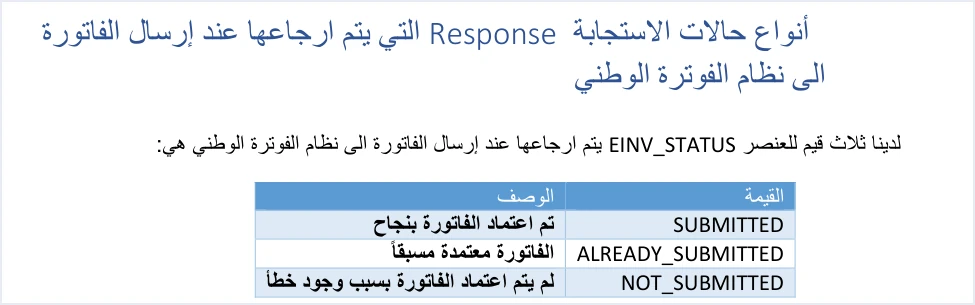
Every reply the system sends after a submission carries an element named EINV_STATUS, and the technical guide (version 1.5, p. 98) gives it three values. SUBMITTED is the first of them, and the guide’s table describes it as an invoice that was approved successfully. Below the table the guide explains the value in these words.
«أي ان الفاتورة موافق عليها من قبل نظام الفوترة الوطني ويتم إرجاع ال QR CODE الخاص بالفاتورة المرسلة».
In English, the guide says that the invoice has been agreed to by the National Invoicing System and that the QR code of the submitted invoice is returned. ISTD publishes this guide in Arabic only; the English here is our rendering, and the Arabic text is the authority.
So the status brings two things in a single reply, a verdict that the invoice is accepted and a code that comes back with it. The other two values complete the picture. ALREADY_SUBMITTED means that the same invoice was sent and accepted before, and the code of the original invoice comes back with it. NOT_SUBMITTED is the only rejection status, and in it the code, identifier and invoice number fields come back empty.
The difference between the first two values is one of timing, not of outcome. SUBMITTED belongs to the first accepted submission of an invoice, and ALREADY_SUBMITTED to a later submission of the same invoice after it was accepted. In both cases you have an accepted invoice and a code to store.
The Jordanian market has its own Arabic phrase for an invoice that has reached this point, an invoice that has gone through the system (فاتورة مفوترة). The phrase is market usage, not a term found in ISTD’s texts. It means an invoice issued through the National Invoicing System, from its portal or from a program linked to it, that the system accepted and that carries the QR code ISTD returns. The legal wording that corresponds to it is in Article 4(a) of Regulation No. 34 of 2019 on Organizing and Controlling Invoicing Affairs, as amended, which speaks of the electronic invoice that is recognized and does not use the market phrase.
«تعتمد الفاتورة الالكترونية الصادرة عن برنامج الفوترة الوطني الالكتروني أو الصادرة عن برنامج تم ربطه ببرنامج الفوترة الوطني الالكتروني».
In English, Article 4(a) of Regulation No. 34 of 2019 provides that, for the purposes of the regulation, the electronic invoice that is recognized is the one issued by the National Invoicing System or by a program linked to it. No official English translation of this regulation was found; the English here is our rendering, and the Arabic text is the authority.
Where to read the acceptance result in the reply
The guide (p. 97) lists the elements of the response file and describes each one. Four of them matter once the invoice is accepted.
EINV_STATUS. The guide describes it as showing the final status of the invoice. It is the element you judge the invoice by.EINV_QR. The guide describes it as containing the invoice’s QR Code.EINV_NUM. The guide describes it as the invoice number sent.EINV_INV_UUID. The guide describes it as the invoice’s universally unique identifier (UUID).
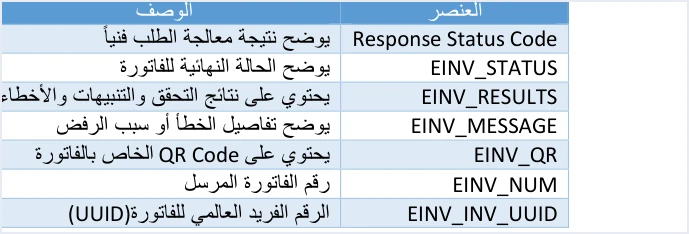
On the same page the guide gives six purposes of the response file. Among them are knowing whether the invoice was approved or rejected, retrieving the QR code, retrieving the invoice’s unique identifier, and enabling linked systems to process the result of the submission automatically. The reply is therefore designed for your software to read and act on, not to be shown to the user as it is. Each element of the reply is described in our article JoFotara API Response: The EINV Elements.
In the sample reply the guide shows for this status (p. 98), the validation result in the EINV_RESULTS element has the value PASS. It comes with an information message saying that the file Complied with UBL 2.1 standards, and the warnings and errors lists are empty. The guide’s samples are illustrative, so do not copy their values into a real file.
A code in EINV_QR is the condition for complete acceptance
Below its explanation of SUBMITTED the guide places a note in red, and it repeats the note among its operational notes (p. 104).
«يجب التحقق من وجود رمز الاستجابة السريع QR CODE في العنصر EINV_QR ضمن ملف الاستجابة الصادر من نظام الفوترة الوطني لاكتمال عملية استلام الفاتورة و اعتمادها من نظام الفوترة الوطني ,كما يجب اظهار QR CODE رمز الاستجابة السريع على فاتورة البائع».
In English, the note says that you must check that the QR code is present in the EINV_QR element of the response file issued by the National Invoicing System for the process of receiving and approving the invoice to be complete, and that the QR code must also be shown on the seller’s invoice. ISTD publishes this guide in Arabic only; the English here is our rendering, and the Arabic text is the authority.
The first half of the note turns reading the reply into two checks rather than one. The first is that the value of EINV_STATUS is SUBMITTED. The second is that the EINV_QR element actually holds a code. If the code is missing, the wording of the note does not treat the receipt and approval process as complete. The guide does not describe this particular case and gives no step for handling it, so do not assume a remedy it does not contain. For a question the guide does not cover, the guide itself (p. 104) refers you to ISTD’s technical support committee for invoicing affairs.
The code comes from the system, not from your software. ISTD returns it in the reply after the invoice is accepted, and the linked software does not generate it locally. There is therefore no point in your system placing a code of its own on the invoice before the reply arrives. The element and where the code comes from are covered in our article JoFotara QR Code: Where the ISTD QR Comes From.
Showing the QR code on the seller’s invoice
The second half of the same note requires the code to be shown on the seller’s invoice, and the same requirement appears on pp. 98 and 104. The verb in the guide’s text is to show, meaning that the code must be visible on the invoice the seller issues. The guide does not set the means of showing it, or the size, position or form of the code on the invoice, so do not read into the text a condition it does not contain.

In practice this text leads to three things.
- Show the code that came back in the reply as it is. The guide does not explain the internal structure of the code, so do not rebuild it or change its content in your system.
- Tie the code to its invoice. The code belongs to one specific invoice, so store it with the invoice number and unique identifier, so that it appears on the right invoice every time you display it.
- Verify the code the way the guide describes. According to the guide (p. 106), a taxpayer who wants to verify the QR code can do so only by scanning it with the Sanad app, through its digital document verification option (التحقق من المستندات الرقمية). The steps are in our article How to Verify an E-Invoice with the Sanad App.
What to store after the JoFotara SUBMITTED status
The fifth of the guide’s operating guidelines (p. 104) is titled storing the basic data. It says that the ID, the UUID, the QR Code and EINV_STATUS must be saved to ensure traceability and retrieval when needed.

The table below links each of the four items to where you find it and why you store it, as the guide’s texts show.
Scroll the table sideways to see the remaining columns
In its operational notes (p. 104) the guide says that the invoice number in the system is not the ID alone. It is made up of the ID and the UUID together, as a primary key. That is why the first two items in the table go together, and storing one without the other is not enough to trace the invoice. The composite key is explained in our article JoFotara UUID: Why It Comes Back With the ID.
Two more passages in the guide concern storage, although they are not part of guideline 5.
- The ID of each item. The operational notes (p. 104) say that the ID of each item must be kept when a sales invoice is issued, so that it can be used later if the invoice is returned, because a returned item is matched against the data of the original invoice by that ID.
- The log of submissions and replies. Guideline 10, tracing operations (Audit Trail), asks for a full record of submissions, responses and resends. What to keep in that record is covered in our article JoFotara Logging: What to Store and Record.
All ten guidelines are explained one by one in our article JoFotara Guidelines for Linked Systems: All Ten Explained. Storing this data is a technical matter for your linked system. It is separate from the period for keeping invoices, which Article 8 of Regulation No. 34 of 2019 on Organizing and Controlling Invoicing Affairs, as amended, governs.
Why you store the code from the first reply
Guideline 5 gives two reasons for storage, traceability and retrieval when needed. The need arises when the code is lost from your system after acceptance. The way the guide gives (p. 99) to recover it is to send the invoice again with the same number and identifier, and the reply then comes back with the status ALREADY_SUBMITTED and the original code.
That method itself depends on the original unique identifier being stored, because the guide (p. 99) ties this status to sending the invoice with the same ID and the same UUID together. Storage therefore starts with the identifier, before the invoice is sent, and is completed with the code and the status once the reply arrives.
The signed invoice in the EINV_SINGED_INVOICE element
The sample reply for the SUBMITTED status (p. 98) carries one more element, EINV_SINGED_INVOICE, and the guide spells its name this way. The element holds the signed invoice that the system returns in the reply. The guide does not ask the taxpayer to sign the invoice, and it does not ask for a digital certificate. The system is what returns the invoice signed.
The guide stops there. It does not explain the structure of this element or how to read it, just as it does not explain the internal structure of the QR code. Guideline 5 does not list this element among the data that must be saved. So do not build logic in your system that decodes the element or depends on its structure, as long as the guide does not explain it. In the rejection case this element comes back empty, together with the code, the identifier and the invoice number.
Judge by the value of EINV_STATUS, not by the technical Response Status Code
The guide (p. 97) describes the Response Status Code element as showing the technical result of processing the request, and EINV_STATUS as showing the final status of the invoice. The difference between the two is what guideline 4, handling the response, sets out. It says not to rely on the Status Code alone, and that you must rely on the value of EINV_STATUS to determine the final status of the invoice.
Code 200 means that the request was received and processed technically, and on its own it is not enough to count the invoice as accepted. The verdict of acceptance comes from the value SUBMITTED together with a code in EINV_QR. If the value is NOT_SUBMITTED, the reason for rejection is in EINV_MESSAGE within the errors list. For the full picture of response codes and rejection messages, read our article JoFotara Error Codes: Why an Invoice Is Rejected and How to Fix It.
For the design of the software itself, guideline 6, managing errors, requires logging errors in detail in the internal log and showing the end user a simplified message. Our suggestion is that an acceptance deserves the same simplicity. It is enough for the user to see that the invoice was accepted and that its code is shown on it.
What not to do with an accepted invoice
Once accepted, the invoice is a record in the system. Here are four actions the guide’s texts do not support.
- Do not send it with a new identifier. If you send it again, use the same number and identifier, because with them it comes back with the status
ALREADY_SUBMITTED(p. 99). Guidelines 3 and 8 require the same when a submission fails or the connection drops, without generating a new identifier. - Do not change its data after it is issued. An invoice cannot be edited once it is issued, and a correction is made with a return invoice (credit note) on quantities. What can and cannot be done after issuing is covered in our article Editing an Issued Invoice in Jordan’s National Invoicing System.
- Do not put a code of your own on it. The code you show on the seller’s invoice is the one that came back in
EINV_QR, not a code your system generates. - Do not decode the content of the code or of the signed invoice. The guide does not explain the structure of either, so do not build logic on it in your software.
Checklist after an invoice is accepted
If the status SUBMITTED comes back in the system’s reply, go through these questions in order before you treat the invoice as finished.
- Did your system read the value of
EINV_STATUSitself, and not only the technical Response Status Code? - Does the
EINV_QRelement actually hold a code? The guide ties the completion of receipt and approval to its presence. - Were the invoice number (ID) and its unique identifier (UUID) stored together?
- Were the QR code and the value of
EINV_STATUSstored with the same invoice? - Is the code shown on the seller’s invoice? The guide requires it to be shown.
- Was the ID of each item on the invoice stored? Matching any later return depends on it.
- Were the submission and the reply recorded in the operations log? That is what guideline 10 asks for.
How Qoyod handles the invoice after acceptance
Everything above is work that falls on the taxpayer’s system linked to the National Invoicing System. Qoyod’s integration with the National Invoicing System works on this layer as follows.
- Building the file and the identifier. Qoyod builds the invoice file in UBL 2.1 format with its unique identifier (UUID) and sends it to the National Invoicing System without any manual intervention.
- Every invoice’s status in view. ISTD returns the invoice status and any error message, and Qoyod shows them in its status panel, with states that include sent (مرسلة), previously sent (مرسلة مسبقًا) and not sent (لم تُرسل) together with the error message.
- Resending with the same identifier. The status panel lists invoices that were not sent and need to be resent, and when you resend one it keeps the same UUID.
Once ISTD accepts the invoice it returns a QR code, and Qoyod shows that code on the invoice. Resending here is a step you take yourself from the status panel. For a wider view of the system and how to connect your business to it, read our article Jordan’s National E-Invoicing System, or see how Qoyod works with JoFotara on our National Invoicing System page.
E-invoicing and full accounting in one system
Qoyod is integrated with the National Invoicing System (JoFotara). You issue your invoice in Jordanian dinars from Qoyod, it is booked to your ledgers automatically and sent to the system, and once it is accepted it comes back with a QR code from the Income and Sales Tax Department.
Frequently asked questions
What does the JoFotara SUBMITTED status mean?
It means the invoice was accepted. ISTD’s technical guide describes it as an invoice that was approved successfully, and the system returns with it the invoice’s QR code in the EINV_QR element.
Is the value SUBMITTED enough on its own for acceptance to be complete?
The guide requires a second check with it. You must check that a QR code is present in the EINV_QR element of the response file, because the guide ties the completion of the invoice’s receipt and approval to the presence of the code.
What data should I store after an invoice is accepted?
Guideline 5 requires saving the ID, the UUID, the QR Code and EINV_STATUS to ensure traceability and retrieval. The guide also requires keeping the ID of each item for use in returns, and asks for a full record of submissions and responses.
Does the guide set how the QR code is shown on the invoice?
The guide only requires the code to be shown on the seller’s invoice. It does not set the means of showing it, or the size or position of the code on the invoice.
Does my system generate the QR code itself?
Your system does not generate it. ISTD returns the code in the EINV_QR element after the invoice is accepted, and according to the guide a taxpayer who wants to verify it can do so only with the Sanad app.
What is the EINV_SINGED_INVOICE element in the reply?
It holds the signed invoice that the system returns in the reply, and the guide spells its name this way. The guide does not explain its structure or how to read it, and it comes back empty in the rejection case.
References
- Income and Sales Tax Department (ISTD), technical guide for integrating with the National Invoicing System through the API, version 1.5 (in Arabic), pp. 97, 98, 99, 100, 104 and 106.
- Regulation No. 34 of 2019 on Organizing and Controlling Invoicing Affairs, as amended, consolidated text (in Arabic), Articles 4 and 8.




