




Comparing JoFotara vs eFAWATEERcom starts with what each system is for. The National Invoicing System (JoFotara) is run by the Income and Sales Tax Department (ISTD). A seller issues the sales invoice on it, or sends the invoice to it from accounting software linked to the system. eFAWATEERcom is a national system for presenting and paying bills electronically, supervised by the Central Bank of Jordan (CBJ). Both systems deal in invoices, but the word means different things in each. In JoFotara an invoice is a document the seller issues for goods or a service. In eFAWATEERcom it is a bill, a payment request shown to the payer to settle.
This article explains what each system does and who uses it, then sets them side by side in one table. Next it looks at the one link between them documented in the sources it relies on, which is that ISTD accepts General Sales Tax (GST) payments through eFAWATEERcom. It closes with practical situations where the two words get mixed up, and with the points these sources do not cover, so that you do not base a decision on them.
JoFotara vs eFAWATEERcom at a glance
The two systems work at opposite ends of the same transaction. A sale needs an invoice that the seller issues, and the amount needs a way for the buyer to pay it. JoFotara covers the first end, which is preparing, issuing and validating the invoice with ISTD. eFAWATEERcom covers the payment end, which is presenting bills that are due to the person who owes them and paying them from a bank app or an e-wallet.
The difference is clearer in what the word “invoice” itself means. Article 2 of Regulation No. 34 of 2019 on Organizing and Controlling Invoicing Affairs defines the invoice as follows.
«وثيقة صادرة عن البائع تبين وصفاً للسلعة أو الخدمة المقدمة والسعر والكمية المبيعة ومقدار الضريبة العامة على المبيعات المحتسبة على الفاتورة في حال كان من المكلفين المسجلين في ضريبة المبيعات»
In English, Article 2 of Regulation No. 34 of 2019 defines the invoice as a document issued by the seller that shows a description of the goods or service supplied, the price and the quantity sold, and the amount of General Sales Tax charged on the invoice if the seller is registered for sales tax. No official English translation of this regulation was found; the English here is our rendering, and the Arabic text is the authority.
That is the document that passes through JoFotara. A bill in eFAWATEERcom is something a billing entity presents to the user for payment, such as a telecom bill or a public utility bill.
So neither system replaces the other. Issuing an invoice through JoFotara does not mean the buyer has paid. Paying through eFAWATEERcom does not mean the seller issued the invoice under the invoicing rules. If JoFotara’s terms are new to you, start with our article JoFotara Terminology: Arabic to English Quick Glossary.
JoFotara: issuing the invoice with ISTD
ISTD runs JoFotara in cooperation with the Ministry of Digital Economy and Entrepreneurship (MoDEE). It is the same body that administers income tax and General Sales Tax. ISTD publishes the system’s four guides, invoices are sent to ISTD, and the validation result for each invoice comes back from ISTD.
The legal basis
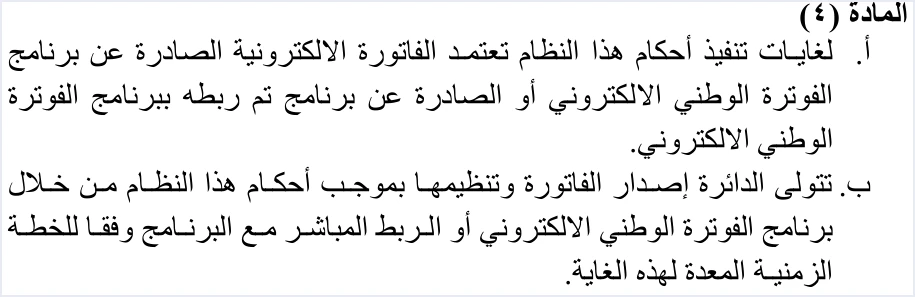
The article that ties the invoice to the system is Article 4 of Regulation No. 34 of 2019 on Organizing and Controlling Invoicing Affairs. Its paragraph (a) reads as follows.
«لغايات تنفيذ أحكام هذا النظام تعتمد الفاتورة الالكترونية الصادرة عن برنامج الفوترة الوطني الالكتروني أو الصادرة عن برنامج تم ربطه ببرنامج الفوترة الوطني الالكتروني»
In English, Article 4(a) of Regulation No. 34 of 2019 provides that, for the purposes of the regulation, the electronic invoice that is recognized is the one issued by the National Invoicing System or by a program linked to it. No official English translation of this regulation was found; the English here is our rendering, and the Arabic text is the authority.
Article 4(b) of Regulation No. 34 of 2019 gives ISTD the task of issuing and organizing the invoice through the system or a direct link to it, according to the timetable set for that purpose.
Use of the system has been mandatory since April 1, 2025, with enforcement continuing to tighten. An invoice not issued through JoFotara is not accepted as a tax document. Under Article 64 of Income Tax Law No. 34 of 2014, the fine ranges from JOD 200 to JOD 500 and doubles for a repeat offense.
Who it applies to
The system reaches further than businesses registered for General Sales Tax. It covers every seller of goods and every service provider, including professionals such as doctors, lawyers and consultants. A business not registered for General Sales Tax issues an income invoice with no tax. A registered business issues a general sales tax invoice at the standard rate of 16%. The exempt categories are set by Instructions No. 1 of 2019 on Invoicing Affairs and Their Control, as amended, so check the text in force for your activity.
How an invoice reaches the system
ISTD’s procedures guide for joining the Jordanian National Electronic Invoicing System, 2026 edition, sets out two paths after the account is created. A business picks one of them to suit its situation.
- From the portal. This path is for a business with no accounting software. The main user creates a sub-user. The sub-user then logs in and chooses the Issue an invoice tile (تنظيم فاتورة), sets the invoice as cash (نقدي) or receivable (ذمم), fills in the fields and presses Issue (إصدار). The full steps are in our article Issue an Invoice on the JoFotara Portal: The Steps.
- By linking from accounting software. The main user chooses device linking (ربط الأجهزة) on the home screen. The system generates the Client ID and the Secret Key, and the accounting software then uses them to send invoices directly.
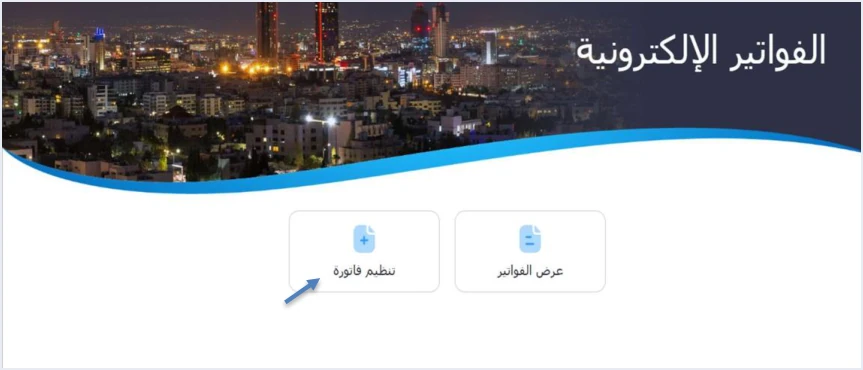
You can reach the portal from the ISTD website, directly at portal.jofotara.gov.jo, or through the mobile app listed in the app stores as JoFotarah.
What comes back after sending
JoFotara works on what we call a real-time approval model, which is our own description and not an ISTD term. The invoice is sent to ISTD, which validates it before it is shared with the buyer. If the invoice is accepted, ISTD returns a QR code and the document it has signed. If it is rejected, ISTD returns a list of errors. The technical guide requires the QR code to be shown on the seller’s invoice. This QR code comes from ISTD, not from any payment system.
Bill presentment and payment: eFAWATEERcom, supervised by the Central Bank of Jordan
eFAWATEERcom is Jordan’s national system for presenting and paying bills electronically. It is an electronic bill presentment and payment (EBPP) system, meaning a system that presents bills to the payer and collects their value electronically. Our sources establish four things about it.
- Responsible body. The Central Bank of Jordan owns and supervises it.
- Operator. MadfooatCom for Electronic Payments runs it, after winning the Central Bank’s tender in 2014.
- Billing entities. It connects more than 400 billing entities, including government bodies, public utility companies, telecom companies and education providers.
- Access. Users reach it through the apps of banks and e-wallets in Jordan.
So the user of eFAWATEERcom is mainly the payer, and the billing entity is the one that presents the amount due. This is the reverse of JoFotara, which the seller turns to in order to issue an invoice and have it validated by ISTD.
This article does not cover eFAWATEERcom’s fees, its list of billing entities, or the payment steps in any particular app. Those details are set by the system’s operator and by the banks. For them, refer to the official eFAWATEERcom website and to your bank.
The two systems compared in one table
The table below brings the points above together under seven items. Every cell rests on the sources listed at the end of this article.
Scroll the table sideways to see the remaining columns
Where the two systems meet: paying General Sales Tax
The documented link between the two systems in our sources is that ISTD accepts General Sales Tax payments through eFAWATEERcom. This link sits on the payment side, not the invoicing side. Here ISTD is the party receiving the tax you owe, not the party that issues or validates an invoice.
That is why the two obligations stay separate. The invoicing obligation arises at the sale. Article 3 of Regulation No. 34 of 2019 fixes the time and date of a sale of goods or services as the time and date on which the sale event occurs, and Article 5(d) of Regulation No. 34 of 2019 requires the seller to issue the invoice when that sale takes place. Paying the tax is a different obligation with its own procedures at ISTD. If you pay the tax through eFAWATEERcom, that does not mean the period’s invoices were issued through JoFotara, and the reverse is also true.
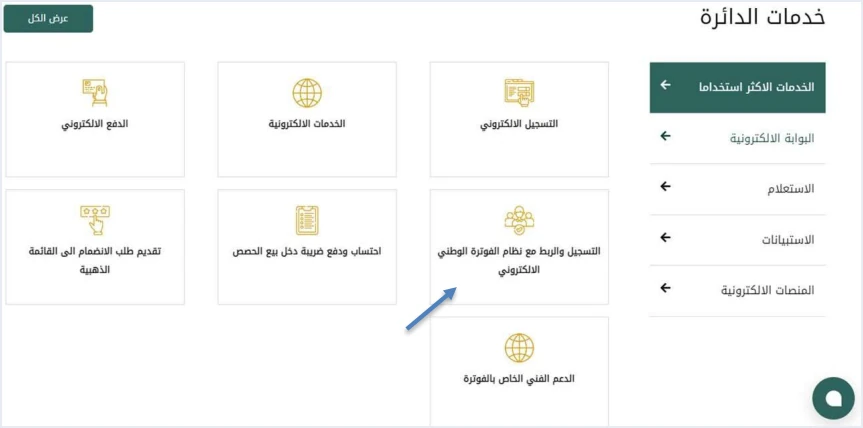
The ISTD services (خدمات الدائرة) panel on ISTD’s website, as shown on page 2 of the procedures guide for issuing an invoice, has a registration and linking with the National Electronic Invoicing System tile (التسجيل والربط مع نظام الفوترة الوطني الالكتروني). It sits apart from the e-payment tile (الدفع الالكتروني). The guide does not explain what lies behind the e-payment tile, so we do not connect it here to eFAWATEERcom or to anything else.
The sending path, as drawn in version 1.5 of the technical guide for integration, starts in the taxpayer’s system and passes through JoFotara. It ends with the result returning to the taxpayer, either a signed invoice with a QR code or a list of errors. There is no payment step in this path and no hand-off to a payment system. So do not assume that an invoice accepted in JoFotara creates a payment request for the buyer in eFAWATEERcom.
The sources of this article stop at the documented sentence above. They do not explain the steps for paying the tax through eFAWATEERcom, the reference number required, or the deadlines and frequency of the General Sales Tax return. Ask ISTD about these details directly, and do not rely on figures in circulation.
Three practical situations where the words get mixed up
A bill showed up in my bank app. Was it issued through JoFotara?
A bill that appears in eFAWATEERcom is a payment request presented by a billing entity. Its appearance there tells you nothing about how it was issued. The obligation to issue an invoice falls on the seller. Article 5(a) of Regulation No. 34 of 2019 says so, unless the seller is exempt.
«على بائع أي سلعة أو خدمة لا تقل قيمتها عن دينار واحد تنظيم وإصدار فاتورة»
In English, Article 5(a) of Regulation No. 34 of 2019 requires the seller of any goods or service worth not less than one dinar to prepare and issue an invoice. No official English translation of this regulation was found; the English here is our rendering, and the Arabic text is the authority.
Under Article 4(a) of Regulation No. 34 of 2019, the recognized invoice is the one issued by JoFotara or by a program linked to it.
To verify an invoice issued through JoFotara, use the QR code shown on it. The technical guide says the taxpayer can verify the code only by scanning it with the Sanad app, through its digital document verification option (التحقق من المستندات الرقمية). The app then shows whether the document is valid, together with the core invoice data held in the code.
I sold a service and the customer paid from a bank app. Is the payment notice enough?
A payment notice proves that an amount moved from one account to another. Under Regulation No. 34 of 2019, an invoice is a document the seller issues that describes the service, its price and its quantity. If you are required to issue invoices, your invoice is still due when the sale takes place, whatever the payment method. It is issued on the portal or through your software linked to the system.
On the portal, the sub-user chooses between a cash (نقدي) invoice for an invoice paid in cash and a receivable (ذمم) invoice for an unpaid invoice due later. The procedures guide for issuing an invoice, 2026 edition, does not explicitly address instant electronic payment. If you are unsure how to classify an invoice paid by card or transfer at the moment of sale, ask ISTD before you settle on a classification. Remember that the buyer’s name is always required on a receivable invoice, and on a cash invoice worth more than JOD 10,000.
I paid General Sales Tax through eFAWATEERcom. Is my invoicing obligation done?
No. Paying the tax and issuing invoices are two different obligations, as explained above, and each has its own route. Payment may go through eFAWATEERcom because ISTD accepts General Sales Tax payments through it. Invoicing goes through JoFotara or a program linked to it. Neither one replaces the other, and neither proves that the other was done.
If you issue invoices from accounting software
ISTD’s written position in its questions and answers guide is that a business that has an accounting system must link that system to JoFotara. This text states no deadline and no penalty. If you are weighing the portal against software, our article National Invoicing Portal in Jordan: When It Is Enough and When You Need an Accounting System covers that choice.
The linking steps on your side are few. The main user opens device linking (ربط الأجهزة), then New link (ربط جديد), enters a username and selects the income-source sequence, and the system generates the Client ID and the Secret Key. The joining guide is explicit here. It tells you to keep the linking credentials in a safe place and not to share them with anyone. For a wider view of the system and how to connect your business to it, read our article Jordan’s National E-Invoicing System.
Qoyod is integrated with the National Invoicing System (JoFotara). If you choose Qoyod Cloud Accounting Software, it needs the Client ID and the Secret Key from the device linking (ربط الأجهزة) screen. The taxpayer needs no digital certificate or signature of their own to send invoices through Qoyod. Qoyod builds the invoice file in UBL 2.1 format with its unique identifier (UUID) and sends it to the National Invoicing System without any manual intervention. ISTD returns the invoice status and any error message, and Qoyod shows them in its status panel.
E-invoicing and full accounting in one system
Qoyod is integrated with the National Invoicing System (JoFotara). You issue your invoice in Jordanian dinars from Qoyod, it is booked to your ledgers automatically and sent to the system, and once it is accepted it comes back with a QR code from the Income and Sales Tax Department.
Frequently asked questions
What is the difference between JoFotara and eFAWATEERcom?
The two systems differ in function and in who runs them. JoFotara is run by ISTD, and the seller issues an invoice on it, or sends the invoice to it from a linked program, so that ISTD can validate it. eFAWATEERcom is a national system for presenting and paying bills electronically, supervised by the Central Bank of Jordan and operated by MadfooatCom.
Is eFAWATEERcom part of ISTD?
eFAWATEERcom belongs to the Central Bank of Jordan, which owns and supervises it, and it is operated by MadfooatCom for Electronic Payments. ISTD runs JoFotara in cooperation with the Ministry of Digital Economy and Entrepreneurship.
Can I pay General Sales Tax through eFAWATEERcom?
ISTD accepts General Sales Tax payments through eFAWATEERcom. The sources of this article do not explain the payment steps or the reference number required, so ask ISTD or your bank about them.
Does an invoice accepted in JoFotara move to eFAWATEERcom?
The technical guide for integration draws the invoice’s path from the taxpayer’s system to JoFotara, then the result returning to the taxpayer with a QR code or a list of errors. There is no step in this path that passes the invoice to eFAWATEERcom, so do not assume it does.
Does paying through eFAWATEERcom replace issuing an invoice?
A seller who is required to issue invoices must still issue one when the sale takes place, whatever the payment method. The payment proves that money moved, and under Article 4(a) of Regulation No. 34 of 2019 the recognized invoice is the one issued by JoFotara or by a program linked to it.
How do I verify an invoice issued through JoFotara?
You verify it by scanning the QR code shown on the invoice with the Sanad app, through the digital document verification option (التحقق من المستندات الرقمية). The app shows whether the document is valid, together with core data that includes the invoice total, its number and date, and the seller’s tax number and name.
References
- Regulation No. 34 of 2019 on Organizing and Controlling Invoicing Affairs, as amended, consolidated text (in Arabic).
- Income and Sales Tax Department (ISTD), procedures guide for joining the Jordanian National Electronic Invoicing System, 2026 edition (in Arabic).
- Income and Sales Tax Department (ISTD), procedures guide for issuing an invoice in the Jordanian National Electronic Invoicing System, 2026 edition (in Arabic).
- Income and Sales Tax Department (ISTD), questions and answers guide for the National Invoicing System, 2026 (in Arabic).
- Income and Sales Tax Department (ISTD), technical guide for integrating with the National Invoicing System through the API, version 1.5 (in Arabic).
- eFAWATEERcom, About us page, efawateercom.jo.




