




Purchase returns in the National Invoicing System (JoFotara) are goods or services your business sends back to a supplier it bought them from on an invoice issued through the system. For purchase returns JoFotara leaves the return document with the supplier, not with you. The supplier was the seller on the original invoice, so the return invoice it sends refers to its own invoice and carries your details as the buyer, exactly as they appeared on that invoice.
Our article Return an Invoice on the JoFotara Portal covers how the seller issues a return on the portal, and our article How to Verify an E-Invoice with the Sanad App covers scanning the QR code. This article takes the buyer’s seat after the purchase. It sets out what you ask the supplier for when you decide to send goods back, what you check on the return invoice when it reaches you, and what you keep in your purchase file. It also says plainly what version 1.5 of the technical guide published by the Income and Sales Tax Department (ISTD) does not document.
Purchase returns JoFotara rules: who issues the return invoice?
The technical guide defines only two types for a document sent to the system. Both are written in the invoice type element InvoiceTypeCode, 388 for a new invoice and 381 for a return invoice. The guide describes the return invoice as a credit note, which is why this article calls it a return invoice (credit note). It defines no third type that a buyer issues for its own returns, and no document type beyond these two. The full set of invoice types is in our article Invoice Types in the National Invoicing System.
The guide also says who sends the return invoice and against which invoice. It allows the taxpayer to send a return invoice against the original invoice once or more, until all the quantities sold on that original invoice are used up. In your purchase returns, the original invoice is the supplier’s invoice, issued in the supplier’s name and under its tax number. Article 2 of Regulation No. 34 of 2019 on Organizing and Controlling Invoicing Affairs defines the invoice as a document issued by the seller. So a return against the supplier’s invoice comes from the supplier.
Three conditions in the guide confirm this tie to the original invoice.
- The reference. The return invoice carries the original invoice’s number, its unique identifier (UUID) and its total.
- The buyer. The buyer details on the return invoice must match the buyer details on the original invoice.
- The lines. The line number, the line name and the unit price must be as they are on the original invoice.
So in the system, a return is a document the supplier issues against its own invoice, and your business appears on it as the buyer, just as it did on the original. Your own part comes in three steps. You request it, you check it, and you keep it.
If the supplier issued its invoice on the portal
ISTD’s questions and answers guide includes a question about returning an invoice that was sent through the platform before the business linked a system. Its answer is that the platform allows invoices sent through it to be returned in all cases, whether or not linking has taken place. So a supplier that moves from the portal to accounting software does not lose the route for returning its earlier invoices.
Step one: what to ask the supplier for when you return goods
The supplier takes most of the return invoice’s data from its original invoice, but some of it only you know. Write your return request so that it holds everything the supplier needs to issue a return invoice the system can accept on the first attempt.
- The number and date of the original invoice. The supplier puts the number, unique identifier and total of its original invoice in the reference block
BillingReference. Naming the exact invoice keeps the supplier from returning against a different invoice it issued to you. - The returned lines and quantities. List each line as it appears on the original invoice, with the quantity you sent back from it. The guide allows the returned quantity to be a whole number or to include decimal parts, and requires it to be greater than zero and no more than the quantity sold.
- The reason for the return. The reason is mandatory on a return invoice, and the supplier writes it as free text. State it clearly in your request, for example goods that arrived damaged, goods that do not match the specification, or goods beyond what you ordered.
- The discount, if any. If the line carried a discount on the original invoice, the guide sets the rule. When the full quantity of the goods or service is returned, the whole discount (if any) goes on the return. When only part of the quantity is returned, the discount (if any) is a part of the item’s total discount according to the quantity returned.
- Your copy of the return invoice once it is accepted. Ask for it with the QR code that the system returns after acceptance. Article 5(c)(1) of Regulation No. 34 of 2019 requires a copy of the invoice to be delivered to the buyer in line with the method used to issue invoices. The regulation does not mention the return invoice by name, so make the request for a copy an explicit part of your return request.
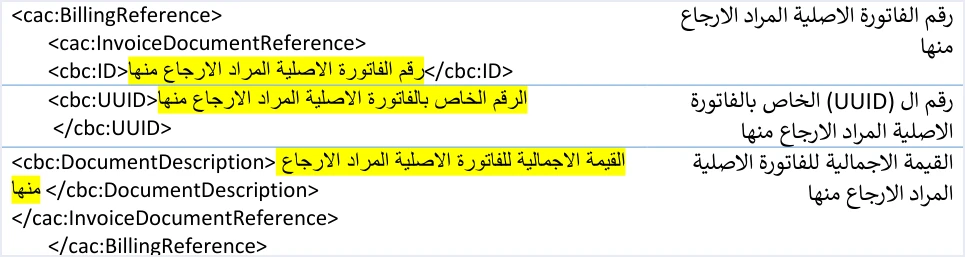
The table below sets out what the supplier takes from its own invoice, what it needs from you, and what you check in each item.
Step two: what to check on the return invoice when it arrives
A return invoice that reaches you is not necessarily correct. Check it in three places before you record it in your books.
Your buyer details as on the original invoice
The guide repeats this rule in more than one place.
«يجب أن تتوافق بيانات المشتري في فاتورة الإرجاع مع بياناته في فاتورة البيع الأصلية المرتبطة بها»
In English, the guide requires the buyer details on the return invoice to match the buyer details on the original sales invoice it is linked to. The English here is our rendering, and the Arabic text is the authority.
So compare your business name and number on the return invoice with the ones on the original invoice, not with your current record at the supplier. If the supplier has updated your details since the sale, the original invoice is still the standard.

Lines and totals
- The line itself. The line number, name and unit price are as on the original invoice, and the quantity is what you actually sent back.
- Totals for the returned part only. The guide says that the totals of a return invoice cover the part being returned, and that its tax total is the sum of the tax amounts being returned from the invoice. So do not expect to see the original invoice total among the return’s totals.
- The value in the reference. The total in the reference block is the value of the original invoice, not the value of the return. Keep the two figures apart when you reconcile.
- The discount in a partial return. If you sent back part of a line that carried a discount, the discount share on the return follows the quantity returned.
The QR code and verification with the Sanad app
«في حال رغبة المكلف بالتحقق من رمز الاستجابة السريع (QR Code)، يمكنه ذلك من خلال مسحه باستخدام تطبيق سند فقط من خيار التحقق من المستندات الرقمية»
In English, the technical guide says that a taxpayer who wants to verify the QR code can do so only by scanning it with the Sanad app, through its verify digital documents option (التحقق من المستندات الرقمية). The English here is our rendering, and the Arabic text is the authority. If your business is a taxpayer, this is the official channel for checking a return invoice you have received.
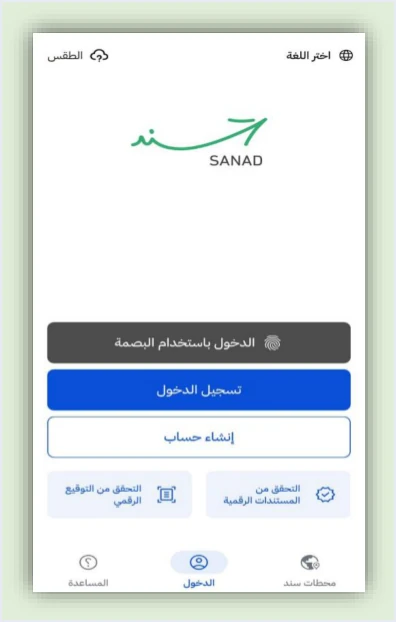
A scan has two possible results. The first is the document is valid (الوثيقة صحيحة), and with it the app shows six data items carried in the code. They are the invoice total, the invoice number, the total tax on the invoice, the invoice date, the seller’s tax number and the seller’s name. The second is an error occurred (حدث خطأ), which means the code is invalid or unreadable for any reason.
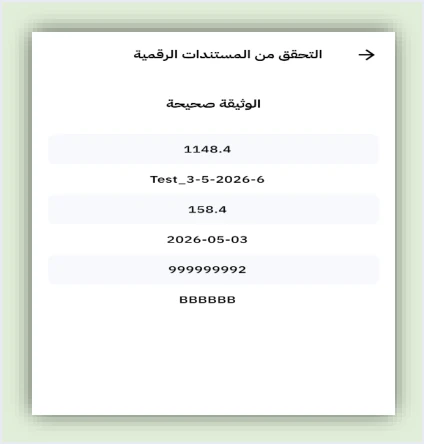
Match the six items against the return invoice in front of you. The number, date, value and tax total must match what is shown on the document, and the tax number and name must be your supplier’s. Note that the six items do not include the buyer’s details, the document type or the original invoice number. The scan confirms the code and what it carries. Matching your own details and the original invoice is a check you make on the document itself, as in the two sections above. If the result is an error occurred (حدث خطأ), go back to the supplier with the document before you record it.
Article 10 of Regulation No. 34 of 2019: why the return must match what you sent back
Article 10 of Regulation No. 34 of 2019 on Organizing and Controlling Invoicing Affairs places the responsibility for matching the data and information in an invoice with the actual sale of the goods or supply of the service on the seller and the buyer alike.
So responsibility for the original invoice does not rest with the supplier alone, and correcting it when you send part of the goods back concerns you too. The working rule is that the quantity on the return invoice equals what left your warehouse for the supplier, line by line. This extends the habit of checking supplier invoices on receipt that our article In-House Accountant JoFotara Tasks describes.
If the quantity on the return invoice is lower than what you sent back, the guide lets the supplier send another return invoice against the same original invoice until its quantities are used up, so ask the supplier for a return covering the difference. If the quantity is higher than what you sent back, the guide documents no way to cancel a return invoice once it is accepted, and an issued invoice cannot be edited. Do not record it until you have taken the error up with the supplier.
Step three: what to keep in your purchase file
Give each return one file that holds the documents telling the story from start to finish.
- The supplier’s original invoice that you bought on.
- The accepted return invoice with its QR code, and the result of your Sanad check if you ran one.
- The return request you sent, with the lines, quantities and reason, and the supplier’s reply to it.
- Proof that the goods left your warehouse for the supplier, in the same quantities.
- A line in your internal returns register that records the original invoice number and the return invoice number.
As for how long to keep them, Article 8 of Regulation No. 34 of 2019 addresses every person required to issue invoices, and requires the invoice that person issues to be kept for four years, counted from the latest of the dates the article sets. If your business issues invoices too, the article governs those invoices. The regulation sets no period for keeping what a buyer receives from its suppliers, and this article does not cover what other laws may require for purchase documents.
Cases that need the buyer’s attention
Returning goods in batches
If you send the goods back in more than one batch, each batch gets its own return invoice against the same original invoice, and the guide allows this until the quantities are used up. Track in your register what remains on each line after every accepted return.
Exchanging goods for something else
If you send an item back and take another in its place, the supplier issues a return invoice for the item you sent back, then a new invoice for the replacement. Our article on exchanging goods in JoFotara covers this case in detail.
A price reduction without sending goods back
The guide states that a return is on quantities only. If you agree a price reduction with the supplier without sending anything back, do not ask for a return invoice with no quantity on it. The guide defines no document for reducing the value alone.
A return invoice rejected on the supplier’s side
If the return invoice comes back with the status NOT_SUBMITTED, the system did not accept it and no QR code came back with it. Do not record in your books a return invoice that carries no code. Wait for the accepted copy.
A supplier that delays or refuses the return
Neither the technical guide nor the questions and answers guide covers what the buyer does in this case, and neither names a body the buyer can turn to. Keep the return request and your correspondence with the supplier in the purchase file, and do not record the return in your books until the accepted return invoice reaches you.
What the guide documents about purchase returns, and what it does not
The table below brings together what the official sources say about the buyer’s side of a return and where they are silent, so that you do not build your procedure on an unwritten rule.
How Qoyod helps
In Qoyod, supplier invoices are recorded in Purchase Management (إدارة المشتريات), so each supplier’s purchases sit in the same software as your books. If your business also sells, Qoyod’s integration with the National Invoicing System works on your side as the seller. Qoyod builds the invoice file in UBL 2.1 format with its unique identifier (UUID) and sends it to the National Invoicing System without any manual intervention. The return invoice is one of the document types it handles when you are the seller.
- A check before sending. Qoyod checks each invoice at field level as it is created, covering the tax number, the document type and payment method, the General Sales Tax rate and whether the lines are complete, and alerts you to any error before the invoice is sent, to reduce rejections.
- The status of each invoice in view. ISTD returns the invoice status and any error message, and Qoyod shows them in its status panel.
The pre-send check is an alert, not a guarantee. Acceptance of the invoice rests with the National Invoicing System alone.
Where to go next
- The full picture of the system. For a wider view of the system and how to connect your business to it, read our article Jordan’s National E-Invoicing System.
- The fields on the invoice form. What each field on the portal’s invoice form holds is in our article JoFotara Invoice Form Fields Explained.
- Qoyod’s integration with the system. How you issue your invoices and follow their status from one program is on our page Qoyod and the National Invoicing System.
E-invoicing and full accounting in one system
Qoyod is integrated with the National Invoicing System (JoFotara). You issue your invoice in Jordanian dinars from Qoyod, it is booked to your ledgers automatically and sent to the system, and once it is accepted it comes back with a QR code from the Income and Sales Tax Department.
Frequently asked questions
Who issues the return invoice when I send goods back to a supplier?
The supplier issues it, because it was the seller on the original invoice. The technical guide lets the taxpayer send a return invoice against the original invoice. The return invoice carries that invoice’s number, unique identifier and total, and shows your details as the buyer exactly as they appear on the original invoice.
Does my business send a document to the system when it returns purchases?
The technical guide defines no type that a buyer issues for its own returns. The two defined types are 388 for a new invoice and 381 for a return invoice, and the seller issues both. Your return request and your returns register remain internal documents of your business.
Must my details on the return invoice match my details on the original invoice?
Your details must match. The guide requires the buyer details on the return invoice to match the buyer details on the original sales invoice it is linked to, so the standard is what appeared on the original invoice, not your current record at the supplier.
How do I confirm that a return invoice I received was issued through the system?
Scan the QR code on it with the Sanad app, through the verify digital documents option (التحقق من المستندات الرقمية), which is the only route the guide mentions. If the result is the document is valid (الوثيقة صحيحة), match the six data items the app shows against the document, then check the buyer details and the original invoice on the document itself.
Can the supplier return only part of the goods?
The supplier can do that. The guide allows a partial return in a whole or decimal quantity, and allows more than one return invoice against the same original invoice until its quantities are used up. In a partial return, the discount is a part of the line’s discount according to the quantity returned.
What do I do if the quantity on the return invoice differs from what I sent back?
Ask the supplier for an additional return if the quantity is lower, because the guide allows more than one return against the same invoice. If the quantity is higher, the guide documents no way to cancel an accepted return, so take it up with the supplier before you record it. Article 10 of Regulation No. 34 of 2019 makes matching the invoice with the actual sale the responsibility of the seller and the buyer alike.
References
- Income and Sales Tax Department (ISTD), technical guide for integrating with the National Invoicing System through the API, version 1.5 (in Arabic), pp. 23, 24, 26, 29, 30, 49, 98 and 104 to 107.
- Income and Sales Tax Department (ISTD), questions and answers guide for the National Invoicing System, 2026 (in Arabic), question 14.
- Regulation No. 34 of 2019 on Organizing and Controlling Invoicing Affairs, as amended, consolidated text (in Arabic), Articles 2, 5, 8 and 10.
- ISTD’s National Invoicing System guides (in Arabic)




