




Before a sale happens, the seller and the buyer exchange documents that lead up to it, such as a quotation and a proforma invoice. Now that invoicing in Jordan runs through a central system, the National Invoicing System (JoFotara), the practical question behind quotation vs invoice in JoFotara is which of these documents is sent to the system, and when. The short answer is that only the invoice is sent, in its two forms, new and return. It is issued when the sale takes place, and the system recognizes no third kind of document and no draft status.
This article does not explain what a quotation is or how to prepare one. Its subject is only how these two documents relate to JoFotara. It rests on two official texts published by the Income and Sales Tax Department (ISTD). The first is Regulation No. 34 of 2019 on Organizing and Controlling Invoicing Affairs, as amended, and the second is version 1.5 of the technical guide for integrating with the National Invoicing System through the API. Where those two texts are silent, the article says so plainly.
Quotation vs invoice in JoFotara: the three rules that decide
Three rules in these two texts settle where pre-sale documents stand in relation to the system. Each has its own source.
- The invoice is issued when the sale takes place. Article 5(d) of Regulation No. 34 of 2019 requires the seller to issue and prepare the invoice at the moment the sale occurs.
- The system knows only two documents. The technical guide sets two values for the document type in the invoice file, namely
388for a new invoice and381for a return invoice. - Every submission comes back with a verdict. The technical guide defines three states for a submitted invoice, namely accepted, already submitted or rejected. It defines no state for a saved document waiting to be issued.
What we draw from these rules is that a quotation and a proforma invoice both come before the sale, so neither has a place in the system. This is our reading of the texts, because neither Regulation No. 34 of 2019 nor the technical guide mentions a quotation or a proforma invoice by name. The sections below take each rule in turn, then set out what the texts leave unresolved.
The sale event: the moment the invoice begins
Regulation No. 34 of 2019 ties the invoice to the sale itself in two places, Article 3 and Article 5(d).
«الوقت والتاريخ اللذان تقع فيهما عملية بيع السلعة أو بيع الخدمة وفق أحكام هذا النظام هما وقت وتاريخ تحقق واقعة بيع أي منهما»
«يتوجب على البائع إصدار وتنظيم الفاتورة عند تحقق واقعة البيع»
In English, Article 3 of Regulation No. 34 of 2019 provides that the time and date of a sale of goods or a sale of services under the regulation are the time and date on which that sale actually takes place, and Article 5(d) of the same regulation requires the seller to issue and prepare the invoice when the sale takes place. No official English translation of this regulation was found; the English here is our rendering, and the Arabic text is the authority.
So the text does not hang the invoice on an offer being made or on an acceptance being announced. It hangs it on the sale itself.

This article does not try to pin down the exact moment of the sale in every situation, or the invoice date that follows from it. For the question here it is enough to establish one point. A document that comes before the sale does not fall under Article 5(d) of Regulation No. 34 of 2019, because that article addresses the seller when the sale happens, not before it.
Why a quotation does not meet the definition of a sale
Article 2 of Regulation No. 34 of 2019 defines both kinds of sale. Because the argument turns on the exact wording, here are the two definitions in Arabic.
«انتقال ملكية السلعة من البائع إلى المشتري لقاء بدل أو بدون بدل أو استعمال السلعة من قبل المكلف لأغراضه الخاصة أو تمكين الغير من ذلك مقابل بدل أو بدون بدل أو التصرف فيها بأي من التصرفات القانونية الناقلة للملكية»
«أداء أو تقديم أو توريد الخدمة من البائع إلى المشتري لقاء بدل»
In English, Article 2 of Regulation No. 34 of 2019 defines a sale of goods as the transfer of ownership of the goods from the seller to the buyer, with or without consideration, or the use of the goods by the taxpayer for its own purposes, or allowing others to use them, with or without consideration, or any legal disposal of the goods that transfers ownership. The same article defines a sale of services as the performance, provision or supply of the service by the seller to the buyer for consideration. No official English translation of this regulation was found; the English here is our rendering, and the Arabic text is the authority.
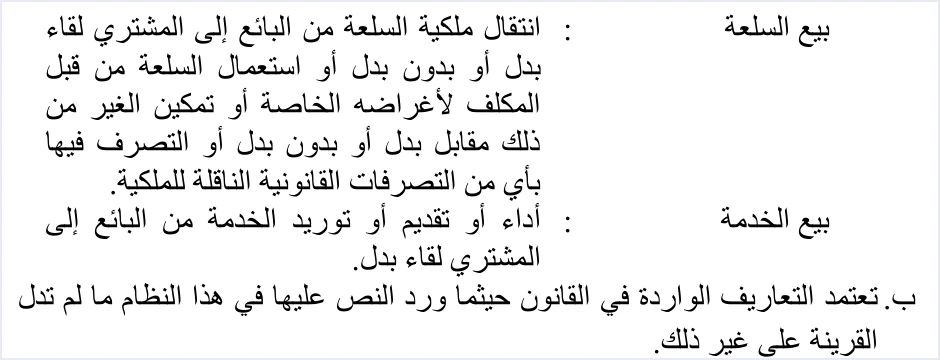
Both definitions rest on something actually happening to the goods or the service. For goods, that is a transfer of ownership, a use, or a disposal that transfers ownership. For a service, it is performance, provision or supply. A quotation, by contrast, sets out a proposed price and proposed terms. On its own it transfers no ownership and performs no service. We therefore read it as meeting neither definition. This is a reading of the two definitions, not something they state outright.
Note also that the definition of a sale of goods mentions consideration and its absence side by side, so under that definition a sale of goods does not depend on the price being received. The definition of a sale of services, on the other hand, requires the service to be supplied for consideration.
Proforma invoices and JoFotara: the name does not make an invoice
A proforma invoice carries the word “invoice” in its name, and that is where the confusion starts. The text that settles it is the definition of an invoice in Article 2 of Regulation No. 34 of 2019.
«وثيقة صادرة عن البائع تبين وصفاً للسلعة أو الخدمة المقدمة والسعر والكمية المبيعة ومقدار الضريبة العامة على المبيعات المحتسبة على الفاتورة في حال كان من المكلفين المسجلين في ضريبة المبيعات»
In English, Article 2 of Regulation No. 34 of 2019 defines the invoice as a document issued by the seller that describes the goods or service supplied, the price and the quantity sold, and the amount of General Sales Tax charged on the invoice where the seller is registered for sales tax. No official English translation of this regulation was found; the English here is our rendering, and the Arabic text is the authority.
The Arabic definition speaks of goods or a service that have been supplied (المقدمة) and a quantity that has been sold (المبيعة). We take this to mean it describes the record of a sale that has happened, not a document that prepares for a sale that may or may not happen.
Article 4(a) of Regulation No. 34 of 2019 then states which electronic invoice is recognized.
«تعتمد الفاتورة الالكترونية الصادرة عن برنامج الفوترة الوطني الالكتروني أو الصادرة عن برنامج تم ربطه ببرنامج الفوترة الوطني الالكتروني»
In English, Article 4(a) of Regulation No. 34 of 2019 recognizes the electronic invoice that is issued by the National Invoicing System or by a program linked to it. No official English translation of this regulation was found; the English here is our rendering, and the Arabic text is the authority.
Two things follow from this.
- A proforma invoice prepared outside the system is not covered by Article 4(a) of Regulation No. 34 of 2019, whatever it is called, because it was not issued by the system or by a program linked to it.
- If its content is sent through the system, it will not arrive as a proforma invoice, because the system has no such type. It will arrive as a new invoice with the value
388and be treated as one.
The receipt voucher is another document that people often confuse with an invoice.
Only two documents in JoFotara: 388 and 381
Every invoice file sent to the system carries the element cbc:InvoiceTypeCode. Its value is one of two, both set by the technical guide.
388for a new invoice.381for a return invoice, which in legal terms is a credit note.
The same element carries a three-digit name attribute. Its digits show the trade type (local, export or another type), the payment method (cash or receivable) and the tax family (income, General Sales Tax or Special Sales Tax). None of the three digits marks a document as a quotation or a proforma invoice. They are details inside an invoice, not a new document type. To read this code and the six invoice types it covers, see our article Invoice Types in the National Invoicing System.
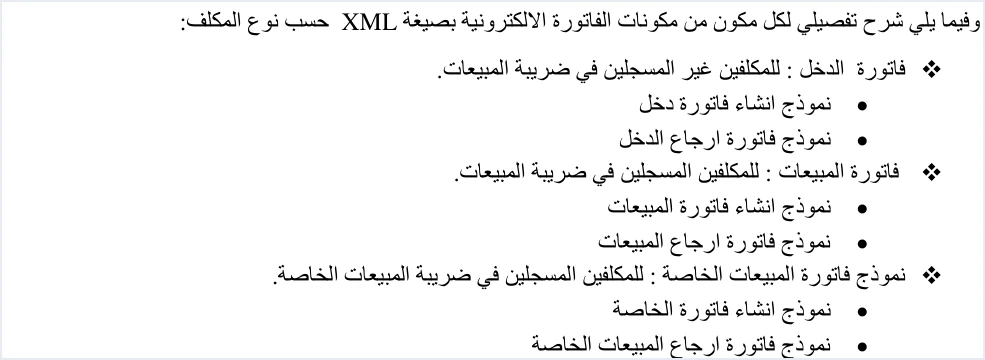
The guide confirms this split on page 10, where it lists the XML file models by type of taxpayer. The income invoice has two models, creating the invoice and returning it. The general sales tax invoice has two, and the special tax invoice has two. There is no model for a quotation or a proforma invoice. Nor does the guide define a debit note. Corrections in the guide are made with a return invoice.
The table below sums up where each document stands in relation to the system.
No draft status in JoFotara: whatever is sent is treated as an invoice
When the seller’s system sends an invoice, JoFotara’s response includes the field EINV_STATUS, which is the reference for the invoice’s status. On page 98, the technical guide defines three values for this field.
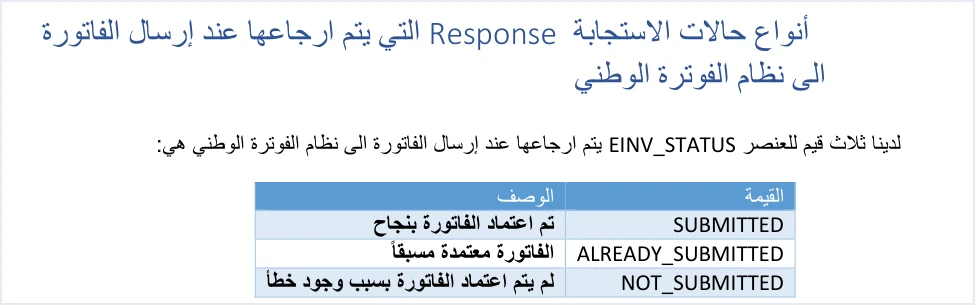
SUBMITTED. The invoice was accepted, and a QR code comes back with it.ALREADY_SUBMITTED. The same invoice was sent before with the same number and the same unique identifier (UUID), so the system returns the original QR code.NOT_SUBMITTED. The invoice was rejected. No QR code, no identifier and no signed invoice come back with it.
None of these values describes a document held by the system while it waits for the seller’s decision. The verdict is given in the response to the submission itself, and the technical guide defines no fourth state. In practice, this means a file that is sent and meets the system’s conditions is accepted as an invoice, even if the seller meant it as an offer or a test. The guide also mentions no test environment where a file can be sent for preview, so do not send a document to the system just to see how it will look.
On the portal side, the 2026 procedures guide for issuing an invoice shows the new invoice (فاتورة جديدة) form. It has an Add button (إضافة) for each line, a Notes box (ملاحظات), and two buttons, Issue (إصدار) and Exit (خروج). The guide describes no way to save an invoice on the portal without issuing it. So a draft, if you need one, stays in your own software or on paper until the sale takes place. The steps for issuing on the portal are in our article Issue an Invoice on the JoFotara Portal.
The technical guide requires the QR code to be shown on the seller’s invoice, and the code comes back only with an accepted invoice. We therefore conclude that the copy the buyer receives comes after the response, not before it.
If a quotation is sent to JoFotara as an invoice
What happens next depends on the status that comes back in the response.
- If the status is
NOT_SUBMITTED, the invoice was not accepted and no QR code came back. A resend after a rejection normally follows a correction of the error. Here, though, no sale stands behind the document, so there is no point in resending it until the sale takes place. - If the status is
SUBMITTED, the document has become an accepted invoice. An issued invoice is not edited, and the means the guide documents for correcting an issued invoice is the return invoice, with the value381.
The technical guide sets specific conditions for the return invoice. It carries the original invoice’s number, its unique identifier (UUID) and its total. The return reason is mandatory. A return is on quantities only and cannot exceed the quantity sold on the original invoice. The buyer details on the return invoice must match those on the original invoice.
The guide does not, however, name the case of an invoice accepted for a sale that never happened. It documents returns on quantities, and it does not say that a return is the official remedy for this case. On top of that, Article 10 of Regulation No. 34 of 2019 places responsibility for the invoice matching what actually happened on the seller and the buyer alike. So if an invoice is accepted for a quotation that never turned into a sale, ask ISTD how to handle it before you act on your own interpretation.
What the texts leave open on quotations and invoices
The texts answer the core question of quotation vs invoice in JoFotara, which is that the invoice follows the sale. They leave several practical questions without a clear answer. We do not answer them here, because the sources we rely on do not answer them.
- Deadline for sending. The official sources we rely on set no deadline, in hours or days, for sending the invoice after the sale. Article 3 and Article 5(d) of Regulation No. 34 of 2019 deal with the invoice, not with when it must be sent.
- An advance payment against a proforma invoice. Regulation No. 34 of 2019 ties the invoice to the sale itself, and its text does not address an amount received before the sale takes place.
- Acceptance, delivery and payment on different days. The texts do not say which of these moments is the sale when the buyer accepts the quotation on one day, takes delivery on another and pays on a third.
- Sales paid in stages. Article 5(b) of Regulation No. 34 of 2019 requires the buyer’s name to be stated clearly in a deferred sale, an installment sale or a sale paid in stages. It says nothing about issuing an invoice for each payment. The technical guide also sets no payment method code for an invoice that has been partly paid.
- Keeping quotations. The retention period in Article 8 of Regulation No. 34 of 2019 applies to invoices, and the regulation does not mention quotations in that provision.
If you face one of these situations, get the answer from ISTD or from your tax adviser. Do not rely on a figure or a rule that has no source.
Checklist before turning a quotation into an invoice
When a quotation turns into a sale, these questions help you issue the invoice the way the texts require.
- Has the sale actually taken place, or is the deal still an accepted quotation that has not been carried out?
- Is the sale worth one dinar or more? Article 5(a) of Regulation No. 34 of 2019 requires an invoice from the seller of any goods or service worth not less than one dinar. This threshold is explained in our article Minimum Invoice Value in Jordan.
- Is the invoice dated on the day the sale took place, rather than the date of the quotation or any earlier date?
- Is the document type value
388, and does the three-digit code match the trade type, the payment method and the tax family? - Have you stated the buyer’s name where it is required? It is always required on a receivable invoice, and on a cash invoice worth more than JOD 10,000.
- Do the quantities and prices on the invoice match what was actually sold, rather than what the quotation said if anything changed?
- Did your software generate the invoice’s unique identifier (UUID) once and store it, so it can be reused if the invoice has to be resent?
- Did the status
SUBMITTEDand the QR code come back before you handed the buyer their copy?
How Qoyod handles sending the invoice to JoFotara
Building the invoice file and sending it is the job of the seller’s system, that is, the software that issues the invoice. Qoyod’s integration with the National Invoicing System works on this layer as follows.
- Building and sending the file. Qoyod builds the invoice file in UBL 2.1 format with its unique identifier (UUID) and sends it to the National Invoicing System without any manual intervention.
- An alert before sending. Qoyod checks each invoice at field level as it is created, covering the tax number, the document type and payment method, the General Sales Tax rate and whether the lines are complete, and alerts you to any error before the invoice is sent, to reduce rejections.
- Every invoice’s status in view. ISTD returns the invoice status and any error message, and Qoyod shows them in its status panel, with states that include sent (مرسلة), previously sent (مرسلة مسبقًا) and not sent (لم تُرسل) together with the error message.
- Resending with the same identifier. The status panel lists invoices that were not sent and need to be resent, and when you resend one it keeps the same UUID.
- The QR code comes from ISTD. The taxpayer needs no digital certificate or signature of their own to send invoices through Qoyod. Once ISTD accepts the invoice it returns a QR code, and Qoyod shows that code on the invoice.
For a wider view of the system and how to connect your business to it, read our article Jordan’s National E-Invoicing System. You can also see what Qoyod offers businesses in Jordan on our National Invoicing System page.
E-invoicing and full accounting in one system
Qoyod is integrated with the National Invoicing System (JoFotara). You issue your invoice in Jordanian dinars from Qoyod, it is booked to your ledgers automatically and sent to the system, and once it is accepted it comes back with a QR code from the Income and Sales Tax Department.
Frequently asked questions
Is a quotation sent to JoFotara?
Our reading of the texts is that it is not. According to the technical guide, the system accepts only two documents, a new invoice with the value 388 and a return invoice with the value 381. Article 5(d) of Regulation No. 34 of 2019 requires the invoice to be issued when the sale takes place, so we conclude from the two texts that a quotation is not sent, because it comes before the sale.
Is a proforma invoice an invoice under Regulation No. 34 of 2019?
Regulation No. 34 of 2019 does not mention the proforma invoice by name. It defines the invoice as a document showing the goods or service supplied and the quantity sold, and Article 4(a) of the same regulation recognizes the invoice issued by the National Invoicing System or by a program linked to it. A preliminary document prepared outside the system is therefore not covered by that article.
Can I save a draft invoice in JoFotara?
The technical guide defines three states for a submitted invoice, SUBMITTED, ALREADY_SUBMITTED and NOT_SUBMITTED, and it defines no draft state. The procedures guide for issuing an invoice on the portal describes no way to save an invoice without issuing it either. Keep any draft in your own software until the sale takes place.
When do I issue the invoice after the buyer accepts the quotation?
Article 5(d) of Regulation No. 34 of 2019 ties issuing to the sale taking place, not to the acceptance of the quotation. The texts do not say which moment counts as the sale when acceptance, delivery and payment fall on different days. If your deal works that way, get the answer from ISTD.
What do I do if an invoice I sent for a quotation that never became a sale was accepted?
An accepted invoice is treated as an issued invoice, and an issued invoice is not edited. The correction method the technical guide documents is the return invoice, on quantities. The guide does not name the case of a sale that never happened, so ask ISTD before you deal with it.
References
- Regulation No. 34 of 2019 on Organizing and Controlling Invoicing Affairs, as amended, consolidated text (in Arabic), pp. 1 to 4, Articles 2, 3, 4, 5, 8 and 10.
- Income and Sales Tax Department (ISTD), technical guide for integrating with the National Invoicing System through the API, version 1.5 (in Arabic), pp. 10, 12, 24 and 98.
- Income and Sales Tax Department (ISTD), procedures guide for issuing an invoice in the Jordanian National Electronic Invoicing System, 2026 edition (in Arabic).
- ISTD’s National Invoicing System guides (in Arabic)




