




A developer who builds the link between accounting software and the National Invoicing System (JoFotara) reaches the second section of the technical guide and finds, right after the income invoice example, a full example of how to return it. This article walks through the JoFotara income invoice return XML example block by block, as it appears on pages 22 to 31 of version 1.5 of the guide issued by the Income and Sales Tax Department (ISTD). For each block we say what it is, what kind of value goes into it and which rule the guide attaches to it. ISTD publishes the technical guide in Arabic only; the English here is our rendering, and the Arabic text is the authority.
The return example shares most of its structure with the income invoice example. This article therefore concentrates on what a return adds or changes, which is the reference to the original invoice, the type code 381, the return reason, the rules for quantities and discounts in the lines, and a note on the figures in the example itself.
One caution from the start. What this article shows is an annotated structure, not a file ready to send. The fragments below are shortened, and their values are written as ellipses with a comment describing what goes in their place. We did not send this example, or any fragment of it, to the National Invoicing System, because the guide documents no open test environment for taxpayers or developers.
JoFotara income invoice return XML example: what the guide shows
The example sits in the second section of the guide, titled Income return invoice (فاتورة إرجاع الدخل), after the income invoice section, which is meant for taxpayers not registered for General Sales Tax (GST). On page 23 the guide opens it with a note that sets three conditions for a return.
- Returns are on quantities only. The note says the system allows returns on quantities only.
- No return beyond the quantity sold. The system does not accept a return of a quantity larger than the quantity sold on the original invoice.
- More than one return against the same invoice. The system allows a return invoice to be sent against the original invoice once or several times, until all of its sold quantities are used up.
After the note the guide repeats the color key that comes with all of its templates. Elements highlighted in yellow are mandatory variables that the seller’s system fills in, and elements highlighted in green are optional variables. The rest, in the guide’s words, is a fixed description with no change. How to read this highlighting is covered in our article JoFotara Mandatory Fields: Reading the Technical Guide. The guide then divides the example into seven sections, lettered A to G, and the rest of this article follows the same order.
Map of the example sections, pages 23 to 31
The table below lists the seven sections with their pages, what each section carries and how it differs from the original income invoice.
Scroll the table sideways to see the remaining columns
The table shows that the difference between the two examples comes down to three places. The first is the invoice header, where the reference block is added. The second is Section E, which has no counterpart in a sales invoice. The third is the lines, which are written with the returned quantities. The seller and the income-source sequence stay as in every invoice your system sends.
Return invoice header and original invoice reference (Section A)
The guide titles this section Return invoice and original invoice information (معلومات فاتورة الإرجاع والفاتورة المراد الارجاع منها), and it holds the data of two invoices in one place. The upper elements belong to the return invoice itself, and the cac:BillingReference block belongs to the original invoice being returned.
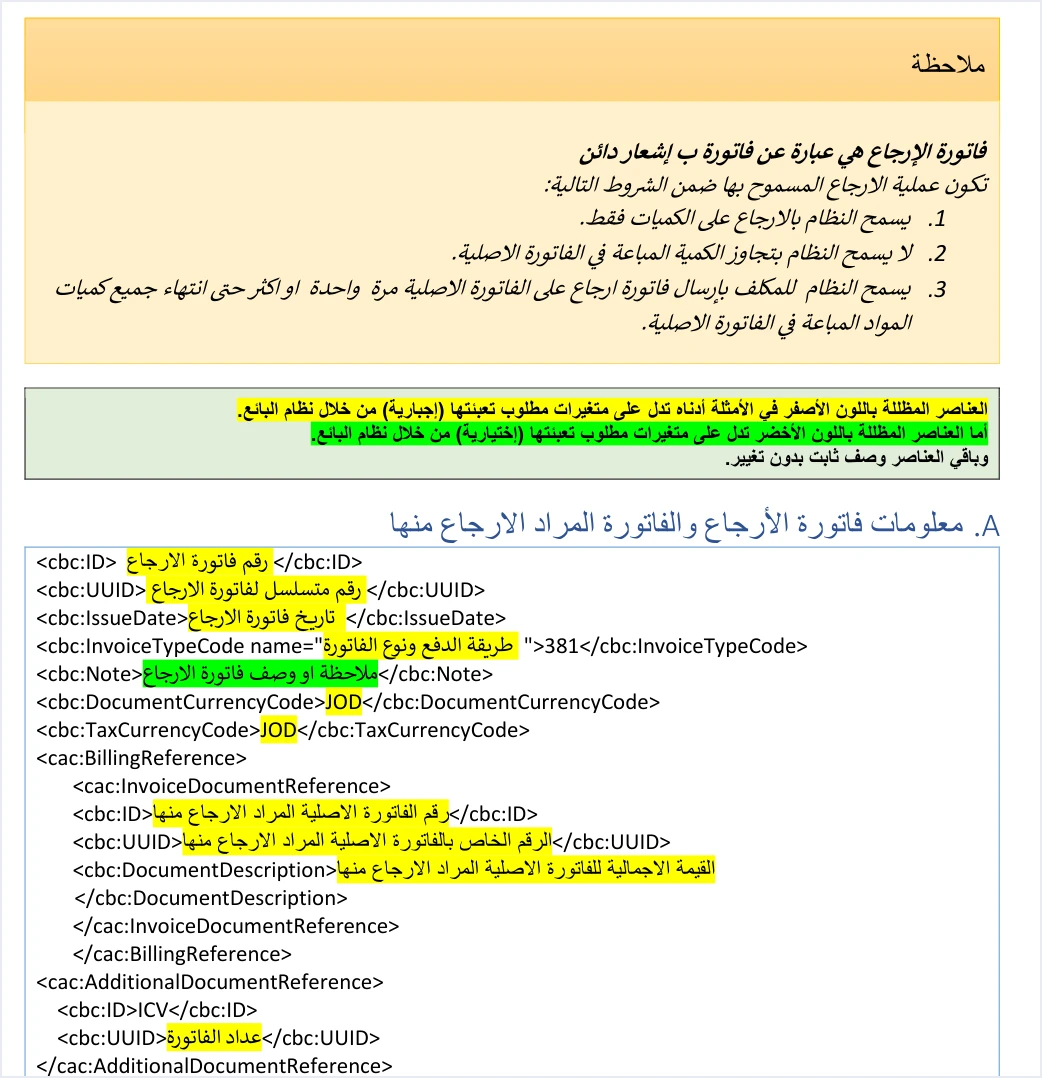
The fragment below is shortened and follows the order of the template. The comments describe the value your system fills in for each element.
<cbc:ID>…</cbc:ID>  <!-- number of the return invoice itself -->
<cbc:UUID>…</cbc:UUID>  <!-- unique identifier of the return invoice, generated and stored by your system -->
<cbc:IssueDate>…</cbc:IssueDate>  <!-- return date in the format yyyy-mm-dd -->
<cbc:InvoiceTypeCode name="…">381</cbc:InvoiceTypeCode>  <!-- name is the original invoice's own code -->
<cbc:Note>…</cbc:Note>  <!-- optional -->
<cbc:DocumentCurrencyCode>…</cbc:DocumentCurrencyCode>  <!-- currency of the original invoice -->
<cbc:TaxCurrencyCode>…</cbc:TaxCurrencyCode>  <!-- currency of the original invoice -->
<cac:BillingReference>
  <cac:InvoiceDocumentReference>
    <cbc:ID>…</cbc:ID>  <!-- number of the original invoice -->
    <cbc:UUID>…</cbc:UUID>  <!-- unique identifier of the original invoice -->
    <cbc:DocumentDescription>…</cbc:DocumentDescription>  <!-- total value of the original invoice -->
  </cac:InvoiceDocumentReference>
</cac:BillingReference>
<cac:AdditionalDocumentReference>
  <cbc:ID>ICV</cbc:ID>  <!-- fixed value -->
  <cbc:UUID>…</cbc:UUID>  <!-- invoice counter value -->
</cac:AdditionalDocumentReference>
Here is what each element means and what governs it.
- Return invoice number and unique identifier. The
cbc:IDandcbc:UUIDelements in the header belong to the return invoice, and together they are its primary key, as for every invoice. Your system generates the identifier and stores it, then reuses it if it resends the same invoice. The rule is explained in our article JoFotara UUID. - Return date.
cbc:IssueDateis written in the formatyyyy-mm-dd, as in all the XML examples in the guide. - The note.
cbc:Noteis highlighted in green, which means it is optional. The income return template keeps it, while the General Sales Tax and special tax return templates leave it out (pp. 23, 46 and 73). - Currency.
cbc:DocumentCurrencyCodeandcbc:TaxCurrencyCodecarry the valueJODin the template. The red note on page 24, which follows the rule for choosing the return type according to the original invoice, says that this “also applies to currencies”, so the currency of the return is the currency of the original invoice. - Reference to the original invoice. The
cac:InvoiceDocumentReferenceblock carries three elements, which are the original invoice’s number, its unique identifier and its total value incbc:DocumentDescription. The value here is the total of the original invoice, not the total of the return. The block is covered in detail in our article JoFotara BillingReference. - Invoice counter. The
cac:AdditionalDocumentReferenceblock carries the fixed valueICVin the identifier and the counter value incbc:UUID. In the guide’s words it is a counter created by the taxpayer for electronic invoices, starting sequentially from 1 to infinity (p. 13). It is explained in our article JoFotara ICV.
The point to watch in this section is not to mix up the two identifiers. The identifier in the header belongs to the return, the identifier inside the reference block belongs to the original invoice, and each has its own source in your records.
Type code 381 and the name attribute in an income invoice return
The cbc:InvoiceTypeCode element carries two pieces of information. Its value shows whether the invoice is new or a return, and its name attribute carries a three-digit code that describes the invoice type. In every return invoice the value is 381, against 388 for a new invoice.
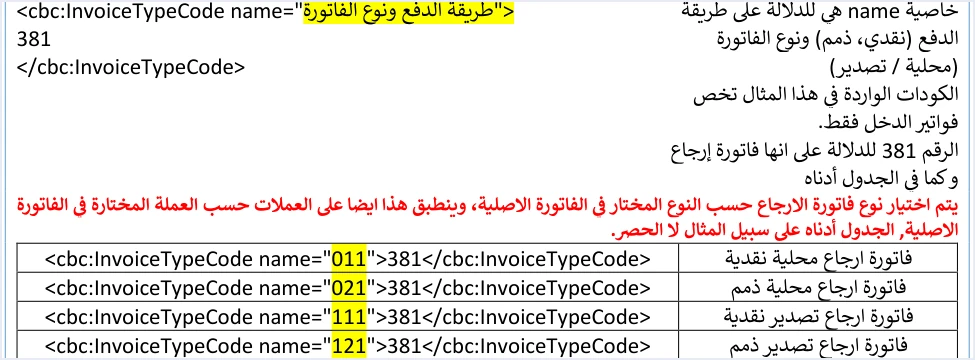
The attribute code is not chosen afresh. The guide states that the return invoice type is chosen according to the type selected in the original invoice, and then gives examples for returning income invoices, 011, 021, 111 and 121, which it describes as examples “and not limited to” them. The three digits read as follows.
- The first digit is the trade type.
0is for local and1is for export, and the remaining values extend to development zones, transit, foreign trade and assignment inside free zones. - The second digit is the payment method.
1is for cash and2is for receivable. - The third digit is the tax family.
1is for income,2is for General Sales Tax and3is for special tax. That is why every example in this section ends in 1.
If the original invoice is a local cash income invoice with the code 011, the return is written name="011" with the value 381. The guide’s own example uses this same code. The guide does not include a full example of returning a receivable invoice or any non-local type, only the type code lines on their own.
Keep in mind that the file declares the type, and the taxpayer’s registration with ISTD determines what it may declare. If your system sends a type that does not fit the tax number or the income-source sequence, the expected message is This user is not authorized to submit this type of invoice.
Seller, buyer and income-source sequence (Sections B, C and D)
These three sections come one after the other between pages 25 and 27. A return adds nothing to their elements. It only requires the buyer to match the original invoice.
Seller details (Section B). The cac:AccountingSupplierParty block carries the country code JO, the seller’s tax number in cbc:CompanyID, the fixed value VAT for the tax-scheme code, and the seller’s name in cbc:RegistrationName as registered with ISTD.
Buyer details (Section C). The guide describes this section in a return as a fixed description with no change or addition, and then states the rule explicitly on page 26.
«يجب أن تتوافق بيانات المشتري في فاتورة الإرجاع مع بياناته في فاتورة البيع الأصلية المرتبطة بها»
In English, the guide requires the buyer details on the return invoice to match those on the original sales invoice it is linked to. Your system therefore does not retype the buyer’s details on the return screen. It takes them from the record of the original invoice as it was sent. That covers the identifier type, NIN, PN or TN, and its value, the name, and any optional field that was filled in on the original.
Income-source sequence (Section D). The cac:SellerSupplierParty block carries the income-source sequence value in cbc:ID, and it is mandatory in every submission. On page 101 the guide lists among the causes of server error 500 an error in the tax number or the income-source sequence, and, less often, an error in the Client_ID or the Secret_Key. The meaning of this field and where to find it are covered in our article JoFotara Income Source Sequence: Where to Find It.
Return reason in PaymentMeans (Section E)
This is the only section of the example that has no counterpart in a sales invoice. Next to it the guide prints, in red, the sentence “the return reason must be entered”.
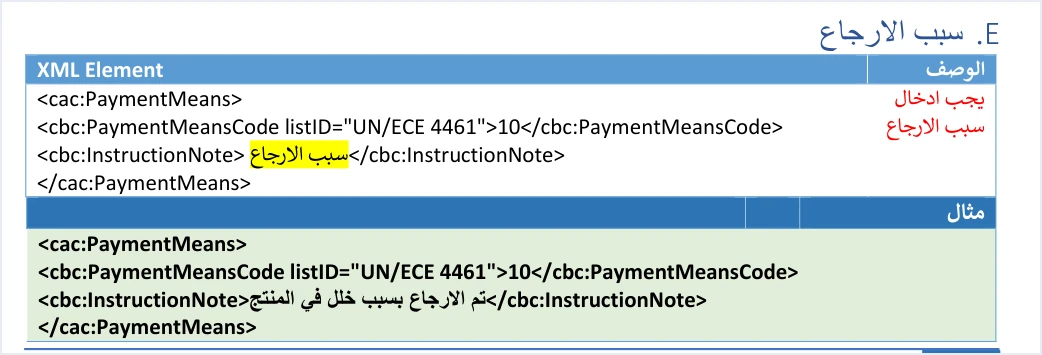
The cac:PaymentMeans block has two elements.
cbc:PaymentMeansCodewith the attributelistID="UN/ECE 4461"and the fixed value10, which is a fixed description copied as it is.cbc:InstructionNoteholds the return reason as free text, and it is the only variable in the block. The guide’s example is “The return was made because of a product defect” (تم الارجاع بسبب خلل في المنتج).
From the name of the block a developer might expect it to carry the payment method. In this position it does not. The payment method is written in the second digit of the name attribute in the type code. This section and how to word the reason are covered in our article JoFotara return reason.
Return totals without a tax block (Section F)
Income invoices carry no TaxTotal block at all, neither at invoice level nor at line level. For that reason the income return example has no tax section, and the guide moves straight from the return reason to the totals and then the lines. This is the clearest difference between it and the General Sales Tax return example, which carries a tax block whose value is, in the guide’s words, the total of the tax values to be returned from the invoice.
The totals are in Section F, on pages 28 and 29, and they follow the same formulas as a sales invoice.
cac:AllowanceChargeat invoice level. It carriesChargeIndicatorwith the valuefalse, the reasondiscount, and a value equal to the sum of the line discounts.TaxExclusiveAmount. The sum of quantity times unit price over all lines.AllowanceTotalAmount. The sum of the line discounts, which must equal the value inAllowanceChargeabove.TaxInclusiveAmountandPayableAmount. The invoice total. In the income invoice example each equals the value of the lines before the discount minus the discount, that is 116.000 minus 7.000, which equals 109.000.
Because return lines are written with the returned quantities only, and because all of these totals are calculated from the lines, the return totals cover the returned part only, not the whole original invoice. The guide says this explicitly in its General Sales Tax return section, with the phrase “the part to be returned” (pp. 51 and 52), and in its special tax return section, with “to be returned” (pp. 78 and 79). Do not confuse these totals with the value in cbc:DocumentDescription in the header, which is the total of the original invoice, as above.
Under every amount the guide repeats that it can be rounded to 3 decimal places, up to a maximum of 9 decimal places, as long as the difference is no more than 0.001. The guide’s examples use the value JO in the currencyID attribute on every amount, and the guide does not say whether the system accepts another value there.
Return lines: what stays the same and what changes (Section G)
The lines section runs from page 29 to page 31, and most of the return rules are gathered in it. The table below summarizes each element in a line and what your system writes in it.
Scroll the table sideways to see the remaining columns
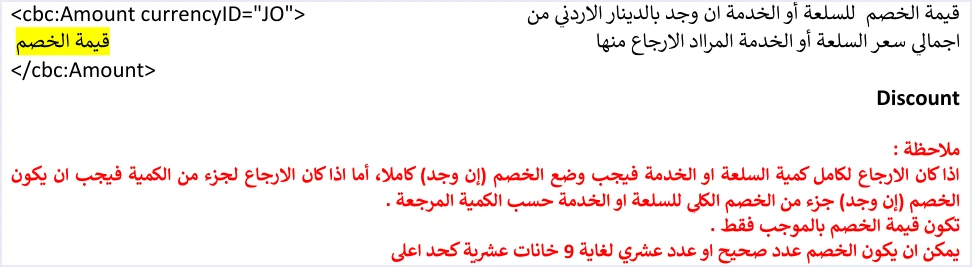
Three practical consequences follow from these rules for anyone programming returns.
- Keep every line number from the original invoice. A return matches lines by their number, so if your system renumbers the lines at return time it breaks that link. The line structure is covered in our article JoFotara InvoiceLine.
- Track the returned quantity per line. Because the guide allows more than one return against the same invoice until its quantities are used up, your system needs a returned balance for each line that prevents going over the quantity sold. For the portal side of a return, see our article Return an Invoice on the JoFotara Portal: Step by Step.
- Take the discount from the original line discount. In a full return the whole discount is written, and in a partial return it is a part of the line discount “according to the returned quantity”. The guide gives no formula for this share, so we do not attribute a specific formula to it here.
The example’s figures do not match the original income invoice
Before you use the example in a test, note that its figures do not match the income invoice example that precedes it in the guide. The value of cbc:DocumentDescription in the return example is 64.000, while the total of the original income invoice in its own example is 109.000 (pp. 19 and 25). This element is supposed to carry the total of the original invoice, as above.
The guide does not explain the difference, and we do not try to reconstruct the figures that should have appeared. The practical conclusion is the same either way. The example is useful for understanding where each element goes and in what order, and it is not a reference for values. If you build your test on the sales example and then on the return example as they stand, you are sending a return that points to an invoice it does not match.
The same applies to every illustrative value in the example, from tax numbers and names to unique identifiers. The alternative is to build each return from the stored record of the original invoice.
Pre-submission checklist: income invoice return
This checklist gathers the rules of the seven sections into steps that your system verifies before it encodes the file and sends it.
- The original invoice is accepted and stored. You hold its number, its unique identifier, its total, its buyer details and its lines as they were sent.
- The return header has its own number and identifier. Generate a unique identifier for the return and store it before the first send, and write the date as
yyyy-mm-dd. - The type code is carried over from the original. The
nameattribute is the original invoice’s own code, the value is381, and the currency is the original’s currency. - The reference block is complete. The original number, its identifier and its total, in its three elements.
- The buyer details match. Taken from the original invoice record without change or addition.
- The return reason is written. The code
10and the reason text incbc:InstructionNote. - The lines are correct. Number, name and price as on the original, the returned quantity not above the remaining balance, and the discount full or partial according to the quantity.
- The totals are calculated from the return lines. No tax block, and the invoice-level discount equals the sum of the line discounts.
- The file is well formed. The opening invoice tag is on one line,
cbc:ProfileIDcarriesreporting:1.0, and then the file is Base64 encoded. - The response is read from the status. Judge the result from
EINV_STATUS. The statusSUBMITTEDmeans acceptance and a QR code comes back with it, and the statusNOT_SUBMITTEDmeans rejection, with the error message.
How Qoyod handles the invoice file
Everything above is work that falls on the taxpayer’s system, handled by the accounting software linked to the National Invoicing System. Qoyod’s integration with the National Invoicing System works at that layer as follows.
- Building the file. Qoyod builds the invoice file in UBL 2.1 format with its unique identifier (UUID) and sends it to the National Invoicing System without any manual intervention.
- Checking before sending. Qoyod checks each invoice at field level as it is created, covering the tax number, the document type and payment method, the General Sales Tax rate and whether the lines are complete, and alerts you to any error before the invoice is sent, to reduce rejections.
- The status of each invoice. ISTD returns the invoice status and any error message, and Qoyod shows them in its status panel, with states that include sent (مرسلة), previously sent (مرسلة مسبقًا) and not sent (لم تُرسل) together with the error message.
- Resending. The status panel lists invoices that were not sent and need to be resent, and when you resend one it keeps the same UUID.
The pre-send check is an alert, not a guarantee. For a wider view of the system and how to connect your business to it, read our article Jordan’s National E-Invoicing System, or see what Qoyod offers on the National Invoicing System page.
E-invoicing and full accounting in one system
Qoyod is integrated with the National Invoicing System (JoFotara). You issue your invoice in Jordanian dinars from Qoyod, it is booked to your ledgers automatically and sent to the system, and once it is accepted it comes back with a QR code from the Income and Sales Tax Department.
Frequently asked questions
Does an income invoice return carry a TaxTotal block?
An income invoice return has no such block, just as the income invoice itself has none. There is no tax block at invoice level or at line level, and the totals are limited to the value of the lines before the discount, the discount and the total.
What is the InvoiceTypeCode value for returning a local cash income invoice?
The value is 381 with the attribute name=”011″, because the return code is carried over from the original invoice. The guide also gives 021, 111 and 121 as examples for returning other income invoices.
What do I write in DocumentDescription inside the reference block?
It holds the full total of the original invoice being returned, not the total of the return invoice. Do not take the value from the guide’s example, because the example value of 64.000 does not match the total of the original income invoice in its own example, which is 109.000.
Can I return part of a line quantity more than once?
The guide allows a return invoice to be sent against the original invoice once or several times, until all of its sold quantities are used up. The condition is that the total returned does not exceed the quantity sold on the original invoice.
Does the Note element stay in an income invoice return?
The element stays in the income return template as an optional element highlighted in green. This differs from the General Sales Tax and special tax return templates, whose headers do not have this element.
Should I copy the return example from the guide and send it as a test?
The example is not suitable for sending as it is, because its values are illustrative and its figures do not match the original invoice in the guide. The guide documents no open test environment, so build the return from an accepted original invoice in your own records.
References
- Income and Sales Tax Department (ISTD), technical guide for integrating with the National Invoicing System through the API, version 1.5 (in Arabic), pp. 10, 12, 13, 19, 22 to 31, 46, 51, 52, 73, 78, 79 and 101.
- ISTD’s National Invoicing System guides (in Arabic)




