




When you return part of the goods sold on an accepted invoice, it is not enough for the return invoice to carry the returned quantities. It also needs something that ties it to the invoice you are returning from. That is the JoFotara BillingReference, the original invoice reference in the National Invoicing System (JoFotara), and it sits in the invoice file as a cac:BillingReference block with cac:InvoiceDocumentReference inside it.
The short answer is that the technical guide issued by the Income and Sales Tax Department (ISTD) asks for three values in this block, all taken from the original invoice and none from the return invoice. They are the original invoice number in cbc:ID, its unique identifier in cbc:UUID, and its total value in cbc:DocumentDescription. The first two together are the key by which the system knows which invoice is meant, so if they do not match the original invoice, the reference points to another invoice or to nothing.
Our article goes through the block element by element. It shows what each element equals, where your system gets it, how to tell the return invoice number from the original invoice number inside one file, what not to copy from the guide’s examples, and what the guide does not document at all.
What is the JoFotara BillingReference?
A return invoice in the National Invoicing System is the invoice that carries the code 381 in the cbc:InvoiceTypeCode element. In the technical guide’s own words it is a return invoice (credit note). To issue one on the portal, see our article Return an Invoice on the JoFotara Portal: Step by Step. This article stays with one part of the file, the part that tells the system which invoice is the original.
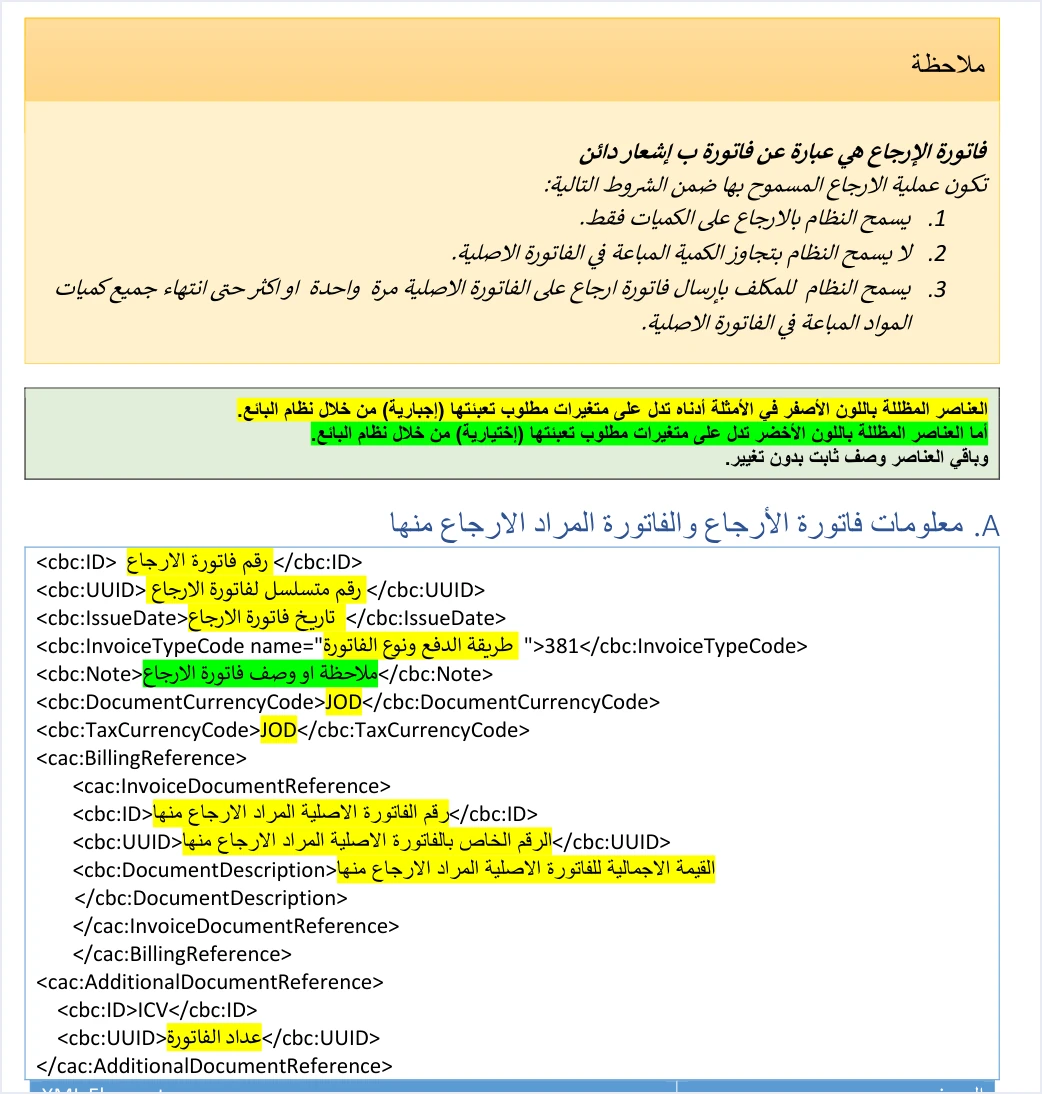
Before the return invoice template (version 1.5, p. 23), the guide places a note with three conditions for a return. The system allows a return on quantities only, it does not allow the returned quantity to exceed the quantity sold on the original invoice, and it allows a return invoice to be sent against the original invoice once or several times until its quantities are used up. How to work out what remains of each line is covered in our Arabic article on a return that exceeds the original quantity, which has no English version yet.
All three conditions are measured against “the original invoice”, and the reference block is where the return file names that original invoice. This is why the template, under a heading that covers the return invoice and the invoice being returned from, shows the return invoice header first and then the cac:BillingReference block, after the two currency elements and before the invoice counter (ICV) block, as the figure above shows.
The guide also classifies its fields by color. Elements shaded yellow are mandatory variables that the seller’s system fills in, those shaded green are optional, and the rest are fixed description with no change. The three values inside the reference block are shaded yellow, so under the field shading in technical guide 1.5 they are mandatory, and none of them is left empty.
The three elements in BillingReference and what each equals
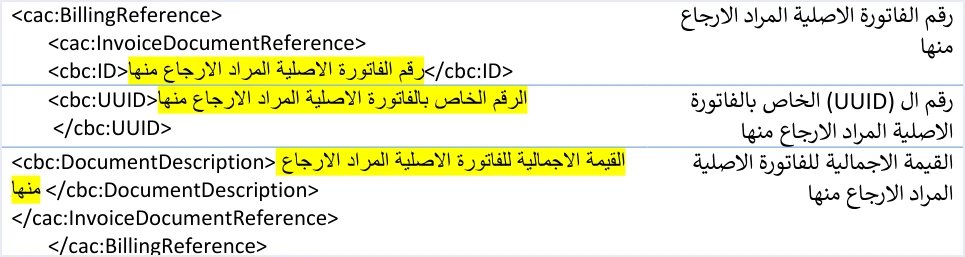
In the table of return invoice elements (p. 24), the guide describes each of the three values in one short phrase. These phrases are the reference to build your software on, because they say where each value comes from. All three end with the same words, which in English are “the original invoice being returned from”. The English wording of the descriptions below is our rendering of the guide’s Arabic.
Scroll the table sideways to see the remaining columns
What stands out in the table is that the guide asks for no value that belongs to the return invoice itself in the reference block. Everything in the block is a copy from the original invoice. Everything that belongs to the return (its number, its identifier, its date, its quantities and its totals) goes outside the block.
Two numbers and two identifiers in one file, the return header and the reference block
What confuses people most when they build a return invoice file for the first time is that cbc:ID and cbc:UUID appear in it twice, once in the file header and once inside the reference block, and each appearance means something different.
The technical guide makes the invoice number and its unique identifier together the primary key of the invoice in the system. Our article JoFotara UUID: Why It Comes Back With the ID covers that in detail. Two consequences follow for the return invoice.
- The return invoice is a separate invoice with its own key. Its header carries a number and an identifier of its own. It must not repeat the original invoice number or identifier there, because then the return header would carry the key of an invoice that was already accepted.
- The reference points with the whole pair. The original invoice number alone does not identify it, and neither does the identifier alone. That is why the guide asks for both values inside the reference block.
There is a practical consequence when sending fails. In its guidelines (p. 104), the guide recommends resending with the same number and identifier, without generating a new identifier. For a return invoice, this means you resend with the return invoice number and identifier exactly as they are in its header, and the reference block keeps pointing at the same original invoice, unchanged.
DocumentDescription holds the original invoice total, not the return total
The third element needs the most attention, because its name does not tell you what it holds. The word Description suggests descriptive text, but the guide makes the element carry the total value of the original invoice being returned from.
A return invoice file holds two different totals, and each has its own place.
- The return invoice totals are in its own
cac:LegalMonetaryTotalblock. The guide states that they cover only the part being returned, and that their tax is the sum of the tax values being returned from the invoice. - The original invoice total is in
cbc:DocumentDescriptioninside the reference block, exactly as it is on the original invoice.
Suppose goods were sold on an invoice totaling 500.000 dinars and goods worth 120.000 dinars are returned. The return invoice totals are built on 120.000, and the reference block carries 500.000. These numbers are our own illustration, not an example from the guide.
Three questions remain about this element. We give them as the guide has them, keeping what is stated in the text apart from what is our reading.
- Repeated partial returns. The guide allows more than one return invoice against the same original invoice, and the description of the element in every template is the total value of the original invoice. The guide mentions no remaining balance and no value after deducting what was returned earlier. Our reading of this text is that the same value repeats in every return invoice against the same original invoice.
- Which of the original invoice totals. The guide names no particular element of the original invoice’s
cac:LegalMonetaryTotalblock. Its formulas, however, makeTaxInclusiveAmountandPayableAmountboth equal toSum(RoundingAmount), so on the original invoice they are a single value. The closest reading is that “the total value” is that value, and this is a reading with no explicit text behind it. - Currency. According to the guide, the return invoice takes the same currency code as the original invoice. So the total in the reference block and the amounts in the return invoice are in one currency, the currency of the original invoice.
Where your system gets the original invoice reference values
The reference block is not written from memory or from a printed copy. Your system has all three values from the moment the original invoice was sent, provided it saved them.
In the fifth of its ten guidelines (p. 104), the guide asks you to store the key data of every invoice, namely the number ID, the identifier UUID, the QR code and the invoice status EINV_STATUS, for tracking and retrieval. In its response to every accepted invoice, the system returns the invoice number in EINV_NUM and its identifier in EINV_INV_UUID. So the first two elements of the reference block come from this saved record.
The total value is not listed among the key data in the fifth guideline. It is in any case part of the original invoice file that your system built. We suggest, and this is our suggestion rather than text in the guide, reading it from the original invoice’s own record when you build the return, rather than recalculating it or typing it by hand. The practical order for building the block is as follows.
- Pick the original invoice from your records. It must be an invoice that was accepted and whose response came back with its number and identifier. According to the guide, the response to a rejected invoice carries the number, the identifier and the QR code with the value null.
- Copy its number and identifier as saved into
cbc:IDandcbc:UUIDinside the block, without retyping or reformatting. - Copy its total into
cbc:DocumentDescriptionfrom the original invoice totals, not from the return totals. - Generate a new number and a new identifier for the return invoice header, and save them before the first attempt to send.
If you want to check the original invoice data from a source outside your system, the guide says that scanning the QR code with the Sanad app, through its digital document verification option (التحقق من المستندات الرقمية), shows the basic invoice data held inside the code, including the invoice total and the invoice number. The unique identifier is not among the data it shows, so its source stays your own record.
What else carries over from the original invoice to the return invoice
The reference block is not the only place where data moves from the original invoice. The guide ties the return invoice to its original in other parts of the file too. This is also what makes a return the alternative route for anyone asking about editing an issued invoice in the National Invoicing System, because an issued invoice is not edited after it is accepted. The table brings these places together so that you can see the block in context, without detailing each one.
Scroll the table sideways to see the remaining columns
The return reason is added to this. It is mandatory on every return invoice and is written as free text in a separate block, and we cover it in a separate article in this series on the return reason. As for the line number, the guide recommends keeping it from the sales invoice because the return is matched on it. The rule that it must be unique within the invoice is covered in our Arabic article on the message “The ID number must be unique”, which has no English version yet.
Do not copy the return examples in the technical guide
After each template, the guide includes a written example with actual values. The return examples in particular do not work as a model for the reference block, because they do not match the original invoices they are supposed to be returned from.
- The income return invoice example (pp. 24 and 25). In the example,
cbc:DocumentDescriptionholds 64.000, while the total of the original income invoice in the guide’s example is 109.000. - The general sales return invoice example (p. 47). The example points to a unique identifier that differs from the identifier of the original invoice in its own example.
- The special sales return invoice example (p. 74). The example carries over the header of the general sales return invoice as it is.
The guide’s examples are illustrations of the shape of the file, not files that were validated. We collect other observations on the guide’s examples in our Arabic article on the technical guide examples, which has no English version yet. The safe way is to build the block from the template and the description of its elements, and to take the values from your original invoice’s record. This is the structure of the block as the template has it, with descriptive names where the values go.
<cac:BillingReference>
  <cac:InvoiceDocumentReference>
    <cbc:ID>ORIGINAL_INVOICE_ID</cbc:ID>
    <cbc:UUID>ORIGINAL_INVOICE_UUID</cbc:UUID>
    <cbc:DocumentDescription>ORIGINAL_INVOICE_TOTAL</cbc:DocumentDescription>
  </cac:InvoiceDocumentReference>
</cac:BillingReference>
The three upper-case names are not values to send. They stand for what goes in their place, and all three come from the original invoice.
If a return invoice is rejected, what the guide documents and what it does not
The guide documents no specific message for an error in the reference block. The list of errors it gives (pp. 101 and 102) has no message that mentions the original invoice number, its identifier or its total. So we cannot tell you what text would appear if a value in the block differed from the original invoice, nor whether the system rejects the invoice in every case of a difference.
What the guide does document is how to read the result. The final status of an invoice is read from EINV_STATUS, not from the technical status code alone. When an invoice is rejected the status is NOT_SUBMITTED, and the error details appear in EINV_MESSAGE. If a return invoice is rejected, these are the review steps in order.
- Read the message in
EINV_MESSAGEfirst, and work from what it says, not from what you assume. - Match the three values in the reference block against the original invoice’s record character by character, and confirm that the total is the original invoice total, not the return total.
- Confirm the return header carries its own number and identifier, not the original invoice number or identifier.
- Review what carries over from the original invoice in the table above, from the type code and currency to the buyer details and line data.
- Resend with the same return invoice number and identifier after the correction, without generating a new identifier.
If the rejection stays unexplained after this review, the guide refers inquiries to the Technical Support Committee for Invoicing Affairs at ISTD, through its site istd.gov.jo.
How Qoyod handles return invoices
Building the reference block and saving what it needs from the original invoice is work that falls on the taxpayer’s system, which is what your accounting software does when it is connected to the National Invoicing System. According to Qoyod’s integration with the National Invoicing System, the document types in Qoyod for Jordan are the four that the National Invoicing System defines, which are the income invoice, the General Sales Tax invoice, the special tax invoice and the return invoice.
- Building the file and sending it. Qoyod builds the invoice file in UBL 2.1 format with its unique identifier (UUID) and sends it to the National Invoicing System without any manual intervention.
- The status of each invoice in view. ISTD returns the invoice status and any error message, and Qoyod shows them in its status panel, with states that include sent (مرسلة), previously sent (مرسلة مسبقًا) and not sent (لم تُرسل) together with the error message.
- Resending with the same identifier. The status panel lists invoices that were not sent and need to be resent, and when you resend one it keeps the same UUID.
- A return invoice tied to its original. The integration page says that Qoyod issues the return invoice linked to the original invoice by its number and UUID, with the return reason, on quantities and without exceeding the original quantity.
For a wider view of the system and how to connect your business to it, read our article Jordan’s National E-Invoicing System, or see Qoyod and the National Invoicing System.
E-invoicing and full accounting in one system
Qoyod is integrated with the National Invoicing System (JoFotara). You issue your invoice in Jordanian dinars from Qoyod, it is booked to your ledgers automatically and sent to the system, and once it is accepted it comes back with a QR code from the Income and Sales Tax Department.
Frequently asked questions
What is the original invoice reference in the National Invoicing System?
It is the cac:BillingReference block in the return invoice file, with cac:InvoiceDocumentReference inside it. The seller’s system puts in it the original invoice number, its unique identifier and its total value, so that the National Invoicing System knows which invoice is being returned from.
Do I put the return invoice number in the reference block?
No. The reference block carries the original invoice number and identifier. The new number and identifier of the return invoice belong in the return invoice header.
What value goes in DocumentDescription?
The total value of the original invoice being returned from, according to the technical guide’s description. It is not the return invoice totals, which cover only the part returned.
Does the value in DocumentDescription change on a second partial return?
The technical guide mentions no remaining balance for this element, and its description in every template is the total value of the original invoice. Our reading is that the same value repeats in every return invoice against the same original invoice.
What error message appears if the original invoice reference is wrong?
The technical guide documents no specific message for this case. Read the rejection details in EINV_MESSAGE, match the three values against the original invoice’s record, then resend with the same return invoice number and identifier.
Can I copy the return invoice example from the technical guide?
No. The return examples in the guide (pp. 24 and 25, 47 and 74) do not match their original invoices. The income example, for instance, carries a total that differs from the total of its original invoice. Build the block from the template and take the values from your own record.
References
- Income and Sales Tax Department (ISTD), technical guide for integrating with the National Invoicing System through the API, version 1.5 (in Arabic), pp. 12, 23 to 26, 47, 74, 100 to 102 and 104 to 107.




