




Does an invoice from the National Invoicing System (JoFotara) need the business’s stamp or the seller’s signature to be recognized? An e-invoice stamp in Jordan is not one of the details required by Regulation No. 34 of 2019 on Organizing and Controlling Invoicing Affairs, and neither a stamp nor a handwritten signature appears in any of its sixteen articles. The regulation recognizes an electronic invoice by where it comes from, meaning that it was issued by the National Invoicing System or by a program linked to it. Once the invoice is accepted, it comes back with a QR code from the Income and Sales Tax Department (ISTD).
In short, Article 5(a) of Regulation No. 34 of 2019 lists five mandatory details, and neither a stamp nor a signature is among them. The mark that ISTD’s technical guide requires on the seller’s invoice is the QR code that ISTD returns, and that code is verified with the Sanad app.
This article answers one specific question that sellers and buyers both ask, which is where the paper stamp and the handwritten signature fit on an invoice issued through JoFotara. It sets out what the texts put in their place as the basis for recognizing the invoice, and it says plainly what those texts do not answer.
E-invoice stamp in Jordan: what the invoicing texts say
We built the answer on two official texts published by ISTD, and we relied on no other source when judging the stamp and the signature.
- Regulation No. 34 of 2019 on Organizing and Controlling Invoicing Affairs, as amended, in the consolidated version that ISTD publishes after the 2023 amendment. We read all sixteen of its articles.
- The technical guide for integrating with the National Invoicing System through the API, version 1.5, which describes what the taxpayer sends and what comes back from the system.
The reading comes down to three findings. First, Regulation No. 34 of 2019 does not mention a stamp or a signature in any article, so it neither requires them nor forbids them. Second, the technical guide does not ask the taxpayer to sign the invoice, and it does not ask for a digital certificate either. Third, the text that defines the recognized invoice is Article 4(a) of Regulation No. 34 of 2019, and it ties recognition to the program that issued the invoice.
So in the context of JoFotara, the sharper question is not whether the invoice was stamped. It is whether the invoice was issued through the system or through a program linked to it, and whether a QR code came back on it from ISTD. The sections below take each text in turn and what it means for your day-to-day work.
For the wider picture of the National Invoicing System and its two joining paths, issuing on the portal or linking accounting software, see our article Jordan’s National E-Invoicing System.
The five details in Article 5(a): no stamp and no signature
Article 5(a) of Regulation No. 34 of 2019 requires the seller of any good or service worth not less than one dinar to prepare and issue an invoice of at least two copies. It then sets out, in five items, the details the invoice must contain.
- The invoice serial number.
- The seller’s full name and address.
- The seller’s tax number if registered for sales tax, or national number if not.
- The date the invoice was prepared and issued.
- The type, quantity and value of the goods or service sold, and the invoice total.
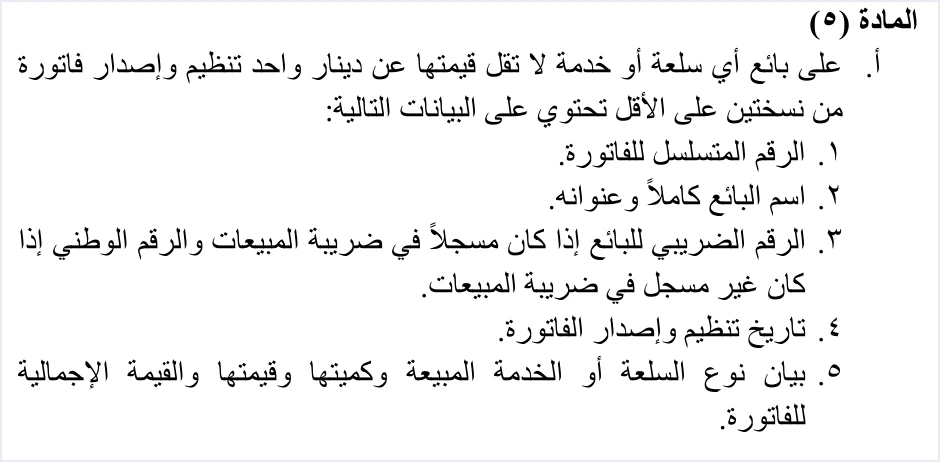
These items identify the seller through three details written on the invoice, namely the full name, the address and the tax or national number. Article 5(a) of Regulation No. 34 of 2019 asks for them as details in the body of the invoice. It does not tie any of them to a stamp carrying the business’s name or to the signature of an authorized person.
Paragraph (b) of Article 5 of Regulation No. 34 of 2019 adds one detail for certain sales. In a deferred sale, an installment sale or a sale paid in stages, the invoice must state the buyer’s name clearly. Neither this paragraph nor any other paragraph of the article adds a stamp or a signature to the invoice details.
The one-dinar threshold and the two-copy requirement are covered in our article Minimum Invoice Value in Jordan. What matters here is that an invoice carrying all five details, plus the buyer’s name where it is required, meets what Article 5 of Regulation No. 34 of 2019 asks for in terms of content, whether or not its printed copy carries a stamp.
Article 4(a): what makes a National Invoicing System invoice recognized
If the stamp is not a condition, what makes the invoice recognized? Article 4(a) of Regulation No. 34 of 2019 answers this in explicit terms.
«تعتمد الفاتورة الالكترونية الصادرة عن برنامج الفوترة الوطني الالكتروني أو الصادرة عن برنامج تم ربطه ببرنامج الفوترة الوطني الالكتروني»
In English, Article 4(a) of Regulation No. 34 of 2019 recognizes the electronic invoice issued by the national electronic invoicing program or by a program that has been linked to it. No official English translation of this regulation was found; the English here is our rendering, and the Arabic text is the authority.
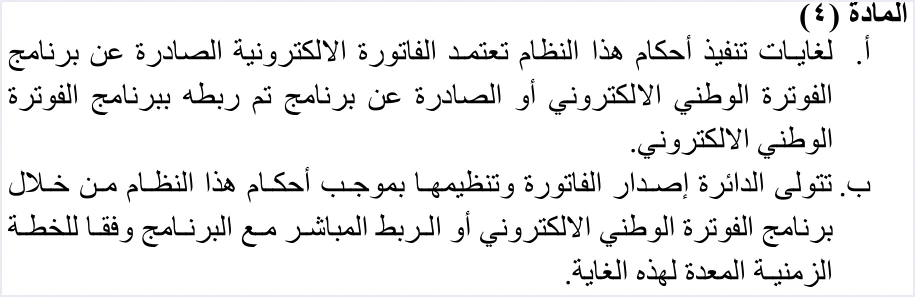
The test in this text is the source that issued the invoice. An invoice prepared on the National Invoicing System portal, or issued from accounting software linked to the system, falls within the article. The text says nothing about the form of the paper, and nothing about a stamp added after the invoice is issued.
Paragraph (b) of Article 4 of Regulation No. 34 of 2019 gives ISTD the task of issuing and organizing the invoice through the national invoicing program or a direct link to it, according to the timetable set for that purpose.
The practical result is that an invoice written outside JoFotara, in a spreadsheet file or in a paper invoice book, does not fall within Article 4(a) of Regulation No. 34 of 2019, because it was not issued by the program or by a program linked to it. This conclusion comes from the text of the article, and stamping or signing the paper does not change it.
The QR code ISTD returns: the mark the guide requires you to show
When your software sends the invoice to JoFotara and the system accepts it, the status in the response is SUBMITTED, and a QR code comes back with it in the EINV_QR field. ISTD generates this code, not your software. The technical guide states that the code must be present in the response for the invoice to count as received and accepted.
If the invoice is rejected, its status is NOT_SUBMITTED, and neither a QR code nor the invoice signed by ISTD comes back with it. The code goes with acceptance, and a rejected invoice has no code.
On pages 98 and 104, the technical guide requires the QR code to be shown on the seller’s invoice. The guide’s verb here means to show or display, so it does not specify printing the code on paper, its size or its position on the invoice.
This makes the difference between the stamp and the code clear in the texts. Neither the regulation nor the guide mentions a stamp. The QR code, on the other hand, is something the guide requires on the seller’s invoice, and it is issued by ISTD itself after the invoice is accepted.
Stamp, handwritten signature and the ISTD-signed invoice: the difference
The question about stamping an invoice tends to mix up four different things. Two of them are habits from paper invoices, and two are returned by JoFotara after the invoice is accepted. The table below shows where each one stands in the texts.
Scroll the table sideways to see the remaining columns
The only signature the technical guide mentions along the invoice’s path is ISTD’s own signature on the copy it returns in the EINV_SINGED_INVOICE field. The guide does not describe how that signature is made or what kind of certificate ISTD uses for it.
So if you hear the phrase “signed invoice” in a conversation about JoFotara, ask what is meant by it. In the technical guide it does not mean a handwritten signature, and it does not mean a signature that the taxpayer puts on their own invoice.
The paper copy and handing the invoice to the buyer
Article 5(c)(1) of Regulation No. 34 of 2019 requires a copy of the invoice to be handed to the buyer in line with the method used to prepare and issue invoices, and the remaining copies to be kept by the seller. Under the text, the delivery method follows the issuing method, and the text does not require a stamped paper copy.
On keeping records, Article 8(b) of Regulation No. 34 of 2019 provides as follows.
«تعتمد بيانات برنامج الفوترة الوطني الإلكتروني بدلاً من الاحتفاظ بالفاتورة ورقياً المنصوص عليه في هذه المادة»
In English, Article 8(b) of Regulation No. 34 of 2019 provides that the data of the national electronic invoicing program is relied on instead of keeping the invoice on paper as set out in that article. No official English translation of this regulation was found; the English here is our rendering, and the Arabic text is the authority.
This provision concerns the duty to keep invoices set out in Article 8 of Regulation No. 34 of 2019 itself, so it does not extend to other provisions of the regulation.

Invoices over JOD 10,000: proof of receipt with no set method
Article 5 of Regulation No. 34 of 2019 has one provision that concerns the buyer and raises the signature question.
«إذا زادت قيمة الفاتورة على (10000) دينار يثبت البائع استلامها من قبل المشتري»
In English, Article 5(c)(2) of Regulation No. 34 of 2019 requires the seller, when an invoice is worth more than JOD 10,000, to prove that the buyer received it. No official English translation of this regulation was found; the English here is our rendering, and the Arabic text is the authority.
The condition is that the value is more than JOD 10,000, so an invoice worth exactly JOD 10,000 does not fall within the text.
The text does not set a method of proof, however. It does not mention the buyer’s signature, the buyer’s stamp, an electronic notice or any other means. None of the sources we relied on sets this method either, so this article does not suggest one. If your invoices go above this threshold, agree on the method with your tax advisor, or ask ISTD which method is enough to prove receipt.
Verifying the invoice with the Sanad app, not by looking for a stamp
The technical guide states that the QR code can be verified by scanning it with the Sanad app only, through its Verify digital documents option (التحقق من المستندات الرقمية). The guide frames this step as something the taxpayer does if they wish to verify the code.
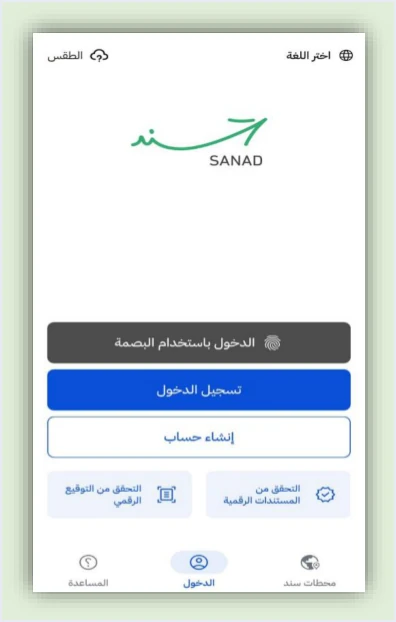
The guide gives two possible results. The first is Document is valid (الوثيقة صحيحة), where the app shows the basic invoice data carried inside the code, namely the invoice total, the invoice number, the total tax on the invoice, the invoice date, and the seller’s tax number and name. The second is An error occurred (حدث خطأ), which means the code is invalid or unreadable for any reason, such as not being linked to the National Invoicing System.
The stamp plays no part in this check, because the app reads the code alone. The app’s home screen also shows a Verify digital signature option (التحقق من التوقيع الرقمي), but the guide does not explain it as part of verifying invoices, so we build nothing on it here. The verification steps and their special cases are in our article How to Verify an E-Invoice with the Sanad App.
What the texts do not answer about stamping an invoice
The texts answer the recognition question clearly, but they are silent on some closely related questions. We list them here so that the answer is not read as wider than it is.
- What other parties accept. The texts we relied on do not cover what banks, insurance companies, government bodies or any other party asking for a “stamped invoice” will accept. If a party asks you for one, ask it about its own requirement, because this article has no answer on that point.
- Adding a stamp by choice. Regulation No. 34 of 2019 neither requires nor forbids a stamp, and the technical guide does not deal with the layout of the printed copy of the invoice. What the guide requires on this front is that the QR code is shown on the seller’s invoice.
- How to prove receipt. Regulation No. 34 of 2019 does not set how the seller proves that the buyer received an invoice worth more than JOD 10,000.
- How ISTD signs. The technical guide does not describe how ISTD signs the invoice it returns, or which certificate it uses.
- The Verify digital signature option in the Sanad app. It appears on the app’s screen, and the guide does not explain how to use it with invoices.
If you come across a source saying that an invoice issued through JoFotara is not accepted without a stamp, ask which official text it relies on before you change your procedures.
Checklist before handing the invoice to the buyer
Here is a short list to go through before you hand over the invoice. Each item rests on one of the texts above.
- The five details are complete, meaning the serial number, the seller’s name and address, the tax or national number, the date, and the description and value of the goods or service, in line with Article 5(a) of Regulation No. 34 of 2019.
- The buyer’s name is clear if the sale is deferred, by installments or paid in stages, in line with Article 5(b) of Regulation No. 34 of 2019.
- The invoice was issued through the National Invoicing System or through a program linked to it, in line with Article 4(a) of Regulation No. 34 of 2019.
- The invoice status is
SUBMITTEDand the QR code came back in the response. If the status isNOT_SUBMITTEDthere is no code, and the invoice needs correcting and resending. - The QR code is shown on the seller’s invoice, as the technical guide requires.
- The buyer’s copy has been handed over by the method used to issue it, in line with Article 5(c)(1) of Regulation No. 34 of 2019.
- Proof of receipt is arranged if the invoice is worth more than JOD 10,000, in line with Article 5(c)(2) of Regulation No. 34 of 2019.
- A stamp requested by another party is a question for that party, because the texts do not answer it.
How Qoyod handles the QR code and invoice data
This section applies if you issue invoices from Qoyod with its National Invoicing System integration. The taxpayer needs no digital certificate or signature of their own to send invoices through Qoyod. Qoyod builds the invoice file in UBL 2.1 format with its unique identifier (UUID) and sends it to the National Invoicing System without any manual intervention. Once ISTD accepts the invoice it returns a QR code, and Qoyod shows that code on the invoice.
Qoyod checks each invoice at field level as it is created, covering the tax number, the document type and payment method, the General Sales Tax rate and whether the lines are complete, and alerts you to any error before the invoice is sent, to reduce rejections. ISTD returns the invoice status and any error message, and Qoyod shows them in its status panel.
E-invoicing and full accounting in one system
Qoyod is integrated with the National Invoicing System (JoFotara). You issue your invoice in Jordanian dinars from Qoyod, it is booked to your ledgers automatically and sent to the system, and once it is accepted it comes back with a QR code from the Income and Sales Tax Department.
Frequently asked questions
Does an e-invoice in Jordan have to be stamped?
Regulation No. 34 of 2019 on Organizing and Controlling Invoicing Affairs does not require the invoice to be stamped, and it does not mention a stamp in any of its articles. Article 5(a) of the regulation lists five mandatory details, and the invoice it recognizes is the one issued by the national invoicing program or by a program linked to it.
Does the seller have to sign a National Invoicing System invoice?
A handwritten signature is not among the invoice details in Article 5(a) of Regulation No. 34 of 2019, and the technical guide does not ask the taxpayer to sign the invoice or to hold a digital certificate. The only signature the guide mentions is ISTD’s signature on the invoice it returns after accepting it.
What shows that an invoice was issued through the National Invoicing System?
The system returns a QR code in the EINV_QR field when it accepts the invoice, and the technical guide requires that code to be shown on the seller’s invoice. The code is verified with the Sanad app only, through the Verify digital documents option (التحقق من المستندات الرقمية).
Do banks or insurance companies accept an unstamped invoice?
The texts this article relies on do not cover what banks, insurance companies or other parties accept. Ask the party that wants the invoice about its requirement directly.
Can I add the business stamp to the printed invoice?
Regulation No. 34 of 2019 neither requires nor forbids a stamp, and the technical guide does not deal with the layout of the printed copy. What the guide does require on this front is that the QR code is shown on the seller’s invoice.
Does an invoice over JOD 10,000 need the buyer’s signature?
Article 5(c)(2) of Regulation No. 34 of 2019 requires the seller to prove that the buyer received an invoice worth more than JOD 10,000, but it does not set how that proof is made. It does not mention the buyer’s signature or any other method, so ask your tax advisor or ISTD which method is suitable.
References
- Regulation No. 34 of 2019 on Organizing and Controlling Invoicing Affairs, as amended, consolidated text after Amending Regulation No. 13 of 2023 (in Arabic), Articles 4, 5 and 8.
- Income and Sales Tax Department (ISTD), technical guide for integrating with the National Invoicing System through the API, version 1.5 (in Arabic), pp. 98, 104 and 106.




