




Has your business decided to move from accounting software linked to the National Invoicing System (JoFotara) to another program? When you change accounting software linked to JoFotara, the job does not end once the new software is running. The invoices the old software sent stay in the system under their number and unique identifier. Any return invoice you later issue against them must reference them with that same data, and this time it comes from the new software.
This article covers what the new software needs to work from its first invoice, which is a set of linking credentials for each income-source sequence it sends from. It then covers the data you should move over from the old software so that returns against earlier invoices stay possible, and finally what the technical linking guide issued by the Income and Sales Tax Department (ISTD) leaves open. Everything here rests on ISTD’s technical guide for integrating with the National Invoicing System through the API, version 1.5, and its questions and answers guide for 2026.
The article does not cover choosing the software itself, moving balances and inventory, or weighing issuing on the portal against device linking. That last comparison has its own article.
Change accounting software linked to JoFotara: what changes and what stays
Separating what changes from what stays tells you what to prepare before the switch.
- The sending software changes. The new software is the one that builds the invoice file in the UBL 2.1 standard and sends it. To do that, it needs linking credentials that it uses on every send.
- Your account on the system stays. The business’s tax number and its income-source sequences belong to your account on the National Invoicing System, not to the software that sends from it.
- Previously accepted invoices stay. Every invoice the old software sent that was accepted remains identified in the system by its number and its unique identifier together.
- The duty to link stays. ISTD’s questions and answers guide says that a business that has an accounting system must link that system with the invoicing system. Moving between two programs therefore happens inside the linking path and does not leave it. Whether linking is required at all is answered in our article Is Linking Accounting Software to JoFotara Mandatory?
The real work of the switch falls in two places. You prepare linking credentials for the new software, and you move the data of earlier invoices into it. The sections below take each in turn.
Linking credentials: a Client ID and Secret Key for each income-source sequence
Linked software sends its invoices with a pair of linking credentials, the Client ID (رقم المستخدم) and the Secret Key (المفتاح السري). The technical guide describes how to obtain them from the main user account on the National Invoicing System. You open the device linking option (ربط الأجهزة) and create a new link, where you enter a username and select the income-source sequence. The system then generates the Client ID and the Secret Key. The steps are in our article JoFotara Client ID and Secret Key: Device Linking Steps.
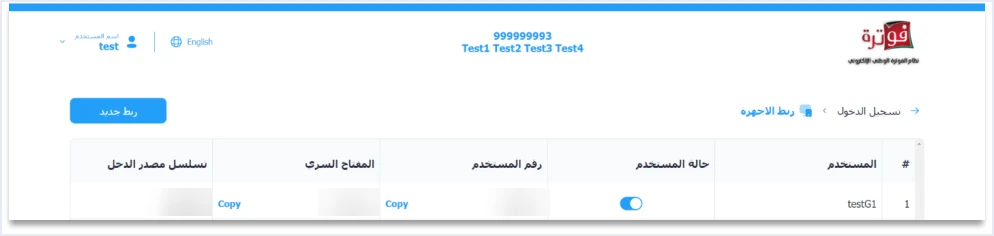
Three things in this list matter when you change software.
- Each pair is tied to one sequence. Every row shows the income-source sequence the link was created for. If the new software will send invoices for more than one sequence, it needs a pair for each of them.
- The sequence also travels inside every invoice. The invoice file carries the income-source sequence in the element
cac:SellerSupplierParty/cbc:ID, so the new software must set it to the correct sequence. - A sequence error shows up as a rejection. The guide attributes error 500 to an error in the tax number or the income-source sequence and, less often, to an error in the
Client_IDor theSecret_Key. It also gives the rejection messageThis user is not authorized to submit this type of invoicefor the case where the taxpayer sends an invoice type that does not match its tax number or its income-source sequence.
The technical guide does not say explicitly whether the taxpayer should create a new pair when changing software or hand the existing pair to the new software. It does, however, place the confidentiality of the linking credentials on the taxpayer alone, who bears full responsibility for any unauthorized use. Among its guidelines, it also asks you to protect the Client ID and the Secret Key and not to store them in the open inside the source code. From this, our practical view is that creating a pair for the new software ties each pair to one program whose operator you know. This is our reading of the text, not a statement by ISTD.
The list also shows a column called user status (حالة المستخدم), and the technical guide does not explain any effect of changing it. Ask ISTD how it handles the linking credentials the old software was using, and do not build on an assumption about it.
ISTD’s procedures guide for joining the National Invoicing System directs the taxpayer to coordinate with the system’s programmer or the technical solutions provider it works with, to complete the technical requirements. This means the provider the taxpayer itself deals with. The wording does not point to any list of providers kept by ISTD. The technical linking steps themselves are covered in our article on connecting to Jordan’s National E-Invoicing System, step by step.
Why returns on old invoices need data from the previous software
Once an invoice has been sent, the National Invoicing System corrects it through a return invoice. In the technical guide this is the invoice with code 381, the return invoice (credit note), and a return is made on quantities only. A return invoice does not stand alone. It points to the original invoice through three elements.
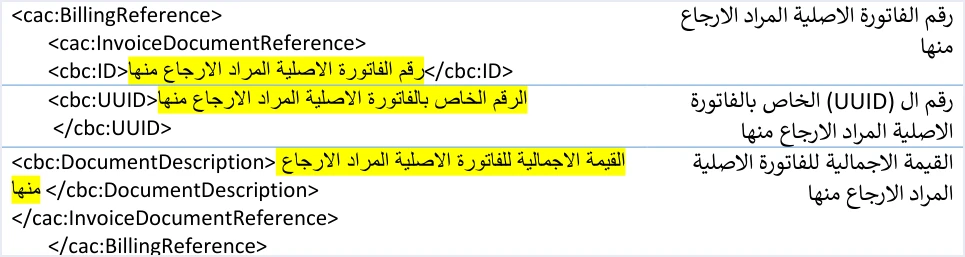
- The original invoice number in
cbc:ID. - The original invoice’s unique identifier in
cbc:UUID. - The original invoice’s total value in
cbc:DocumentDescription.
Suppose the old software sent an invoice last month, and the customer returns part of the goods after the switch. The new software is the one that will issue the return invoice, and it needs these three elements exactly as they were first sent.
The conditions do not stop at the invoice header. The guide requires the lines of a return invoice to carry the line number, the item name and the unit price as they appear on the original invoice. It also requires the buyer to match, stating that the buyer details on the return invoice must match those on the original sales invoice it is linked to.
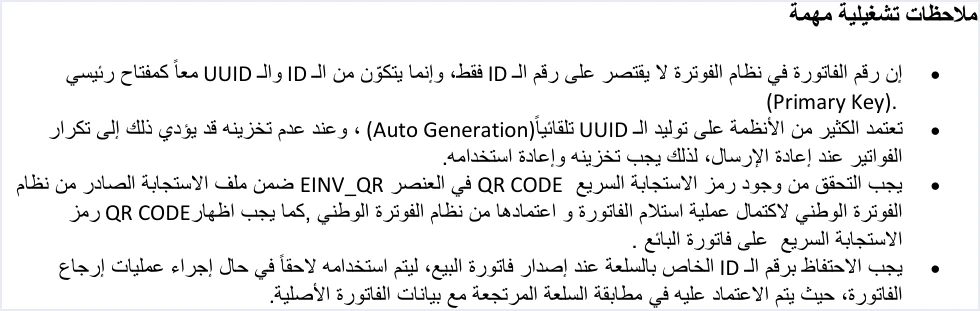
The operational notes in the guide state that the invoice number is not the ID alone, but the ID and the UUID together as a primary key. They also require you to keep the line number of each item when you issue the sales invoice, for later use in a return, because it is what the returned item is matched against in the original invoice data.
The guide adds two rules that bear directly on the switch.
- Returns are on quantities and cannot exceed the original. You may return the whole quantity or part of it across more than one return invoice, until the quantities of the original invoice are used up. In practice, the new software needs to know what has already been returned from each line, even if that earlier return was issued from the old software.
- The discount follows the returned quantity. The guide states that if the return covers part of the quantity, the discount (if any) must be a part of the item’s total discount according to the quantity returned. So the discount on each line of the original invoice is another piece of data the new software needs.
The data to move from the old software to the new one
The table below lists what should reach the new software for every earlier invoice from which quantities may still be returned, with the basis for each item in the technical guide.
Scroll the table sideways to see the remaining columns
The last two rows match guideline 5 of ISTD’s ten guidelines, titled storing the core data.

The technical guide sets no format for moving this data between two programs, so the method is something you agree with the provider of the new software. What matters is that the data arrives as it was sent to the system, not as it appears on the printed copy.
Invoices pending at the moment of the switch
The switch date may arrive while the old software still holds invoices whose status is unresolved. One example is an invoice whose connection dropped while it was being sent. Another is an invoice that was rejected and has not been resent yet. The technical guide settles how to handle them with three rules.
- Status is read from
EINV_STATUS. The guide decides the invoice’s outcome from the invoice status returned in the response, not from the connection success code alone. - Resend with the same number and identifier. When a send fails or the connection drops, the taxpayer resends with the same number and the same unique identifier, without generating a new identifier. The guide warns that not storing the identifier may lead to duplicate invoices on resend.
- A previously accepted invoice returns its code. If an invoice that was already accepted is resent with the same number and identifier, the status returned is
ALREADY_SUBMITTED, together with the original QR code. This is the documented way to recover a code that was not stored.
The best time to settle these invoices is before you switch off the old software. If you move before settling them, carry their number and unique identifier into the new software before any resend, so that it does not generate a new identifier for them and duplicate them.
The ICV invoice counter after a software change: what the guide leaves open
Every invoice file carries a counter in the element cac:AdditionalDocumentReference with the value ICV. The guide defines it as a counter created by the taxpayer for electronic invoices, which starts sequentially from 1 to infinity according to the global definition.
Whether this counter carries on after a software change is not addressed by version 1.5 of the technical guide. It does not say whether the new software continues from the last value the old software sent or starts again from 1. Nor does it say whether there is one counter for the business or a separate one for each income-source sequence. The guide also does not address invoice numbering itself when moving between two programs. It only states that an invoice is identified by its number and unique identifier together.
So we do not offer a rule here that the text does not contain. The safe step is to agree on the counter and numbering method with the provider of the new software before the first send, and to ask ISTD’s technical support committee for invoicing affairs, which the guide refers you to through ISTD’s website.
Unlinking devices is not a step in changing software
It may look as if a switch starts by unlinking and then linking again, but that is not how ISTD presents unlinking. It is an internal service request of the invoicing-system support request type (طلب دعم فني لنظام الفوترة), which ISTD decides on. The steps for submitting one are in our article ISTD Internal Service Request: The Steps. ISTD limits unlinking to a single case, set out in its questions and answers guide.
«طلب فك ربط الأجهزة يكون فقط لمن ليس لديه نظام محاسبي ويكون قام بالربط عن طريق الخطأ اما من يمتلك نظام محاسبي يلزمه ربط نظامه مع نظام الفوترة»
In English, ISTD says that a request to unlink devices is only for a business that has no accounting system and linked by mistake, and that a business that has an accounting system must link that system with the invoicing system. The English here is our rendering, and the Arabic text is the authority.
The request includes an undertaking that the taxpayer has no accounting system, which is not true of a business moving from one program to another. Changing the accounting software linked to the National Invoicing System therefore stays inside the linking path. Preparing for it runs through the linking credentials and the data transfer described above, not through an unlinking request.
If you have invoices you issued on the portal before you linked your first software, ISTD’s answer to question 14 of its questions and answers guide is that the platform lets you return invoices sent through it in all cases, whether or not the business has linked a system.
Checklist before the first invoice from the new software
- List the sequences. Identify every income-source sequence the new software will send from, and prepare a pair of linking credentials for each one.
- Hand over the credentials securely. Enter the Client ID and the Secret Key in the new software without passing them around in the open, because their confidentiality is your responsibility.
- Settle pending invoices. Check the status of every invoice in the old software from
EINV_STATUS, and resend what needs resending with the same number and identifier. - Move the data of earlier invoices. Make sure the number, the unique identifier, the total, the line numbers, names, prices, quantities and discounts, and the buyer details have reached the new software.
- Move what was already returned. Make sure the new software knows the quantities returned before the switch, so that a later return invoice does not exceed the original quantity.
- Agree on the counter and numbering. Agree with the new provider on how the ICV counter and invoice numbering will work, and ask ISTD about what the guide leaves open.
- Keep the invoices. Article 8(a)(1) of Regulation No. 34 of 2019 requires invoices to be kept for four years, so keep copies of the old software’s invoices even after you stop using it.
- Watch the first sends. Follow the status of the new software’s first invoices and the QR code returned on them before you rely on it for all your sales.
For a wider view of the system and how to connect your business to it, read our article Jordan’s National E-Invoicing System.
How Qoyod helps if it is your new software
If Qoyod is the software you are moving to, it is accounting software that brings e-invoicing and accounting together in one system. Qoyod is integrated with the National Invoicing System (JoFotara). This is what it does when you send your invoices from it.
- Qoyod builds the invoice file in UBL 2.1 format with its unique identifier (UUID) and sends it to the National Invoicing System without any manual intervention. The taxpayer needs no digital certificate or signature of their own to send invoices through Qoyod.
- Qoyod checks each invoice at field level as it is created, covering the tax number, the document type and payment method, the General Sales Tax rate and whether the lines are complete, and alerts you to any error before the invoice is sent, to reduce rejections.
- ISTD returns the invoice status and any error message, and Qoyod shows them in its status panel. The status panel lists invoices that were not sent and need to be resent, and when you resend one it keeps the same UUID.
- Once ISTD accepts the invoice it returns a QR code, and Qoyod shows that code on the invoice.
To be precise, Qoyod does not create your account on the National Invoicing System, and it does not generate the Client ID and Secret Key. You complete both of those steps on ISTD’s platform in your own name. Moving the invoice data from your previous software is something to clarify with the Qoyod team before the switch, and this article does not present it as a ready-made feature.
E-invoicing and full accounting in one system
Qoyod is integrated with the National Invoicing System (JoFotara). You issue your invoice in Jordanian dinars from Qoyod, it is booked to your ledgers automatically and sent to the system, and once it is accepted it comes back with a QR code from the Income and Sales Tax Department.
Frequently asked questions
Do I need a new Client ID and Secret Key when I change the linked accounting software?
The technical guide ties each pair of linking credentials to one income-source sequence, so the new software needs a pair for every sequence it sends from. The guide does not say explicitly whether you create a new pair or use the existing one. It does make you fully responsible for any unauthorized use, which is why our view is to create a pair for the new software.
Can I return an invoice the old software sent from the new software?
The technical guide links a return invoice to the original through its number, its unique identifier and its total value. It also requires the lines to carry their number, name and price as on the original, and the buyer details to match. If this data reaches the new software, it can build the return invoice under these conditions.
Does the ICV invoice counter continue from the last number in the old software?
Version 1.5 of the technical guide does not address this. It defines the counter as starting sequentially from 1 and says nothing about how it behaves when you move between two programs. Agree on the counter method with the provider of the new software, and ask ISTD’s technical support committee for invoicing affairs before the first send.
Should I request unlinking of devices before moving to the new software?
No, because ISTD limits the unlinking request to a business that has no accounting system and linked by mistake, and the request includes an undertaking that the business has no accounting system. A business moving from one program to another stays in the linking path, and unlinking is not one of the steps of its switch.
What do I do with an invoice when I do not know whether it was accepted before the switch?
Resend it with the same number and unique identifier, as the guide requires when a send fails. If it was already accepted, the status ALREADY_SUBMITTED comes back with the original QR code. If it was not, the response shows whether it is accepted now or why it was rejected.
Why was the first invoice from the new software rejected with a not authorized message?
The technical guide ties this message to sending an invoice type that does not match the taxpayer’s tax number or its income-source sequence. Check the invoice type the new software has set and the income-source sequence in the invoice file, and make sure the linking credentials in use were created for that same sequence.
References
- Income and Sales Tax Department (ISTD), technical guide for integrating with the National Invoicing System through the API, version 1.5 (in Arabic), pp. 7, 8, 13, 23, 24, 26, 30, 99, 101 and 104.
- Income and Sales Tax Department (ISTD), procedures guide for joining the Jordanian National Electronic Invoicing System, 2026 edition (in Arabic), device linking path.
- Income and Sales Tax Department (ISTD), questions and answers guide for the National Invoicing System, 2026 (in Arabic), questions 9 and 14.
- Regulation No. 34 of 2019 on Organizing and Controlling Invoicing Affairs, as amended, consolidated text (in Arabic), Article 8.
- ISTD’s National Invoicing System guides (in Arabic)




