




Every step in the National Invoicing System (JoFotara) leads back to one tax authority, from creating the account to the QR code that comes back on an invoice once it is accepted. That authority is the Income and Sales Tax Department (ISTD). The ISTD JoFotara relationship decides where you turn when you look for an official guide, when a step stops working, or when you need a procedure that you cannot carry out yourself.
This article explains ISTD’s role in JoFotara using ISTD’s own official sources only. It starts with the legal basis for that role. It then covers the four guides ISTD publishes, what ISTD issues and returns to you inside the system, the contact routes its guides name, and the cases you can solve yourself without going to ISTD. It ends with what these sources do not say, so that you do not build on it.
ISTD JoFotara roles: who runs what
ISTD runs the National Invoicing System in cooperation with the Ministry of Digital Economy and Entrepreneurship (MoDEE). ISTD is the tax authority responsible for the system. The guides come from ISTD, invoices are sent to it, and the result of checking each invoice comes back from it. MoDEE’s presence shows in the footer of the system’s portal, which the screenshots in the joining guide reproduce with the line all rights reserved to the Ministry of Digital Economy and Entrepreneurship («جميع الحقوق محفوظة وزارة الاقتصاد الرقمي والريادة»).
You reach the system from ISTD’s own website. The procedures guide for joining the Jordanian National Electronic Invoicing System (2026 edition) opens its six steps with going to ISTD’s website, then logging in to the e-services, then moving to the National Invoicing System. The guide shows the home page of ISTD’s website, with a National Electronic Invoicing System item in its menu and the Log in to e-services button (الدخول للخدمات الإلكترونية).
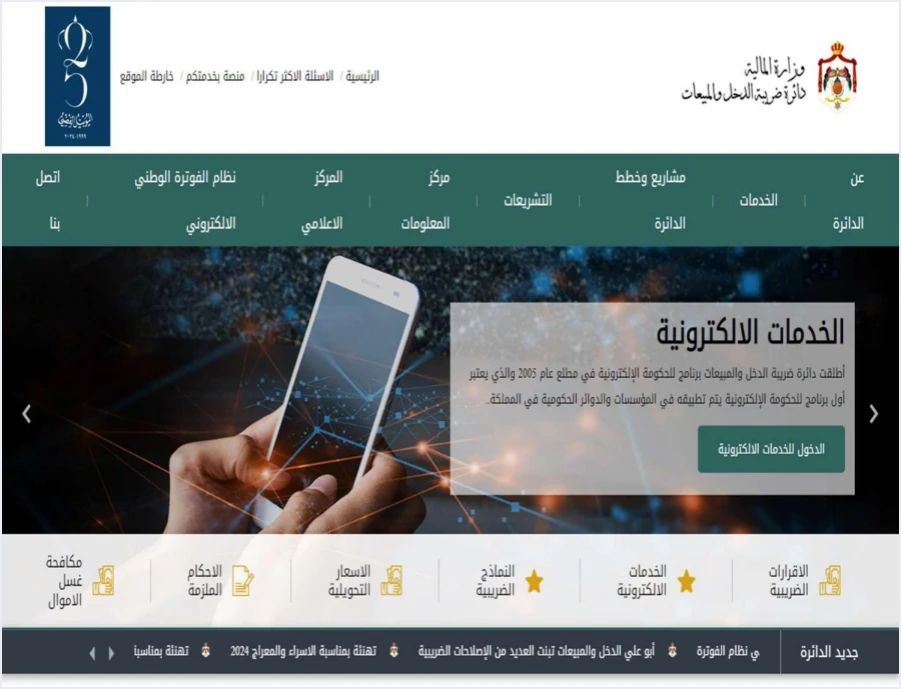
After that, the system keeps its own address, the portal at portal.jofotara.gov.jo. There is also a mobile app, which the procedures guide for issuing an invoice says is available in the app stores under the name JoFotarah. Administrative requests, such as changing the taxpayer’s details or opening an income source, stay on ISTD’s e-services site and not on the portal, as explained further down.
This article is limited to ISTD’s role in invoicing. ISTD also administers income tax and General Sales Tax (GST), which is a separate subject covered in our article Income Tax in Jordan.
The legal basis for ISTD’s role in invoicing
Article 2 of Regulation No. 34 of 2019 on Organizing and Controlling Invoicing Affairs, as amended, defines the Department as the Income and Sales Tax Department, the Director as the Director General of the Department, and the Minister as the Minister of Finance. The regulation is issued under paragraph (F) of Article 23 of Income Tax Law No. 34 of 2014.
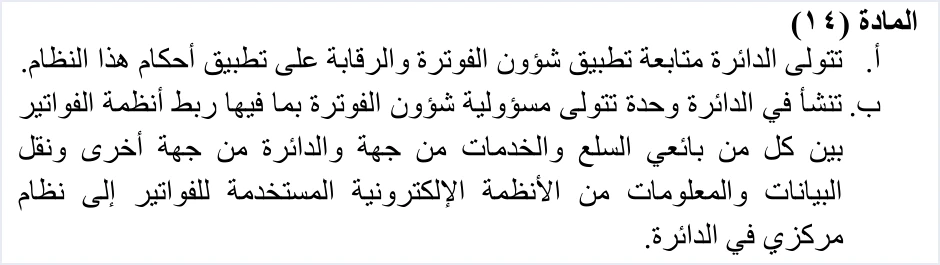
The article that sets out ISTD’s role explicitly is Article 14 of Regulation No. 34 of 2019. Its first paragraph reads as follows in the consolidated text that ISTD publishes.
«أ. تتولى الدائرة متابعة تطبيق شؤون الفوترة والرقابة على تطبيق أحكام هذا النظام».
In English, paragraph (a) of Article 14 of Regulation No. 34 of 2019 gives ISTD the task of following up the application of invoicing affairs and overseeing the application of the regulation. No official English translation of this regulation was found; the English here is our rendering, and the Arabic text is the authority.
Paragraph (b) of Article 14 of Regulation No. 34 of 2019 provides for setting up a unit (وحدة) within ISTD that is responsible for invoicing affairs. That responsibility includes linking the invoice systems of sellers with ISTD and transferring the data to a central system at ISTD. The text calls it a unit and nothing more, and it does not tie it to the name of any existing administration.
Article 14 is not the only place in Regulation No. 34 of 2019 that mentions ISTD or its Director. Taken together, the other articles give a clearer picture of what ISTD holds in invoicing affairs.
As for penalties, Regulation No. 34 of 2019 does not set any amounts. Article 15 of Regulation No. 34 of 2019 provides that anyone who does not comply with issuing the invoice is punished with the penalties set out in the law. The amounts are explained in our article JoFotara Penalties: Articles 64 and 66 Explained.
The four guides ISTD publishes
ISTD publishes four official guides for the National Invoicing System on a single page of its website, titled ISTD’s National Invoicing System guides (in Arabic). These guides are the highest reference for any procedural step in the system, ahead of any explanation written by another party, this article included.
The technical guide was approved by the director of the Invoicing Affairs Directorate and by the Director General, and version 1.5 replaced version 1.4, issued in December 2023. If an explanation you read cites an older version number, go back to the version currently published on the guides page.
A note on names. The guides are issued in the name of the Invoicing Affairs Directorate (مديرية شؤون الفوترة) and the Technical Support Section (قسم الدعم الفني) at ISTD, while Article 14 of Regulation No. 34 of 2019 speaks of a unit set up within ISTD. Neither source says that the directorate is the unit, so we do not treat them as the same here.
What ISTD issues and returns to you inside the system
ISTD’s role is not limited to publishing guides and oversight. It is a party to every stage of a taxpayer’s work in the system, and these are the stages as its guides describe them.
- Linking credentials. On the device linking path, the main user chooses device linking (ربط الأجهزة) from the home screen and selects the income-source sequence, and the system then generates the Client ID and the Secret Key. The technical guide places the confidentiality of these two values on the taxpayer alone, who bears full responsibility for any unauthorized use.
- The result of checking the invoice. The invoice is sent to the system, which checks it and returns its status. On acceptance, ISTD returns the signed invoice and a QR code, and the taxpayer is not asked for a digital signature or a certificate of their own.
- The QR code. The code comes from ISTD after the invoice is accepted, and the technical guide requires it to be shown on the seller’s invoice. According to the technical guide (p. 106), a taxpayer who wants to verify the QR code can do so only by scanning it with the Sanad app, through its digital document verification option (التحقق من المستندات الرقمية).
- The registration document. Its official title is «وثيقة تسجيل في نظام الفوترة الوطني الالكتروني» (registration document in the National Electronic Invoicing System). It carries the signature of the Director General and states that the business with the tax number shown is registered in the system. It is proof of registration only, not a license and not a compliance certificate. The steps to obtain it are in our article JoFotara Registration and the Registration Document.
- The registration check service. ISTD offers a service on its website to verify registration in the National Invoicing System (التحقق من التسجيل في نظام الفوترة الوطني) by tax number, and it publishes a list of registered businesses grouped by sector.
Each of these items has details of its own, explained in our article Jordan’s National E-Invoicing System. What matters here is that all of them come from ISTD.
How to contact ISTD about invoicing
ISTD’s guides name three contact and support routes for invoicing affairs, and each has its own place.
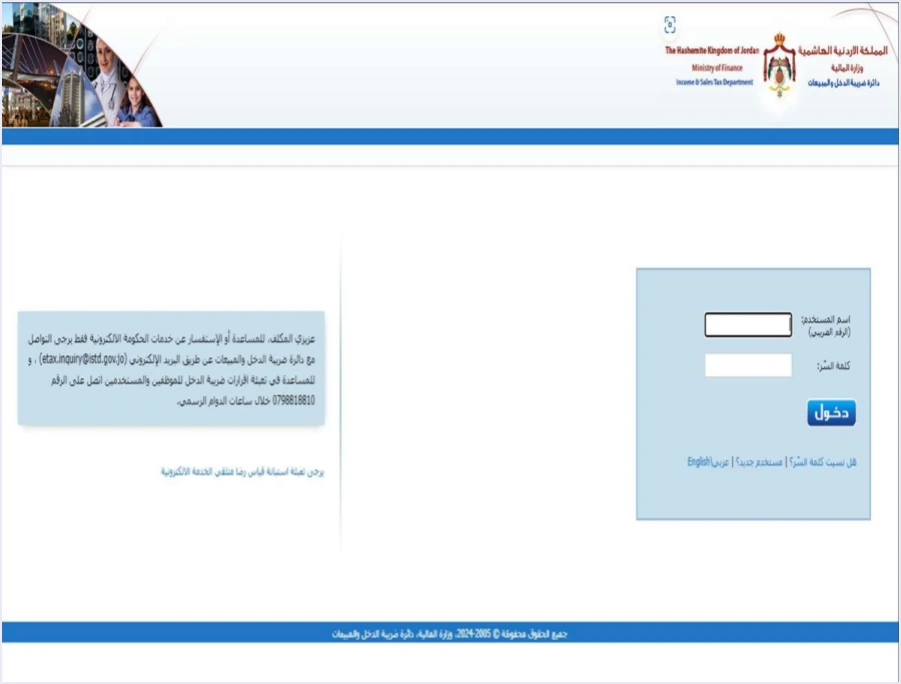
The first is the e-services email address. The joining guide (p. 5) shows the login screen for the e-services, next to an official contact box with the address etax.inquiry@istd.gov.jo. It is the e-services address, which is the site where the joining journey starts and where internal requests are submitted.
The second is the technical support committee for invoicing affairs. The technical guide for integrating with the National Invoicing System through the API, version 1.5 (p. 104), closes its instructions with an explicit referral to this committee, in these words.
«لمزيد من الاستفسارات يمكن التواصل مع لجنة الدعم الفني لشؤون الفوترة في دائرة ضريبة الدخل والمبيعات على الرابط التالي: https://istd.gov.jo».
In English, the guide says that for further questions you can contact ISTD’s technical support committee for invoicing affairs at istd.gov.jo. ISTD publishes this guide in Arabic only; the English here is our rendering, and the Arabic text is the authority.
The third is the Invoicing technical support tile (الدعم الفني الخاص بالفوترة). The procedures guide for issuing an invoice (p. 2) shows the Department services panel (خدمات الدائرة) on ISTD’s website. It holds the Registration and linking with the National Electronic Invoicing System tile (التسجيل والربط مع نظام الفوترة الوطني الالكتروني), and next to it the Invoicing technical support tile. The guide does not explain what this tile contains, so we only point out where it is.
Before you write to anyone, prepare what will keep the exchange short.
- The business’s tax number and its trade name.
- An exact description of the step where you got stuck, and the text of any message that appeared, exactly as shown.
- A screenshot of the problem, without the password and without the Secret Key.
- If the problem is in the linking, the details of the request you sent and the response the system returned, with the income-source sequence you used.
The internal service request: the official route for specific cases
Some problems are not solved by writing to ISTD or by a setting you change yourself. They are solved by a request you submit to ISTD from its e-services site. The taxpayer logs in with the tax number and password, chooses Internal services (الخدمات الداخلية), then Send an internal service request (ارسال طلب خدمة داخلية). The taxpayer picks the request type, writes a note in the Taxpayer notes box (ملاحظات المكلف) and sends it, and then tracks it under Track sent internal requests (متابعة الطلبات الداخلية المرسلة). The route has its own article in this series, ISTD Internal Service Request: The Steps, which goes through it step by step.
The questions and answers guide uses this route in three cases, and only the request type changes between them.
Scroll the table sideways to see the remaining columns
The first case is explained in detail in our article JoFotara Option Missing E-Services: Cause and Fix, which includes a full example of the internal request from submission to tracking.
The third case comes with a condition that ISTD sets. In the guide’s words, the request to unlink devices is only for the following situation.
«يكون فقط لمن ليس لديه نظام محاسبي ويكون قام بالربط عن طريق الخطأ اما من يمتلك نظام محاسبي يلزمه ربط نظامه مع نظام الفوترة».
In English, the guide says the request is only for someone who has no accounting system and linked by mistake, while someone who has an accounting system is required to link it with the invoicing system. ISTD publishes this guide in Arabic only; the English here is our rendering, and the Arabic text is the authority.
In the note, the person submitting the request undertakes that they have no accounting system. So the decision here belongs to ISTD. It is not a setting the taxpayer changes on their own.
The technical guide (p. 86) names a similar route for a fourth case, which is activating the consumer price option for a taxpayer who asks for it. The request goes through Internal services (الخدمات الداخلية) with the request for invoicing-system technical support (دعم فني نظام الفوترة).
What you can solve yourself without going to ISTD
Not every problem in the system is a request to ISTD. The questions and answers guide solves some cases inside the account itself, and knowing them saves you a message you do not need to send.
- The Issue an invoice tile (تنظيم فاتورة) does not appear at all. The cause in the guide is that you are on the main user’s page. The fix is to create a sub-user, log out and log in again with it. The difference between the two users is explained in our article JoFotara Sub-User vs Main User: Roles and Permissions.
- The message that the account has been suspended and that you should contact the system administrator (تم إيقاف الحساب الرجاء الاتصال بمسؤول النظام). The guide’s answer is that you suspended the sub-user (قمت بإيقاف المستخدم الفرعي), and the fix is to reactivate it from the main user’s account. The four steps are in our article JoFotara Account Suspended: Contact the Administrator.
- The verification code goes to the old phone number. The guide’s answer, word for word, is that you need to enter the password incorrectly for your phone number to be updated («عليك ادخال كلمة المرور بشكل خاطئ ليتم تحديث رقم هاتفك»). The limits of this answer are explained in our article JoFotara Verification Code Old Number: How to Fix It.
- Returning an invoice issued on the portal before linking. ISTD’s questions and answers guide states that the platform lets you return invoices sent through it in all cases, whether or not the business has linked a system.
If you tried the fix the guide gives and the situation did not change, contacting ISTD becomes the next step, through the routes listed in the section on contacting ISTD above.
The limits of what ISTD’s sources say
Some of what is written about ISTD’s role in the National Invoicing System has no basis in its guides or in the regulation. We build nothing on these points in particular.
- No published list of approved software providers. On the linking path, the guide asks the taxpayer to coordinate with the system’s programmer or the technical solutions provider that the taxpayer uses (مبرمج النظام أو مزود الحلول التقنية المعتمد لديه), meaning the provider the taxpayer works with. ISTD’s four guides publish no approval program for software and no list of approved providers.
- No documented test environment for taxpayers. Version 1.5 of ISTD’s technical guide does not state that there is a test environment open to taxpayers or providers.
- No set response time. The guides state no time for processing internal requests and no deadline for replies from the technical support committee.
- No invoicing phone number in the guides. The guides name the email address, the technical support committee and the technical support tile, but they give no number for contact about invoicing affairs, so we do not carry numbers over from other sources.
- The directorate and the unit are not the same thing. The Invoicing Affairs Directorate (مديرية شؤون الفوترة) is the body that prepares the guides, and the unit in Article 14 of Regulation No. 34 of 2019 is a body the regulation sets up. Linking the two names is an inference that neither source makes.
If you are linking your accounting software to JoFotara
ISTD’s written position in the questions and answers guide is the following.
«من يمتلك نظام محاسبي يلزمه ربط نظامه مع نظام الفوترة».
In English, the guide says that someone who has an accounting system is required to link it with the invoicing system. ISTD publishes this guide in Arabic only; the English here is our rendering, and the Arabic text is the authority.
This text states no date and no fine. Article 4(a) of Regulation No. 34 of 2019 provides that, for the purposes of the regulation, the electronic invoice that is recognized is the one issued by the National Invoicing System or by a program linked to it. The detail is in our article Is Linking Accounting Software to JoFotara Mandatory?
On the linking path, the roles are split among three parties. ISTD runs the system, checks the invoices and returns the result. The taxpayer generates the linking credentials from the device linking screen (ربط الأجهزة) and keeps them safe. The software provider completes the technical requirements for the linking. The joining guide sums up the taxpayer’s responsibility in one line, telling the taxpayer to make sure the linking credentials are kept in a safe place and not shared with anyone.
If you choose Qoyod Cloud Accounting Software, integrated with the National Invoicing System, the Client ID and the Secret Key from the device linking screen are what it needs from you. The taxpayer needs no digital certificate or signature of their own to send invoices through Qoyod. Qoyod builds the invoice file in UBL 2.1 format with its unique identifier (UUID) and sends it to the National Invoicing System without any manual intervention. ISTD returns the invoice status and any error message, and Qoyod shows them in its status panel. To see how Qoyod works with JoFotara, visit our National Invoicing System page.
E-invoicing and full accounting in one system
Qoyod is integrated with the National Invoicing System (JoFotara). You issue your invoice in Jordanian dinars from Qoyod, it is booked to your ledgers automatically and sent to the system, and once it is accepted it comes back with a QR code from the Income and Sales Tax Department.
Frequently asked questions
What is ISTD’s role in the National Invoicing System?
Under Article 14 of Regulation No. 34 of 2019 on Organizing and Controlling Invoicing Affairs, ISTD follows up the application of invoicing affairs and oversees the application of the regulation. It runs the National Invoicing System in cooperation with the Ministry of Digital Economy and Entrepreneurship, publishes the system’s four guides, checks invoices and returns a QR code on those it accepts.
Where can I find the official guides for the National Invoicing System?
ISTD publishes them on its National Invoicing System guides page on istd.gov.jo. There are four of them, the joining guide and the invoice issuing guide (2026 edition), the questions and answers guide (2026), and the technical integration guide (version 1.5).
How do I contact ISTD about a problem with the National Invoicing System?
ISTD’s guides name the e-services email address etax.inquiry@istd.gov.jo, the technical support committee for invoicing affairs through istd.gov.jo, and the Invoicing technical support tile in ISTD’s services panel. Some cases have a set route of their own, which is an internal service request from the e-services site.
Does ISTD approve specific accounting software for linking with the system?
ISTD’s four guides publish no approval program for software and no list of approved providers. The guide asks the taxpayer to coordinate with the technical solutions provider that the taxpayer uses, meaning the provider the taxpayer works with.
Is the Invoicing Affairs Directorate the unit named in Article 14?
No official source says so. The guides are issued in the name of the Invoicing Affairs Directorate, and Article 14 of Regulation No. 34 of 2019 provides for setting up a unit for invoicing affairs within ISTD without naming it, so linking the two names is an inference that no text states.
References
- Regulation No. 34 of 2019 on Organizing and Controlling Invoicing Affairs, as amended, consolidated text (in Arabic).
- Income and Sales Tax Department (ISTD), procedures guide for joining the Jordanian National Electronic Invoicing System, 2026 edition (in Arabic).
- Income and Sales Tax Department (ISTD), procedures guide for issuing an invoice in the Jordanian National Electronic Invoicing System, 2026 edition (in Arabic).
- Income and Sales Tax Department (ISTD), questions and answers guide for the National Invoicing System, 2026 (in Arabic).
- Income and Sales Tax Department (ISTD), technical guide for integrating with the National Invoicing System through the API, version 1.5 (in Arabic).




