




Anyone building the link between accounting software and Jordan’s National Invoicing System (JoFotara) can start from the technical guide issued by the Income and Sales Tax Department (ISTD). It contains full XML examples of sales and return invoices, sample responses and part of a C# code sample. The question a developer asks quickly is whether the JoFotara technical guide examples can be copied as they are into the file you send. The direct answer is that the examples explain the structure well, but some of their values and texts should not be copied verbatim.
A reader who goes through version 1.5 of the guide page by page notices six spots of this kind. They are unique identifiers written in a non-standard format, doubled quotation marks in the special tax examples, return examples that do not match their original invoices, description text that, as copied from the PDF, does not give the date format in the same order every time, a session line in the C# example, and a sample heading on page 100 that does not match the sample under it. A governorate code with a missing character in one table adds a seventh.
This article takes each spot with the page where it appears, what the example shows, why copying it fails, and what to write instead. The purpose is purely practical. The guide is the official reference for linking, and these notes help you read it precisely.
Why the JoFotara technical guide examples should not be copied as they are
The guide itself separates three kinds of elements in every invoice template and explains this with colors (p. 12). Elements shaded yellow are mandatory variables that the seller’s system fills in, and elements shaded green are optional variables. About everything else the guide says the following.
«وباقي العناصر وصف ثابت بدون تغيير»
In English, the remaining elements are fixed description with no change. ISTD publishes this guide in Arabic only; the English here is our rendering, and the Arabic text is the authority.
How to read this shading is explained in our article JoFotara Mandatory and Optional Fields.
This split decides what you take from an example and what you do not. Fixed description is carried over as it is, while the variables are filled in from the data of your own invoice. Some of the spots covered here sit in the illustrative values placed where the variables go, and some sit in the descriptive text written around the example. If you copy the whole file in one go, you carry these values along with it.
The first of the ten guidelines in the guide (p. 104) adds another reason for care. It requires the XML file to follow the UBL 2.1 standard, and any defect in the structure leads to the invoice being rejected. The standard and what it requires are covered in our article JoFotara UBL 2.1 Standard.
Summary of the spots that need attention in the guide’s examples
The table below gathers all the spots with their pages in version 1.5, and the sections after it explain each one on its own.
Scroll the table sideways to see the remaining columns
The unique identifiers on pages 14 and 98
The unique identifier in the cbc:UUID field is one half of the invoice’s primary key, together with the invoice number in the cbc:ID field, and the taxpayer’s system generates it, not the invoicing system. In the example on page 14 the last group of the identifier is incomplete, because it holds only eleven digits. In the sample response for the SUBMITTED status on page 98, the value of the EINV_INV_UUID field contains characters that do not belong to the hexadecimal system.

We deliberately do not rewrite the two values here, so that they are not copied from this article either. The problem with copying them goes beyond the format. An identifier copied from an example is one fixed value, and if your software uses it for more than one invoice, it has stopped doing the job of an identifier, which is to tell each invoice apart from the others.
The alternative is for your system to generate an identifier in a standard format for each invoice, store it with the invoice record before the first send, and reuse it on every resend of the same invoice. This rule is explained in detail in our article JoFotara UUID.
Doubled quotation marks in the special tax examples
In an XML file the value of each attribute is written between two quotation marks, one that opens it and one that closes it. In the special tax invoice examples some attributes were written with doubled marks, so the file is no longer well-formed if it is copied as it is.
- The tax-scheme line in the invoice line. On pages 69, 82, 91 and 93 the attributes
schemeAgencyIDandschemeIDappear with doubled quotation marks around each value. - The currency attribute on amounts. On pages 68 and 81 the value of the
currencyIDattribute ends with two quotation marks instead of one.

The correct form of the tax-scheme line is in the guide itself, in the table of lines for the general sales tax invoice (pp. 41 to 43), where schemeAgencyID="6" and schemeID="UN/ECE 5153" are each written with one quotation mark on each side. The guide’s examples use the value JO for the currencyID attribute in all amounts. The guide does not say whether the system accepts another value in this attribute, so we build nothing on that here.
Because this spot sits in the special tax examples, it is worth reviewing the structure of the special tax line itself. It is a line with the tax scheme OTH that comes before the general tax line and carries no percent element. It is explained in our article JoFotara Special Tax OTH.
Return invoice examples that do not match their original invoices
A return invoice in the National Invoicing System is tied to an original sales invoice, and the guide sets clear rules for that tie. The cac:BillingReference block carries the number of the original invoice and its unique identifier, and the cbc:DocumentDescription field carries the total of the original invoice. The line number, the name and the unit price are written as they are on the original invoice. The guide also requires that the buyer details on a return invoice match the buyer details on the original sales invoice it is linked to (pp. 26, 49 and 76).
«يجب أن تتوافق بيانات المشتري في فاتورة الإرجاع مع بياناته في فاتورة البيع الأصلية المرتبطة بها»
In English, the guide requires the buyer details on the return invoice to match those on the original sales invoice it is linked to. ISTD publishes this guide in Arabic only; the English here is our rendering, and the Arabic text is the authority.
The problem is that the return examples in the guide (pp. 24, 25, 30, 47, 55, 56 and 74) do not match the sales examples that come before them. The following can be observed in them.
- The income invoice return example (pp. 24 and 25). Its
cbc:DocumentDescriptionvalue is 64.000, while the total of the original income invoice in its own example is 109.000. - The general sales tax invoice return example (pp. 47 and 56). The reference points to a unique identifier that differs from the identifier of the original invoice in its example, and the exempt line, which has category
Zin the original invoice, appears with categorySat 10%. - The special tax invoice return example (p. 74). It carries the same header data as the general sales tax return example.
These examples are good for understanding where each element sits in a return invoice, but they are not a reference for the values. If you build your test on the sales example and then on the return example as they stand in the guide, you send a return that points to an invoice it does not match. The alternative is to always build the return from the stored record of the original invoice. From it you take its number, its identifier, its total, the buyer details, and the line numbers, names and prices, and then you write the returned quantities alone.
A related point is that the totals of a return cover only the part being returned, and that the discount on a partial return is part of the line’s total discount according to the returned quantity, as the guide states (pp. 30 and 55).
The invoice date format between the text and the examples
The guide describes the format of the cbc:IssueDate field on several pages, and the description text, as copied from the PDF, does not always give the parts in the same order. On pages 12, 24 and 58 the copied text gives the pattern yyyy-mm-dd with an example whose parts are in a different order. On page 33 it gives a pattern with the day before the month after the year, and on pages 46 and 73 a pattern that starts with the day. On the rendered pages a reader sees yyyy-mm-dd, so the safest course is to rely on the XML examples.
The XML examples themselves all agree. Every date in every example is written as year, then month, then day, which is also the order used by the UBL standard and by the international standard ISO 8601. So write the date in the format yyyy-mm-dd, as in all the XML examples in the guide, and do not adopt any other order that appears in the descriptive text in its place. The ninth guideline in the guide supports this, because it calls for a standard time format, to avoid differences in processing between systems.
The C# example on page 96 and the session line
The guide gives a C# example that shows what the submission request looks like, and it is useful in that respect. The request is sent with the POST method to https://backend.jofotara.gov.jo/core/invoices/. It carries the Client ID in Client-Id, the Secret Key in Secret-Key and the content type Content-Type: application/json in its headers. The body of the request carries the invoice file after Base64 encoding, under the key invoice.
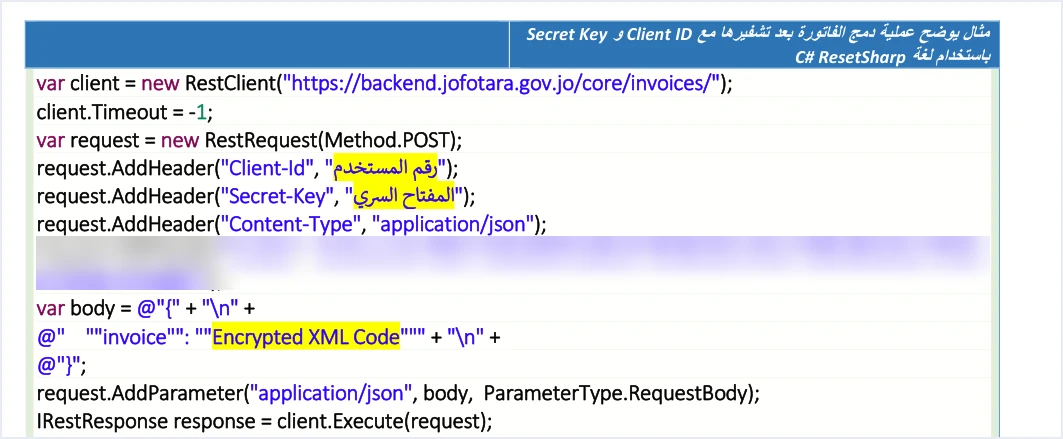
But the example adds a fourth line to these headers, a Cookie header that carries a session value. This value is not one of the components of the request that the guide explains, since page 10 counts only three components, which are the Client ID, the Secret Key and the invoice file. For that reason we blurred its value in the image above. Do not copy this line into your software, and do not send any session value with the request.
The example also has a line that sets the connection timeout. The timeout decision belongs to the design of your system, and what the guide fixes is what you do when the timeout runs out.
«عند حدوث Timeout أو فشل اتصال يجب إعادة المحاولة دون توليد UUID جديد»
In English, the eighth guideline says that when a timeout or a connection failure occurs, the attempt must be repeated without generating a new UUID. ISTD publishes this guide in Arabic only; the English here is our rendering, and the Arabic text is the authority.
Since we are on the subject of headers, the guide puts the protection of the Client ID and the Secret Key entirely on the taxpayer, and says the taxpayer bears full responsibility for any unauthorized use of them. The seventh guideline asks that these two values not be written explicitly inside the code. So if you borrow the structure of the example, read the two values from protected settings in your system and not from the code text.
The sample heading on page 100
On page 100 the guide explains the NOT_SUBMITTED status and then gives the sample of the response file under it. The heading above the sample says it is the response for the ALREADY_SUBMITTED status, although the sample itself is the response for the NOT_SUBMITTED status.

The difference between the two statuses is large. The ALREADY_SUBMITTED status means the same invoice, with the same number and unique identifier, was accepted earlier, and the system returns with it the original QR code. The NOT_SUBMITTED status means the invoice was rejected. The status code in that case is not 200, and the fields for the code, the identifier, the number and the signed invoice EINV_SINGED_INVOICE come back empty, with the value null.
If you build the response handling in your software on the heading of the sample, you may treat a rejected invoice as an invoice accepted earlier. The alternative is to read the value in the EINV_STATUS field itself, because the fourth guideline says to rely on it to determine the final status of the invoice, not on the status code alone.
The Balqa governorate code in the special tax table
The cbc:CountrySubentityCode field in the buyer details carries the governorate code, and it is an optional field according to the guide’s shading. In the table of governorate codes inside the special tax invoice template (p. 63), the code for Balqa is printed without its first character, and the correct code is JO-BA. If you move the list of codes into your software from this table in particular, correct this code before you use it. The full list of the twelve codes is in our article JoFotara Governorate Codes.
A safe way to use the guide’s examples
None of this means you should set the examples aside, because they are the clearest part of the guide for understanding the order of the elements. The steps below are our practical suggestion for using them without carrying over the spots above, and each step rests on a rule stated in the guide.
- Take the structure and the fixed description from the template. Carry over the elements that are not shaded as they are, including the file prolog and the
cbc:ProfileIDelement with the valuereporting:1.0, and put the opening invoice tag on one line, as the guide requires on p. 102. The rule is explained in our article JoFotara XML Minification. - Fill every variable from the actual invoice data. Do not leave any illustrative value from the example in your file, whether a tax number, a name, an amount or an identifier.
- Generate the unique identifier and store it. Make it a standard-format identifier for each invoice, stored before the first send and reused when the invoice is resent.
- Calculate the totals from the lines. Apply the guide’s formulas to the lines of your own invoice, and do not carry the total figures over from the example.
- Build the return from the record of the original invoice, not from the return example in the guide.
- Write the date in the format yyyy-mm-dd, as in all the XML examples in the guide.
- Check the structure of the file before encoding it. Use a check that catches doubled quotation marks and any unclosed tag, because the first guideline states that any defect in the structure leads to the invoice being rejected.
- Read the response from EINV_STATUS, not from the status code alone and not from the headings of the samples.
The technical guide remains the reference whenever there is a difference, and the version this article relies on is 1.5. If a newer version is issued, review these spots in it again, because some of them may change.
How Qoyod handles the invoice file
Everything above is work that falls on the taxpayer’s system, which is the accounting software linked to the National Invoicing System. Qoyod’s integration with the National Invoicing System works on this layer as follows.
- Building the file. Qoyod builds the invoice file in UBL 2.1 format with its unique identifier (UUID) and sends it to the National Invoicing System without any manual intervention.
- Checking the fields before sending. Qoyod checks each invoice at field level as it is created, covering the tax number, the document type and payment method, the General Sales Tax rate and whether the lines are complete, and alerts you to any error before the invoice is sent, to reduce rejections. The pre-send check is an alert, not a guarantee.
- Every invoice’s status in view. ISTD returns the invoice status and any error message, and Qoyod shows them in its status panel, with states that include sent (مرسلة), previously sent (مرسلة مسبقًا) and not sent (لم تُرسل) together with the error message.
- Resending with the same identifier. The status panel lists invoices that were not sent and need to be resent, and when you resend one it keeps the same UUID.
For a wider view of the system and how to connect your business to it, read our article Jordan’s National E-Invoicing System.
E-invoicing and full accounting in one system
Qoyod is integrated with the National Invoicing System (JoFotara). You issue your invoice in Jordanian dinars from Qoyod, it is booked to your ledgers automatically and sent to the system, and once it is accepted it comes back with a QR code from the Income and Sales Tax Department.
Frequently asked questions
Are the XML examples in the JoFotara technical guide ready-to-send files?
No, the examples explain the structure of the file and the order of its elements, but they are not ready-to-send files. Some of their values are illustrative, and a few spots should not be copied, such as the non-standard identifiers on pages 14 and 98 and the doubled quotation marks in the special tax examples.
What is the correct invoice date format in the XML file?
The format is yyyy-mm-dd, which means year, then month, then day, as in all the XML examples in the technical guide. The descriptive text copied from the PDF on some pages may show the parts in a different order, so do not adopt it in place of that format.
Should I send a Cookie header as in the C# example in the guide?
No, do not send it. The request needs three headers, Client-Id, Secret-Key and Content-Type, while the Cookie line in the example on page 96 carries a session value that is not one of the request components the guide explains.
Can I build a return invoice from the return example in the guide?
You can take only the structure from it. The return examples in the guide do not match the sales examples that come before them in the total and the identifier, and an actual return is built from the stored record of the original invoice in your system.
The sample on page 100 says ALREADY_SUBMITTED, so which status is correct?
The sample shows the response for the NOT_SUBMITTED status, which is a rejected invoice whose fields for the code, the identifier, the number and the signed invoice come back empty. The invoice is always judged by the value of EINV_STATUS in the response.
What is the governorate code for Balqa in the invoice file?
The code is JO-BA. In the special tax table on page 63 it is printed without its first character, so correct it if you move the list from that table.
References
- Income and Sales Tax Department (ISTD), technical guide for integrating with the National Invoicing System through the API, version 1.5 (in Arabic), pp. 10, 12, 14, 24 to 26, 30, 33, 41 to 43, 46, 47 and 49, 55, 56, 58, 63, 68, 69, 73, 74, 76, 81, 82, 91, 93, 96, 98, 100, 102 and 104.




