




The questions and answers guide from the Income and Sales Tax Department (ISTD) solves three problems in registering for and using the National Invoicing System (JoFotara) in the same way, with an ISTD internal service request. You submit the request from its e-services site. You pick the request type from a dropdown list, write your note and send it, and you then track it from the same menu.
This article explains the route itself, not one case in particular. It starts with where the route sits on ISTD’s site. It then covers the six steps, with the option names as they appear in the guide’s screenshots, and the request types the guide names, with the note text for each. After that, it covers the use that the technical integration guide mentions, the items that appear in the list without the guide offering them as a fix, how to track the request, and what the sources do not say about it.
What an ISTD internal service request is
An internal service request is a request that the taxpayer sends to ISTD from its e-services site, through the Internal services menu (الخدمات الداخلية) and then the Send an internal service request option (ارسال طلب خدمة داخلية). ISTD’s questions and answers guide for the National Invoicing System (2026) uses it as the official fix in three cases. The first is when the taxpayer’s file type is users (مستخدمين). The second is when the taxpayer has no active income-source sequence. The third is when the taxpayer needs to unlink devices after linking them by mistake.
Three features set this route apart from the other fixes in the guide.
- It lives on ISTD’s e-services site. You will not find it on the JoFotara portal (portal.jofotara.gov.jo), because the portal has its own address, separate from ISTD’s site.
- It is a request you submit, not a setting you change yourself. You write what you are asking for, and ISTD is the one that reviews the request. This is what separates it from other cases in the guide that the main user fixes from inside the portal without going to anyone.
- Its form is the same in every case. The six steps do not change. Only two things vary, the request type you choose and the note text you write.
This article deals with the internal request alone.
Where to find the Send an internal service request option
You start on ISTD’s website (www.istd.gov.jo). ISTD’s procedures guide for joining the Jordanian National Electronic Invoicing System (2026 edition) says that you reach the e-services through the Log in to e-services option (الدخول للخدمات الإلكترونية) in the site’s main menu. That option takes you to the login page at Etax.istd.gov.jo/Login.aspx. There you log in with your tax number and password, as step one of the questions and answers guide states.
After you log in, a menu bar appears at the top of the page, and it includes Internal services (الخدمات الداخلية). Under it is a dropdown list with two options. The first is Send an internal service request (ارسال طلب خدمة داخلية) and the second is Track sent internal requests (متابعة الطلبات الداخلية المرسلة). The first is for submitting the request, and the second is for tracking it after you send it.
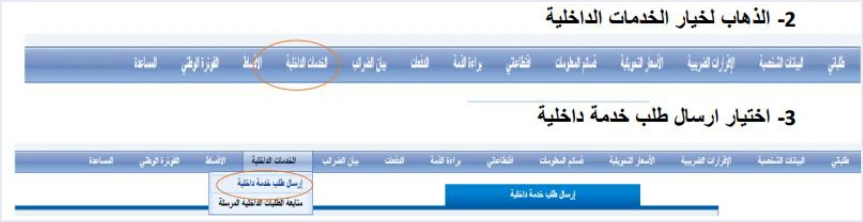
In the guide’s screenshot, the same bar also shows the National Invoicing option (الفوترة الوطني), which is how you move to the system. This position has a practical benefit. The internal request is open to you before you reach the system’s portal. That is why it is the fix in the first two cases, because the person with the problem has not yet been able to create an account in the system.
The six steps of an ISTD internal service request
These are the steps as the questions and answers guide gives them (pp. 4 to 6). They are the same in all three cases.
- Log in to your account on the website with your tax number and password.
- Go to Internal services (الخدمات الداخلية) in the menu bar.
- Choose Send an internal service request (ارسال طلب خدمة داخلية) from the list that drops down under it.
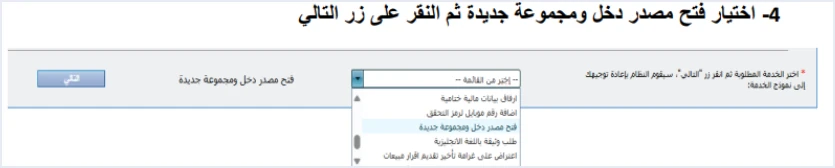
- Choose the request type from the dropdown list, then click Next (التالي).
- Write your note in the Taxpayer notes box (ملاحظات المكلف).
- Click Send the request (ارسال الطلب).
Steps 4 and 5 are where one case differs from another. In step 4 you choose the request type that the guide names for your case. In step 5 you write the note that the guide gives word for word. The dropdown list in the screenshot holds types with similar names, and several of them begin with the words modification request (طلب تعديل). Read the full name before you click Next.

Request types named in the questions and answers guide
The guide names three types of internal request, each with its own case and note text. The table below brings them together. The note text is given in Arabic exactly as the guide prints it, because that is the text you type, with an English rendering beside it.
Scroll the table sideways to see the remaining columns
In the first case, the taxpayer asks ISTD to change the file type. In the second case, the guide’s heading for its steps reads steps to request adding an active income-source sequence (خطوات طلب إضافة تسلسل مصدر دخل فعال). So the obstacle is the lack of an active sequence.
The third case has a condition that the first two do not have, so it gets the next section to itself.
Invoicing-system support request: the condition for unlinking devices
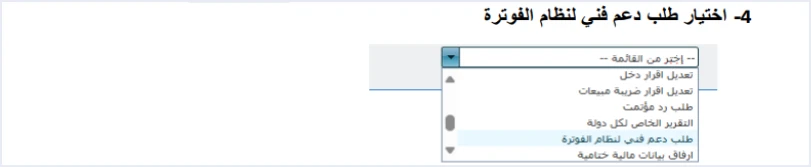
The guide uses this request to answer two questions. The first is that the sub-user does not see the Issue an invoice tile (تنظيم فاتورة). The cause the guide gives is that someone clicked the device linking option (ربط الأجهزة). The second is a direct question on how to unlink devices for someone who linked them by mistake, and the guide answers it with the same answer as question 9 (نفس إجابة السؤال رقم 9).
This request differs from the other two in two ways. First, the note is not limited to a fixed sentence. You write please unlink the devices (ارجو فك ربط الأجهزة), give your reasons, and undertake in the same note that you have no accounting system. Second, the guide limits the request to a specific group, in the following words.
«طلب فك ربط الأجهزة يكون فقط لمن ليس لديه نظام محاسبي ويكون قام بالربط عن طريق الخطأ اما من يمتلك نظام محاسبي يلزمه ربط نظامه مع نظام الفوترة»
In English, ISTD says a request to unlink devices is only for a business that has no accounting system and linked by mistake, and that a business with an accounting system must link that system to the National Invoicing System. ISTD publishes this guide in Arabic only; the English here is our rendering, and the Arabic text is the authority.
This text has three practical results.
- Unlinking is not a button on the portal and not a setting you reset yourself. It is a request to ISTD, and ISTD is the one that reviews it.
- The request is for someone who linked by mistake and has no accounting system, and who undertakes this in writing in the note. It is not a route for a business that has accounting software and wants to go back to issuing invoices on the portal.
- The last sentence of the text is ISTD’s position as stated in its guide. The guide gives no date and no penalty with it.
We read this sentence together with the texts of the regulation in our article Is Linking Accounting Software to JoFotara Mandatory?, which sets it beside Article 4 of Regulation No. 34 of 2019 on Organizing and Controlling Invoicing Affairs.
A fourth use in the technical guide: the consumer price permission
ISTD’s technical guide for integrating with the National Invoicing System through the API, version 1.5, mentions internal services in another place that has nothing to do with joining problems. The consumer price is the final price to the consumer that is taken as the basis for calculating the tax on an invoice line. It can only be used with a permission that ISTD grants on request. On p. 86 the guide names the activation route in two parts, Internal services (الخدمات الداخلية) and then invoicing system technical support (دعم فني نظام الفوترة).
The guide limits this permission to taxpayers registered for General Sales Tax (GST) or for Special Sales Tax. It also states that if the consumer price is used on an invoice, it applies to all of that invoice’s lines, and that it is not less than the unit price.
Note that the technical guide does not give the request type by the name that appears in the dropdown list, the invoicing-system support request (طلب دعم فني لنظام الفوترة), and it does not set note text the way the questions and answers guide does. The likeliest reading is that it means the same item, but this is our inference, not a statement in the guide. If the item is not clear to you, ask ISTD before you send. The consumer price and how tax is calculated with it have their own article in this series, Consumer Price in JoFotara: Who Needs It, How to Calculate.
Other items in the dropdown list
The dropdown list in step 4 is longer than the three types. In the guide’s screenshots, the list of requests shows an option for adding a mobile number for the verification code (اضافة رقم موبايل لرمز التحقق), among other items. But the guide does not offer any of them as the answer to a question, and it does not explain when to use them.
This difference matters for the verification code problem in particular. When a taxpayer in the guide asks about a verification code that still goes to the old phone number after the number was changed, the official answer has nothing to do with internal requests. Its exact wording reads as follows.
«عليك ادخال كلمة المرور بشكل خاطئ ليتم تحديث رقم هاتفك»
In English, the answer tells you to enter the password incorrectly so that your phone number is updated. ISTD publishes this guide in Arabic only; the English here is our rendering, and the Arabic text is the authority.
The option for adding a mobile number for the verification code is only an item in the list, and the guide does not describe it as the fix.
The rule, then, is to choose from the list the type that the guide names for your case. If your case is not one of the three, ask ISTD before you choose an item that the guide does not explain.
Cases that look like an internal request but are not
The same guide has cases that look much like the three above, but their fix does not go through internal services at all. It happens inside the system’s portal.
- The message The account has been suspended, please contact the system administrator (تم إيقاف الحساب الرجاء الاتصال بمسؤول النظام). The guide’s answer is that you suspended the sub-user (قمت بإيقاف المستخدم الفرعي). The fix is for the main user to log in to the portal, open Add a sub-user (إضافة مستخدم فرعي), change the user’s status from inactive to active, then log out and log in again as the sub-user.
- The Issue an invoice tile (تنظيم فاتورة) does not appear at all. The cause in the guide is that you are on the main user’s page. The fix is to create a sub-user and then log in with it, as in our article Add a Sub-User in JoFotara: Step by Step.
- The verification code goes to an old number. The guide’s answer is the instruction quoted in the previous section, not an internal request.
Comparing the guide’s cases gives a rough rule to help you remember. This is our reading of the text, not a statement by ISTD. What the main user controls inside the portal, the main user fixes directly. What needs a change to the taxpayer’s file, or to its link with the system, goes through a request to ISTD.
Tracking sent internal requests
After step 6, you go back to Internal services (الخدمات الداخلية) and choose Track sent internal requests (متابعة الطلبات الداخلية المرسلة), the second option in the same list. That is all the questions and answers guide says about tracking. It does not describe the request statuses shown on the tracking screen. The guide sets no response time, and does not say whether ISTD sends a notice when the request is completed.
So the practical sign that the request has been handled is that the problem you submitted it for has gone away. This is a check we suggest, not a step in the guide.
- Taxpayer data modification request. Log out of the e-services and log in again, then look for National Invoicing (الفوترة الوطني) in the services bar.
- Opening a new income source and group. Try registering in the system again, and check that it no longer takes you back to the home page.
- Invoicing-system support request. Log in as the sub-user, and check that the Issue an invoice tile (تنظيم فاتورة) appears.
How to write the Taxpayer notes (ملاحظات المكلف)
The note is the part of the request that you write yourself, and it is what ISTD reads to understand what you are asking for. In all three cases the guide sets the wording, so there is no need to write your own.
- Copy the text exactly as the guide gives it. In the first two cases, the text states in one sentence what you are asking for and why, which is to register in the National Invoicing System.
- Send a separate request for each case. Each case in the guide has its own request type and its own note text. If the file conversion succeeds and the sequence problem then appears, that is a second obstacle with its own request.
- In the unlinking request, add your reasons and the undertaking. Say why you linked by mistake, and undertake that you have no accounting system, as the guide requires.
- Do not write your password or your Secret Key in the note. The guide does not ask for either of them in any of the three cases.
What the guide does not say about the ISTD internal service request
The official sources behind this article explain the route and name the types, but they are silent on points you may need. The questions and answers guide does not give a processing time for the request, any fees, any required attachments, the request statuses on the tracking screen, or a way to cancel the request after it is sent. We do not answer any of these here, because the correct answer lies with ISTD.
ISTD’s guides give two written contacts. The first is the e-services email address printed on the e-services login screen, according to the joining guide (p. 5). It is etax.inquiry@istd.gov.jo, the email address of the site you submit the request from. The second is ISTD’s technical support committee for invoicing affairs, which the technical integration guide (version 1.5, p. 104) refers you to in these words.
«لمزيد من الاستفسارات يمكن التواصل مع لجنة الدعم الفني لشؤون الفوترة في دائرة ضريبة الدخل والمبيعات على الرابط التالي: https://istd.gov.jo»
In English, the guide says that for further inquiries you can contact the technical support committee for invoicing affairs at the Income and Sales Tax Department through the link https://istd.gov.jo. ISTD publishes this guide in Arabic only; the English here is our rendering, and the Arabic text is the authority.
Before you write to either of them, prepare what will keep the exchange short.
- The business’s tax number.
- The request type you chose in step 4, and the note text you wrote.
- The date you sent the request, and its details as they appear under Track sent internal requests (متابعة الطلبات الداخلية المرسلة).
- A description of the symptom you submitted the request for, and a screenshot of it without your password.
For a wider view of the system and how to connect your business to it, read our article Jordan’s National E-Invoicing System.
E-invoicing and full accounting in one system
Qoyod is integrated with the National Invoicing System (JoFotara). You issue your invoice in Jordanian dinars from Qoyod, it is booked to your ledgers automatically and sent to the system, and once it is accepted it comes back with a QR code from the Income and Sales Tax Department.
Frequently asked questions
Where do I submit an internal service request to ISTD?
You submit it from ISTD’s e-services site after logging in with your tax number and password, through Internal services (الخدمات الداخلية) and then Send an internal service request (ارسال طلب خدمة داخلية). You do not submit it from the JoFotara portal.
Which request types does the questions and answers guide mention?
The guide mentions three types. The taxpayer data modification request (طلب تعديل بيانات المكلف) converts the file to individuals. Opening a new income source and group (فتح مصدر دخل ومجموعة جديدة) adds an active income-source sequence. The invoicing-system support request (طلب دعم فني لنظام الفوترة) unlinks devices.
How do I track the request after sending it?
You track it from Internal services (الخدمات الداخلية) and then Track sent internal requests (متابعة الطلبات الداخلية المرسلة). The guide does not describe the request statuses on this screen and sets no response time, so if the wait is long, contact ISTD.
Can I unlink devices myself from the portal?
The guide mentions no self-service way to do this. Unlinking is an invoicing-system support request that you submit to ISTD, and in the guide’s words it is only for a business that has no accounting system and linked by mistake.
Is the option for adding a mobile number for the verification code the official fix for the verification code problem?
The option appears in the list of requests, but the guide does not offer it as a fix. The guide’s answer for a verification code that goes to the old number is an instruction to enter the password incorrectly so that your phone number is updated.
Does reactivating a suspended sub-user need an internal request?
According to the guide, it does not. The main user reactivates it from inside the portal through Add a sub-user (إضافة مستخدم فرعي), by changing the user’s status from inactive to active.
References
- Income and Sales Tax Department (ISTD), questions and answers guide for the National Invoicing System, 2026 (in Arabic).
- Income and Sales Tax Department (ISTD), procedures guide for joining the Jordanian National Electronic Invoicing System, 2026 edition (in Arabic).
- Income and Sales Tax Department (ISTD), technical guide for integrating with the National Invoicing System through the API, version 1.5 (in Arabic).




