




The consumer price in JoFotara is the final price of a good or service to the end consumer. It is sent on every line of the invoice inside the cac:ItemPriceExtension element, and the line’s General Sales Tax is calculated on it. The concept is new in version 1.5 of the technical guide published by the Income and Sales Tax Department (ISTD). It is not available to every taxpayer by default. It is switched on by a permission that ISTD grants on request.
This article answers two questions. Who may request the consumer price permission, and how? And how do the tax formulas on a line change once it is active? It then works through the guide’s examples with real numbers, including the guide’s examples for an invoice that also carries Special Sales Tax, shows what happens to a discount when the consumer price is higher than the unit price, and ends with a checklist and with what the guide leaves unsaid.
It is written for the developer who builds the XML file in software linked to the National Invoicing System (JoFotara), and for the accountant who reviews line tax before or after sending. It does not deal with how goods are priced. The technical guide defines the consumer price as a tool for calculating tax in the invoice file and says nothing about setting prices. For a wider view of the system and how to connect your business to it, read our article Jordan’s National E-Invoicing System.

What is the consumer price in JoFotara?
On page 86, the technical guide defines the consumer price in a single passage that gives both its meaning and its condition. In the guide’s words, the consumer price is the final price of the good or service to the end consumer, it is used as the basis for calculating tax in the system, and it must be greater than or equal to the unit price.
The definition carries three elements. First, the consumer price is a final price for the good or service as the end consumer pays it. Second, it is the basis for calculating tax in the system, so the general tax on the line is built on it. Third, it is never lower than the unit price. It is either equal to it or higher.
The unit price here is the value of the cbc:PriceAmount element inside the line’s cac:Price block, which is the unit price before tax. The table below compares the two prices as the guide presents them.
Scroll the table sideways to see the remaining columns
Who may request the consumer price permission
The guide sets two conditions for using the consumer price. One concerns the nature of the business. The other concerns the type of tax registration.
The first condition is a request justified by the business. The guide states that the consumer price permission is granted on a request from a taxpayer whose type of business calls for this mechanism. The permission is not assumed and is not switched on for every taxpayer. The taxpayer asks for it because the business needs it. The guide gives no examples of businesses that call for it, and no criteria for assessing a request.
The second condition is registration for General Sales Tax or Special Sales Tax. The guide states that the permission to use the consumer price is limited to taxpayers registered for General Sales Tax (GST) or registered for Special Sales Tax (SST). A taxpayer registered for neither is outside the scope of this permission.
How to request the consumer price permission
On page 86, the technical guide sets out the route for the request. You submit an electronic transaction through internal services (الخدمات الداخلية), as an invoicing-system support request (دعم فني نظام الفوترة). In the guide’s words, its purpose is to request activation of the consumer price permission.
The steps for submitting an internal request, from logging in to the website to following up on the request, are covered in our article ISTD Internal Service Request.
The technical guide does not give the wording of the request, how long ISTD takes to review it, or how the taxpayer is told that the permission is active. The safer course is not to have your system start sending the element until you have confirmed that the permission is active for your business, because the guide does not explain how the National Invoicing System handles the element when it comes from a taxpayer who does not have the permission.
Three rules for the consumer price inside the invoice
Once the permission is active, the guide sets three rules for using the consumer price on the invoice itself.
- All lines or none. The guide states that the consumer price applies to all the goods and services on the invoice, and that it may not be applied to one good or service and not to the others on the same invoice. So do not send an invoice where some lines carry the consumer price and others do not.
- Never below the unit price. The consumer price on each line is equal to or greater than the unit price on the same line, as the definition says.
- It does not have to be shown to the buyer. The guide states that the consumer price does not have to be shown to the buyer, because it is used as an internal mechanism for calculating tax on the final selling price. The element is in the invoice file sent to the system, and the guide does not require you to show it on the copy of the invoice that the buyer sees.
The guide shows a case where the consumer price equals the unit price, and in that example the element carries the same 5.000 as the unit price. Read together with the first rule, this example suggests that a line where the two prices do not differ still carries the element. This is our reading of the text, not a statement by ISTD.
Where ItemPriceExtension sits on the invoice line
The cac:ItemPriceExtension element comes on the line directly after the cac:Price block and before the line closes with </cac:InvoiceLine>. It holds a single element, cbc:Amount, whose value is the consumer price. This order appears in the guide’s examples on pp. 88, 92 and 94.
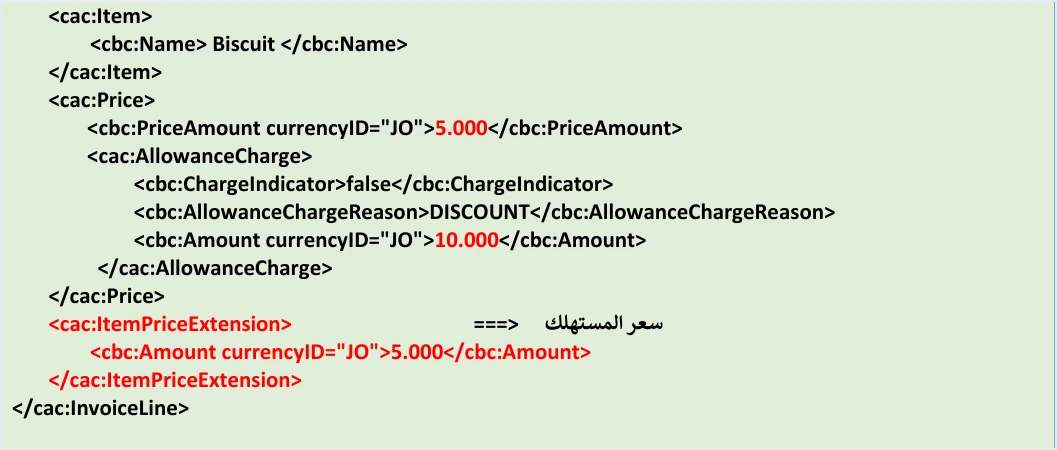
The snippet below reproduces the order of the elements from the guide’s example of a line where the two prices are equal. The values of the currency attributes have been replaced with dots on purpose, because the guide does not settle which values the system accepts in that attribute.
<cac:Price>
  <cbc:PriceAmount ...>5.000</cbc:PriceAmount>
  <cac:AllowanceCharge>
    <cbc:ChargeIndicator>false</cbc:ChargeIndicator>
    <cbc:AllowanceChargeReason>DISCOUNT</cbc:AllowanceChargeReason>
    <cbc:Amount ...>10.000</cbc:Amount>
  </cac:AllowanceCharge>
</cac:Price>
<cac:ItemPriceExtension>
  <cbc:Amount ...>5.000</cbc:Amount>
</cac:ItemPriceExtension>
</cac:InvoiceLine>
The whole invoice file follows the UBL 2.1 standard.
The four formulas for calculating tax with a consumer price
The guide splits the tax calculation with a consumer price into four cases, depending on two things. The first is whether the consumer price equals the unit price or is greater than it. The second is whether the invoice is a general sales tax invoice or a special tax invoice. The table below brings together the formula for the General Sales Tax amount in each case.
Scroll the table sideways to see the remaining columns
In all four cases the line amount, LineExtensionAmount, is calculated the usual way, as quantity × unit price − discount. The consumer price does not change the line amount. It changes the base on which General Sales Tax is calculated, when it is higher than the unit price.
The table shows that the equal case changes nothing in the calculation, because its formula is the formula of an ordinary line with no consumer price. The real change is in the greater case. There, quantity × consumer price replaces the line amount in the tax base, and the discount drops out of that base.
The guide’s example when the consumer price equals the unit price
On pp. 87 and 88, the guide gives an example of a general sales tax invoice with a single line. The quantity is 10, the unit price is 5.000, the line carries a discount of 10.000, the consumer price is 5.000, and the tax rate in the example is 16%.
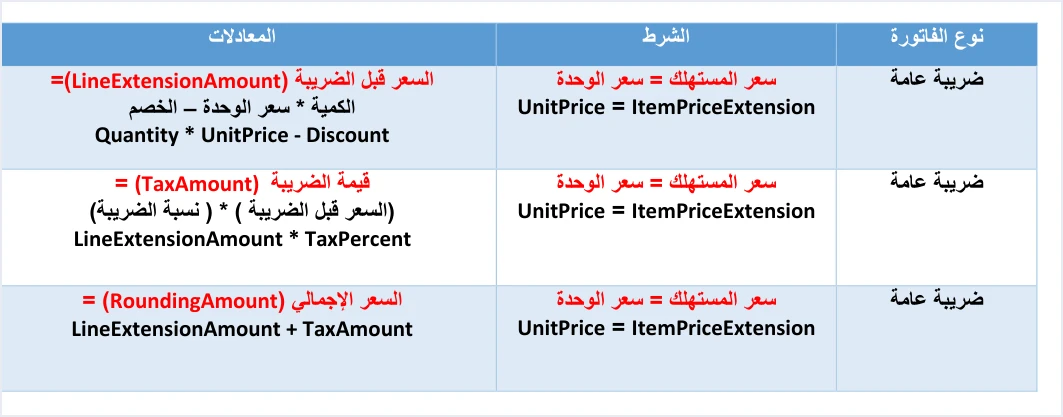
The result is the same as an ordinary line would give, because the tax was calculated on the line amount after the discount. Carrying the element with a value equal to the unit price does not change the numbers.
The guide’s example when the consumer price is higher than the unit price
On pp. 89 and 90, the guide repeats the same example with one change. The consumer price is now 6.000 instead of 5.000. The quantity stays at 10, the unit price at 5.000, the discount at 10.000 and the rate at 16%.
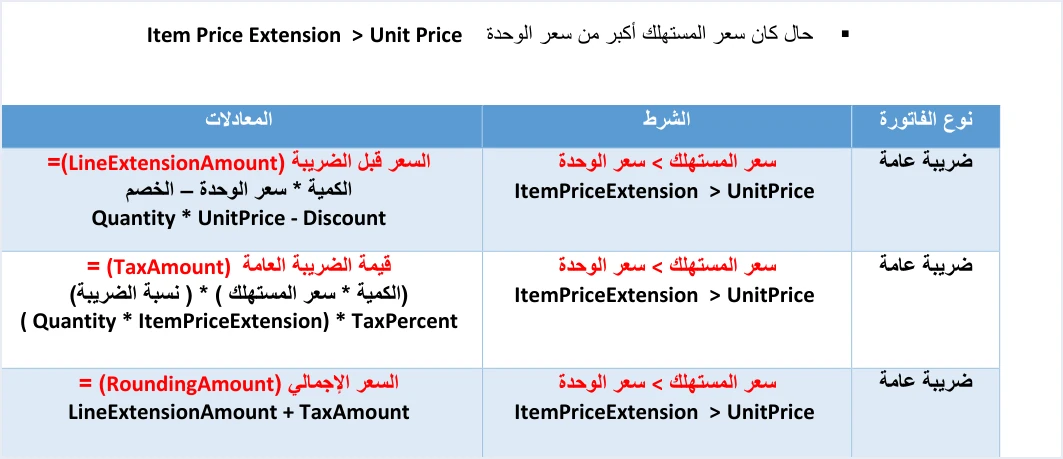
The line amount did not change between the two examples and stayed at 40.000. The tax amount rose from 6.400 in the first example to 9.600 in the second, and the total price rose with it from 46.400 to 49.600. The reason is that in the second example the tax was calculated on quantity × consumer price, not on the line amount.
A discount does not reduce the tax base when the consumer price is higher
This point shows in the guide’s formula and in its example. In the greater case the tax formula does not contain the discount at all, because tax is calculated as quantity × consumer price × rate. The discount still affects the line amount, LineExtensionAmount, and nothing else.
In the guide’s example, 10.000 was deducted from the line amount, which became 40.000. The tax, however, stayed at 9.600 as if there were no discount, because it was calculated on 10 × 6.000. This has two practical consequences.
- For the developer. In the greater case, do not calculate the tax by multiplying the line amount by the rate. Calculate it directly from the quantity and the consumer price, and keep the line amount calculated with the discount as usual.
- For the reviewer. On such a line, the tax amount will not equal the line amount multiplied by the rate. This is not an error in the file. It is what the guide’s formula for the greater case requires.
Consumer price with Special Sales Tax
On a special tax invoice, the Special Sales Tax is added to the General Sales Tax base in both cases. In the equal case, General Sales Tax is calculated on the line amount plus the Special Sales Tax. In the greater case, it is calculated on quantity × consumer price plus the Special Sales Tax. The Special Sales Tax amount also goes into the line’s total price, as the last two rows of the formulas table show. The guide works through both cases with numbers on pp. 91 to 94.
The starting point is an ordinary line on a special tax invoice. The guide states that the special tax is a value entered without any calculation, so it is an amount written on the line, not a rate multiplied by a price. It travels in its own cac:TaxSubtotal block with the scheme OTH and no rate element, and that block comes before the General Sales Tax block. The special sales tax invoice is identified by its type code, whose third digit is 3, so the local one is 013 for cash and 023 for receivable. It is one of the tax document types compared in our article Invoice Types in the National Invoicing System.
Case one, consumer price equal to the unit price
On page 91, the guide gives a table for the special tax invoice where the consumer price equals the unit price. It holds three formulas.
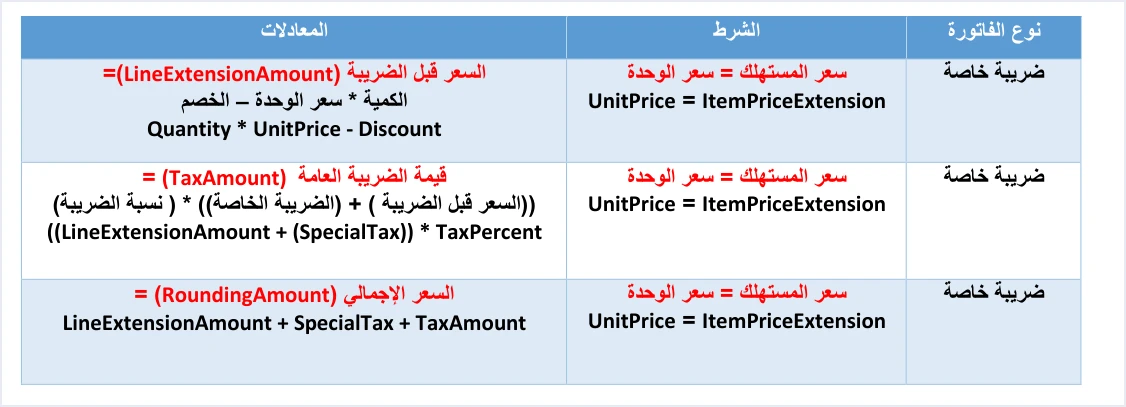
Scroll the table sideways to see the remaining columns
Here the General Sales Tax base is the line amount after the discount plus the Special Sales Tax amount. This is the same formula as a special tax line with no consumer price, so carrying the element with a value equal to the unit price does not change the numbers. The discount does reduce the base in this case, because it enters the calculation through the line amount.
The guide’s example for this case is a line whose amount before tax is 495, with a Special Sales Tax amount of 10 and a rate of 16% in the example. The General Sales Tax base is 495 + 10 = 505, and the General Sales Tax amount is 505 × 16% = 80.800. So the Special Sales Tax amount was itself subject to General Sales Tax. That comes from the formula, not from the consumer price, since the two prices are equal in this case. The line’s TaxAmount element carries the General Sales Tax alone, 80.800, while the Special Sales Tax amount stays in its own OTH block.
Case two, consumer price greater than the unit price
On page 93, the guide gives the matching table for the greater case. The formulas for the line amount and the total price stay the same. Only the General Sales Tax formula changes.
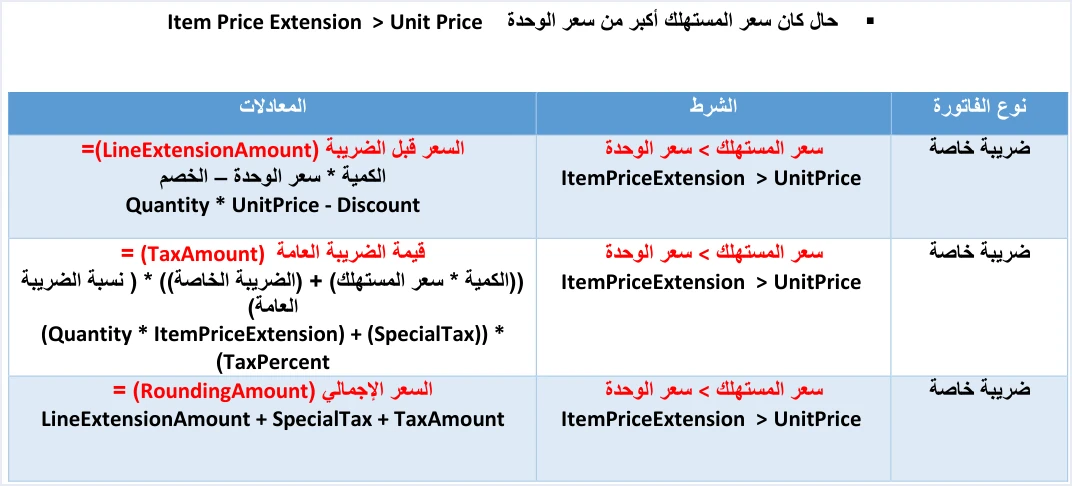
Scroll the table sideways to see the remaining columns
The General Sales Tax base here has two parts, quantity × consumer price and the Special Sales Tax amount. Neither the discount nor the unit price appears in this formula. They affect the line amount only.
The guide’s example for this case runs over pp. 93 and 94. It is a line with a quantity of 10, a unit price of 50.000, a discount of 5.000 and a consumer price of 55.000. The first part of the example starts with the quantity, the line amount and the tax amount.

The second part completes the line with the price block, which holds the unit price and the discount, followed by the cac:ItemPriceExtension element that carries the consumer price.
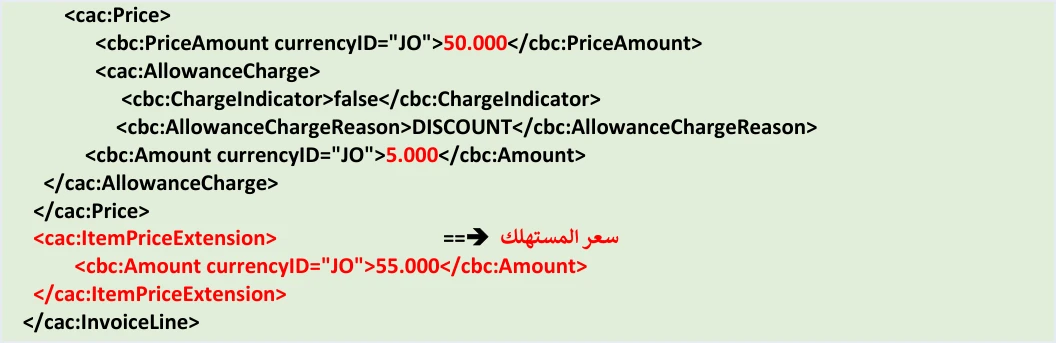
The table below lays the example’s numbers out against the guide’s formulas, with a Special Sales Tax amount of 10 as in the example.
Scroll the table sideways to see the remaining columns
The first part of the example shows a line amount of 495.00 and a tax amount of 89.600, the two figures the formulas give. The line amount was calculated from the unit price after the discount. The tax was calculated on quantity × consumer price plus the Special Sales Tax amount.
The total price in the examples and in the table
The same part of the example prints a total price (RoundingAmount) of 584.600. That equals the line amount plus the General Sales Tax (495 + 89.600), without the Special Sales Tax amount. The table’s formula gives 495 + 10 + 89.600 = 594.600. The example for case one shows the same gap, since the guide prints 575.800 and the formula gives 585.800. The guide does not explain this difference between the table and the examples. We do not favor either figure, and ISTD is the authority on it.
Discount out of the base, Special Sales Tax in
In the greater case the guide treats the discount and the Special Sales Tax in two different ways, and this shows in the formula and in the example.
- The discount is outside the base. It does not appear in the General Sales Tax formula for the greater case. In the example, 5.000 was deducted from the line amount, which became 495.00, but the tax base was built on 10 × 55.000 with nothing deducted.
- The Special Sales Tax is inside the base. Its amount is added to the base in both cases, so it is part of the General Sales Tax base whether the two prices are equal or the consumer price is higher.
- The line amount does not change.
LineExtensionAmountis calculated in both cases as quantity × unit price − discount, so the consumer price never enters the line amount.
The table below compares the guide’s two examples on the base and the tax. In both, the line amount is 495 and the Special Sales Tax amount is 10.
In practice, a developer should not calculate General Sales Tax in the greater case by multiplying the line amount by the rate, or by adding the Special Sales Tax to the line amount. Build the base from the quantity and the consumer price, add the Special Sales Tax amount, then multiply by the rate. For the reviewer, the General Sales Tax on such a line will not equal (line amount + Special Sales Tax) × rate. That is what the guide’s formula requires, not an error in the file.
Two further points are specific to this case. The guide gives no rate for the special tax, because it is an amount entered without calculation, and the 10 in both examples is an illustrative figure, not a rate. The guide’s sample files for the special tax also contain doubled quotation marks in some attributes, so do not copy them as they are or treat them as valid files.
What the guide does not say about the consumer price
The consumer price section of the technical guide is short and leaves practical questions unanswered. They are listed here so that nothing is built on an assumption.
- Criteria for accepting the request. The guide does not identify the businesses that call for the consumer price, or say how a request is assessed.
- Activation time and notice. The guide gives no time for reviewing the request and no way for the taxpayer to be told the permission is active.
- Effect of a breach. The consumer price section does not say what happens if a price lower than the unit price is sent, if the element is sent on some lines and not others, or if it is sent by a taxpayer who does not have the permission.
- Return invoice. The consumer price section does not deal with the return invoice (credit note). It does not say whether the element is sent again on it, or how its tax is calculated, including when the original invoice carries both a consumer price and Special Sales Tax.
- The invoice form on the portal. The consumer price is not among the goods or services fields that the procedures guide for issuing an invoice in the Jordanian National Electronic Invoicing System, 2026 edition, shows for the invoice form on the portal (see our article JoFotara Invoice Form Fields Explained). The two guides do not connect the permission with the portal form, so we assume nothing about it.
If you face one of these situations, take the answer from ISTD, not from an analogy with another case.
Pre-submission checklist
Check these points in your system before you send the first invoice that carries a consumer price, and whenever you review a rejected invoice that carries one.
- Permission. The request to activate the consumer price permission was submitted through internal services, and you have confirmed it is active for your business.
- Registration. The business is registered for General Sales Tax or for Special Sales Tax.
- Every line. Every line on the invoice carries the
ItemPriceExtensionelement, without exception. - Minimum. The consumer price on each line is equal to or greater than the unit price,
PriceAmount. - Position. The element comes directly after the
cac:Priceblock and before the line closes. - Line amount.
LineExtensionAmount= quantity × unit price − discount, in every case. - Tax amount. In the equal case it is calculated on the line amount. In the greater case it is calculated on quantity × consumer price. On a special tax invoice, the Special Sales Tax is added to the base, and the line’s
TaxAmountcarries the General Sales Tax alone. - Total price.
RoundingAmount= line amount + tax amount, plus the Special Sales Tax on its lines, per the guide’s table, bearing in mind the gap in the special tax examples explained above. - The buyer’s copy. You have decided whether to show the consumer price on the invoice the buyer sees, knowing that the guide does not require it.
How Qoyod handles the invoice file
When the invoice is issued from accounting software linked to the system, you do not write the line elements into the XML file by hand. Qoyod builds the invoice file in UBL 2.1 format with its unique identifier (UUID) and sends it to the National Invoicing System without any manual intervention. Read more about Qoyod’s integration with the National Invoicing System.
- Qoyod checks each invoice at field level as it is created, covering the tax number, the document type and payment method, the General Sales Tax rate and whether the lines are complete, and alerts you to any error before the invoice is sent, to reduce rejections.
- ISTD returns the invoice status and any error message, and Qoyod shows them in its status panel.
- The status panel lists invoices that were not sent and need to be resent, and when you resend one it keeps the same UUID.
The pre-send check is an alert, not a guarantee. Accepting the invoice remains a decision for the National Invoicing System alone. The consumer price permission is requested from ISTD, not from the software, so if your business needs it, check with the Qoyod team how it is handled in the integration before you activate it. For the full picture, see Qoyod and the National Invoicing System.
E-invoicing and full accounting in one system
Qoyod is integrated with the National Invoicing System (JoFotara). You issue your invoice in Jordanian dinars from Qoyod, it is booked to your ledgers automatically and sent to the system, and once it is accepted it comes back with a QR code from the Income and Sales Tax Department.
Frequently asked questions
What is the consumer price in JoFotara?
It is the final price of the good or service to the end consumer. It is sent on every line inside the cac:ItemPriceExtension element, and General Sales Tax is calculated on it. The technical guide requires it to be equal to or greater than the unit price.
Who may use the consumer price?
The permission is limited to taxpayers registered for General Sales Tax or for Special Sales Tax. It is granted on a request from a taxpayer whose type of business calls for this mechanism.
How do I request activation of the consumer price permission?
You submit an electronic transaction through internal services (الخدمات الداخلية), as an invoicing-system support request (دعم فني نظام الفوترة), to ask for the permission to be activated, as the technical guide states on page 86. The guide sets no time for reviewing the request.
Can the consumer price be applied to some lines of the invoice only?
The guide rules this out explicitly. The consumer price applies to all the goods and services on the invoice, and may not be applied to one good or service and not to the others on the same invoice.
Does the consumer price have to be shown to the buyer?
The guide states that it does not have to be shown to the buyer. It is used as an internal mechanism for calculating tax on the final selling price.
Does a discount reduce the tax when the consumer price is higher than the unit price?
The discount affects the line amount only, while the tax is calculated as quantity × consumer price × rate. In the guide’s example the tax stayed at 9.600 despite a discount of 10.000, and the line amount stayed at 40.000.
References
- Income and Sales Tax Department (ISTD), technical guide for integrating with the National Invoicing System through the API, version 1.5 (in Arabic), pp. 86 to 94.
- Income and Sales Tax Department (ISTD), procedures guide for issuing an invoice in the Jordanian National Electronic Invoicing System, 2026 edition (in Arabic).
- ISTD’s National Invoicing System guides (in Arabic)




