




Anyone building a link between accounting software and Jordan’s National Invoicing System (JoFotara) benefits from one complete example in which the invoice file can be seen from start to finish. The technical guide for integrating with the National Invoicing System through the API, issued by the Income and Sales Tax Department (ISTD) in version 1.5, gives that example for the general sales tax invoice on pages 32 to 44. This article walks through the JoFotara cash invoice XML example block by block. It shows what each block stands for, what kind of value goes into it and the rule the guide states for it.
The example is a new, local, cash invoice for a taxpayer registered for General Sales Tax (GST). Its type code in the file is 388 with the attribute name="012", and it has two lines. The first is taxable under category S at a rate of 7.00, and the second is exempt under category Z. What you read here is an explanatory map of the example, not a file ready to copy. We did not test submitting this example, or any part of it, to the system. Version 1.5 of ISTD’s technical guide does not state that any test environment is open to taxpayers or developers.
What a JoFotara cash invoice XML example represents
The technical guide presents sales invoices in three families that follow the taxpayer’s registration with ISTD, the income invoice, the general sales tax invoice and the special tax invoice. For each family it gives a complete example of a new invoice and an example of a return invoice. The example this article covers is the new-invoice example in the second family, under the heading “Third: general sales tax invoice” (ثالثاً: فاتورة المبيعات العامة).
One element in the header sets the invoice type, and it carries two pieces of information. The technical guide codes each invoice type as a three-digit number placed in the name attribute of the invoice type element. The value of the invoice type element itself shows whether the invoice is new or a return, 388 for a new invoice and 381 for a return.
The first digit is the trade type, the second is the payment method (1 for cash, 2 for receivable), and the third is the tax family. In this example the first digit is 0 for a local invoice, the second is 1 for cash payment, and the third is 2 for the General Sales Tax family. So 012 reads as a local cash invoice in the General Sales Tax family, and it should not be reused for other cases, because the code changes with the trade type and the tax family together.
The file declares the type, but what a taxpayer may declare is decided by its registration with ISTD. The system reads the invoice type from two elements of the file, and what those elements may say is decided by the taxpayer’s registration and the reality of the sale. If a taxpayer sends a code that does not fit its tax number or its income-source sequence, the invoice is rejected with the message This user is not authorized to submit this type of invoice. Our article JoFotara Error Codes: Why an Invoice Is Rejected and How to Fix It lists that message with the others.
On page 33 the guide gives examples of other codes in the same family, among them 322, 512 and 422. It shows no complete example of a receivable invoice or of any non-local type. A developer who needs a full file for a receivable invoice or an export invoice has nothing in the guide to compare against, and any file built for those types needs a trial run by the developer before it is described as correct.
The block map of the example
The guide divides the general sales tax invoice example into six blocks lettered A to F, preceded by the declaration line and the root element that all invoices share. The table below lists the blocks in the order the guide shows them, with their pages. The sections after it explain each block on its own.
Scroll the table sideways to see the remaining columns
The same blocks are listed in our article JoFotara UBL 2.1: What It Is and What It Requires as a general description that fits every invoice. The difference here is that the map is read from one specific example, so it shows the elements that belong to the general sales tax invoice. The clearest are the tax total block in the invoice header and the tax block inside each line.
What comes before the blocks in the invoice file
Every file starts with the XML declaration line, then the Invoice root element with its four namespaces, then the cbc:ProfileID element with the value reporting:1.0 on every invoice (p. 10). The guide requires the opening Invoice tag to sit on one line, and a file that breaks the rule is rejected with the message Invalid Invoice Minification (p. 102). Page 10 prints that tag over four lines, and the guide does not say whether those are real line breaks or a wrap, so the one-line layout is our reading of the rule on page 102. These lines are fixed description that your system copies as it is, and the UBL 2.1 article named in the previous section explains them in detail.
The header (A) of a cash sales invoice
The header carries the identity of the invoice, its type and its currency. The image below is the template as the guide shows it on page 33. Above it is the color key that repeats in every template. The elements shaded yellow are mandatory variables that the seller’s system fills in, the elements shaded green are optional variables, and the remaining elements are fixed description with no change. ISTD publishes this guide in Arabic only; the English here is our rendering, and the Arabic text is the authority. How to read this shading across the whole file is covered in our article JoFotara Mandatory Fields: Reading the Technical Guide.
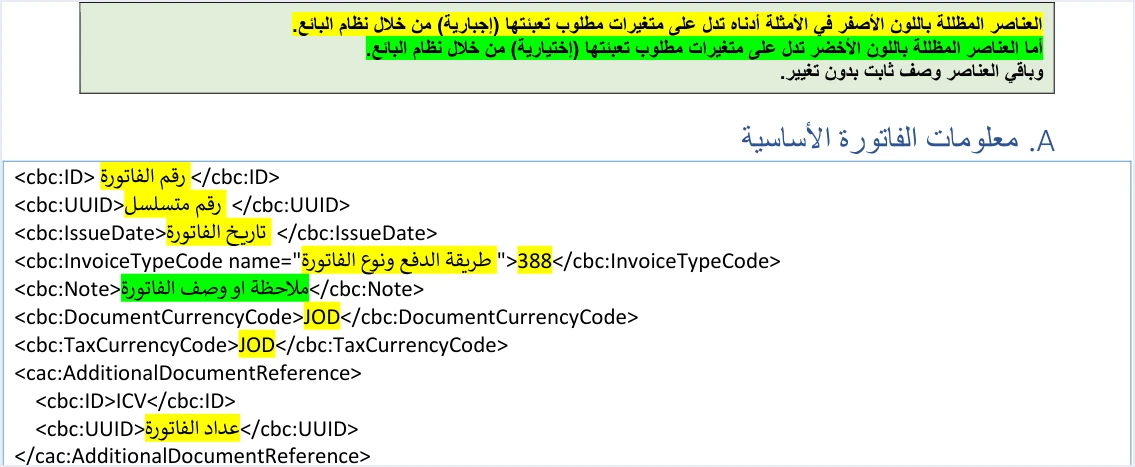
The snippet below rearranges the same template and puts a description in English where each variable goes. It is meant for explanation, not for copying.
<cbc:ID><!-- the invoice number in your system --></cbc:ID>
<cbc:UUID><!-- a unique identifier generated and stored by your system --></cbc:UUID>
<cbc:IssueDate><!-- the date in the format yyyy-mm-dd --></cbc:IssueDate>
<cbc:InvoiceTypeCode name="012">388</cbc:InvoiceTypeCode>
<cbc:Note><!-- an optional note describing the invoice --></cbc:Note>
<cbc:DocumentCurrencyCode>JOD</cbc:DocumentCurrencyCode>
<cbc:TaxCurrencyCode>JOD</cbc:TaxCurrencyCode>
<cac:AdditionalDocumentReference>
  <cbc:ID>ICV</cbc:ID>
  <cbc:UUID><!-- the invoice counter --></cbc:UUID>
</cac:AdditionalDocumentReference>- Invoice number and unique identifier. The key that distinguishes an invoice in the system is
cbc:IDandcbc:UUIDtogether, not the invoice number alone. The identifier is generated by the taxpayer’s system. The guide warns against generating a new identifier when a request is retried, because that duplicates the invoice, so your system stores the identifier and reuses it. The details are in our article JoFotara UUID: Why It Comes Back With the ID. - Date. The format is
yyyy-mm-dd, as in all the XML examples in the guide. The description copied from the PDF on page 33 may show the date parts in a different order, so use the format of the examples. Our article JoFotara Invoice Date Format: yyyy-mm-dd covers this. - Invoice type. The value
388is for a new invoice, and the code012sits in thenameattribute, as explained above. - Note. The
cbc:Noteelement is shaded green, so it is optional and holds free text that describes the invoice. - Currency. The value
JODappears in both the document currency element and the tax currency element. The guide says that changing the currency applies at the level of the whole invoice only. It mentions no exchange-rate element and no rule for converting to the dinar. - Invoice counter. The
cac:AdditionalDocumentReferenceblock with the identifierICVcarries a counter. The guide describes it as a counter created by the taxpayer for electronic invoices, starting in sequence from 1 and continuing without limit, following the global definition (p. 13). Our article JoFotara ICV: The Invoice Counter Explained explains it.
The seller block (B)
The cac:AccountingSupplierParty block identifies the taxpayer who issues the invoice. It carries four values, the country code JO, the seller’s tax number in cbc:CompanyID, the value VAT in the tax-scheme identifier, and the seller’s name in cbc:RegistrationName as registered with ISTD.
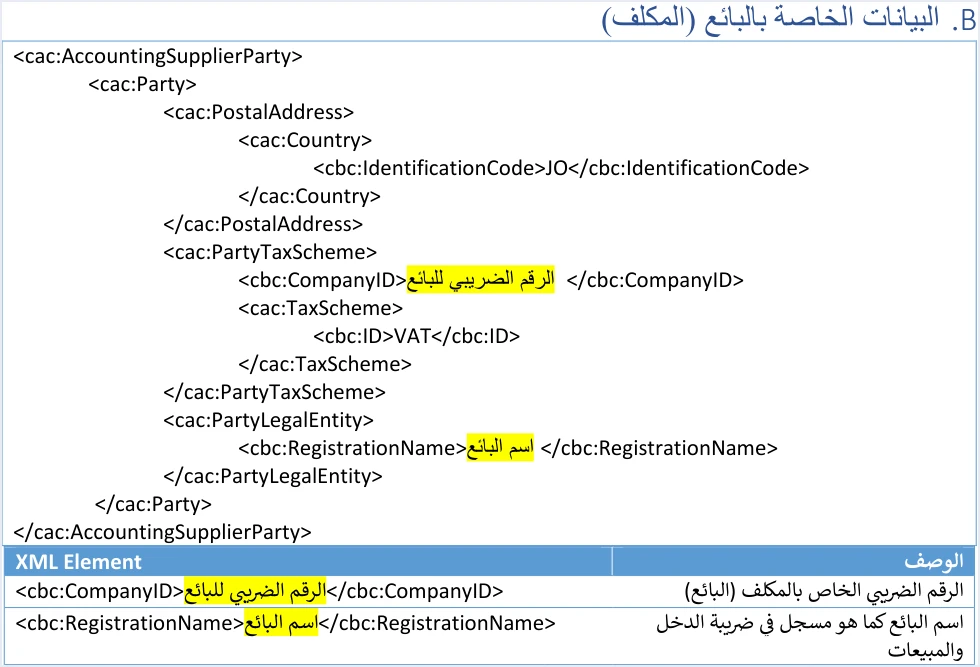
The tax number in this block is not a formality. The guide lists an error in it among the causes of error 500, as the section on block D below shows. All the rules for the seller fields are in our article JoFotara Seller Details: Fields and Rules.
The buyer block (C) in a cash invoice
The cac:AccountingCustomerParty block is the one in the example most affected by the payment method. The guide shows its template and example on pages 36 and 37, and its elements are as follows.
- Buyer identifier type in the
schemeIDattribute. It is mandatory, and its values areNINfor the national number,PNfor the personal number of a non-Jordanian andTNfor the tax number. The identifier number itself is shaded green and is written in digits only. - Postal code in
cbc:PostalZone. It is optional, with a maximum of 5 characters. - Governorate code in
cbc:CountrySubentityCode. It is optional, for exampleJO-AMfor Amman andJO-IRfor Irbid. - Phone number in
cbc:Telephone. It is optional. If you enter the buyer’s phone number, the guide requires digits only, with at least 9 digits and at most 14. - Buyer name in
cbc:RegistrationName.
The buyer’s name is where a cash invoice differs from a receivable invoice. The buyer’s name is always required on a receivable invoice, and on a cash invoice worth more than JOD 10,000 or its equivalent in foreign currency (p. 101). When the name is missing in that case, the message is Bayer name is missing, spelled as the guide writes it. The buyer’s tax number remains mandatory on development zone invoices, which are outside this example. The details of the buyer fields are in our article JoFotara Buyer Identification: NIN, PN and TN.
The income-source sequence (D)
The cac:SellerSupplierParty block on page 38 is short. It holds one element, cbc:ID, whose value is the income-source sequence that the taxpayer selects when creating the link from the device linking option (ربط الأجهزة). Each Client ID and Secret Key pair is tied to one sequence.
This value matters more than its size in the file. The guide gives the causes of an HTTP 500 response as an error in the tax number or the income-source sequence and, less often, an error in the Client ID or the Secret Key (p. 101). How to find the sequence is covered in our article JoFotara Income Source Sequence: Where to Find It.
The totals (E) and what General Sales Tax adds
The guide shows the invoice totals on pages 39 and 40 in three consecutive blocks. This part most clearly separates the general sales tax invoice from the income invoice, because the tax total block in the invoice header is present here and does not exist in an income invoice at all. The snippet below shows the three blocks with descriptions in place of the values.
<cac:AllowanceCharge>
  <cbc:ChargeIndicator>false</cbc:ChargeIndicator>
  <cbc:AllowanceChargeReason><!-- the discount reason as in the example --></cbc:AllowanceChargeReason>
  <cbc:Amount currencyID="JO"><!-- the total of the line discounts --></cbc:Amount>
</cac:AllowanceCharge>
<cac:TaxTotal>
  <cbc:TaxAmount currencyID="JO"><!-- the total of the line taxes --></cbc:TaxAmount>
</cac:TaxTotal>
<cac:LegalMonetaryTotal>
  <cbc:TaxExclusiveAmount currencyID="JO"><!-- the sum of quantity times unit price --></cbc:TaxExclusiveAmount>
  <cbc:TaxInclusiveAmount currencyID="JO"><!-- the sum of RoundingAmount of the lines --></cbc:TaxInclusiveAmount>
  <cbc:AllowanceTotalAmount currencyID="JO"><!-- the total of the line discounts --></cbc:AllowanceTotalAmount>
  <cbc:PayableAmount currencyID="JO"><!-- the sum of RoundingAmount of the lines --></cbc:PayableAmount>
</cac:LegalMonetaryTotal>- Header discount. The
cac:AllowanceChargeblock in the header carriescbc:ChargeIndicatorwith the valuefalse. The system does not accept a separate invoice-level discount. The discount in the header is the sum of the line discounts, so a seller who discounts the invoice total spreads that discount across the lines before sending. Our article JoFotara Invoice Discount: Line and Invoice Level explains it. - Tax total. The
cbc:TaxAmountelement insidecac:TaxTotalin the header is the total General Sales Tax amount in the guide’s description, that is, the sum of the line taxes. - Monetary totals.
cac:LegalMonetaryTotalhas four elements.TaxExclusiveAmountis the sum of quantity multiplied by unit price,TaxInclusiveAmountis the sum of theRoundingAmountvalues of the lines,AllowanceTotalAmountis the sum of the line discounts, andPayableAmountis also the sum of theRoundingAmountvalues. The header discount andAllowanceTotalAmountmust each equal the sum of the line discounts.
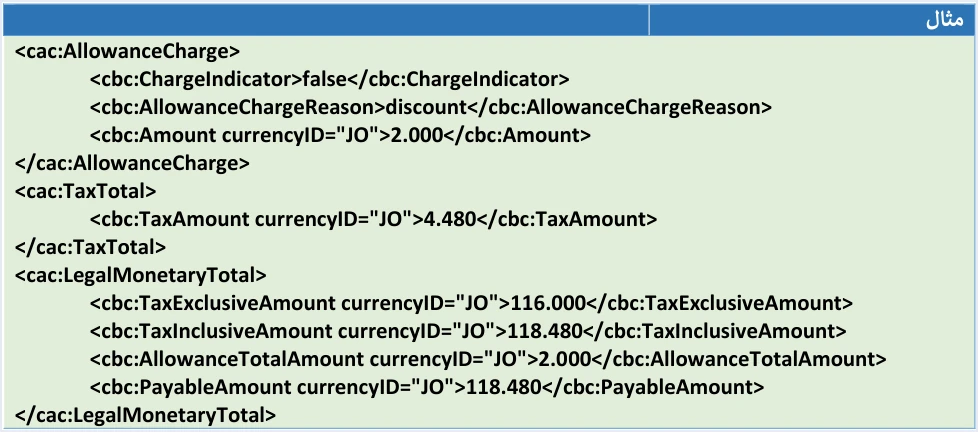
The values in the example on page 40 are 116.000 for the invoice total before discount and tax, 2.000 for the discount, 4.480 for the total tax and 118.480 for the amount payable. Our article JoFotara Taxable and Exempt Lines: Worked Example traces these figures from the two lines step by step, so we do not repeat the calculation here. One of the error messages tied to the totals is Total General Amount is Not Correct, which our article JoFotara Error Codes: Why an Invoice Is Rejected and How to Fix It also covers.
Under the amounts the guide repeats a rounding note. Rounding is allowed to 3 decimal places and up to 9, provided the difference is no more than 0.001. The guide’s examples use the value JO in the currencyID attribute on every amount, and the guide does not say whether other values are accepted there.
The lines (F) and the tax category of each line
Lines start on page 41. Each line has a cac:InvoiceLine block with a sequence number that is unique within the invoice, a quantity, a unit price before tax, a discount, and the line value after discount in cbc:LineExtensionAmount. What sets a general sales tax invoice line apart is the cac:TaxTotal block inside the line. It holds the line tax in cbc:TaxAmount, the line value with its tax in cbc:RoundingAmount, and then cac:TaxSubtotal with the category, the rate and the tax scheme.
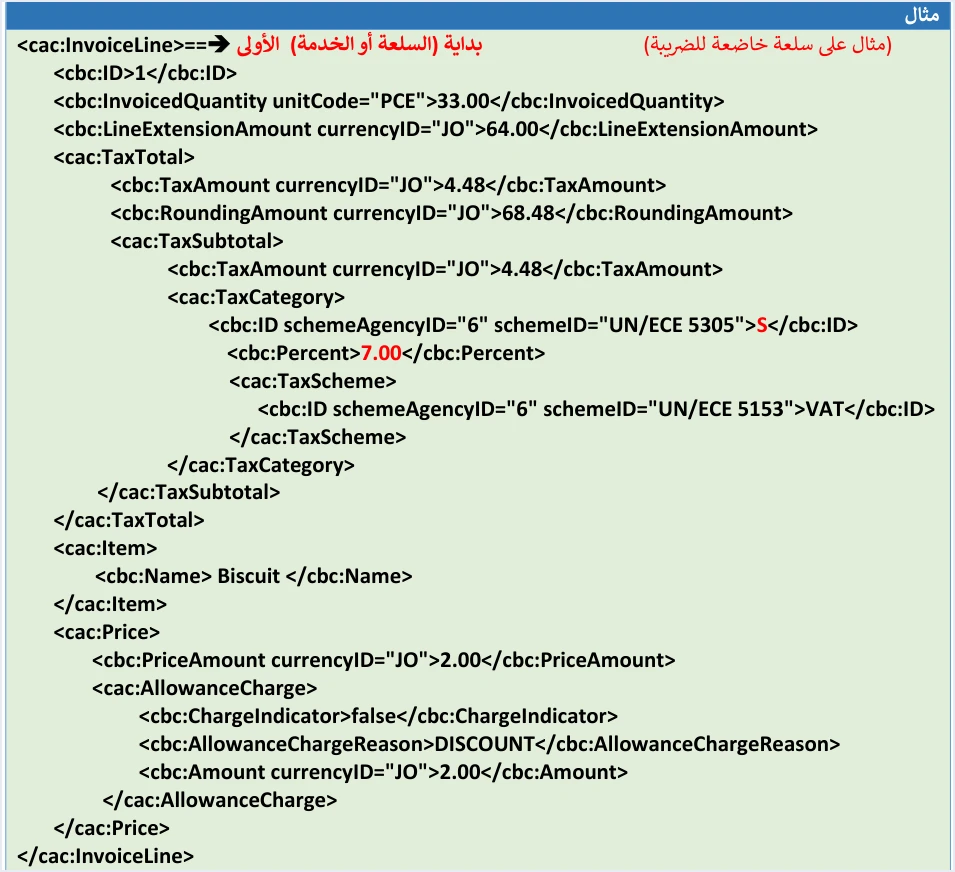
The image above shows the first line of the example, a taxable line under category S at a rate of 7.00. The second line is exempt, with category Z and a rate of 0.00. The table on page 42 defines the categories. S is for a good or service taxed at any rate other than zero, Z is for an exempt good or service, and O is for a good or service taxed at a zero rate. At a rate of 0% the category S is not used; Z is used for an exempt item and O for a zero-rated one. The categories are covered in our article JoFotara Tax Categories: S, Z and O Explained.
Three notes apply to the lines of this example.
- The rate 7.00 is a value from the list of rates that the interface accepts. That list is a validation list, not a table of tax rates, so the example is no evidence of the rate for any particular good.
- The
cbc:TaxableAmountelement insidecac:TaxSubtotalappears in the return templates and the special tax templates, and does not appear in the template of a new general sales tax invoice. - The quantity unit in the example is
PCE, and the guide gives no list of other units and no rule for them.
The line elements and their limits, including the limits on quantity, price and discount, are explained in our article JoFotara InvoiceLine: Invoice Lines and Their Rules.
How this example differs from the guide’s other examples
Setting the example beside the guide’s other examples shows what is added or removed when the invoice type changes. The table below compares them at the block level only.
Scroll the table sideways to see the remaining columns
Checklist before building a cash sales invoice on this example
The purpose of the example is to understand the structure, and the values come from the data of your own invoice. Before your system sends its first invoice built on this example, check the following points.
- The declaration line and the root element are copied as on page 10, with the opening
Invoicetag on one line. - The code
012with the value388matches your registration for General Sales Tax, and the sale is local and paid in cash. - Your system generates the unique identifier in the standard format and stores it, because some of the guide’s examples give identifiers that do not follow the standard format (pp. 14 and 98).
- The date is in the format
yyyy-mm-dd. - The buyer’s name is present if the cash invoice is worth more than JOD 10,000 or its equivalent in foreign currency.
- The income-source sequence in block D is the one tied to the Client ID and Secret Key that your system sends with the request.
- The header discount and the discount total both equal the sum of the line discounts, and the header tax total equals the sum of the line taxes.
- Every line at 0% has category
ZorOaccording to its nature, notS. - Line numbers are unique within the invoice and stored by you, because a return invoice matches lines by them.
After sending, judge the invoice by the value of EINV_STATUS in the response, not by the HTTP status code alone. Some points in the guide’s examples are not meant to be copied literally, such as the identifiers in item 3 of the checklist.
How Qoyod handles the invoice file
When a cash sales invoice is issued from accounting software linked to the system, you do not write this XML file by hand. Qoyod builds the invoice file in UBL 2.1 format with its unique identifier (UUID) and sends it to the National Invoicing System without any manual intervention. This is done through Qoyod’s integration with the National Invoicing System.
- A check before sending. Qoyod checks each invoice at field level as it is created, covering the tax number, the document type and payment method, the General Sales Tax rate and whether the lines are complete, and alerts you to any error before the invoice is sent, to reduce rejections.
- Every invoice’s status in view. ISTD returns the invoice status and any error message, and Qoyod shows them in its status panel, with states that include sent (مرسلة), previously sent (مرسلة مسبقًا) and not sent (لم تُرسل) together with the error message.
- Resending with the same identifier. The status panel lists invoices that were not sent and need to be resent, and when you resend one it keeps the same UUID.
For a wider view of the system and how to connect your business to it, read our article Jordan’s National E-Invoicing System. You can also see what Qoyod offers on our National Invoicing System page.
E-invoicing and full accounting in one system
Qoyod is integrated with the National Invoicing System (JoFotara). You issue your invoice in Jordanian dinars from Qoyod, it is booked to your ledgers automatically and sent to the system, and once it is accepted it comes back with a QR code from the Income and Sales Tax Department.
Frequently asked questions
Is the cash sales invoice XML example in the technical guide ready to send?
The example explains the structure of the file, but it is not a file ready to send. Its values are illustrative and are replaced by the data of your own invoice, and some of the guide’s examples give values that are not safe to copy literally, such as identifiers in a non-standard format. Version 1.5 of ISTD’s technical guide does not state that any test environment is open for testing the file before the real submission.
What does the code 012 mean in a JoFotara invoice?
The code 012 in the name attribute stands for a local invoice, because its first digit is 0, a cash invoice, because its second digit is 1, and an invoice in the General Sales Tax family, because its third digit is 2. It comes with the value 388 for a new invoice.
When is the buyer name required on a cash sales invoice?
The buyer’s name is always required on a receivable invoice, and on a cash invoice worth more than JOD 10,000 or its equivalent in foreign currency. When the name is missing in that case, the message is Bayer name is missing, spelled as the guide writes it.
Why does a general sales tax invoice carry a TaxTotal block in its header?
The guide puts in this block the total General Sales Tax amount of the invoice lines, and it must equal the sum of the line taxes. An income invoice carries no TaxTotal block at all, neither in the header nor in the lines.
Does the technical guide show a complete example of a receivable general sales tax invoice?
The guide shows no complete example of a receivable invoice or of any non-local invoice, and it settles for one-line examples of the type code such as 322 and 422. Any complete file for those types needs a trial run by the developer before it is described as correct.
Which currency does the cash sales invoice use in the example?
The example writes the value JOD in the document currency element and the tax currency element. The guide allows changing the currency at the level of the whole invoice only, and it mentions no exchange-rate element and no way to convert to the dinar.
References
- Income and Sales Tax Department (ISTD), technical guide for integrating with the National Invoicing System through the API, version 1.5 (in Arabic), pp. 10, 12, 13, 14, 32 to 44, 98, 101 and 102.




