




JoFotara developer prerequisites are the data and decisions that the programmer of an accounting or enterprise resource planning (ERP) system collects from the taxpayer before writing a single line of code that connects to the National Invoicing System (JoFotara). The invoice file sent to the Income and Sales Tax Department (ISTD) carries values the developer does not own, such as the tax number, the income-source sequence and the type of tax registration, and some of them are decided by the taxpayer’s registration with ISTD, not by the developer’s choice.
This article gathers those prerequisites into seven ordered items. For each one it gives what ISTD’s technical guide (version 1.5) says and what follows for the design of your system. The article stops at the gathering and design stage. Building the request itself and checking the file before it is sent are separate topics. It also contains no runnable code, only steps and a suggested data structure.
Why JoFotara developer prerequisites start with gathering, not coding
The link to JoFotara works on a model of real-time approval, which is our own description, not ISTD’s wording. The invoice is sent to the system, and the response returns its status, together with a QR code if the invoice was accepted. Some acceptance conditions never appear in the XML file itself. They sit in ISTD’s records about the taxpayer. The technical guide says that code 500 comes back on an error in the tax number or the income-source sequence, and then, less often, on an error in the Client ID or the Secret Key, or on a tax rate that is not among the rates ISTD has approved (p. 101). It also lists a rejection message that appears when the taxpayer sends an invoice type that does not match their tax number or their income-source sequence.
Testing your code alone will not catch these errors, because their source is a wrong configuration value or a wrong assumption about the taxpayer’s registration. So the prerequisites begin by asking the taxpayer and documenting the answers, and design comes after. The seven items below are what a developer needs to know before starting.
- The tax number and the seller name as registered.
- Every active income-source sequence, and one pair of linking credentials per sequence.
- The invoice family that the taxpayer’s registration allows.
- The trade types the taxpayer actually uses, and the payment methods.
- The consumer price permission, granted or not.
- The buyer ID types your system will collect.
- The storage design for what is sent and what comes back.
Item 1. The tax number and the seller name as registered
On every invoice your system fills in the seller’s details in the cac:AccountingSupplierParty element. It holds the country code JO, the seller’s tax number in cbc:CompanyID, and the seller’s name in cbc:RegistrationName, exactly as registered with ISTD. So ask the taxpayer for the tax number and the registered name as they appear in the taxpayer’s records at ISTD, and do not rely on the trade name used in marketing.
The tax number is also the first field on the login screen of the invoicing system, ahead of the username and the password. Through that account the taxpayer reaches the device linking option (ربط الأجهزة), from which the linking credentials in the next item are created.
Item 2. Every active income-source sequence and its linking credentials
The income-source sequence is a mandatory value on every invoice sent through the API, and your system places it in the cac:SellerSupplierParty/cac:Party/cac:PartyIdentification/cbc:ID element. We explained what it means and where the taxpayer finds it in our article JoFotara Income Source Sequence: Where to Find It. What you need here is a list from the taxpayer of every active sequence that will issue invoices, and a clear map of which branch, activity or point of issue in your system corresponds to each sequence.
The linking credentials are created from the taxpayer’s account, not from your system. According to the technical guide, the taxpayer logs in to the invoicing system, chooses device linking (ربط الأجهزة), enters a username and selects the income-source sequence, and the system then generates the Client ID and the Secret Key. So the taxpayer selects the sequence, and the system generates only the linking credentials. The steps to create them on screen are laid out in our article JoFotara Client ID and Secret Key: Device Linking Steps.
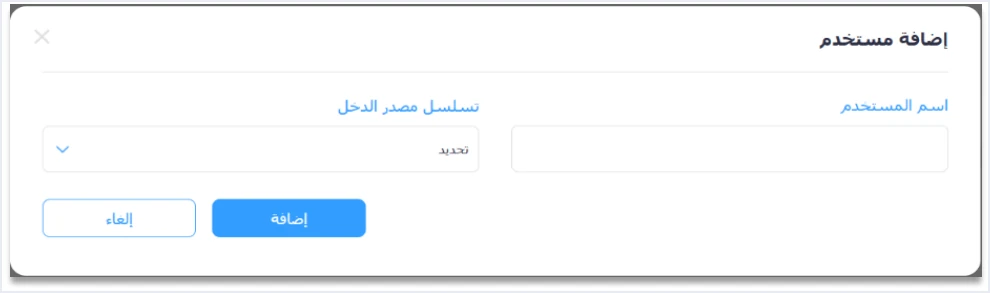
Three things follow for your design.
- One pair of credentials per sequence. The linking credentials are tied to a single income-source sequence. If the taxpayer issues invoices from two sequences, your system needs two pairs, and a clear rule that decides which pair is sent with which invoice.
- The sequence must match its credentials. The rejection message about an unauthorized invoice type can result from a type that does not match the income-source sequence, not only the tax number. So keep the sequence and its credentials as one setting in your system, not as two separate fields.
- Protect the credentials. Guideline 7 asks you to protect the Client ID and the Secret Key and not to leave them exposed in code. The guide puts responsibility for keeping them secret on the taxpayer, who bears full responsibility for any unauthorized use. The joining guide also carries an explicit warning to the taxpayer, quoted below.
«تأكد من حفظ بيانات الربط في مكان آمن وعدم مشاركتها مع أحد.»
In English, the joining guide tells you to keep the linking credentials in a safe place and not to share them with anyone. ISTD publishes this guide in Arabic only; the English here is our rendering, and the Arabic text is the authority.
If the taxpayer has no active income-source sequence at all, the official fix in the questions and answers guide is an internal service request of the type opening a new income source and group (فتح مصدر دخل ومجموعة جديدة), submitted from ISTD’s e-services site. The taxpayer has to finish this before linking begins. It is not something the developer can solve. The registration side is covered in our article JoFotara Registration and the Registration Document.
Before the taxpayer presses device linking, also find out whether the business issues invoices from the portal through sub-users. The questions and answers guide says the Issue an invoice tile (تنظيم فاتورة) is missing for a sub-user because the device linking option was clicked, and that a request to unlink is only for a business that has no accounting system and linked by mistake. The roles of the two accounts are explained in our article JoFotara Sub-User vs Main User: Roles and Permissions. The same guide states that the platform lets you return invoices sent through it in all cases, whether or not the business has linked a system.
Item 3. The invoice family that the registration allows
The technical guide presents XML models by taxpayer type. There are three families, each with a create model and a return model. They are the income invoice for taxpayers not registered for General Sales Tax (GST), the sales invoice for taxpayers registered for it, and the special sales invoice for taxpayers registered for Special Sales Tax (SST).
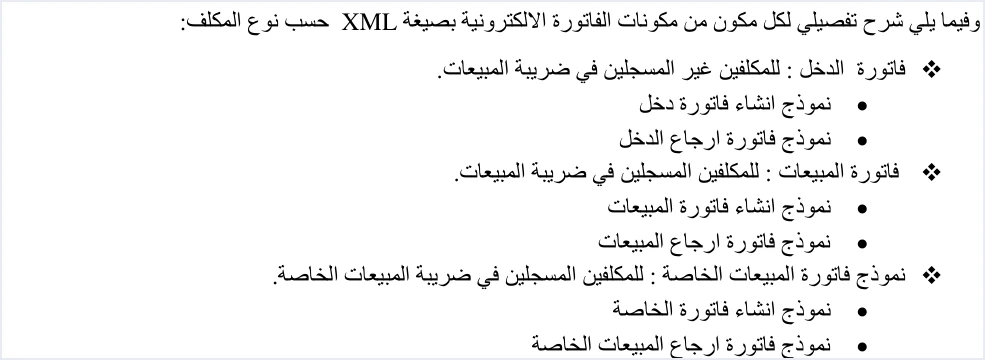
The family appears in the third digit of the name attribute of the cbc:InvoiceTypeCode element. The value 1 is for income, 2 for general sales tax and 3 for special sales tax. The file declares the family but does not decide it. The taxpayer’s registration with ISTD decides it. If the file declares a family that does not match the registration, the message This user is not authorized to submit this type of invoice comes back.
So ask the taxpayer about their registration, and record the answer as a fixed setting in your system instead of inferring it from the item lines. The structure of the file also differs between the families in ways that affect design.
- The income invoice carries no tax block on its lines and no tax total at invoice level. A line in it is a quantity, a price, a discount and a name.
- The general sales tax invoice carries the tax on every line, with its category and rate, and a General Sales Tax total at invoice level. The values the interface accepts in the
cbc:Percentrate field form a validation list, while the rate actually due on a good is set by the General Sales Tax law. - The special sales tax invoice adds the Special Sales Tax. The guide describes it as a value entered without calculations. General Sales Tax is then computed on the line value plus the Special Sales Tax.
Item 4. The trade types and payment methods actually used
The first digit of the name attribute sets the trade type, and the second sets the payment method, where 1 is cash and 2 is receivable. There are six trade types, and not every taxpayer needs all of them. So ask the taxpayer which types the business really uses, and build the rules for each of those, instead of building all six without need.
Scroll the table sideways to see the remaining columns
On general sales tax and special tax invoices of the five non-local types, the guide requires a 0% tax rate and the value O for all goods (p. 42 for General Sales Tax and p. 69 for special tax). On a local invoice at 0%, the category S is not used. The category Z is used for exempt goods and O for goods subject to the zero rate.
The development-zone invoice has a condition your system cannot see, which is that the buyer is registered in a development zone and holds a valid exemption letter entered on the financial system. Your system can check that the buyer’s tax number is present, but whether the registration is valid shows up in the system’s response. Note also that the guide gives no complete example of a receivable invoice or of any non-local type, only one-line examples of the type code. If you build a file for one of them, treat it as untested until it has been sent and accepted.
Settle the invoice currency with the taxpayer as well. The default currency in the guide is the Jordanian dinar (JOD), and the currency can be changed for the whole invoice only, not for a single line.
Item 5. The consumer price permission
The consumer price was added in version 1.5 of the guide. It is the final price to the consumer when that price is taken as the basis for computing the tax, and it is sent for each line in the cac:ItemPriceExtension/cbc:Amount element after the cac:Price element. How to calculate it is covered in our article Consumer Price in JoFotara: Who Needs It, How to Calculate.
The question a developer asks before coding is whether the taxpayer has been granted this permission, because the guide attaches four conditions to it that affect design.
- It is granted on request only, through an electronic transaction that the taxpayer submits from the internal services to the invoicing system technical support.
- It is available only to taxpayers registered for General Sales Tax or Special Sales Tax, so it does not apply to an income invoice.
- It applies to all lines of the invoice, so it is not used for some goods and not others.
- The consumer price must be equal to or greater than the unit price.
If the permission is granted, design the calculation so that a line discount does not reduce the tax base when the consumer price is higher than the unit price, because the tax is then computed on the quantity multiplied by the consumer price.
Item 6. The buyer ID types your system collects
The guide defines three buyer ID types in the schemeID attribute, NIN for the national number, PN for the personal number of a non-Jordanian, and TN for the tax number. The value is digits only. These fields are detailed in our article JoFotara Buyer Identification: NIN, PN and TN.
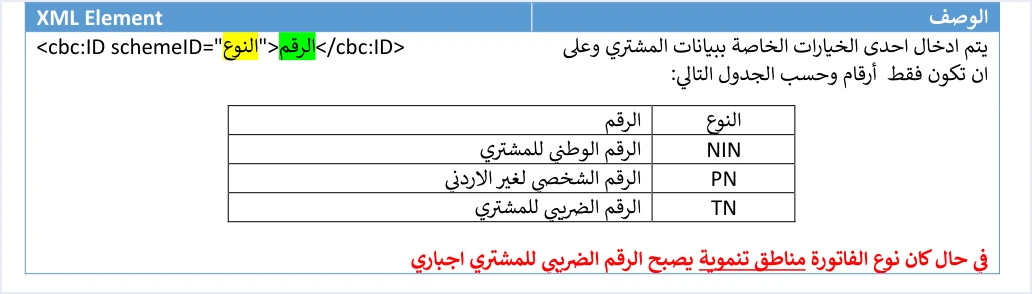
What matters at the prerequisites stage is that your customer records must be able to hold this data before invoicing starts. Ask the taxpayer about their customers, whether they include Jordanian individuals, non-Jordanian individuals or registered businesses, and design the customer card around these rules.
- The
schemeIDID type is mandatory according to the field shading in the guide, and the ID value is optional. - The buyer’s name is always required on a receivable invoice, and on a cash invoice worth more than JOD 10,000 or its equivalent in foreign currency.
- The buyer’s tax number is mandatory on a development-zone invoice.
- If you enter the buyer’s phone number, the guide requires digits only, with at least 9 digits and at most 14. The postal code is at most 5 characters, and the governorate code comes from the guide’s list.
Also store the buyer details as they were sent on each invoice, not as they stand on the customer card later. The guide states that the buyer details on a return invoice must agree with the buyer’s details on the original sales invoice it is linked to, and editing the customer card after the sale does not change what was sent.
Item 7. Storage design before the first submission
Guideline 5 in the guide is titled storing the core data, and it asks you to save the ID, the UUID, the QR code and the EINV_STATUS to ensure tracking and recovery. Guideline 6 asks you to log errors internally in detail, with a simplified message for the user.

The return rules add to what the guideline lists, because a return invoice refers to the original by its number, its unique identifier and its total. The table below is a suggested structure for what your system keeps about each invoice, where each value comes from, and why you need it.
The most important decision here is when the unique identifier is generated. The guide warns that generating a new identifier on a retry creates duplicate invoices. So the identifier must be generated and saved before the first send, and then read from storage on every retry. We explained this in our article JoFotara UUID: Why It Comes Back With the ID. If the QR code of an accepted invoice is lost, resending that invoice with the same number and the same identifier returns the status ALREADY_SUBMITTED with the original QR code.
Standardize the date and time format in your system too. Guideline 9 asks for a uniform time format to avoid processing differences between systems, and every XML example in the guide writes the issue date as yyyy-mm-dd.
What comes after the prerequisites
Once the seven items are complete, you move on to building the request. The guide defines a single submission endpoint, POST https://backend.jofotara.gov.jo/core/invoices/, and three headers, Client-Id, Secret-Key and Content-Type: application/json. The XML file is sent after Base64 encoding, inside a JSON body.
Three notes settle the taxpayer’s expectations before work starts.
- No digital signature from the taxpayer. The guide does not ask the taxpayer for a certificate or a signature, and the signed document comes back from ISTD in the response.
- No test environment in the guide. Version 1.5 does not mention an open test environment for taxpayers, so plan your testing on that basis.
- Do not copy the guide’s examples as they are. Some examples in the guide contain documented defects, and the code sample in it sends a cookie that belongs to an ISTD session, which your system does not send.
Before every send, your system should check the file against the documented rules.
For a wider view of the system and how to connect your business to it, read our article Jordan’s National E-Invoicing System. For the linking path from the side of a Qoyod user, read our article how to connect your system to JoFotara step by step.
What the guide does not settle, so do not build an assumption on it
Some questions a developer asks at the prerequisites stage have no ruling in version 1.5 of ISTD’s technical guide. It is safer to record them as open questions and take them to the invoicing technical support committee at ISTD, instead of building a rule on them.
- Currency conversion. The guide has no element for an exchange rate and no rule for converting a foreign-currency invoice into dinars.
- The currency code value on amounts. The guide’s examples use
currencyID="JO", and the guide does not say whether other values are accepted. - Units of measure. The only unit that appears in the examples, on new-invoice lines, is
PCE, and the guide gives no list of units. - A partly paid invoice. We found no rule in the guide for choosing cash or receivable for it.
If your case depends on any of these points, confirm it with ISTD before you rely on it.
How Qoyod helps
If the business issues its invoices from Qoyod, Qoyod builds the invoice file in UBL 2.1 format with its unique identifier (UUID) and sends it to the National Invoicing System without any manual intervention. The taxpayer needs no digital certificate or signature of their own to send invoices through Qoyod. Qoyod checks each invoice at field level as it is created, covering the tax number, the document type and payment method, the General Sales Tax rate and whether the lines are complete, and alerts you to any error before the invoice is sent, to reduce rejections. The pre-send check is an alert, not a guarantee. The final decision rests with ISTD.
ISTD returns the invoice status and any error message, and Qoyod shows them in its status panel. The status panel lists invoices that were not sent and need to be resent, and when you resend one it keeps the same UUID. What stays with the taxpayer are the prerequisites that concern the registration with ISTD, such as the type of tax registration, the income-source sequences, and the request for the consumer price permission if the business needs it. To see the full integration, visit our National Invoicing System page.
E-invoicing and full accounting in one system
Qoyod is integrated with the National Invoicing System (JoFotara). You issue your invoice in Jordanian dinars from Qoyod, it is booked to your ledgers automatically and sent to the system, and once it is accepted it comes back with a QR code from the Income and Sales Tax Department.
Frequently asked questions
What is the first thing a developer asks the taxpayer for before coding the link to JoFotara?
The developer first asks for the tax number and the seller name as registered with the Income and Sales Tax Department, and then for the list of active income-source sequences that will issue the invoices. These values go into every invoice file, and an error in the tax number or in the income-source sequence is the first cause the technical guide lists for code 500.
Does every income-source sequence need its own linking credentials?
Each sequence does need its own credentials. The taxpayer selects the income-source sequence when creating the link from the device linking option (ربط الأجهزة), and the system generates the Client ID and the Secret Key, which are tied to that one sequence. A taxpayer who issues invoices from more than one sequence therefore needs one pair per sequence, and the taxpayer’s system must tie each invoice to the right sequence and its credentials.
How does a developer know which invoice type the taxpayer may send?
The developer learns it from the taxpayer’s registration with ISTD. The income invoice is for those not registered for General Sales Tax, the sales invoice is for those registered for it, and the special sales invoice is for those registered for Special Sales Tax. The file declares the type in a code of three digits, but sending a type that does not match the tax number or the income-source sequence returns a rejection message saying the user is not authorized to submit that type.
Can any taxpayer use the consumer price on invoices?
Only a taxpayer who has been granted the permission on request can use it. The taxpayer submits an electronic transaction from the internal services to the invoicing system technical support to have it activated. It is available only to taxpayers registered for General Sales Tax or Special Sales Tax, and it applies to all lines of the invoice.
What data should be saved after every submission?
Guideline 5 in the technical guide asks you to save the ID, the UUID, the QR code and the EINV_STATUS to ensure tracking and recovery. To these you add the number of each line, the invoice total and the buyer details, because a return invoice is built on them.
References
- Income and Sales Tax Department (ISTD), technical guide for integrating with the National Invoicing System through the API, version 1.5 (in Arabic), 2026.
- Income and Sales Tax Department (ISTD), procedures guide for joining the Jordanian National Electronic Invoicing System, 2026 edition (in Arabic).
- Income and Sales Tax Department (ISTD), procedures guide for issuing an invoice in the Jordanian National Electronic Invoicing System, 2026 edition (in Arabic).
- Income and Sales Tax Department (ISTD), questions and answers guide for the National Invoicing System, 2026 (in Arabic).




