




JoFotara tax categories are three values, S, Z and O, that the seller’s system places on every line of a sales tax invoice in the National Invoicing System (JoFotara). They tell the Income and Sales Tax Department (ISTD) how the goods or service on that line are treated. S marks a line subject to a rate other than zero, Z marks an exempt line, and O marks a zero-rated line. ISTD’s technical guide calls this value the classification and takes its codes from the international UN/ECE 5305 code list.
This article explains what each category means and where it sits in the XML file. It covers the practical difference between Z and O, even though both carry the same rate, and the invoice types for which the guide requires a 0% rate. It then works through the guide’s own example of an invoice that combines a taxable line and an exempt line, and shows how Special Sales Tax travels in a separate block under the OTH scheme.
The article is written for anyone who builds or reviews the invoice file, whether a developer linking accounting software to the system or an accountant who wants to understand why a line was rejected. Everything in it comes from version 1.5 of the technical guide that ISTD published.
What the JoFotara tax categories S, Z and O mean
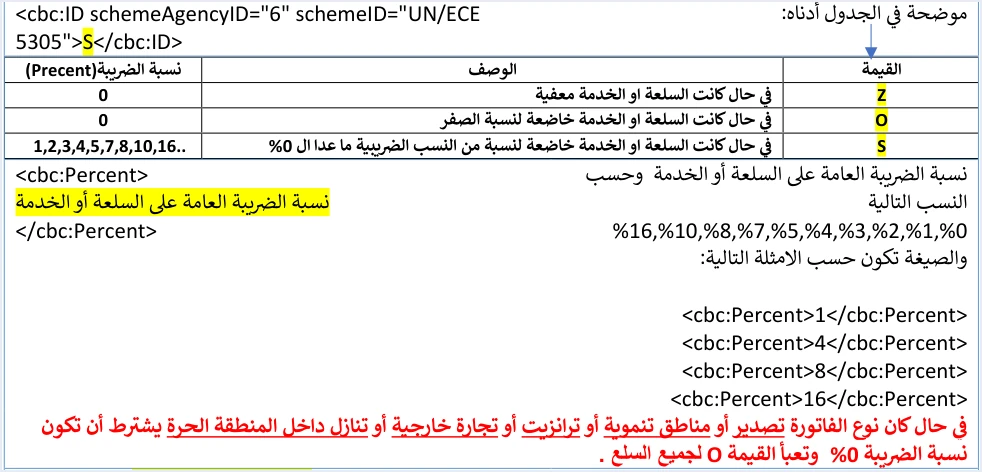
On page 42, the technical guide shows a three-row table of classification values. It ties each value to a description and a tax rate. The table below sets out what it contains.
These three rows set two rules that govern how the field is filled. First, category S never goes with a 0% rate, because it is reserved for a line that carries a positive rate. Second, a line with a 0% rate takes one of two values, Z if the goods or service are exempt and O if they are zero-rated. The guide documents no fourth value for this field.
The category belongs to the line, not to the invoice. Each line carries its own category and its own rate, so a single invoice can combine lines from different categories, as the example later in this article shows.
Where the category sits in the invoice file
The category is written inside the tax block of each line, in the cbc:ID element that carries the attribute schemeID="UN/ECE 5305". The rate element cbc:Percent follows it. Then comes the tax scheme, in an element with the attribute schemeID="UN/ECE 5153", whose value is VAT on a general sales tax invoice. This is the form the guide gives for a taxable line at a rate of 16.
<cac:TaxSubtotal>
  <cbc:TaxAmount currencyID="JO">...</cbc:TaxAmount>
  ...
    <cbc:ID schemeAgencyID="6" schemeID="UN/ECE 5305">S</cbc:ID>
    <cbc:Percent>16</cbc:Percent>
    <cac:TaxScheme>
      <cbc:ID schemeAgencyID="6" schemeID="UN/ECE 5153">VAT</cbc:ID>
    </cac:TaxScheme>
  ...
</cac:TaxSubtotal>
On an exempt line, the category letter changes to Z and the rate to 0. On a zero-rated line, the letter becomes O and the rate 0. The tax scheme stays VAT in both cases. The tax amount on the line follows the formula the guide gives, (quantity × unit price − discount) × tax rate, so it is zero on both the Z line and the O line.
An income invoice does not carry this block at all. Its lines hold only the quantity, the price, the discount and the name, with no category and no rate. The three categories therefore belong to general sales tax invoices and special tax invoices.
The difference between Z and O at a 0% rate
An exempt line and a zero-rated line carry the same rate in the file, and the guide accepts both. The guide’s own general sales tax invoice example includes an exempt line sent with the value Z and a rate of 0.00. So it is wrong to say that JoFotara rejects category Z at a 0% rate on a local invoice.
What the guide rejects is a 0% rate combined with category S. Its explanation of this case, on page 102, reads as follows.
«نسبة الضريبة حينما تكون 0% يجب ان يكون ال Category الخاص بالضريبة قيمته O وليس S».
In English, the explanation says that when the tax rate is 0%, the value of the tax category must be O and not S. ISTD publishes this guide in Arabic only; the English here is our rendering, and the Arabic text is the authority.
Reading the table and the example together gives the practical rule. A line with a 0% rate is never sent with category S. It is sent with Z if it is exempt and with O if it is zero-rated. The rejection message tied to this case is General tax percentage must be zero.
For a given line on a local invoice, the technical guide does not settle the choice between Z and O. That choice follows how the General Sales Tax Law treats the goods or service. The difference in tax effect between exempt goods and zero-rated goods is explained in our article General Sales Tax in Jordan: Rates, Registration, Filing.
Rate values the API accepts with category S
On page 42, the guide sets the values that the rate field cbc:Percent accepts on new sales invoices. They are 0, 1, 2, 3, 4, 5, 7, 8, 10 and 16. Zero goes with categories Z and O, and every other value goes with category S.
This list is a technical validation list. It holds the values the API accepts at submission, and it is not a table of the tax rates imposed on goods and services. The rate that applies to a given item is set by the General Sales Tax Law, and the seller’s system then writes it into the field. A value that appears in the list does not mean the law imposes a rate of that size on any item.
If a line is sent with a rate outside this list, the request may come back with status code 500. The guide names this among the causes of that code, after an error in the tax number or the income-source sequence.
Invoice types where the guide requires a 0% rate
The guide codes the invoice type in the name attribute of the invoice type element, and gives each type a conditions column. On general sales tax and special tax invoices, the local invoice has no condition. For the other five types, the guide requires a tax rate of 0%.
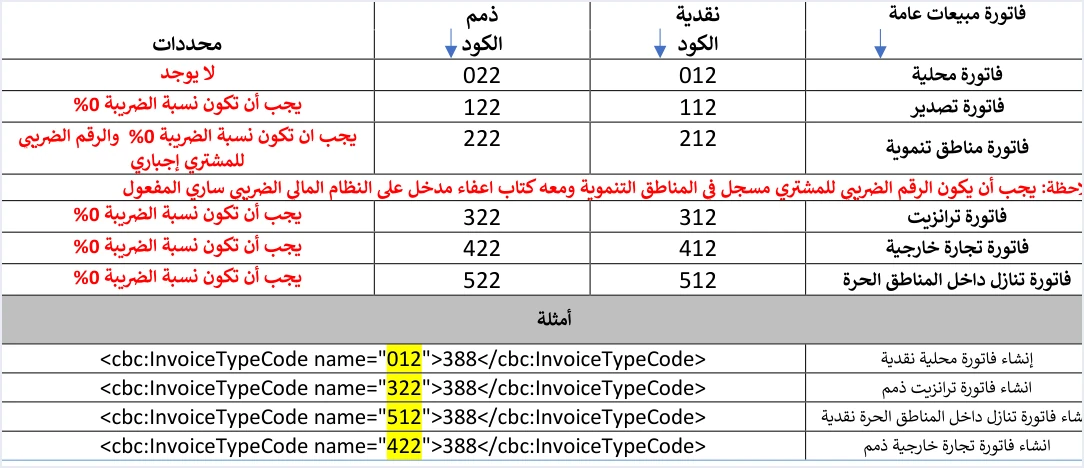
The guide states the category for these types in plain words. In the invoice lines table, under the rate element cbc:Percent, page 42 carries the following note.
«في حال كان نوع الفاتورة تصدير أو مناطق تنموية أو ترانزيت أو تجارة خارجية أو تنازل داخل المنطقة الحرة يشترط أن تكون نسبة الضريبة 0% وتعبأ القيمة O لجميع السلع».
In English, the note says that if the invoice type is export, development zones, transit, foreign trade or assignment inside the free zone, the tax rate must be 0% and the value O must be entered for all goods. ISTD publishes this guide in Arabic only; the English here is our rendering, and the Arabic text is the authority.
The same text appears again in the special tax invoice table on page 69. Every line of these invoices is therefore sent at 0% with category O. The choice between Z and O by the nature of the item belongs to the local invoice. The export case is covered on its own in our article Export Invoice JoFotara: Code, 0% and Category O.
The development zones type has further conditions that have nothing to do with the category. The buyer’s tax number must be stated, and the buyer must be registered in the development zones. The guide adds that the exemption letter must be valid and entered on the financial system. Income invoices of these types carry no rate condition, because they carry no tax block at all.
A mixed invoice with category S and category Z
In its general sales tax invoice example, the guide gives a single invoice with two lines in two different categories. It is a good example for seeing how the totals are worked out when the category changes from one line to the next.
Scroll the table sideways to see the remaining columns
The invoice totals then come out as follows.
- Total before tax and discount. 116.000, the sum of quantity × unit price on both lines.
- Total discount. 2.000, the discount on the first line alone.
- Total General Sales Tax. 4.480, from the first line alone, because the tax on the exempt line is zero.
- Amount payable. 118.480, the sum of the two line totals.
The lesson of this example is that the exempt line counts in the pre-tax amounts and in the amount payable, but not in the tax total. If the seller’s system calculates the tax at invoice level with a single rate, instead of adding it up from the lines, the totals will not match, and the invoice may be rejected for that reason.
One warning applies here. The guide’s return invoice example does not match the original invoice, because it turns the exempt Z line into S at a rate of 10. Do not copy the return example as it stands. The guide requires the line number, name and price on a return invoice to be the same as on the original invoice.
Special Sales Tax and the OTH scheme
On a special tax invoice, each line carries two TaxSubtotal blocks. The first is for Special Sales Tax (SST). Its scheme is OTH, its category is S, and it has no cbc:Percent element. The second is for General Sales Tax. Its scheme is VAT, and it holds the category and the rate as on any other line. The OTH block comes before the VAT block.
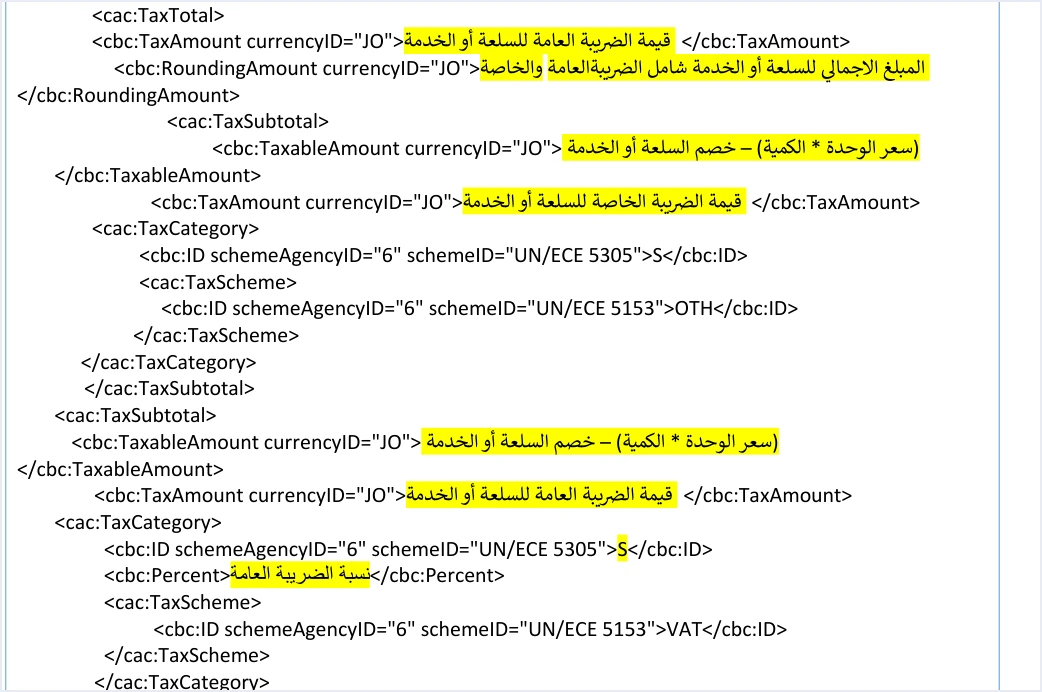
The missing rate element in the OTH block is deliberate. The guide puts it this way.
«الضريبة الخاصة هي قيمة يتم إدخالها دون عمليات حسابية».
In English, the guide says that Special Sales Tax is a value entered without any calculation. ISTD publishes this guide in Arabic only; the English here is our rendering, and the Arabic text is the authority.
In other words, it is an amount written as it is, not a rate multiplied by a price. General Sales Tax is then calculated on the line amount after discount plus the Special Sales Tax. In the guide’s example, the line comes to 495 after discount and the Special Sales Tax is 10. General Sales Tax is (495 + 10) × 10% = 50.500, so the line total is 555.500. The tax amount on the line carries General Sales Tax alone, while the line total adds up all three amounts.
Common mistakes with JoFotara tax categories
- Sending a 0% rate with category S. The guide’s table reserves
Sfor rates other than zero, and a zero-rate line takesZorO. - Turning every zero-rate line into O. The guide accepts
Zfor an exempt item, and its own example sends an exempt line with the valueZ. On a local invoice, choose the category by how the item is treated, not by the rate alone. On export invoices and the four other types, the guide requiresOfor all goods. - Sending a line with category S on an export or transit invoice. These types require a 0% rate, so a line with a positive rate cannot appear on them.
- Calculating the tax on the invoice total with a single rate. The tax is calculated for each line with its own category and rate, and then added up.
- Adding a rate element to the OTH block. The guide’s template for the Special Sales Tax block has no such element, and the Special Sales Tax in it is an entered amount.
- Reading the list of accepted values as the rates in the law. The list is a technical check on the field, and the correct rate for each item is set by the law.
How Qoyod handles line tax
When the invoice is issued from accounting software linked to the system, you do not type each line’s category into the XML file yourself. That is the job of Qoyod’s integration with the National Invoicing System. Qoyod builds the invoice file in UBL 2.1 format with its unique identifier (UUID) and sends it to the National Invoicing System without any manual intervention.
- A check before sending. Qoyod checks each invoice at field level as it is created, covering the tax number, the document type and payment method, the General Sales Tax rate and whether the lines are complete, and alerts you to any error before the invoice is sent, to reduce rejections.
- The status of each invoice in view. ISTD returns the invoice status and any error message, and Qoyod shows them in its status panel.
- Resending with the same identifier. The status panel lists invoices that were not sent and need to be resent, and when you resend one it keeps the same UUID.
The pre-send check is an alert, not a guarantee. It covers the four fields listed above. Accepting the invoice remains with JoFotara alone.
For a wider view of the system and how to connect your business to it, read our article Jordan’s National E-Invoicing System. You can also see how Qoyod works with JoFotara on our National Invoicing System (JoFotara) page.
E-invoicing and full accounting in one system
Qoyod is integrated with the National Invoicing System (JoFotara). You issue your invoice in Jordanian dinars from Qoyod, it is booked to your ledgers automatically and sent to the system, and once it is accepted it comes back with a QR code from the Income and Sales Tax Department.
Frequently asked questions
What do the JoFotara tax categories S, Z and O mean?
S marks a line subject to a tax rate other than zero, Z marks an exempt line, and O marks a zero-rated line. The seller’s system writes the value on every line of a sales tax invoice, using the codes of the international UN/ECE 5305 list.
Does JoFotara reject category Z at a 0% rate?
The technical guide does not reject it on a local invoice. Its table accepts Z for an exempt item and O for a zero-rated item, both at a rate of 0. What is rejected is a 0% rate sent with category S. On export invoices and the four other types, the guide requires O for all goods.
Which category do I use on an export invoice?
Category O. The guide states that on export, development zones, transit, foreign trade and assignment inside the free zone invoices, the tax rate must be 0% and the value O must be entered for all goods, so S cannot be used on them.
Can one invoice combine lines from different categories?
Yes, because the category is written for each line separately. The guide’s general sales tax invoice example combines a line with category S at a rate of 7 and a line with category Z at a rate of 0.
Is the guide’s list of accepted rates the list of sales tax rates in Jordan?
No, it is the set of values the API accepts in the rate field at submission. The rate that applies to each item of goods or service is set by the General Sales Tax Law.
Which category does the Special Sales Tax block carry?
The Special Sales Tax block carries the OTH scheme and category S, with no rate element, because Special Sales Tax is an amount entered as it is. This block comes before the General Sales Tax block on the same line.
References
- Income and Sales Tax Department (ISTD), technical guide for integrating with the National Invoicing System through the API, version 1.5 (in Arabic), 2026.
- General Sales Tax Law No. 6 of 1994, as amended (in Arabic).
- ISTD’s National Invoicing System guides (in Arabic)




