




Your invoice reaches the National Invoicing System (JoFotara), and the response comes back with a field called EINV_QR that holds a value your software never wrote. That value is the JoFotara QR code issued by the Income and Sales Tax Department (ISTD), the code that comes back with an invoice once it is accepted. A developer building the integration for the first time may assume the software has to build the code itself and then place it on the invoice.
The short answer is that the code is not generated in the taxpayer’s system. The National Invoicing System returns it in the EINV_QR field after it accepts the invoice. It also comes back with the ALREADY_SUBMITTED status when an already accepted invoice is sent again, and it does not come back with a rejected invoice. ISTD’s technical guide asks you to check that the code is present in the response, so that receipt and approval of the invoice are complete, and then to show it on the seller’s invoice.
This article covers where the field sits in the system’s response, where the code comes from, when it comes back and when it does not, what the guide asks of you once it arrives, and what the guide leaves unsaid, where nothing should be built on a guess.
What the JoFotara QR code (EINV_QR) is
Every invoice sent through the API gets a response from the system, and the technical guide (version 1.5, p. 97) describes the elements of that response one by one. One of them is dedicated to the code. Here is a summary of the elements as the guide presents them.
EINV_STATUS. The approved status of the invoice, which is what decides acceptance or rejection.EINV_RESULTS. The result of the check, with arrays for information, warnings and errors.EINV_MESSAGE. The error details or the reason for rejection.EINV_QR. The QR code of the approved invoice.EINV_NUM. The invoice number that was sent.EINV_INV_UUID. The unique identifier of the invoice.EINV_SINGED_INVOICE. The signed invoice that the system returns, which appears in the response examples in the guide (pp. 98 to 100). The guide spells the name this way, so write it in your software exactly as it appears.
So EINV_QR is part of the system’s response, not part of the file you send. On the same page the guide lists six purposes of the response, among them retrieving the QR code, alongside confirming that the submission succeeded, learning whether the invoice was accepted or rejected, showing the reasons for errors, retrieving the unique identifier, and letting linked systems process the result automatically. Retrieving the code is therefore a stated purpose of the response in the guide itself, not a side effect of it.
In everyday speech people say “QR code” or “quick response code”, and the guide uses both terms, sometimes writing QR CODE in capitals. All of them mean one thing, the value that comes back in the EINV_QR field.
Where the JoFotara QR code comes from and why your software does not generate it
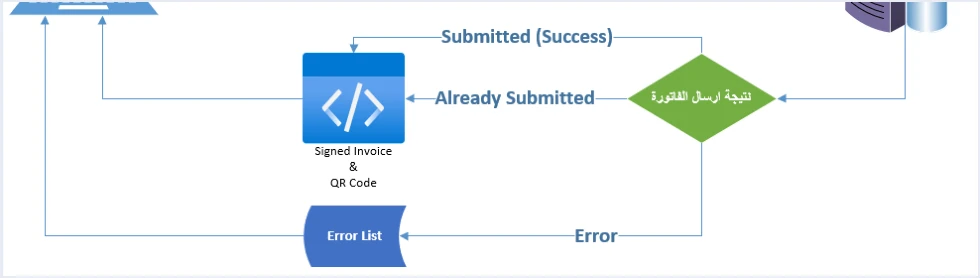
The technical guide (p. 9) draws the submission path in one diagram. The taxpayer’s system builds the invoice file as XML, encodes it in Base64, places it inside a JSON file, and sends it to the National Invoicing System with the Client ID and the Secret Key in the request header. After that comes the “result of submitting the invoice”, which has three exits in the diagram.
- Submitted (Success). The “Signed Invoice & QR Code” comes back from it to the taxpayer’s system, that is, the signed invoice and the QR code.
- Already Submitted. The same two things come back.
- Error. An “Error List” comes back from it, that is, a list of errors, with no code.
The direction of the arrows is the heart of the matter. The code travels from the National Invoicing System to the taxpayer’s system, never the other way. The file your software sends carries no code at all, because the code does not exist until the system has looked at the invoice and accepted it. The step before submission is covered in our article JoFotara Base64: The Invoice File Inside JSON.
Three practical consequences follow for anyone building the integration.
- Do not build the code yourself. The system returns the code after acceptance, and it is not generated locally. A code your software makes from the invoice data is not the code the system returned.
- Do not put a code on the invoice before the response. Before the response comes back there is no code to place, because the invoice has not been accepted at that stage.
- You need no digital signature of your own. The guide does not ask the taxpayer to sign the invoice digitally. The system is the one that returns the signed invoice in the
EINV_SINGED_INVOICEfield, next to the code.
In the part of the guide about the app that reads the code, the guide says that the result of a scan may be an error message when the code is invalid or unreadable for any reason, for example because it is not linked to the National Invoicing System or was generated incorrectly. So the guide itself names incorrect generation as a cause of that result.
When the JoFotara QR code appears in the response
The EINV_QR field is always among the response elements, but its value follows the invoice status in EINV_STATUS. The guide gives that status three values (p. 98), and the table below gathers what the guide says about the code in each of them.
Scroll the table sideways to see the remaining columns
In short, the code appears in the response when the invoice is accepted, whether at the first accepted submission or at a later submission of the same invoice. It does not appear when the invoice is rejected, because all the fields tied to acceptance come back empty. Reading the reasons for rejection and fixing them is covered in our article JoFotara error codes.
Do not judge the outcome by the technical response code alone. The fourth guideline in the guide (p. 104) asks you to determine the final status of the invoice from EINV_STATUS, not from the technical response code. The guide then adds a requirement about the code itself, which is the subject of the next section.
The code must be present in the response for the invoice to count as received
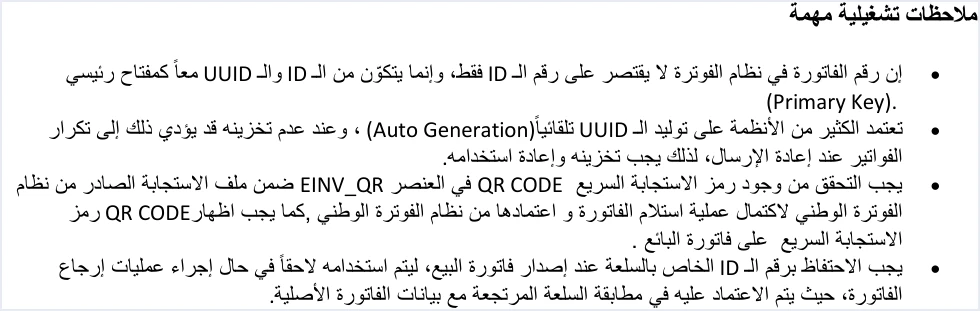
The guide does not stop at saying that the system returns the code. It makes the presence of the code in the response an explicit requirement. In the operational notes (p. 104) this text appears.
«يجب التحقق من وجود رمز الاستجابة السريع QR CODE في العنصر EINV_QR ضمن ملف الاستجابة الصادر من نظام الفوترة الوطني لاكتمال عملية استلام الفاتورة واعتمادها من نظام الفوترة الوطني، كما يجب اظهار QR CODE رمز الاستجابة السريع على فاتورة البائع».
In English, the guide says the presence of the QR code in the EINV_QR element of the response file from the National Invoicing System must be checked, for the receipt of the invoice and its approval by the system to be complete, and that the QR code must also be shown on the seller’s invoice. ISTD publishes this guide in Arabic only; the English here is our rendering, and the Arabic text is the authority.
The text contains two duties in sequence, and each one affects how you design your software.
- The first duty concerns the response. Your software has to read the
EINV_QRfield and confirm it holds a value before it treats the invoice as complete. A response that comes back without a code is not enough to regard the invoice as received and approved. - The second duty concerns the invoice. The code that came back is shown on the seller’s invoice. The verb in the guide is “show”.
The fifth guideline in the guide (p. 104) goes with this requirement. It asks you to store the invoice number (ID), the unique identifier (UUID), the QR code and the EINV_STATUS value, for tracking and for retrieval later. So the code is not a value you display once and forget. It is a record you keep with the invoice. Our article JoFotara Guidelines for Linked Systems: All Ten Explained brings these texts together in one place.
If the code was not saved at the first submission
The response may reach your software and the code still fail to be saved, or the connection may drop after the invoice was accepted and before the response arrived. In both cases the system holds an accepted invoice and you hold no code. The guide handles this situation in plain words in its definition of the ALREADY_SUBMITTED status (p. 99).
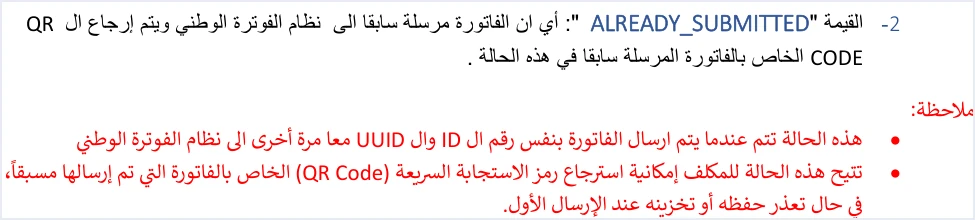
The second note under the definition reads as follows.
«تتيح هذه الحالة للمكلف إمكانية استرجاع رمز الاستجابة السريعة (QR Code) الخاص بالفاتورة التي تم إرسالها مسبقًا، في حال تعذّر حفظه أو تخزينه عند الإرسال الأول».
In English, the guide says this status lets the taxpayer retrieve the QR code of an invoice that was sent earlier, if saving or storing it at the first submission was not possible. ISTD publishes this guide in Arabic only; the English here is our rendering, and the Arabic text is the authority.
The way to use it is to resend the invoice with its original number (ID) and its original unique identifier (UUID), and the response then returns the original code. That does not work if your software generates a new identifier, which is why the guide asks you to keep the identifier and reuse it, as our article JoFotara UUID: Why It Comes Back With the ID explains, including the recovery steps for the ALREADY_SUBMITTED status.
Reading the code once it is shown on the invoice
After the code is shown on the invoice, the guide names one way to read it and check it, the Sanad app. The guide says this on p. 106.
«في حال رغبة المكلف بالتحقق من رمز الاستجابة السريع (QR Code)، يمكنه ذلك من خلال مسحه باستخدام تطبيق سند فقط من خيار التحقق من المستندات الرقمية».
In English, the guide says that a taxpayer who wants to verify the QR code can do so only by scanning it with the Sanad app, through its digital document verification option (التحقق من المستندات الرقمية). ISTD publishes this guide in Arabic only; the English here is our rendering, and the Arabic text is the authority. The word “only” is in the text itself, and the guide names no other app for reading the code.
If the document is valid, the app shows the basic invoice details that the guide says are held inside the code, among them the invoice total, its number, its date and the seller’s tax number. The full steps and the two possible outcomes are in our article how to verify an e-invoice with the Sanad app in Jordan.
What the guide does not say about the code
Some questions about the code come up when you build the integration, and the technical guide does not answer them. Where it is silent, nothing should be built on a guess, so here is the list.
- The structure of the code content. The guide says the basic invoice details are inside the code, but it does not document how they are arranged inside it or the format of each field. Do not write software that unpacks the code and depends on a particular order.
- The encoding of the signed invoice. The system returns the signed invoice in
EINV_SINGED_INVOICE, and the guide does not explain its encoding, what it contains or how to decode it. Store it as it came back. - The size, position and look of the code on the invoice. The text this article relays asks for the code to be shown on the seller’s invoice, and it sets no size, position or design.
- The response example in the guide. The guide’s examples are illustrative, and they include a sample value for
EINV_QR. Do not copy that value into a real invoice, or into a test that you count as proof your software works.
Saying the guide does not cover a point here does not mean ISTD has no answer. It means the answer is not in the published technical guide. For questions, the guide (p. 104) points to the invoicing technical support committee at ISTD, through its website istd.gov.jo.
QR code checklist for your system
If you are building or reviewing the integration, these are questions to go through in order, and each one rests on a text in the guide.
- Does your software read the code from the
EINV_QRfield in the response, and not generate it itself? - Does your software judge the invoice by the
EINV_STATUSvalue, not by the technical response code alone? - Does your software confirm that
EINV_QRholds a value before it treats the invoice as complete? - Does your software store the code with the invoice number, its unique identifier and its status?
- Is the code shown on the seller’s invoice?
- Does your software keep the unique identifier before sending, so that you can recover the code when needed by resending the invoice with the same number and the same identifier?
- Does your software treat the
ALREADY_SUBMITTEDstatus as an earlier acceptance that comes back with the code, not as an error?
How Qoyod handles the QR code
Everything above is work for the software that is linked to the National Invoicing System. Qoyod builds the invoice file in UBL 2.1 format with its unique identifier (UUID) and sends it to the National Invoicing System without any manual intervention. Qoyod does not generate the QR code. Once ISTD accepts the invoice it returns a QR code, and Qoyod shows that code on the invoice.
ISTD returns the invoice status and any error message, and Qoyod shows them in its status panel, with states that include sent (مرسلة), previously sent (مرسلة مسبقًا) and not sent (لم تُرسل) together with the error message. The status panel lists invoices that were not sent and need to be resent, and when you resend one it keeps the same UUID. For a wider view of the system and how to connect your business to it, read our article Jordan’s National E-Invoicing System. You can also see what Qoyod offers on our National Invoicing System page.
E-invoicing and full accounting in one system
Qoyod is integrated with the National Invoicing System (JoFotara). You issue your invoice in Jordanian dinars from Qoyod, it is booked to your ledgers automatically and sent to the system, and once it is accepted it comes back with a QR code from the Income and Sales Tax Department.
Frequently asked questions
What is the JoFotara QR code (EINV_QR)?
It is the QR code that the National Invoicing System returns in the EINV_QR field of its response to an invoice submission. The technical guide describes it as the QR code of the approved invoice, and it comes back after the invoice is accepted.
Does my accounting software generate the QR code itself?
No. Your software sends the invoice file, and the system returns the code after it accepts the invoice, as the submission diagram in the technical guide shows (p. 9).
When does the QR code appear in the system’s response?
It appears when the invoice status is SUBMITTED, that is, when the invoice is accepted for the first time. It also appears with ALREADY_SUBMITTED when an accepted invoice is sent again with the same ID and UUID. The field comes back empty with NOT_SUBMITTED.
Is a technical response code of 200 enough to treat the invoice as accepted?
It is not enough. The guide asks you to determine the final status from EINV_STATUS, and to check that the code is present in EINV_QR for the receipt and approval of the invoice to be complete.
What do I do if I did not save the QR code of an accepted invoice?
Resend the invoice with its original number and its original unique identifier. The response comes back with the ALREADY_SUBMITTED status and the original code, and you store the code and show it on the seller’s invoice.
Does the technical guide explain what is inside the QR code and how its data is ordered?
It does not. The guide says the basic invoice details are inside the code and are read by the Sanad app, but it does not document their order or format inside the code.
References
- Income and Sales Tax Department (ISTD), technical guide for integrating with the National Invoicing System through the API, version 1.5 (in Arabic), pp. 9, 97, 98, 99, 100, 104, 106 and 107.




