




A developer who connects accounting software to Jordan’s National Invoicing System (JoFotara) usually starts from the technical guide issued by the Income and Sales Tax Department (ISTD). After the introduction to linking, the first thing the guide offers is the JoFotara income invoice XML example, which runs from page 10 to page 21 of version 1.5. An income invoice carries no tax, so whole blocks that appear in the general sales tax and special tax examples are missing from it.
This article walks through the example block by block, in the order the guide uses. For each element it says what the element is, what kind of value goes in it and which rule governs it, and then it looks at what the file leaves out and what that does to the totals. It is a reading map, not a file ready to send. Every XML snippet in it is short, and its values are descriptive phrases, not real data. None of these examples was submitted to the system as a test. Version 1.5 of ISTD’s technical guide does not state that a test environment is open to taxpayers or developers.
What the JoFotara income invoice XML example is and where it sits in the guide
The technical guide groups its examples by tax family, and the section headed “First, the income invoice” («أولًا: فاتورة الدخل») comes before the others. Page 10 opens it with the first line of the file and the root element. Six blocks follow, lettered A to F. They are the basic invoice information, the seller details, the buyer details, the income-source sequence, the totals and the lines.
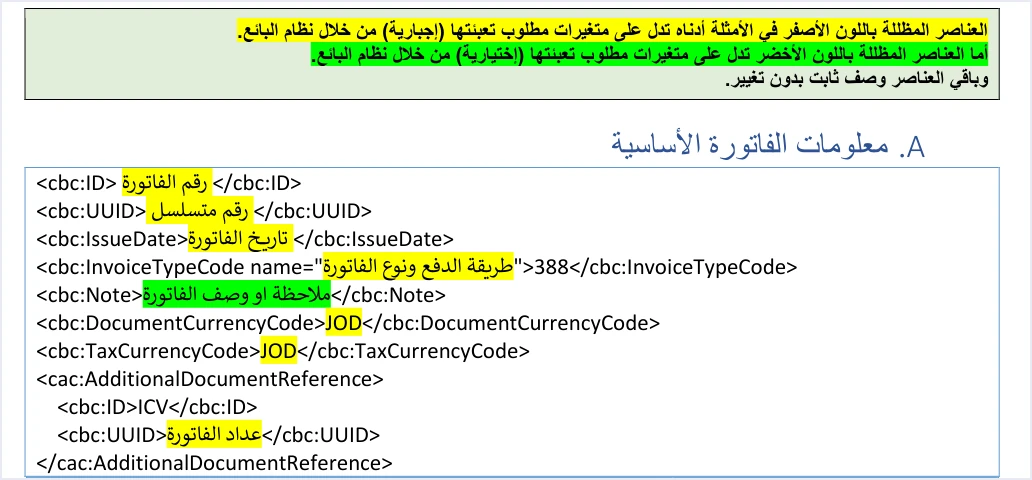
On page 12 the guide explains how to read every template by color. Elements shaded yellow are variables that the seller’s system must fill in (mandatory), elements shaded green are optional variables, and the remaining elements are fixed description with no change. This is the wording of the guide.
«وباقي العناصر وصف ثابت بدون تغيير»
In English, the guide says the rest of the elements are fixed description with no change. ISTD publishes this guide in Arabic only; the English here is our rendering, and the Arabic text is the authority. This shading is the only marker in version 1.5 of what is mandatory and what is optional. How to read it across the whole file is explained in our article JoFotara Mandatory Fields.
Who issues an income invoice, and when, is a separate subject from the structure of the file. It is covered in our article Income Invoice in JoFotara. This article stays within the file itself.
A map of the example blocks from page 10 to page 21
The table below lists the blocks of the example in the order of the guide, with the pages each occupies and its main elements. The sections after it explain each block in turn.
Scroll the table sideways to see the remaining columns
The start of the file and the basic invoice information
The file opens with the XML declaration line, in UTF-8 encoding, and then the root element Invoice with the four namespace declarations the guide lists on page 10. The guide requires the opening Invoice tag to come on one line, and an invoice that breaks the rule is rejected with the message Invalid Invoice Minification. The page prints the tag over four lines and the guide does not say whether those are real line breaks or a wrap, so the one-line reading is ours. After the tag comes cbc:ProfileID with the fixed value reporting:1.0 on every invoice. What the UBL 2.1 standard requires of this structure is explained in our article JoFotara UBL 2.1, and the one-line rule in our article JoFotara XML Minification.
Block A, the basic invoice information on pages 12 to 14, comes next. The snippet below shows the order of its elements, with descriptive phrases in place of the variables.
<cbc:ID><!-- the invoice number in your system --></cbc:ID>
<cbc:UUID><!-- a unique identifier your system generates and stores --></cbc:UUID>
<cbc:IssueDate><!-- the invoice date in the format yyyy-mm-dd --></cbc:IssueDate>
<cbc:InvoiceTypeCode name="<!-- a three-digit code ending in 1 -->">388</cbc:InvoiceTypeCode>
<cbc:Note><!-- an optional note --></cbc:Note>
<cbc:DocumentCurrencyCode>JOD</cbc:DocumentCurrencyCode>
<cbc:TaxCurrencyCode>JOD</cbc:TaxCurrencyCode>
<cac:AdditionalDocumentReference>
  <cbc:ID>ICV</cbc:ID>
  <cbc:UUID><!-- the invoice counter, starting from 1 --></cbc:UUID>
</cac:AdditionalDocumentReference>
The elements in the snippet work as follows.
cbc:IDandcbc:UUID. The first is the invoice number and the second is a unique identifier that the taxpayer’s system generates. What identifies an invoice is the two together, not the invoice number alone. The guide warns against generating a new identifier when you resend, because that creates a duplicate invoice. The detail is in our article JoFotara UUID.cbc:IssueDate. The date is written in the format yyyy-mm-dd, as in all the XML examples in the guide. The description copied from the guide’s file may show the parts of the date in a different order on some pages, and the rule to follow is explained in our article JoFotara Invoice Date Format.cbc:InvoiceTypeCode. The value of the element is 388 for a new invoice. Thenameattribute is a three-digit code explained in the next section.cbc:Note. A note or description for the invoice. It is shaded green, which means it is optional.- The two currency codes. The default value in both elements is JOD. The guide says the currency is changed at the level of the whole invoice only.
- The invoice counter ICV. It is carried by
cac:AdditionalDocumentReference. On page 13 the guide describes it as a counter created by the taxpayer for electronic invoices, which starts sequentially from 1 and has no upper limit. Our article JoFotara ICV explains it, and our article JoFotara Invoice Header sets out all the header elements in one place.
The invoice type code in the income family
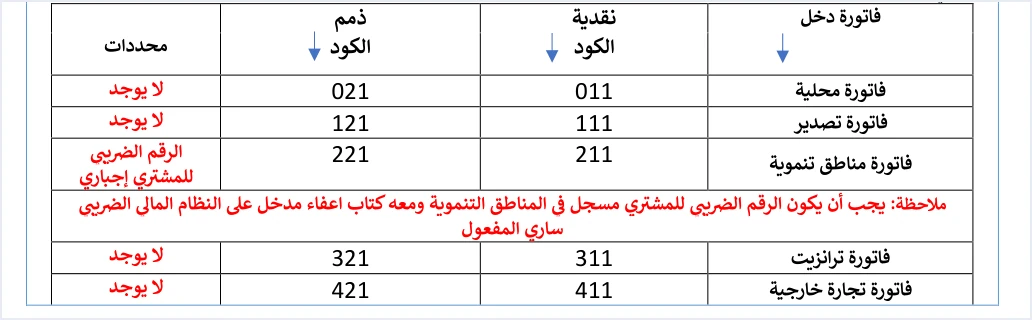
The system reads the invoice type from two places in cbc:InvoiceTypeCode. The value of the element says whether the invoice is new (388) or a return invoice (381). The name attribute packs three pieces of information into three digits. The first digit is the trade type, the second is the payment method (1 for cash and 2 for receivable), and the third is the tax family. In an income invoice the third digit is always 1, while it is 2 for General Sales Tax (GST) and 3 for Special Sales Tax (SST).
The income invoice codes appear in the table on pages 12 and 13 of the guide, as follows.
Scroll the table sideways to see the remaining columns
On page 13 the guide gives two examples of the code, 011 and 321. The conditions column for the income family differs from the other two families. The requirement of a 0% tax rate that appears for the non-local trade types does not apply here, because an income invoice carries no tax lines at all.
The file declares the invoice type, but what it may declare is decided by the taxpayer’s registration with ISTD and by the reality of the transaction. If a taxpayer sends an invoice type that does not match their tax number or their income-source sequence, such as an income invoice from a taxpayer registered for GST, the invoice is rejected with the message This user is not authorized to submit this type of invoice. Error messages in general are collected in our article JoFotara error codes.
Seller details, buyer details and the income-source sequence
Blocks B, C and D, on pages 15 to 18, are no different in idea from their counterparts in the other examples. Each is therefore summarized briefly here, with a pointer to the article that explains it in detail.
- The seller,
cac:AccountingSupplierParty(p. 15). The country code is JO, the seller’s tax number is incbc:CompanyID, and the seller’s name is incbc:RegistrationNameas registered with the Income and Sales Tax Department. Our article JoFotara Seller Details covers the block. - The buyer,
cac:AccountingCustomerParty(pp. 16 and 17). The buyer ID type goes in theschemeIDattribute with one of the valuesNINfor the national number,PNfor the personal number of a non-Jordanian, orTNfor the tax number. The postal code is optional with at most 5 characters, the governorate code is optional, and the phone number is optional and accepts digits only, between 9 and 14 of them. The buyer’s name becomes mandatory if the invoice is a receivable invoice, or if it is a cash invoice worth more than 10 thousand dinars or the equivalent in foreign currencies, according to the error message table on page 101. The detail is in our article JoFotara Buyer Identification. - The income-source sequence,
cac:SellerSupplierParty(p. 18). Thecbc:IDinside it carries the income-source sequence that the taxpayer selected when linking the devices. A wrong value here is one of the causes the guide gives for the 500 error. The sequence is explained in our article JoFotara Income Source Sequence.
In development zone invoices the buyer’s tax number becomes mandatory. As the table above shows, this is the only condition in the income family.
What an income invoice file leaves out, and why it matters to you
This is the essential difference between the income example and the rest of the guide’s examples. An income invoice carries no cac:TaxTotal block at all, neither at invoice level nor at line level. Three consequences follow, and a developer notices them when comparing with the general sales tax example.
- No tax total in the invoice header. In a general sales tax invoice,
cac:TaxTotalat invoice level carries the total General Sales Tax amount. That element is absent from the income example, and the totals move from the discount block straight tocac:LegalMonetaryTotal. - No tax category and no rate in the line. A line in an income invoice carries the quantity, the price, the discount and the name only. It has no element carrying the category S, Z or O, no tax rate, no tax amount and no tax-inclusive amount.
- No tax-rate restrictions apply. The list of rates the system accepts, the 0% rate requirement for the non-local trade types and the category rule at zero are all restrictions on tax lines. An income invoice has no such lines.
The practical result is this. If your system builds the income invoice file from the same template it uses for a general sales tax invoice, the safer course is to drop all the tax blocks, not to fill them with zeros. The template the guide shows for an income invoice does not include those blocks in the first place, and the guide does not say how the system treats a zero tax block in an income invoice.
The totals block without tax on pages 18 and 19
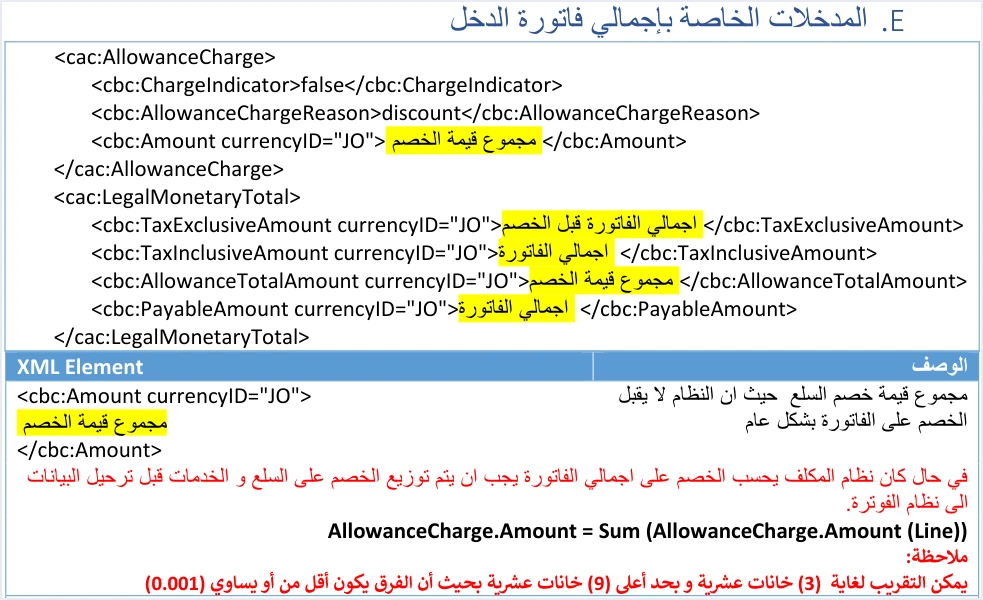
Block E is titled “The inputs for the income invoice total” («المدخلات الخاصة بإجمالي فاتورة الدخل»). It has two parts, the discount block at invoice level and then cac:LegalMonetaryTotal. The snippet below shows their order.
<cac:AllowanceCharge>
  <cbc:ChargeIndicator>false</cbc:ChargeIndicator>
  <cbc:AllowanceChargeReason>discount</cbc:AllowanceChargeReason>
  <cbc:Amount currencyID="JO"><!-- the sum of the line discounts --></cbc:Amount>
</cac:AllowanceCharge>
<cac:LegalMonetaryTotal>
  <cbc:TaxExclusiveAmount currencyID="JO"><!-- the sum of quantity × unit price --></cbc:TaxExclusiveAmount>
  <cbc:TaxInclusiveAmount currencyID="JO"><!-- the invoice total --></cbc:TaxInclusiveAmount>
  <cbc:AllowanceTotalAmount currencyID="JO"><!-- the sum of the line discounts --></cbc:AllowanceTotalAmount>
  <cbc:PayableAmount currencyID="JO"><!-- the invoice total --></cbc:PayableAmount>
</cac:LegalMonetaryTotal>
<!-- there is no cac:TaxTotal element in an income invoice -->
Read the snippet as follows.
- The invoice-level discount.
ChargeIndicatorhas the fixed value false, the reason isdiscount, and the amount is the sum of the line discounts. The guide says the system does not accept a discount on the invoice as a whole, so if your system calculates the discount on the invoice total, it must spread that discount across the lines before sending. Our article JoFotara Invoice Discount covers this. TaxExclusiveAmount. The invoice total before the discount, which is the sum of quantity multiplied by unit price for all the lines.AllowanceTotalAmount. The total discount. It and the amount of the preceding discount block must both equal the sum of the line discounts.TaxInclusiveAmountandPayableAmount. The template describes both elements with the same phrase, “the invoice total”.
The same page repeats the rounding note that accompanies every amount in the guide. It allows rounding to 3 decimal places, with up to 9, as long as the difference is no more than 0.001. The guide’s examples use the value JO in the currencyID attribute of every amount, and the guide does not say whether the system accepts other values in this attribute.
The InvoiceLine lines on pages 20 and 21
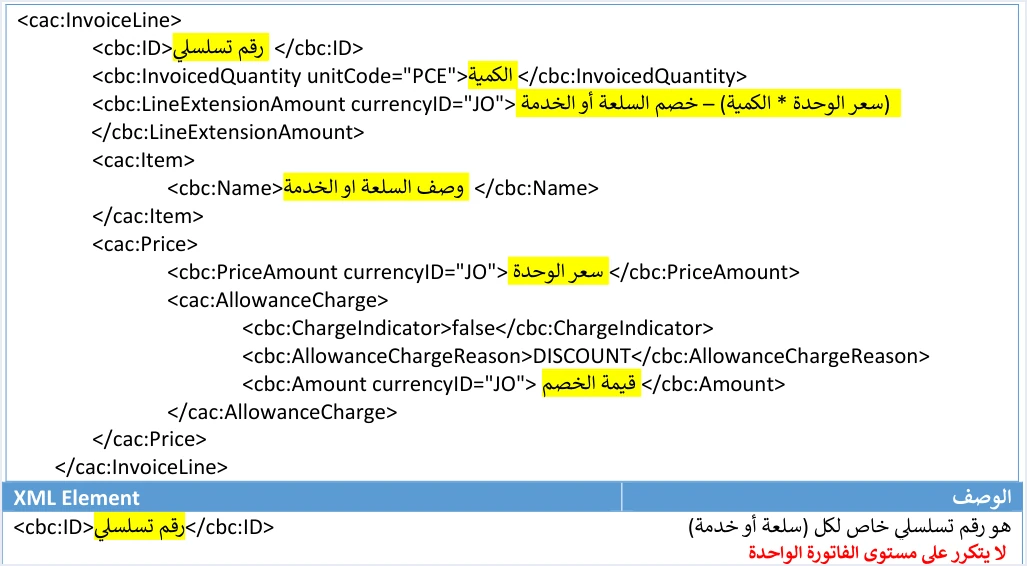
Block F holds the lines. The element cac:InvoiceLine repeats once for each item or service. The snippet below shows one line in the order the guide gives.
<cac:InvoiceLine>
  <cbc:ID><!-- a sequential number that does not repeat within the invoice --></cbc:ID>
  <cbc:InvoicedQuantity unitCode="PCE"><!-- the quantity, greater than zero --></cbc:InvoicedQuantity>
  <cbc:LineExtensionAmount currencyID="JO"><!-- quantity × unit price − discount --></cbc:LineExtensionAmount>
  <cac:Item>
    <cbc:Name><!-- the description of the item or service --></cbc:Name>
  </cac:Item>
  <cac:Price>
    <cbc:PriceAmount currencyID="JO"><!-- the unit price --></cbc:PriceAmount>
    <cac:AllowanceCharge>
      <cbc:ChargeIndicator>false</cbc:ChargeIndicator>
      <cbc:AllowanceChargeReason>DISCOUNT</cbc:AllowanceChargeReason>
      <cbc:Amount currencyID="JO"><!-- the line discount, as a positive value --></cbc:Amount>
    </cac:AllowanceCharge>
  </cac:Price>
</cac:InvoiceLine>
The guide states a rule for each element in the line.
cbc:ID. A sequential number specific to each item or service, which does not repeat within a single invoice. A repeat is rejected with the messageThe ID number must be unique. Store this number in your system, because a return invoice matches lines by it.cbc:InvoicedQuantity. The quantity is greater than zero, with up to 9 decimal places. The unitPCEis the only unit shown in the lines of new invoices, and the guide gives no list of other units.cbc:LineExtensionAmount. The quantity multiplied by the unit price, minus the line discount.cbc:PriceAmount. The unit price, a whole or decimal number greater than zero with up to 9 decimal places.- The line discount. A positive value only, with up to 9 decimal places.
No tax element appears in this line, and that is the difference between it and a line in a general sales tax invoice. The rules for lines in general are set out in our article JoFotara InvoiceLine.
The numbers of the example, step by step
The guide’s example has two lines, and their figures can be followed through to the total, as follows.
Scroll the table sideways to see the remaining columns
The sum of quantity times price for the two lines is 66 plus 50, which is 116.000, and that is TaxExclusiveAmount. The two discounts, 2 and 5, add up to 7.000, which appears in the discount block and in AllowanceTotalAmount. The amount payable is 109.000. In the example it is the difference between 116.000 and 7.000, and it equals the sum of LineExtensionAmount for the two lines (64 and 45). This simple check is useful before you send, because the rejections tied to the calculation of totals come with the message Total General Amount is Not Correct.
Comparing the income example with the general sales tax example
The guide’s general sales tax example uses the same quantities and prices as the income example and differs from it in the discount on the second line, which makes the comparison between the two clear. The table below summarizes the structural differences.
How the lines of the general sales tax example are calculated is explained in our article JoFotara Taxable and Exempt Lines.
What not to copy verbatim from the income invoice example
The example explains the structure, but it is not a tested file. Three points on the pages it occupies deserve attention before you draw on it.
- The unique identifier on page 14. The identifier in the example is not in the standard format, so do not carry it into your file. Your system generates the identifier itself and stores it.
- The date format. Use the format yyyy-mm-dd, as in all the XML examples, and do not take a different order from text copied out of the guide.
- The illustrative values. The numbers and names in the example are illustrative, and you fill the shaded variables from the data of your own invoice. The fixed description you carry over as it is.
The return of an income invoice follows this example in pages 22 to 31 of the guide, and it has its own article on the XML example for returning an income invoice. In it, the return reuses the name code of the original invoice and changes the value of the element to 381.
Checklist before building an income invoice file
If your system builds the income invoice from this example, these are points to review on every file before you send it.
- The opening
Invoicetag is on one line, andcbc:ProfileIDhas the valuereporting:1.0. - The invoice number and the unique identifier are stored in your system and are reused exactly as they are when you resend.
- The date is in the format yyyy-mm-dd.
- The value of
InvoiceTypeCodeis 388, and the third digit of thenameattribute is 1. - The invoice counter ICV is sequential and starts from 1.
- The income-source sequence in
cac:SellerSupplierPartymatches the sequence tied to the linking data. - The buyer’s name is present if the invoice is a receivable invoice, or a cash invoice above the threshold mentioned.
- There is no
cac:TaxTotalblock anywhere in the file, neither in the header nor in the lines. - Line numbers are not repeated, quantities and prices are greater than zero, and discounts are positive.
- The amount of the discount block and
AllowanceTotalAmountboth equal the sum of the line discounts. TaxExclusiveAmountequals the sum of quantity times price for all the lines.- You judge the result of sending by the invoice status returned in the response, not by the technical response status code alone.
How Qoyod handles the invoice file
Everything above is work that falls on the taxpayer’s system, meaning the software that builds the invoice file and sends it. Qoyod’s integration with the National Invoicing System works at that layer as follows.
- Building and sending the file. Qoyod builds the invoice file in UBL 2.1 format with its unique identifier (UUID) and sends it to the National Invoicing System without any manual intervention.
- A check before sending. Qoyod checks each invoice at field level as it is created, covering the tax number, the document type and payment method, the General Sales Tax rate and whether the lines are complete, and alerts you to any error before the invoice is sent, to reduce rejections. The pre-send check is an alert, not a guarantee.
- Every invoice’s status in view. ISTD returns the invoice status and any error message, and Qoyod shows them in its status panel, with states that include sent (مرسلة), previously sent (مرسلة مسبقًا) and not sent (لم تُرسل) together with the error message.
- Resending with the same identifier. The status panel lists invoices that were not sent and need to be resent, and when you resend one it keeps the same UUID.
For a wider view of the system and how to connect your business to it, read our article Jordan’s National E-Invoicing System.
E-invoicing and full accounting in one system
Qoyod is integrated with the National Invoicing System (JoFotara). You issue your invoice in Jordanian dinars from Qoyod, it is booked to your ledgers automatically and sent to the system, and once it is accepted it comes back with a QR code from the Income and Sales Tax Department.
Frequently asked questions
Does the income invoice XML example contain a TaxTotal element?
No. An income invoice carries no cac:TaxTotal block, either at invoice level or at line level, and in the example the totals move from the discount block straight to cac:LegalMonetaryTotal.
What is the invoice type code of a local income invoice in the XML file?
The code is 011 for a local cash invoice and 021 for a local receivable invoice. It goes in the name attribute of cbc:InvoiceTypeCode, while the value of the element is 388 for a new invoice.
How is the total of an income invoice calculated in the guide’s example?
The example adds up quantity times price for the two lines to reach 116.000, then adds the two line discounts to reach 7.000, and the amount payable is 109.000. No tax enters this calculation.
Can I send the guide’s example as it is to test my integration?
No, that is not suitable. The values in the example are illustrative, the unique identifier on page 14 is not in the standard format, and version 1.5 of ISTD’s technical guide does not state that a test environment is open to taxpayers or developers. Build the file from the data of a real invoice in your system.
Does JoFotara accept a discount on the total of an income invoice?
The guide says the system does not accept a discount on the invoice as a whole. The discount block in the header carries only the sum of the line discounts, so if your system calculates a discount on the total, it must spread the discount across the lines before sending.
Is the buyer’s name mandatory in an income invoice?
The buyer’s name becomes mandatory if the invoice is a receivable invoice, or if it is a cash invoice worth more than 10 thousand dinars or the equivalent in foreign currencies.
References
- Income and Sales Tax Department (ISTD), technical guide for integrating with the National Invoicing System through the API, version 1.5 (in Arabic), pp. 10 to 21, 33, 40, 43, 44, 101, 102 and 104.




