




A JoFotara negative quantity or negative price is rejected when your accounting software sends the National Invoicing System (JoFotara) an invoice with a line whose quantity or unit price is below zero. The technical guide issued by the Income and Sales Tax Department (ISTD) requires the quantity and the unit price each to be greater than 0, and it requires the discount on a line to be written as a positive value only.
The condition is wider than the name of the problem suggests. “Greater than 0” rules out zero as well, not only negative values. What a negative line is meant to say, such as a returned item or a price reduction, has a different form in the guide. A discount is written as a positive value inside the line itself, and a return is sent as a separate return invoice with the code 381, in which the returned quantity carries no minus sign.
This article explains the condition as it appears in the technical guide (version 1.5), then the places where a negative value may appear in the invoice file and the accepted form for each. It ends with the steps to fix the invoice before you resend it, and how to confirm that it was accepted.
Why JoFotara negative quantity and price values are rejected
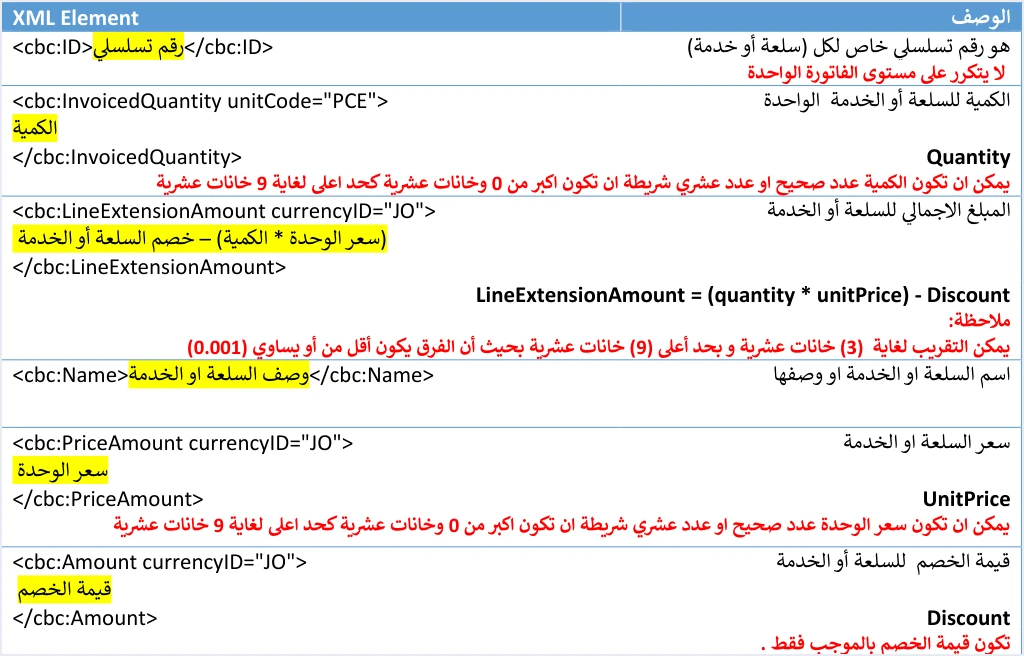
JoFotara rejects negative quantities and prices on invoice lines because the technical guide sets conditions on every line that these values do not meet. Each line is sent in a cac:InvoiceLine block, and that block holds three numeric elements governed by these conditions. They are the quantity cbc:InvoicedQuantity, the unit price cbc:PriceAmount and the discount amount cbc:Amount inside the cac:AllowanceCharge block.
The guide describes the unit price as the price of one unit before tax, and it sets this condition on it.
«عدد صحيح او عدد عشري شريطة ان تكون اكبر من 0 وخانات عشرية كحد اعلى لغاية 9».
In English, the guide says the unit price is a whole or decimal number, on condition that it is greater than 0, with a maximum of 9 decimal places. ISTD publishes this guide in Arabic only; the English here is our rendering, and the Arabic text is the authority.
The guide sets the same condition on the quantity, which means a whole or decimal number greater than 0 with a maximum of nine decimal places. For the discount on a line, it requires the value to be positive only («بالموجب فقط»), also with a maximum of nine decimal places.
The technical guide documents no specific message for this case, so do not search the response file for a particular text. Read what comes back in the EINV_MESSAGE field, and judge the invoice from the EINV_STATUS field rather than from the HTTP code alone. If the status comes back as NOT_SUBMITTED, the invoice was not accepted and no QR code comes back for it.
Zero is outside the condition too
The condition reads “greater than 0”, not “not negative”. A line whose quantity is zero, or whose unit price is zero, does not meet the guide’s condition, just as a negative line does not. So when you check the invoice lines, look for zero values as well as negative ones, because both fall outside what the guide requires for these two elements.
The technical guide does not say how to write an item or service supplied free of charge in the invoice file. If your business has such cases, review their treatment with your accountant before you choose a form for them in the invoice file, and do not write them as a line with a zero price.
The three line conditions in the technical guide
The table below brings together the three elements on a line that carry a sign condition, and what fails the condition for each one.
Scroll the table sideways to see the remaining columns
These three elements feed every formula on the line. The line amount cbc:LineExtensionAmount equals (quantity × unit price) − discount. The tax on the line cbc:TaxAmount in a general sales tax invoice equals (quantity × unit price − discount) × tax rate. The line total cbc:RoundingAmount equals the line amount plus the tax. So the sign lives in the formula, and the values that go into it are positive.
Our article JoFotara InvoiceLine explains all the line elements and the conditions on each, including the line number, the unit of measure and the tax block. This article stays with the sign condition alone and what follows when it is broken.
The discount is written as a positive value and the formula subtracts it
A discount on a line comes inside the cac:AllowanceCharge block, and its value is written in the cbc:Amount element. The block it is sent in is what marks the amount as a discount, and the formula takes care of subtracting it from the line amount. So the discount value needs no minus sign to show that it is a discount, and the guide requires that it carry none.
Two lines from the guide’s income invoice example show this. The first is 33 units at a price of 2 per unit with a discount of 2, so its amount is 33 × 2 − 2 = 64. The second is 10 units at a price of 5 with a discount of 5, so its amount is 10 × 5 − 5 = 45. In both lines the discount is written as a positive number (2 and 5), and the subtraction happens in the formula.
Scroll the table sideways to see the remaining columns
The totals of this invoice in the same example are all positive. The amount before the discount is 116, the total discount is 7, and the invoice total is 109.
The discount values move from the lines up to the invoice header. The AllowanceTotalAmount element equals the sum of the line discounts, and so does the discount value in the invoice-level cac:AllowanceCharge block. Both must equal the sum of the line discounts. So if the discount on one line is written with a minus sign, the sign carries into both of these totals as well.
In the National Invoicing System file, a discount is a line discount. The system does not accept a separate invoice-level discount. The discount in the header is the sum of the line discounts, so a seller who discounts the invoice total spreads that discount across the lines before sending. Each line’s share is then written as a positive value in its own line. A separate line with a negative price standing for the discount is no substitute for that. Our article JoFotara Invoice Discount covers the line and invoice level in more detail.
Where a negative value in the invoice file comes from
The guide does not say why negative values appear in invoice files. But a seller’s software may represent some accounting operations with a negative line, and for each of them the guide has a form that uses positive values. The table below sets out these cases, with the condition each one breaks and the form the guide sets.
Scroll the table sideways to see the remaining columns
The first and the last cases lead to a return invoice. The other three are fixed inside the invoice itself, by moving the discount to its place in the line and writing it as a positive value.
The 381 return invoice instead of a negative line
An invoice issued through the National Invoicing System cannot be edited after issuance, and a later invoice cannot carry a negative line that reduces its effect. The correction is made with a return invoice, and on quantities only. What can and cannot be done after issuance is set out in our article Editing an Issued Invoice in Jordan’s National Invoicing System.
The system reads the document type from the cbc:InvoiceTypeCode element. The value of the invoice type element itself shows whether the invoice is new or a return, 388 for a new invoice and 381 for a return. The guide’s note on page 23 describes a return invoice as an invoice with a credit note. The return invoice carries in the name attribute the same invoice-type code as the original invoice, and only the number inside the element changes. It is also written in the same currency as the original invoice. So the example <cbc:InvoiceTypeCode name="011">381</cbc:InvoiceTypeCode> is a return against a local cash income invoice.
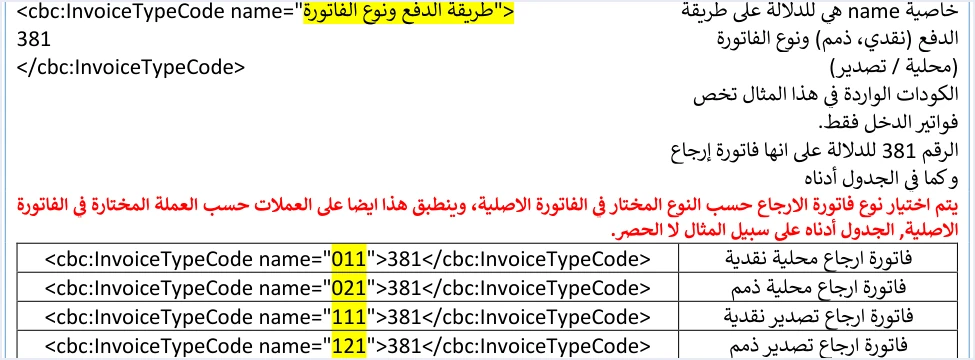
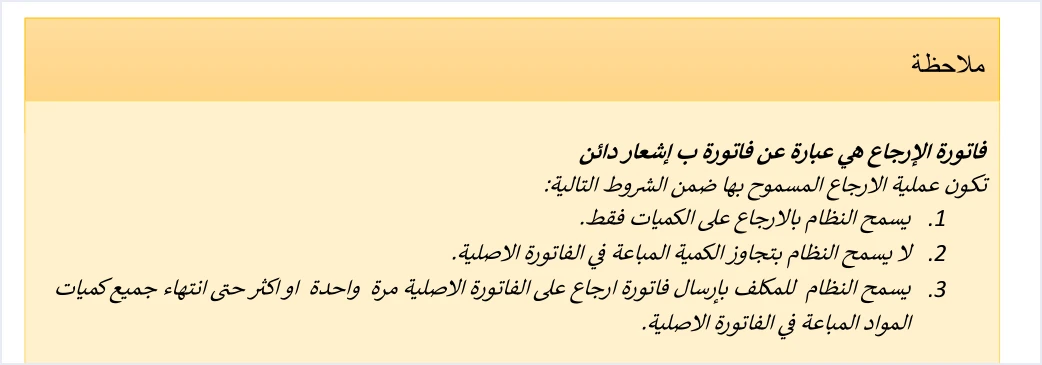
The code 381 is what makes the document a return, so the returned quantity on it is written without a minus sign, as on a sales invoice. The guide says the returned quantity may be the whole quantity or part of it, as a whole number or with decimal fractions.
«كاملة او جزء منها … برقم صحيح او بأجزاء عشرية».
In English, the guide says the quantity may be returned in full or in part, as a whole number or in decimal fractions. ISTD publishes this guide in Arabic only; the English here is our rendering, and the Arabic text is the authority.
What a return invoice carries
The technical guide sets conditions that tie the return invoice to the original invoice, and none of them uses a negative value.
- The reference to the original invoice. The
cac:BillingReferenceblock carries the original invoice numbercbc:IDand its unique identifiercbc:UUID, andcbc:DocumentDescriptioncarries the original invoice’s total. - The return reason. The return reason is mandatory. It is written as free text in the
cbc:InstructionNoteelement inside thecac:PaymentMeansblock. - The line data as in the original. The line number
cbc:ID, the name of the item or servicecbc:Nameand the unit pricecbc:PriceAmountare written «كما هو في الفاتورة الاصلية», that is, as they are on the original invoice. - Returns on quantities only. A return cannot exceed the quantity sold on the original invoice, and more than one partial return is allowed against the same invoice until its quantities are used up.
- The same buyer details. The guide states «يجب أن تتوافق بيانات المشتري في فاتورة الإرجاع مع بياناته في فاتورة البيع الأصلية المرتبطة بها». In English, the guide requires the buyer details on the return invoice to match those on the original sales invoice it is linked to.
- Totals for the returned part only. The totals of the return invoice cover «الجزء المراد ارجاعه», the part being returned, and on a return of a general sales tax invoice its tax carries «مجموع قيم الضريبة المراد ارجاعها من الفاتورة», the total of the tax amounts being returned from the invoice.
The limit on the returned quantity, and what happens when a return exceeds the quantity sold, have their own article in this series, on a return that exceeds the original quantity in the National Invoicing System.
The discount on a partial return
If the original line carried a discount, the guide sets what part of it goes on the return line in this text.
«اذا كان الارجاع لكامل كمية السلعة او الخدمة فيجب وضع الخصم (إن وجد) كاملا، أما اذا كان الارجاع لجزء من الكمية فيجب ان يكون الخصم (إن وجد) جزء من الخصم الكلي للسلعة او الخدمة حسب الكمية المرجعة».
In English, the guide says that if the whole quantity of the item or service is returned, the discount (if any) must be included in full, and if part of the quantity is returned, the discount (if any) must be a part of the item’s total discount according to the quantity returned. ISTD publishes this guide in Arabic only; the English here is our rendering, and the Arabic text is the authority.
The guide gives no arithmetic formula for this share. The plain reading of “according to the quantity returned” is that the share is in proportion to the quantity. This is our reading of the text, not a statement by ISTD. As an illustration only, not an official formula, if 3 units of the second line in the earlier example (10 units at a price of 5 with a discount of 5) were returned, the return line would look like the table below. All of its values are positive.
If the original invoice was issued on the portal
On the invoice form of the National Invoicing System portal, the Quantity (الكمية) and Unit price (سعر الوحدة) fields are mandatory, and the Discount value field (قيمة الخصم) has a default value of 0. ISTD’s questions and answers guide states that the platform lets you return invoices sent through it in all cases, whether or not the business has linked a system. For the steps to issue an invoice on the portal, see our article Issue an Invoice on the JoFotara Portal, and for the return steps, see our article Return an Invoice on the JoFotara Portal.
Steps to fix the invoice before you resend it
If an invoice was rejected and its lines hold a negative or zero value, these are the steps to fix it, in order.
- Read the response file. Record the status in
EINV_STATUSand the text of the message inEINV_MESSAGEbefore you change anything, because the invoice may have another reason for rejection besides the sign. - Check every line. Make sure that
cbc:InvoicedQuantityandcbc:PriceAmountare greater than 0 on every line, and that every discount value is written without a minus sign. - Identify the operation behind the value. Ask what the software meant by the negative line, whether a discount, a return or a reduction of an earlier invoice, and pick the matching form from the table of cases above.
- If it is a discount. Move it to the
cac:AllowanceChargeblock on the discounted line and write it as a positive value. Then recalculate the line amount, its tax and its total, and then all the header totals. A discount that changes place without the totals being recalculated may lead to a different rejection, the messageTotal General Amount is Not Correct. - If it is a return. Remove the negative line from the sales invoice, and send the sales invoice with what was actually sold. Then issue a return invoice with the code 381 that refers to the accepted invoice the goods are returned from, with the quantity written without a minus sign.
- Resend with the same identifier. When sending fails, the guide requires the invoice to be resent with the same invoice number
cbc:IDand the same identifiercbc:UUID, not with a new identifier. - Confirm acceptance. An accepted invoice comes back with the status
SUBMITTEDand a QR code in theEINV_QRfield. Save the invoice number, its identifier, the QR code and its status. The guide requires the QR code to be shown on the seller’s invoice.
When to contact ISTD
If the invoice lines meet all the conditions above and the invoice is still rejected, go back to the text of the returned message, because the cause then sits in another element of the file. The technical guide refers further questions to ISTD’s technical support committee for invoicing affairs, through the ISTD website.
How Qoyod helps
When you issue your invoice from accounting software, you do not write the XML file by hand. Qoyod builds the invoice file in UBL 2.1 format with its unique identifier (UUID) and sends it to the National Invoicing System without any manual intervention. This is done through Qoyod’s integration with the National Invoicing System, which also works on this layer.
- Check before sending. Qoyod checks each invoice at field level as it is created, covering the tax number, the document type and payment method, the General Sales Tax rate and whether the lines are complete, and alerts you to any error before the invoice is sent, to reduce rejections.
- Every invoice’s status in view. ISTD returns the invoice status and any error message, and Qoyod shows them in its status panel.
- Resending with the same identifier. The status panel lists invoices that were not sent and need to be resent, and when you resend one it keeps the same UUID.
The pre-send check is an alert, not a guarantee. It covers the fields listed above, and whether an invoice is accepted remains a decision for the National Invoicing System alone.
Where to go next
- All the line elements. See our article JoFotara InvoiceLine.
- The other rejection codes and messages. See our article JoFotara Error Codes.
- The discount rules in detail. See our article JoFotara Invoice Discount.
- The full picture of the system. For a wider view of the system and how to connect your business to it, read our article Jordan’s National E-Invoicing System.
E-invoicing and full accounting in one system
Qoyod is integrated with the National Invoicing System (JoFotara). You issue your invoice in Jordanian dinars from Qoyod, it is booked to your ledgers automatically and sent to the system, and once it is accepted it comes back with a QR code from the Income and Sales Tax Department.
Frequently asked questions
Why does JoFotara reject a negative quantity or price?
The technical guide requires the quantity and the unit price each to be a whole or decimal number greater than 0, with a maximum of nine decimal places. A line that carries a negative quantity or price does not meet this condition.
Does the system accept a quantity or unit price of zero?
The guide requires the value to be greater than 0, and zero does not meet that condition. So a zero line belongs in the same check as a negative one.
How do I write a line discount without a minus sign?
Write the discount as a positive number in the cbc:Amount element inside the AllowanceCharge block on the same line, and let the formula subtract it, since the line amount equals quantity × unit price − discount. If the discount applies to the invoice total, spread it across the lines before sending, because the system does not accept a separate discount on the total.
How do I return part of an accepted invoice without negative values?
Issue a return invoice with the code 381 that refers to the number, identifier and total of the original invoice and carries the return reason. The returned quantity is written without a minus sign and cannot exceed the quantity originally sold, while the line number, item name and unit price stay as they are on the original invoice.
What error message appears when a negative value is sent?
The technical guide documents no specific message for this case. So read what comes back in the EINV_MESSAGE field of the response file, and judge the invoice from the EINV_STATUS field, where the status NOT_SUBMITTED means it was not accepted.
Do I generate a new unique identifier when I resend after the fix?
The guide requires resending with the same invoice number and the same unique identifier. The rejected invoice was not accepted, and generating a new identifier on every attempt may lead to duplicate invoices.
References
- Income and Sales Tax Department (ISTD), technical guide for integrating with the National Invoicing System through the API, version 1.5 (in Arabic), 2026.
- Income and Sales Tax Department (ISTD), procedures guide for issuing an invoice in the Jordanian National Electronic Invoicing System, 2026 edition (in Arabic).
- Income and Sales Tax Department (ISTD), questions and answers guide for the National Invoicing System, 2026 (in Arabic).
- ISTD’s National Invoicing System guides (in Arabic)




