




The message This user is not authorized to submit this type of invoice appears when your accounting software sends an invoice to the National Invoicing System (JoFotara) and the invoice comes back rejected with code 400. A rejection that says the user is not authorized to submit this type of invoice means that the invoice type your file declared does not match your tax number or the income-source sequence you sent it under.
The message has nothing to do with a password or with the linking credentials, which have a code of their own. It is about one question only. Is this taxpayer allowed to issue this type of invoice? The answer is set by your registration status with the Income and Sales Tax Department (ISTD), not by the code your software chose.
This article explains what the message means as it appears in ISTD’s technical guide for integrating with the National Invoicing System through the API, version 1.5. It then shows how the system reads the invoice type from your file, covers the two causes the guide names, and lists the steps to fix the invoice before you send it again.
What This user is not authorized to submit this type of invoice means
The technical guide describes code 400 (Bad Request) as an error in the values sent inside the XML file, with the detail written in the EINV_MESSAGE field of the response. One of the messages it lists under this code is This user is not authorized to submit this type of invoice, and it explains the message in these words about the taxpayer.
«يقوم بارسال نوع فاتورة لا يتناسب مع رقمه الضريبي او تسلسل مصدر الدخل الخاص به».
In English, the guide gives the cause as the taxpayer sending an invoice type that does not match their tax number or their income-source sequence. ISTD publishes this guide in Arabic only; the English here is our rendering, and the Arabic text is the authority.
The guide then gives an example. An income invoice is sent by a taxpayer whose tax number is registered for General Sales Tax (GST), or the reverse.

So the message carries two possible causes in a single text. The first is the tax number, meaning your General Sales Tax registration status. The second is the income-source sequence the invoice is sent under. The message does not say which of the two applies, so you need to check both.
Where to find it in the response
The system returns the validation result in the EINV_RESULTS field, which holds arrays for information, warnings and errors. Each entry in the errors array carries the fields type, status, EINV_CODE, EINV_CATEGORY and EINV_MESSAGE, and the message appears as text in the last of these. The final verdict on the invoice still comes from its status in EINV_STATUS, not from the HTTP code alone. Each element of the response is described in our article JoFotara API Response: The EINV Elements.
How the system reads the invoice type from your file
JoFotara reads the invoice type from the cbc:InvoiceTypeCode element in the XML file. The value of the invoice type element itself shows whether the invoice is new or a return, 388 for a new invoice and 381 for a return. The name attribute carries a three-digit code that combines three pieces of information.
- The first digit is the trade type, such as local trade or export.
- The second digit is the payment method, 1 for cash and 2 for receivable.
- The third digit is the tax family, 1 for the income invoice, 2 for General Sales Tax and 3 for Special Sales Tax (SST).
So the code 011, for example, is a local cash income invoice, and the code 012 reads as a local cash invoice in the General Sales Tax family. The two codes share their first two digits and differ in the third, and that third digit is where this message comes from.
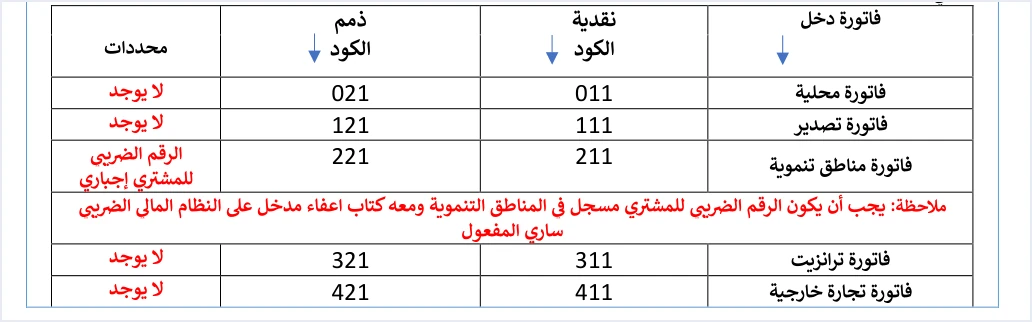
The file declares the type, then, but it does not decide it. The third digit follows the taxpayer’s registration status with ISTD, and if the file declares a type that does not match that registration, the invoice is rejected with this message. The other codes and the differences between the types are in our article Invoice Types in the National Invoicing System.
Cause one: the invoice type does not match your General Sales Tax registration
The National Invoicing System is not only for sellers registered for General Sales Tax. Sellers of goods and services who are not registered issue their invoices through it too, and the difference between the two lies in the invoice type. A taxpayer not registered for General Sales Tax issues an income invoice, and a registered taxpayer issues a general sales tax invoice. The table below applies the guide’s example to both cases. Some activities are exempted from the invoicing obligation by Regulation No. 34 of 2019 on Organizing and Controlling Invoicing Affairs, as amended, and by Instructions No. 1 of 2019 issued under it.
Correcting the type is more than swapping one digit in the code, because each type comes with a different template in the technical guide.
- The income invoice carries no tax block at all. Its lines hold quantity, price, discount and name only, and there is no
TaxTotalelement in the lines or in the invoice header. - The general sales tax invoice carries the tax, its rate and its category on every line, and its header carries the total General Sales Tax amount, which is the sum of the line taxes.
If you move from an income invoice to a general sales tax invoice, your software has to build the invoice with its full template, not change the code alone. Any error in the totals after that is reported by a different message, Total General Amount is Not Correct. The rules of the income invoice itself are in our article Income Invoice in JoFotara: Who Issues It, What It Carries.
Special Sales Tax has the digit 3 in the code. The guide’s example for this message covers only the income invoice and the general sales tax invoice, so we draw no specific rule for Special Sales Tax from it.
When this mismatch arises
The mismatch arises when what your software assumes differs from your registered status at ISTD. One possible case, which is an illustration of ours and not taken from the guide, is a software setting for the invoice type that was configured for an earlier status and stayed the same after your registration changed. Article 13 of the General Sales Tax Law sets registration thresholds by annual taxable sales, including JOD 30,000 for services and JOD 75,000 for goods, and Article 14 of the same law allows voluntary registration. Once a business is registered, whether it had to register or chose to, the code on its invoice follows that registration.
Cause two: the income-source sequence
The guide names the income-source sequence as a second cause of the same message, without describing what a mismatch with it looks like. So this section sets out what the guide does establish about the sequence, followed by the check we suggest on that basis.
The guide establishes three points.
- The sequence is a mandatory field in the file. It is written in
cac:SellerSupplierParty/cac:Party/cac:PartyIdentification/cbc:IDin every invoice you send through the API. - The linking credentials are tied to one sequence. When the main user creates a new link from the device linking option (ربط الأجهزة), they enter a username and select the income-source sequence, and the system then generates the Client ID and the Secret Key. The steps are in our article JoFotara Client ID and Secret Key: Device Linking Steps.
- The sub-user is also tied to one sequence, selected when the sub-user is created, as explained in our article JoFotara Sub-User vs Main User: Roles and Permissions.
The check we suggest is to match the sequence written in the invoice file against the sequence on which the Client ID and Secret Key sent with the request were created. This is our reading of the text, not a statement by ISTD. If the business has more than one sequence, make sure each file is sent with the linking credentials created for its own sequence.
What the income-source sequence is and where to find it is the subject of our article JoFotara Income Source Sequence: Where to Find It.
How to tell the message apart from errors 403 and 500
This message shares its ingredients with two other codes, because the tax number, the sequence and the linking credentials all play a part in all three. The difference lies in the type of error the system returns.
- Code 403 means the Client ID or the Secret Key is wrong.
- Code 500 is traced by the guide to an error in the tax number or the income-source sequence, less often to the Client ID or the Secret Key, or to a tax rate in the XML file that is not among the rates ISTD accepts.
- Code 400 with this message means the system read the file and checked its values, then found that the invoice type does not match your tax number or your sequence.
If code 400 comes back with this exact message, start from the invoice type, not from the linking credentials.
Steps to fix not authorized to submit this type of invoice
- Save the message exactly as it came back. The guide requires logging errors in detail inside your system and showing the user a simplified message, so the original text is your reference if the rejection repeats.
- Read the type code in the rejected file. Open the
cbc:InvoiceTypeCodeelement and look at the third digit of itsnameattribute. - Match it against your registration with ISTD. If you are registered for General Sales Tax the third digit is 2. If you are not registered it is 1, and the invoice is an income invoice.
- Fix the software setting, not only the invoice. If the error lies in the invoice type setting, the message will repeat with every following invoice until the setting is corrected. Build the invoice with the template of its correct type, as described above.
- Check the sequence. Make sure the sequence in
cac:SellerSupplierParty/cac:Party/cac:PartyIdentification/cbc:IDis the one on which the linking credentials in use were created. - Contact ISTD if the registration itself is in doubt. If you think your registered status does not reflect your actual activity, it is corrected with ISTD, not in the invoice file. The technical guide refers inquiries to ISTD’s technical support committee for invoicing affairs.
- Resend with the same number and identifier. When you resend, the guide requires using the same invoice number and the same unique identifier (UUID), because generating a new identifier can duplicate the invoice. Then judge the result by
EINV_STATUS.
An invoice rejected with this message was not accepted, so no QR code comes back for it. The code is returned only after acceptance, and the guide then requires it to be shown on the seller’s invoice.
How Qoyod helps
When you issue your invoice from accounting software, you do not write the XML file by hand. Through Qoyod’s integration with the National Invoicing System, Qoyod builds the invoice file in UBL 2.1 format with its unique identifier (UUID) and sends it to the National Invoicing System without any manual intervention. Three more things come with it.
- A check before sending. Qoyod checks each invoice at field level as it is created, covering the tax number, the document type and payment method, the General Sales Tax rate and whether the lines are complete, and alerts you to any error before the invoice is sent, to reduce rejections.
- Every invoice’s status in view. ISTD returns the invoice status and any error message, and Qoyod shows them in its status panel.
- Resending with the same identifier. The status panel lists invoices that were not sent and need to be resent, and when you resend one it keeps the same UUID.
The pre-send check is an alert, not a guarantee. It covers the fields listed above, while your registration status stays with ISTD and the acceptance of the invoice rests with JoFotara alone. To see the full integration, visit our National Invoicing System page.
Where to go next
- The other rejection codes and messages are in our article JoFotara Error Codes: Why an Invoice Is Rejected and How to Fix It.
- The full picture of the system, how it works and how to connect your business to it, is in our article Jordan’s National E-Invoicing System.
- Invoice types and their codes are in our article Invoice Types in the National Invoicing System.
- Reading the response file and its fields is covered in our article JoFotara API Response: The EINV Elements.
E-invoicing and full accounting in one system
Qoyod is integrated with the National Invoicing System (JoFotara). You issue your invoice in Jordanian dinars from Qoyod, it is booked to your ledgers automatically and sent to the system, and once it is accepted it comes back with a QR code from the Income and Sales Tax Department.
Frequently asked questions
What does This user is not authorized to submit this type of invoice mean?
It means that the invoice type your file declared does not match your tax number or your income-source sequence. The technical guide lists it among the code 400 messages, and its example is an income invoice sent by a taxpayer registered for General Sales Tax, or the reverse.
Does the message mean that the Client ID or the Secret Key is wrong?
It does not, according to the guide. A wrong Client ID or Secret Key corresponds to code 403, while this message comes back with code 400 and concerns the invoice type.
I am not registered for General Sales Tax. Which invoice do I issue?
You issue an income invoice, and the third digit of its name attribute is 1, as in 011 for a local cash invoice and 021 for a local receivable invoice. The income invoice carries no tax block.
Is it enough to change the type code and send the invoice again?
It is not enough when you move between the income invoice and the general sales tax invoice. Moving from an income invoice to a general sales tax invoice adds the tax to the lines and the total General Sales Tax amount to the invoice header, and moving the other way removes both. Then resend with the same invoice number and the same unique identifier.
How is the income-source sequence related to this message?
The guide names the sequence as a second cause of the message without giving detail. It does establish that the linking credentials are created on one sequence chosen by the taxpayer and that the sequence is a mandatory field in the file, so matching the two is a reasonable check when the message appears.
Does Qoyod prevent this message?
Qoyod alerts you to any error in the fields it checks before the invoice is sent, to reduce rejections. The alert does not guarantee acceptance, because your registration status is set by ISTD and the acceptance of the invoice is decided by JoFotara.
References
- Income and Sales Tax Department (ISTD), technical guide for integrating with the National Invoicing System through the API, version 1.5 (in Arabic), pp. 12, 101 and 104.
- ISTD’s National Invoicing System guides (in Arabic)




