




In the National Invoicing System (JoFotara), the JoFotara return reason is the text that explains why a return invoice was issued. The technical guide issued by the Income and Sales Tax Department (ISTD) requires it on every return invoice. It is sent inside an element named cac:PaymentMeans, a name that suggests to a first-time reader that this is where the payment method goes. It is not.
In a return invoice, the element carries only two things, a fixed code with the value 10 and a free-text field in which the seller writes the reason. The payment method, whether cash or receivable, sits somewhere else in the file entirely.
This article explains the structure of the element as the technical guide gives it (version 1.5), separates it from the payment method, tells the reason field apart from the general note field, suggests a way to write a clear reason, and ends with a checklist and common questions. ISTD publishes the technical guide in Arabic only; the English here is our rendering, and the Arabic text is the authority.
JoFotara return reason: what the technical guide requires
The technical guide gives the return reason its own section within the description of the return invoice, titled Return reason (سبب الإرجاع). In the description column it states that the return reason must be entered. The reason is therefore not an optional field that can be left empty when the seller has nothing to write.
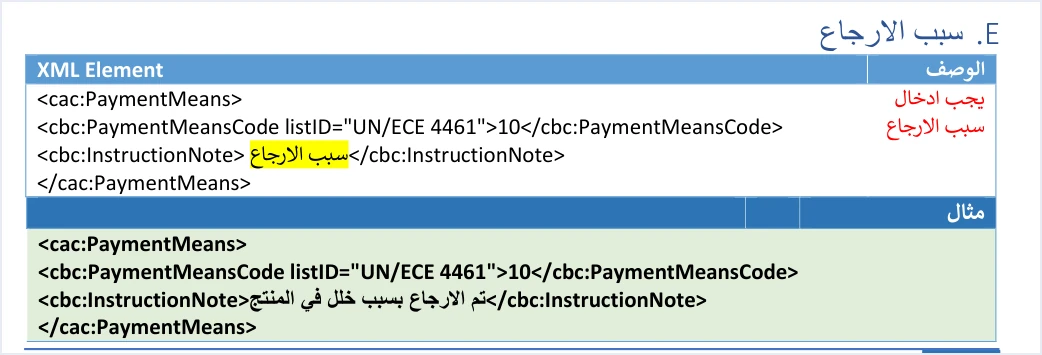
The block in the guide is made of three nested elements. The outer container is cac:PaymentMeans. Inside it sits cbc:PaymentMeansCode with the value 10 and the attribute listID="UN/ECE 4461", followed by cbc:InstructionNote, which carries the text of the reason. Below the structure, the guide gives one example of the reason text, which says that the item was returned because of a product defect.
At the start of its templates, the guide also explains a color key for its examples. Elements highlighted in yellow are mandatory variables that the seller’s system fills in, elements highlighted in green are optional variables, and everything else is fixed description that does not change. The key is explained in our article JoFotara mandatory fields. Apply it to the reason section and you find that the text of the reason is the only element highlighted in yellow.
Scroll the table sideways to see the remaining columns
Two practical results follow from this reading.
- The code 10 is not chosen. The guide gives no other value for
cbc:PaymentMeansCodeand does not explain what the UN/ECE 4461 list means. Write the value 10 and the attribute as given, and do not put a value from outside the guide in their place. - The text is the part that changes. Every return invoice carries its own reason in
cbc:InstructionNote, and this element is never left empty.
This is how the block looks in a return invoice file, with an illustrative reason text of our own.
<cac:PaymentMeans>
  <cbc:PaymentMeansCode listID="UN/ECE 4461">10</cbc:PaymentMeansCode>
  <cbc:InstructionNote>Two units of line 2 returned because of a manufacturing defect</cbc:InstructionNote>
</cac:PaymentMeans>
The first two lines and the last line are as in the guide. The text between the cbc:InstructionNote tags is an example we wrote. The position of the block among the other elements of the file is taken from the guide’s own return invoice template.
Why PaymentMeans does not carry the payment method
The word PaymentMeans literally means a means of payment, so a developer or accountant expects to find in it what separates a cash invoice from a receivable invoice. The guide does not use the element for that purpose. It puts the payment method in a three-digit code carried by the name attribute of the invoice type element, cbc:InvoiceTypeCode.
The system reads three pieces of information from this code. The first digit is the invoice type (local, export, development zones, transit, foreign trade, and assignment within free zones). The second digit is the payment method, 1 for cash and 2 for receivable. The third digit is the tax family, 1 for income, 2 for General Sales Tax and 3 for Special Sales Tax.
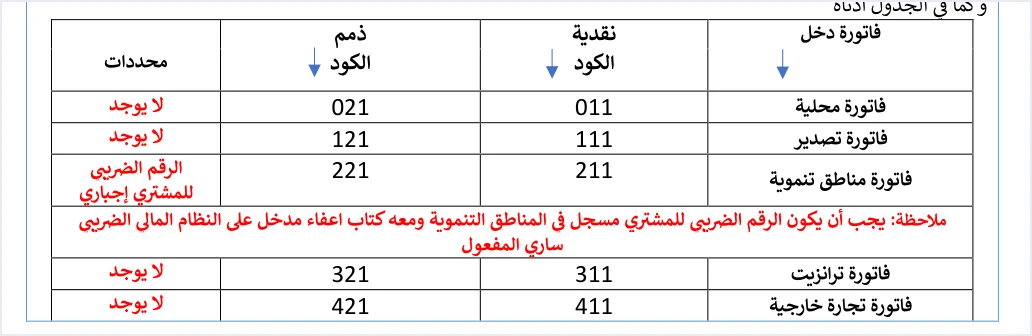
The table of income invoice codes above shows it. A local cash invoice has the code 011 and a local receivable invoice has the code 021. The difference between them is in the middle digit alone, and it has nothing to do with the cac:PaymentMeans element.
In a return invoice, the guide describes the name attribute as indicating the payment method (cash, receivable) and the invoice type, and it sets the value of the element at 381 to show that the document is a return invoice (credit note). It also states that the type of the return invoice is chosen according to the type selected on the original invoice, and that this applies to the currency as well.

So if the original invoice was a local income invoice on receivable terms, the return invoice carries the same code 021 with the value 381. The payment method in a return is therefore carried over from the original invoice through this code, not from the reason element. If the code differs from what the taxpayer’s registration allows, the message the guide documents for that case is This user is not authorized to submit this type of invoice.
Two rules for handling the element follow from this separation.
- Do not look for the payment method in PaymentMeans. If your system needs to know whether a return is cash or receivable, the reference is the second digit of the original invoice’s code.
- Do not carry the element over to the new invoice on your own initiative. The guide documents
cac:PaymentMeansin the return invoice only. It does not address its appearance in the new invoice that has the value 388. Follow the template of each type as it is given.
Scroll the table sideways to see the remaining columns
The reason goes in InstructionNote, not in Note
The invoice header carries another free-text element, cbc:Note, and it can look like a suitable place to write the reason. The guide separates the two elements clearly.
cbc:InstructionNoteis the place for the return reason, and it is mandatory in every return invoice.cbc:Noteis an optional general note. It remains in the header of an income invoice return as an optional element, and it does not appear at all in the header of a General Sales Tax invoice return or a Special Sales Tax invoice return.
Whoever writes the reason in cbc:Note and leaves cbc:InstructionNote empty has not met the field the guide requires. And whoever sends a return for a General Sales Tax or Special Sales Tax invoice will not find cbc:Note in its template at all. So bind the reason field in your system to cbc:InstructionNote alone, and do not rely on the general notes field.
How to write a clear reason (our suggestion)
The technical guide gives no list of accepted return reasons, no length limit and no required wording. What it requires is that a reason exists, and its only example is a short sentence describing the case. What follows is therefore our own suggestions for writing a reason that whoever reviews the invoice later can understand. They are not requirements from ISTD.
- State what happened, not just a category. “Two units returned because of a manufacturing defect” is clearer than “returned goods”.
- Keep the reason consistent with the returned lines. If you return one line, do not write a reason that suggests the whole invoice was returned.
- Tie it to quantity, not price. The guide allows a return on quantities only. A reason such as “price reduction after the sale” describes a case that a return invoice does not handle in the first place.
- Write what you can prove. The reason is part of a document that is sent to ISTD and kept on your side, so make it match your records and your correspondence with the customer.
- Avoid unnecessary personal data. Describing the case is enough, without phone numbers or details the document does not need.
- Standardize wording inside your business. A short internal list of your recurring reasons makes classification and review easier, as long as it stays your own list and not an official one.
If one return invoice combines lines returned for different reasons, the guide does not address that case. Our suggestion is that the text states the reasons briefly in one sentence, or that you split the return across more than one invoice if that is clearer for your records. The guide allows more than one return invoice against the original invoice until its quantities are used up.
Where the reason sits in the rest of the return invoice
The reason is one of several conditions that come together in a return invoice (credit note) before it is accepted. It helps to see it in context.
- Type. The value of
cbc:InvoiceTypeCodeis 381, with thenamecode and the currency as on the original invoice. - Reference. The return invoice carries the original invoice’s number, its unique identifier (UUID) and its total. This block is the
cac:BillingReferenceelement, which our article on the BillingReference element in this series explains. - Reason. The
cac:PaymentMeansblock with the code 10 and the reason text. - Buyer. The guide requires the buyer details on the return invoice to match those on the original sales invoice it is linked to.
- Lines. Returns are on quantities only, with the line number, description and unit price as on the original invoice, and a return cannot exceed the quantity sold.
- Totals. They cover only the part being returned, and the discount in a partial return is the part of the line discount that matches the returned quantity.
Because an invoice cannot be changed once it is issued, the return invoice is the route explained in our article Editing an Issued Invoice in Jordan’s National Invoicing System.
One last caution concerns the guide’s examples. Its return examples do not match their original invoices in some values, such as the total of the original invoice in the income invoice return example. So do not copy them literally to build a real return invoice.
The return reason on the web portal
A business that issues its invoices from the portal of the National Invoicing System does not write an XML file, but it still supplies the same information. ISTD’s questions and answers guide states that the platform lets you return invoices sent through it in all cases, whether or not the business has linked a system.
As for the return steps inside the portal, they include, according to the 2024 user guide for the platform, a field titled Reason for issuing the notice (سبب إصدار الإشعار) before you choose the quantity to return. The current interface may differ, so check it before relying on this order. The full portal steps are in our article Return an Invoice on the JoFotara Portal: Step by Step.
If a return invoice is rejected
The technical guide documents no specific error message for a missing return reason or for an incorrect value in cbc:PaymentMeansCode. So do not assume the block is the cause of a rejection before you read the response.
- Read the status. The final decision is in
EINV_STATUS, not in the response code. The statusNOT_SUBMITTEDmeans the invoice was rejected, and no QR code comes back with it. - Read the error details.
EINV_MESSAGEcarries the reason for the rejection as the system returned it, and from it you can tell which element is meant. - Review the reason block. Make sure
cbc:InstructionNoteis not empty, that the code 10 and the attributelistID="UN/ECE 4461"are as in the guide, and that the reason was not written incbc:Noteinstead. - Review the other conditions. The reference, the buyer, the lines and the totals, because the rejection may be in a different element altogether.
- Resend with the same invoice number and identifier. When a send fails, the guide’s notes advise resending with the same invoice number and unique identifier, not with a new identifier.
Our article on JoFotara error codes is the hub for messages the guide does document. If the rejection persists after these checks, the technical guide refers inquiries to the invoicing technical support committee at ISTD through the ISTD website. Attach to your request the return invoice number and identifier, the original invoice number, and the text of the message as it came back.
Pre-submission checklist
The guide’s notes call for checking the mandatory fields before sending. For the reason specifically, check the following.
- The
cac:PaymentMeansblock is present in the return invoice. cbc:PaymentMeansCodehas the value 10 and the attributelistID="UN/ECE 4461"as in the guide.cbc:InstructionNotecarries text that describes the reason for the return, and is not empty.- The reason is written in
cbc:InstructionNote, not incbc:Note. - The payment method is taken from the second digit of the original invoice’s code, not from the reason block.
- The value of
cbc:InvoiceTypeCodeis 381, with thenamecode and the currency as on the original invoice. - The text is consistent with the returned lines and quantities.
- The reason is stored in your system together with the return invoice number, its identifier and its status, as part of the operations log.
How Qoyod helps
When you issue your invoices from accounting software, you do not write the XML file by hand. Qoyod builds the invoice file in UBL 2.1 format with its unique identifier (UUID) and sends it to the National Invoicing System without any manual intervention. The return invoice is one of the document types it handles.
- Check before sending. Qoyod checks each invoice at field level as it is created, covering the tax number, the document type and payment method, the General Sales Tax rate and whether the lines are complete, and alerts you to any error before the invoice is sent, to reduce rejections.
- Every invoice’s status in view. ISTD returns the invoice status and any error message, and Qoyod shows them in its status panel.
- Resending with the same identifier. The status panel lists invoices that were not sent and need to be resent, and when you resend one it keeps the same UUID.
The pre-send check is an alert, not a guarantee. Whether an invoice is accepted is decided by the National Invoicing System alone. For a wider view of the system and how to connect your business to it, read our article Jordan’s National E-Invoicing System.
E-invoicing and full accounting in one system
Qoyod is integrated with the National Invoicing System (JoFotara). You issue your invoice in Jordanian dinars from Qoyod, it is booked to your ledgers automatically and sent to the system, and once it is accepted it comes back with a QR code from the Income and Sales Tax Department.
Frequently asked questions
Is the return reason mandatory in the National Invoicing System?
Yes. The technical guide requires it on every return invoice and states that the return reason must be entered. It is written as free text in the cbc:InstructionNote element inside the cac:PaymentMeans block.
What value goes in PaymentMeansCode?
The guide sets the value 10 with the attribute listID="UN/ECE 4461" and gives no other value. This part is not highlighted in the guide, so it is copied as it is in every return invoice.
Does PaymentMeans show whether the return is cash or receivable?
No. The payment method is the second digit of the name attribute code in cbc:InvoiceTypeCode, 1 for cash and 2 for receivable, and a return invoice takes the same code from the original invoice.
Is there a list of accepted return reasons?
No. The technical guide has no such list. It only requires the reason and gives one example, that the item was returned because of a product defect, so the wording is left to the seller.
Do I add PaymentMeans to the new invoice?
The guide documents this element in the return invoice only, and it does not address its appearance in the new invoice that has the value 388. In each type, follow the template the guide shows for it.
What error message appears if I forget the reason?
The technical guide documents no specific message for this case. Read the status in EINV_STATUS and the error details in EINV_MESSAGE, then review the reason block and the other conditions of the return invoice.
References
- Income and Sales Tax Department (ISTD), technical guide for integrating with the National Invoicing System through the API, version 1.5 (in Arabic), pp. 12, 24, 26, 27 and 104.
- Income and Sales Tax Department (ISTD), questions and answers guide for the National Invoicing System, 2026 (in Arabic).
- User guide for the National Invoicing System platform (2024), prepared by a software vendor (secondary source, not issued by ISTD, used for the portal step only) (in Arabic).




