




A special sales tax invoice in JoFotara is the third invoice family in the technical guide that the Income and Sales Tax Department (ISTD) publishes for the National Invoicing System (JoFotara). The first two families are the income invoice and the general sales tax invoice. A seller registered for Special Sales Tax (SST) issues this invoice when it sells goods subject to that tax. The invoice carries the special tax amount on each line, and General Sales Tax (GST) is then calculated on top of it.
This article answers the business owner’s and the accountant’s questions before the developer’s. It covers who issues this invoice, its codes in the invoice type table, how it differs from the general sales tax invoice, how it appears on the portal, and how to correct it once it has been issued.
What the special sales tax invoice in JoFotara is
The technical guide for integrating with the National Invoicing System through the API, version 1.5, sorts invoices into three families according to the tax they carry. The income family carries no tax on its lines. The general sales family carries General Sales Tax. The special sales family carries both Special Sales Tax and General Sales Tax. The guide’s code table calls this family the special sales invoice, and in this article we call it the special sales tax invoice.
Special Sales Tax does not replace General Sales Tax. It is an additional tax levied on specific goods, and General Sales Tax is then calculated on the line value plus the special tax. That is why a general sales tax invoice is not enough for these goods, since it has no place for the special tax amount.
International tax summaries of General Sales Tax Law No. 6 of 1994, as amended, published by PwC and BDO, list goods subject to Special Sales Tax that include tobacco, alcoholic beverages, cars, fuel, lubricants and cement. These are examples from those summaries, not a closed list. Whether your goods are subject to the tax is settled by the text of the law and its schedules, and by ISTD. For the full picture of this tax and how its layers fit together, read our article General Sales Tax in Jordan: Rates, Registration, Filing.
JoFotara also has a fourth document, the return invoice, which is legally a credit note and is issued within each of the three families. All the invoice types are covered in our article Invoice Types in the National Invoicing System.
Who issues the special sales tax invoice
The seller does not choose the invoice family at will. The family follows the seller’s registration status at ISTD. The system reads the invoice type from the invoice file, but the taxpayer’s registration and the reality of the sale decide what the codes in that file may say. A business registered for Special Sales Tax therefore issues the special sales tax invoice for its sales of goods subject to that tax.
If a taxpayer sends an invoice type that does not match its registration, the system rejects it with the message This user is not authorized to submit this type of invoice. The guide explains that this happens when the taxpayer sends an invoice type that does not match its tax number or its income-source sequence.
As for when registration for sales tax is required in the first place, the same international summaries give annual thresholds for taxable sales. They set a lower threshold for manufacturers of goods subject to Special Sales Tax than for other businesses. The table shows these thresholds as those summaries report them.
The summaries add that a business with more than one activity applies the lowest threshold among its activities, and that voluntary registration is available. These figures come from professional summaries of the law, not from its text. Check your business’s position with ISTD or with your accountant before you base a decision on them.
Registration for Special Sales Tax has one more effect in JoFotara. The consumer price feature, added in version 1.5 of the guide, is available only to taxpayers registered for General Sales Tax or Special Sales Tax, and it is activated at the taxpayer’s request.
Special sales tax invoice codes: the third digit is 3
The guide codes each invoice type as a three-digit number placed in the name attribute of the invoice type element. The first digit is the trade type. The second is the payment method, 1 for cash and 2 for receivable. The third is the tax family. In the special sales family the third digit is 3, against 1 for income and 2 for general sales. Any code that ends in 3 is therefore a special sales tax invoice.
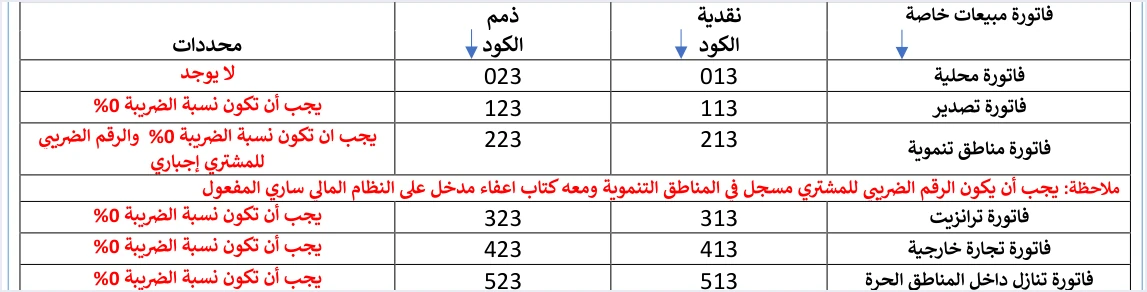
The next table summarizes the special sales row of the guide’s table, with the conditions written against each type.
Scroll the table sideways to see the remaining columns
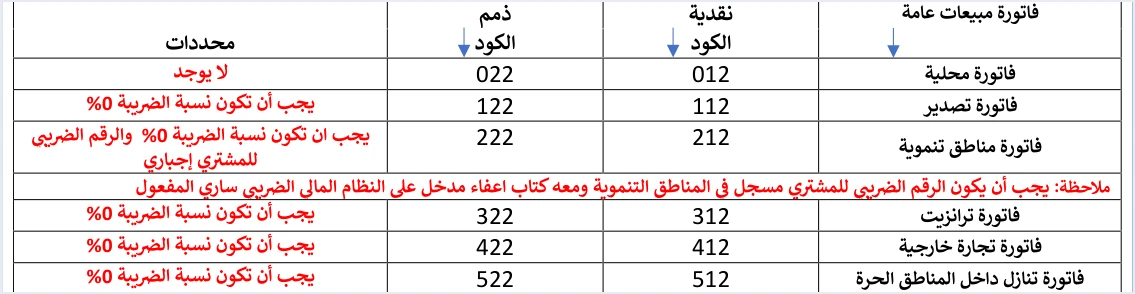
For comparison, the guide gives a matching table for the general sales invoice, with the same six types and the same conditions. The only difference in the codes is the third digit. The local cash invoice is 012 there and 013 here, and the local receivable invoice is 022 there and 023 here.
The value of the invoice type element itself shows whether the invoice is new or a return. It is 388 for a new invoice and 381 for a return, in all three families alike. Version 1.5 of the guide defines no other value, so JoFotara has no debit note.
How it differs from the general sales tax invoice
In the guide’s templates, the two families share the seller and buyer details, the lines, the discount and the trade type. The difference comes down to three things. They are the family code, the special tax amount on the line, and the base on which General Sales Tax is calculated. The table compares the two from the accountant’s point of view.
The most important row in the table is the special tax. The guide settles its nature in a sentence it repeats on pages 68 and 81, which says that the special tax is a value entered without any calculation. JoFotara does not calculate the special tax from a rate. It receives the amount ready-made from the seller. Getting that amount right is therefore the responsibility of the seller and of its accounting system before the invoice is sent.
In practice, an error in the special tax amount does not stay where it is. The amount is part of the base for General Sales Tax, so the error carries into that tax, and from there into the line total and the invoice total.
The special sales tax invoice total under the guide’s formula
The guide writes the total of a special sales tax invoice as a formula that combines the two taxes.
Invoice total = (invoice total before discount − total discount + total special tax + total general tax)
The special tax therefore enters the total twice, in two ways. It enters once as its own amount, and once inside the base for General Sales Tax.
The guide applies the formula to an example with two identical lines. Each line is worth 500 before discount, with a discount of 5 and a special tax of 10. The general tax rate in the example is 10% on (495 + 10), so the general tax on each line is 50.500. The invoice figures come out as follows.
The 10% rate is one the guide chose for illustration. It is not a ruling on any particular product. Note that the total general tax in the invoice header, 101.000, does not include the total special tax of 20, because each tax has its own total. If the total your system sends does not match this formula, the invoice is rejected with a message such as Total General Amount is Not Correct.
The special sales tax invoice on the portal
A business that issues its invoices on the JoFotara portal, without linking accounting software, logs in as the sub-user, selects the Issue an invoice tile (تنظيم فاتورة) and fills in the form. ISTD’s procedures guide for issuing an invoice in the Jordanian National Electronic Invoicing System, 2026 edition, shows the form as it appears to a sub-user registered for General Sales Tax. It does not describe the fields of the special sales tax invoice form. The general issuing steps are in our article Issue an Invoice on the JoFotara Portal: The Steps, and the fields of the 2026 form are explained in our article JoFotara Invoice Form Fields Explained.
The only available source for the special sales tax invoice fields on the portal is a 2024 user guide for the platform, prepared by a software vendor and not by ISTD. The current interface may differ from it. That guide compares the forms of the three families in a single table.
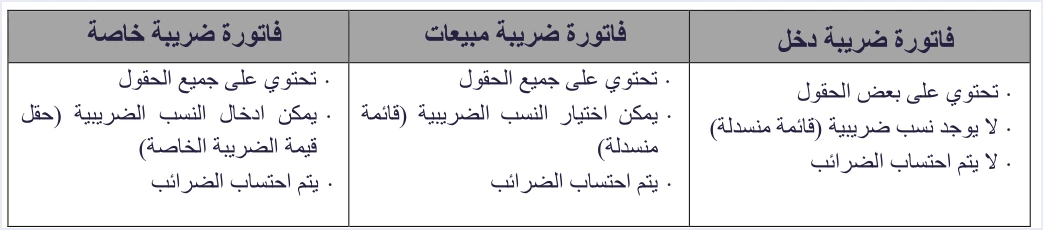
According to that guide, the special tax invoice form has a special tax value field (قيمة الضريبة الخاصة) that is filled in by hand. The guide’s table describes this field as one in which tax rates can be entered. However, the field’s own name says value, and ISTD’s technical guide describes the special tax as a value entered without any calculation. The safer course is to enter the line’s special tax amount in this field, and to check how the field behaves on the current interface before your first invoice.
Returning and correcting a special sales tax invoice
A special sales tax invoice cannot be edited after it is issued, just like the other two families. You correct it with a return invoice that carries the value 381 in the invoice type element and reuses the original invoice’s code in the name attribute. The guide’s return examples for this family are 013 and 023. The guide sets rules for the return invoice that apply here as they do elsewhere.
- Returns are on quantities only. A return cannot exceed the quantity sold on the original invoice, and more than one partial return is allowed against the same invoice until its quantities are used up.
- The buyer details match the original. The guide requires the buyer details on the return invoice to match those on the original sales invoice it is linked to.
- The discount follows the returned quantity. If the whole quantity is returned, the full discount is entered. If part of it is returned, the discount is a share of the total discount according to the returned quantity.
- The return reason is mandatory. The reason is written as free text on the return invoice.
Checklist before issuing a special sales tax invoice in JoFotara
These are the questions an accountant reviews before issuing the first invoice in this family.
- Is the business registered for Special Sales Tax? If it is not, the system will not accept a code that ends in 3.
- Are the goods actually subject to Special Sales Tax? The reference is the text of the law and ISTD, not a list of examples.
- Is the code correct? The code is 013 for a local cash invoice and 023 for a local receivable invoice, and the other types have their codes in the table above.
- Is the special tax amount a final amount? It is entered as a ready-made figure, and the system does not calculate it from a rate.
- Is General Sales Tax calculated on the right amount? Its base is the line value after discount plus the special tax.
- Is the trade type non-local? For export, transit, foreign trade, assignment within free zones and development zones, the general tax rate is 0% with category
O, and development zones also need the buyer’s tax number and a valid exemption letter. - Is the buyer’s name required? It is always required on a receivable invoice, and on a cash invoice worth more than JOD 10,000 or its equivalent in foreign currency.
- Does the total match the guide’s formula? The invoice value before discount, minus the discount, plus the total special tax, plus the total general tax.
For a wider view of the system and how to connect your business to it, read our article Jordan’s National E-Invoicing System. You can also see how Qoyod works with the National Invoicing System.
E-invoicing and full accounting in one system
Qoyod is integrated with the National Invoicing System (JoFotara). You issue your invoice in Jordanian dinars from Qoyod, it is booked to your ledgers automatically and sent to the system, and once it is accepted it comes back with a QR code from the Income and Sales Tax Department.
Frequently asked questions
Who issues the special sales tax invoice in JoFotara?
A seller registered for Special Sales Tax with ISTD issues it when selling goods subject to that tax. The invoice family follows the taxpayer’s registration, and the system rejects an invoice type that does not match the tax number or the income-source sequence.
What is the code for a local special sales tax invoice?
The code is 013 for a local cash invoice and 023 for a local receivable invoice. A third digit of 3 marks the special sales family in every type, from 013 and 023 to 513 and 523.
Is Special Sales Tax calculated in the system as a percentage?
It is entered as an amount, not a rate. The technical guide states that the special tax is a value entered without any calculation, and the seller works out the amount before issuing the invoice.
Is General Sales Tax charged on a special sales tax invoice?
It is charged, and it is calculated on the line value after discount plus the special tax. Special Sales Tax is added to General Sales Tax and does not replace it.
How do I correct a special sales tax invoice issued in error?
You correct it with a return invoice that has the value 381 and the same code as the original invoice. The return is on quantities only and carries the same buyer details, and JoFotara has no debit note.
Is the special sales tax invoice different from the general sales invoice on the portal?
A 2024 user guide for the platform, prepared by a software vendor, describes an extra field on its form named special tax value (قيمة الضريبة الخاصة). ISTD’s 2026 guides do not describe this form, so check the current interface before you issue the invoice.
References
- Income and Sales Tax Department (ISTD), technical guide for integrating with the National Invoicing System through the API, version 1.5, 2026 (in Arabic).
- Income and Sales Tax Department (ISTD), procedures guide for issuing an invoice in the Jordanian National Electronic Invoicing System, 2026 edition (in Arabic).
- PwC, Worldwide Tax Summaries, Jordan, 2026, and BDO, Jordan country summary in its indirect tax Navigator, 2024. Secondary sources for the examples of goods and the registration thresholds.
- User guide for the National Invoicing System platform (2024), prepared by a software vendor (secondary source). The current interface may differ.
- ISTD’s National Invoicing System guides (in Arabic)




